



So you’ve heard of the red shelf, or maybe this is your first time and you’re wondering how to use it, well I’m here to give you a quick tutorial and change the way you build, forever.
Firstly let me give you a brief description of what the red shelf is and what it’s used for. It was created by pictureamoebae and it acts as a *you guessed it* a shelf, but it has over 100 slots for clutter of all different sizes, ever notice when you’re building and you want to put a stereo on a side table? It doesn’t snap to the surface, with the shelf, it does.
There’s also an invisible swatch of the shelf if you don’t mind having CC in your builds, but with this tutorial I’m going to show to how to use it and still remain CC free.
BEFORE
How things look without the shelf, as always to get free object placement on surfaces you have to fill all the pre-existing slots and then once you choose your clutter you use the 0 and 9 keys to raise it up to the level you want, and yeah it works, but chances are it’s floating, here’s an example.

But worry not! Things don’t have to be this way, and I’m going to show you how to do it.
THE TUTORIAL
It’s easy, I promise even Don Lothario could manage to follow along.
STEP ONE:
Pick your surface, it can be anything, a counter, side table, end table, bookshelf, it’s your choice. Next as mentioned before to have free placement you have to fill the pre-existing slots, once you’ve done that it should look something like this.
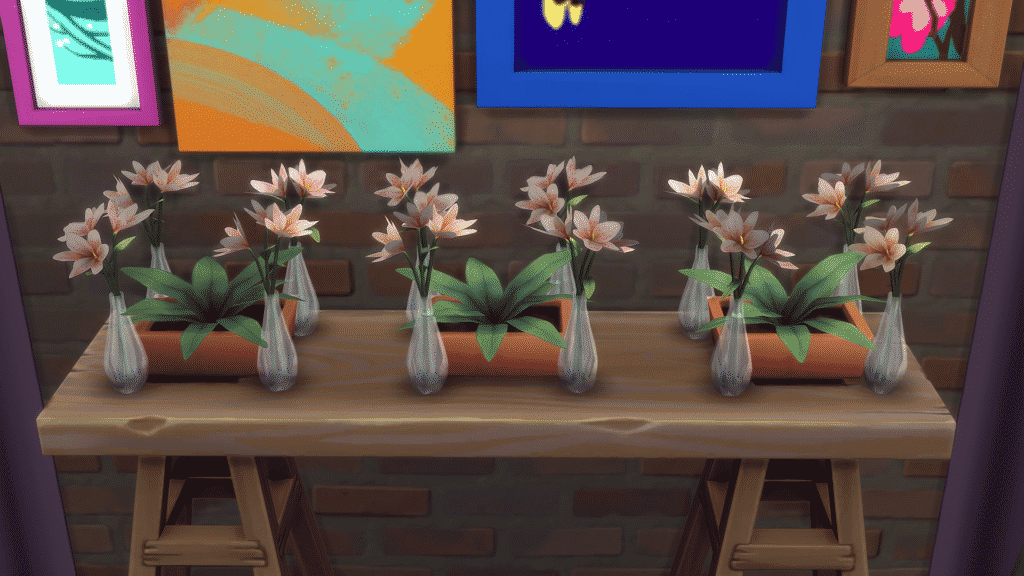
(Note there are small and medium slots, make sure to fill them all).
STEP TWO:
Next find the shelf in Buy Mode, you can find it in a couple of places but it’s easiest to locate in the surfaces section, under shelves. You can place it wherever for now, then add your clutter, as much or as little as you’d like, there’s a tonne of slots so you can add pretty much any surface object your heart desires (except for computers and and kitchen appliances). Here’s an example of mine.

Here are all the objects I want to use to clutter my side table.
STEP THREE:
Once you’re happy with the clutter you’ve selected the next thing you’re going to want to do it grab the red shelf and line it up with the surface of the side table, or whatever you’ve chosen, making sure the top of the shelf lines up with the top of the table. then provided all slots on the side table are filled you should be able to place your clutter wherever you want, when you’re happy with the arrangement just delete objects that were filling slots and the now empty red shelf. Your finished result should look something like this.

And voila! Nothing’s floating everything is where I want it to be and if you’ve deleted the red shelf your build is still completely CC free, incredible right? Even people who are sworn against build/buy CC use the shelf, it really is a game changer.
That’s literally all there is to it, three simple steps and your builds are looking so much better than before and so much more realistic, unless of course you have floating furniture in real life, in that case maybe move house, sounds like you’ve got a ghost problem…
DISCLAIMER:
The shelf recently broke with the Discover University patch (November 2019). It was causing players games to crash due to the overwhelming number of slots, it has since been fixed and new versions have been added with less slots, you can choose between 80 or 130. Either is more than enough in my opinion.
DOWNLOAD THE SHELF
♢ TUMBLR ♢
And that’s all from me today friends, thank you so much for reading this article and I hope I’ve been able to help some of you, if you need any further help please don’t hesitate to comment and I’ll respond ASAP, until next time, Jack.

















When you already knew how to do this with normal shelves is everyone else really not aware of how to do this with almost any objects and surfaces in sims?
Not every clutter object / surface object snaps to the in game shelves, but with the red shelf you have much more variation of what you’re able to use and where you can place it.
Can this be done on the ps4? Xx
Unfortunately not as the console versions of the game don’t support custom content, sorry!
Hi,
Any idea why the shelf is not showing in the game?
It is added to mods folder.
It will be in the shelf section.
How do i get the red shelf?
Tried to download. Went to turn game back on and it wasn’t there.
omg best one so far
I downloaded it, moved it to my mods folder, and made sure cc is allowed in the game settings and there is no red shelf showing in game. Any help?
look in surfaces, or you should be able to search it in the search bar. If all else fails go to filters and checkmark custom content
Hello! When I try to delete the shelf, objects on the shelf are also deleted… But when I use the invisible swatch, the gallery wont let me upload my build without checking the CC box.
What am I doing wrong? 😀
This is also happening to me. Is there a trick to being able to leave the objects? Hold down Alt or something?
This is what I do:
In TS4, when you have the move objects cheat ON, if you place an object for example on a table and then move it, the object keeps its height (the table’s height), so I just place the shelf in other place and then move the objects from there.
I don’t know if Iwas very clear, I hope you could understand xD
At least it works for me!
Hi!
tysm for this mod, I use it all the time!
There’s just one thing that bothers me, why doesn’t it work for small appliances like microwaves or coffee makers :___________(
I haven’t found any OMSP mod that works with them and I just can’t understand!!!!! Isn’t there any way to make it work?
Thanks!!
I tried downloading it but it does not appear in my shelfs, i have a mac, could that be why it is not there?
I think this is a cool mod but i really can´t get it to work properly on my sims 4 game . i can place everything on the red shelf but then when it come to moving it on the shelf it just click down to the ground ? so how can i change this or am i doing something wrong
Ive downloaded and installed the mod. Its in my mod folder. I have enable mods turned on. The only other mods I have are betterbuildbuy and Tool. I have restarted my game several times I cant find the red shelf in game. I have typed in shelf. I have looked up shelves in surfaces. I dont think its working and I dont know why! Im new to mods… I only just tried to use the tool mod for the first time today. help please!
Can this be done on the ps4? Xx
Unfortunately not as the console versions of the game don’t support custom content, sorry!
When you already knew how to do this with normal shelves is everyone else really not aware of how to do this with almost any objects and surfaces in sims?
Not every clutter object / surface object snaps to the in game shelves, but with the red shelf you have much more variation of what you’re able to use and where you can place it.
Tried to download. Went to turn game back on and it wasn’t there.
omg best one so far
Hello! When I try to delete the shelf, objects on the shelf are also deleted… But when I use the invisible swatch, the gallery wont let me upload my build without checking the CC box.
What am I doing wrong? 😀
This is also happening to me. Is there a trick to being able to leave the objects? Hold down Alt or something?
This is what I do:
In TS4, when you have the move objects cheat ON, if you place an object for example on a table and then move it, the object keeps its height (the table’s height), so I just place the shelf in other place and then move the objects from there.
I don’t know if Iwas very clear, I hope you could understand xD
At least it works for me!
How do i get the red shelf?
I downloaded it, moved it to my mods folder, and made sure cc is allowed in the game settings and there is no red shelf showing in game. Any help?
look in surfaces, or you should be able to search it in the search bar. If all else fails go to filters and checkmark custom content
Hi,
Any idea why the shelf is not showing in the game?
It is added to mods folder.
It will be in the shelf section.
I think this is a cool mod but i really can´t get it to work properly on my sims 4 game . i can place everything on the red shelf but then when it come to moving it on the shelf it just click down to the ground ? so how can i change this or am i doing something wrong
Ive downloaded and installed the mod. Its in my mod folder. I have enable mods turned on. The only other mods I have are betterbuildbuy and Tool. I have restarted my game several times I cant find the red shelf in game. I have typed in shelf. I have looked up shelves in surfaces. I dont think its working and I dont know why! Im new to mods… I only just tried to use the tool mod for the first time today. help please!
Hi!
tysm for this mod, I use it all the time!
There’s just one thing that bothers me, why doesn’t it work for small appliances like microwaves or coffee makers :___________(
I haven’t found any OMSP mod that works with them and I just can’t understand!!!!! Isn’t there any way to make it work?
Thanks!!
I tried downloading it but it does not appear in my shelfs, i have a mac, could that be why it is not there?
—-> what does this even mean??? Do you not see your comments? “Once you’re happy with the clutter you’ve selected the next thing you’re going to want to do it grab the red shelf and line it up with the surface of the side table, or whatever you’ve chosen, making sure the top of the shelf lines up with the top of the table. then provided all slots on the side table are filled you should be able to place your clutter wherever you want, when you’re happy with the arrangement just delete objects that were filling slots and the now empty red shelf. Your finished result should look something like this.” —>>>These directions and the accompanying picture make no sense.” What does “delete objects that were filling slots and the now empty red shelf,” Does this mean we’re filling slots with unwanted junk on the side table to fill the slots before hand? Also isn’t Alt needed to move around said objects? Also, don’t you have to activate bb.moveobjects? these directions are crappy. Please rewrite this, it is cofusing…see Ms. Griphy on Youtube and watch her tutorial. Then rewrite this, christ.
The Red Shelf mod is a total game-changer for anyone who loves detailed interior design in The Sims 4. It makes placing clutter so much more intuitive and realistic. However, spending hours perfecting every small detail can really strain your eyes and drain your focus. To stay productive and creative, I’ve found it essential to take quick breaks to recalibrate. Whenever I feel a bit overwhelmed by the screen, I visit this page to give my eyes a much-needed rest. It’s a simple but effective way to decompress before jumping back into my next big build. Thanks for sharing such a helpful tutorial!