


This feature from The Sims 4 Lovestruck got unexpectedly affected by the latest game update.
The Sims 4 Turn-Ons and Turn-Offs have been affected by the latest Sims 4 Game Update on December 2nd, 2025. Over a hundred people have reported a broken User interface in the Create A Sim Menu, where the icons for Likes and Dislikes have disappeared from the interface.
Choosing any of the preferences in the Turn-Ons and Turn-Offs menu will still work as intended, and you’ll be able to assign any preferences successfully. It’s just that the Thumbs Up and Thumbs Down icons are missing from the menu:
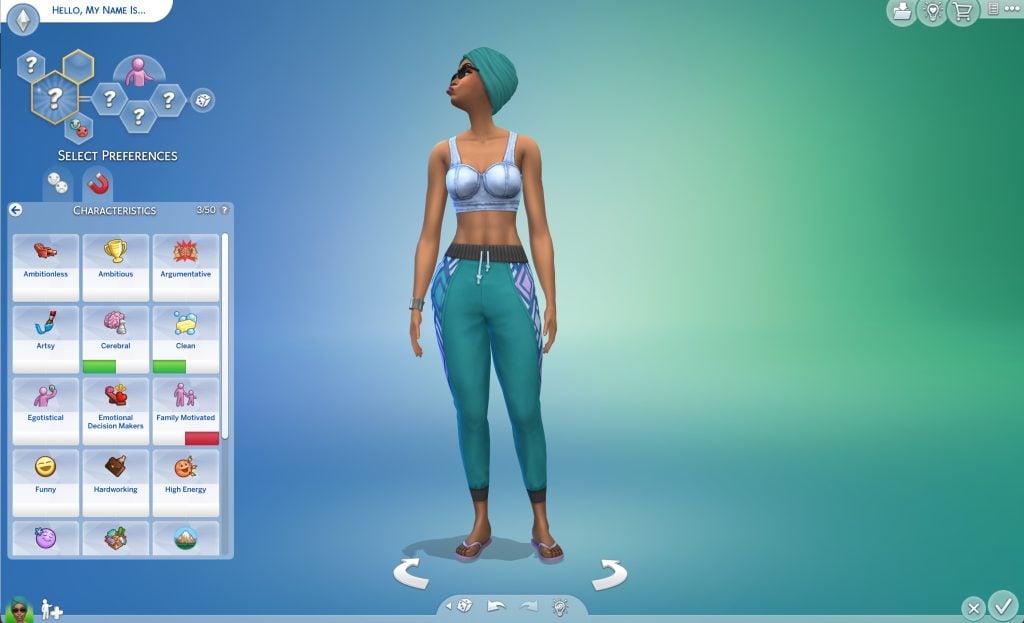
Players in the EA Forum have tried many official solutions to resolve this issue. From clearing the cache files in save games to completely reinstalling the game. The issue persists for players who have never used Mods / CC and also for players who play The Sims 4 on Console.
It was confirmed only a few hours ago by The Sims Team on Discord that the issue has been spotted by the team and that they’re investigating a fix for a future Sims 4 game update.
Sul Sul, Simmers We’re aware of an issue in CAS showing the correct icons for Turn On/Turns Offs. We’re currently investigating a fix and will update this thread when we have more info.
Until the issue gets fixed at least you know you can blindly click on the empty icon spots and choose your Sim’s Turn-Ons and Turn-Offs.
Stay tuned on Sims Community for more updates on The Sims 4!


Luckily, in my game isn’t that the case. The ui is how it always been. For the record: I’m playing with mods.
Ohhh! That’s news indeed and good to know thank you ! I’m going to check right now !
Great to see they can address such a pressing issue like missing icons but no a word on the console players who littraly haven’t been able to save their games for several months now!
Great Job Again EA ,u fixed alot upcoming Bug Fixes Upd. ,but still bring new ones in to the Game ,well u can fix bugs the rest of ur life ,u good at to make Bugs and Bring Bugs into the Game ,what a shame for as a big Company as u !!
When you place your own Lot in The Sims 4 and go into Build Mode, it sometimes remembers the setting as a Vacation Destination, but often it switches back to Residential, and it doesn’t show the vacation icon on the World Map. Sometimes a lot even disappears.
Hopefully you have fixed the Endless Loading Screens. I play without Mods & CC.
Sometimes my Sims freeze or get stuck for a moment before continuing. Seagulls fly through my house or apartments!!
I have Autonomy turned off, but when their needs get low, they still keep doing things automatically!
When they age from Teen to Young Adult, the acne spots don’t go away. It’s very important that you fix these bugs as soon as possible in an update!!
This is unacceptable for such a big company. You should fully check every Kit or Pack before releasing it!
With the new Spongebob Bundle Kits, I think only the 3 items you get don’t show any price in Build Mode. You are very good at creating and adding bugs to the game, but this way you are constantly busy fixing them for players. Players should be able to play peacefully and bug-free!!
You also can’t say Goodbye to random Sims or send them away. They stay on the lot, and I have to travel to another Lot and come back. Random Sims also often walk into your house without knocking, which is very annoying and frustrating!!
Infants suddenly reach their tummy time milestones a lot faster. This was never the case before. I’m not sure if it’s a bug or if it was intentionally updated, but this is one positive thing.
My game was working 100% after update. Spongebob broke my game. I don’t care about SpongeBob.
that goofy goober how dare he–
My game has started closing during active play/builds. It doesn’t shut down, it just closes the screen. When I open the game, I’m right where I left off, but it’s annoying. Could it be a mod thing or is there an update glitch?
Are you great minds behind the sims franchise fix the prom ceremony bug, it’s not allowing my high school sims to attend weekly prom. It’s not an event on the calendar anymore.
Ahh I thought it was one of my mods. Yay! For once that’s not it lol