


Learn how to use and enable Cheats on The Sims 4 Console!
Cheats on The Sims 4 for Xbox One and PS4 are almost exactly the same as the ones on PC. However, the way you use them is a little bit different.
You open up the cheat console by pressing L1 + L2 + R1 + R1 (PS4) / LT + LB + RT + RB (Xbox One).
NOTE: What’s different with cheats for The Sims 4 Console is that almost all of them require the testingcheats true enabled cheat before entering other ones. You will have to enter this cheat or otherwise other cheats won’t function.
After entering that cheat the game will let you know that it’ll disable trophies on your current save game because cheats and achievements don’t go along together.
Enabling Cheats on Sims 4 for PS4
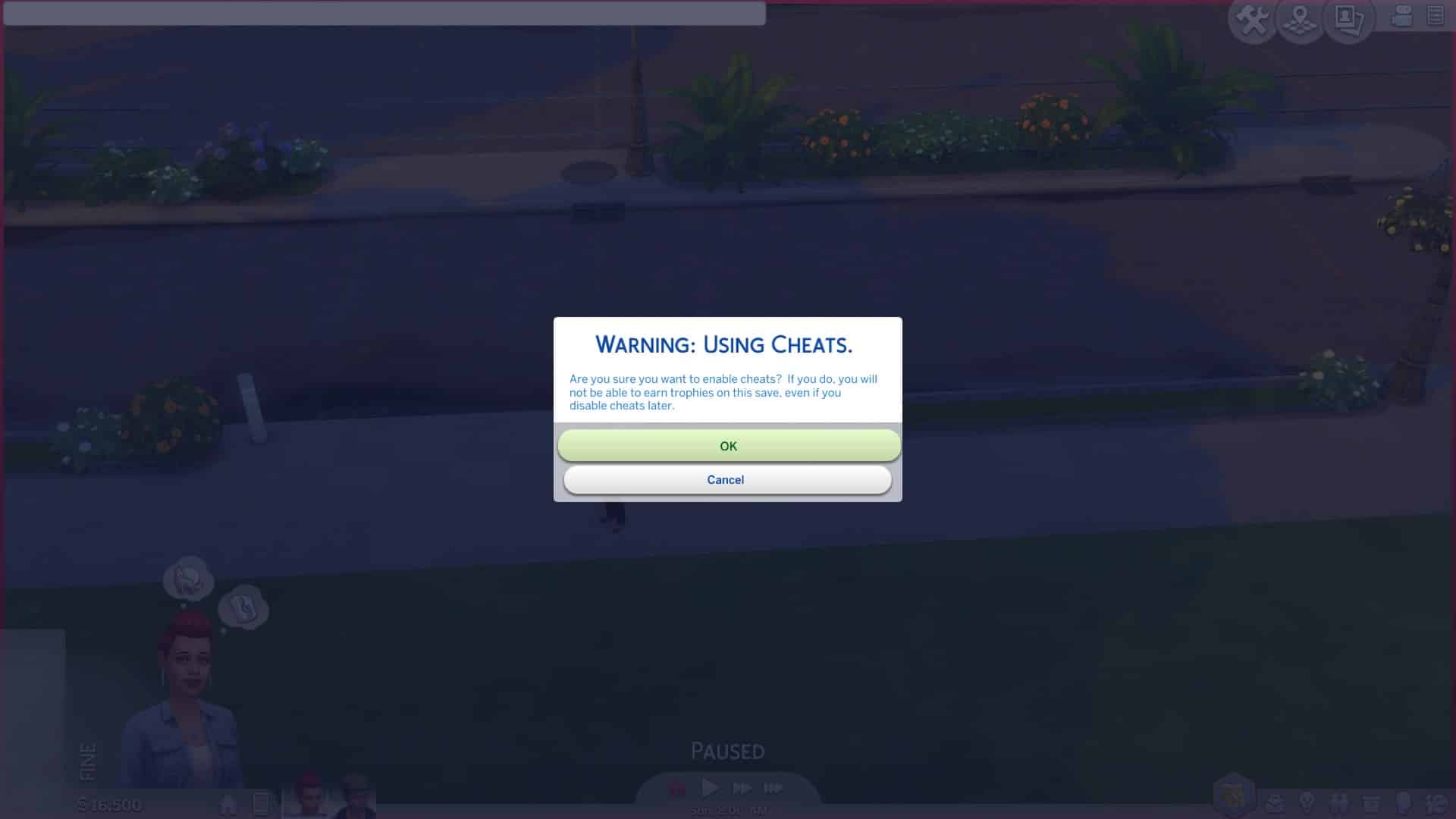
After you hit OK you are free to enter any type of cheat that’s currently available in The Sims 4 for PC. Yes, motherlode is available.
However, one of the great things about this is that the game lets you use Debug cheats as well – meaning that you can promote your Sims’ careers using the following cheat:
Careers.promote [Career Name]


Also – spawn cheats are working as well! I managed to spawn a fish right next to my Sim.


However – not all cheats revolve around entering text in the cheat console. Enabling the testingcheats true cheat will also unlock some object-specified and Sim-specified cheats. For example you can fill the motives of your entire household or add a Sim to the family (just some of the examples) by holding O + pressing X (PS4) / holding A + pressing B (Xbox One).


Where do you enter it? I’ve enter it in the live mode and nothing pops up (PS4)
same! it doesn’t seem to work 🙁
for ps4 L1 L2 R1 R2 basically as close together as you can in that order then press X button and it will open the cheats window
got it thanks!!!
How u get it to work
Anybody no how to rescale on ps4 the controls are no we’re to been seen
Thank yall. BTW I am not living in the South. I live in Massachusetts.
You have to press L1+L2+R1+R2 at the same time on live mode then (testingcheats true) first before putting in any other cheats. The person who did this page messed up the cheat.
That explains why it didn’t work… they should update this post. I will try this. Thanks!
Well of course idiot
You have to press L1+L2+R1+R2 at the same time on live mode then (testingcheats true) first before putting in any other cheats. The person who did this page messed up the cheat.
You have to type “testingcheats true” before type another cheat
click x and just type it in the pop up keyboard
Because you can only do it in build mode
It actually does work
You problem is that you do not nanowire how to tYpe
Same question, which screen or mode do we enter this into?
live mode
is there a cheat for skills ?
Look at the link above that says full cheat list go to bottom u will see them
You have to press L1+L2+R1+R2 at the same time on live mode then (testingcheats true) first before putting in any other cheats. The person who did this page messed up the cheat.
We actually mentioned the fact that testingcheats true is required for further use of cheats 🙂
Yes but your article has a typo. You say L1+L2+R1+R1. You say R1 twice and also don’t indicate it’s at the same time, the way you type it implies you do them in sequence. Angelic was way more helpful.
Can someone give me a tip for getting the mailbox cheat to work? How do I do that
I haven’t got all of the debug objects shown in the video… such as all the fruit and vegetables for the kitchen. how do I get them? :/
I haven’t got all of the debug objects shown in the video… such as all the fruit so how do I get them? :/
You can find them here: https://simscommunity.info/sims-4-cheats/
It would take me ages to cover all the collectables haha 😀
Has anyone else had issues with saving while they are enabled??? Went to go save my game last night and it wouldn’t do anything. No message or anything and I couldn’t get out of the pause menu without pressing the controls button. Went and saved my original game. The one without the cheat and it saved no problem.
I noticed that myself has worked fine with the monry cheat i noticed the problem happened after i used the satisfied points cheats just use money is what im gonna do at least til they patch the game
Hey if your having trouble trying to get the cheat console open just press L2 and R2 at the same time then press X or on Xbox press LT and RT then let go and press A then a keyboard will show up and you can type in the cheats
Do you have to buy the standard edition and the deluxe or can you just buy the deluxe????
Can anyone tell me how to level up, fitness, gourmet cooking, mixology and video gaming. The stats cheat seems to work for all other than these 4??
Ok got “VideoGaming” and “GourmetCooking” to work but mixology and fitness is still baffleing me
I haven’t figured that one out, but will be following this !
Is there a way to enable trophies in new game? I have tried this and it didn’t work even when I turned off cheats and started new game with new save.
I used the Testingcheast true but when I try to use motherload cheat after it wont let me.
You probably spelled it wrong. It’s “motherlode” in console command.
How do I get a keyboard to open when I get the cheat box up?
Issues with saving xbox one. I will save it, but when I come back to the game another day… i lost days in sim time. Whole chunks of time go missing. If i spend an entire day away from lot, when I come back the progress is lost!
Time seems to continue on as long as you are doing something within the same world. I saved my lot (a couple newly pregnant), then went to build mode onto another lot (added a new neighbor and house). When I went back to my original, the wife had already had her baby even though I had not been in live mode since saving that particular lot.
Ah, I misread your post…
I have two separate saved games and I’m wondering if I use cheats on saved game 2 will it disable achievements on saved game 1 or just saved game 2?
Can we disable cheats to get back trophies?
Can you disable cheats I just want the CAS cheat? Then I want to go back to my original sims game I have a Xbox one
U touch the sim with A and B at the same time and it should show “modify in cas”
I’ve brought up the box in live mode testing cheats true no effect whatsoever and I ended up just typing testing cheats and “cheats are disabled” came up how do I fix this anyone it’s doing my head in
This doesn’t work
How to get a sim pregnant?
Me and my friend have done this at least 10 times and it doesn’t seem to work (Xbox 1)
Wtf PS4 cheats r different then Xbox one cheats
how do i change a sims trait
how do i change a sims trait
Is there a health/mood cheat?
How to go on filter
Thx I have recently gotten it and was wondering if i could do cheats
I quite like looking through a post that will make men and women think.
Also, many thanks for allowing me to comment!
Although kinda late on this I found that the debug does work and will show the whole list. PS4 controls
***steps***
1. Open up the cheat bar then type in bb.showhiddenobjects (all lowercase)
2. Exit, Then go to sort by room and press R2
3. Go to content and press debug
4. Exit and go to sort by category (chair icon)
6. Before selecting a category you want to press L2 (search bar will pop up)
5. Don’t type anything in the search bar and just press R2 (it will send you to ALL the debug items)
I hope you found this useful 🙂
How do u move objects off the ground and how do u shrink them on console?
Sims 4 on Xbox the cheat log command prompt doesn’t pop up for me. Anybody else having that issue? How do I fix that? Please help
Best code for getting a lot of money is just MONEY and however much you want. I have found with other codes that have a capitol letter in the code it is best to input the code as written.
Awesome blog! Do you have any hints for aspiring writers?
I’m planning to start my own blog soon but I’m a little lost on everything.
Would you suggest starting with a free platform like WordPress or go for
a paid option? There are so many choices out
there that I’m completely confused .. Any suggestions?
Thank you!
Guys it doesn’t work for me can someone help…whenever I press all the buttons together a red screen thing pops up and no box shows up
WORKS PERFECT!!! (XBOX 10) So much easier to role-play with cheats! Thank you for teaching us how! 😀
How do u go on to cas full edit mode in Xbox 1
Youre so talenteed. Yasssss queeen slayyyy!b
This meens I can make my Simms have toilats on there hed!
Yasss queen slayyyyy
Roses are red
Violates are blue
My sim is dead
All because of you
I am just a paintbrush
With no purpose in this world
When someone paints a rainbow with me
I fe l such purpose
I get that same feeling when I kill sims
So thank you, thank you, thank you, thank you, thank you, thank you, thank you, thank you, thank you, thank you,
Your such a G bro
Your poems are so insprational keep up being the sassy paintbrush that you are
It works thanks you
I cannot for the life of me get the fill needs cheat to work, I’m holding down A & pressing B and nothings happening, nothings coming up on the mailbox or my sim. I’ve followed all the instructions and its just not working…can someone please help, its driving me crazy!
Is there a way to disable the cheats I’m on PS4 btw
WONT WORK
It’s L1 L2 R1 R2
It is hold B and press A
How can I use the debug? I’ve pressed on an appliance and then pressed R2 but still all I have under content is unlock and purchased
It’s not working for me I’ve tried so much times it does not work
I have been told that Ro level up a skill you need a word in front of the skill. Appenently it’s on this website but I can’t find the word you have to put in front of the writing skill
If you idek cheats in one household, does it disable trophies for all households? Even new ones?
Use*
Does using cheats effect the Achievements on all games saved or just the one you are playing?