Home Blog Page 181

The Sims 4: Official Statement on the Simulation Lag

6

The Sims Team has released an official statement regarding the Simulation Lag in The Sims 4 in their latest Sims 411 blog post.

In case you don’t know what a Simulation Lag is, it’s an issue where Sims would become unresponsive to certain interactions that you set them to do and just stand around for a few seconds until they finally respond.

The issue has become more persistent over the last few years and many have wondered when is The Sims Team going to address it and fix it.

In their latest statement they’ve acknowledged the issue and stated they’re actively working on fixing the issue. However, they will need your help with sharing the save game files and information on the Simulation Lag that occured in your game. They’ve also shared a workaround how to make the issue occur less often which you can all check out down below!

When will the ‘Simulation/Autonomy Lag’ be fixed? 

We’re on it! Particularly, what we’re doing right now is identifying what the root cause of this issue is. That means, we’re investigating what specific actions during gameplay do lead to the lag? This is the first step we need to take because the simulation/autonomy lag is not the actual issue, it’s rather a symptom that can have dozens of different causes. If the lag has happened in your game, you’ve probably experienced the following most common manifestations of this symptom:

  • Sims standing around doing nothing
  • Sims not doing anything on their own (with free will set to max)
  • Sims take forever to do a given command
  • Time jumping backwards after fast forwarding to Ultra Speed. The Sims will usually freeze while fast forwarded.
  • Sims come home late from school
  • FPS Drops

Once we identify what specific actions and circumstances lead to the lag, we’ll know what we need to work on. And the best way to find out, is by analysing your save files! The more save files we can analyse the higher the chance we’ll be able to find the cause soon. That said, please continue your awesome support and keep sending us your save files whenever you experience the lag!


How to share your save files 

Please provide the following information when sending your save files. You can send your info through this form or DM SimGuruNick directly on AHQ.

  • Basic Information about your computer (CPU, Operating System, Amount of RAM, Graphics Card, Hard Drive Space). This is not to blame your computer for the issue but to see what kinds of systems this issue is occurring on)
  • How big is your save game ?
  • Does the issue also occur on a new save for testing purposes
  • Video of the issue happening. Just upload to youtube and post the link in this thread. You don’t need to list it
  • Please add the following files to a .rar or .zip archive and share with QA
    These files can all be found in the following folder: DocumentsElectronic ArtsThe Sims 4

    • lastException.txt (if it exists. If there is more than one, please include all of them.)
    • lastUIException.txt (if it exists. If there is more than one, please include all of them.)
    • Config.log
    • the entire saves folder

Things you can try in the meantime 

  • Empty out your Sims inventories (all households you have ever played)
  • Reduce the amount of objects in your house
  • Play in a smaller house with less art pieces and stuff lying around
  • If you over-clocked your computer, check how it goes if you revert that.
  • Once the freezing occurs, try saving your game (save as), go to your options and back or press M or to go to the world map and back
  • Lower Graphics settings
  • If you play with higher resolution than 1920×1080, try lowing to 1920×1080
  • Go to the Audio settings and remove the check next to Enable Mood Sting
  • Make sure you fulfill the minimum requirements of the game
  • Reduce the amount of mods and cc you use
  • Start a new game (completely shut down the game, then restart it and start a new save game)
  • Move your Sims to a new game

The Sims 4 City Living is FREE for Trial this Weekend!

0

Just a few days ago we reported on The Sims Team planning to do Pack Trials for The Sims 4 where you’ll be able to play with a certain Pack for free for a limited time and try it out!

Today EA officially announced that their first Pack for Trial – The Sims 4 City Living Expansion Pack, is completely FREE for playing from today, April 30th at 10AM PT until May 3rd at 10AM PT. This offer is only available through Origin for PC and Mac players.

The Sims 4 City Living is FREE for Trial this Weekend!

During this period you’ll be able to play with all of the pack features and items that come with it. EA has shared more details about the Trial and how you can play with City Living this weekend in the official F.A.Q. that you can check out below.

For more information on The Sims 4 City Living check out our City Living Articles! You can get the City Living Trial from Origin HERE!

When does The Sims 4 City Living Trial take place?

The Sims 4 City Living Trial will be available between the following dates and times:

  • Start: Friday, 30th April 2021 – 10:00AM PDT / 17:00 UTC
  • End: Monday 3rd May 2021 – 10:00AM PDT / 17:00 UTC

During this time, you will be able to play as much City Living as you like.

What do I need to know about the City Living Trial?

There are a few prerequisites to using the City Living Trial.

You must:

  • Have the most up to date version of The Sims 4 installed on your PC/Mac
  • Have the most up to date version of Origin installed on your PC/Mac. EA Desktop is not currently supported by the City Living trial.
  • Claim the City Living Trial through the Origin client, Origin.com or from The Sims 4 Main Menu.

Can I run the City Living Trial on my PC/Mac?

If you have the latest version of Origin and your PC or Mac meets The Sims 4 minimum and recommended system requirements then you can take part in the City Living Trial

PC: https://www.ea.com/games/the-sims/the-sims-4/faqs/base-game#faq-base-game-pc

Mac: https://www.ea.com/games/the-sims/the-sims-4/faqs/base-game#faq-base-game-mac

Can I play the City Living Trial with The Sims 4 Legacy Edition?

No, while City Living is compatible with the Legacy Edition, it does not support the City Living Trial.

Can I play the City Living Trial on my PlayStation or Xbox?

At this time we are currently only supporting the City Living Trial on PC/MAC.

Can I play the City Living Trial with an EA Play subscription?

Yes. If you have an active EA Play or EA Play Pro subscription for PC, you can download The Sims 4 from Origin, claim the City Living Trial and play with the pack content.

Can I play the City Living Trial with The Sims 4 Trial?

Yes. If you do not currently own The Sims 4, you can claim the 48 hour trial from Origin and the City Living Trial and try out everything in one go.

What can I use in the City Living during the Trial?

You will be able to use every part of City Living including San Myshuno where you can discover new neighborhoods and festivals.  If you are more of a creative Simmer then all of the pack content is available to you in CAS and Build mode.

Why does it ask me to Restart The Sims 4 when switching between Trial Saves and my existing Saves?

The Sims 4 will ask you if you want to restart your game so that it can include or exclude the City Living Trial from your current session.
Selecting to restart when going back to a non-trial save will keep the City Living Trial on your PC/Mac for when you want to come back to the trial later. When you want to play with City Living again, load a saved game or start a new trial save and you’ll be asked to restart the game so that City Living can be included in your session for as long as the trial is available.
Can I use my saves with the Trial?

Yes. If you want to put City Living into saved games you have already created, you can. Simply select your Save from the LOAD screen on the Main Menu and when asked if you want to PLAY WITH TRIAL? Select Yes, Start as New Trial Save. Once you do that, The Sims 4 will make a copy of your save to use with the trial and lets you save your progress without affecting your original saved game files.
I created a new Trial save based on my existing save, how do I tell the difference?

If you load an existing save while using the City Living Trial, we will copy your save and rename it for you so that it can be identified as a Trial save. Once you have loaded your save, you can hit Save to finish applying the Trial to your save game. If you do not save your session, you will still have a Trial save but it will not use City Living and you will be able to use the save without the Trial content.

What happens to my Trial Saved Games when the trial ends?

Your saves created while using the City Living Trial will still be available after the trial ends. If you choose to add City Living to your collection, you will be able to pick up where your saves left off.

The Trial has ended. Now what?

City Living will stay installed on your machine and if you purchase City Living, you will be ready to start playing with your content straight away.

PC Steps

  • If you have decided that you do want to remove City Living Trial from your PC follow these quick steps.
  • Find your The Sims 4 installation directory (Default C:Program Files (x86)Origin GamesThe Sims 4
  • Look for a directory called EP03
  • Select the directory, Right Click and select Delete
  • This will move City Living to your Recycle Bin
  • Right click on Recycle Bin and select Empty Recycle Bin to free up disk space
  • If you decide to purchase City Living in the future, you will need to re-download the pack from Origin or EA Desktop.

Mac Steps

  • If you have decided that you do want to remove City Living Trial from your Mac follow these quick steps.
  • Find your The Sims 4 Packs directory (usually located in the same place as The Sims 4.app, which is located in ~/Applications by default)
  • Look for a directory called EP03
  • Select the directory, Right Click and select Move to Trash
  • This will move City Living to your Trash
  • Right Click on the Trash, and select Empty Trash to free up disk space
  • If you decide to purchase City Living in the future, you will need to re-download the pack from Origin

THE SIMS 5: EA’s Director of Studios talks about the next generation Sims Game

12

Yesterday VentureBeat published an interesting interview with Laura Miele, EA’s Chief Studio Officer within Electronic Arts. In this interview they’ve covered a lot of different EA Franchises including The Sims.

The interviewer went on to talk about what we can expect from the next Sims Game and what opportunities could there be within the franchise when it comes to multiplayer and the next generation Sims Game. Laura confirmed in the interview that Maxis is currently hard at work on the next generation Sims game and some of the things they’re bringing into this new Sims Game.

Check out our full transcript of the interview below:

Interviewer: On another note I talked a little about The Sims – you mentioned that which is totally a great point with Maxis related games SimCity, SimFarm, even The Sims Online. It was 20 years ago, ahead of its time, with letting people build a character, build your environment. The Sims is still a vibrant franchise for EA right now. Is there sort of an opportunity to do more of there? I look at Roblox, Fortnite Creative and things like that. It seems like The Sims out of all your franchises is maybe best equipped to play in this world?

Laura Miele: Yes, a lot of fertile ground for The Sims for sure and the idea that we will build on the tools for people to play with life (thats our brand) and the idea for people to be able to play with life together. We had The Sims Online that came out in 2002 which was around 20 years ago. We certainly were ahead of our time.

I think 20 years later we learned a lot about how players interact, what motivates players, how players can come together co-operatively and so as you imagine as we think about the next generation of The Sims it’s SUPER important for us to have the best tools, the most flexibility and for players to really expand on their creativity, remix items and objects in the world. And then to do that together – I think that’s one of our biggest opportunities with The Sims is the social connection component that we need to bring to this brand and this franchise. The team is hard at work on the next generation of that experience.

Interviewer: …I imagine as The Sims becoming more of a platform for creativity – it feels like an opportunity?

Laura Miele: Absolutely. And it’s us being able to create a framework and that players are actually gonna create these experiences and in the end its doing it together, doing it collaboratively. They are sharing, they could create marketplaces.

What we arm them with and the capabilities and frameworks we arm them with and where they take that I think it’s going to be a pretty significant surprise and a pretty exciting time for us as we bring these tools and platforms to market.

It’s no secret that the next generation Sims Game, or The Sims 5 as we call it until the official announcement, is hard in development. We’ve made numerous reports about Maxis’ active plans and work behind-the-scenes that they’re researching and looking for this game.

You can check out all of the news and articles we have so far about the next Sims Game on our The Sims 5 News Category!

Tip: PekeSims

The Sims 4 PC & Mac: New Hotfix + Patch Notes! (April 28th, 2021)

0

The Sims 4 PC & Mac: New Hotfix + Patch Notes! (April 28th, 2021)

The Sims Team has released a hotfix to repair some UI issues on PC and Mac after yesterday’s update for The Sims 4.

To download the latest version of The Sims 4, simply open your Origin program and if the game doesn’t update automatically, right click on The Sims 4 and select ”Update”.

In case you have Mods or Custom Content, the game will automatically disable them for you after first launching The Sims 4 after the update. To re-enable all your Mods and Custom Content, select the Settings option in the Menu and select Settings. Under the ”Other” section you’ll find the ”Enable Custom Content and Mods” option. Check it and restart your game in order for it to take effect!

Patch Notes

PC: 1.73.57.1030/ Mac: 1.73.57.1230

Heya Simmers!

The team got wind of some issues caused by some cheeky Gnomes that were not treating some of our backend right on PC and macOS… who knew? What were they doing? We can’t really say, but we sure put a stop to that. Rest assured.

Note: No Gnomes in Build Mode were affected or used to combat these ailments.

-SimGuruRusskii

The Sims 4: More Information About the Upcoming Pack Trials

1

Yesterday we reported that coding had been found in game that linked into the possibility of Game Trials coming to The Sims 4. Since we shared that post, more information has been found that further confirms that an official announcement about Game Trials could be coming very soon.

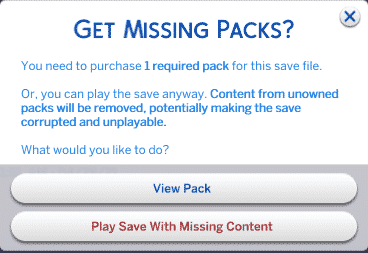
Crosimmer shared the images on Twitter showing us what some of the UI updates for Game Trials look like in game and how it would appear against a save file that had used a pack from a trial.

Take a look at the images below for a closer look at the changes.

The Sims 4: More Information About the Upcoming Pack Trials

Source: Crosimmer

Crosimmer also went on to share that the “requirements information” doesn’t appear to by exclusive to the Game Trials but to save files created after the April 27th, 2021 patch. He also shared that if you disable packs using the command line in Origin you will also see the  “Get Missing Packs” pop up.

While it is still unclear as to what packs Game Trials will be available for or if they will just be limited to Expansion Packs, we are hoping to hear more about this very soon.

You can read our original post about the Game Trials here and let us know what you think in the comments below!

The Sims 4: New Hair Colours and More Diversity Coming in Next Update

2

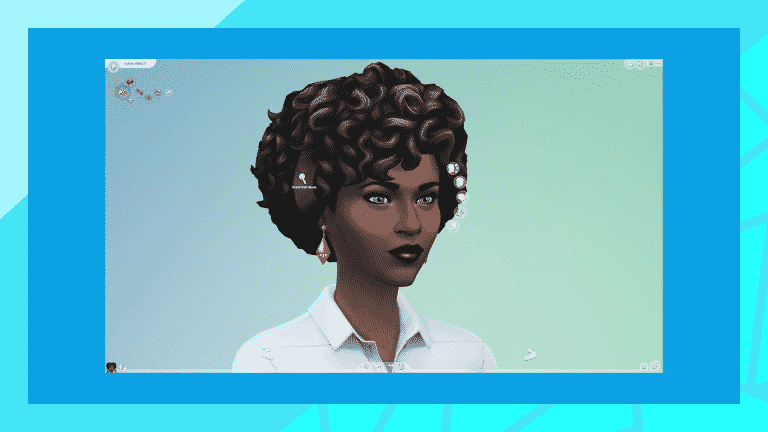
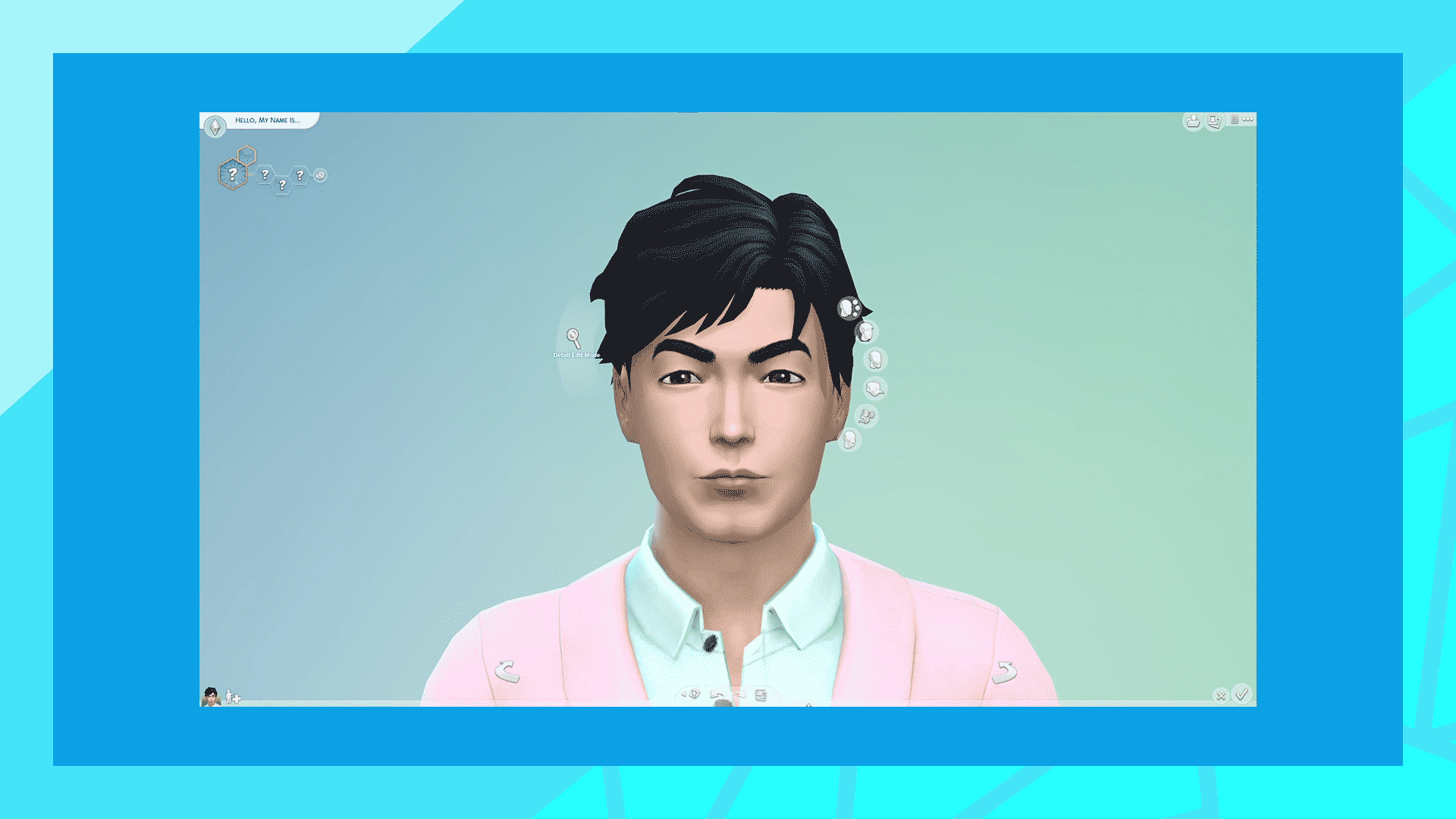
In today’s Inside Maxis livestream, hosted by @SimGuruSalo and @SimGuruPopcorn, we got a sneak peek at the next update coming to The Sims 4, which includes 6 new hair colours, two new African hairstyle retextures, and 16 new East Asian eye presets.

Take a look at the previews from the livestream below!

The afro hairstyle is getting a desperately needed update, as well as the smaller afro with a fade.

Six new hair colours will be coming to the game in the next update as well, including a true black, a neutral blonde, and a warmer white which have all been highly requested by players.

16 new East Asian eye presets will also be making their way into the game in the next update. You can see all the presets we managed to capture from the livestream above.

For a breakdown of what’s been added to the game in today’s update, you can check out our overview and read the official patch notes right here on Sims Community!

Could Game Trials Be Coming To The Sims 4?

2

Modder TURBODRIVER has discovered some new code in the game after today’s patch which talks about the possibility of trying out packs before fully committing to them. Although the new code doesn’t specify which packs are included, it is interesting to see if more comes of this discovery.

Could Game Trials Be Coming To The Sims 4?

Source: TURBODRIVER

In addition to the above code being found, TURBODRIVER and Lowpolypancake also discussed some new UI elements. These can be seen in the new style Load UI after today’s patch caused a few of the UI mods to need updating.

It would appear that the game could potentially lock save files that have had a pack in a game trial once the trial period is over.

Lowpolypancake also went on to discover a new ‘DLC Trials’ UI file which also confirms that Game Trials are very likely on the horizon.

It is definitely an interesting move for The Sims that could help many players decide if a pack is right for them before fully committing to purchasing it.

Let us know what you think about the possibility of game trials coming to The Sims 4 in the future in the comments below.

The Sims 4: New Kit and Game Pack to be revealed very soon!

The Sims Team has officially confirmed the upcoming two DLC content that are coming next for The Sims 4 – a Kit and a Game Pack!

Although they haven’t shared any specifics regarding when the full reveal is set, they did say that both should be revealed in the next couple of weeks!

We’ll keep you posted on all things The Sims 4 right here on Sims Community!

The Sims 4: April 2021 Update Overview

1

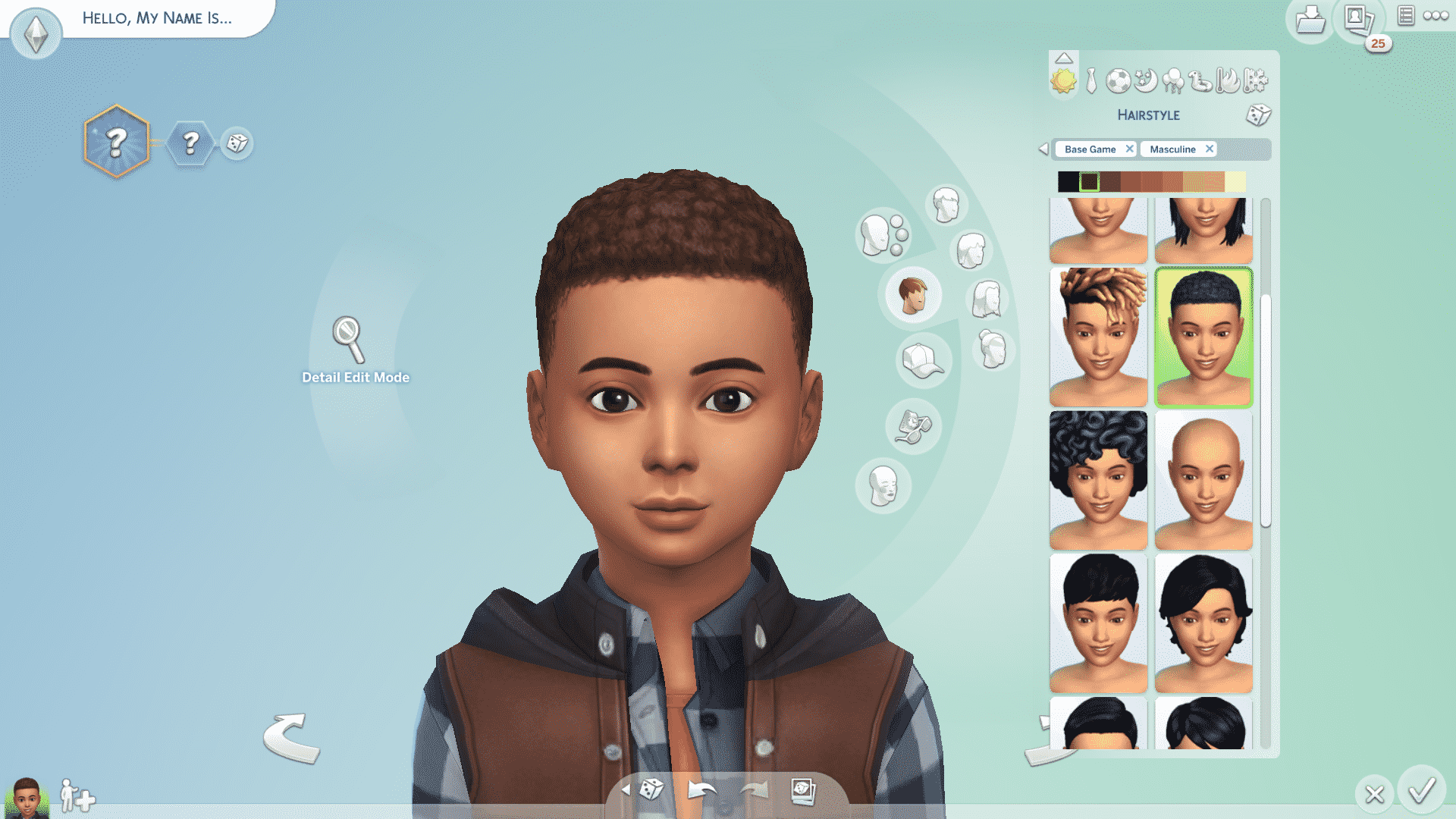
The Sims Team released a small update today, retexturing two more base game African-inspired hairstyles and fixing a few bugs across several packs.

Take a look at the retextured hairstyles below!


The tight curls hairstyle has gotten an update for both masculine and feminine Sims, as well as being made available for children and toddlers!


The short textured hairstyle has also gotten a texture upgrade.

In addition to the retextured hairstyles, this upgrade brings numerous bug fixes across different packs. You can read more about these in the official patch notes.

Sul-Sul!

The Sims 4 PC & Console: NEW UPDATE + Patch Notes! (April 27th, 2021)

The Sims 4 PC & Console: NEW UPDATE + Patch Notes! (April 27th, 2021)

The Sims Team has released a brand new update for The Sims 4 on PC, Mac, Xbox One and PS4!

To download the latest version of The Sims 4, simply open your Origin program and if the game doesn’t update automatically, right click on The Sims 4 and select ”Update”.

In case you have Mods or Custom Content, the game will automatically disable them for you after first launching The Sims 4 after the update. To re-enable all your Mods and Custom Content, select the Settings option in the Menu and select Settings. Under the ”Other” section you’ll find the ”Enable Custom Content and Mods” option. Check it and restart your game in order for it to take effect!

Patch Notes

PC: 1.73.48.1030 / Mac: 1.73.48.1230
Console: Version 1.40

Heya Simmers!

Today we bring you a small but neat update, we hope you all enjoy it!

We also hope you are all well wherever you are in the World, and thanks again for all your continued support and feedback.

Chaucitos – Dag Dag!

-SimGuruRusskii

What’s New?
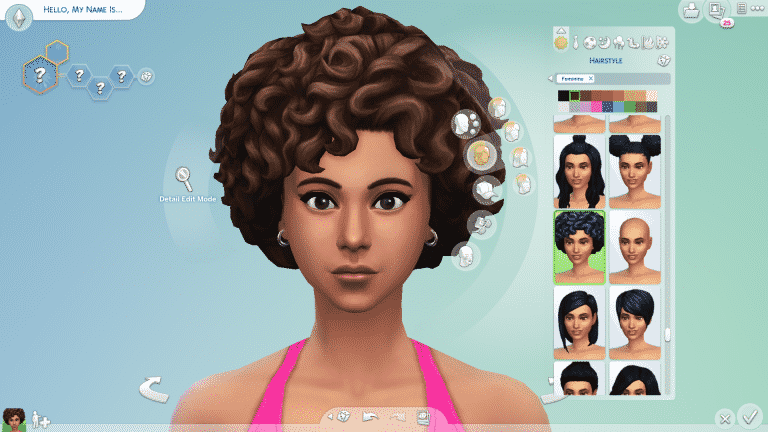
In Create A Sim, we have updated two hairstyles and have converted them to be used with Children and Toddler Sims as well.

First, we have the beautiful pfHair_EF30TightCurls, cfHair_EF30TightCurls, and yfHair_EF30TightCurls as pictured below, including how it would look like if worn on a Male Frame pictured as ymHair_EF30TightCurls.

lq54wj3famv6.png
8dt94czf7c6g.png

Then we have pictured below, including how it would look like if worn on a Female Frame pictured as yfHair_ShortTextured.

cqsupjm4n2q1.png
t8h8nobtwcmc.png

This author would like to apologize for her terrible photoshop skills in putting these together side by side. Very sorry… much photoshop! Getting better!

Now onto the fixes…

Bug Fixes

Sims 4

  • Fixed an issue in which in the Gallery Preview pop-ups, Build Mode objects will now appear properly under the “Show Used Items” panel. Accuracy is the best policy… in this case.
  • We made some edits to some Career and School-related tooltips so they are consistent and clearer for Simmers.
  • The book cradleObject_GENBook is no longer visible to Simmers, it wasn’t meant to be… it wasn’t a pretty book. We didn’t like doing it!
  • Some DEBUG pie menu options including some from Discover University and Snowy Escape were translated. We didn’t translate these, well since ever… as they were DEBUG and only accessible with a specific cheat, but we are working on them as we go now. Thanks for your reports and patience!
  • We discovered that Sims were becoming uncomfortable when Gathering Water… we didn’t really understand why, so we decided to have them not be uncomfortable. Let them feel how they want to feel, I say.
  • Ghost Sims will now appear as Ghosts in CAS. There were moments that they made us take a second look there, but nope, they are Ghosts and Ghosts they shall display as. I think I saw this as a plot for a movie… Ghosts… a machine, a dance… ANYWAY.
  • As always this editor and the Localization team made some adjustments and perfected some of the text in-game across all packs and previous updates. #getit

Get Together

  • Social Panel will no longer default to the incorrect tab. What tab was I on? Now I will always know.

City Living

  • Vegetarian Sims will no longer mistakenly eat non-vegetarian leftovers from the refrigerator. Not funny guys!
  • Fixed an issue that didn’t let the DigiRAD Keyboard make a sound when choosing Keyboard Auto Play.

Cats and Dogs

  • Listen, I think every species – well everyone, has the right to find love. But we did have to fix an issue with Female Cats going into Heat despite being Spayed. Even so, I hope my lovely Spayed Female Felines will still find love out there.

Seasons

  • Oh the rain, such a poetic moment from nature. Sitting cozied up with a blanket and a cup of coffee watching the world go by with the melodious sound of the raindrops falling lightly on the ground… wait… is that a Sim showering outside? Yes indeed! Showering in the Rain is possible in Light Rain conditions.
    • Similarly, Shower in the Rain has been fixed for Simmers who have installed Eco Lifestyle, making the most of every resource available!
    • All soaps used are biodegradable – we promise!
  • Fish Dinner will now be counted for completing Grand Meal Holiday Events.

Snowy Escape

  • Create A Sim asset yfBody_EP10CoatDenim will no longer create an issue with all knee-high boots. Though those boots were made for walking, the dress needs to look fabulous too. My opinion, allegedly.
  • Child Sims will no longer get the Unblessed sentiment after getting Blessed at the Youth Festival. Children should only get the Unblessed sentiment if they ask Yamachan about a Voidcritter Hunt and also avoid getting the Blessing of Youth from an Adult Sim as well. #Blessed
  • Extreme Sports enthusiasts will now be able to complete High-Intensity Skiing or Snowboarding on Intermediate or Expert Slopes. Good luck!
  • Recipes from this pack will now appear when unlocking Gourmet Cooking Skill Levels. Particularly Levels 3 and 5. Yum.
  • Sims will no longer freeze when performing interactions from a computer in Mt. Komorebi, specifically 2-4-2 Wakabamori. I think I saw this in a movie once… but… had a less “happy ending.

Discover University

  • Fixed an issue in which the icon for the trait Mental Magister appeared to be a Placeholder icon. Or was it?
  • Progressing in the Law Career will now unlock Promotions appropriately. Keep up the good work!

Eco Lifestyle

  • Fixed an issue in which the icon for the Making with a Mentor Moodlet was not showing the correct icon.
  • Eco Lifestyle-specific Traits are now added to the Clubs choices if Simmers have Get Together installed.
  • Collecting Beetle Nuggets will now be possible when Beetles are ready. Bon Appetit.

Outdoor Retreat

  • Veggie Dogs and Hot Dogs will be able to be roasted in Campfires once again. Iconic.

Vampires

  • Is your Vampire Sim tired of drinking the same old regular Plasma? Are they drinking it to the point that they can no longer tell if it is Plasma anymore? Ugh, such a hard diet, right? I can relate…ahem… Vampire Sims will now enjoy a more varied diet of Fish, Frog, and yes… Regular Plasma when left to their own devices.

Tiny Living

  • Tiny Homes will no longer magically get clean and have Dust Bunnies disappear (if Simmers own Bust the Dust) when Sims travel or Simmers reload the game. Man, I wish my apartment would magically get clean like that though.

Nifty Knitting

  • Fixed an issue in which the expiration timer for items listed on Plopsy was not appearing.

Paranormal

  • Haunted House Residential Lots will now enjoy the presence of Dust Bunnies and Fiends if Simmers also have Bust the Dust. Dust Bunny goes Boooooo.

Bust the Dust

  • Your Sims had a lot of things to do today, but you know what they did instead? They Vacuumed the Lot. It was a really good clean. Cooking? Vacuumed the Lot. That Gig? Vacuumed the Lot. What about those push ups? Vacuumed the Lot. Reading? Vacuumed the Lot. Looking at this bug? We made time for that. The end of this bug? Released with this Patch. Sims will no longer randomly drop their queued tasks for Vacuuming.

Sim Gurus Tease a New Pack for The Sims 4!

16

It seems the Sim Gurus are back at it with their cryptic tweets and the whole fandom knows what that means. New content! In the past, the Sim Gurus have taken to Twitter to tease upcoming content with vague tweets that hint at new packs. Yesterday, SimGuruGeorge and SimGuruFrost did just that.

SimGuruGeorge initially tweeted out a seemingly routine tweet, asking players if they can only play in one world for the whole weekend, which world would they pick? Pretty standard stuff, right?

https://twitter.com/SimGuruFrost/status/1385702375768268802

Well, maybe not. SimGuruFrost replied to SimGuruGeorge’s comment with “I choose [REDACTED].” Interesting but he could have just been talking about StrangerVille. After all, the Sim Gurus did make a series of tweets around this theme of secrecy back before the official announcement for the StrangerVille game pack was made.

However, SimGuruGeorge’s response makes us think this is something more.

This of course has players speculating on what exactly this “new” mechanic could be. We know the first [REDACTED] in SimGuruGeorge’s tweet is a world based on the context of the tweets but the rest of the tweet is somewhat of a mystery.

The only thing we can predict is that some kind of new content is most likely on the horizon and we can’t wait to see what it is!


What do you think SimGuruGeorge was talking about? Leave a comment or come chat with us on social media!

The Sims 4 Laundry List: April 13th, 2021

0

The Sims Team has published the second Laundry List for The Sims 4. The laundry list addresses some of the most important bugs and issues in the game that the community have reported and that the team has prioritized to fix in time for the next game update.

Check out the official post below!

Hi Simmers!

Welcome to the Laundry List where we’ll share a list of the top community concerns that we’re currently investigating and hope to have resolved in the upcoming patch.

These concerns were reported by players who help us continue our work of improving the user experience on a regular basis.

Please note that some topics can be tricky and require an extended investigation on our end, so even though we are actively investigating it’s not a guarantee that we’ll have an immediate fix for it in the upcoming patch.

Also note that this is just a list of the “top” concerns. There are more topics that we saw reported by players that are not listed and being worked on.

So, without further ado, here is a list of the top community concerns we’re currently investigating:

Thanks for all your patience and valuable help! Please continue telling us about any issues you’re experiencing on Answers HQ, we’ll continue to work on improving our transparency, and together we can make this game the best that it can be. Happy Simming!

EA Shines The Spotlight on Maxis & Shares New Job Listings

0

Each month, EA has chosen one of its many studios to spotlight over on Twitter and this month is none other than Maxis! As many of us know, Maxis is a studio full of numerous passionate people and The Sims Team is no exception to that.

The tweet from EA also includes messages from SimGuruLyndsay as well as Development Director Seema Moorjani.

However, there’s more. There are also listings for six vacancies at Maxis mentioned in the tweet. There appears to be a variety of job titles being filled, which could mean some exciting future content for The Sims series; however, this is not necessarily proof of any upcoming content beyond what The Sims Team has already shared with us.

EA Shines The Spotlight on Maxis & Shares New Job Listings

You can read more about the current vacancies here.

Let us know what you think of the new vacancies in the comments below.

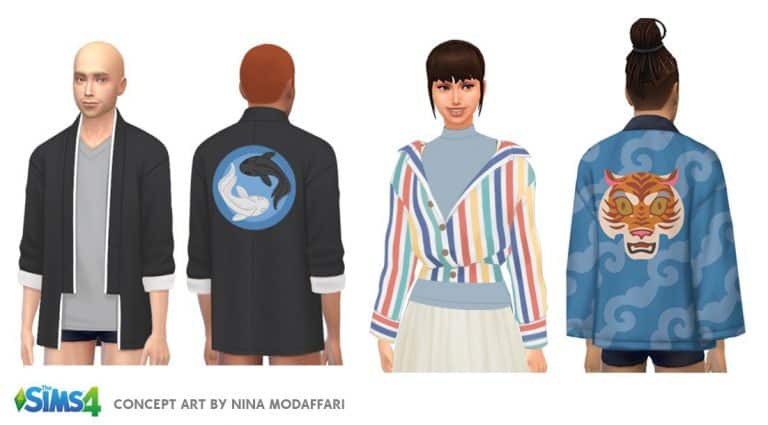
The Sims 4 Snowy Escape: Create-A-Sim Concept Art

0

SimGuruBat has shared some of the concept art work she’s done for The Sims 4 Snowy Escape Expansion Pack. Check it out!


The Sims 4 Base Game and Packs are on Sale!

The Sims 4 Base Game and Packs are on Sale!

The Sims 4 is having a huge Origin sale right now! The base game and all expansions, game packs, and stuff packs are currently discounted in price. See the savings below!

  • The Sims 4 Base Game – 88% off
  • Expansion Packs – 50% off
  • Game Packs – 25% off
  • Stuff Packs – 20% off

The Sims 4 Kits are not included in this sale.

The sale will run until April 20th, 2021 at 10AM PDT so make sure you grab any packs you’ve been eyeing on Origin before the sale ends.