


The Sims Team is working on a fix. Until then here’s how you can prevent the “Error Code 0” from happening!
A few hours ago we reported on hundreds of players encountering the Error Code 0 issue when trying to Save Game in The Sims 4.
The Sims Team has confirmed that they’re working on a fix for this error. Until then you can always use “Save As” as one of the workarounds. However, to ensure that you never encounter this issue again, SimGuruNick has shared a smart method (and a possible cause) of why this issue has been happening in the game.
Check out the official workaround for this Error and try it yourself so you don’t encounter this issue. If you already did encounter it it’s encouraged by The Sims Team that you share your save game with them so they can pinpoint all the causes so the error doesn’t happen again.
Workaround
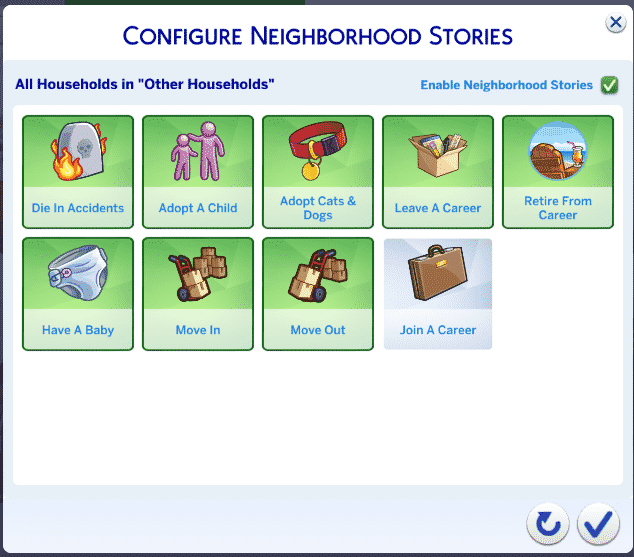
Regarding Error Code 0, I have a couple workarounds that should prevent the error code from happening. I highly recommend all players do the following two things (thread incoming). First, disable Join A Career from your Neighborhood Stories. Do this for Other and My Households.
Next, for players that own Wedding Stories, do not set a cake for your wedding event. If you currently have any pre-existing events that have cakes set, cancel those events and reschedule them. See how in this screenshot there is no wedding cake selected? Do that.
Will these workarounds fix already-corrupted saves? I’m not entirely sure, testing is still occurring, I just wanted to get this info out ASAP. If you’ve never encountered Error Code 0 though, this should ensure that you never will.
And if you do still get Error Code 0? That’s a clear sign that you’ve found a case we haven’t addressed yet, and I would really appreciate your save file.
[mks_button size=”large” title=”Community Bug Report Form” style=”squared” url=”https://docs.google.com/forms/d/e/1FAIpQLSfmGBSvKURn9Ew6FLZDXs3cgAjYUGgkqMWbpvehGHmK4CX_ow/viewform” target=”_blank” bg_color=”#4ab538″ txt_color=”#FFFFFF” icon=”” icon_type=”” nofollow=”0″]


Glad there is a Workaround!
I don’t have My Wedding Stories, any CC or mods and I took out the “getting jobs” part of the story progression….still got the error
I don’t have My Wedding Stories, any CC or mods and I took out the “getting jobs” part of the story progression….still got the error