


EA drops a new hotfix patch for The Sims 4.
There’s a new The Sims 4 Update across PC, Mac and Console platforms Xbox and Playstation. The latest patch is bringing a hotfix solution to the missing stair rails bug, as announced last week by The Sims Team.
Find out what’s been improved and changed in the official patch notes below:

The Hotfix and Day 0 Royals Update
Table of Contents
IInstalling the Latest Sims 4 Update
You can get the latest The Sims 4 Update on the following official launchers and platforms:
- PC: EA App, Origin, Steam, Epic Games
- Mac: Origin, Steam
- Playstation: PS4 and PS5
- Xbox: Xbox One and Xbox Series X / S
You can download the latest Sims 4 Update by checking for a Patch through the EA App, Steam or Epic Games launcher for Desktop. If you have Automatic Updates enabled the update will automatically download through your client program. In case your EA App is not working properly ensure you’ve cleared your app cache!
If you play The Sims 4 on Xbox Series X / S and Playstation 4 and 5 you can request a new update by checking for updates under The Sims 4 game in the Main Menu. If you’ve enabled automatic updates the Patch should download right away.
There’s also a handy official guide to Mods and CC maintenance, as well as backing up your Saves! Click here to learn all about healthy upkeep of your The Sims 4 files.

Official Sims 4 Patch Notes
Update 2/12/2026
PC: 1.121.361.1020 / Mac: 1.121.361.1220
Console: Version 2.29
Sul Sul, Simmers!
This is a small patch to address a few player-reported issues since our last Base Game update. Thank you so much for your continued reports via the EA Forums!
-The Sims 4 Team
Bug Fixes
Base Game / Multipack
Live Mode
- [EA Forums] Stair railings will no longer be missing on premade lots, Gallery Lots, and player-created lots.
- Resolved an issue where Distant Relative and Distant Relative-In-Law relationship labels were showing up inconsistently.
- Resolved an issue where newly adopted Sims failed to appear in the Family Tree after exceeding a certain number of children.
- The same Sim will no longer show up as a part of different generations in the Family Tree.
Apparently the update is just 675MB on Windows. No idea why the size difference is drastic, but my original download report includes a filesize of 7.8GB on Mac.
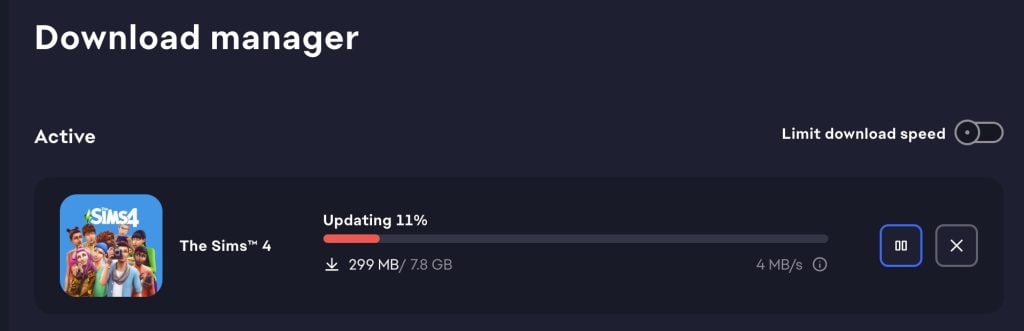
What’s your experience with downloading the latest Sims 4 Update hotfix on your platform? Let us know in the comments below and stay tuned to Sims Community for more Royalty & Legacy release coverage!


damn
glam
Hotfix of their latest hotfix, it’s so difficult to get it right the first time?.
They program a patch and they don’t boot up the game to check if the stair railings are still there?, and the same for the labels of the family tree. I guess EA, one off the worst companies to work for, attracts the most mediocre developers.
I’m on a macbook and my file size for the update is 675mb too.
Can you fix the 45 other things first, my god I don’t care about stair rails. I was told in the last hot fix randos wouldn’t come into my house well they still do. Why is there a phone in my inventory that does nothing. Why are sims absolutely not taking care of their children and I have reset debug 16 times to give them a bath. Don’t get me started on the negatives of the souls journey I want the option to turnt that offfff. I haven’t even touched getaways I’m honestly scared of MWS repeat.
the same things are happening to me
Perhaps try asking this on the official bug reports instead of a community fan made website that has no control over what is fixed or not.
Perhaps try not being a pedantic douchewaffle who feels the need to be superior on a fan made website that has no control over what is fixed or not.
It’s actually just called using common sense. Report the issues to the official forums, it really isn’t that hard to do. Seems like you need to step outside, take a deep breath and reflect on how you speak to people yourself, instead of calling people names. A little bit of kindness goes a long way if you make the effort 🙂
Don’t really care about stair railings. Just want to save my build to the gallery.
fr i’m about to lose my mind
I’m on Mac and my update isnt 7.8 GB… girrl whatchu do?
Im on windows and my upgrade is 7.8GB
right its 649 mb
I just want the occult packs to be fixed and refreshed hey. We don’t care about stairs. There’s a lot that needs to be fixed and has been broken for months. Stop bringing out new expansion packs and kits until everything is running smoothly
Some of us want new things without using mods ^_^ do you empty your cache when you play? I have bugs too, so I understand but they can have multiple teams for things.
photos taken from the photo booth are still black for me.
The reason why different players get different size patches is simple.
Not every single file is opened and applied to your game folder. They’re packaged in different files. File structure is the same, but sometimes you don’t need the same update for your single files as someone who might not played in year might need. That’s why, when you’re getting whopping 7GB update file, you’re not actually getting that 7GB. You’re getting the same 760Mb update as everyone else does! Your package that is being unpackaged (opened) just happens to be that huge (and the updater asks your computer is there enough space, and then your computer tells, yes, and downloader tells your computer to save at least that amount of diskspace so your game can be updated without the space running out! Then that uploader calls “home” and asks to bring the big stuff, just in case (or more likely because you have modded your game etc)) That happens because the big file already in your computer is been unpackaged. You download parts of it to make sure that the every file in that package is new. Downloader shows you that it downloaded 7GB because they’re not very smart, but what it really did was that it checked the file hash in your disk, and then it either asked to download it or leave it behind as is, and it was updating the files that needed an update.
Similar thing happens when you repair you game. It checks if the files are matching and although it says it downloads everything, it doesn’t download everything. It just downloads files that are old or doesn’t match, meaning that the file is unfinished.
So, your actual game file won’t be suddenly 7GB bigger! It will be the same size as your friends game or as your other computer has. You can check that from download manager and see that you haven’t downloaded that much stuff even though your computer files have been updated that much! Hope this explains a bit.
It’s really simple, but sometimes to explain the simplest things needs complex explanations.
That’s true. When I clicked for the update just now, it started out as 7.7 GB but now it reads 651 MB.
PSA! The patch is BROKEN! Do not update! It can cause your game to freeze and become unresponsive. It’s a known issue with the Feb patches specifically. If you have this issue send in your save and upvote the forum post! And this is another reminder BACK UP YOUR SAVES!