Home Blog Page 486

The Sims 4: Mod Workshop

Hey everyone, Zerbu here! I’d like to introduce you all to my custom modding tool: The Sims 4 Mod Workshop.

First of all, for those of you not familiar with the file formats that will be mentioned in this post, I’ll run through them:

  • XML is a common text format used for storing data. It is not exclusive to The Sims, in fact most of you reading this will probably already know what XML is. In case of The Sims 4 though, or at least the part relevant to The Sims 4 Mod Workshop, it is the main file type used for pieces of content (buffs, traits, aspirations, etc).
  • DATA is a custom binary format used mainly for handling rendering and  UI, and works together with an associated XML file. DATA files don’t alter the effects of gameplay, but do effect what is displayed.
  • STBL is a custom binary format containing a table of text strings used by the game.

The Sims 4 Mod Workshop (or TS4MW for short) is a tool for modders which primarily performs cloning tasks on XML and DATA files. Without the tool, you’d have to manually copy files, use a tool to generate a hash, and then manually alter the instance. The process was tiring, and huge mods were out of the question unless you had an insane level of patience.

With The Sims 4 Mod Workshop, all that’s a thing of the past. TS4MW allows you to perform a text search on XML files, and then with just a few extra clicks, the program will automatically copy the XML file and any associated DATA file to the assigned result folder, update the instance and name the file in a way that it can be quickly imported using S4PE. You could be spending hours less than you would cloning the files manually.

There is also a Mod Manager tool, which displays all XML files in your result folder in a way similar to the Clone tool (including optional search features), and contains buttons to quickly open the XML file in your default XML/text editor, or its associated DATA file in your default DATA editor, without having to open the folder in Windows Explorer.

The latest version of TS4MW allows you to clone up to 3 levels deep (with a command line code for removing the limit) for any content type. For example, you could clone an aspiration track, its category, its reward trait, its levels and all its associated goals all in one use of the cloner tool. The references are automatically replaced, even the ones in the DATA files. You can also clone STBL strings and copy them into the tool’s built-in STBL editor, so you won’t have to rename every piece of content manually.

You can get The Sims 4 Mod Workshop here: http://zerbu.tumblr.com/post/102988245727/the-sims-4-mod-workshop-version-2

Screenshots

1

2

3


4

The Sims 4 Gallery Spotlight: 28/11/14

11-28-14_9-02 PM11-28-14_9-04 PM

 Sweet Indulgence created by Tashifae

Value: §227,811
Size: 30 x 20
Type: Residential

A beautiful creation that any Sim would love to spend their lives in.

Download this lot on the web version: Sweet Indulgence

Creators description:
#pretty #gardens surround this #family ready lot that’s fully #furnished with #nocc. 3 outdoor patios give easy access to wrap around #pool. #30×20 Sim #tested. Made by Tashifae. Happy gaming.

11-28-14_9-17 PM11-28-14_9-20 PM
Modern Class created by RaisingHell12

Value: §214,376
Size: 50×50
Type: Residential

This massive home is stunning and has plenty of room for many Sims!

Download this lot on the web version: Modern Class

Creators Description:
#sims4 #celebrity #luxury #mansion #modern #kids #family #furnished #home #house #unique #decorat

11-28-14_9-31 PM-311-28-14_9-32 PM

Cozy Family Home created by jennifermeurer

Value: §203,906
Size: 40×30
Type: Residential

I adore this house and so will your Sims. 🙂

Download this lot on the web version: Cozy Family Home

Creators Description:
#house #cool #cute #sims4 #modern

11-28-14_9-37 PM11-28-14_9-39 PM

Black and White created by bullibs

Value: §180,198
Size: 40×30
Type: Residential

This unique house caught my attention straight away. Everything is set out perfectly to the theme, well done!

Download this lot on the web version: Black and White

Creators Description:
#apartment #house #garden #kitchen #dinningroom #nursery #office #family #bath #beth #staly #sims #sims4 #luxury #modern #restroom #study #celebrity #room #dressingroom #kids #design #qotik #pool

The Sims 4: Cradle-to-Grave Mod Pack

Hey everyone, Zerbu here, with a brand new mod for The Sims 4. This is not a regular mod, but a Mod Pack. A Mod Pack is a concept I recently came up with, which is a very large mod containing multiple additions which work together, rather than a single addition that only works on its own.

The Sims 4: Cradle-to-Grave is my very first Mod Pack for The Sims 4. This Mod Pack makes various changes to the ages in The Sims 4. It alters the rate of Need decay for each age, causes Child Sims to get occasional Playful Moodlets (of random strength between 1-3) and Teen Sims to get Sad, Angry and Flirty mood swings (again, random strength between 1-3).

Cradle-to-Grave adds two new Social Event types: Child Hangout and Teen Party, and also unlocks the “Throw a Social Event” interaction for Child Sims. These new events have the same goes as a House Party, except the Child Hangout doesn’t have goals that are inappropriate for Child Sims. The best part of these new events is the rewards: throwing a gold level Child Hangout will earn the host(s) the Social Prodigy trait, and throwing a gold level Teen Party will earn the host(s) the Young Star trait. Both of these traits allow Sims to gain relationships faster, and will expire after the Sim ages up twice (ie Social Prodigy expires at Young Adult, Young Star expires at Adult).

There is a twist, however: earning only silver will result in a trait that will negatively impact gameplay. Throwing a silver level Child Hangout will earn the host(s) the Party Bug trait. This trait will cause Sims to gain a negative Bored Moodlet if they don’t throw enough silver or gold level age-based parties, and works similar to how needs decay. The trait expires when the Sim becomes a Young Adult. There are plans to extend it to Adult in the future (and add an event exclusive to Young Adults), but this isn’t promised. Throwing a silver level Teen Party will earn the host(s) the Social Animal trait, which not only causes a Sim’s Social need to decay quickly, but will cause them to have the same negative Moodlets from low Social as Sims with the Outgoing trait.

Inspiration and Behind the Scenes

Unless you’re new to the franchise, you probably remember all the discussion and speculation that went on before The Sims 4 was released. In my list of most wanted features for The Sims 4, at the very top was for Sims to develop personally and emotionally through time. It would mean that the choices you made in the game would have a much larger impact on a Sim’s future, and would also help set a history of events that occurred. Sadly, all we got were aspiration rewards, which was a great feature, but not exactly the feature I was most wanting.

The fact that Cradle-to-Grave allows Sims to develop through the event reward traits is a key feature, and that is only the start. The ability to earn traits through game choices will be a huge cornerstone in most, if not all, of my future Mod Packs. The next Mod Pack that I have planned will completely transform the effects of emotions on the younger stages of a Sim’s life.

I’m happy to be bringing this feature to The Sims 4, and I hope others will like it was much as I do.

Download

You can download The Sims 4 Cradle-to-Grave Mod Pack here on my blog: http://zerbu.tumblr.com/post/103308174012/the-sims-4-cradle-to-grave-mod-pack-phase-3

Screenshots

Throwing a "Child Hangout" event.
Throwing a “Child Hangout” event.
Throwing a "Teen Party" event.
Throwing a “Teen Party” event.
The Sims 4: Cradle-to-Grave Mod Pack
The “Party Bug” trait displayed in the UI.
The Sims 4: Cradle-to-Grave Mod Pack
The “Social Prodigy” trait displayed in the UI.
The Sims 4: Cradle-to-Grave Mod Pack
The “Social Animal” trait displayed in the UI.
The Sims 4: Cradle-to-Grave Mod Pack
The “Young Star” trait shown in the UI.
The Sims 4: Cradle-to-Grave Mod Pack
A Teen Sim with a Sad Mood Swing.

The Sims 4 Custom Content: Outdoor Project Set

0

This Set has been brought to you by The Sims Resource member – TheNumbersWoman!

Bringing That shabby look to your garden, this set has all the things you need for that country feel. This set has an extra color option. Recoloring will not be allowed.

Click on the picture below to download this Set!

w-600h-450-2526519

Click Here for more information on how to install Custom Content!

The Sims 4: Early Sim Model by Brian Steffel

0

Made by Brian Steffel between June 2010 and May 2012!

20

The Sims 4: This is just the beginning!

2

SIMS4_Logo_Final_rgb

Simmers are constantly sharing their feedback on The Sims Forums concerning about the fact that The Sims 4 lacks content that we’ve seen in previous Sims games and expansions. In this case, they’re (including me as well) worried how the game doesn’t have enough family play material and interactions.

Before I share what the official Sims Dev said, let me say that The Sims Team has no intentions to abandon this sequel. We’re getting new updates at least 2 times a month and free, new content monthly. The team is trying hard to collect your feedback and honest opinion about this game to make it better, so if you have anything to share with the community or with developers, post your Feedback HERE!

SimGuruBChick:

Hello everyone. I just wanted to take this opportunity to let you know that we are watching this thread and taking your comments and feedback very seriously. The reason behind not commenting is that we have nothing to say yet. We are working on the game constantly. We are improving and enhancing content every day. And, we do take everyone’s feedback into consideration.

This is the reality of game development. You can’t make everything for everyone. What you can do is have a design vision and then make your decisions based on that vision. The vision for The Sims 4 was to refocus attention on the Sims. What makes them intriguing? How to make them feel more alive? How to bring the inner Sim to the surface? Not all the decisions the studio make will be popular with all the players. That’s a universal truth.

And, as we have said all along is, this is just the beginning. A Sims game is a massive undertaking. The base game is the foundation for everything that follows. Look back at The Sims 3 or The Sims 2 when the base games first launched. Then look at them again after 5 years of added content. They are so different at the end of that journey from when they started.

Please, know this. The team working on The Sims cares deeply about the game they are making and the people who play it. We are not ignoring you.

blewis823:

@SimGuruBChick, I really appreciate your post and I am happy that you’ve responded. However, the Sims team’s vision is not what I envision when imagining more alive, what makes a sim who they are without the family aspect in the game. Sorry, I am not enjoying your vision right now but may revisit buying more for Sims 4 when something change in the family relationships, interactions, and goals. Thank you for reading.

SimGuruBChick:

Totally understand. We all have our opinions. And sometimes it’s tough to see what another person (or team) vision is, or how it is realised in a beloved game. I hope that you will revisit The Sims 4 further down the road. The game will continue to evolve over time. And, on a personal note, I didn’t really like The Sims 3 until World Adventures came out. I understood the vision but I didn’t appreciate it or feel that it applied to me. Gaming is such a personal journey and it can be something seemingly insignificant or something really huge that engages you.


Tip: Honeywell

The Sims 4: 50% off on Origin!

0

The Sims 4 and The Sims 4 Digital Deluxe are now both 50% off on Origin!

If you haven’t got the latest Sims sequel yet, this is your ultimate chance! This offer is part of Origin’s Black Friday deal which lasts until 1st of December.

Click on the picture below to check out this offer!

Capture

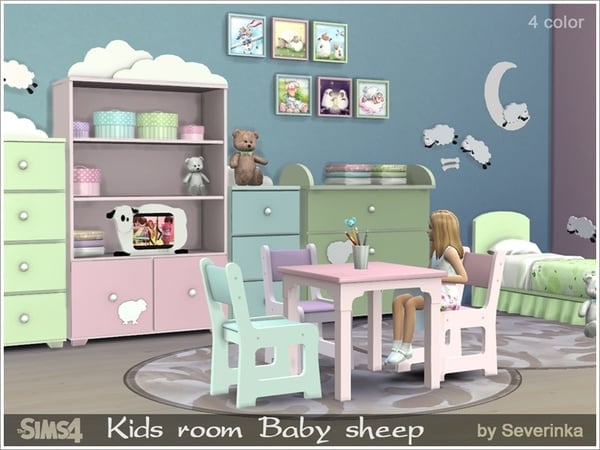
The Sims 4 Custom Content: Baby Sheep Kids Room

0

This Set has been brought to you by The Sims Resource member – Severinka_!

A set of furniture and decor for the nursery Baby sheep
All the furniture has 4 different colors – pink, blue, green and purple. You can put objects of the same color, but you can make different colors of baby furniture.
Design for this child’s room was the image of sheep – a symbol of the new year.
Funny sheep not only decorate the room of your Sims’ small, but undoubtedly cause a smile.

The set includes 21 objects:
single bed
large cupboard for toys or books
translucent curtains
table
chair
box with toys
2 dressers
changing table (a function dresser)
2 bedside tables of different sizes
TV
toy rocking a sheep (idecor)
2 toy Teddy bear
diapers
2 round boxes of various sizes (can be stacked)
pictures with funny sheep

Click on the picture below to download this Set!

w-600h-450-2525890

Click Here for more information on how to install Custom Content!

The Sims 4 Custom Content: Contemporary Christmas Decorations

2

This Set has been brought to you by The Sims Resource member – Angela!

A small set with 7 new Christmas decorations, this set contains a vase with gold and silver balls, a (very) contemporary Tree, a white shelf, golden sparkling letters making the word JOY, a few gifts, a picture and holiday stockings.

Click on the picture below to download this Set!

w-600h-450-2525584

Click Here for more information on how to install Custom Content!

Origin Black Friday: Up To 75% Off

0

Click on the picture below to check out Origin’s Black Friday offers. This deal ends on 1st of December.

Capture

The Sims 4: New Game Patch (25/11/14)

2

Before you start updating The Sims 4, make sure you follow THESE steps to ensure that nothing goes wrong.

EA Help Post

Hey Simmers,

Just a small update for the end of November! Hopefully you have kept healthy this past month. It feels as though a minor plague has swept through the Studio, knocking folks down one after another. But that aside, we have fixed some crashes, addressed some community concerns, and sorted out a few other fixes that just happened to sneak their way into this release.

As always, the community has been doing an excellent job of keeping us on our toes. A new batch of fixes is on its way out with this release, including the un-breaking of the Add to Family cheat, a Sim pruning issue, and some water opacity issues. Thank you for your feedback, keep it up!

Crashes / Performance

  • Fixed a crash that was the result of long term gameplay instability in the UI framework that only occurred after moving, traveling, creating new families, and building for some time. Also known as playing the game.
  • We fixed a crash reported on the modding forums where custom content clones of hats and hairs could cause a crash on Intel graphics cards due to an issue with the skinning code.
  • Fixed a crash wherein should you click on an underwater light and change the dimness setting, and you do that again, and you do it again, and then again, again, again, again, again… the game would crash. The waters are safe again.
  • The game was freezing under some circumstances when a swimming Sim attempted to use an object found outside the pool. We have fixed all issues that we have found resulting in this freeze, and prevented the freeze from occurring in those cases we have not found. It’s magic.

Community Feedback

  • We fixed a bug where close family relationships were still getting pruned if they lived in different households. Previously, we were looking at each household individually, which was incorrect. For example, say you have a Sim with two children and one of them moves out. The second child then has a kid who also has a kid who also has a kid. Then the original Sim dies, but the child who moved out is still alive. That dead Sim should not be culled because he/she still has a living child.
  • The Vidame Hostess Station was causing Sims to freeze if objects that the Sim wanted to interact with were placed on top of it. We contemplated renaming the surface to the Vidame Hostess Station of Mesmerizing Never-endedness but opted to fix the issue instead.
  • Casual “if you were swimming before you went to work” Workdays have been cancelled, and Sims will once again spin into their work outfit before going to work.
    • On a side note, folks are happy that Casual “if you were swimming before you went to work” Workdays have been cancelled, because it was just too much to say.
  • Children and Teens can no longer be modified with the sims.add_buff Buff_Pregnancy_Trimester3 cheat.
  • The release of Pools introduced an issue with visitation that hid the Visit interaction when clicking on the door of a neighbor’s home. You can now click on your neighbor’s door to visit them once again!
  • In addition, there was an issue with being able to set which door was the front door on your home lot. That too has been fixed.
  • The Add to Family cheat has been re-enabled.
  • We fixed water opacity issues where the water was turning opaque on some graphic configurations.

Tuning / Graphics

  • Fixed an issue that was preventing live drag from functioning when dragging from a Sims Inventory to an Object Inventory (such as a fridge or bookshelf).
  • The game will no longer fail to save if you have over (Step 1: Face computer. Step 2: Place fingertip marked A next to lip corner marked B. Step 3: Say clearly but elongate the quoted phrase) “1 million” satisfaction points.
  • Ambrosia will no longer be eaten autonomously by your Sims.
  • We fixed an animation issue that can best be described as “we fixed an issue that caused Sims to scratch their back with their elbows when they chose to sit at the edge of a pool with a drink in their hand.” It wasn’t pretty. Thankfully no Sims were permanently scarred by the experience.
  • Sims who sat at the edge of a pool during the moment of bladder failure found they were unable to satisfy their bladder. Whereas had they been in the pool…
  • Pregnant Sims have temporary immunity from drowning per a previously agreed upon pact with the Reaper. However, if the pregnant Sim found that they “should” have died while in the pool, their buffs would get all wonky (actual technical term as used by the production team). The buff wonkiness has been fixed.
  • Death by drowning will now count towards the Vengeful Deity Achievement.
  • Swimming Laps will now help to alleviate the Not Enough Exercise buff that Active Sims can get.
  • Pool ladders have an interaction “Get In” that you can choose when clicking on them. Now, when you choose that action, it will do something.
  • If a Sim decided to cancel their adventure in the Forgotten Grotto to go swimming, the Forgotten Grotto would forget that Sim existed, preventing them from adventuring within her forgotten realm. We have spoken to the Forgotten Grotto, explaining that the pool is just another place that Sims want to go, that they have not forgotten the Grotto, they will return once again, but that the Forgotten Grotto can’t forget them, and they must be allowed once again to enter the Forgotten Grotto, lest they be forgotten and thusly forget the Forgotten Grotto. The Forgotten Grotto, jealous… yes. But also forgiving.

Thank you,
-SimGuruGnome

The Sims 4: Concept Art by Norman Felchle!

0

Via Norman Felchle!

10505260_909316352429022_4612256696898305182_o

Click on the pictures below to enlarge them.

1491325_908956539131670_5913229212989033514_o 10498398_908956729131651_7109729085062837170_o 10450239_908956719131652_7439208870236991029_o 10382431_908956669131657_2772718127783198832_o 1962341_908956559131668_271125278016313407_o 10523976_908956662464991_1665931393721527059_n 10672311_909317659095558_3154932987334923599_n 10672244_908956752464982_861845689671223561_n 10626647_908956622464995_8010086309976625862_n 10584051_908956592464998_496507113105936455_n 10562463_908956552465002_7136612002743275965_o 10536533_908956665798324_9037262810290340590_o10409139_10204793966634221_1910057473326854436_n

The Sims Magazine: Get ready for the best Sims magazine EVER!

0

hero

Newsletter Link

NEW LOOK! NEW FEATURES! Get ready for the best Sims magazine EVER!

First, business up front. The Privacy Policy and Terms of Service for The Sims Official Magazine are changing on Dec 1, 2014. Click on the following links to review our new terms: Privacy Policy and Terms of Service.

Now the fun stuff! The Sims Magazine is changing. It’s getting even better! We’re still going to bring you the very best features and insight into the best gaming franchise of all-time, but we’re going deeper. We’ll be rounding up the world’s very best players and creators and each issue will feature their exclusive advice and techniques on how to make your game amazing.

But that’s not all! We want to hear from YOU.

What do you want to see in The Sims Magazine? Do you want more tips on how to play or where to find cool hidden stuff? Do you want more on building or modding or a place to show off your creations and Sims stories? Are you a Sims 3 or a Sims 4 player? What gets you really excited about the games?

Not only will we make sure we feature the articles you want to read but there will be a breaking news feed bringing you live updates.

There will be other cool features too. You’ll be able to read stories without downloading the app and save your favorites to read when you’re offline. Plus you can be notified when there’s new content to check out. Basically, we’ll make sure you never miss a thing from the world of the Sims.

The new magazine is coming soon. Get the latest by following The Sims Magazine:

Tweet us @thesimsmag
Like us on Facebook
Follow us on Pinterest

And bookmark the new The Sims Magazine website www.thesimsmag.com

We can’t wait to hear from you!
The Sims Mag Team

The Sims Medieval: 3D Concepts by Matty Murakami!

0

Via mattymurakami.com!

Click on the pictures below to enlarge them.

image00_arcane_tome01 image00_well01 image00_skeleton01 image00_sculptures01 image00_object_collage02 image00_object_collage01 image00_monk01 image00_market_stall01 image00_knight01 image00_griffin01 image00_evil_throne01 image00_cabinet01 image00_bookshelf01