Home Blog Page 498

EA Record Engagement for Q3 featuring The Sims 4

1

Electronic Arts has released an Inforgraphic of their latest games, featuring The Sims 4!

According to EA, Sims have WooHooed for approximately 1 Million times per day since launch of The Sims 4!

Click on the picture below for more fun facts about other EA titles

Capture

The Sims 4 Custom Content: Provence Living Room Set

Created by The Sims Resource member – Severinka_!

A set of furniture for your Sims in Provence style.
Simple shapes, matte surface of the wood and floral patterns – perfectly suited for the design of your dining room or in the style of Provence or Shabby-chic.
The set includes 16 items:

  • sofa and chairs with floral upholstery
  • pillows for the sofa
  • coffee table
  • cabinets for books
  • different books
  • floor lamp with fabric shade
  • wall clock
  • pictures
  • decor – basket with knitting and apples

    All the furniture has three colors of wood – white, dark walnut and alder. On a sofa, armchairs and lamps several fabric options with a floral pattern. Cushions – 8 choices of various colors.
    All objects are updated in the game.

Click on the picture below to download this Set!

w-600h-450-2512728


Click Here for more information on how to install Custom Content!

The Sims 4 Custom Content: Glossy Nails

Created by The Sims Resource Member – SintikliaSims!

  • 21 recolors

  • Standalone

  • 3d mesh by me

  • Handpainted texture

  • With thumbnails

  • In Accessories – Rings

  • Created from middle ring, so can wear with other rings. Available for making recolors but with original link to mesh!

Click on the picture below to download this Set!

w-600h-450-2512084

Click Here for more information on how to install Custom Content!

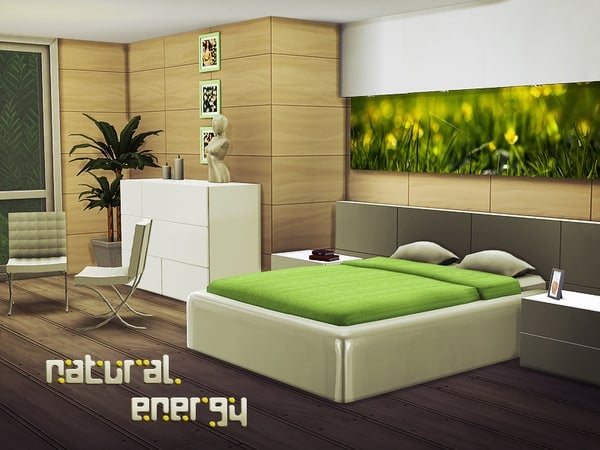
The Sims 4 Custom Content: Natural Energy Bedroom

Created by The Sims Resource Member – Kiolometro!

Energy of nature. Six objects in set. First variation: white plastic and green. Second: light brown wood and blue. Third: Red and black.

NOT FOR USE WITH SIMS INVENTORY

Click on the picture below to download this Set!

w-600h-450-2510793

Click Here for more information on how to install Custom Content!

The Sims 4 Custom Content: Gab Contemporary Living Set

This modern and highly-detailed Living Room set that has 13 objects is created for The Sims 4 by TheNumbersWoman!

Tired of box uncomfortable Sofas but want that stylish modern look? Is your sims bottom sore from the stiffness of leather? Well then this set if for you! Comfy yet contemporary your sim will thank you! Created with Chemy in mind. Some objects have a second color option. THIS SET CANNOT BE USED IN A SIMS INVENTORY. This is an EA fault with CC and so do not use the CC with a sims inventory.

Click on the picture below to download this Set!

w-600h-450-2507326

Click Here for more information on how to install Custom Content!

The Sims 4 Custom Content: My Little Town Carpet Set

MTS member DasMatze2 created this excellent set of 17 carpets that you can use to decorate your Kids room in The Sims 4!

Please note that in order to download this set, you need to be registered on Mod The Sims!

I saw the models of cars, boats and trains ingame and thought “Hey, where should I place them?”. So I created a set of 17 carpets with which you can create roads, railroads, rivers and tram tracks.

Click on the picture below to download this Set!

MTS_DasMatze2-1475544-002

Click Here for more information on how to install Custom Content!

The Sims 4 Custom Content: Elegant Bathroom Set

Created by The Sims Resource Member – ShinoKCR!

Bathroom for a Lady with several beautiful and elegant parts

– Bathtub 4 Colors
– Sink 3 Colors
– Bench with Towel or Robe 7 Colors
– Bench as Sidetable 7 Colors
– Curtain right and left side – solid color – 4 Colors
– Curtain sheer right and left side 4 Colors (you find them in Paintings
– several Perfum bottles – recolors allowed
– man care set
– Wallsconce 3 Colors
– Mirror 3 Colors
– Hutch 2 Colors
– Ceilinglamp white with gold

Click on the picture below to download this Set!

w-600h-450-2511568

Click Here for more information on how to install Custom Content!

The Sims 4 Custom Content: Satin Nightwear

Created by The Sims Resource Memer – melisa_inci!

Bright satin fabric which is designed using a soft night in a deep decollete obtained using triangular chest cut, chest and elegant lace embroidery is used under the yoke. Robaina with batteries of light from the ends of the skirt is finished with stitching flywheel. Thin rope strap, chest fabric rope attached to the middle stone movement has given night.

Click on the picture below to download this Sleepwear!

w-600h-450-2507230

Click Here for more information on how to install Custom Content!

The Sims 4 Custom Content – 2 New Hairstyles by MJ95!

Created by The Sims Resource member – MJ95!

So this is the first hair I’ve ever made for sims and also my first TS4 creation, so silky and smooth. Mesh is completely new (made by myself) and low poly, Joints are perfectly assigned. Texture is modified EA texture. All LODs are replaced with new ones. This hairstyle is available for hat category. It is also available in all EA colors.

Click on the picture below to download this Hairstyle!

w-600h-450-2506378

I hope you liked my first TS4 hair because here comes the next one! Mesh is completely new (made by myself) and low poly, Joints are perfectly assigned. Texture is modified EA texture. All LODs are replaced with new ones. This hairstyle is available for hat category. It is also available in all EA colors.

Click on the picture below to download this Hairstyle!

w-600h-450-2510095

Click Here for more information on how to install Custom Content!

The Sims 4 Custom Content: Bedroom Simplicity Set

A modern bedroom set with 6 items.

Set contains:

double bed – 2 color options
end table – 2 color options
dresser – 2 color options
rug – one color
painting – 3 color options
wallpiece – 2 color options

Click on the picture below to download this Set!

w-600h-450-2508753

Click Here for more information on how to install Custom Content!

The Sims 4 Blog: Whims, Aspirations & Goals Quick Guide

0

Blog Post

Hi Simmers –

We build big games with a lot of stuff to do. There’s a LOT of content in The Sims 4 that you might not know exists if we didn’t point it out. One of the ways we do this is with our Goal systems, including Whims and Aspirations. These goals create what we call a “breadcrumb” trail to the content and, when completed, give you a nice reward to change your strategy, options, and story in the game.

Today, I snapped some screenshots to go over a few of the things you might have missed.

Whims

I told my Sim to take a Brisk Shower. This gave her the Energized Emotion. Sims always have two basic Whims, which are the little fluffy clouds above their Portraits. However, when Sims have any Emotion other than Fine (which is our neutral Emotion), they get what we call an Emotional Whim. This Whim is in the far left and is based on their current Emotion.

Emotional Whims are designed to point you towards content that you can ONLY do while in that Emotion, OR ways to fix your current Emotion. If your Sim is Sad, for example, you might get a Whim to Water your Garden with Tears.

If you hover your cursor over any of the Whims, you can find information on that Whim. You’ll find the high level subject, where it came from (an Emotion, Trait, or Aspiration), how much Satisfaction you’ll receive for completing it (more on that in a second), and a detailed explanation. See the little red X? If you ever don’t want to complete a Whim, or want a different one, simply click that X, and it goes away.

whims_blog1

Read More

The Sims 4 Tutorial: Making Memories

5

Making Memories in The Sims 4 is simple as pressing the C button on your keyboard. Well, maybe not that simple…

After taking a Screenshot in The Sims 4 (with the C keyboard button), click on the Camera Controls button on the top right corner and select ”Memories & Pictures” option. You’ll get a panel of all the Memories of your Sim, but since you probably don’t have any Memory in there, you’ll need to import one. To do so, click the ”View Screenshots” option on the bottom right corner.

Click on a Screenshot that you want to use as a Memory and select the circled icon that says ”Click here to make this screenshot a memory for all selected Sims”.

Note: only Sims who are inside the Screenshot can make that certain Screenshot a memory and can reminisce about it!

After you’ve done that, go back to your Memory panel and select the Memory you imported. To reminisce about that Memory, you’ll need to select  type of that Memory (which Emotion should trigger; Angry, Embarrassing, Confident, Romantic, Sad, Happy)

TS4 2014-10-25 01-28-02-10 TS4 2014-10-25 01-28-19-69

After you’ve set that, you can finally throw back to the past! Each Memory gives your Sim a +1 worth of Emotional Buff (doesn’t matter which Emotion). You can do so by clicking on a Memory and selecting the cloud icon that says ”Reminisce about this Memory”.

TS4 2014-10-25 01-30-04-39

The Sims 4 Custom Content: Halloween Props Set

Heads up: Halloween starts in just one week! Don’t forget to make spooky Sims and Houses and upload them to The Gallery.

Click on the picture below to download this Set!

w-600h-450-2508705

Click Here for more information on how to install Custom Content!

The Sims 4 Custom Content: Eloisa Living Room

Click Here for more information on how to install Custom Content!

This is an asian yet contemporary living room consisted of finest quality furniture. This living room is the perfect choice for those Sims who are looking for cozy but stylish furniture. Let them sink into the lovely loveseat or the comfy living chair and enjoy their day.

Click on the picture below to download this Set!

w-600h-450-2508628