Home Blog Page 499

SimCity BuildIt now available in Canada! (Android)

1

SimCity BuildIt has got unlocked on Google Play a week ago for New Zealand and Australia, but now players from Canada are reporting that they can now download the game and play it as well!

If you’re from Canada/New Zealand/Australia and own an Android phone that has decent specs, then click on the picture below to download SimCity BuildIt!

Capture

The Sims 4 Custom Content: Pumpkin Patch Set

Halloween is only about a week away! This Pumpkin Patch Set of Objects created by sim_man123 for The Sims 4 will go perfectly for decorating your House for Halloween.

For more information on how to install Custom Content, Click Here!

A few simple items to help your sims get read for Autumn! This set features a hay bale that can be used as a table, a wagon (also a table), and two sizes of pumpkins – each with three recolors.

Click on the picture below to download this Set!

w-600h-450-2505488

The Sims 4 Custom Content: Asian Bedroom Set

Creative The Sims Resource member Severinka  published her set of 7 Asian-themed objects for The Sims 4!

For more information on how to install Custom Content, Click Here!

Set of bedroom furniture in Asian style. This set will be an indispensable Addendum for your oriental home.
The set includes: bed, dresser, table, bonsai, wall sculpture – the coin of happiness, vases, partitions.

Click on the picture below to download this Set!

w-600h-450-2508436

The Sims 4 – Invisible Lights are back!

8

With The Sims 4’s latest update, Invisible Lights from The Sims 3 World Adventures update are now back to The Sims 4 as well!

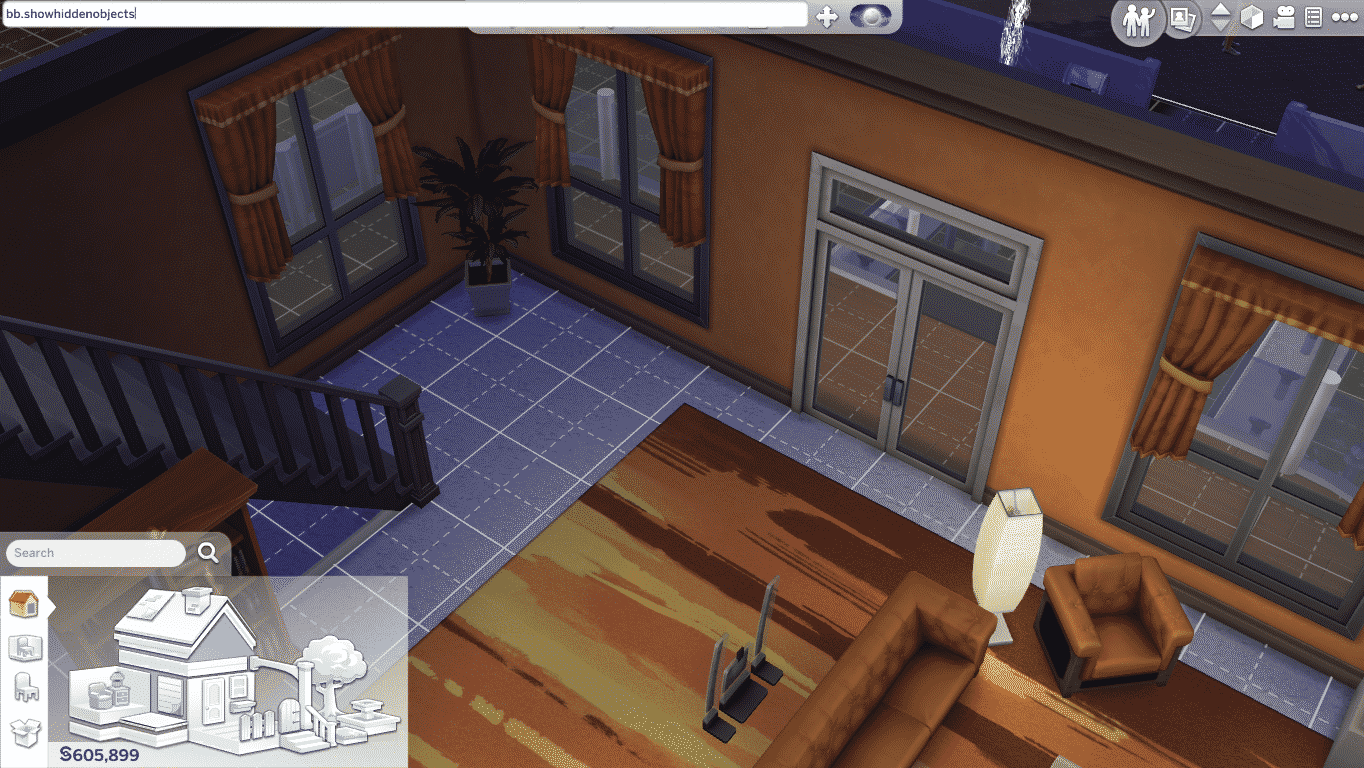
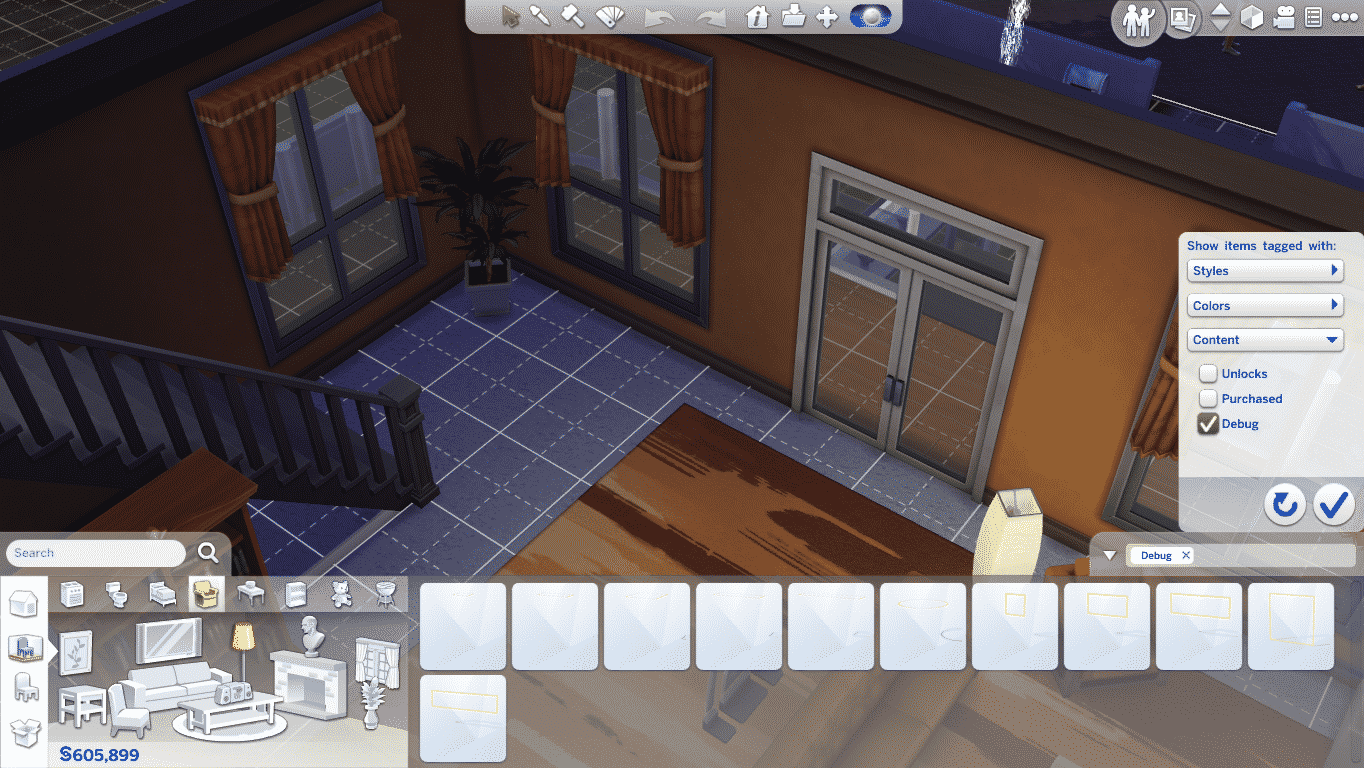
To add invisible lights into your Room, open Build Mode and enter the bb.showhiddenobjects cheat. Select filters and choose Content > Debug.

TS4 2014-10-21 23-33-02-44 TS4 2014-10-21 23-33-19-58

You can plop any Invisible Light you want into your room. There are all sort of sizes for a ceiling and wall/floor invisible lightings.

After you’ve finished adding invisible lights, the yellow outline on each lighting will disappear and all you’ll see in Live Mode is light without the light source.

TS4 2014-10-21 23-34-41-09 TS4 2014-10-21 23-34-46-70

The Sims 4: Skills Live Broadcast Replay (21/10/14)

0

This video was split into 3 parts due to broadcast issues. First 2 Parts last 6 minutes total, while the third part lasts 55 minutes. Part 3 is the one you should focus on!

Part 1Part 2Part 3

The Sims 4 Game Update (21/10/14)

To update your The Sims 4 game to the latest version, simply open your Origin and the game will automatically update for you!

Capture

Update: 10/21/2014 – Version 1.0.797.20

Hello Simmers, readers of patch notes, and other developers who just happen to be searching the internet for examples of how other teams are writing up their release notes!

We had a few issues we felt needed to be addressed sooner rather than later, and have tackled them in today’s patch! Many of these issues were brought forth by the community through the forums. We thank you for your efforts, your posts, and your focus in helping us create a better experience with The Sims 4.

Some bugs you might be keen to know were fixed: The “Eye and jaw width looks funky” bug! The “I can’t get married if my fiancé died” issue! And the “My Sims can’t age up anymore” bug.

The other issues which we have fixed are detailed below, and we are always dedicated to fixing performance and gameplay blocking issues in order to provide the best gaming experience possible. Please keep posting on the forums. We do read them and we are tracking issues that you are finding.  Thank you!

Crashes / Performance

  • Fixed an issue where the game could enter into an infinite load after all Sims in a household had died.
  • Fixed a performance issue resulting in too many hidden Sims being created for “just in case” scenarios. Resulting in a large number of Sims being loaded that were not needed.
  • Scrolling left in the Memory timeline will no longer freeze your game. Yea… we just… don’t ask…
  • Fixed an issue that was caused by placing a Sim from the gallery into multiple households that could result in either simply causing the appearance to revert to the original Sims appearance, or could cause the household to become unplayable.
  • Fixed an issue that would result in the player being unable to place a Room from the Gallery if the room had been uploaded with a single plate of food.

Tuning

  • Fixed an appearance issue that caused Sims to incorrectly appear with small eyes and wide jaws on age up. This was a result of a modifier value being improperly ignored for one age group, that resulted in the value being incorrectly applied, and was exacerbated if a Sim moved into or out of that age group.
  • The grieving period is over… Sims can now attempt to marry again if their fiancé has died.
  • Players can once again tell their Sim to age up with a cake, regardless of the Auto Age setting. On a side note, I feel strongly as though I should have used the word irregardless, if only to anger my co-workers who contend that the word is not a word. I feel however, that it is a perfectly fine word, irregardless of their feelings.
  • Fixed an issue where Widows and Widowers were not being properly given their relationship status as Widows and Widowers.
  • Sims made from the same Gallery Sim will now properly populate the world as desired, rather than secretly kill off their clones before moving into the world.
  • Fixed an issue where Ambrosia was “sort of” allowing itself to be copied in Build Mode, however, while it was charging full price for the copy, it was only delivering an empty plate with FX.
  • Resurrected Ghosts by way of Ambrosia, will properly age up upon their return to the land of the living… which is unfortunate because they are just going to die again.
  • Fixed an issue with the Throw 5 Parties goal not counting thrown parties correctly, making it impossible to throw a party that would satisfy the Throw 5 Parties goal. We have thrown together a few lines of code, talked to all parties involved, and verified that it is once again possible to throw a party that satisfies the Throw 5 Parties goal.
  • Fixed an issue preventing Ghosts from showing up as valid targets in some Sim Picker dialogs, such as Write Love Email or Send Spam Money Request to.
  • Teens can now write Love Emails to other Teens.
  • Ghostly Repair will now satisfy the Repair an Object whim.
  • Added a venue wall speaker for the Spooky station into the debug catalog.
  • Fixed an issue that would cause a Sim to attempt to repair a working shower, if the broken shower was on the 2nd floor.

UI / Text

  • Manage households will no longer show empty households as a result of Sims dying from old age.
  • Fixed an improper string update which resulted in the 1st goal of the Writing aspiration informing you that you should “Read 1 Book at the Library,” rather than the correct goal of “Beat Writer’s Block”. Odd that the writing aspiration had an error in the text.

EA Post


Giveaway: Win The Sims 4 SteelSeries Peripherals!

328

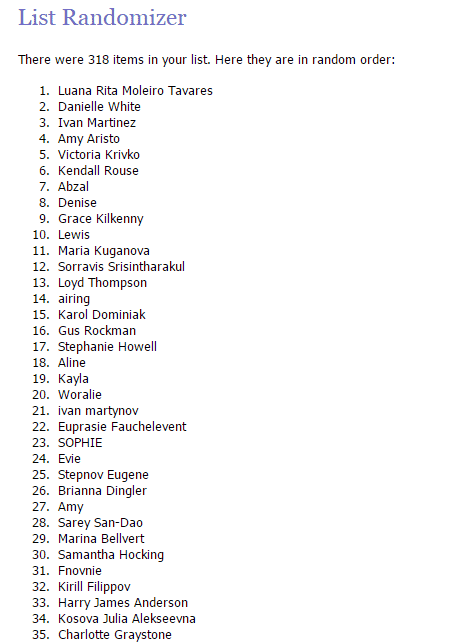
Congratulations Luana Rita!

Random.org selected you as a winner of this giveaway.

random_org_giveaway_311014

SteelSeries recently published their new video for The Sims 4 Gaming Gear and with that they gave us a full set of TS4 Peripherals to give away to one lucky Simmer!

To enter this giveaway, all you have to do is write a few sentences in the comment section below on why would you like to win these Peripherals.

The winner will be chosen randomly via random.org. We’ll make sure to provide a screenshot after we choose the winner.

This giveaway ends on 28th of October, 2014 (21:00 – GMT +01). The winner will be announced on October 31.

Before entering this giveaway, please note:

  • This giveaway is for Simmers worldwide.
  • Make sure you provide a correct E-Mail address when writing a comment!
  • If you make a mistake in your original comment and/or want to add something, just write a reply to your existing comment.
  • In case you can’t submit your comment, contact us at contactsimscommunity@gmail.com and we’ll be happy to help you!
  • Cheating is NOT allowed! If you try to represent as someone just so you have a bigger shot of winning, you will be disqualified.
  • Foul language is NOT allowed!
  • In case the winner doesn’t reply 48 hours after we publish the results, we’ll pick a person who’s #2 on random.org list.

Good luck to all of you who are entering this Giveaway!  🙂


Origin: 30% off on The Sims 4 (UK & USA)

0

Origin is selling The Sims 4 and The Sims 4 Digital Deluxe for 30% off it’s original price! This offer is valid for all of those living in USA or UK.

This offer will expire on 24th of October, 2014!

Click on the picture below to check out this offer!

Capture

The Sims 4 – More options to Edit Worlds coming soon?

4

With the latest The Sims 4 Patch that released on 01/10/14, 2 interesting icons were added into the game files.

By the looks of those 2 icons, it seems that The Sims Team is working on features to load, delete, and probably create/build new Worlds!

world1 world2

That’s not all though. SimGuruZera posted today on The Sims Forums asking about what feature would we like to see that would help us shape and change our Worlds. This post also confirms that they are currently working on new features for editing worlds!

Tell us the features you most want to change your World. We have ideas, we have things a spinnin’, but we want to hear from you first hand. What can we do to help you make your The Sims 4 Worlds the best ever?

Give your feedback HERE!

The Sims Blog: Learn How to Edit Lots & More in The Sims 4!

0

There are so many ways to customize your experience in The Sims 4, including the ability to edit a lot.

Here’s a step-by-step guide for editing in The Sims 4.

We’re going to use Sandtrap Flat in Oasis Springs as our example. Let’s say I want to do something with it other than leave it as a Residential Lot. What if I want to make it a Library?

Go to Oasis Springs, click Sandtrap Flat, and look at the options in the contextual menu. From the top, you can:

1.       Move in a New Family

2.       Free Build. You have no money restrictions, though you’ll need enough money to move in.

3.       Click the … for More and change the Lot Type. This is what we’ll click for our library.

lots_1

Read More

SimCity BuildIt: First Gameplay Screens!

0

@SimmerNick sent us some of the first in-game screens of SimCity BuildIt!

These screens show the first tutorial you’ll get when entering the game, as well as some of the options to build and optimize your City.

SC20141017-072240

SC20141017-072255 SC20141017-072306 SC20141017-072316 SC20141017-072322 SC20141017-072335 SC20141017-072346 SC20141017-072410 SC20141017-072429 SC20141017-072454 SC20141017-072503 SC20141017-072512 SC20141017-072532 SC20141017-072543 SC20141017-074112 SC20141017-074153 SC20141017-074240 SC20141017-074305 SC20141017-074426 SC20141017-074509 SC20141017-074526 SC20141017-074612 SC20141017-074843 SC20141017-074859 SC20141017-074904 SC20141017-074923 SC20141017-074946 SC20141017-074954 SC20141017-075136 SC20141017-075211 SC20141017-075313 SC20141017-075628 SC20141017-075709 SC20141017-075713 SC20141017-075720 SC20141017-075727 SC20141017-075736 SC20141017-075740 SC20141017-075746 SC20141017-075751 SC20141017-075826 SC20141017-080244 SC20141017-080419 SC20141017-080447 SC20141017-080755 SC20141017-081201 SC20141017-081614 SC20141017-081617 SC20141017-081622 SC20141017-081627 SC20141017-081830 SC20141017-081836 SC20141017-081907 SC20141017-081949 SC20141017-082159 SC20141017-082211 SC20141017-085416 SC20141017-091502 SC20141017-091523 SC20141017-091619 SC20141017-094941 SC20141017-100201 SC20141017-100301 SC20141017-100316 SC20141017-150554

The Sims FreePlay: Witches & Wizards Update Coming Soon!

2

Magic is appearing in Sim Town! Get the help of Sim Town’s resident Wizard and conjure up new spells to save your neighborhood from impending doom.  Summon your enchanted broomstick and hold on to your wand; magical mysteries and mayhem are just around the corner!

Video Link

SimCity BuildIt: New Screens + Info

0

Update: @PeterSimsYT and @SimmerNick just tweeted that they’re able to download SimCity BuildIt. Since they’re from Australia and New Zealand, I assume that this game is currently unlocked for people living in the eastern continents.

Google Play just released a SimCity BuildIt info page with lots of new screens and game description.

According to the page, the game will more than 210MB of your Smartphone memory and you’ll need at least a 2.3.3 version of Android in order to run this game.

Although the page says that the game released on 13th of October, it’s still locked for downloading worldwide!

As soon as the game unlocks for both Android and iOS devices, we’ll let you know!

Description

Build and manage your very own city and watch it come to life.
With stunning 3D graphics, famous landmarks, bustling streets, and citizens that tell you what you need, this is the most realistic city builder on mobile!WELCOME MAYOR! We’re glad to have you on board. Your first order of business — create your own unique city that has people flocking to your town. The larger your city gets, the more needs your citizens have. Solve real city problems and add city services to keep them happy and your city thriving.
=FEATURES=
• SimCity, reimagined for a new generation of mobile players
• Solve real city problems like traffic, fires and pollution
• Add basic city services, including water and electricity to keep your citizens happy and your city growing
• Specialize your city with iconic landmarks, casinos, and more!
• Create and trade resources with friends and other cities
• Unleash natural (and not so natural) disasters
• Explore your 3D city from all angles with 360° controls
• Watch your city come to life – night and day!

unnamed unnamed9 unnamed8 unnamed7 unnamed6 unnamed5 unnamed4 unnamed3 unnamed2 unnamed1

The Sims 4: Sim-ifying the Awkwardness!

0

The Sims 4 teamed up with Awkward Family Photos – a website that collects rather intersting family photos, to recreate some of hilarious real life family photos and portraits from real life to The Sims World.

Check out more amazing recreations by clicking the picture below!

Capture