Home Blog Page 545

The Sims Dev EA Salt Lake Focusing on Mobile Following Layoffs

2

Electronic Arts has put a focus on firing their employees lately. Now, they decided to close The Sims Franchise future development in EA Salt Lake.
IGN got some answers from EA on why did they decide to make EA Salt Lake a Mobile development studio.

Electronic Arts has laid off numerous employees at its Salt Lake City, Utah office today, affecting both the Maxis and All Play divisions.

According to an IGN source close to EA, “all of Maxis is gone” in Utah, with approximately 40 former employees migrating to Maxis in California. Around 35 other Salt Lake employees have been laid off, including an estimated 20 at EA All Play.

EA Salt Lake was working on The Sims on mobile, which it will continue to do, and assisting on The Sims 4.

EA declined to verify the specific number of affected employees.

An EA representative told IGN, “EA Salt Lake is becoming largely focused on mobile development, including The Sims and other projects. Recent shifts unfortunately resulted in the reduction of a few teams.  As we look to match skills with opportunities, some staff will be offered other positions at EA, while others will leave the company.”

EA Salt Lake opened in 2010, and has developed numerous console, Facebook, and mobile games, including Risk Factions, Littlest Pet Shop, Monopoly, and a still-ongoing undisclosed project. The studio also assisted on The Simpsons: Tapped Out.

Earlier this week, EA detailed the strength of its growing digital business, but expects a net loss of $130 million for the full fiscal year, which runs through March 31, 2014.

IGN wishes the best of luck to anyone affected by today’s news.

 IGN’s post

The Sims 4 Team is mismanaged?

1

Jace Wallace, a designer and creator of icons and illustrations that we can find in The Sims 3, got fired by Maxis. We don’t know the exact reason why, but looking at the tweets from Jace, it seems that the whole The Sims 4 team is in a mess.


SimGuruHydra’s First Memory With The Sims

0

Source: The Sims 3 Community Blog

Howdy everyone! SimGuruHydra here – I’ve been with The Sims Team for  more than five years hanging out with the community on TheSims3.com forums and My Page ! Another year, another bladder failure, another Klepto Sim stealing the toilet, another Bella Goth sighting.

As our 14th Anniversary closes in, we’re kicking off Flashback February! Think of our Throwback Thursday posts on Twitter or Facebook – except this time it’s twice a week. And it’s not just posts from us – we’re inviting all Simmers to share their favorite memories!

One of my favorite memories of playing The Sims games was when I had this ambitious idea of turning the entire neighborhood in The Sims into a graveyard. Normally, I’m more of a nurturing kind of player with a motherlode (or in The Sims case – rosebud) trigger finger. Only the best for my Sims! Then I ran into a site where a player documented his Sims’ deaths. The rest was history.

Some lots would be cemeteries, some would be mausoleums filled with urns and medieval décor. I didn’t fill out the whole neighborhood, but let’s just say many of my Sims saw Grimmy back then.

ts1_dungeon(Re-creation from SimGuruHydra’s The Sims game)

What was your favorite memory with The Sims games? Was it the first time you jumped when a burglar came tip-toeing into your home? Maybe it was when one of your Sims reached Permanent Platinum in The Sims 2without using cheats when achieving their Lifetime Want!

CONTINUE TO READ BLOG POST


The Sims 2 Pets Concept Art

0

Source: SimGuruSarah

Update: Sarah uploaded 5 new Concept arts for The Sims 2 Pets! Take a look:

BfVH5PdCYAACsLu BfVHih2CAAASzOy BfVHuZ5CQAAWlrW BfVIF5cCQAAnETr BfVIX-UCEAAtDeE

I have 3 pieces of Sims 2 Pets concept art for you today featuring objects from the “atomic” themed set of Build/Buy

BfP-iNvCQAALA-A


This is the “atomic” living room concept art from The Sims 2 Pets expansion pack.

BfP-oE-CMAATFxt

This is the “atomic” bed room concept art from The Sims 2 Pets expansion pack.

BfP-rbSCcAAoUCl

Oh, one more for you! I found the concept art for the “atomic” kitchen from The Sims 2 Pets.

BfP_PC9CcAAT2br

The Sims 3 Store: Prism Art Studio

8

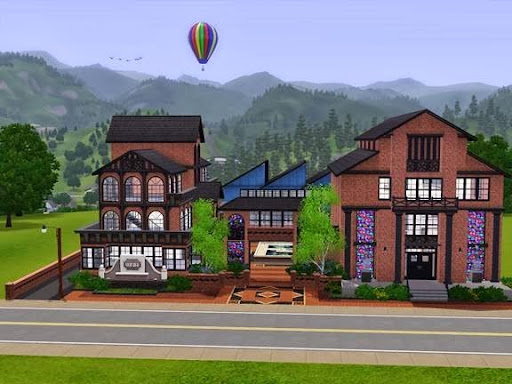
The new The Sims 3 Store Venue wis called ”The Prism Art Studio” and will release on 6th of February. Until then, take a look at what SimGuruTaterTot has to say about this fine looking venue!

Hello Simmers!

I am so excited to be able to finally talk about the upcoming venue, The Prism Art Studio!

It’s hard keeping secrets from you guys, especially when we know you are all are going to flip when I tell you the exciting new features!

The Prism Art Studio is an all-new venue that will let your creativity shine and with a brand new Artisan skill.

1
2

Sims can practice their still-life technique with fellow artists on a bright Spring morning or try their hand at some really unique crafts.

3

…Like Glass Blowing!

Will your Sim become a Fan-glass-tic Artisan or will this new skill prove to be a Pain in their Glass?

4
5

Glass Blowing opens up an exciting array of new items for your Sims to fashion. And speaking of fashion, take a look at all the beautiful jewelry you can make exclusively with the with the Artisan’s Glassblowing and Jewelry Making Station!

Here are some pretty necklaces to adorn your Sims neckline.

6

Mix them with some drop earrings and bangles to complete the look!

7

These stunning hand crafted items come in an elegant gift box that can be gifted to that special Sim in your life.

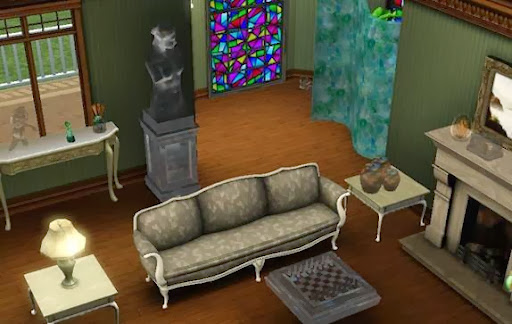
But your Sim can make so much more than just pretty jewelry. They can make stunning works of art to decorate your home, from glass partitions, to chess sets, stained glass windows, beautiful glass containers, a variety of different perfumes, glass gnomes and so much more!

8

Have your Sim craft a variety of different perfumes that Sims can wear for romantic or downright hilarious outcomes!

9

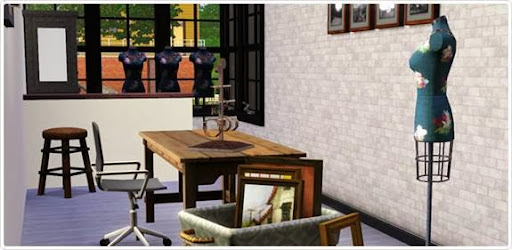
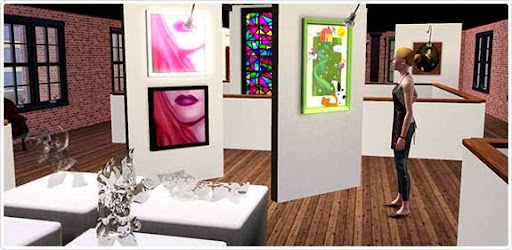
Every artist needs that perfect workspace to inspire them. This is how mine would look.

10

We really love the aesthetics of this venue with the bricks, huge window panes and warehouse-loft like structure. Can we just have this already?

11

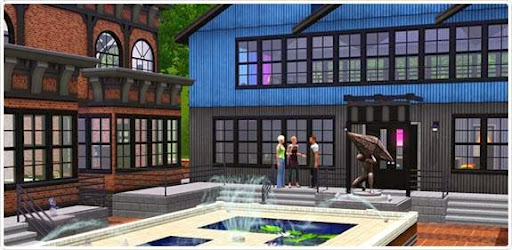
And what would a studio be without a gallery to display all the beautiful artwork? The Prism Art Studio comes with an area for you to debut your career as a budding artist! Soon, there will be no more starving artists; success is on the horizon.

12

And lastly, one more small surprise as another fan-favorite request – L-shaped staircases! Now you can turn left, or right, 100% of the time!

13

Be sure to share your new creations made with the Prism Art Studio! We can’t wait to see them!

Love,

SimGuruTaterTot and The Sims 3 Store Team

P.S. Have you spotted the free Chinese New Year Set?

The Sims 2 Glamour Life Stuff Concept Art

0

I don’t think this actually made it into The Sims 2 Glamor Life Stuff pack,but the concept was too pretty not to share

SimGuruSarah

BfMtI2ACEAAgsHy

Full color living room concept art from The Sims 2 Glamour Life Stuff. Enjoy! And have a wonderful Wednesday 🙂

SimGuruSarah

BfLBYwXCEAAMUnQ

The Sims 4 – CAS Music to be recorded this March

0

Check out what SimGuruGraham said about The Sims 4 CAS Music!

The Sims Anniversary – Logo + Wallpapers

1

We made some The Sims Anniversary material for you to celebrate 14 years of The Sims existence!

Below you can find The Sims Anniversary logo and Wallpapers to decorate your Desktop, profile pictures and more!

Logo

sims anniversary logo

Wallpapers

16:9

wallpaper 2

16:10

wallpaper 1

The Sims Anniversary – New Hint

0

The Sims DE Facebook Page posted a new hint that’s related to The Sims 1 Anniversary. Now, we know that the render on the pic is The Sims 3 render, but we also know how EA is strict to their Embargo when it comes to releasing new information. I guess that we’ll just have to wait and see. Until then, we translated the picture for you!

only till Tuesday…then what?

14795_10151912804033583_2050204564_n

Capture

The Sims 2 H&M Concept Art

0

A gorgeous piece of concept art from The Sims 2: H&M Fashion Stuff featuring an H&M Customer’s Apartment.

SimGuruSarah

BfAZ5LICYAAX3LE

Sims Community Magazine – Issue 2 Articles

2

Here is the list of all articles that will be featured on Issue 2 of our Magazine.

februarybetacover

  • News
  • SimGuru Tweets
  • Valentine’s Day Special
  • Sims Nostalgia (The Sims 1, The Sims 2, The Sims Stories)
  • The Sims 3 Supernatural – life as a Werewolf
  • Homecoming Store Set Review
  • The Sims 4 News & Updates

THE COMMUNITY

  • Community Spotlight
  • YouTube Videos
  • Exchange Showcase
  • My interesting Sim Story/Moment
  • Simmer Charts

My interesting Sim Story/Moment

Did your Sim have any embarrasing, funny or interesting moment? Send in your story with a screenshot and we’ll publish your entry!

SEND YOUR ENTRY!

CONTACTSIMSCOMMUNITY@GMAIL.COM

Simmer Charts will open next week!

VentureBeat: The frustration and progress of women in video games, as viewed by The Sims 4′s Lyndsay Pearson

1

Video games have a problem when it comes to the inclusion of women in game design and the depiction of females in video games.

lyndsay-pearson-of-sims-studio

Dean TakahashiLyndsay Pearson of EA’s Sims Studio

It’s not quite like the 1950s. But women in positions of leadership like Lyndsay Pearson, the lead producer of The Sims 4 at Electronic Arts’ The Sims studio, are still a rarity.

The Sims Studio is an island of diversity in an industry that is sorely lacking when it comes to gender balance — but it still lags. The percentage of women in EA’s The Sims Studio, based in Redwood City, Calif., is just 20 percent. That’s high for most game studios, but it’s nowhere near parity, given the population and the roughly 50 percent female audience of The Sims games.

Some may view the gender-balance issue with frustration, while others may see so much progress in characters like Ellie in The Last of Us or Jodie in Beyond: Two Souls in 2013. Like it or not, women like Pearson are role models. So we asked her about that. Here’s part one of our interview with Pearson.

CONTINUE READING

The Sims 4 – Behind the Scene Animations

1

SimGuruShannon just posted a screen of two TS4 developers making a scene for The Sims 4 Animation. What do you think they are doing? 🙂

Just walked past the animators acting out an animation they are going to animate for the game.

proxy

The Sims 3 – Game Update 1.67

33

Just when we thought that version 1.66 of The Sims 3 will be the last update, the new update releases. I’m not sure how much will this new update affect your game since there’s only one fix.

Capture

Super Patch (1.6 GB) – Download Link

To install this update, please start your game and use the “Updates” tab in your Launcher.

This game update includes the following changes:

Base Game:

  • Updated server messaging


Before installing an Update for The Sims 3, an Expansion Pack, or a Stuff Pack, it is a good idea to run through the following checklist to ensure your game continues to work smoothly.
If you have any questions about the below steps, please visit the Technical Support forum on the official Sims 3 community found at this URL: http://forum.thesims3.com/jforum/forums/show/10.page

Step 1: Disable Custom Content
Custom Content is all Sims content that did not come from an official The Sims 3 Update, The Sims 3 Store, Expansion Pack, or Stuff Pack. Custom Content is created by 3rd Party Developers that are not regulated by Electronic Arts or The Sims 3 Development Team and may not work with new updates. Custom Content may cause the game to behave unexpectedly or not function entirely.
To disable your custom content, undo whatever you did to install this content to get your game back into an unmodified state. If you placed it in a Sims 3 directory folder, move it to a new folder that is outside your Sims 3 file directory. Your Sims 3 file directory can be found using the paths listed below:
Windows File Directory: C:Documents and SettingsUSERMy DocumentsElectronic ArtsThe Sims 3
Mac File Directory: User/Documents/Electronic Arts/The Sims/
Once you have installed the official update you may re-enable your custom content. If you experience problems, disable it again until the 3rd party developer updates their content to work with the official Update, Expansion Pack, or Stuff Pack.

Step 2: Back Up your Save Files
It’s always a good precaution to back up your save files before installing an Expansion Pack, Update, or Stuff Pack. To do this, copy the “.sims3” folders found in the Saves folder onto your desktop or another file directory.
Your Sims 3 Saves folder can be found using the paths listed below:
Windows File Directory: C:Documents and SettingsUSERMy DocumentsElectronic ArtsThe Sims 3Saves
Mac File Directory: User/Documents/Electronic Arts/The Sims/Saves
After the Update is installed, run the game to verify your saves still function correctly.

Step 3: Let the Update Complete Entirely
Updates can sometimes be rather large and may take a while to download and install completely. Cancelling the update before it has completed may cause unexpected problems, so it is always best to let it finish entirely. Do not close the Launcher until you have confirmed the update is completely installed, as this will cancel the update.

Sims Community Magazine – Issue 2 Cover

2

After the successful launch of Issue 1 of our Magazine, we are happy to show you the beta cover of Issue 2. Please note that some parts of this cover are not shown since the Issue 2 is in the making.

All Articles in this Issue will be announced on 26th of February, 2014. Until then, take a look at the cover!  🙂

februarybetacover