

Click the image below!


So, we’ve learned how to build pond-pools in the first part of our three-part series on how to create cool pools.
Today we are going to go above and beyond… the ground!


Laying The Foundation
The first thing we need to understand is how foundations work in The Sims 4. This is where you find them:

They have adjustable heights, with several settings. They range from no foundation at all…

…to a rather tall foundation.
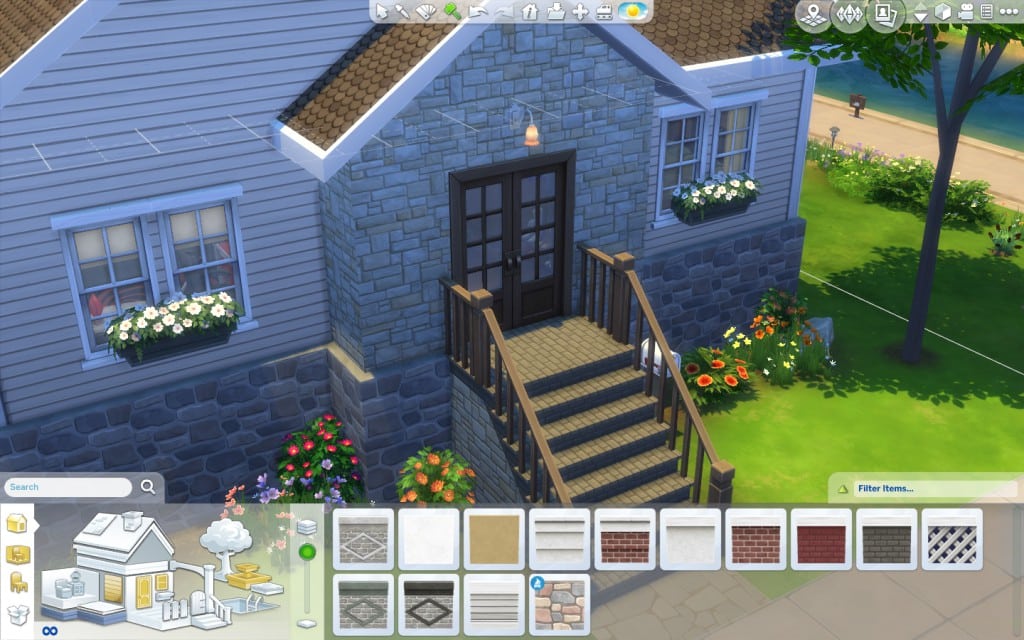
There are number of heights in-between, but, for maximum impact, we are going to stick with the tallest setting. You may be asking yourself what the height of the house foundation has to do with building an above-the-ground pool. The foundation height is universal to a lot. When you change it, you change it for everything in the lot that has a foundation. And above-the-ground pools are built on foundations. That is what set them apart from your regular, more mundane kind of pool.

The secret to an above-the-ground pool is building a room first.

There we go.

What about we add a second room, so we can achieve an L-shaped pool?

Done. Because we have previously set our lot foundation height to the maximum and they are universal, these rooms are already on a tall foundation from the get-go.

Let’s use the Hammer tool and delete the ceilings…

…and walls.

We are now ready for the next step.
Let’s use the pool tool and fill out the entire space available…

…except for a small spot to allow sims to get in and out.

We will need a one-tile landing for the stairs. Room tool again.

Delete the ceiling and walls.

Let’s add the stairs.

These are good!

Insert Tile
Wooden floor tiles will look great with what we are going for.

I’m not sure if anyone noticed, but I rotated the floor tiles, so they’d be parallel to the stairs. To rotate them, you simply press the period key.

Let’s apply a wooden foundation pattern as well.

I think we can add a ladder.

Done. Our pool is ready!

Circular Above-The-Ground Pool

For these we are going to use a special wall tool.

It’s called Rounded Deck.

There are three sizes. I picked the smallest due to the space available for this specific build. We are going to place four of them, creating a circle.

You can rotate the decks for optimal placement using the period key.
The next step is to use the hammer tool to delete the inside fences – keep the outside ones.

We can now add the stairs. I’m feeling metal.

A bit wider, perhaps.

Yes! Just right.

Octopool
We don’t have a round pool – at least yet. Therefore, we will use the octagonal pool tool.

Here we go.
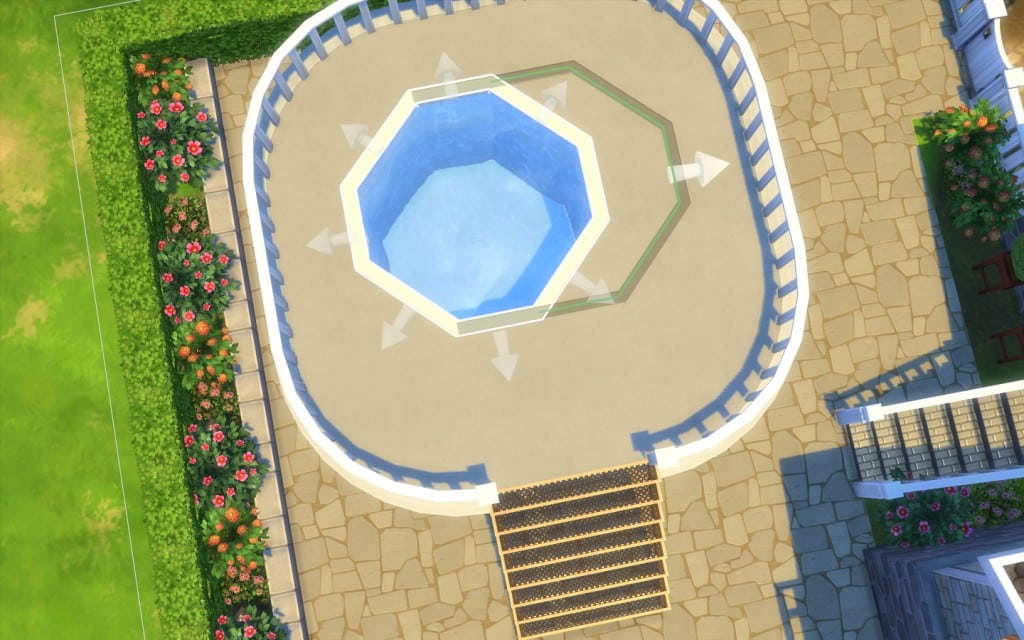
Bigger!

Perfect.

Wooden floor tiles, anyone?

Let’s make the foundation wooden as well. Do you remember where?

Let’s change these fences, shall we? I really like the one from Spa Day, but you can choose any.

Let’s replace fences.

You just click on the old fences and they’ll be replaced by the new selection.

How about we add matching railings?

The very last detail is a ladder.

Let’s see the result!
If you think that is too tall, you can readjust it at any time.

Share Your Pools!
The world is ready for you to unleash your above-the-ground pools!
Upload pictures to Sims Community Social Media section.
Create threads about your creations at the My Gallery section.
Share at the Gallery using the hashtash #simscomunnity.
I am Kai Chen at Sims Community Social and kaichen04 at the Gallery. See you soon for the final part of this building pools series.

Our fierce Babs has joined the #LiveToPlay line up representing female characters in gaming! http://t.co/Syi6TPMuZ5 pic.twitter.com/Jt8DtDCAZn
— The Sims (@TheSims) August 10, 2015
Back at E3, we unveiled three special designs of powerful female characters featured in our games at the show: a Rebel Fighter from Star Wars Battlefront, Faith from Mirror’s Edge Catalyst, and Alex Morgan who is featured this year in FIFA 16.
This week at gamescom, we unveiled two new female characters to the collection. Read on to learn what makes these characters so special and if you happen to visit our Business Lounge, be sure to try and snag an exclusive button of one of these characters.
Babs L’Amour
First Seen: The Sims 4
Skills: Romance
What Makes Her Tick: Her quest for true love (until her creator and controller changes their mind, of course!)
How does the Sims team approach building female characters?
“The team thinks that representation is important, so when creating the tools to create Sims, it focuses on inclusion, and being able to make whoever the players want to make. Since The Sims 4 is a life simulation game, it gives you the power to create and control people – so our players need to be able to make Sims that look like them, and look like their friends and family. You can make Babs an astronaut who doesn’t care about finding love, or make a Sim that befriends – or marries her. She can be whatever you want her to be.” – Lyndsay Pearson, Senior Producer, The Sims 4.

We’re happy to announce that Sims Community’s brand new design is now available for everyone! If you’re having issues with loading the website properly, please clear your browser cache.
Down below you’ll find some of the new features on Sims Community ver. 3! We’ll be adding more features in the weeks to come.
Thank you all for your dedication and we hope you like the new design! 🙂
Hover over the blue buttons below to learn more about the new features!

What’s your favorite ice cream flavor?
Subscribe to get ready for the The Sims 4 Cool Kitchen launch trailer! http://bit.ly/1KYaF5a

Simlicious was present at EA’s Community Lounge at Gamescom and together with Sims Online, they made a list of all the Ice Cream Recipes, Garnishes and Toppings that you get in The Sims 4 Cool Kitchen!
Toppings
Caramel Syrup, Cherries, Chocolate Sauce, Coconut Shavings, Nuts, Raspberry Sauce, Sprinkles, Whipped Cream.Garnishes
Banana Slices, Cinnamon Sticks, Flowers, Mint Leaves, Nut Bar, Orange Slices, Peppermint Sticks, Sprinkle Stick, Waffle Pieces, Strawberries.Level 1
Vanilla
Pistachio Gelato
Chocolate
Level 2
Lemon Gelato
Pure Perfection
Orange Sorbet
Level 3
Weight of the World
Peach Yogurt
Mint Chocolate Chip
Level 4
Basic Gelato
Cherry
Taste of Diet
Level 5
Strawberry
Twin Roses
Liquor Ice Gelato
Level 6
Mango Sorbet
Stracciatella Gelato
Haunted Mint
Level 7
Banana Yogurt
Blue Moon
Mental Upheaval
Level 8
Plant Matter
Fruits of the Forest
Butter Pecan
Level 9
Amarena Gelato
Rainbow Sherbet
Dragon’s Breath
Level 10
Chilling Mocha
Ricotta Stregata
Neapolitan

Summer is still strong and your sims still have a few weeks left to enjoy the sun. However, the people of your own virtual world no longer care for a simple square…

They want to live the high life, with style and glamour! Therefore, we will be publishing a three-part article to help you out. Regardless if you are an inexperienced or avid builder, take a look at these step-by-step designs and give your sims more than simple water in a boring stationary container! Here’s the first:
A Gallery favourite, this ever popular design is easy to achieve and with stunning results.

You are going to use the Custom Pool Tool.

Start drawing a line by left-clicking the mouse as you go. The more irregular, the better.

Make sure the last postmark meets the first, completing the drawing.
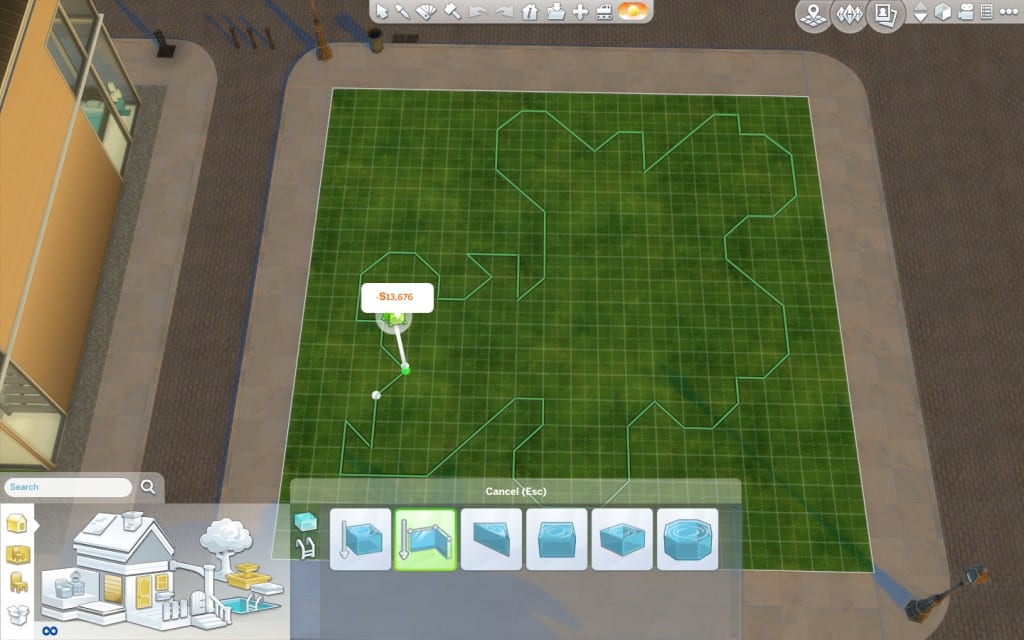
There you go!

For the next step we are going to need a cheat. Don’t worry! Nobody needs to know! Move Objects will allow us to place objects anywhere, without any sort of restriction. To activate it, you you press Ctrl, Shift and C all at once. That will open a cheat box on the top left corner. Type in bb.moveobjects on. Finally, hit Enter.

As you can see above, there is a confirmation that you’ve entered the cheat correctly.
Now we are going to place rocks around the pool’s border. If you don’t know where to find them, simply search for Rocks and press Enter.

Let’s do this!

Try to intercalate different rocks and rotate them, so they look more natural and not like this:

This, below, is what you want.

When placing rocks, smaller ones that are part of the sets might look like they are floating, a fairly unusual behaviour for rocks!

Please, rotate them, so the laws of Physics can be maintained!

In order for sims to be able to swim in it, you’ll need to leave a few access points, not covered by rocks, similar to these indicated by red the circles.

A stone finish will help. First, let’s change the floor tiles.

Matching walls are next!

This is a good time to decide how deep our pond-pool will be. Click on the pool and you’ll see three available depths.

I think we are going for shallow here.
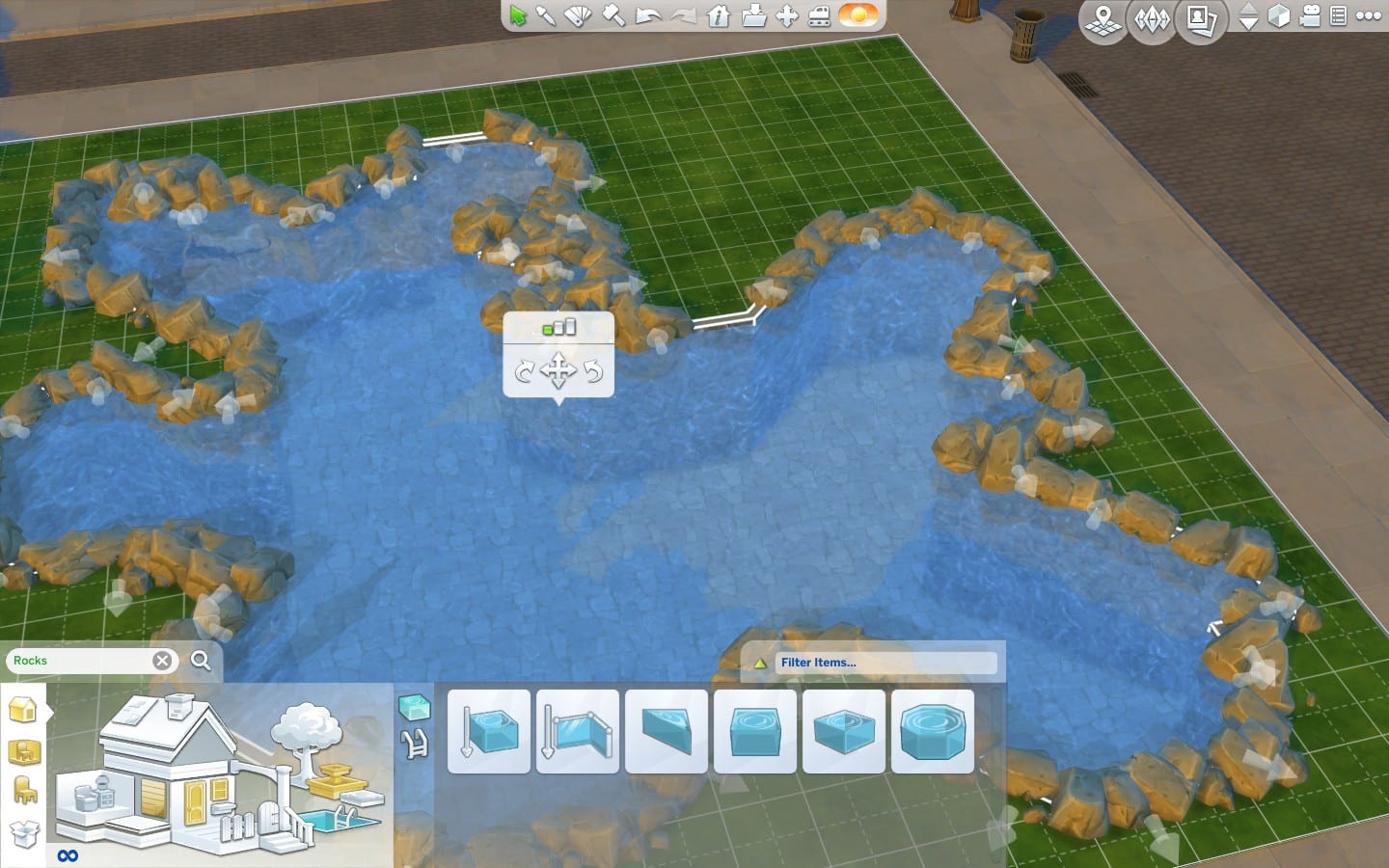
Normally, we cannot use fountain decorations in pools. But, because we have Move Objects activated, we are able to and will. Let’s add a some water plants to feign a more natural look.

Remember to rotate the plants a bit and use irregular placement patterns, much like we did with the rocks. Also, make sure you leave space for swimming.

And since we have started landscaping, let’s add some plants around our pond-pool.

Because of , again, Move Objects, we can place plants close together and it looks much more seamless and real.
The last step will be applying terrain paints around the pond-pool. First, something sandy.

After using it around the entire pool, let’s get a second paint, darker. Move the strength slider to the softer side. We just want to add some nuance and detail closer to the border and to the plants’ roots.

The pool is ready and you can set it as a Generic lot. However, only your own sims will visit a Generic lot. A simple solution is to add a grill, a picnic table and a trash can. Now you can set it as a National Park! You can set any lot as a National Park, even if you do not own Outdoor Retreat.

Whether your pool is standalone, like the above, or part of a home or community lot, we want to see it!
Upload pictures to Sims Community Social Media section.
Create threads about your creations at the My Gallery section.
Share at the Gallery using the hashtash #simscomunnity.
I am Kai Chen at Sims Community Social and kaichen04 at the Gallery. You can download the lot from this tutorial HERE.

A new survey requesting select people via e-mail has revealed the concepts and descriptions of expansion packs being considered by Maxis / EA Games for The Sims 4. Are you curious?
Here are the short descriptions of the nine options the recipients were asked their opinion on, provided by Sims Online!
Get behind the wheel of different vehicles, including cars, trucks and motorcycles. Fix up old cars, build a hotrod or jump on your ride and explore a number of tourist destinations.
Send your sims off to University.Explore the university campus and decide whether your sims are going to study to ace their exams or spend their days partying it up. Sims can also pledge fraternities and sororities and try to become members of these prestigious organizations.
It’s time to raise a family! Raise your children from babies into toddlers. Watch your children grow into moody pre-teens and help them overcome the tribulations of youth. Create a Sims family dynasty that will last forever.
It’s time to become a reality star! Join the cast of Sliced ‘N’ Diced to compete with other chefs, Finding Love to become the most desirable bachelor/bachelorette or Runway Take Off to become a fashion designer star!
Find true love in The Sims 4! Meet your date on SimsMatch, take your date to romantic getaway spots, build up your romantic reputation, and have the wedding of your dreams!
Move into a bustling, modern city! Live in new apartments and penthouses eat food at carts and shop at street markets and immerse your sims in the different cultures of the city by exploring the many diverse neighbourhoods.
Turn your sims into superheroes! Use powers like mind reading, telekinesis, and teleportation. Learn new powers at the Super Hero Academy and use them to make the world a better place or terrorise the population.
Take your sims to school! Have your child and teen sims participate in school activities including classes, dances and student government elections or become a teacher with the new teacher active career.
Take your sims on vacation! Head to Mt. Wright for fun winter getaway with ice skating, sledding, snowboarding and mysterious ice caves. Or head to Isla Cordinda to soak up the sun and build sandcastles, surf the waves, and uncover ancient tombs.
The apocalypse has struck The Sims 4! Explore abandoned neighbourhoods and rescue survivors, rebuild your town into a thriving community, and fight off zombies to protect your new town.

Click the picture below to enter this giveaway via Facebook! Valid only for residents of Germany.

We were for you at this year’s gamescom and have the new Pack The Sims 4 Cool Kitchen accessories looked at more closely. The expansion will be released on 11thAugust 2015 as a digital download and will cost about 10 euros.
With the pack we will get a completely new kitchen set with a variety of decorative objects. The kitchen is in modern colors and thus provides a very considerable design freedom. Bene from the SimFans team has put together a few color variations for you.


The Sims 4 Get Together’s live segment starts at 16:17 CET, 15:17 BST and 07:17 PST

Once you have chosen the taste of your ice, your Sim is ready to make an ice box that will be placed in your inventory as a result you have the choice of garnish your ice cream with banana slices, cinnamon stick, flowers, mint leaf, nut bar, orange slice, strawberry … There are a lot of choices about the filling.
That is not all ! You can also add your topping on ice, for example syrup caramel, cherry, chocolate sauce, coconut shavings, raspberry coulis, glitter … The Sims certainly appreciate the toppings, they can get a moodlet “perfect toppings “which will make them happy 4:00.
You can only add one topping and one garnish!

To sign up for Origin’s Game Tester Program, click Origin > Account and Privacy > Game Tester Program.

French SimmerPixia Gaame had a chance to interview SimGuruAzure about the upcoming The Sims 4 Get Together Expansion Pack.
Although the questions are in French, the answers are in English so you’ll be able to understand all the important parts!
Actual interview starts at 1:45!


