Home Blog Page 46

The Sims 4 Sleek Bathroom Kit Review

A Sleek look at every object in Syboulette’s Sleek Bathroom Creator Kit!

SIMS v3 1213 wBubbles 1920x1080 1 .png

The Sims 4 Sleek Bathroom Kit was released last Thursday from CC creator Syboulette, alongside AHarris00Britney’s Sweet Allure Kit. With the Sweet Allure Kit being Create-A-Sim focused, Syboulette’s Sleek Bathroom Kit brings a host of new bathroom objects and decor to elevate the most private areas of your Sims’ homes. Let’s take a look at every item and swatch included in this new Kit, and stick around until the end to hear my verdict!

The Sims 4 Sleek Bathroom Kit: Features Overview

The Sims 4 Sleek Bathroom Kit Co

The Kit is packed with 23 sleek bathroom items and 1 new wall plus floor tiling to complete the set. The Sims 4 Sleek Bathroom Kit blends in nicely with existing items in The Sims 4’s constantly growing Build-Buy catalogue.

Kit Features

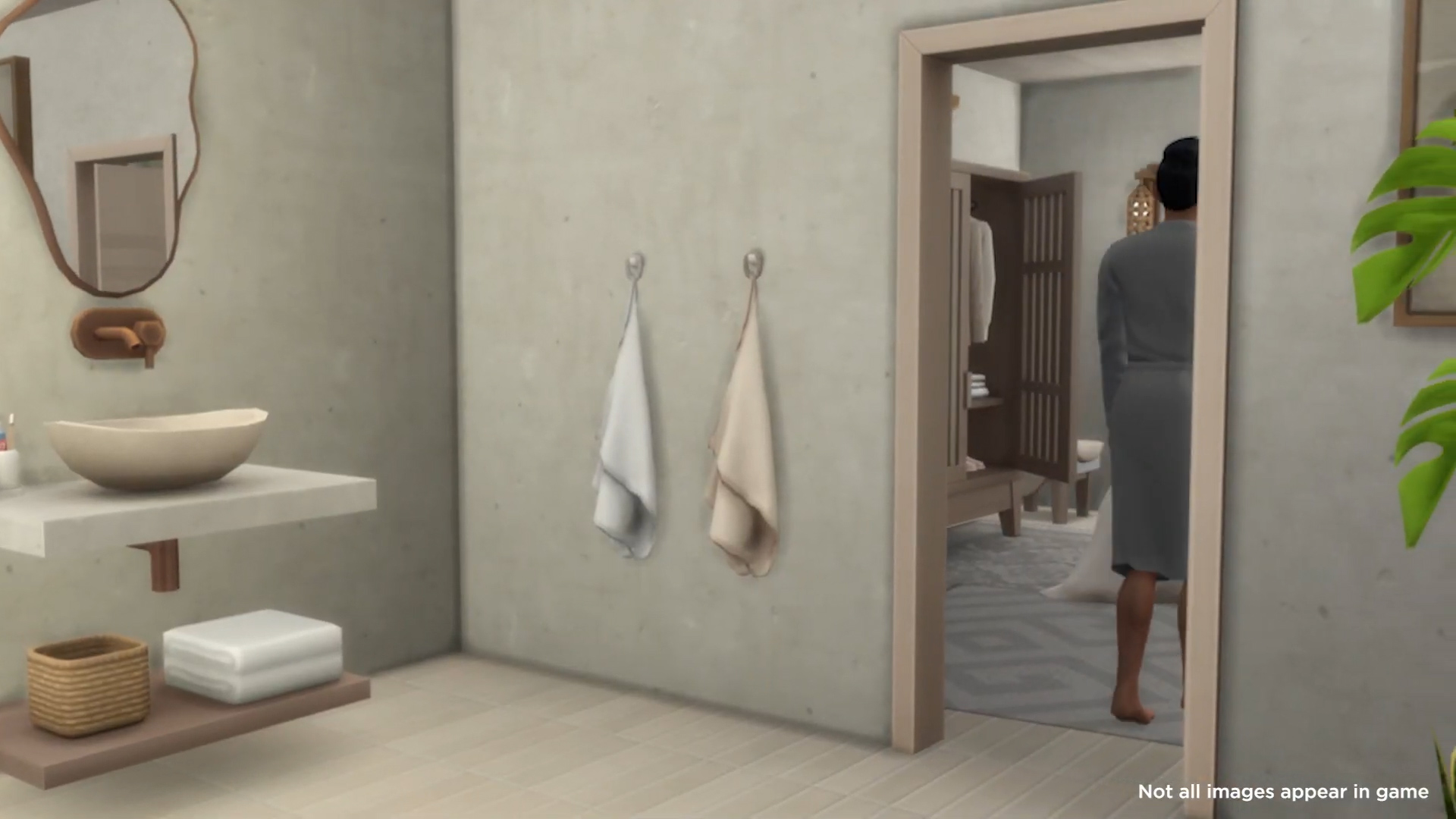
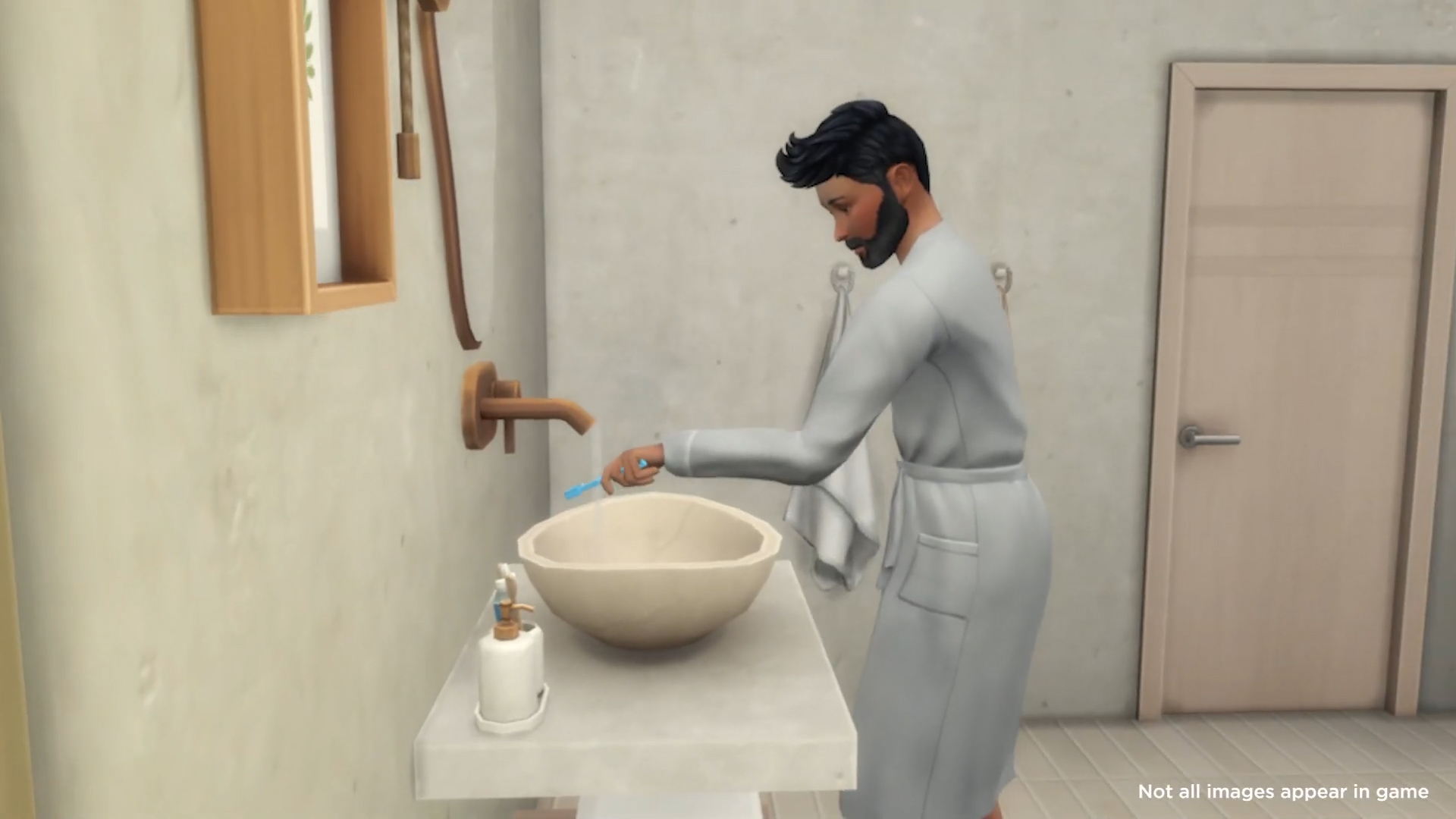
  • Refined Plumbing Let’s bring a balance of style and comfort. A custom glass divider adds style to the walk-in shower, while a simple bathtub creates a high-end feel. The toilet features a streamlined design, paired with a wall-mounted ceramic sink accented with wood. Thoughtful details like towels, clutter, and a draping plant add warmth, while an olive tree and wavy mirrors soften the clean lines, bringing life and flow to the space.
ea.com

Items Preview

Screenshot 2025 04 10 at 1.24.02 PM

Object Overview

See below for an in-depth look at each item’s description.

Object Swatches

Shelfie Supreme

Screenshot 2025 04 13 17 18 32

Rock Solid Faux Wall

Screenshot 2025 04 13 17 16 52

Sleek Stone Sink

Screenshot 2025 04 13 17 11 05

Throne of Stone

Screenshot 2025 04 13 17 10 23

Barely-There Shower

Screenshot 2025 04 13 17 20 24

Serenity Stone Tub

Screenshot 2025 04 13 17 09 24

Phill the Thrillodendron

Screenshot 2025 04 13 17 19 47

Olive You Forever Tree

Screenshot 2025 04 13 17 13 43

Quirk & Reflect Mirror

Screenshot 2025 04 13 17 21 13

Brush-tastic Cleaner

Screenshot 2025 04 13 17 26 08

Chaos Control Tray

Screenshot 2025 04 13 17 25 32

Marble-ous Soap Products

Screenshot 2025 04 13 17 23 37

Marble-ous Toothbrush Holder

Screenshot 2025 04 13 17 24 54

Wicker Upper Hamper

Screenshot 2025 04 13 17 11 47

Waffle Fluff Towels Pile

Screenshot 2025 04 13 17 24 17

Hold My Towel

Screenshot 2025 04 13 17 14 21

Fringe with Benefits Bath Mat

Screenshot 2025 04 13 17 12 42

Hold It Right There Toilet Paper Holder

Screenshot 2025 04 13 17 22 52

Suds & Scrubs Sponge and Brush

Screenshot 2025 04 13 17 22 05

Invisible Shower Shield

Screenshot 2025 04 13 17 15 48

Wave Goodbye Privacy Screen

Screenshot 2025 04 13 17 15 11

Orbs Ceiling Light

Screenshot 2025 04 13 17 27 38

Orb Wall Light

Screenshot 2025 04 13 17 28 17

Gleam Dream Wall Tiles

Gleam Dream Tiles

Screenshot 2025 04 13 17 32 02
Sims 4 Refined Living Room Kit Review

Our Review of The Sleek Bathroom Kit

Syboulette understood the assignment and delivered! That is how I would sum up The Sims 4 Sleek Bathroom Kit. Every item has been meticulously designed to bring something new to the game or give a modern spin on existing items. Yes, we already have toilet brushes, toothbrush holders, and towel racks, but Syboulette has given those items a modern finish.
If you aren’t familiar with Syboulette’s previous work, I would highly recommend that you check out her CC library over on her website! Their work truly shows how versatile their designs are and how diverse their creations can be. When the Sleek Bathroom kit was first leaked, I did think that Syboulette had played it safe with the designs, but once I built with the items in-game, I was blown away by the amount of detail.
One thing I look for when reviewing packs is how these items can be used to create a cohesive space with existing objects in The Sims 4. Packs such as Outdoor Retreat and Seasons struggle when it comes to object versatility; however, Sybouylette has crafted a pack that works alongside many existing build-buy objects. This is what a Kit should be

bath 1

Some stand-out items from this pack include the ‘Hold My Towel’ towel rack and the ‘Wave Goodbye Privacy Screen’. All existing towel racks in The Sims 4 are wall-mounted, as many are in real life. Despite this, Syboulette has freed those towels from the wall and given us an entirely new object. The Privacy Screen reminds me of the room dividers that have existed in The Sims 4 since the base game; however, this time, it feels much less intrusive than those bulky three-tile wide objects. This privacy screen doesn’t have to be used in bathrooms but could be used to separate any space, be it residential or community lot.

Overall, I am impressed by the quality of the objects and how thought has been put into each and every design. As with AHarris00Britney’s Sweet Allure Kit, this kit will introduce more players to an excellent creator within The Sims 4’s modding scene. For an asking price of $5/£5, I believe this kit to be essential for builders, especially those who enjoy modern designs, and I can see myself using these objects often.


What are your thoughts on the Kit? Join the discussion below, and stay tuned for future updates on The Sims 4 Kits!

You can find The Sims 4 Sleek Bathroom Kit on Steam, EA App and other official platforms for Desktop and Console.
WCIF: The Sims 4 Little Witches CC Showcase

I want to showcase the custom content I’ve found, and use, for toddler and infant Witches in my game. Specifically, The Sims 4 Little Witches CC that ecompasses these two life stages.

Introducing…

Introducing my Sims family, with a lot of Little Witches, living in Glimmerbrook. The Windsong family. Parents are Jake and Golda. Toddlers: Eliza, Alice, Clara and Violet. Infants Tiffany and Natasha. Eliza is the difficult child, the one who won’t eat, makes a mess, wrecks the dollhouse, plays in the toilet, you know, the one you plan to lock in a dungeon some day.

Above images are an attempt at a family portrait and the house I made for them, in Glimmerbrook.

An Official Witch Uniform?

Custom content for Witches is important to me because I consider myself a non-fiction, real Witch. I don’t want to get into a promotion of Witches and their beliefs, but…

First, there is no official Witch uniform. No rule about wearing black or pointy hats or carrying broomsticks. But, please, no upsidedown pentacles. A little Witch could wear anything and top it off with a Witch hat, and accessories for special occasions.

Secondly, I’m not including horns, tails, or other body parts for non-human Sims. A Witch may wear cosmetics and costumes but we don’t come with horns or tails.

merry littlewitches3

Here is Dad, in his lucky suit, chasing down and catching one of the toddlers at the Celebration Center.

One sad thing, I have not found any CC for little boy Witches. I have been dressing them in Witch hats with a nice full, dark suit. There is a suit with short pants is in the base game but I like long pants. If nothing else, it protects those toddler knees from scrapes. Which may make one wonder why we dress girls and don’t include longer socks. Some of the Witch outfits do have long stockings!

Sims 4 CC for Infant Witches

ILKI Sims (For infant). Glitchy, hat and hair will appear in mid air. I end up removing them. The dress works great. Update, the account for ILKI Sims on Patreon has been taken down. But, with searching I found an archived link. You can download the files still but it takes a bit more clicking to get them.

merry littlewitches4

Mom and Natasha, putting her back to bed after a bath. Dad in the background sneaking upstairs for a video game.

merry littlewitches5

Mom, with Natasha in the white Witch CC, at the Celebration Center. They all got dressed up that day.

Sims 4 CC for Toddler Witches

merry littlewitches6

Dad listening to Clara telling a story in the kitchen at home. Clara is wearing the StorySims CC, in green. I also had her wearing it in purple, red, and white.

The girls outside. Eliza (the one with a regular hat), wearing the Paogae set, arrived last. Dad showed up and kept getting in the way until I got him stargazing. Clara (wearing the Witch hat without band) in the StorySims set. Violet wearing the Arcane Illusions set. Alice wearing the dress from PowLuna.

Friendly or Ferocious?

I’ve been playing The Sims 4 a few years. I tend to do the same things with each new family or single I create and then feel the game falls flat. I have found great inspiration to keep playing and try new things from other Simmers (players). Video posts, challenges they have tried, and of course modifications and custom content. They go together well.

Get inspired and fired up by a new idea, friendly or ferocious? We aren’t always so kind to our Sims. Once I get an idea I look for mods and CC to work with it. Although I have a lot of pack contents I still hunt for special CC and my thanks to every modder out there because I’ve used a lot of them!

My favourite source for finding Sims 4 Witch custom content is Talia’s Witchy CC Finds. I still dig around online (like a kid circling everything in the Christmas catalogue) but Talia is a great starting point for Witch Sims content. Thanks Talia.


Little Witch Sims 4 CC I’d Like to Find

Bonus inspiration for those who make the CC – I found this little Witch outfit on Amazon (not available). This is an outfit I would love to dress little Witches in, the infants and the toddlers and the children. I especially like polka dots! If you make custom CC can you make this with a dress, hat, stockings, and the broom too in different colours and polka dots? Let me know in comments. Please and thank you!

merry littlewitches10

10 Fun Hidden InZOI Features You Probably Didn’t Know About!

1

If you have been diving into the virtual world on InZOI, you might think you’ve seen it all. However, this game is packed with hidden gems you might not know about. From your Zoi getting into trouble with the police to unexpected relationship dynamics, here are some hidden InZOI features you may not know about!

1. Your Zoi Can Go to Prison! 

image 1

That’s right, you read that correctly! If your Zoi creates enough trouble, like constantly punching or threatening another Zoi, they can end up behind bars. It was very hard trying to get my Zoi in prison, but the one thing that worked for me was trying to extort a police officer – that didn’t go very well. A life of crime might sound thrilling, but it only lasts for 24 hours in unfashionable orange jumpsuits. 

2. Order Services on Your Smartphone 

image 11

Your Zoi probably doesn’t have the time or the energy to do everything themselves. Through Pmarket, you can easily order food, hire a cleaner or a babysitter, or even call a repairman to fix your broken items. With a few taps on your Zoi’s phone, life is just more convenient. Give it a try!

3. Persistent Arguing? Time for a Divorce 

image 3

Maybe not all relationships in inZOI last forever. If your Zoi and their partner keep arguing and neither of you will back down, it may be time to consider a divorce. After clicking on divorce, your marriage certificate will go up in flames and your Zoi will be single again – ready to explore new romances, enjoy the single life or maybe give your ex a second chance?

4. Customize Your Gameplay with Special Filters 

image 8

Want to add cinematic flair to your gameplay? You can, as the game offers a variety of visual effects that allow players to mess around with filters like cartoon, black and white, thriller and more! This is the perfect way to add life to your gameplay; whether you want a nostalgic aesthetic or want to create a horror film, this is the perfect feature for you.

5. Relive Special Moments with Shared Memories 

image 7

Your Zoi’s life is filled with important events, and it might be hard for you to keep track of them all. Thankfully, inZOI keeps track of shared memories, which include instant attractions, first impressions, getting married and other big life milestones. This makes your Zoi’s journey feel more meaningful!

6. Dynamic Partner Interactions 

Screenshot 2025 04 14 at 15.01.40

Your partner isn’t just a background character – they are interactive! They can send you a text, and you can reply with different options! You can be nice or mean, and it’ll affect your relationship for the better or worse. Additionally, they just might surprise your Zoi with thoughtful gifts at their apartment. Talk about thoughtful! 

7. Your Zoi Can Sleepwalk… and Cook?! 

Screenshot 2025 04 14 at 15.05.17

One of the quirky features of the game is sleepwalking. Yep – your Zoi can get up in the middle of the night and start doing things without them knowing. My Zoi suddenly got up to start making ramen while sleepwalking; I was lucky they didn’t burn down the kitchen. Just keep an eye on them… not all midnight cooking adventures end well.

8. Edit Cities, Craft Clothing, and More! 

Screenshot 2025 04 14 at 14.55.03

Customisation is a big part of the game. You can edit cities by adjusting the decorations, weather, billboards and even relationships! The creativity doesn’t stop there – you can craft your own clothing and furniture. Want a specific kind of top? You can design the neckline, sleeves and hem before adding colours and textures. Although some items have limited variations, future updates will most likely expand customisation even more. I can’t wait to see what you create!

9. Discover the Meow Store for Special Perks 

image 10

Wishing you add some special perks? Click on your Zoi’s card which will reveal the Meow store, a hidden gem where you collect points by completing your Zoi’s wishes. Save enough points, and you can use them to satisfy a specific need or trigger a particular emotion. The more you scroll, the better the rewards – like having good luck or improving a skill faster!

10. Unlimited Money Cheat! 

image 2

Did you spend all your money on your house or maybe a car and in need of extra cash? Head into Settings and navigate to the Psicat guide menu. You’ll find a button labelled ‘Money Cheat’- click on it, and you will instantly receive 100,000 meows! No shame in using it; even Zois have to deal with the cost of living!


These features have made the game more immersive and fun for me! Which ones have you already found, and which ones are excited to try out? Let us know in the comments!

Hackers target select The Sims 4 CC Creators with a Virus

Simandy and TheNinthWaveSims Custom Content Creator accounts have been compromised in the latest SimFileShare hack.

Latest updates as of 15th April: SimsFileShare has now paused uploads temporarily while they investigate the issue, and Pixelunivairse’s SFS has also been compromised according to our readers.

image 13

It has recently come to light in a sims after dark discord server post that Simandy’s and TheNinthWaveSims SimFileShare account has been hacked.

Many download links previously associated with the CC for these creators have been replaced with a zip file containing a single executable file labelled “install.exe.”

This file is almost certainly malicious, and we strongly advise against downloading, unzipping, or executing it under any circumstances to keep your game and your computer safe.

A screenshot of the discord post raising awareness of the account hacking. Full text is below.

The discord server post reads: 

POLICE SIREN 2 1

WARNING: DO NOT DOWNLOAD ANY SIMANDY CC FROM SIMFILESHARE (SFS)!

Simandy’s SimFileShare account has been hacked, and many links leading to her CC have been replaced by a zip containing just one file called “install.exe”.

This is almost certainly malicious. Do not download these files. Do not unzip these files. Do not click or run these files. Do not allow these files to remain on your computer.

Note that unlike previous malware coming from Sims mods, this one does not rely on you running the game with a script file installed, so ModGuard will not help stop any infection. However, if you have unzipped these exe files into your Mods folder, get rid of them anyway! And if you don’t have Modguard installed, go get it anyway.

If you have already downloaded any CC from Simandy’s SFS account in the past 24 hours, DELETE THEM immediately, and RUN A VIRUS SCAN on your computer.

We will update with more info as it becomes available. Stay vigilant, be on the lookout for similar hacks on SFS or other platforms, as these malware outbreaks historically have not been isolated to one creator. Remember to never click dodgy files.

– Source

Simandy addressed this situation on her tumblr page, stating:

DO NOT DOWNLOAD ANY OF MY CC THAT LEADS YOU TO SIMFILESHARE.

You have been warned so, from this moment on, don’t come at me telling it was my fault you got malware. I’ll tell you when it’s fixed.

We will continue to monitor the situation and share updates as they become available.

In the meantime, we would urge everyone to exercise caution, review recent downloads, and take appropriate security measures like running antivirus scans or installing the ModGuard mod by TwistedMexi as a precaution.

Unfortunately, this isn’t the first time we’ve seen hackers target creators, and it likely won’t be the last. These kinds of attacks can happen to anyone, and they’re usually not just isolated to one person. So it’s a good idea to be extra cautious about downloading CC right now across all platforms.

Protecting your system and preserving the integrity of your game is of the utmost importance.

the sims 4 cc creators virus

General advice to protect your computer when downloading custom content online

Always remember that Sims 4 custom content files should only have the .package or .ts4script extensions. Never download or run .exe files, and ideally avoid automatically unpacking ZIP or RAR files directly into your Mods folder. Instead, inspect each file individually to ensure it’s safe. Always verify that you are downloading from official, creator-posted links, and avoid suspicious URLs, especially those using link shorteners.

It’s also important to stay on top of security hygiene. As well as regular antivirus scans and the ModGuard mod mentioned above, consider setting up a weekly system restore point in Windows before adding new mods and back up your important files regularly. this includes Sims saves, mods, and any personal documents. If you use services like Google or Firefox, take advantage of features that scan for password breaches, enable two-factor authentication, and routinely check logged-in sessions across your accounts.

Lastly, for both creators and players: be mindful and cautious. Don’t rush to download every new mod or piece of CC, take a moment to ask yourself if you actually need it. For creators, regularly monitor your files and hosting platforms to ensure nothing has been tampered with. These precautions might not guarantee 100% protection, but staying vigilant and informed will greatly reduce your risk of encountering malicious content.

Update 17:50: It’s now also been confirmed that creator TheNinthWaveSims has had their SFS account compromised too.

Screenshot 2025 04 14 181638

The Sims 4 Animal Crossing Inspired CC Pack: NolanSims Set

Sims 4 Animal Crossing Fans, assemble! NolanSims, a well-known longtime Simmer in the Sims 4 Community, has created a The Sims 4 Animal Crossing Inspired CC set. Animal Crossing: New Horizons is a Nintendo Switch game that has been loved by millions of gamers worldwide. Let’s check it out and see what’s in store!

featured image nolansims animalcrossing cc

Look book

NolanSims Sims 4 Animal Crossing CC Pack has a natural tone that makes it feel like it belongs in The Sims 4. The soft yet vibrant and cozy aesthetics blend with the game’s existing style, making this pack perfect for day-to-day gameplay, such as legacies and personal saves. Additionally, your sims can seamlessly use this pack for your Sims’ everyday warm weather outfits and blend other Sims 4 Packs into your outfits. I will place my Simselfs’ lookbook with this pack below!

Create a Sim Overview

I am very impressed with the Create a Sim (CAS) that Nolan Sims designed so carefully (and skillfully) in The Sims 4. The attention to detail and its Animal Crossing roots are remarkable, especially the thoughtfully curated colour palettes.

Accessories

Bertha Beret

Tulip Hat

Crochet Socks (LONG LENGTH)

Crochet Socks (MEDIUM LENGTH)

Crochet Socks (SHORT LENGTH)

Tops

Nook T-Shirt

Maple Sweater

Gaucho Pants

Checkered Sweater Dress

Casual Chic Dress

Fauna Dress

Frilly Dress

My thoughts

As a longtime simmer, I was excited to see another CC pack done by the wonderful Nolan Sims. I have followed her stuff and creations for years now. In addition, I have been an Animal Crossing fan since 2008 on the Nintendo GameBoy. I wanted to provide some background and story before sharing that I adore this CC pack. I genuinely hope that everybody interested will download this wonderful Custom Content (CC) Create A Sim pack.

My favourite piece of CC in this creative set would have to be Nolan Sims’ Casual Chic Dress. I love the colour swatches and patterns especially, as well as

I want to take a second to explain how Custom Content Creation works in The Sims 4. CC Creators take hours out of their time to curate these wonderful pieces for us Simmers to enjoy. Creators usually use software such as Blender and carefully model clothing for us simmers (and our sims!) to enjoy. I think that is super cool and impressive. If you want to support a CC creator online on a platform like Patreon, I will link NolanSims’ Patreon here. She provides a $1 and $3 a month tiers.

Download

Final Thoughts

To conclude my thoughts, I believe this is a really great Custom Content (CC) CAS item pack, but I do believe that this pack is not for everybody, but more so aimed towards Animal Crossing and The Sims 4 fans. Not every single Simmer is an Animal Crossing fan, and that is okay! NolanSims carefully curated this pack to be inspired by actual clothing that is in Animal Crossing: New Horizons. The textures are very well made, and deeply thought out. I was very impressed with how NolanSims converted the ideas from Animal Crossing: New Hoirzons and brought them to life in The Sims 4!

Will I continue to have this CC in my game? Yes! I absolutely LOVE all of the Animal Crossing titles, so this will for sure be a member of my personal Custom Content collection. I believe this CC Pack also is very, very cozy for Maxis Match CC lovers alike. There is usually not a lot of cozy vibes with Maxis Match Custom Content so this is very refreshing to see.

If you are interested in seeing more custom content for The Sims 4, check out more of our Sims 4 content!

The Sims 4 Sweet Allure Kit Review

AHarris00Britney STUNS In New Creator Kit!

SIMS v4 01 wBubbles 1920x1080.png

CC Creator aharris00britney has collaborated with The Sims team to bring us the latest of two Creator Kits. This release marks the sixth entry for the still relatively new concept of Creator Kits, created by CC creators and released by Maxis and EA. The Sims 4 Sweet Allure Kit brings 27 new Create-A-Sim items to The Sims 4, with options for both masculine and feminine outfit choices. Is this Kit worth the $5 asking price? Check out my (probably divisive) review at the end.
Let’s take a look at everything alluring in The Sims 4 Sweet Allure Kit!

Screenshot 2025 04 14 13 10 27

The Sims 4 Sweet Allure Kit: Features Overview

Kit Features

Add soft colors and clothing adorned with ribbons and bows to your Sims’ wardrobe with The Sims 4 Sweet Allure Kit*. With fashion featuring light colors and clothing adorned with ruffles and frills, the clothing and accessories in this kit give off an elegant vibe with their everyday looks. Express a more delicate side to a Sims’ fashion sense, effortlessly giving your Sim a casual coquette fashion feel. Created by aharris00britney.

EA Store
  • Soft and Sweet Elegance – Whether for a formal event, a walk in the garden, or a simple brunch, adorn your Sims with pearl necklaces, soft sweaters, and delicate cute skirts for them to live out their coquette fashion fantasies.

CAS Preview

Screenshot 2025 04 10 at 1.22.05 PM

CAS Overview

Let’s take a look at every new CAS item. And who better to model them than Willow Creek’s own BFF Household?

Hats

hat1

Accessories

Tops

Bottoms

Full Body

Leggings

tights1

Shoes

Sims 4 Artist Studio Kit Review

Our Review of The Sweet Allure Kit

It is undeniable that AHarris00Britney understood the assignment. The items included in The Sims 4 Sweet Allure Creator Kit are on trend and perfectly alongside existing in-game assets. Each piece comes in an array of soft pastels, as well as much welcomed neutral swatches. Another aspect that is appreciated is the gender balance. Often times Kits, Expansions, and Stuff Packs are unbalanced in terms of male and female outfit choices, with the available assets weighted heavily to the female side. As with The Sims 4 Businesses & Hobbies Expansion Pack, Sweet Allure has struck a perfect balance between the number of male and female items. This isn’t to say that they have been given equal treatment, as I can’t help but notice that the female CAS items have been given more time and attention. This isn’t much of a surprise as a large portion of AHarris00Britney CC library is female-oriented. If you’re not familiar with their previous work, I would highly recommend checking out their Patreon if you are looking for Maxis Match CC hairs.

Screenshot 2025 04 14 13 18 39

On the subject of Maxis Match CC, there is a process within custom content creation known as “frankenmeshing”. This process is when a creator combines two or more existing items to create a new item, hence frankenmesh, named after Frankenstein’s Monster. AHarris00Britney is known for using this process, and when used to create free CC, there is no issue with it. However, I am uneasy at this process being used to create paid official content.
Over on Tumbler, puppycheesecake made a post about the reuse of existing meshes to create a new male top. This top used the over-the-shoulder sweater from Base Game and the sleeves and shirt from Perfect Patio Stuff. Personally, this has left me with a sour taste in my mouth while playing around with assets in this Kit. To add to this further, Sketch-Brooke on Reddit had discovered that several female tops and jeans were also combined meshes from existing DLC, with the jeans being a recolour of jeans previously sold with Lovestruck Expansion Pack. I would love to know your personal opinion on recycling content from previously sold packs in the comments below.

Despite its development-focused shortcomings, The Sims 4 Sweet Allure Kit is a welcome addition to The Sims 4’s ever-growing library of content. Hopefully, The Sims Team’s collaboration with AHarris00Britney has brought new players to discover their amazing library of custom content. Not only do creator kits shine a spotlight on hard-working members of the community, but they also allow console players and those who choose to play without CC the chance to have a taste of what this brilliant community can provide.

Screenshot 2025 04 14 13 15 36 1

What are your thoughts on the Kit? Join the discussion below, and stay tuned for future updates on The Sims 4 Kits!
You can find The Sims 4 Sweet Allure Kit on Steam, EA App and other official platforms for Desktop and Console.

New The Sims 4 Creator Kits Out Now: Sleek Bathroom and Sweet Allure

Sleek Bathroom and Sweet Allure for The Sims 4 Are Available Now!

It’s certainly been quite the year for kit releases. The most we’ve ever had in one year previously was ten. We’re in the first half of April and today’s releases bring the total for the year up to seven with another three already scheduled for May 1.

The releases for today are a Build/Buy kit by Syboulette titled Sleek Bathroom and a CAS kit by aharris00britney’s titled Sweet Allure.

New The Sims 4 Creator Kits Releases

The Sims 4 Sleek Bathroom Creator Kit

The Sims 4 Sleek Bathroom Kit

Now available on the following platforms:

Kit Feature:

  • Refined Plumbing – Let’s bring a balance of style and comfort. A custom glass divider adds style to the walk-in shower, while a simple bathtub creates a high-end feel. The toilet features a streamlined design, paired with a wall-mounted ceramic sink accented with wood. Thoughtful details like towels, clutter, and a draping plant add warmth, while an olive tree and wavy mirrors soften the clean lines, bringing life and flow to the space.

Kit Items Preview

Screenshot 2025 04 10 at 1.24.02 PM

Kit Screenshots


The Sims 4 Sweet Allure Creator Kit

The Sims 4 Sweet Allure Kit

Kit Feature:

  • Soft and Sweet Elegance – Whether for a formal event, a walk in the garden, or a simple brunch, adorn your Sims with pearl necklaces, soft sweaters, and delicate cute skirts for them to live out their coquette fashion fantasies.

Kit Items Preview

Screenshot 2025 04 10 at 1.22.05 PM

Kit Screenshots


What do you think? Will you be buying either of these new Creator Kits? Let us know how you feel below.

Also, stay tuned for our upcoming reviews of each kit for a detailed look at what is included in each.

InZOI Moving Guide: How to Move and Transfer Households

Getting sick of the same old walls and scenery? Looking to give your Zois a fresh start? Time to pack up and seek out new adventures with this guide to InZOI moving and transferring households in InZOI’s Early Access Build!

inzoi update article image2
20250405213742 1

For all of these features, start by pressing M or the map icon on your InZOI’s phone to view the city map and begin editing the city. You’ll know you’re in the city map once you see the view above. One thing to note, you cannot currently relocate from city to city, but the developers are planning to add the feature in a later update.

How To Relocate

20250405213746 1

To relocate the family you are currently playing, click on an uninhabited lot or home, signified by gray lot symbols to initiate a move.

A new menu will appear with one side being your household’s information (Name, Current Address, Current Assets) and the ability to store or sell the furniture on the lot, and the other side displaying the name and cost of the lot or home they’re moving to. If you decide not to move to the lot specified or to move at all, just hit the “Go Back” button and click M to exit the map.

If you want your Zois to move to the selected lot, click “OK”. Your Zois, if they are home or not scheduled to be at another lot (for work, school, events, etc.) will travel to their new home. Any vehicles on the lot will be automatically moved to the designated parking space of the new lot, even if your Zois do not use them to travel to it.

How To Transfer Zois and/or Assets Between Households

20250405213846 1

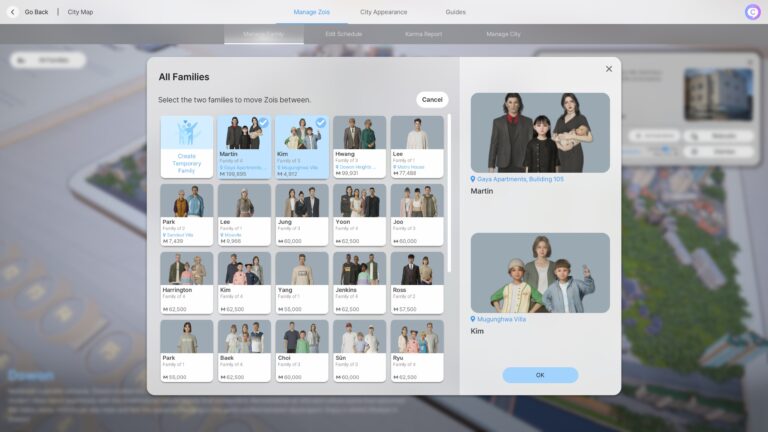
While on the city map, click the button in the upper left corner labeled “All Families” to view a grid of all the families in the city, including their addresses, assets, members, and a family photo.

Once this menu has appeared, you can click the upper left button labeled “Move Zois Between Families” to allow you to swap both Zois and Assets (Meaning Money/Meows) in between two selected households.

You can customize the households members and assets in almost anyway you want in this menu; You can adjust which Zois live in which household (Note; Any Zois in the baby or toddler stage cannot be moved), you can combine the households into one on the side you’d like them to live at the address of, you can change the ratio of assets between the two, the world is your oyster!

How To Split Zois Into a New Household

Are your Zois not getting along, moving out on their own, or just need a fresh start? It is all too easy to split zois into their own households for new beginnings.

Using the “All Families” tab in the city map, select the same “Move Zois Between Families” button. Once you’ve entered the menu, click the “Create Temporary Family” slot and then select the family you want to split off from.

20250405213938 1

Once you’ve entered this menu, divvy up both the assets and family members however you would like, name the temporary family, and then hit “OK”. If one family does not have any assets, the game will warn you and ask for confirmation if you would like to proceed.


Do you like the InZOI moving system? Are there any improvements you’re hoping for in the future? Stay tuned for upcoming guides for different features across InZOI’s Early Access Build!

InZOI’s Early Access Build is NOW AVAILABLE on Steam for $39.99, with plans in the future for console releases on Xbox and Playstation.

Interested in InZOI’s CAZ (Create a Zoi) features? We just released a guide here!

Evolution of The Sims on Console

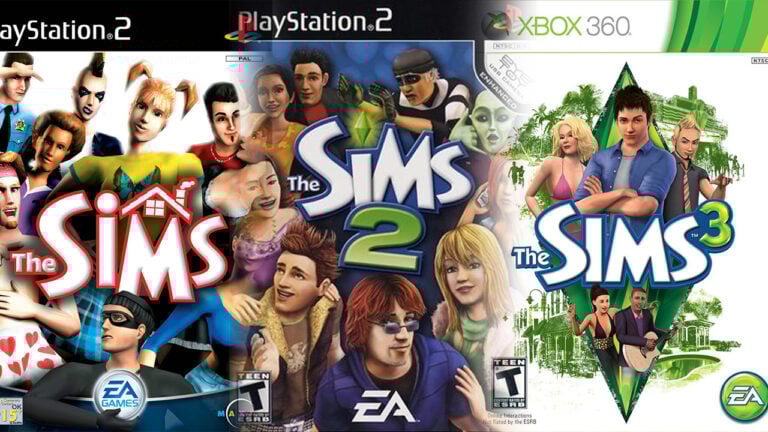
From its humble beginnings and announcement in 1997, The Sims quickly became a staple of PC gaming. Over the years, it grew into one of the most beloved franchises in gaming history. However, a large majority of simmers were unable to experience the game on PC due to hardware limitations or purely not having a computer to play on. Leaving space for EA and Maxis to explore deeper into the world of The Sims on Consoles.

To the delight of many, The Sims eventually made its way to consoles, allowing a broader audience of simmers to enjoy the game and its many expansions. From its early console adaptations to the release of the newest expansion pack, Business and Hobbies, The Sims has continued to evolve, offering a unique and accessible experience for players across all platforms.

The sims covers of all console editions
The Sims: Console edition covers

The Sims (2000)

In 2003, The Sims was released for PlayStation 2, Xbox, and GameCube, offering a very different experience compared to the PC version. Rather than the free form gameplay the PC version was known for, the console edition introduced a more structured experience. Players could control their Sims while also being given specific missions and goals to complete.

The sims console edition gameplay
The Sims console edition gameplay
The Sims Bustin’ Out
The sims bustin out cover
The Sims: Bustin’ Out PS2 Cover

One of the most famous early console versions was The Sims Bustin’ Out which was also covered in this article, which introduced simmers to a more mission driven experience. Players had to complete various objectives revolving around socializing, working, and achieving your sim’s personal goals. The focus on progression gave The Sims Bustin’ Out a more narrative driven gameplay mechanic, which some simmers felt was limiting compared to the freedom of The Sims PC.

The sims bustin out gameplay
The Sims : Bustin’ Out gameplay
The Urbz: Sims in the City
The urbz sims in the city cover
The Urbz : Sims in the city PS2 Cover

The Urbz: Sims in the City was released, offering an entirely different take on the Sims formula. Set in a vibrant, urban environment, the game emphasized social interactions, reputation building and the influence of the character’s personality effecting the evironment around them. Though not a traditional Sims game, The Urbz showed how the series could experiment with different themes and settings while maintaining the core gameplay elements the simmers know and love.

Check out Plumbella’s gameplay

The Sims 2 (2004)

With the release of The Sims 2 console edition in 2005, the franchise took another significant step forward. The PlayStation 2, Xbox, and GameCube versions of The Sims 2 still featured the basic gameplay elements that made the series so popular, but with a few key differences with one of the biggest changes being the lack of open end gameplay. Instead of the sandbox style play simmers were used to, they were instead given specific goals to achieve for each sim, effectively turning the game into more of an adventure simulation.

Check out @lissthelass’ gameplay

Another noticeable difference was the size of the lots and the customization options. The console versions of The Sims 2 featured much smaller lots, which made building larger homes or creating large neighborhoods less possible and the build mode was much more restricted compared to the PC version. Although, the game’s focus on storytelling and character driven missions was a welcome change for some simmers, while others wanted a similar experience to PC.

The Sims 2 console map
Sims 2 PS2 Map

The Sims 2 Castaway

A spin-off, The Sims 2 Castaway, was released taking the series in an entirely new direction. Simmers were stranded on a deserted island, and the focus shifted to survival. The Sims 2 Castaway introduced new mechanics like crafting and resource gathering, but still maintained the franchise’s hallmark focus on character relationships and aspirations. This spin-off, while not as popular as other Sims titles, still had its moment in the spotlight and in the memories of many console players.

The Sims 3 (2009)

In 2010, The Sims 3 made its console debut on PlayStation 3, Xbox 360, Wii, and Nintendo 3DS. The shift from The Sims 2 to The Sims 3 brought in a more open world design and some customization options. However, due to hardware limitations, the open world experience was not exactly “open” world as the PC version. While players could explore larger neighborhoods, loading times and world restrictions still hampered the experience. Furthermore, the map featured a 2D design with unchangeable icons of houses. The console version of The Sims 3 did not have the option to build / change any community lots.

The Sims 3 console edition map "Moonlight bay"
The Sims 3 : Console edition map “Moonlight bay”

The Sims 3 console version did not have loading screens between neighboring houses, only when switching between neighborhoods. The game also featured a karma system which worked on gaining karma power by completing a sim’s wishes which you can read more about here. Good karma power could be used to give your sims

  • Giant Jackpot to make your sim instantly filthy stinking rich! It’s better than a pot of gold at the end of the rainbow.
  • Get Lucky to give your sim a higher chance of succeeding with socials, woohoo, raises, promotions, fishing and more.
  • Super Satisfy to immediately fulfills all of your sims’ needs. Life is so wonderful! Your Sims feel completely invigorated and is ready to face the future with new found hope.

And other karma effects that can be found here.

In comparison to the other Sims games’ console versions, The Sims 3 console version is the first in the franchise to be similar to its PC counterpart.

The sims 3 console edition gameplay
The Sims 3 PS3 gameplay

The Sims 4 (2014)

The Sims 4 made its console debut three years after its PC release for PlayStation 4 and Xbox One which was covered in real time in this article, marking a major milestone for the franchise. For the first time in Sims history, the console edition was the same as its PC counterpart – cursor and everything!

The Sims 4 console edition gameplay

The streamlined interface worked well for many players, but others found it less intuitive compared to the PC experience and some found it outright bulky to use. Additionally, the console versions had to deal with performance issues, with some reports of frame rate drops and much slower load times, particularly on older hardware.

The future of The Sims on consoles lies in balancing the needs of both casual players and long time fans of the franchise. It will be crucial for EA to improve the gameplay and performance that simmers have come to expect, while also embracing the convenience and accessibility that consoles offer.

The Sims 4 Sleek Bathroom Kit Preview: New Variants Look

New Modern Items for your Bathroom!

ezgif 4aa7e223c1798f

Scrub-a-Dub-Dub! Partnered with EA, Syboulette has shared a preview on YouTube of their creator kit coming out on April 10th; The Sims 4 Sleek Bathroom Kit.

From Syboulette’s own website;

“Give your Sims a serene, modern bathroom featuring minimalist design and refined details with The Sims™ 4 Sleek Bathroom kit. This collection brings a soothing vibe with a sophisticated aesthetic. The combination of clean lines and natural materials strikes a harmonious balance between warmth and elegance. Soft pastel tones blend effortlessly with brushed metal accents, while touches of greenery breathe life into the space, transforming any bathroom into a polished sanctuary. Created by Syboulette.”

Build/Buy Items Preview

Focused on simple luxury with beautiful earth tones, smooth ceramic, brass fixtures, and glass structures, the Sleek Bathroom kit preview gives a feeling of peace and relaxation. The plumbing feels modern and refined but the curved natural shapes allow for bathrooms that beautifully flow together.

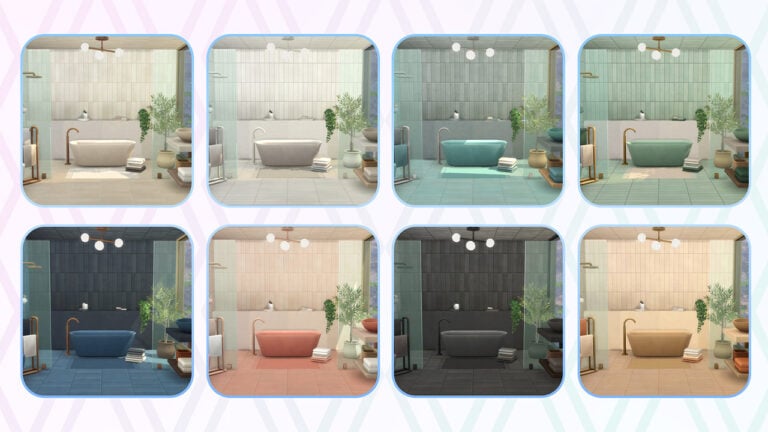
Color Schemes Preview

While these may not be representative of the entirety of swatches for each item in game, we did get snippets of the color schemes that will be available in this kit! From a poppy coral to a cool mint to a deep charcoal, there seems to be many swatches for you customize to you (and your sim’s) preferences!

Possible Hearing Aids Changes?

The SimsTM 4 Sleek Bathroom Creator Kit Official video by Syboulette.mp4.00 00 59 16.Still029 2

One thing to note from the preview, which is not proven or disproven yet, is that there seems to be a clutter item for hearing aids. The Sim, after soaking in the tub, appears to go her counter to place her hearing aids back in. This could hint at a change to how hearing aids and other medical devices work as accessories, or it could also mean that they come as a separate clutter item. Looking forward to seeing what this means!


What are your thoughts on the design of the Sims 4 Sleek Bathroom creator kit by Syboulette? You can watch the full motion trailer down below:

Both this kit and aharris00britney’s Sims 4 Sweet Allure Kit are set to release on April 10th, 2025 at $4.99 USD or a price equivalent to your local currency. Follow our countdown to the release here!

InZOI Gameplay Review: My Take on the Newest Life Sim (With Chaos and Confetti) 

I dove headfirst into inZOI, and let me tell you – this game is wild. It’s like someone took every life sim I’ve ever loved, turned the dial on the realism, sprinkled some random surprises, and called it a day. I was loving the entertainment while eating my big bowl of sweet popcorn.

In my InZOI Gameplay Review I’ll be taking you through some of the personal experiences and achievements in the game. From funny bugs to cool features like Karma Powers, see what caught my eye and what’s my final verdict of the newest life simulation entry:

Relationship Log and Awkward Conversations 

InZOI Gameplay Review: Relationships

One of the features I liked was the relationship log. I could track my Zoi’s first impression of people, see how their relationships develop, and you can even pinpoint when they regretted mentioning their ex at dinner. We can now detect red flags and can run to safety! It just adds to the storytelling and makes the experience more immersive.

Bugs, but make them funny

I have been reading that I’m not the only one playing with a few quirks. A few of them had me scratching my head – I wasn’t allowed to perform friendly interactions until I ‘knew’ someone better… but how was I supposed to know them better if I couldn’t talk to them? I awkwardly waited for the game to decide if I could move the conversation along. However, after some time and rebooting the game, I was able to have a conversation, thankfully.  I hope when it comes to traffic, everyone is more patient than I am because I kept attracting traffic, and driving took some getting used to as it felt like I was trying to parallel park blindfolded. 

The Wedding Crashers (But Make it Cute)

Now, let’s talk about my Zoi’s beautiful wedding. It was a well-designed outside wedding that had me squealing every minute then – bam! Random strangers started showing up to throw confetti, which was nice of them, but no cargo shorts at my wedding! It was just hilarious, 10/10, would have my uninvited guests again.

What you can actually do (Besides dodge traffic and awkward weddings)

The true magic of the game is in the freedom. You can decorate your Zoi and their dream home to the tiniest detail, choose a career, fall in love, and have your heart broken, then get revenge and even cry or laugh at which genetics your kids inherit. I made a cute couple, and their baby… didn’t look like them at all, but that’s science for you. We move on. If that doesn’t sound exciting, well… you can technically mow people down in your car. I mean, not that I would ever do that in the game (cough), but at least you know that the chaos has potential. 

Karma, Ghosts and the Meaning of Life

Additionally, I really enjoyed looking at how your Zoi’s actions affect their karma levels. If you can get enough, your luck will improve and you can get that lottery ticket! On the other hand, anything can happen if you go complete villain. The developers mentioned that low-karma Zois will be able to return as ghosts to fix their mistakes. That makes for a good story – everyone loves a spiritual redemption arc. I instantly thought of making my Zoi a menace that gets haunted by their bad decisions, like A Christmas Carol, but with more questionable life choices.

Cool features (and a few missing ones)

One of my favourite features about inZOI is how you can move every part of the UI anywhere you like on the screen. This is a perfect feature for those who want to have more freedom with your layout. 

Some other interesting features include:  

  • AI Smart Zoi Mode (still experimental) – This lets you see their inner thoughts, making their actions make way more sense, which I am excited to mess around with more.  
  • Motion and facial capture – It is still in development, so it is kinda hit-or-miss but very promising.

Although there is still a lot to explore, some stuff is still missing or not fully fleshed out yet. For instance:

  • No group meals – If you want to make a big dinner for your entire family, tough luck. Everyone eats separately like it’s an awkward high school cafeteria.  
  • No maternity leave or sick days – So if your Zoi is sick or just had a baby, they’re still expected to show up to work. Hope that newborn is fine on its own!  
  • No cutscenes (except for childbirth) – I was really looking forward to cinematic moments, but they’ve mostly been removed. Hoping they bring them back! 

We can all be patient and understanding as we know it will take some time for everything to be perfect. Rome wasn’t built in a day! 

Glitches that had me crying (some for the wrong reasons)

As expected, bugs were going to happen in early access games, but there was one that shocked me. Apparently, you were able to run over virtual kids in the game. It was so bad that a Krafton spokesperson said: “This issue was caused by an unintended bug that has been resolved in the latest patch. These depictions are highly inappropriate and do not reflect the intent and values of inZOI. We understand the seriousness of this matter and age-appropriate content, and we are strengthening our internal review processes to prevent similar incidents in the future.”.

inzoi gameplay review ribbon

InZOI Gameplay Review Verdict: A Chaotic, Addictive, and Exciting Start 

Yes, inZOI has bugs. Yes, it can feel a bit overwhelming at times, but honestly? I truly loved just messing around and exploring with my Zois, eating from food trucks, and just living out cute and weird little slice-of-life moments. We can see that there is so much potential, and knowing the big plans for future updates makes me really eager to know what’s next.

Personally, I would recommend keeping an eye on inZOI as it has something for everyone. A little bit of mayhem, unexpected wedding guests mixed with ignoring traffic laws can create an interesting story. If you want something more chilled, why not give it a try and head to the cafe and get your fortune told or head to the amusement park and ride the Ferris Wheel?

The Sims 4 Plumfruit Collection Mod: Brand New Phone and Gadgets Refresh

Exciting news! Well-known and well-respected modder Arnie, known for his farming mod and open-world Brookheights mod, has announced the return of the Plumfruit Collection after his return to the modding community in October 2024.

Plumfruit is a series of custom content that introduce a range of tech-inspired items to enhance your Sims’ digital lives. This reimagined collection features new designs, themes, and functionalities, all built from the ground up.​

The Sims 4 Plumfruit Collection Mod includes two main kits – Plumfruit Essentials and Retrofruit. We’re going to show you each one and let you know how much it will set your Sims back.

Plumfruit Essentials

Plumfruit Essentials offers a variety of sleek, modern devices, including a computer, laptop, tablets, and smart speakers.

This new Plumfruit release it is an update on the previous mod in the series – Plumfruit Lite – from a few years back, but everything here is brand new.

PlumPhone

PlumPhone Air: A stylish phone replacement with the plumfruit logo on the case and a new menu screen with PlumfruitOS icons.​ This functions just like any of the other mobile phones in game – meaning it is also free for your Sims!

PlumPad

PlumPads on a table

PlumPad Air & PlumPad Mini: Elegant tablets featuring an overhauled menu consistent with all other Plumfruit items with new app icons for easier navigation. These devices are also portable, so they slot straight into your inventory.

Your sims will be able to use them to browse the web, play games like Bicblock, go on Social Bunny if you have High School Years, and they also allow you to read e-Books.

The PlumPad Air will cost §999 and the PlumPad Mini will cost §499, making it a reasonable price.

iPlum and Plumbook Air

iPlum Air & PlumBook Air: A futuristic all-in-one desktop and a sleek laptop to match, both equipped with 15 beautiful wallpapers featuring familiar desktop images and in-game destinations, pride themes, landscapes, and also a plain black swatch which will make it look like your Sim has turned their computer off.

They function just like any other in-game computer and feature apps like Mail, Web Explorer, Amazim, and more.​ One little touch that we also loved is the Simlish keyboard!

They don’t come cheap though, the PlumBook Air costs §1159 and the iPlum air §1899.

PlumPod

PlumPod Max & PlumPod Mini: Smart speakers with animated screens, colourful swatches, and access to Plumfruit’s virtual assistant, Neo.​ Just like the other Plumfruit devices it has a stylish menu with new icons. It lets your sims listen to music, ask Neo questions, and control their lights.

The PlumPod mni and max speaker both cost §299.

The Neo Pie menu on the PlumPods

Neo: Plumfruit’s answer to Alexa, Siri, and other popular virtual assistants. They are going to tell you everything that is going on in town and give you some ideas of shows to watch, as well as answer some all important questions.

When asking Neo something your sims will walk towards the device and speak to it. Arnie has definitely given Neo a personality, if you ask “When is Pride Month?” Neo will reply “ALL YEAR LONG BABY! Happy pride month to YOU!”

PlumCam

Screenshot 2025 04 04 080306

PlumCam Future: A high-end camera with three lenses, three stylish colour swatches and a massive touchscreen, perfect for capturing in-game moments.​ It functions just like all other cameras in the game and slots nicely into your Sim’s inventory.

PlumTV

PlumTV: A modern television running PlumfruitOS, plus apps like Simflix and Simsney+. The TV itself is a wall mounted TV with rounded corners and a selection of new screensavers full of little easter eggs to real TV shows as well as some of Artie’s old mods.

It is the most expensive item in this bundle, though, at §2699 simoleons (but we can all agree it is worth it).

PlumBuds

A sim wearing Airpod style ear buds.

These air pod style ear buds are a reskin of the ones that come with Fitness Stuff. Your sims will get given them on occasion, but you can also buy them from the catalogue for §220.

Retrofruit Nostalgia

For those who appreciate a nostalgic touch, Retrofruit brings vintage-inspired tech from the ’90s and early 2000s.

These items are not available yet, but will be in early access soon. Stay tuned!

Plumfruit is BACK 1 32 screenshot

When can I download these?

Plumfruit Essentials is out today for early access download; public release will follow next week on the 11th of April.

Retrofruit’s release date has yet to be announced, but we can look forward to more updates soon.

Learn more

If you are interested in expanding your Sims’ technological horizons, then keep an eye on Arnie’s Patreon page and this article for the latest developments as they happen. Stay tuned on Sims Community for all the latest Sims 4 Mod Updates!

InZOI Cars: Your Ultimate Driving Guide

The highly anticipated life simulation game, inZOI, has finally arrived to early access, and we are ready to teach about inZOI Cars and it’s uniqueness. Players (including myself) are eager to explore it’s new world. One of the standout features that many players are excited for, is the ability to use and drive cars. This mode of transportation expands on realism and freedom in the life simulation game industry, exciting many players to get the game. This feature also allows players to drive around the map and physically drive around the open world.

Screenshot 10

If you are wondering how to get behind the wheel in InZOI and make more of it’s driving gameplay, this guide will cover everything you might need to know, from acquiring a physical vehicle to exploring the open world.


Screenshot 15

How to get a Car in InZOI

Before you can start driving in the game, you have to start with purchasing a vehicle. InZOI honestly makes driving cars an exciting part of the gameplay experience, making it a vital mechanic part of the game.

InZOI Cars

I purchased my car for a pretty fair price (10,000 Meows), but there is also a variety of different vehicles provided in the “Dream Car” Application.

  • Purchasing a Vehicle: Press P on the keyboard of your computer, and this will take you to your ZOI’s cell phone. With this phone, there are many different functions to cover but today we will just be covering how to buy a car. Then refer to the top of the phone, pulling up the “Dream Car” application.
Screenshot 3

How to purchase your InZOI Cars

Screenshot 7

Once you purchase your vehicle, you will receive a pop up screen that reads the following:

Vehicle Purchase Successful!

The Z-Car has arrived at the parking lot in front of the house.

Click on the Zoi who purchased the vehicle to access the vehicle interaction menu and have it pulled up anytime. Choose between the manual and automatic driving modes and enjoy the ride.

Embark on an amazing journey with your new vehicle!”

Meaning, you will be able to access your Zoi’s vehicle by either going to the parking spot on your lot, or clicking on your Zoi and selecting, “Car>Get in Car” as in the screenshot below, then your Zoi will walk to their car and get into the drivers seat.

Untitled 1

Getting Behind the Wheel: How to Enter your Vehicle

Once you purchase your car, it’s time to hit the road. Here’s how to do it!

  1. Adjust your Game Settings Accordingly: First of all, you may need to adjust your game settings manually if you are wanting to drive your car free roam using the WASD keys to move the car you will need to adjust it in your Gameplay settings and turn Manual Driving to on.
  2. Enter your vehicle: After purchasing your car, it will be parked in your designated parking spot at your home. Approach your vehicle, click on the vehicle and select , “Get in>Sit in the Drivers’ seat” you will now be inside your vehicle.

Driving Controls and Mechanics

  • Acceration: W
  • Brake: S
  • Steer Left/Right: A/D
  • Brake: Spacebar

Exploring the World of inZOI by Car

Once you have mastered the driving mechanics, you will definitely want to explore inZOI’s map! The game’s Early Access version of the game offers three different “worlds”, each with it’s own special vibe and environment. From the beaches, industrial shopping areas, and the local parks, there is plenty of lively places to discover.

Screenshot 16

Other Transportation Features

While inZOI’s Early Access version already offers a pretty solid driving system, the inZOI team has also offered other means of transportation including Public Transportation, which means players can currently take busses around the three different worlds. This truly adds a layer of realism and convivence for Zoi’s and players who do not have a vehicle. The bus system features stops scattered throughout the city, making it easy to hop on and off the bus system.

Screenshot 8

Conclusion

Driving in inZOI brings to life an entirely new level of realism to the life simulation genre. Whether you’re commuting to work, or just wandering around the city, the driving mechanics offer a unique and immersive experience. Even though inZOI is an Early Access game, I am genuinely impressed with how inZOI is, I’m really excited for it.

As the game continues to evolve, you can expect more inZOI content here at the Sims Community. Grab your keys and stay tuned with inZOI here!

Review of the Latest Sims 4 SDX Drop: Show Your Pride Everyday

On April 2nd, The Sims released their latest SDX drop, centered on Pride! Though Pride Month is still two months away, the release is arriving just two days after Trans Day of Visibility. The drop features a collection of build objects and create-a-sim assets featuring pride flags and their color schemes, as well as a few additional black-and-white colorways. Read until the end to see our review of the assets we received!

Two sims sit and talk on a bed, while another stands and paints at an easel. Of the two sitting sims, the left one wears rainbow eye makeup, a rainbow checkered button-up, jean shorts, and rainbow sneakers. The other sitting sim also wears jean shorts and has a tattoo on their upper left arm, which is white, black, purple, and yellow. The sim standing at the easel wears the same button up, but in black, and she also wears  black knee-high socks with rainbows on them.

The Sims 4 SDX Drop: Pride Content Review

Create-A-Sim

The release comes with six new unisex CAS assets. The eyeshadow has 9 swatches, all of which are equally colorful. Admittedly, the texture is somewhat underwhelming – I was hoping for it to have more sparkly quality.

The other form of body art available in this drop is a new tattoo, available to use on the upper left arm. The tattoo has a cute, wispy design, and the 10 swatches feature color schemes from different pride flags. My only critique of the tattoo is that it doesn’t look quite like an actual tattoo, but the design and concept are beautiful.

This image is a series of four screenshots. From left to right is a sim wearing rainbow eye makeup, then a sim wearing purple and green eye makeup, a sim's upper arm with an abstract black, white, purple, and yellow tattoo. The far right picture is of the same tattoo, but with rainbow colors instead.

Moving on to clothing, there are four assets: a layered button-up with a ribbed shirt underneath, jean shorts, above-the-knee socks, and high-top sneakers. All are tagged for both masculine and feminine frames, and, thankfully, the items fit well on both frames!

The top has 14 swatches, the jean shorts have 9, the socks have 17, and the sneakers have 12. While most of the colorways are colorful, the top, socks, and sneakers also have plain black and white swatches, allowing the assets to be more versatile while still prioritizing the colorful and celebratory theme of the drop. The pieces all appear well-made and offer a wide variety of designs and colors. Notably, two of the assets – the high-top sneakers and the jean shorts – are also available to child sims.

This is a series of four images. From left to right: a splotch-patterned rainbow button-up layered over a white tank top, dark jean shorts with a distressed pattern and a yellow, white, and purple stitched stripe pattern on the right leg. The third image shows a pair of rainbow high-top sneakers. The final image shows a set of above-the-knee socks with a rainbow diamond pattern.

The only noticeable glitch is with the jean shorts and bodysuits/tucked-in shirts, where the ‘concealed’ portion of the shirt sometimes layers on top of the shorts. The glitch did not always happen, but I only encountered it on feminine frames, and not on male frames.

Two images next to each other. On the left is a child sim figure, who wears light wash denim sorts that are distressed with a rainbow striped pattern on the right leg. The child also wears rainbow high-top sneakers. On the right is an image of a sim wearing jean shorts and a red bodysuit, but the bottom of the bodysuit is visible on top of the shorts.

Build-Buy

Image depicts a bedroom with three sim figures. The bed has orange and pink bedding. Above the bed is a collage of posters, polaroids, string lights, and a tricolored striped flag. On the same wall is a wooden shelf, on which a photograph sits and under which hand a coat and a bag. On the other wall hangs a knitted pride flag and a gallery of pictures, mirrors, and a sun-shaped clock.

The build-buy addition features six new objects: a double bed, single bed, shelf, gallery, pride collage, and a new knit pride flag. The Burst of Pride double and single beds are essentially the same design, each with 11 matching swatches (including two black and white colorways). The Out & About Wall Shelf has 9 swatches and two small object slots on top of it. The Pride Rocks! Collage features 12 different swatches, each with slightly different details on the flag, posters, and polaroids. The Colorfully Eclectic Wall Gallery has 9 swatches, which, like the collage, also vary in their designs. And last but certainly not least is the Knitted Pride Flag, of which there are a whopping 23 swatches! Each of the objects is detailed, versatile, and aesthetically pretty. 


Our Review

The SDX drop is filled to the brim with great new (and free!) assets celebrating Pride. The designs veer away from previous, more “kitschy” attempts to incorporate Pride into the create-a-sim and build-buy objects. Though I may have critiqued the renderings of the body assets (albeit mildly), that does not track for the rest of the objects. By making the game evermore inclusive and celebrating Pride, The Sims has reinforced their allyship for the LGBTQ+ community. Also, they gave us new beds for free! All in all, that’s pretty awesome.

Do you agree with our review? Let us know your thoughts on the SDX Drop in the comments!

Alpha vs Maxis Match: Get To Know The Different Types of Sims 4 Custom Content

Today, we are diving into the glorious world of CC in this in-depth Sims 4 Custom Content comparison guide. Whether you’re a casual player who loads up the game once every few weeks or live and breathe Sims, you have almost certainly run into the Alpha vs. Maxis Match debate.

So, what is the difference? Which side do you pledge your loyalty to? Let’s get into it together.

First off, what is custom content?

If you are totally new to this side of the Sims (don’t worry, we all were at some point), custom content is basically items which are made by members of the community that you can then download and put into your game.

There are thousands of CC creators and countless items out there to browse – we’ve even covered a few different ones here – and they will mostly fit into either the Alpha or Maxis Match box. Depending on which one you use, your game will have two very different feels.

Alpha Custom Content

Sims 4 Custom Content Comparison: Alpha CC

What is Alpha CC?

Alpha CC is for the people who want their Sims to look like they just walked off a fashion week catwalk or Instagram explore page. It’s realistic, detailed, high-definition, and often looks nothing like the base game. We’re talking shiny, luscious hair with individual strands, eyelashes and make-up that anyone would envy, and clothes that look like they were imported straight from a fashion catalogue.

Pros of Alpha CC

Your Sims are going to be walking around looking stunning. A lot of Alpha CC has a really gorgeous finish to it because it focuses on real-life textures. Even now if I want to clear out my mods folder I make sure to have a few custom eyelashes on hand (trust me, once you start using them it’s hard to go back).

Because of this focus on real-life textures and designs they can also be made to look true to life, so if you want your Sims to rock designer outfits and shoes which cost more than a car, nothing is holding them back. Who can honestly say they don’t live vicariously through their Sims anyway?

Cons of Alpha CC

These high-resolution items can cause some game lag or performance issues since the file sizes are often higher than something that follows a Maxis Match style. If you’ve ever felt the heat coming off a lower-end laptop that is trying to run The Sims 4 with lots of custom content installed, then you know what I’m talking about.

It also definitely clashes with the game’s more cartoony aesthetic. For some people having a seamless look and feel in the game is really important to them, and with Alpha CC having a style which is really different from that in the base game, it can feel immersion-breaking.

Maxis Match CC

Sims 4 Custom Content Comparison: Maxis Match CC

What is Maxis Match CC?

Just like the name suggests, it is designed to match the original Sims 4 aesthetic (aka the Maxis art style). It’s smoother, softer, and blends in with what EA gives us. Think of it as “The Sims, but better” rather than “The Sims, but looks like a next-gen console game”.

Pros of Maxis Match

You are going to get a seamless experience with your Sims looking like they belong in the world around them. No uncanny valley here!

Because these items need less detail in their textures, it also means that the file sizes are much smaller than the ones you’ll get with Alpha CC, so your computer will have an easier time running the game with them installed.

Generally, Maxis Match content creators also tend to update their content regularly when we get new patches and expansion pack releases. This is especially true of creators who tend to focus on build/buy items. Many of the most popular creators have their finger on the pulse, and so when a new pack is released that introduces a new game item, custom content items are never far behind.

Cons of Maxis Match

Some people find them too simplistic. If you want ultra-detailed clothes and photo-realistic skin textures, you’re going to struggle to find that with Maxis Match.

Hair options can be hit or miss – Not all creators can nail the balance between cartoony and stylish. Because of this, one of the main criticisms of this art style is the lack of realistic textures and options for curly hair.

This is improving though, and there are some brilliant creators out there that do a great job at making Maxis Match options more diverse. Here is an example from Quirky Introvert.

So, which one is best?

Honestly, it depends on your vibe.

If you want a library of custom content that looks like it could run on a catwalk tomorrow, and don’t mind something less immersive, then you are going to want to look at Alpha CC.

If you want something that blends seamlessly with all the base game and DLC you already have, and you don’t mind the cartoony appearance, stick to Maxis Match.

Or go rogue and mix the two styles together! Maybe you want to give your Sims realistic hair and eyelashes but don’t mind the less realistic clothing options, or you want to stick to Alpha CC in Create a Sim but Maxis Match in Build/Buy. There is no right or wrong way to play around with different options.

The world of custom content is your oyster. Go out and explore!