Home Blog Page 467

The Sims 4: New Patch! (13/04/2015)

12

Capture

The Sims Team has released a brand new Patch for The Sims 4 that addresses many glitches and bugs from the Base Game and Get to Work!

Make sure you remove all Custom Content and Mods before installing the new Patch.

Update: 04/13/2015 – PC Version 1.5.149.1020/ Mac Version 1.5.149.1220

Howdy Simmers,

While everybody else has been trying to “Get to Work”, SimGuruGnome has been trying to “Get Some Time Off” for a while now. We took pity on him and let him out of his cave temporarily.

Here’s a small round of fixes to rein in a few pesky problems…

Issues Fixed

  • Our overly-friendly visitors from Sixam were a bit too amorous. We’ve reduced the frequency of alien abductions and further reduced the frequency of male pregnancy thereafter. We know our men are good looking but that’s no excuse!
  • We’ve fixed a couple issues in the Medical career that could cause problems for actions around repairing broken medical equipment or transferring a patient case. A career in medicine can be grueling for anybody, but nobody wants to be given an impossible task.
  • We’ve upgraded the firmware on our cameras to prevent larger photos from appearing too dark. We’ve also fixed an issue that was causing screenshots to come out blurry.
  • So what did five say to three about… you know what? I don’t have a joke for this. Save Error 531 is bad and we fixed a couple situations that would cause it to occur.
  • Fixed an issue that sometimes caused a crash when doing sciencey stuff during the Scientist career.
  • Is your Sim unsatisfied with their love life? Maybe it’s all that alien affection they’ve been getting, or maybe it’s the stress from their new careers, but our Sims have been leaving their partners with an unsatisfied moodlet. We’ve conducted some remedial WooHoo education and Sims should now be better about taking care of their partner’s needs.
  • Fixed an issue where children and teens weren’t getting school credit if they were coming home in a mood not explicitly approved by their school. Harsh!
  • A recent update mistakenly removed some items from teens, but they’re back now. Teens can wear heels again! Fashionable teen Sims can once again experience unnecessary foot pain in the name of looking good.
  • We fixed a few unintended issues on our side that caused problems with certain types of CAS Custom Content.

That’s all for this quick update. Most of these fixes started as feedback from the community and we couldn’t do it without your help and support.
-SimGuruGnome’s Understudy

Source: EA Help

Tip: Crinrict

The Sims 4 Get to Work Lots by IslaRose

IslaRose has proven that creativity knows no boundaries; she managed to create 17 Beautiful Lots for The Sims 4 Get to Work just several days after the release!

Most of them are Retail Lots that each have a different theme, but there are also 2 Career Lots and 2 Miscellaneous Lots & Venues.

You can download these lots by searching them under the Islarosexiv Origin ID, or you can simply click on the Lot titles below.

The Toy Chest

5lbbIYm

Magnolia Florist Shop

Cbbtppo

Bella’s Secret

Cnktn1I

Rustic Bakery

d9mRTqz

Magnolia Bakery Ver 3.0

DdP5yvk

Sprinkles Cupcake Bakery

EBZRt8S

Small Photography Studio

fqP4bOE

Magnolia Apothecary Shop

GGRUWDE

Retail Boutique

ilRDSVV

New Riverstone Book Shop

ME8NwHY

Modern Boutique Gym

nNf3l79

Modern Retail Art Gallery

qYWnHUI

Magnolia Grocery Co-Op

UyH71Ow

Areni! Downtown Retail

wPrf5Md

Neighborhood Aliens (LGR)

Z6WLpvF

Science Career Lab

c68g0bl

Willow Medical Hospital

lj0rkuk

SMagazine Under The Spotlight

0

Here to steal the second Spotlight is a popular Sims Magazine called SMagazine. Take it away George!

smaglogo

Hi everyone! My name is George and I’m best known as the guy behind SMag. The Sims is one of my favourite pastimes, and I share my passion for that through SMag.

– How long have you been a Simmer?

I first started my time as a Simmer (or should I say my addiction) with The Sims 2. I got it for my birthday, and I was a little overwhelmed by it at first. My dad, who now says he has no memory of this (let’s face it, he’s getting old!), taught me how to build a house. We built a 6-storey house that I chucked everything into and got confused when I couldn’t build a roof on top. Since then, I’ve religiously played The Sims whenever I got spare time. Of course, there’s other games besides The Sims that I like to play. I love simulation games, like Cities: Skylines, Prison Architect and Rollercoaster Tycoon – I love games with a creative twist.

– How did you begin with SMagazine?

I began SMag in 2013. I had no idea that I would even finish the first issue, since it was just a little bit of fun. Looking back, it was terrible, but it opened the door to me being able to take SMag a lot more seriously. It still isn’t huge, but that doesn’t really bother me – the most important part about doing something like this is enjoying yourself.

SMagazine’s First Issue

– How would you describe your Magazine?

SMag is primarily an online magazine that’s all about design and inspiration in The Sims. I think it’s really unique – you have a whole load of houses made by people in the community, a dash of custom content, a little splash of humour, some news and a bucketload of content made by the amazing team I have at SMag. They’re all amazing and they helped shape SMag into the amazing smorgasbord of content it is today. Whilst we’re not working on issues, there’s a smaller team of people that dedicate their time on the team to updating what we have on the website. My team is so amazing, and hopefully one day they’ll be responsible for SMag growing even further than it has already.

SMagazine’s Latest Issue

– What do you want your Magazine to become?

Honestly, I have no idea. I love what we have now and I wouldn’t change it for the world. I want to grow SMag even more, through creating content that gets better and better every time. The only way is up, but how do we start going up? Do I want to make SMag more interactive? Make an SMag app? Who knows. The most important thing about this is that you enjoy yourself. When it becomes a chore, you need to take a break or even start over.

SMag Issue 10 has just come out when you’re reading it, and if you’re interested you can visit our website to find out more!

Thank you George for getting under our Spotlight!

You can check out SMagazine’s website HERE and make sure you’re following them on Twitter HERE!

Do you want to get under our Spotlight? Contact Us!

Are Pets coming to The Sims 4 soon?

Update #4: We finally have a possible hint for Cats and their arrival to The Sims 4. We updated the post from Dogs to Pets 🙂

cathint

Thanks @TheSims4RU for the tip!

FYI: So far we’ve had Hints about Dogs and Cats. Here’s a Survey that was released in March 2014 that could tell you what features should we expect.

Pets – Create perfect – or imperfect – pets for your Sims with a wide variety of unique dogs, cats, lizards, rodents, and birds. Teach them tricks and enter them in talent shows, or simply hang out and watch them destroy your neighbor’s yard…more pets means more fun!

Dogs – Use the new Create-A-Puppy to design your Sim’s new best friend! Teach your dog tricks, train him to hunt collectibles, play with toys, and even enter him in a dog show! Raise your puppy and help him grow! Will he age up to become friendly and loyal, or aggressive and independent? Your interactions with your dog shape his future!

Update #3: DOTsim found out that there’s another object that hints at Dogs; Dalmatians to be exact!

dalmatianobject

If you look at it, this isn’t the first time that EA has done a hint for a future Pack. In the Base Game, there was an object called ”Commemorative Freeze Ray” that wasn’t usable, but it was certainly hinting at the interactive Freeze Ray that comes with Get to Work (Scientist Career).

scientisthint

Update #2: The Sims Social Channels posted a new screenshot from Get to Work for their Doctors Blog, but there’s a bubbly hint in that screenshot that’s certainly worth mentioning in this post:

dogshint

Update: The Sims Germany Official Facebook Page asked:

What is needed for a very good Pets Expansion?

Capture

This could really mean that Dogs (or any other Pets) might make their return to The Sims 4 soon!

Thanks @TheSimplyNando for the tip!

An Easter Egg was found in the object description of the new objects! It looks like a simple Object Description, but if you look closer, Dogs and Babies were mentioned 3 times repeatedly. Could we be getting a Pets Addition sooner than we thought?

Does your baby or dog pose so adorably that you simply must capture every single moment? Is your phone so overloaded with baby and dog pics that you don’t have space for apps? Pick up the Appreciably Average Digital Camera and free yourself to take as many pictures of your baby riding your dog like a cowboy as you could possibly want!

TS4 2015-04-12 11-55-04-31

 Thanks November_11Sarah for the tip!

The Sims 4 Custom Content: Animals (Decoration)

These Sets have been brought to you by Severinka!

Click on the picture below to download the first part of the Set!

animals1

Click on the picture below to download the second part of the Set!

animals5

Click Here for more information on how to install Custom Content!

CC Wedding Cakes for The Sims 4 Get to Work!

Want to expand your Bakery Store in The Sims 4 Get to Work? Now you can with Custom Content Wedding Cakes brought to you by jomsimscreations!

Please note that these Cakes are only decorative.

Click on the picture below to download this Set!

1

Click Here for more information on how to install Custom Content!

The Sims 4: New Concept Art by Wesley Burt

1

Wesley Burt has recently published his new Concept Art piece to his existing Portfolio. Check out the new Concept Art piece down below.

nox_Sims4lineup-900x350

Down below is the rest of his Concept Art pieces for the game that we published last year.

01 - xyNOAar 02 - 033GsQL 03 - AZkqclo 04 - atJtjEc 05 - gprH19q 06 - QNebGmM 07 - 4LKAe0P 08 - KIDVgI4 09 - IypJnxo 10 - Y4sYRo3 11 - ChCVkte 12 - nqQLSX3 13 - TfvupPk 14 - GwXBH6b 15 - Gv8TDd1 16 - qNlGSf5

17 - tvzpnbv 18 - WnL7xU7 19 - tGuLwJk 20 - XZ1jegi 21 - TDdT8Ds 22 - rcFEadc 23 - 46AOpUv 24 - 9YeV76u 25 - xiCRYna 26 - Iyid0HA 27 - TGD4NZg 28 - A1zVbD6 29 - EnCganV 30 - XiPjSOX 31 - yosfRhv 32 - forlHSq 33 - CJzqYk8 34 - VmPt3hS

The Sims 4 Get to Work Mod: Free Retail Perks

This Mod has been brought to you by CyberOps!

Tired of those Retail Perks costing so many points and tired of it taking a long time to finally get the Perk you want ? Look no further, this mod makes all perks free so now it will cost you 0 points to get all the Retail Perks you want.

Click on the picture below to download this Mod!

tumblr_inline_nmlf5lDhAB1ts7m5i_500

Click Here for more information on how to install Custom Content and Mods!

Tip: Sims-Online

The Sims 4 Dance Machinima: Shake It Off

Just when you think Simmers couldn’t get more awesome, Malik Hatsune proved it wrong by uploading a brand new The Sims 4 Dance Machinima featuring Taylor Swift’s Shake It Off.

Please note that some effects were used to improve the graphics of the video below.

The Sims 4: CAS CC Lookbook #8

TS4 2015-04-05 01-31-33-70

Hair / Skin / Eyes / Eyebrows / Lipstick (EA) / Earrings / Top / Bottoms (EA) / Shoes (EA) / Pose 1 / Pose 2

TS4 2015-04-05 01-45-18-65

Hair (EA – Get To Work) / Skin / Facemask / Eyes / Eyebrows / OutfitShoes / Pose

TS4 2015-04-05 21-15-44-66

Hair / Skin / Eyes / Eyelashes / Lipstick (EA) / Eyeliner (EA) / Outfit / Shoes / Pose 1 / Pose 2

Click Here for more information on how to install Custom Content!

Download these Sims on The Gallery here, here and here.

The Sims 4 Get to Work: Reaching a Scientific Breakthrough

So you think your Sim can Invent?

Well, think again!

The Sims 4 Get to Work comes with a dozen of new Inventions and Serum for Scientists to discover, but how?

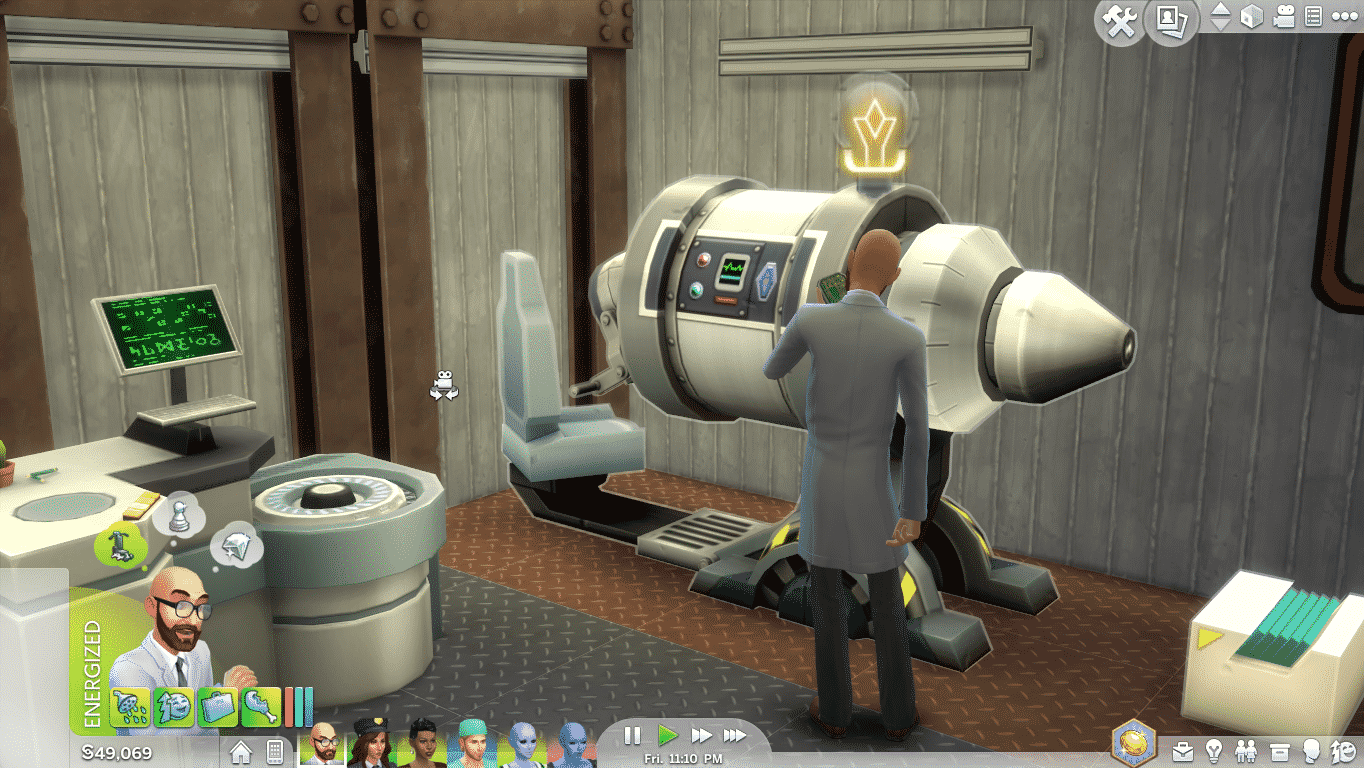
Scientific Breakthroughs allow your Scientist Sim to concoct new Serums at the Chemistry Lab and create new Inventions at the Inventions Constructor.

04-04-15_5-28 PM-3 04-04-15_2-51 PM-3

Each Scientific Breakthrough can be achieved by doing a different variety things that can Aspire your Sim. Let’s say my Sim wants to read something. When you click on the Bookcase, you’ll notice a lightbulb next to the ”Read Something” interaction. That means that my Sim’s Breakthrough level will rise as he continues to read a book.

TS4 2015-04-11 00-05-20-94 TS4 2015-04-10 23-01-18-72

There are 4 levels of each Breakthrough: 25%, 50%, 75% and 100%. You can see those levels by looking at the yellow stripe strokes around the lightbulb.

TS4 2015-04-10 22-53-16-86 TS4 2015-04-10 22-54-33-59 TS4 2015-04-10 23-29-20-82 TS4 2015-04-10 23-02-46-88

Don’t stop on just one object though, there are plenty stuff that can lighten up your Sim’s lightbulb. Here’s a list of some objects and interactions that can help you reach Scientific Breakthroughs:

  • Tinker
  • Weed Plants
  • Use the Microscope
  • Brainstorm at the Inventor Constructor
  • Experiment at the Chemistry Lab
  • Play Chess
  • View Paintings
  • Take Thoughtful Showers
  • View Scientific Objects

04-04-15_2-54 PM-4 04-04-15_2-49 PM

You should really look after your Sim’s Emotions. Sims with a Focused Emotion will reach their Breakthroughs much faster than those who are just Happy.

Not all Breakthroughs are available to achieve in an instant. As your Sim progresses through the Scientist Career they’ll be able to work on their Breakthroughs.

Sims can keep track of all their Breakthroughs by selecting Phone > Open Phonebook.

TS4 2015-04-10 23-06-28-73

The Sims Magazine: Simmies Awards!

3

simmieslogo

The Sims Magazine is hosting their first annual Simmies Awards! What are these Awards all about and how can you participate? Read below to find out!

This is the first time we’re doing the Simmies Awards, so we’re excited to see what nominations we receive. We like to think we’ve seen a lot of the great Sims content out there, but there’s bound to be loads we’ve missed and we hope the awards will give them some recognition…

Basically, the awards are just a bit of fun and we’ll be publishing the shortlists and winners in our April issue. Who is nominated and who wins is down to the community and an expert panel we’ve put together. For some of the awards we’ve teamed up with fansites so we’ll have the benefit of the expert knowledge of their followers in finding the best of the best.

So, here are the categories

  • The ‘I Actually Know Who That Is Without Looking at the Name!’ Best Likeness Award
  • ‘Looking Good’ – the Award For Best Dressed Sim
  • Most Pimped Crib (in conjunction with the lovely @EmSims81)
  • Most Awe-Sim Architect
  • Coolest Custom Content
  • Most Amazing Modder
  • The ‘Got to Have it’ Lot (in conjunction with building experts Simified)
  • Greatest Sim Storyteller (in conjunction with a very great Sim Storyteller (!) xSimSugar)
  • Best Use of Custom Content (also in conjunction with xSimSugar. This could be using CC in a build, story or sim)
  • Best Sim Interior Designer (in conjunction with the – clearly – awesome Sims Community)

We’d welcome your nominations for any of these categories and – yes – you can nominate yourselves! You can do that by tweeting us (@thesimsmag) or emailing us at simssocial@thesimsmag.com. We’ll consider every nomination and yours might make it onto the shortlist. You’ve got until Sunday 12th April to submit them.

We know we’re bound to overlook some amazing stuff – there’s just so much out there. So if you disagree with any of our winners once the mag is out, you can always let us know 🙂

We hope the Simmies will grow to be even bigger and better in years to come and involve even more of the community and brilliant fansites. In the meantime, look out for the next issue – due out mid April – to see if you’re a winner..!

So there you have it – you have about 2 days to nominate your favorite Creations and Simmers!

The Sims 4 Custom Content: Azoura Bedroom

This Set has been brought to you by jomsimscreations!

Click on the picture below to download this Set!

1-13

Click Here for more information on how to install Custom Content!

The Sims Blog: 6 Things you should try out as a Business Owner

Via TheSims.com!

Get Ready for Your Grand Opening

The Sims 4 Get to Work* has been out for almost a week now, meaning many of you have already tried your hand at some of the new features of the expansion pack. You’ve messed with your neighbours as the Scientist, saved lives as the Doctor, and cracked cases as the Detective.

But today, I want to focus on the part of the expansion I’m most excited about: retail stores. Granted, I might be a little biased since it’s the part I worked on, but seriously – you can open your own shop! You can sell almost anything! That’s super cool.

I pulled together six things you should try out while you’re making your own shop.

TS4_480_RETAIL_BLOG_01_001

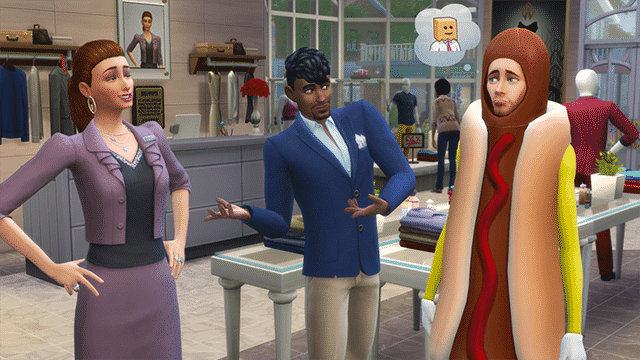
Mess with your employees. Being able to hire employees opens up plenty of opportunities to business-owners. Some are useful, while others are more devious. For instance, you can hire a highly skilled employee and demote them to the bottom pay level. Their job satisfaction will take a huge hit, but if you sweet talk them enough (and have the Mega Manager business perk), you might get plenty of bang for your buck. You could also create a special uniform for your employee of the month… or alternatively dress up an employee who’s doing poorly in an embarrassing clown outfit (or a hotdog, my own personal favourite).

Create a store within a store. On the outside, Drake’s clothing store was fairly typical and ordinary. It sold shirts, pants, hats, and even some sleepwear. But in the back room, he had a… something else. Wander back there if you want to buy the secret stuff: the slickest Gnomes money can buy.

Create the perfect side business. You can make your retail business your main job. Create a store, open it every day, and work until your Sim is nearly falling asleep on the floor. But if you want, your store can be supplemental to your main career. Writers can sell their books, or – if you’re looking to double up on The Sims 4 Get to Work’s new features – you can have your Scientist run an Elixir shop as a side money-making venture.

Run a specialty store. Nearly everything in The Sims 4 can be sold in your retail store, meaning you can theme your shop in any way you want. Obviously you can run a Bakery or a Photo Studio, but if you want to get more specific and creative, you can do some really cool things. You can open a Seafood Market by catching fish and selling them from cold display cases, or even a Wedding Shop. You can sell wedding arches, wedding gowns, wedding cakes, wedding flowers, wedding furniture… even a grand piano. Everything a bride-to-be needs!

TS4_477_BUSINESS_01_002

Take advantage of advertising. Creating a shop is only half of your job as a store-owner – you also need to make sure you’re successful. One way to do so is by advertising, but you can manage your ads even closer if you really want to maximize profit. Purchase an Advertising Campaign on the web to create a rush of customers to your store, and hire extra employees to deal with the extra customers. Once the effectiveness of the advertising starts to wear off, send the excess employees home for the day so their hourly wages don’t eat into your profits.

Play with your customers (and employees) emotions. Sims in The Sims 4 can be very emotional, and you can take advantage of that if you’re running a retail store. Sims that are in a good mood are easier to talk to, and employees that are inspired are better at schmoozing. If you put items around your store to manipulate these emotions, it’ll be easier for your customers to have positive social interactions, making them more likely to buy.


The Sims 4: CAS CC Lookbook #7

LOOKBOOK

Hair / Skin / Skintone / Eyes / Eyelashes / Eyebrows / Eyeliner (EA) / Lipstick (EA) / Top / Skirt (EA) / Shoes (EA) / Pose 1 / Pose 2

TS4 2015-04-05 01-26-29-25

Hair / Skin / Eyes (there is a problem with these eyes where they will switch back to EA default eyes, the creator will fix it ASAP) / Eyebrows / Dress / Leggings / Shoes (EA)

TS4 2015-04-05 01-17-57-92

Hair / Skin / Facemask / Eyes / Eyebrows / Top / Bottom / Shoes (EA)

Click Here for more information on how to install Custom Content!

Download these Sims on The Gallery here, here and here.