Home Blog Page 492

The Sims 4: December Update release date (via Amazon)

2

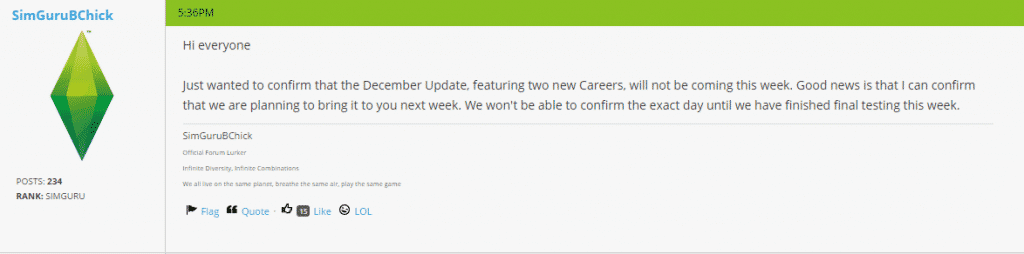
Update: SimGuruBChick has confirmed that the new patch will release next week. Thanks for the tip @JohnBigOz!

Capture

Amazon.co.uk‘s The Sims 4 standard edition product page has revealed a list of this year’s The Sims 4 Patch releasements that bring new content. They also listed a possible release date for the December patch – 16th of December!

Capture

The Sims 4’s Free December patch will feature 2 new Careers: Business and Athletic. Business will feature management and investor branches while the Athletic career will feature bodybuilder and professional branches.

Thanks for the tip @JohnBigOz!

The Sims 4 Tutorial: How to extract Household Photos

13

Before we begin with explaining how to extract Household Photos from The Sims 4, you need to know that for this Tutorial you’ll need The Sims 4 Package Editor. (Click Here to download it).

You need to create and save the Household in order to generate a photo of your Household (duh).

For more angles and screens of your Household, click on the Randomize Portrait icon before saving.

CaptureCapture

Now, open Documents > Electronic Arts > The Sims 4 and make a copy of localthumbcache package file in a different folder.

Open S4PE file and in that program, select File > Open > localthumbcache that you copied.

Since these Household photos are one of the largest files in localthumbcache, sort the items inside this package by clicking the Filesize sort so that the files go from biggest to smallest.

Capture

Select files from the top and then file by file to the bottom until you find your Household.

Now that you’ve found your Sims, right click on that file and select Details.

Capture

In the Type section, remove every letter and add 0x3C2A8647 and select OK.

type1 type2

Since S4PE for some reason confuses file groups, you’ll need to select a file that’s a different type than the file you edited.

alltypes

Then, right click on the file you edited and select ”Export to Image” option. Select where do you want to save it, name it and select Save.

Capture

Your Household photo is now finished and ready for use!

household4tutorial

You can also use these same steps and extract each Sim individually. Just seek for your desired Sim in the files and follow the steps above.

sim1tutorial sim2tutorial

The Sims 4 Tutorial: All about Woodworking

19

Woodworking allows your Sim to express their Creativity (and Emotions) by crafting wooden decor and useful objects.

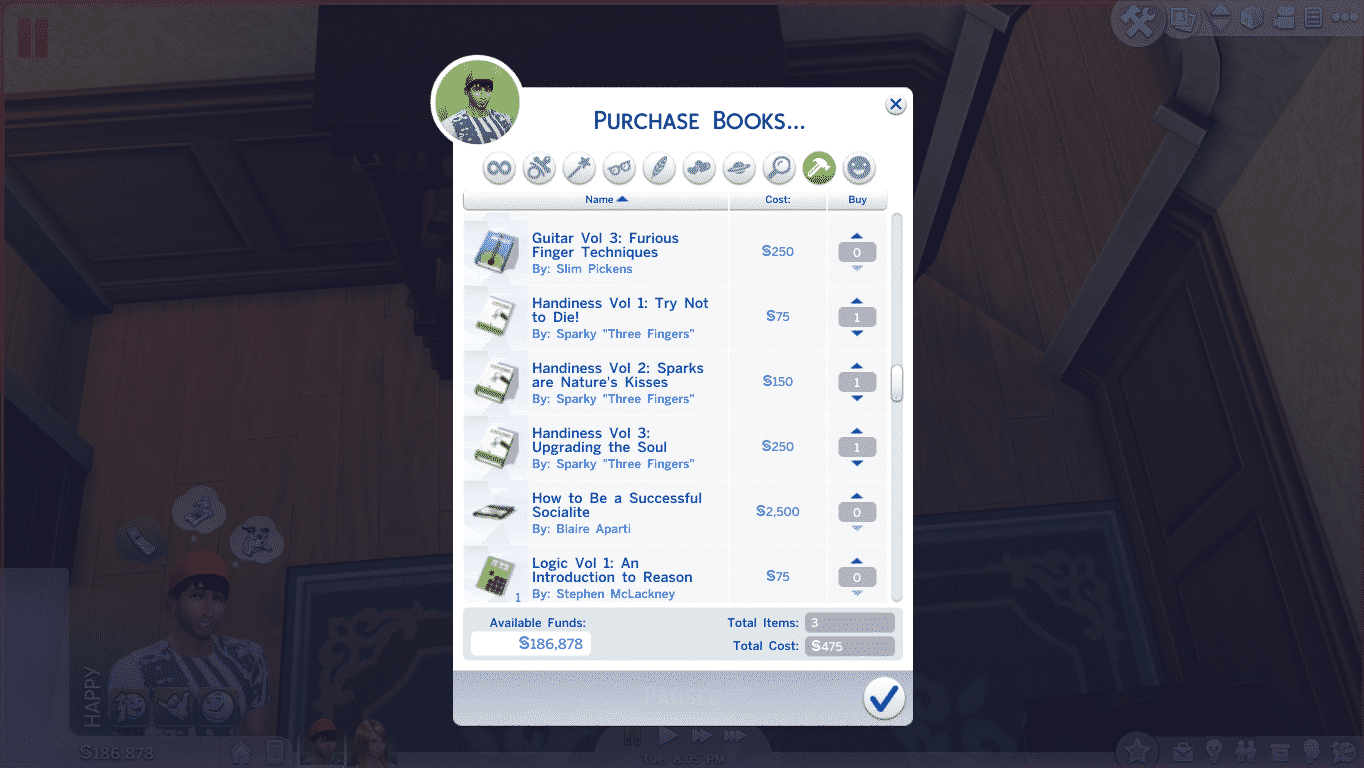
Before you start with wooden adventures, it’s recommended that your Sim purchases and reads Handiness books so that they create better quality objects and make that process accident-free.

TS4 2014-12-06 13-52-49-99

You cannot craft wooden items without the Woodworking Table. This Table is available in Build Mode for 1,800 Simoleons.

Tip: Place the Woodworking Table along with some decor that’ll help your Sims stay Focused. Focused Sims build better quality objects.

Tip #2: The bigger your Handiness Skill is, the more objects you’ll be able to build. Your chances of building a Good or Excellent objects also increases with the skill.

TS4 2014-12-06 13-27-58-45

12-06-14_2-47 PM 12-06-14_2-53 PM-2 12-06-14_3-04 PM-2

Facts:

  • It takes longer for a Perfectionist to finish with creating an object, but the object they create will certainly have a higher quality.
  • Certain Emotional Sculptures possess certain Emotional Auras. Their Moodlet strenght depends on a Sculpture’s quality.
  • Sims who completed the Painter Extraordinaire Aspiration are, thanks to their earned Expressionistic Trait, able to make Emotional Sculptures of their choice disregarding their current emotional state.
  • You can find Sculptures in your Sims inventory after finishing them, while objects that you create can be found in your Household inventory.
  • Clumsy and Dazed Sims have a higher chance of pinching their fingers while woodworking, giving your Sim a +1 Uncomfortable Moodlet.
  • Sims who mastered the Handiness Skill will receive the ”So Handy!” +2 Focused Moodlet each time they finish creating an object.

Wooden Objects


Object

Requirements

Cost

Value (Excellent Quality)

Horse Sculpture

Level 1 Handiness Skill

§10

§40

Knife Block

Level 1 Handiness Skill

§5

§20

Angry Sculpture

Level 2 Handiness Skill + Angry Emotion

§7

§30

Flirty Sculpture

Level 2 Handiness Skill + Flirty Emotion

§7

§30

Sad Sculpture

Level 2 Handiness Skill + Sad Emotion

§7

§30

Playful Sculpture

Level 2 Handiness Skill + Playful Emotion

§7

§30

Barstool

Level 2 Handiness Skill

§15

§24

Elephant Sculpture

Level 3 Handiness Skill

§10

§40

Dragon Sculpture

Level 3 Handiness Skill

§10

§40

Bunny Sculpture

Level 3 Handiness Skill

§10

§40

End Table

Level 4 Handiness Skill

§52

§210

Large Lumberjack Sculpture

Level 5 Handiness Skill

§15

§60

Large Bear Sculpture

Level 5 Handiness Skill

§15

§60

Dining Chair

Level 6 Handiness Skill

§45

§180

Dining Table

Level 6 Handiness Skill

§157

§630

Guitar

Level 8 Handiness Skill + Level 8 Guitar Skill

§300

§1200

Violin

Level 8 Handiness Skill + Level 8 Guitar Skill

§212

§850

Child’s Violin

Level 8 Handiness Skill + Level 8 Guitar Skill

§45

§180

Wooden Bath Tub

Level 9 Handiness Skill

§377

Around §700

Wooden Toilet

Level 10 Handiness Skill

§55

§220

Note: We couldn’t get an exact price of the Wooden Bath Tub due to a Script Error when plopping this object.

Sculptures

12-06-14_7-34 PM

Objects

12-06-14_7-32 PM

Instruments

12-06-14_7-35 PM

Low Quality Objects

12-06-14_7-42 PM

Emotional Sculptures

woodworkingemotions

The Sims 4 Custom Content: Holiday String Lamp Set

This Set has been brought to you by The Sims Resource member – DOT!

Holiday String Lamp Set. Modern, Traditional and Contemporary Holiday Lighting that never goes out of style. In all your favorite Holiday colors from Red and White to Orange and Black for Halloween.

Click on the picture below to download this Set!

w-600h-450-2529454

Click Here for more information on how to install Custom Content!

SimCity & Cities of Tomorrow: Concept Art

0

Created by Jeong Keum!

 Click on the pictures below to enlarge them!

Casino_city_fuzzout Casino_city_night_5 city_hall_5 Eiffel_tower_withlogo SimCity_concept_CoalCity futurecity_sketch_05 high_wealth_megatower_crowns megatower_sketch_J_06

The Sims 4: First Expansion Pack Hints!

5

Update: several moments after, Taylor removed her Tweet. Luckily, we saved a screenshot!

A singer and songwriter Taylor Parks has shared an interesting tweet about her interesting day at Electronic Arts. When asked was she working on an Expansion Pack for The Sims 4, she confirmed ”yes”!

Capture

Tip: The Sims Style

SimCity Update: Transfer Cities/Regions from Multiplayer to Single-Player

5

SimCity team has released a brand new Patch that lets you transfer your Cities/Regions from your Multiplayer saved game to your Single-Player game!

Forum Post

Update 10.3 is available now. This update adds the ability to transfer your Regions and Cities from the game servers to Single-Player for Offline play. To get the update simply restart SimCity.

How to transfer your Cities to Single-Player

  • Launch SimCity and connect to the game server
  • On the Main Menu select the PLAY tab
  • You will be taken to the Region select screen where you will see the Regions you have created on the server
  • Select a Region which contains a city you want to take to Single-Player
  • You will be taken to the games Region View
  • You will see a “Transfer Region” button, click this button to start the transfer process from Multiplayer to Single-Player
  • Once the transfer is complete, you will receive a notification of completion
  • Click OK
  • You will be returned to the Region select screen where you can continue to transfer additional Regions and Cities to Single-Player


You can also do this by highlighting your Region after selecting PLAY from the Main Menu. A “Transfer Region” button will appear. Clicking the button will commence the transfer process.

Note:

  • The whole Region and its Cities will be transferred for use in Single-Player
  • You will automatically become Mayor of cities within the Region unless it contains content you do not currently own.

– If this is the situation you will be able to visit the city which uses the content.
– The city will continue to trade and simulate automatically at the same rate it had when on the game server.

  • If you purchase additional content after transferring a region you may be able to claim cities using additional content, simply load any city in your region that you control, the next time you return to the Region Overview screen if you own the same or more content than the visited city you will be assigned control of the city.
  • The file size of the download can vary depending on the number of Cities in the Region. Each city has an approximate file size of 1MB.
  • Once you have transferred your region from Multiplayer to Single-Player, your Cities in that Region will be abandoned. Other players in your Region will be able to continue online in Multiplayer or also opt to transfer to Single-Player at a later time.
  • When you transfer a City to Single-Player, the most recent Region that was transferred will appear in the top left slot of your save games.

The Sims 4: Custom Content Tracker

Hey everyone, it’s Zerbu here!

I come today with a brand new tool for users of custom content, The Sims 4 CC Tracker. It performs one simple function: it lists the .package files you used for a certain Sim.

Previously, if you wanted to share a Sim that used CC, you would need to manually keep track of the CC you used in order to link back to it.

I might update the program in the future to include lots and rooms, but I’m not making any promises.

You can download The Sims 4 CC Tracker here: http://zerbu.tumblr.com/post/104251575512/the-sims-4-cc-tracker

CC Tracker

Sims Community: Holiday Wallpaper!

3

We made a special Holiday Wallpaper just for you Simmers!

This Wallpaper comes in maximum resolution, in 16:9 and 16:10 formats.

To download it, click on the wallpaper format of your choice. It will re-direct you to a new tab. Then, right click on the wallpaper, select ”Save Image As” and choose in which folder would you like it to download.

Click Here to check out some of our other Wallpapers!

2560×1440 – 16:9

holidaywallpaper2

2560×1600 – 16:10

holidaywallpaper1

The Sims 4 Custom Content: Holiday Yard Lights

This Set has been brought to you by The Sims Resource member – DOT!

Holiday Yard Light Set. Traditional and Contemporary Large Christmas Lighting in Red, Green, White and Gold to brighten your favorite Sims Yard. 7 Sims 4 Lamp Meshes by DOT of The Sims Resource.

Click on the picture below to download this Set!

w-600h-450-2524983

Click Here for more information on how to install Custom Content!

The Sims 4 Mod: Servo from The Sims 2 (Skin + Traits)

This Mod has been brought to you by The Sims Resource member – Esmeralda!

TRAITS:
I included two sim trays, one for the male version, called ‘Servo’, and one for the female version, called ‘Servette’, so that you’d have two already-made sims ready to go instead of having to fiddle around with making either gender. I gave them different aspirations for variety – one can be a cook, the other a gardener.

Male Servo: Master Chef/Essence of Flavor, Neat, Cheerful, Geek
Female Servo: Freelance Botanist/Collector, Neat, Cheerful, Geek

Click on the picture below to download this Mod! (Requires MTS registration)

MTS_Esmeralda-1484931-ServosinCAS-thumbnail

Click Here for more information on how to install Custom Content!

The Sims 4: No December Update this week!

4

SimGuruBChick has confirmed that The Sims 4 Patch that’ll add 2 new Careers and other new content is delayed and won’t be released this week.

Patch/Update testing runs right up until a few days before the go live date. Sometimes, we find a major bug at the last minute and then have to delay going live. We don’t like to provide firm dates in case we have to delay. Hence the “early warning system” of BatGnome avatars.

However, I can confirm that there will be no Update this week.

In case you didn’t know, The Sims 4’s Free December patch will feature 2 new Careers: Business and Athletic. Business will feature management and investor branches while the Athletic career will feature bodybuilder and professional branches.

We’re also expecting a free holiday sweater. (number 4 won the Poll contest on The Sims Forums).

eswfif6b2xpz

Origin: Cyber Monday (75% off on selected titles)

0

Click on the picture below to check out these offers. Offer expires 11:59 PM today.

Capture

The Sims 4: Mod Workshop

Hey everyone, Zerbu here! I’d like to introduce you all to my custom modding tool: The Sims 4 Mod Workshop.

First of all, for those of you not familiar with the file formats that will be mentioned in this post, I’ll run through them:

  • XML is a common text format used for storing data. It is not exclusive to The Sims, in fact most of you reading this will probably already know what XML is. In case of The Sims 4 though, or at least the part relevant to The Sims 4 Mod Workshop, it is the main file type used for pieces of content (buffs, traits, aspirations, etc).
  • DATA is a custom binary format used mainly for handling rendering and  UI, and works together with an associated XML file. DATA files don’t alter the effects of gameplay, but do effect what is displayed.
  • STBL is a custom binary format containing a table of text strings used by the game.

The Sims 4 Mod Workshop (or TS4MW for short) is a tool for modders which primarily performs cloning tasks on XML and DATA files. Without the tool, you’d have to manually copy files, use a tool to generate a hash, and then manually alter the instance. The process was tiring, and huge mods were out of the question unless you had an insane level of patience.

With The Sims 4 Mod Workshop, all that’s a thing of the past. TS4MW allows you to perform a text search on XML files, and then with just a few extra clicks, the program will automatically copy the XML file and any associated DATA file to the assigned result folder, update the instance and name the file in a way that it can be quickly imported using S4PE. You could be spending hours less than you would cloning the files manually.

There is also a Mod Manager tool, which displays all XML files in your result folder in a way similar to the Clone tool (including optional search features), and contains buttons to quickly open the XML file in your default XML/text editor, or its associated DATA file in your default DATA editor, without having to open the folder in Windows Explorer.

The latest version of TS4MW allows you to clone up to 3 levels deep (with a command line code for removing the limit) for any content type. For example, you could clone an aspiration track, its category, its reward trait, its levels and all its associated goals all in one use of the cloner tool. The references are automatically replaced, even the ones in the DATA files. You can also clone STBL strings and copy them into the tool’s built-in STBL editor, so you won’t have to rename every piece of content manually.

You can get The Sims 4 Mod Workshop here: http://zerbu.tumblr.com/post/102988245727/the-sims-4-mod-workshop-version-2

Screenshots

1

2

3


4

The Sims 4 Gallery Spotlight: 28/11/14

11-28-14_9-02 PM11-28-14_9-04 PM

 Sweet Indulgence created by Tashifae

Value: §227,811
Size: 30 x 20
Type: Residential

A beautiful creation that any Sim would love to spend their lives in.

Download this lot on the web version: Sweet Indulgence

Creators description:
#pretty #gardens surround this #family ready lot that’s fully #furnished with #nocc. 3 outdoor patios give easy access to wrap around #pool. #30×20 Sim #tested. Made by Tashifae. Happy gaming.

11-28-14_9-17 PM11-28-14_9-20 PM
Modern Class created by RaisingHell12

Value: §214,376
Size: 50×50
Type: Residential

This massive home is stunning and has plenty of room for many Sims!

Download this lot on the web version: Modern Class

Creators Description:
#sims4 #celebrity #luxury #mansion #modern #kids #family #furnished #home #house #unique #decorat

11-28-14_9-31 PM-311-28-14_9-32 PM

Cozy Family Home created by jennifermeurer

Value: §203,906
Size: 40×30
Type: Residential

I adore this house and so will your Sims. 🙂

Download this lot on the web version: Cozy Family Home

Creators Description:
#house #cool #cute #sims4 #modern

11-28-14_9-37 PM11-28-14_9-39 PM

Black and White created by bullibs

Value: §180,198
Size: 40×30
Type: Residential

This unique house caught my attention straight away. Everything is set out perfectly to the theme, well done!

Download this lot on the web version: Black and White

Creators Description:
#apartment #house #garden #kitchen #dinningroom #nursery #office #family #bath #beth #staly #sims #sims4 #luxury #modern #restroom #study #celebrity #room #dressingroom #kids #design #qotik #pool