

TwistedMexi warns about “AI Slop” Game Mod Tools for The Sims 4.
In the wake of the March 2026 Patch for The Sims 4 that caused many issues within the Sims 4 mods and custom content community, tensions have been incredibly high and many creators during this time period have been stuck between their own problems with getting their mods updated due to the initial patch issues that caused their CC and mods to not load properly, as well as users of their mods turning to them for tech support in the midst of the confusion surrounding the update. This, in turn, led to a rise in alternative suggestions for fixing folders rather than the standard of removing mods (especially script mods) and using the “50/50 method”.
With issues of CC and Sims 4 mods not being recognized, excessive crashing and last exceptions, etc., a noticeable flood of new tools intended to streamline the process have appeared online and promoted to The Sims community. These tools often promote tons of features, some that already exist in known and well-vetted programs in the community, as well as some features that seem a little too good to be true.
Popular Sims 4 Mods Creator Warns About Recent Wave of Game Mod Tools
TwistedMexi, a creator known for their incredibly popular Sims 4 Mods used widely in the community that focus on improving player experience and adding utilities to make modding the game loads easier, put out a notice to members of their Discord server after seeing multiple posts floating around online regarding new third-party programs to make sorting through your mods folder easier, even claiming to take most or all of the work out of it for the actual player, while often not providing any background info as to who it was created by, their experience in The Sims community and elsewhere, and what the program actually does.
TwistedMexi’s experience and history in The Sims community is enough to make them a fairly reputable source on technology and tools to make The Sims 4 modding experience easier, having created mods like Better BuildBuy, TOOL (Take Objects Off Lot), and BetterExceptions. All these mods help Sims 4 mod users to streamline their experience in-game, customize it to its full potential, and to make figuring out the causes of the dread last exception errors much easier.

Rash of “AI Slop” Community Tools
TwistedMexi on Discord
All,
Unfortunately these have become so commonplace and so destructive to players games that this announcement has become necessary. At this point, it seems like every few days a new tool pops up out of nowhere claiming to automagically fix all of your mod woes from outside of the game entirely. They often have generic names similar to “Mods Saver”, “Mods Fixer”, “Mods AutoFix”, “S4 Mod Magic”, “Sims 4 Mod Mover”, “S4 Crash Fixer”, etc.
Players should remain cautious & avoid any community made tools that have seemingly popped up overnight from creators with no established reputation, claiming to fix your mods folder, 50/50 for you, etc.
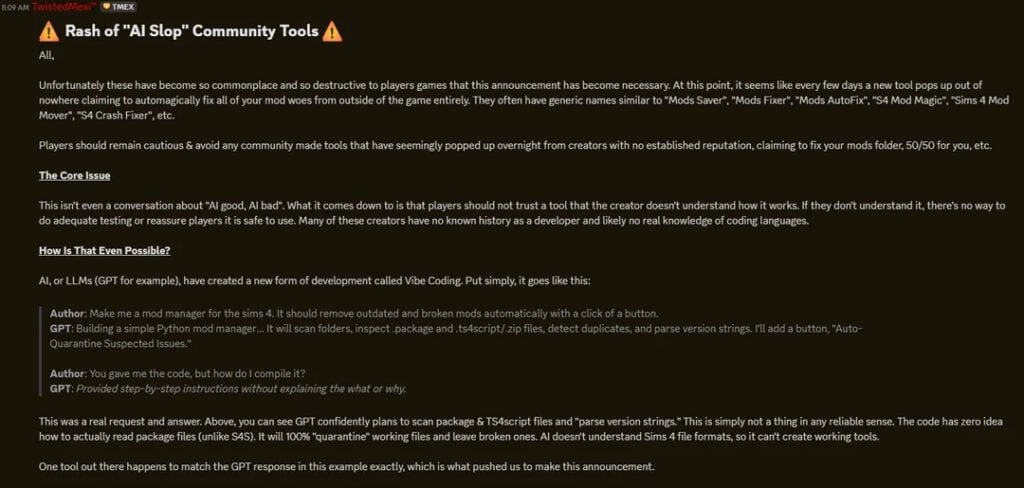
The Core Issue
This isn’t even a conversation about “AI good, AI bad”. What it comes down to is that players should not trust a tool when the creator doesn’t understand how it works. If they don’t understand it, there’s no way to do adequate testing or reassure players it is safe to use. Many of these creators have no known history as a developer and likely no real knowledge of coding languages.
How Is That Even Possible?
AI, or LLMs (GPT for example), have created a new form of development called Vibe Coding. Put simply, it goes like this:
Author: Make me a mod manager for the sims 4. It should remove outdated and broken mods automatically with a click of a button.
GPT: Building a simple Python mod manager… It will scan folders, inspect .package and .ts4script/.zip files, detect duplicates, and parse version strings. I’ll add a button, “Auto-Quarantine Suspected Issues.”
Author: You gave me the code, but how do I compile it?
GPT: Provided step-by-step instructions without explaining the what or why.
This was a real request and answer. Above, you can see GPT confidently plans to scan package & TS4script files and “parse version strings.” This is simply not a thing in any reliable sense. The code has zero idea how to actually read package files (unlike S4S). It will 100% “quarantine” working files and leave broken ones. AI doesn’t understand Sims 4 file formats, so it can’t create working tools.
One tool out there happens to match the GPT response in this example exactly, which is what pushed us to make this announcement.
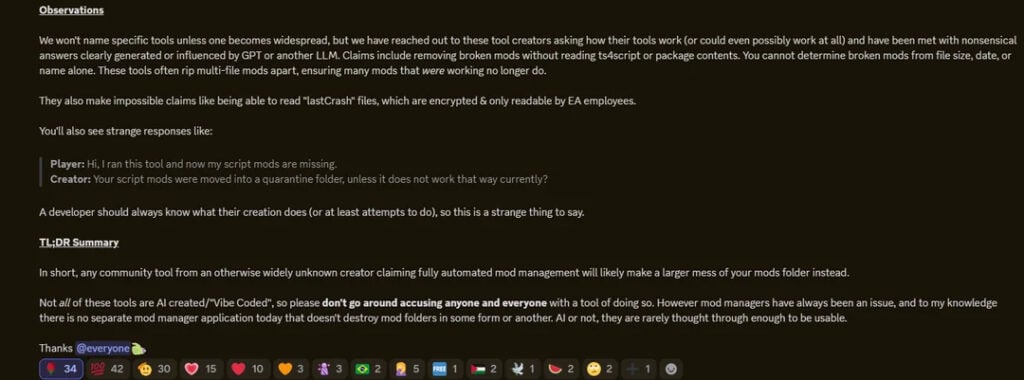
Observations
We won’t name specific tools unless one becomes widespread, but we have reached out to these tool creators asking how their tools work (or could even possibly work at all) and have been met with nonsensical answers clearly generated or influenced by GPT or another LLM. Claims include removing broken mods without reading ts4script or package contents. You cannot determine broken mods from file size, date, or name alone. These tools often rip multi-file mods apart, ensuring many mods that were working no longer do.
They also make impossible claims like being able to read “lastCrash” files, which are encrypted & only readable by EA employees. You’ll also see strange responses like:
Player: Hi, I ran this tool and now my script mods are missing.
Creator: Your script mods were moved into a quarantine folder, unless it does not work that way currently?
A developer should always know what their creation does (or at least attempts to do), so this is a strange thing to say.
TL;DR Summary
In short, any community tool from an otherwise widely unknown creator claiming fully automated mod management will likely make a larger mess of your mods folder instead.
Not all of these tools are AI created/”Vibe Coded”, so please don’t go around accusing anyone and everyone with a tool of doing so. However mod managers have always been an issue, and to my knowledge there is no separate mod manager application today that doesn’t destroy mod folders in some form or another. AI or not, they are rarely thought through enough to be usable.
Thanks everyone
In the same vein as TwistedMexi’s announcement, we won’t directly mention any specific programs to avoid spreading any accusations without the creators themselves being able to address them. What tools do you use to sort through your mods folder and keep things in check?
Make sure to follow The Sims Community as we keep you in the loop with popular, new, and upcoming Sims 4 mods and mod creators, as well as any news springing out of the community! (We also have a guide on the 50/50 method, if you’ve been running into issues with your mods as of late!)

