Home Blog Page 471

The Sims 4: Bunny Egg Hunt Challenge!

2

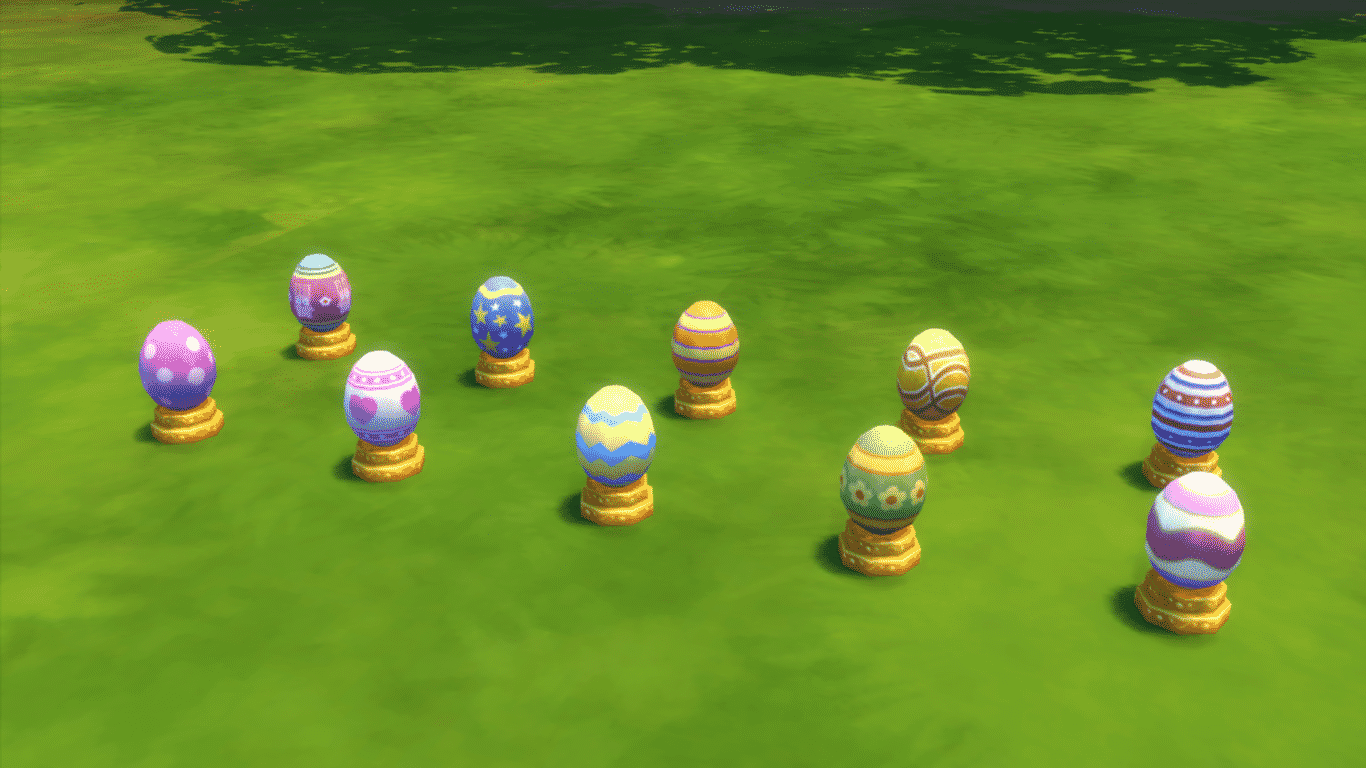
Thanks to the latest The Sims 4 Update, your Sims are able to hunt for Eggs in the upcoming weeks! (Challenge lasts throughout April).

To find all 10 Decorative Eggs, search for the Fallen Logs which will spawn randomly around any Neighborhood. You’ll be prompted to search for Frogs when clicking the Fallen Log, but don’t worry, you’ll either end up with a Frog, an Easter Egg, or both!

03-27-15_9-12 PM-2

You can also find Decorative Eggs by harvesting any type of Plant or by digging a Rock and searching for Treasure!

You’ll be able to keep track of all the Decorative Eggs you’ve collected in the Household Collections window.

TS4 2015-03-27 21-55-24-11

Once you find all 10 Eggs, you’ll receive 100 Simoleons as well the Bun Bun stuffed Bunny Toy that’ll be delivered into your Mailbox. After you Get the Mail you can find Bun Bun in your Household inventory. This Toy can also be bought for 155 Simoleons after you finish the Challenge.

03-27-15_9-26 PM

Each Egg is worth 10 Simoleons.

Once the Challenge is over, you’ll be able to purchase these Decorative Eggs in BuyDebug using the bb.showhiddenobjects cheat.
03-27-15_9-54 PM-2

The Sims Blog: Basements, Bunny Eggs, and Painting Upgrades Added in Free Update

0

Via TheSims.com!

We rolled out a free Update to all The Sims 4 players this week. If you’ve loaded up the game recently there’s a good chance you’ve already downloaded the Update. If not, you’re in for a surprise – it’s packed with some great new content, totally free to our players.

Besides general tweaks and fixes which you can read about in the patch notes, this patch adds four updates into the core game: Basements, an upgrade to the easel, two new hairstyles (unlocked thanks to the hard work of the community during WooHoo weekend), and a Bunny Egg Hunt that’ll run through the month of April.

Let’s start with the biggie: Basements and a fourth top-floor. These aren’t just any basements: they’re The Sims 4 basements. You can dig two levels down, and customize them using all of the creative tools available in Build Mode to create absolutely incredible lots. And while we were at it, we added another floor above ground – now, buildings in The Sims 4 can be six floors in total, up from three. @SimGuruRomeo wrote a blog about these changes earlier this week, so feel free to check it out for more information.

TS4_470_FAMILY_PORTRAIT_Social

If you’re looking for something new to decorate those basements with, there’s something in this Update that’ll do the trick. Easel updates were rolled out in this new patch, and they let your Sims paint portraits of what they can see in the world. Want to portrait of your Sim’s loved one on the wall? Do it! Want to paint a picture of your house to put in your house? A little weird, but we’re not going to get in your way.

We’re also starting a time-limited challenge that’ll run through the month of April. We’re calling it the Bunny Egg Hunt! This month, your Sims might find some interesting decorative eggs scattered around the world. There are ten different designs in all, and they’re part of a new collection that’s only available for the next few weeks. If you collect them all, you’ll unlock a giant stuffed bunny!

TS4_473_BUNNY_EGG_HUNT_001

We’re really excited for these updates, and look forward to seeing all of the amazing creations you make with them.

The Sims 4 Update: Paint from Reference Feature

7

Your Sims can now capture any picture around them (in their head of course) and Paint it on the Easel!

Once you reach the 3rd Painting Skill Level, you’re able to Paint from Reference. Click on the Easel, select that feature and move the camera around to pick your best scene to paint.

TS4 2015-03-27 00-52-00-07 TS4 2015-03-27 00-54-14-28 TS4 2015-03-27 01-03-53-20 03-27-15_1-04 AM

There’s also a new feature that allows you to create a Copy of your painted work. Each Copy costs the amount of how much that painting is worth.

TS4 2015-03-27 00-54-24-74

The Sims 4 Update: Move Lot Build Feature

1

The new Update now allows you to move your entire Lot (not just the House).

To start playing with this feature, open the Move Lot & House section (icon with 4 arrows) and select Move Lot.

TS4 2015-03-26 20-58-09-23

This feature is more fun to showcase with a House bigger than the Lot itself, so we’re going to use the Yuma Heights 40×30 House on a 30×20 lot.

TS4 2015-03-26 21-09-45-16

As you can see on the picture below, the House is too big for the Lot, but you’re still able to move it around, rotate and place it.

TS4 2015-03-26 21-09-55-36

The green blueprints show objects and rooms that will be implemented into the lot, while the objects and rooms highlighted with yellow won’t be plopped on your lot.

03-26-15_9-10 PM

The Sims 4 Update: New Hairstyles and Lipsticks

0

Great news for the Create A Sim lovers! The new Patch for The Sims 4 has brought a new Hairstyle for males and females (from Teens to Elders).

03-26-15_8-34 PM 03-26-15_8-32 PM

The fun doesn’t stop there though. Female Sims can enjoy in 3 new Lipstick variations. Each new Lipstick brings lots of Presets.

TS4 2015-03-26 20-35-10-74 TS4 2015-03-26 20-35-16-37 TS4 2015-03-26 20-35-26-11

The Sims 4 Update: Worlds User Interface

0

New The Sims 4 Update brought some new User Interface changes, including the brand new re-design of the Worlds UI.

If you have The Sims 4 Outdoor Retreat installed, you can find Granite Falls under the Destination Worlds section on the top left corner.

Willow Creek and Oasis Springs belong in the Home Worlds section.

TS4 2015-03-26 19-46-33-22 TS4 2015-03-26 19-46-48-78 TS4 2015-03-26 19-46-51-76

The Sims 4 Update: My Packs Feature

1

With the latest The Sims 4 Update, you’re now able to view all the Packs that have been released (or announced) and installed on your PC so far.

The My Packs button can be found on the top right corner next to The Gallery icon.

TS4 2015-03-26 19-44-36-84 TS4 2015-03-26 19-50-06-00

You can also view all the objects of each Pack including Get to Work, so make sure you check out all the CAS and Build Objects this Expansion Pack has to offer!

What’s also new is the Introduction screen you get for each Pack you have installed.

TS4 2015-03-26 19-50-15-39 TS4 2015-03-26 19-50-35-63

The Sims 4: New Update! (26/03/2015)

Via EA Help!

Update: 03/26/2015 – PC Version 1.5.139.1020 / Mac Version 1.5.139.1210

Hey Simmers,

It’s the end of March and Get to Work is inches away from your fingertips. However, but before you work your way into a new expansion, we’ve got a release full of stuff.

We’ve got NEW! We’ve got UPDATES! We’ve got Bunny Eggs? We’ve got performance improvements! We’ve got fixes! And hopefully you are comfortable as you read on.

So, let’s jump in with…


What’s New?
What’s new for building?


  • Basements!
    • Build 2 levels down to create the ultimate in underground excellence.
    • The Basement Tool is found in the Build sort, next to the Wall tool. Dig in and start building.
  • An additional above ground floor is available for a total of 4 up and 2 down
    • For the mathematically challenged, that is SIX FLOORS!
  • Move Lot is now an option under Move Lot & House in Build Mode, and can be used to pick up and rotate the entire lot. You can also use the shortcut key [Y] to access the tool
  • You can now download lots from the Gallery that are larger than your current lot, and crop them to fit.


What’s new in the game?


  • Paint from Reference is a new option on the Easel that lets Sims paint family portraits, landscapes, or whatever else you want!
  • We have added a Notebook, found in the phone menu, under a tiny button at the top of the menu (we tried to make the button even smaller, but some folks wanted you to find this new feature).
    • Now as your Sim is gardening or fishing and they make discoveries (such as splicing recipes, or what bait caught what fish) these discoveries will be catalogued in your Notebook.
  • Your Sims will now meet and build relationships with their co-workers and schoolmates.
    • Actions that you can take while your Sim is at work/school have been updated to allow you to gain relationship with or meet more co-workers/schoolmates.
  • Non-played Sims (sometimes referred to as townies) now have jobs!
    • The “Ask about Career” interaction has been updated to provide career information for Sims that you meet.
    • The career information discovered will be found in the Relationship panel. Hover over the Sim portrait to see their career, schedule, and, if they work at a venue (like the bartender), where they work.
  • Overmaxing!
    • When you reach the top of a career, there is a reason to continue to perform well, as you can now continue to gain rewards and promotions.
  • We have revised the interface for traveling to and choosing worlds to play. Click on the icon in the upper left corner of the map to take it for a spin.


What’s new in content?


  • Our first challenge rewards are hair… um, here! A new hair for Female and Male Sims. Look for them in Create A Sim, because if you are looking for them elsewhere, we should consider having you talk with someone.
  • Gnomes are new! Well, these gnomes are new! Gnomes are old, I mean historically speaking they are quite old, but in our game they are older, I think, though I guess we’ve never really asked how old, but we can talk about that another time.
    • Mr. Floppy the Gnome is available for home decoration
    • And if you dare… Guardian of the Gnomelaxy is also hiding in our catalog.


What’s new in The Gallery?


  • Now you can see who is following you from the Player Profile page.
  • The file size for downloads is now available in The Gallery.


A Challenge you say?
The Bunny Egg Hunt is on! For the month of April, you will be able to hunt and search out 10 decorative eggs, each with a different design – found in various locations in the world (some might say an egg lays with the frogs). As you collect each egg, your collection information will update in the Household Collection panel. You can collect multiples of the same design but they don’t contribute to your Collection.

Collect all 10 of the different designs to unlock a reward… it’s big, it’s stuffed, and it might be a bunny. But I’m not confirming this information.
Well, that’s about it. Except, there is more… do you want the rest? Better start reading.
Performance
The development team has been hard at work making performance improvements to various systems in the game. Some are the low level, under the hood type that will shave a millisecond here or there, some are a bit more. I’ll do my best to keep the technical jargon to a minimum.


  • Gameplay decision making has been made more responsive.
    • Posture decision making has been optimized – this would be something like how the Sim decides whether to Sit or Stand.
    • Autonomy decision making has been improved in determining the time it takes for a Sim to decide what to do next.
    • Broadcasters have been optimized – a broadcaster is something like a plate of food that has spoiled, and it is just sitting in the corner of the lot yelling “Hey, I’m here! I’m spoiled! I offend, don’t I? Yes, yes I do. Pay attention to me!”
  • Memory optimizations have been made to the amount of memory the game is using during runtime.
    • Memory use is a leading cause of thoughts, actions, and software crashes.
  • Addressed a large performance spike that was caused by hovering your mouse cursor over the pool and pool edge.
  • Improved the performance of the View Screenshots section of the memories interface.
    • Users should not experience excessive hang times when loading this screen.
  • Made several improvements to the visual creation of the Family Tree when opened to view
  • Fixed a performance issue that was resulting in too many unique Sims being created due to a previously created Sim being added to a “Don’t use me” list for far too long when they were needed. We have shortened the “Don’t use me” list length.
  • Save Time optimizations have been made which will speed up save operations as well as travel times.


Issues
In addition to all the new content, features, and performance improvements being added with this release, we have fixed a few issues.


Build (General)


  • If you place two blocks next to one another, and then place a column on the shared wall between them, then set the walls to cutaway view, which will hide the columns, and then you move one of the blocks, the columns that were left behind were remaining invisible. This is now fixed.
    • Have you noticed how issues with building lots are incredibly complex when describing their reproduction? Yea… me too.
  • Stairs placed parallel to double doors should no longer clobber the double doors placement.
    • Yes, “clobber” is a proper technical term – to clob, clobbing, or the act of being clobbed.
  • Fixed an issue that was causing an objects shadow to remain stationary while the object was being rotated.
  • Fixed an issue that resulted if you deleted a light and then chose to undo that deletion, it would kill the ability for the light to ever turn on again.
    • 3 out of 4 teen sweethearts agree we should never have fixed this issue.
  • Counters placed diagonally will now appear visually correct, rather than leave a gap.
  • Placing objects on a roof will no longer clobber objects in the room below it.
    • “Clobber” must be the proper term, I keep using it over and over again.
  •     Fixed an issue that would reset adjustments made to the eaves, after using the Move Whole House tool to rotate the house.
  • Mailboxes can now be deleted from a venue lot, or re-added from the catalog if one does not exist.
  • Wall visual settings will now properly respect donut block creation and deletion.
    • Donuts are however not respected, and will be devoured on sight.
  • We fixed an issue where walls built near pool edges were sometimes creating odd routing issues, which were preventing Sims from being able to use objects placed on the walls such as mirrors or paintings.
  • Stairs now move with the supporting block when using the Move Whole House tool.
  • Fixed a z-fighting issue that would result when friezes of different colors would overlap.
  • Sharing lots or rooms to the gallery with craftables (potions, wood working objects, or similar) and player planted plants will no longer remove the crafted objects and plants.
  • Fixed an issue that was causing all seats at the edge of a pool to become momentarily invalid when entering and exiting Build Mode, which would result in Sims resetting if they were on the way to use the pool.
  • Fences enclosed within a block built using the wall tool should no longer be improperly lit.
  • Fixed an issue where undoing the action of drawing a wall next to a staircase was causing gaps to appear in the stair geometry. Young Harry is pleased.
  • The Rattlesnake Juice lot is apparently not flat. This resulted in pools that were placed upon this lot being non-routable. We have corrected the issue.


Content


  • The trash plant will no longer change soil type throughout its growth cycle.
  • Sim can now fish at all posted fishing spots near Willow Creek Archive.
    • Sims rejoice. Fish swim.
    • Did you think I was going to say fish panic? Or run for cover? Have you talked with a fish lately? They don’t do much, kind of swim left and right, open and close their mouth… that’s about it.
  • Updated some of the fishing spots to provide greater variation in rarity.
  • Fixed an issue that would cause paintings to appear self-illuminated on some graphic cards.


Gameplay


  • Sims have a handedness that is set by the game, yep, surprised me too. We fixed an issue where if that Sim was shared to the Gallery they could lose the information that told them which hand they preferred.
  • School will no longer count as a career when attempting to complete the Fabulously Wealthy aspiration.
  • Sims will no longer route fail when multiple craft actions are queued up on the Woodworking Bench.
  • There is now a thought balloon that will inform you that you are overfeeding your baby if you overfeed your baby.
  • We fixed an issue that was disabling Build Mode if you queued up travel and then cancelled the travel action before the map screen.
  • You can now go into Create A Sim and change the name of any of your Sims.
    • So go ahead, download Mr. Fluffy URox0r, because, well… you can change his name.
  • Sims will no longer talk to the dead space that was previously occupied by a traveling Sim.
    • They tried to smile it off, as if the other Sim was really still there listening, but we knew and we snickered a little when they weren’t looking.
  • Fixed an audio issue that could occur when attempting to re-connect online that resulted in the background audio track playing on top of itself.
  • Objects will no longer fade in Camera Man Mode (aka the camera that is accessed when using [TAB])
  • Fixed an issue that was preventing the correct price from showing when attempting to sell a stack of items from the Sim Inventory.
  • Fixed an issue that would prevent ultra-speed from being available after the Maid had left the lot.
  • We fixed an issue that could occur if a household was split via Manage Worlds. It was not properly handling the relationships of the Sims in the household, and parents were not properly being remembered in their child’s relationship panel.
  • Babies no longer will have an unknown trait in their relationship panel display.
  • You can now edit Teens in Create A Sim if they are the only member/s of a household.
  • Tranquilized Sims will now gain energy while they are sleeping.
  • Fixed an issue where food that was left to spoil inside a microwave would prevent a Sim from being able to use or clean the microwave. In some cases this would also prevent the Sim from being able to clean up dishes anywhere on the lot.
  • Sims are no longer allowed to Try On Outfits at a mirror placed over a pool.
  • Sims can now eat food that was placed into the household inventory through a move out or clobber function once that food had been replaced on the lot.
    • So in the real world this would be…I cooked a turkey pot pie, and left it on the counter. And then moved out of my house, leaving my belongings behind for the new owners. The new family that is moving in unpacks and finds the turkey pot pie. And now… they can eat it. That’s… yuck.
  • We fixed an issue that could result when downloading several items (household, lot, or room) to My Library that was causing the ID of the items to conflict with one another, eventually resulting in the inability to place them.
    • Or as auto-correct would have you believe, the id, because, as we know, The Gallery has no ego or super-ego of its own.
  • We fixed an issue that would cause the Sim to place a book on the ground while seated at a desk, and as a result, then reach through the desk to pick the book up if they wanted to read it.
    • And then they might step to the left, and then to the right. They might put their left foot in. And they might pull it back out. And sometimes, though not often, they might put it back in again and shake it all about.
  • Swimming in the pool will now clear the singed state of a singed Sim after being singed by a fire.
  • Sims will no longer walk on water if they were seated close to the edge of the water when instructed to Swim.
  • Sims can now choose to clean up spoiled food from their inventory while swimming. They will not clean up the spoiled food in the pool, they will get out of the pool in order to clean up the food.
  • Fixed several issues with validating object use while swimming in a pool that could manifest in ways such as attempting to use a bed while swimming would result in a route fail.
  • Teens should no longer lose muscle mass from aging from Teen to Young Adult… don’t worry teens, you have plenty of time to lose muscle mass later.
  • Sims who went into labor while on a vacation lot, and went home, were finding they were in a perpetual state of labor. They will now be able to give birth as desired.
    • We’re very sorry, and deeply regret the trauma imposed upon the Sims who had to endure an unusually elongated labor period.
  • Turns out the fire protection coating applied to babies upon birth was being absorbed by the bassinets, preventing them from burning when no baby continued to reside within them. Sadly, due to a licensing agreement with the Baby No Burn Fire Proofing Protection System, we are not legally allowed to maintain this level of protection when the baby is no longer present in the bassinet and as a result, the bassinets can now burn, turn to ash, and be utterly destroyed by the ravages of a burning inferno.
  • The “Own a Bar and 2 Barstools” goal for the Master Mixologist aspiration will now actually check to ensure you own a Bar.


Interlude
A moment of randomness. I feel every day should have at least one. Stand up and cheer for no reason. Go ahead, do it. Have you ever walked near someone, and just said something completely random (“oh, the salad fork has two tines!”) as if it were a forgone conclusion, smile to yourself as though you had solved a significant issue by coming to this conclusion, and walked on without further need to speak? It’ll make you, and them, smile.

And now back to our release notes currently in progress…


  • Fixed an issue with the Audio Focus option. If checked, the game audio will now properly duck when the game is minimized, rather than just get really, really quiet.
  • Fixed an issue that was causing the pay bills action to become unstable if the player queued up Pay Bills more than once in a row.
  • Fixed an issue that was causing the Mourning buff to remain stuck on the Sim, resulting in unnecessarily long streaks of sadness, which could cause death, which could cause other Sims to acquire the Mourning buff, which … well you see where this is going.
  • Children, when directed to draw shapes at the Activity Table, will no longer stand, sit, stand, and then sit again before performing the action.
    • They may however still have hidden desires to twirl three times before lying down to sleep.
  • You now can now turn the Spooky and Holiday speakers back on after turning them off, because that would be silly to not allow them to be turned on more than once.
  • Revised the eating vs. idle choice for Sims to weigh more heavily upon the eat side than previously.
  • Sims will no longer believe that toilets will increase their Fun need, causing the Sim to use the toilet excessively when it is the only “fun” thing on the lot.
    • Sitting is fun, sure, but flushing is IN-CRAY-DA-BELL!
  • Fixed an issue that could result in a Sim that was supposed to be at work to show up at home but behave as if they were at work.
  • If you delete your current save while in game, you will no longer be booted to the main menu.
  • The option to “Create New Household to Move In” is no longer available in Granite Falls.


Interface


  • Hovertips are now less blurry.

    • If you find they continue to look blurry, eat more carrots.
  • Attempts to comment on the content of a user who has blocked you, will now tell you.

  • Fixed an issue with the cursor in Build Mode, where it was not properly updating as you click on various objects in the catalog.

  • Changing the relationship of Sims in Create A Sim who have the same last name, will no longer remove their last name.

  • Notification messages will no longer show a Sim of a different age than the Sim who drank a Potion of Youth

  • This is not easy to do, I tried it, so if you ran into this issue, congratulations on your issue finding skill! We fixed an issue that could occur if, while live dragging an object (your mouse is down to do this), you dragged the object over the Sell option in the Sim Inventory, and then quickly clicked sell multiple times (which requires you to click the mouse button, thus releasing the mouse down state), the sell confirmation dialog that appeared would appear for each click made.

  • Switching the age or gender of a Sim in Create A Sim while viewing an outfit category other than Everyday will no longer reset the Everyday outfit to a seemingly random outfit.

  • In order to avoid any further confusion, all references to “Go Here” shall henceforth be known as “Swim Here” for all swim related travel actions.

  • Crafting a flirty sculpture on the woodworking bench will now inform you that it is a flirty sculpture when you hover over it.

  • We fixed an issue where clicking on the dimmer bar, rather than dragging the button, was not dimming the lights.

  • Fixed an issue where long names were being cutoff in the Genetics panel in Create-A-Sim.

    • This should help anyone who has named their Sim “WWWWWWWWWWWWWWWWWWWW” but could only see the name as “WWWWWWWWWWWWWWW”
  • Fixed an issue in The Gallery that prevented Show Custom Content and Show Unowned Content filters from being present if the online access was disabled.

  • Spamming Go to Work will no longer grow infinitely in the action queue.

    • Jack, the queue is not your beanstalk.
  • Placing a room from the gallery when you do not own the objects contained within, will now yield an in game message as to the removal of the unowned content.

  • [Mac specific issue] You can now use the left and right command button when attempting to alter the camera angle.


The Sims 4: CAS CC Lookbook #3

LOOKBOOK7

Hair / Skin / Facemask 1 / Facemask 2 / Eyes / Eyebrows / Outfit / Boots / Bracelet / Pose 1 / Pose 2

LOOKBOOK8

Hair / Skin / Facemask 1 / Facemask 2 / Eyes / Eyebrows / Ear Piercings / Eyelashes / Top / Shorts (EA) / Boots (EA – Outdoor Retreat) / Bracelet (EA) / Pose 1 / Pose 2

LOOKBOOK9

Hair / Skin / Skintone / Eyebrows / Eyeshadow / Outfit / Shoes / Pose 1 / Pose 2

Click Here for more information on how to install Custom Content!

Download these Sims on The Gallery here and here.

The Sims Blog: Get Ready for Basements in The Sims 4

0

Via TheSims.com!

Hello everyone! SimGuruRomeo here to give you a quick look at basements in The Sims 4, part of a free update releasing on March 26. When we started working on basements we wanted to make sure they were special. These aren’t just any basements, these are The Sims 4 basements. That means maintaining the flexibility of game’s building systems. We wanted basements to really take advantage of the tools you already know how to use, and to allow the same level of creativity we’ve seen since launch.

Basement Image

Using the new basement tool, you’re able to draw a basement from the floor above easily. Once it’s there, you can begin building with all of the normal build tools, making just about anything you can think of. We’ve had a lot of fun in the past few weeks building different things using the new basements and The Sims 4’s creative tools.

What makes them so great? Well…

You can build them two levels deep. If you’re not content with simply one level of underground housing, we have you covered. You’re able to build a second level underground as well. This, mixed with the addition of one more floor above ground that’s being added with this free update, brings the new total house size to six floors – double what it was before!

You can delete their ceilings. After you build a basement (or two) you can select the basement block, navigate to ground level, click the yellow highlighted area, and completely remove the ceiling. We’ve had a ton of fun creating everything from underground bunkers to open-air houses that look like giant holes in the ground.

You can put pools in the basements. Who hasn’t wanted to drop into their personal basement pool for a midnight swim? But basements can be even cooler than that. Besides being able to create pools in basements, you’re also able to build pools adjacent to basements. That means a pool can be right up against the side of a basement, and if you make the pool’s walls out of glass, you’re basically making a giant human fish tank.

Basement2

You can make your Retail Business even weirder. So, you’ve built a fun bakery in The Sims 4 Get to Work* using the new retail system. Awesome! Good work! But what if you wanted to expand your business? You could always build a shop in your basement, too, selling anything from toilets to… alternative clothing.

Excited? You won’t have to wait long to build your own basements. They’re available in a patch rolling out, for free, to all users on March 26 in anticipation for next week’s launch of The Sims 4 Get to Work.


Origin Update (25/03/15)

6

Open your Origin program to download the new update! Version 9.5.10

originupdate

The Sims 4 Custom Content: Karlstad Living Room

This Set has been brought to you by The Sims Resource member – ArtVitalex!

– Karlstad Sofa
– Karlstad Sofa Pillow
– Karlstad Ottoman
– Karlstad Coffee Table
– Karlstad End Table
– Karlstad Hole Shelf of Drawers
– Karlstad Hole Shelf
– Karlstad Shelf
– Karlstad Floor Lamp
– Karlstad Vases
– Karlstad Paintings
– Karlstad Books

Click on the picture below to download this Set!

w-600h-450-2573916

Click Here for more information on how to install Custom Content!

The Sims 4 Get to Work: IGN Preview

0

03-11-15_10-44 AM-3-720x405

In The Sims 4, we were impressed with Sims’ wide breadth of emotions and their newfound ability to multitask, but we admitted in our review that the base game was (unsurprisingly) “barren” of content, readying itself for countless expansion packs to come. Between then and now, EA has countered this by releasing staggered online updates containing new features, and in January the game received its first, camping-themed ‘Game Pack’ – add-on content that offered a bit more extra gameplay than any of The Sims 3’s numerous Stuff Packs.

Firstly, I gave the new careers a whirl, curious to see how EA had tackled the concept of playable work venues. When it comes to work time, following your Sim to work is only an option – you never have to tag along with him or her if you simply don’t feel like it – but it’s a great break from day-to-day Sim life. Workdays play out in their own separate lots as a sort of nonlinear minigame, where you’ll have Sims perform small tasks towards a larger objective – for instance, a doctor may be tasked with putting a patient through a battery of tests in order to diagnose and cure them. The jobs aren’t always thrilling, like a detective’s occasional snoozy day of patrolling the streets and issuing tickets to litterbugs.

Continue Reading

The Sims 4: CAS CC Lookbook #2

LOOKBOOK4

Hair / Skin / Skintone / Eyeshadow (EA) / Eyelashes / Outfit / Boots / Bracelet (EA – Outdoor Retreat) / Pose 1 / Pose 2

LOOKBOOK5

Hair / Skin / Skintone / Eyeshadow / Outfit / Shoes (EA) / Pose 1 / Pose 2

LOOKBOOK6

Hair / Skin / Skintone / Eyeshadow (EA) / Eyelashes / Top / Shorts (EA) / Shoes (EA) / Pose 1 / Pose 2

Click Here for more information on how to install Custom Content!

Download this Sim on The Gallery here.