Home Blog Page 499

The Sims 4 Custom Content – 2 New Hairstyles by MJ95!

Created by The Sims Resource member – MJ95!

So this is the first hair I’ve ever made for sims and also my first TS4 creation, so silky and smooth. Mesh is completely new (made by myself) and low poly, Joints are perfectly assigned. Texture is modified EA texture. All LODs are replaced with new ones. This hairstyle is available for hat category. It is also available in all EA colors.

Click on the picture below to download this Hairstyle!

w-600h-450-2506378

I hope you liked my first TS4 hair because here comes the next one! Mesh is completely new (made by myself) and low poly, Joints are perfectly assigned. Texture is modified EA texture. All LODs are replaced with new ones. This hairstyle is available for hat category. It is also available in all EA colors.

Click on the picture below to download this Hairstyle!

w-600h-450-2510095

Click Here for more information on how to install Custom Content!

The Sims 4 Custom Content: Bedroom Simplicity Set

A modern bedroom set with 6 items.

Set contains:

double bed – 2 color options
end table – 2 color options
dresser – 2 color options
rug – one color
painting – 3 color options
wallpiece – 2 color options

Click on the picture below to download this Set!

w-600h-450-2508753

Click Here for more information on how to install Custom Content!

The Sims 4 Blog: Whims, Aspirations & Goals Quick Guide

0

Blog Post

Hi Simmers –

We build big games with a lot of stuff to do. There’s a LOT of content in The Sims 4 that you might not know exists if we didn’t point it out. One of the ways we do this is with our Goal systems, including Whims and Aspirations. These goals create what we call a “breadcrumb” trail to the content and, when completed, give you a nice reward to change your strategy, options, and story in the game.

Today, I snapped some screenshots to go over a few of the things you might have missed.

Whims

I told my Sim to take a Brisk Shower. This gave her the Energized Emotion. Sims always have two basic Whims, which are the little fluffy clouds above their Portraits. However, when Sims have any Emotion other than Fine (which is our neutral Emotion), they get what we call an Emotional Whim. This Whim is in the far left and is based on their current Emotion.

Emotional Whims are designed to point you towards content that you can ONLY do while in that Emotion, OR ways to fix your current Emotion. If your Sim is Sad, for example, you might get a Whim to Water your Garden with Tears.

If you hover your cursor over any of the Whims, you can find information on that Whim. You’ll find the high level subject, where it came from (an Emotion, Trait, or Aspiration), how much Satisfaction you’ll receive for completing it (more on that in a second), and a detailed explanation. See the little red X? If you ever don’t want to complete a Whim, or want a different one, simply click that X, and it goes away.

whims_blog1

Read More

The Sims 4 Tutorial: Making Memories

5

Making Memories in The Sims 4 is simple as pressing the C button on your keyboard. Well, maybe not that simple…

After taking a Screenshot in The Sims 4 (with the C keyboard button), click on the Camera Controls button on the top right corner and select ”Memories & Pictures” option. You’ll get a panel of all the Memories of your Sim, but since you probably don’t have any Memory in there, you’ll need to import one. To do so, click the ”View Screenshots” option on the bottom right corner.

Click on a Screenshot that you want to use as a Memory and select the circled icon that says ”Click here to make this screenshot a memory for all selected Sims”.

Note: only Sims who are inside the Screenshot can make that certain Screenshot a memory and can reminisce about it!

After you’ve done that, go back to your Memory panel and select the Memory you imported. To reminisce about that Memory, you’ll need to select  type of that Memory (which Emotion should trigger; Angry, Embarrassing, Confident, Romantic, Sad, Happy)

TS4 2014-10-25 01-28-02-10 TS4 2014-10-25 01-28-19-69

After you’ve set that, you can finally throw back to the past! Each Memory gives your Sim a +1 worth of Emotional Buff (doesn’t matter which Emotion). You can do so by clicking on a Memory and selecting the cloud icon that says ”Reminisce about this Memory”.

TS4 2014-10-25 01-30-04-39

The Sims 4 Custom Content: Halloween Props Set

Heads up: Halloween starts in just one week! Don’t forget to make spooky Sims and Houses and upload them to The Gallery.

Click on the picture below to download this Set!

w-600h-450-2508705

Click Here for more information on how to install Custom Content!

The Sims 4 Custom Content: Eloisa Living Room

Click Here for more information on how to install Custom Content!

This is an asian yet contemporary living room consisted of finest quality furniture. This living room is the perfect choice for those Sims who are looking for cozy but stylish furniture. Let them sink into the lovely loveseat or the comfy living chair and enjoy their day.

Click on the picture below to download this Set!

w-600h-450-2508628

SimCity BuildIt now available in Canada! (Android)

1

SimCity BuildIt has got unlocked on Google Play a week ago for New Zealand and Australia, but now players from Canada are reporting that they can now download the game and play it as well!

If you’re from Canada/New Zealand/Australia and own an Android phone that has decent specs, then click on the picture below to download SimCity BuildIt!

Capture

The Sims 4 Custom Content: Pumpkin Patch Set

Halloween is only about a week away! This Pumpkin Patch Set of Objects created by sim_man123 for The Sims 4 will go perfectly for decorating your House for Halloween.

For more information on how to install Custom Content, Click Here!

A few simple items to help your sims get read for Autumn! This set features a hay bale that can be used as a table, a wagon (also a table), and two sizes of pumpkins – each with three recolors.

Click on the picture below to download this Set!

w-600h-450-2505488

The Sims 4 Custom Content: Asian Bedroom Set

Creative The Sims Resource member Severinka  published her set of 7 Asian-themed objects for The Sims 4!

For more information on how to install Custom Content, Click Here!

Set of bedroom furniture in Asian style. This set will be an indispensable Addendum for your oriental home.
The set includes: bed, dresser, table, bonsai, wall sculpture – the coin of happiness, vases, partitions.

Click on the picture below to download this Set!

w-600h-450-2508436

The Sims 4 – Invisible Lights are back!

8

With The Sims 4’s latest update, Invisible Lights from The Sims 3 World Adventures update are now back to The Sims 4 as well!

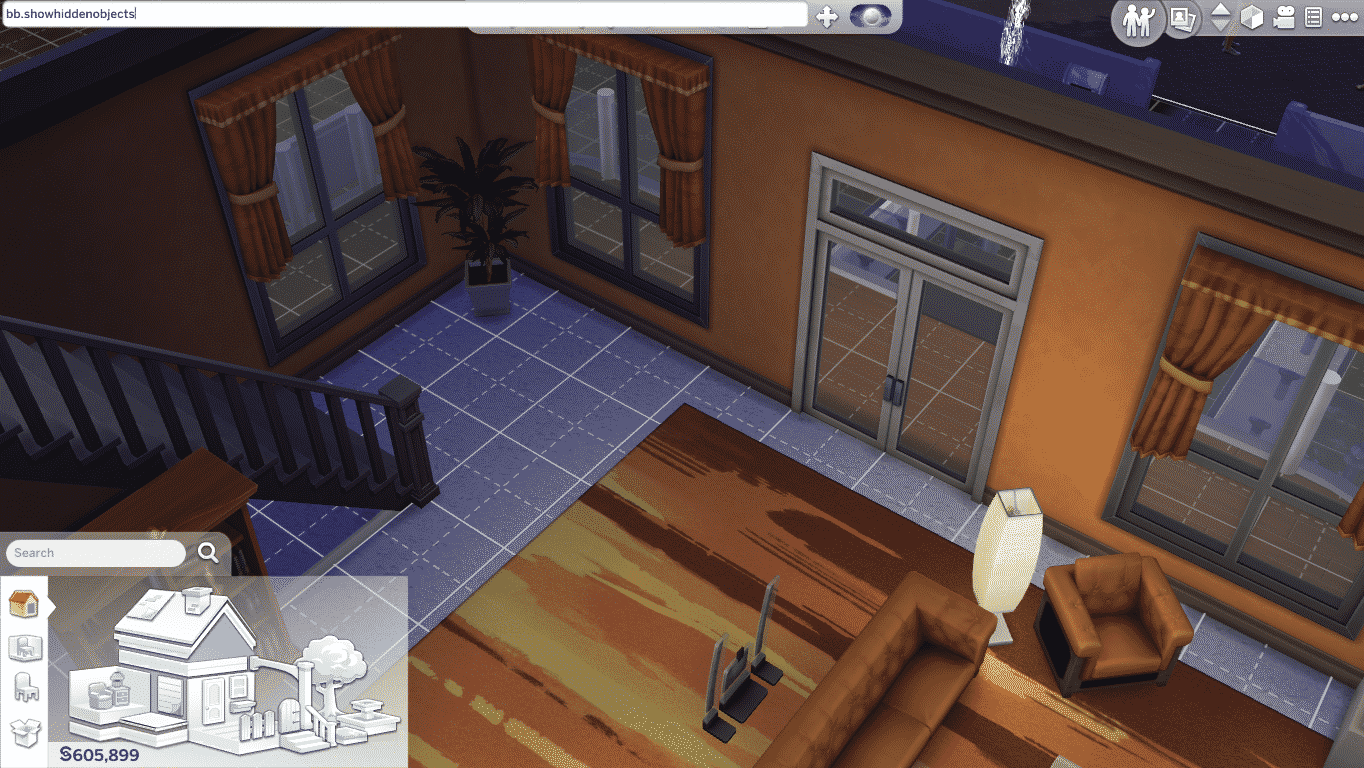
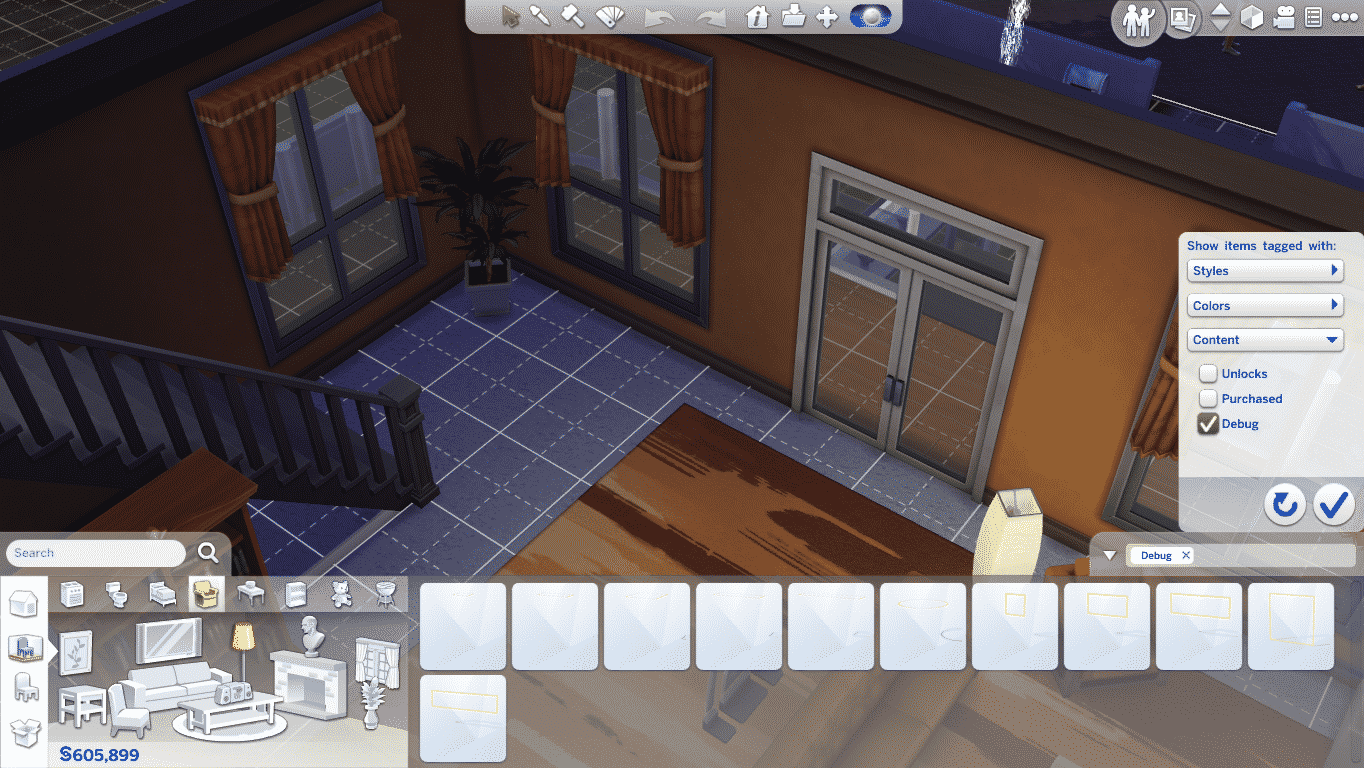
To add invisible lights into your Room, open Build Mode and enter the bb.showhiddenobjects cheat. Select filters and choose Content > Debug.

TS4 2014-10-21 23-33-02-44 TS4 2014-10-21 23-33-19-58

You can plop any Invisible Light you want into your room. There are all sort of sizes for a ceiling and wall/floor invisible lightings.

After you’ve finished adding invisible lights, the yellow outline on each lighting will disappear and all you’ll see in Live Mode is light without the light source.

TS4 2014-10-21 23-34-41-09 TS4 2014-10-21 23-34-46-70

The Sims 4: Skills Live Broadcast Replay (21/10/14)

0

This video was split into 3 parts due to broadcast issues. First 2 Parts last 6 minutes total, while the third part lasts 55 minutes. Part 3 is the one you should focus on!

Part 1Part 2Part 3

The Sims 4 Game Update (21/10/14)

To update your The Sims 4 game to the latest version, simply open your Origin and the game will automatically update for you!

Capture

Update: 10/21/2014 – Version 1.0.797.20

Hello Simmers, readers of patch notes, and other developers who just happen to be searching the internet for examples of how other teams are writing up their release notes!

We had a few issues we felt needed to be addressed sooner rather than later, and have tackled them in today’s patch! Many of these issues were brought forth by the community through the forums. We thank you for your efforts, your posts, and your focus in helping us create a better experience with The Sims 4.

Some bugs you might be keen to know were fixed: The “Eye and jaw width looks funky” bug! The “I can’t get married if my fiancé died” issue! And the “My Sims can’t age up anymore” bug.

The other issues which we have fixed are detailed below, and we are always dedicated to fixing performance and gameplay blocking issues in order to provide the best gaming experience possible. Please keep posting on the forums. We do read them and we are tracking issues that you are finding.  Thank you!

Crashes / Performance

  • Fixed an issue where the game could enter into an infinite load after all Sims in a household had died.
  • Fixed a performance issue resulting in too many hidden Sims being created for “just in case” scenarios. Resulting in a large number of Sims being loaded that were not needed.
  • Scrolling left in the Memory timeline will no longer freeze your game. Yea… we just… don’t ask…
  • Fixed an issue that was caused by placing a Sim from the gallery into multiple households that could result in either simply causing the appearance to revert to the original Sims appearance, or could cause the household to become unplayable.
  • Fixed an issue that would result in the player being unable to place a Room from the Gallery if the room had been uploaded with a single plate of food.

Tuning

  • Fixed an appearance issue that caused Sims to incorrectly appear with small eyes and wide jaws on age up. This was a result of a modifier value being improperly ignored for one age group, that resulted in the value being incorrectly applied, and was exacerbated if a Sim moved into or out of that age group.
  • The grieving period is over… Sims can now attempt to marry again if their fiancé has died.
  • Players can once again tell their Sim to age up with a cake, regardless of the Auto Age setting. On a side note, I feel strongly as though I should have used the word irregardless, if only to anger my co-workers who contend that the word is not a word. I feel however, that it is a perfectly fine word, irregardless of their feelings.
  • Fixed an issue where Widows and Widowers were not being properly given their relationship status as Widows and Widowers.
  • Sims made from the same Gallery Sim will now properly populate the world as desired, rather than secretly kill off their clones before moving into the world.
  • Fixed an issue where Ambrosia was “sort of” allowing itself to be copied in Build Mode, however, while it was charging full price for the copy, it was only delivering an empty plate with FX.
  • Resurrected Ghosts by way of Ambrosia, will properly age up upon their return to the land of the living… which is unfortunate because they are just going to die again.
  • Fixed an issue with the Throw 5 Parties goal not counting thrown parties correctly, making it impossible to throw a party that would satisfy the Throw 5 Parties goal. We have thrown together a few lines of code, talked to all parties involved, and verified that it is once again possible to throw a party that satisfies the Throw 5 Parties goal.
  • Fixed an issue preventing Ghosts from showing up as valid targets in some Sim Picker dialogs, such as Write Love Email or Send Spam Money Request to.
  • Teens can now write Love Emails to other Teens.
  • Ghostly Repair will now satisfy the Repair an Object whim.
  • Added a venue wall speaker for the Spooky station into the debug catalog.
  • Fixed an issue that would cause a Sim to attempt to repair a working shower, if the broken shower was on the 2nd floor.

UI / Text

  • Manage households will no longer show empty households as a result of Sims dying from old age.
  • Fixed an improper string update which resulted in the 1st goal of the Writing aspiration informing you that you should “Read 1 Book at the Library,” rather than the correct goal of “Beat Writer’s Block”. Odd that the writing aspiration had an error in the text.

EA Post


Giveaway: Win The Sims 4 SteelSeries Peripherals!

328

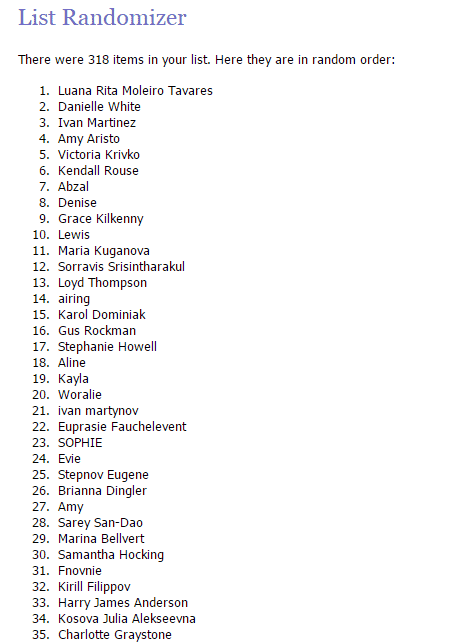
Congratulations Luana Rita!

Random.org selected you as a winner of this giveaway.

random_org_giveaway_311014

SteelSeries recently published their new video for The Sims 4 Gaming Gear and with that they gave us a full set of TS4 Peripherals to give away to one lucky Simmer!

To enter this giveaway, all you have to do is write a few sentences in the comment section below on why would you like to win these Peripherals.

The winner will be chosen randomly via random.org. We’ll make sure to provide a screenshot after we choose the winner.

This giveaway ends on 28th of October, 2014 (21:00 – GMT +01). The winner will be announced on October 31.

Before entering this giveaway, please note:

  • This giveaway is for Simmers worldwide.
  • Make sure you provide a correct E-Mail address when writing a comment!
  • If you make a mistake in your original comment and/or want to add something, just write a reply to your existing comment.
  • In case you can’t submit your comment, contact us at contactsimscommunity@gmail.com and we’ll be happy to help you!
  • Cheating is NOT allowed! If you try to represent as someone just so you have a bigger shot of winning, you will be disqualified.
  • Foul language is NOT allowed!
  • In case the winner doesn’t reply 48 hours after we publish the results, we’ll pick a person who’s #2 on random.org list.

Good luck to all of you who are entering this Giveaway!  🙂


Origin: 30% off on The Sims 4 (UK & USA)

0

Origin is selling The Sims 4 and The Sims 4 Digital Deluxe for 30% off it’s original price! This offer is valid for all of those living in USA or UK.

This offer will expire on 24th of October, 2014!

Click on the picture below to check out this offer!

Capture