Home Blog Page 534

SimCity FreePlay is on it’s way!

1

SimsObjekt and SimTimes are reporting that SimCity FreePlay is on it’s way to Android and Apple App Stores.

We’ll make sure to update you once we find out the release date!

simcity_mobile_1_w-600x449 simcity_mobile_2_w-600x449 simcity_mobile_3_w-600x449 simcity-mobile-logos

Translated from Deutsch:

This new SimCity mobile game features a system for resource management in which you establish different materials such as wood, stone, concrete, etc., to build buildings or to improve.

In this new SimCity game, you have certain tasks such as the production of resources do to make new buildings and expand areas of the city. The more a building, for example, value (which depends on the income from layer), the longer construction times.

The new SimCity game is offered free of charge. The application also provides the ability to purchase items such as game currency in the game. The in-game currency you can use in different ways. You can use it to shorten the construction time and buy missing resource that you need for the construction and expansion of the areas.

The game builds on the foundation of authentic SimCity brand and has been optimized for mobile phones. This genuine city-building simulation allows you to control your city, manage, edit strategically and tinker it – and the whole thing with a groundbreaking graphics in 3-D quality.
The only 3-D city-building simulation for mobile phones in which it is possible is, your thumb and index finger to zoom in and zoom out and see a 360 degree view. Enjoy the experience, with a tap on the phone to pull up entire buildings. Wherever you are on the go: You decide yourself how long you play.


Origin says goodbye to Physical Discs!

2

Starting 4th of April, Origin will no longer provide Physical Copies from the Origin Store. Here’s what they have to say about this:

Starting April 4th Origin will be going all digital. This means the entire Origin game store will be entirely digital downloads for PC and Mac.

What does this mean for you? If you’re among 99% of our users, absolutely nothing. Your shopping experience hasn’t changed one single bit.

But if you’re that 1% who still desires a physical collection, we want to let you know that Origin won’t be able to fulfill that need beginning April 4th. We’ll still be here when you transition your gaming habits to the wonders of digital downloads.

Digital is fast and convenient. Origin’s focus is to give gamers the best experience, and going all-digital will make that possible.

Capture

New ”On The House” Origin Feature

0

Origin has decided to be very generous to their users. They’re deciding to giveaway 1 game/expansion pack every once in while!

Right now, they’re giving away Dead Space. Click Here to claim it while the offer lasts (due 8th of May).

Click on the picture below to check out this new Origin Feature!

Capture

About ‘On the House’

Free?! What’s the catch?
There’s no catch. Grab full games, expansions and more at absolutely no cost. Just make sure to act fast because On the House specials can appear and disappear at any time.
You mean a trial or demo, right?
Nope. You’re getting a full version of the real game — for free!
How long will I own the game?
Once you’ve claimed your game, it’s yours to keep!
Why is Origin doing this?
We’re gamers, too. We appreciate you making Origin your gaming home … and besides, who doesn’t like free stuff?

The Sims 4 – Tattoo’s WILL be included in the base game!

0

New The Sims 4 Screenshot clearly shows Andre (Sim in the yellow T-Shirt) with Tattoo’s all over his hand.

1780098_682466608459079_1797378517_o

SimGuruGraham made an interesting reply related to Tattoo’s on Andre’s hand:

Capture

The Sims 4 – Custcenes will NOT make a return!

0

The Sims 4 Team mentioned Cutscenes at the Game Developer Conference.

SimGuruGraham stated on TS3 Forums that there won’t be Cutscenes in The Sims 4!

Capture

Forum Post

The Sims 4 – Walking Down the Abbey Road (NEW SCREEN)!

0

The Sims Facebook Page posted a photo of Sims in The Sims 4 walking down the Abbey Road!

The Sims 4: Now recording the soundtrack at Abbey Road Studios. LIKE if you’re excited to hear it!

This confirms that The Sims 4 Soundtrack will be recorded at the Abbey Road Studios!

1780098_682466608459079_1797378517_o

The Sims 4 Comparison Photos by Mushilda

0

Take a look at these new The Sims 4 Comparison Photos made by a talented Simmer, Mushilda!

BiC4LvFCMAASymO BiYZUXLCcAAYR_A BiYZn8bCIAAmZa4 BiYX0_PCcAAM_Zx BiOv2uiCAAAK1Lh BiIxeu3CUAE0_ks BiIw9SOCMAASpuU BiC37FvCQAA-yKO

SimCity Blog: The Extended Worker Data Mod and more

0

Hello again, Mayors – I’m Guillaume Pierre, the Lead Gameplay Scripter and a designer on SimCity. You may have read the recently published SimCity Modding Policy postedhere and have wondered how to make Mods yourself.

Today I’m going to talk about a few Mods I’ve been working on. I hope this helps you make your own. Please note, these Mods are to be used strictly at your own risk, as they don’t go through a testing process like an official game update would. As you may already know, there is no official SimCity Mod tool set, so I’ve used a third-party service,Oppie’s SimCityPak tool*.

The Extended Worker Data Mod

Have you ever wondered how many jobs of each wealth level a work building supports? This Mod adds three bars to the civic, commercial and industrial buildings rollovers that gives you just that information. It will also help you make informed decisions in regards to zoning for residential buildings.

ExtendedWorkerData

In order to make this Mod, I created a new piece of UI with a matching data binding function. Fortunately, there was already an example similar to what I wanted to do in the MegaTower Office level rollover, so my first task was to copy the layout with the three bars into a new file.

I then looked up how the worker data was fed into the bars in the rollover, and copied that piece of JavaScript into another file. Because of the way the UI is packed in the game, I had to find a JavaScript file that is packed by itself rather than add the function to the main (and very long) UI file. To do this, I opened the Mayor Rating UI file and pasted the code at the bottom of it. I renamed the original “kSkyTowerLevelOfficePopulation” function to “kWorkers” and encoded it to “0xe15027f1”.

Finally, I went through all the units in the game that have workers (I actually looked for the code for “kMaintenance” and combed through the results) and added the new rollover item’s ID to their list of extended rollover data.

Get the Extended Worker Data mod here: http://community.simtropolis.com/files/file/29208-extended-worker-data-in-rollover/

The Closer Road Guides Mod

This Mod tightens the distance tuning for road guides, so streets and avenues get placed closer to each other when using guides. As a result, there is very little empty space in the back of each building, so you can get more houses into your city.

You may not want to use this Mod if you turn off guides for curved roads though, as you might not get as many buildings developing.

CloserRoadGuides

In order to make this Mod I opened the SimCity game package file and exported a few files, including the global road template which is used by the avenues, and the narrow street definition files. Then I lowered the value of the guide distance (property ID: 0x0ec367af) and saved the files as a new package.

Get the Closed Road Guides Mod here: http://community.simtropolis.com/files/file/29201-closer-road-guides/

The Purple Line in Industrial Tech Map Mod

This Mod takes the pink and purple lines that go from colleges and universities and directs them to factories and certain power plants that appear in the Industrial Tech Map. This is helpful to predict which factories are going to get skill first, and which ones are going to upgrade next.

PurpleLine

In the code, these type of lines are called “pipe overlays”, as they are a visualization definition for agents that use the “pipe” handler. Adding the line that goes from the college to medium tech factories, and the line from the university to high tech factories was straightforward. I added a new property array listing them in the data map file and that took care of it.

The other lines were a little more complex to get working. First I had to create new pipe overlay files for the lines coming from the college and university to the lower tech factories, and to power plants by copying the original pipe overlay files. Then I made these new overlay files point to their correct pipe sinks. Finally, I added references to the new files in the same array as the original overlay files in the data map file so they all show up in game and provide context as designed.

Get the Purple Line in Industrial Tech Map Mod here: http://community.simtropolis.com/files/file/29194-purplelineinindustrialtechmap/

That’s it for this time! I can’t wait to see what kind of amazing Mods you’re going to create. As always, I’m available to answer questions regarding this blog in the comments section below, on Twitter at @MaxisGuillaume, and in the Community-Generated Content section of our forums (http://forum.ea.com/eaforum/forums/show/4227.page).

*Oppie’s SimCityPak tool is not endorsed by Maxis.

BLOG POST

The Sims 4 – Multi-Actor Behavior Sequencing GDC Session

1

The last TS4 Game Developer Conference Session is here, bringing some helpful tips on how The Sims 4 is built.

Capture

One part of the presentation talks about Cutscenes in The Sims 4. Does this mean that the long awaited cutscenes from The Sims 2 will make their return?

cutscene

Presentation Link

The Sims 4 – New Screen from GDC

0

Rebecca Fernandez, Game Developer Conference attendee, posted a screen from the ”Multi-Actor Behavior Sequencing in The Sims 4” presentation. We should expect more screens and info from that presentation next week on gdcvault.com. Until then, enjoy this screen 🙂

Yeah, Sims 4 programming talk. #GDC2014

BjSB__eCYAAButJ

Polygon: Why multitasking in The Sims 4 makes characters feel ‘more believable’

0

A sim’s ability to perform more than one task at any given time helps make the character feel more natural, according to software engineer Peter Ingebretson during a recent Game Developers Conference 2014 panel.

In “Concurrent Interactions in The Sims 4,” Ingebretson explained that Maxis’ goal with the upcoming game was to make it “the most natural iteration” of the series. Part of this required implementing one of the series’ most frequently requested features: multitasking.

ts4_live_2

“When we looked at the sims and tried to decide what would make them feel more natural and more believable, one thing that we realized is that in the real world, people do things at the same time all the time,” Ingebretson said. “For instance, people stand around in a bar drinking drinks, sitting down. Sometimes people will stand and sit and talk to each other. It seems very natural when characters in a game can multitask.”

According to the software engineer, multitasking gives the illusion of doing several things at the same time. It requires less complex demands than actually doingseparate, simultaneous behaviors.

“It also turns out that it’s in some ways realistic,” Ingebretson said. “In the real world, people’s brains work this way. There’s a lot of psychological research that shows people multitask by switching between different things.”

Multitasking, however, can be inhibited by several technical of the game, such as how the sim is positioned or what they’re doing with their hands — this could keep a sim from drinking a soda, for example, or change their options when sitting or standing.

The Sims 4 is expected to launch this fall worldwide for Mac and Windows PC.

Polygon Post

The Sims 4 – 30 Screens from GDC (Alpha Software)

7

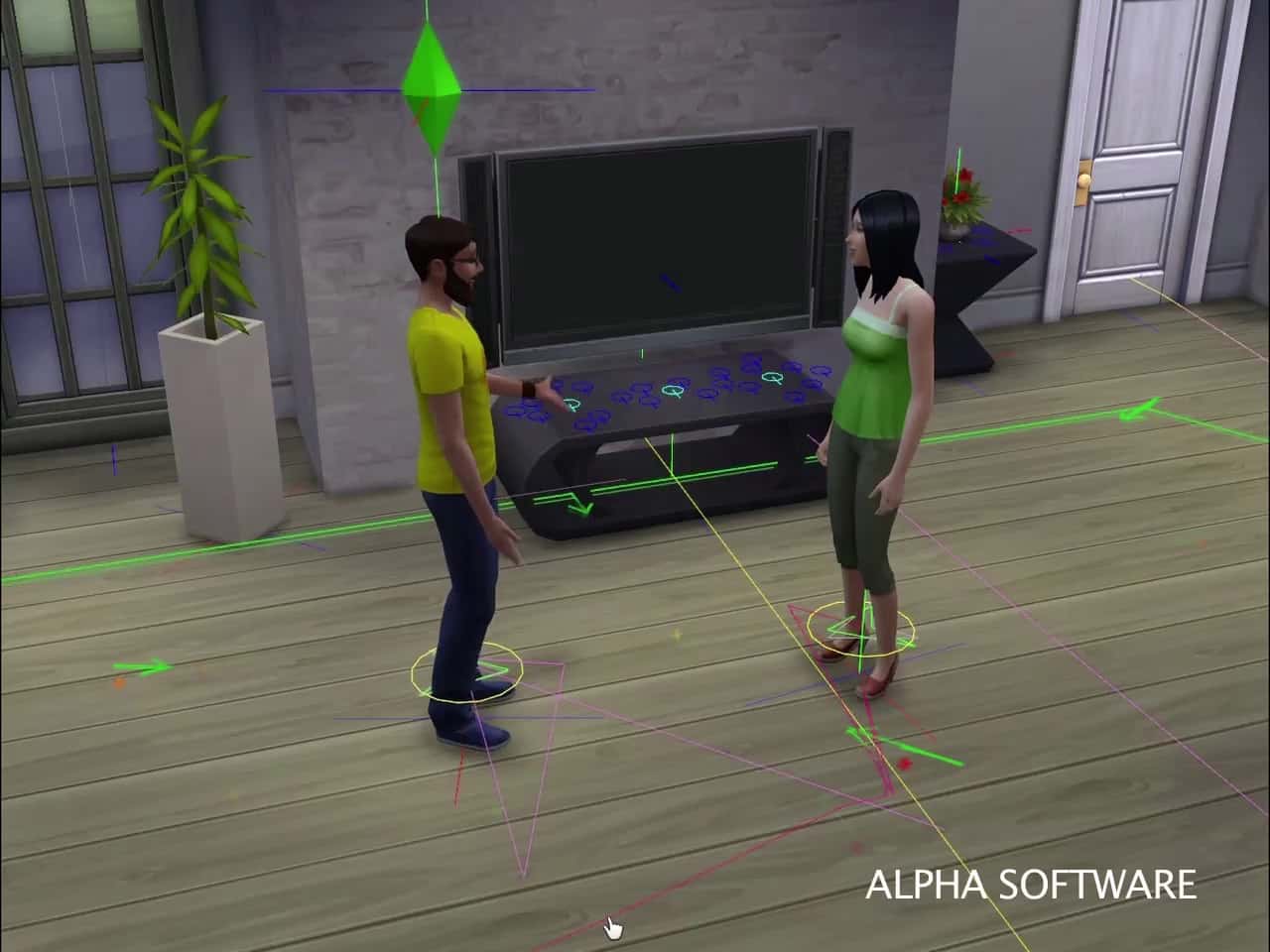
Take a look at some of the screens of The Sims 4 Alpha. These screens were shown on Game Developer Conference for ”Concurrent Interactions in The Sims 4” presentation.

In real life, people often do several things at the same time, but games typically limit agents to performing actions sequentially. For The Sims 4, we developed a system for authoring interactions that allows simulated people (called Sims) to express multiple concurrent behaviors. Interactions are largely data-driven and are defined in terms of constraints, which specify the state a Sim must be in to perform the interaction. Constraints are used to test whether interactions are compatible, and to drive decisions that Sims make about whether, how and where to perform an interaction. This system allows Sims in The Sims 4 to convincingly eat, watch TV, chat with other Sims, express emotion, and perform many more behaviors simultaneously. We believe that this powerful and simple technique could be applied to a similar effect in your game too.

Peter_Ingebretson_Concurrent_Interactions_In-00000002 Peter_Ingebretson_Concurrent_Interactions_In-00000005 Peter_Ingebretson_Concurrent_Interactions_In-00000006 Peter_Ingebretson_Concurrent_Interactions_In-00000008 Peter_Ingebretson_Concurrent_Interactions_In-00000010 Peter_Ingebretson_Concurrent_Interactions_In-00000012 Peter_Ingebretson_Concurrent_Interactions_In-00000014 Peter_Ingebretson_Concurrent_Interactions_In-00000015 Peter_Ingebretson_Concurrent_Interactions_In-00000016 Peter_Ingebretson_Concurrent_Interactions_In-00000018 Peter_Ingebretson_Concurrent_Interactions_In-00000020 Peter_Ingebretson_Concurrent_Interactions_In-00000022 Peter_Ingebretson_Concurrent_Interactions_In-00000024 Peter_Ingebretson_Concurrent_Interactions_In-00000026 Peter_Ingebretson_Concurrent_Interactions_In-00000028 Peter_Ingebretson_Concurrent_Interactions_In-00000030 Peter_Ingebretson_Concurrent_Interactions_In-00000031 Peter_Ingebretson_Concurrent_Interactions_In-00000032 Peter_Ingebretson_Concurrent_Interactions_In-00000033 Peter_Ingebretson_Concurrent_Interactions_In-00000040 Peter_Ingebretson_Concurrent_Interactions_In-00000041 Peter_Ingebretson_Concurrent_Interactions_In-00000042 Peter_Ingebretson_Concurrent_Interactions_In-00000043 Peter_Ingebretson_Concurrent_Interactions_In-00000044 Peter_Ingebretson_Concurrent_Interactions_In-00000045 Peter_Ingebretson_Concurrent_Interactions_In-00000046 Peter_Ingebretson_Concurrent_Interactions_In-00000048 Peter_Ingebretson_Concurrent_Interactions_In-00000050 Peter_Ingebretson_Concurrent_Interactions_In-00000056 Peter_Ingebretson_Concurrent_Interactions_In-00000057

Presentation Link

Source: Rincon Del Simmer

The Sims 4 – New Survey about Expansion Packs/Features!

9

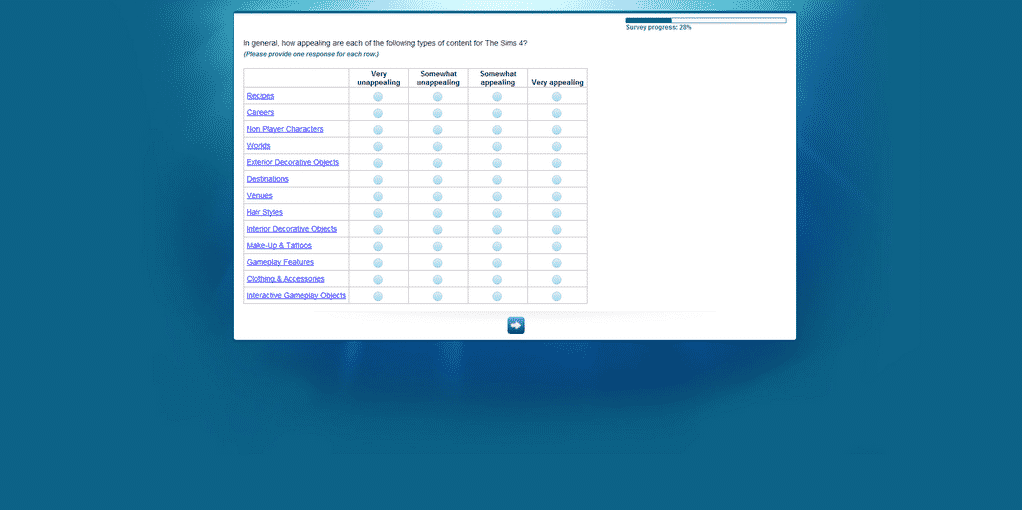
There’s a huge discussion in the community about new The Sims 4 Survey that released yesterday. This Survey includes text about what Bundles do we want for The Sims 4, as well as what Expansion Pack do we want to see released for The Sims 4 Franchise.

BjLNZEHCYAAfuDS

Make sure you check your e-mail to see if you got this Survey!

Recipes – Food and drink items that Sim scan cook and eat to provide gameplay benefits.
Examples include: Sphaghetti and Meatballs, Chocolate Chip Cookies, Pancakes, Special Drinks, etc.

Careers – A new career experience that allows your Sims to pursue a new, unique occupation.
Examples include: Fire Fighter, Astronaur, Doctor, Ghost Hunter, Criminal Mastermind, etc.

Non Player Characters – New computer controlled Sims for your Sims to interact with.
Examples include: Bella Goth, Agnus Crumblebottom, Mailman, Pizza Delivery Person, Bigfoot, etc.

Worlds – A rich new set of themed neighborhoods that your Sims can explore, featuring new Interactive Gameplay Objects and a mix of supporting items (clothing and accessories, hair styles, makeup and tattoos, interior decorative and exterior decorative objects, etc.)
Examples Include: Tropical Shores, Ocean Cliffs, Mountain Hollow, Diamond Coast, River Valley, etc.

Exterior Decorative Objects – Decorative objects to customize the exterior of your Sims’ homes, with no new gameplay features.
Examples include: Different styles and colors of doors, windows, decorative plants, etc. Styles could include vintage, modern, rustic, etc.

Destinations – A group of venues that fall under a certain theme for your Sims to visit, where they can socialize with other Sims and interact with multiple Interactive Gameplay Objects.
An Example is the Amusement Park Destination which contains the Arcade, Haunted House, and Food Market Venues.

Venues – A themed pre constructed lot (separate from your Sims’ home) for your Sims to visit, where they can socialize with other Sims and interact with new Interactive Gameplay Objects.

Hair Styles – Different hair styles that you can use to customize you Sims

Interior Decorative Objects – Decorative objects to customize the interior of your Sims’ homes, with no new gameplay features.
Examples include: Different styles and colors of tables, chairs, couches, beds, showers, etc. Styles could include vintage, modern, rustic, etc.

Make-Up & Tattoos – Different types and colors of makeup and tattoos that you can use to customize your Sims’ appearance.

Gameplay Features – Large gameplay systems that significantly expand the core gameplay experience by adding new game functionality.
Examples include: Casino Games, Zombies, Boating, Camping, Roller Coaster Creator, etc.

Clothing & Accessories – Different clothing and accessories for you to customize your Sims’ appearance.
Examples include: Shirts, Pants, Dresses, Shoes, Hats, Jewelry, etc.

Interactive Gameplay Objects – New objects with gameplay functionality, that Sims can interact with.
Examples include: Chess board, guitar, telescope, etc.

Exterior Decorative Objects – Decorative objects to customize the exterior of your Sims’ homes, with no new gameplay features.
Examples include: Different styles and colors of doors, windows, decorative plants, etc. Styles could include vintage, modern, rustic, etc.

Destinations – A group of venues that fall under a certain theme for your Sims to visit, where they can socialize with other Sims and interact with multiple Interactive Gameplay Objects.
An Example is the Amusement Park Destination which contains the Arcade, Haunted House, and Food Market Venues.

Venues – A themed pre constructed lot (separate from your Sims’ home) for your Sims to visit, where they can socialize with other Sims and interact with new Interactive Gameplay Objects.

Hair Styles – Different hair styles that you can use to customize you Sims

Interior Decorative Objects – Decorative objects to customize the interior of your Sims’ homes, with no new gameplay features.
Examples include: Different styles and colors of tables, chairs, couches, beds, showers, etc. Styles could include vintage, modern, rustic, etc.

Make-Up & Tattoos – Different types and colors of makeup and tattoos that you can use to customize your Sims’ appearance.

Gameplay Features – Large gameplay systems that significantly expand the core gameplay experience by adding new game functionality.
Examples include: Casino Games, Zombies, Boating, Camping, Roller Coaster Creator, etc.

Clothing & Accessories – Different clothing and accessories for you to customize your Sims’ appearance.
Examples include: Shirts, Pants, Dresses, Shoes, Hats, Jewelry, etc.

Interactive Gameplay Objects – New objects with gameplay functionality, that Sims can interact with.
Examples include: Chess board, guitar, telescope, etc.

Green Thumb – Enter the Greenhouse and put your green thumb to the test caring for crops, flowers, or ornamental plants. Combine plants to create fabulous new varietals, and become the top gardener on the block.

Skateboards & Bicycles – Travel your neighborhood with speed and style when you decorate your skateboard and bicycle with custom stickers and accessories.

Professional Gamer – Become a professional video gamer by building the ultimate gaming system, joining a competition team, earning sponsorships, and competing against other Sims to become The Ultimate Gaming Champion.

Amazing Catch – Become a master fisherman and collector with a dozen new aquatic creatures and a deluxe aquarium to keep them in. Master’s Fishing Net lets you catch more than one fish at once.

Family Game Night – Board games, cards games, and pinball are fun for the whole family.

Cosmetics – Give your Sim a makeover with a collection of new lipstick, blush, eye shadow, and a variety of nail color options.

Backyard Sports – Play catch with a baseball, toss a football, or have a water balloon fight in your Sim’s backyard.

Tree Houses – Create and customize unique treehouses with pirate, fairy tale, and back to nature themes.

The Lucky Strike Bowling Alley – Dress your Sim in their best bowling shoes and team shirt, and compete with other Sims to see who can get the most strikes! Do you have what it takes to bring home the league trophy?

Splashdown Water Park – Three unique waterslides and pool games, like water volleyball, create an aquatic wonderland that is fun for all ages.

Fun in the Sun – Fun in the sun with backyard water activities like a kiddie pool, slip’n’slide, and sprinklers!

Luxury Lifestyle – Indulge in the finest things Simoleons can buy. Elegant furniture, clothing, and a luxury hot tub that is sure to put your Sim in a romantic mood.

Fashion Week – Place the catwalk, pick your models, and decide on a dress. Do you have what it takes to start a fashion empire?

Pleasant Rest Cemetery – Uncover the secrets of the graveyard! Explore the crypts, befriend a ghost, and help put restless spirits to rest.

New Year’s Party – Host a News Year’s Eve party with a toast at midnight, then celebrate in style with festive fireworks, but be careful, Sims who play with fire tend to get burned…

Winter Wonderland – Add the winter season to your game to cover your neighborhood in a blanket of fresh snow! Build a snowman, bundle your Sims in cold weather attire, or take the family on a trip to the Alpine Village featuring skiing, ice skating, and snowboarding.

Resort – Own and operate your own resort, or simply vacation at one! Sparkling pools, deluxe spa treatments, festive buffets, and unique locales combine to create the perfect vacation destination.

Dogs – Use the new Create-A-Puppy to design your Sim’s new best friend! Teach your dog tricks, train him to hunt collectibles, play with toys, and even enter him in a dog show! Raise your puppy and help him grow! Will he age up to become friendly and loyal, or aggressive and independent? Your interactions with your dog shape his future!

Swimming Pools & Hot Tubs – Slides, diving boards, beach balls, and water volleyball help you create an exciting pool experience for your Sims. Custom hot tubs range from a cozy tub for two, to an eight Sim party tub with a pool bar!

Rockband – From the garage to the stage to the stadium take your Sims on an epic musical journey to become immortalized as rock and roll superstars! Let your fame take you to new heights of social stardom.

High Roller – Experience the thrills and glamour of life as a high roller! Send your Sims to shop the boulevards, or go all in with interactive casino games.

Ocean Cliffs – High cliffs and serene seas surround a vibrant Mediterranean island port. Charter a fishing boat, dive for pearls, or relax at a picturesque nude beach.

Fast & Fearless – Sport cars, motorcycles, and road bikes will get your Sims where they want to go with speed and style! Race against other Sims on unique streets to win upgrade parts, prizes, and unique vehicles or just hang out at the street party.

Castaway – Your Sim awakes alone on a tropical island…utilize your survival skills to make shelter, find food, and search for a way to be rescued. Can you escape before the volcano erupts and destroys the island?

Heroes & Villains – Secret identities, super powers, and spandex combine to create Super Sims! Fight crime, change the world around you with telekinetic powers, or manipulate your friends and enemies with mind control.

Amusement Park – Enjoy a fun day at the amusement park and experience all the exciting rides and carnival games! Assemble your dream roller coaster and give your Sims the ultimate thrill ride.

Wilderness Explorer – Explore the great outdoors by hiking, fishing, camping, and white water rafting. What new adventures await just around the river bend?

Cruise Ship – Set sail for the high seas aboard a luxury cruise ship! Snack at the pool bar, challenge other Sims to a game of basketball, or stay in your stateroom and share a romantic moment on the veranda.

Wizards – Put on your wizard’s robes and grab your wand, there’s magic in the air! Fly with dragons, conjure trolls for battle, and craft wondrous artifacts to help your friends and terrorize your enemies.

South Beach – When the sun goes down the fun heats up with beach front dance clubs, karaoke, and bands playing live music!

Careers – Pick your dream job and take control of your Sims actions and choices through interactive gameplay on location! Tell the story of the aspiring chef whose catering choices will make or break their career, or take on the role of a Criminal Mastermind and rob a rich residence…will your Sims succeeded or fail? Their fate is in your hands!

Season – Experience the joys and challenges of changing weather! Seasonal festivities, outdoor attire, and new activities like skiing, sunbathing, and face painting guarantee that Sims will have plenty to do no matter what the temperature is outside.

The Scene – Hang out at the hottest spots in town, from dive bars to dance clubs to chic lounges. Gain fame and fortune to earn access to exclusive celebrity perks like penthouse living, luxury hot tubs, and sleek cars. What will your Sims do after dark?

Hobbies & Skills – Awaken your Sims’ true passions in life as they discover and excel at all-new activities. Whether they’re tossing a football with the family, practicing ballet, playing in a band with friends, or hand crafting artsy home décor, your Sims now have more ways to build skills, enhance friendships and make their lives more successful.

Crime & Justice – Make a difference in your Sims’ town – clean up the streets with the new District Attorney career and organize neighborhood improvement projects, OR indulge a life of crime and greed growing an underground criminal organization that deals in black market goods and smuggling contraband. Pick your side in this world of Crime and Justice!

Weather & Disasters – Experience the awe-inspiring beauty and power of nature as never before as weather plays a major role in shaping your Sims’ lives and environments. How will you prepare your home for severe conditions? Will you weather the storm and help rebuild your neighborhood after disaster strikes, or tempt fate and take part in a little looting?

Magic University – Join your fellow sorcerers at a school specializing in hexes, potions, and dragonology. Do you have the skills and commitment to gain the rank of Supreme Dragon Handler, or will you drop out and be stripped of your powers forever?

Rise to Fame – Watch your Sims rise to stardom, revel in the limelight or crash and burn as they perform as singers, actors, supermodels, and rock musicians. Do you have what it takes to earn a coveted Simmy Award nomination and earn access to the hottest A-list parties and events?

University – Achieve Academic Excellence! Sororities & fraternities, secret societies, and sport clubs can all grant you powerful career connections, but only if you graduate! Pick a major, go to class, and write your term paper, all while balancing an active social life.

Pets – Create perfect – or imperfect – pets for your Sims with a wide variety of unique dogs, cats, lizards, rodents, and birds. Teach them tricks and enter them in talent shows, or simply hang out and watch them destroy your neighbor’s yard…more pets means more fun!

Source: SimCookie, Honeywell’s Sims 4 Blog, Zerbu

The Sims 3 Store – New Set Screen

0

That cookie jar comes in a variety of flavors. Plus other new décor items including the Perfect Plastic Pie!

SimGuruCopeland

BjHRP0ECAAA-3gn

SimCity – Version 10 coming today + Patch Notes

0

New: SimCity Single-Player Mode.
o Enables Offline Play.
o Single-Player Mode includes multi-city play, regional interdependence, and city specialization. Regions are saved locally and there is no limit on number of save games.
o Autosave can be disabled in Single-Player Mode in order for players to experiment and load their regions at a previous save point.
o Save As a copy feature. Players can make copies of their regions at multiple save points.
o See FAQ on Single-Player Mode for full details. [link]
Performance: Optimizations in the simulator to improve performance of both Multiplayer and Single-Player Mode.
Friends: Friends Search now uses the Origin friend search.

Q: How do I play SimCity offline?
A: The new Single-Player Mode allows you to play SimCity anytime, anywhere, without the need of an active Internet connection. For the full details please read our blog post here.

Q: How do I download the Single-Player Mode for SimCity?
A: The Single-Player Mode will be included as part of Update 10 at no additional cost. This will be available to all current and future players on PC and Mac starting March 18, 2014.

Q: Will I still require an Internet connection to play?
A: An Internet connection is required to download Update 10 when it becomes available on March 18, 2014. You will not require an active Internet connection to play SimCity offline in the Single-Player Mode.

Q: Can I still play the game Online?
A: Yes, the Online game and all of its features are still intact. This includes Multiplayer, SimCity World and Online Save Games.

Q: Will my previous Downloadable Content (DLC) be playable in the Single-Player Mode?
A: Yes. All of your previous DLC is available for use in both the Single-Player Mode and Multiplayer Mode.

Q: Do I need an Origin Account to play?
A: Yes, you use Origin to download and launch SimCity. Once you’ve installed Update 10, you can put Origin into offline mode when you are playing Single-Player Mode.

Q: How do I put Origin into Offline Mode?
A: To put Origin in Offline mode, log in to the Origin client and select: Origin>Go Offline

Q: Do I need to login to Origin online in order to play the Single-Player Mode?
A: No. If you do not have an active internet connection, you can put Origin in the offline Mode and play SimCity offline in the Single-Player Mode.

Q: What features are available in Single-Player Mode?
A: Single-Player Mode allows for a multi-city Single-Player experience without requiring an internet connection. All region maps are available in Single-Player Mode. Since Single-Player Mode does not require a persistent internet connection, Leaderboards, Citylog, Achievements, Friends List, Player Profile, the Region Wall, and region invites are not available in Single-Player Mode. The Global Market will be available in Single-Player Mode, but prices will be fixed.

Q: What are the requirements to play in Multiplayer mode?
A: The requirements to play Multiplayer have not changed. An Internet connection is required to play Multiplayer mode, Origin must be running in online mode and SimCity must be updated to the latest version.

Q: Can I transfer my regions between modes?
A: No. Single-Player and Multiplayer are separate modes and regions cannot be transferred between modes.

Q: Where are Single-Player regions saved?
A: Single-Player regions are saved locally, not on the server.
You can find your regions on PC here: DocumentsSimCityGames~ID NUMBER~
You can find your regions on Mac here: Go->Documents->SimCity -> Games -> ~ID NUMBER~

Q: If I uninstall or change machines, can I transfer my Single-Player Mode regions to the new install or Machine?
A: If you uninstall SimCity, your saved games will still be available. However if you change machines, you will need to manually move your game files to the games file location on your new machine.

Q: Can I move my Single-Player Mode saved game from my PC to Mac and vice versa?
A: Yes, you can transfer your Single-Player Mode saved games between PC and Mac.

Q: How many regions can I have?
A: There is no limit to the number of saved regions a player can have in Single-Player Mode. The file size of your regions will vary depending on density and population of your cities.

Q: How do saves work in Single-Player Mode?
A: Autosave is on by default and saves your region every ten minutes. Your region is also automatically saved if you quit your region or switch to another city in the region. To disable Autosave, go to the Options menu > Settings > Gameplay tab and uncheck “Enable Autosave in Single-Player Mode”. Disabling Autosave will allow you to save at points you want to save at. If Autosave is disabled, you will be asked if you would like to save your region when you quit or switch to another city in the region.

You can manually save your region at any time by pressing “Save Game” from the options menu.

Q: How do I rollback my regions? How do I make a copy of my region?
A: If Autosave is disabled, you can save your region at a certain point and then experiment with your region. If you wish to go back to a previous save point, you can choose not to save your region when exiting the game. If you load that region from the main menu or resume page, it will load from the last saved point.
If you would like to make a copy of your region, press “Save As…” from the options menu. You will be prompted to name the copy of your region. This gives you the control to come up with a naming convention that works for you for your copied version. Once you submit that name, you will load the copy of the region. The original region will remain at the last saved point. You can access the original or the copy from the Main Menu in the Play tab.

Q: What cheats are available in Single-Player Mode?
A: Existing live cheats are available in Sandbox regions while playing Single-Player Mode. The following cheats are available in Single-Player Mode in non-Sandbox games.
Add §10,000 to City budget. Windows: CTRL + ALT + S OS X: CTRL + ALT + S
Add §5,000 per hour to City budget. Windows: CTRL + ALT + S OS X: CTRL + ALT + S
Add §10,000 to City budget. Windows: CTRL + ALT + S OS X: CTRL + ALT + S
Disasters are unlocked in Single-Player Mode.

Forum Post