Keeping your The Sims 4 Folder Tidy: Mods


Hey guys!
I wanted to talk to you about organizing your Sims 4 folders. I’m one of those people who likes everything nice and tidy, including my Sims 4 folders. So, I wanted to show you how I organize my folder. This will be done in multiple articles with the first one covering the mods folder.
Part 1: Tackling the mods folder
Before beginning the tidying up process, copy and paste your entire Sims 4 folder somewhere safe. My suggestion is a thumb drive dedicated strictly for Sims. Get the largest you can afford. A quick search of Amazon shows that a 128gig flash drive can be purchased for under $35 USD. Try to get an even bigger one, if you can. You should already be doing this on a regular basis of your important folders. These include your saves, tray, screenshots, and mods folders. Backing up ensures that you will not have a catastrophic loss of your important Sim documents later.
Now that you’ve ensured that your files are protected, you can begin the process of cleaning things up starting with that mods folder.
I suggest you read the excellent blog post by LindseyXSims where she explains how to remove those pesky extra characters in package names that could slow your computer down. The process may seem daunting; however, after a few times doing this it will become second nature. It’s that easy.
Got that renaming out of the way? Let’s take a look at your mods folder. I’m going to ask you to copy your mods folder to your desktop and then delete everything in it. Trust me. You’ve already backed up your entire Sims 4 folder and for extra measure, you’ve now backed up your mods folder. Double backup, no need to panic.
A quick little side note: It is important to organize your mods folder because if you are like me, you have over a thousand packages. If you are like many of my Simming friends, you have thousands of packages. Now imagine if there is a repeat of the “Day the Mods and Custom Content All Broke”. Remember that day? Remember the nightmare it was to figure out what broke? By having your mods folder organized, it facilitates the trouble shooting process. Instead of hunting and pecking and hoping you found it? You simply remove a few folders at a time, testing your game, till you no longer have their error. It’s that simple.
Now that we know why we want that mods folder organized (it also helps when there are updates to find the package), let’s start organizing.
The first thing you are going to do is launch your game so a brand new resource.cfg file is generated. Once you have done that; go ahead and exit your game. Let’s go take a look at that file so you know what it is and what it does. I would suggest downloading notepad++ because it will allow you to save it as .cfg. You can certainly use notepad but you will need to remember to change the file extension when you are done. Open the resource file and it should look like the below (except for the overrides section):
Priority 500
PackedFile *.package
PackedFile */*.package
PackedFile */*/*.package
PackedFile */*/*/*.package
PackedFile */*/*/*/*.package
PackedFile */*/*/*/*/*.package
Priority 1000
PackedFile Overrides*****.package
The overrides is for any mods you might want to install that function as game overrides. An example would be the one that removes the bathing suit Sims wear while taking a mud bath. That mod goes inside a folder called “overrides” in your mods folder. You have to direct the game to that folder and you do that by putting in the above into your resource.cfg file. That file should only have those words in it. Nothing else. Now comes the tricky part if you are not using notepad ++ because not saving it properly changes the extension to .txt and then it no longer works. Select “saveas” and instead of save. In the drop down menu, select the second option (all files) and then scroll to your old resource.cfg file and overwrite it.
Now you are able to go five sub-folders deep in your mods folder. I suggest that you keep all your mods on the top level and only use the sub-folders for your custom content. Many mods (especially those that are zipped) need to be on the top level. How you organize at this point is really up to you but I will show you how mine looks to give you an idea. I like to organize my folder by what it is and then the creator. So for example my path to a shoes by Madlen would look like this: C:Users****DocumentsElectronic ArtsThe Sims 4ModsCustom ContentClothingMadlen
Here are some graphics for those who prefer a visual. (click to enlarge)


The final step is putting all your stuff back in. This can seem daunting so I suggest grouping things together by creators first. Then you can drop stuff into their appropriate folders from there. What I did when I first organized was go to the creator sites and download new versions.
And that’s it! Your mods folder is now nice and tidy and ready for more goodies. Feel free to contact me at The Sims Community if you have any questions. Next time I’ll show you guys how I organize my saves and tray folders.


Amaz’sims interviews Sims Community

We got a chance to be interviewed by the lovely people from Amaz’sims!
– Your website is developing quickly, its design is changing, the home page too. You add new features to it and I think I’ve seen that you were working on some other websites and graphics. Is it something that you like doing and is that why you decided to create Sims Community?
That is true. We constantly keep improving our website because we’re still exploring what our readers want and do not want. Lately we noticed that they love our Interactive Articles, and we have some awesome plans for them in the future.
I am not really that involved in creating custom code for websites, because mostly they’re pre-made or purchased from Theme Websites. I don’t really mind that because with some work in photoshop and CSS modifications I’m able to create any design I think of!
Continue (English) / Continue (French)
Starting a Youtube Channel Part 1: Tech and Equipment

Tech and Equipment
So you want to start a Youtube channel? Well great news! Here at the Sims Community we have got all the information you will need to get started! Each article will give a detailed guide into every aspect of simming on Youtube starting today with the equipment you will need.
PC or Laptop?
Being a youtuber myself I get a lot of questions regarding PC specs and how I get my game play to run so smoothly. This is one of the most important aspects of your setup, no PC/laptop no sims! Which brings me to my primary point, PC or laptop? In my opinion using a PC for this kind of thing is a much better option for various reasons. When you intend to record game play you need a moderately powerful system that is capable of running your game without a tone of lag and will record at a frame rate of at least 30 frames per second without skipping frames. Of course this is achievable with a laptop, however finding a laptop capable of this could cost you significantly more money and is more likely to overheat. Perhaps the biggest concern of using a laptop is when it breaks, unlike with a PC you cannot simply extract the broken component and replace it, you are more likely to have to replace the entire thing. If you have already made your mind up, its time to talk specs, the minimum required specifications to run The Sims 4 on PC and Mac can be found here and below are the specs that I currently have in my own computer:
Operating System – Windows 7 Ultimate
CPU – Intel Core i3 4130 @ 3.40GHz
Motherboard – ASUS H81M-E
Graphics Card – ATI ASUS R7 250X Series
4GB RAM
Recording Audio
Aside from your actual system, the next essential bit of kit you will need is a microphone! This is a controversial topic as there are so many different brands and at times they can be very pricey! But if you make the right choice first time round you can save yourself some pennies. Expensive microphones ARE NOT necessary. Yes they are good, but there are others out there that work the same if not better for a lot less money!


Pricey microphones like the Blue Yeti or Rode Podcaster are very popular in the simming/Youtube community. I know very little simmers who don’t use one of these, but it is not necessary as there are cheaper options like I have listed above which produce very clear audio needed for voice over! Nobody likes to sit through 25 minutes of muffled, echoed, crackly audio and so this is one of the most important aspects of your videos. If you would like to hear how the Floureon BM-800 sounds check out SourPatchSimmer, she uses this for her voice overs! And I use the Blue Snowball. In the reviews section for the Tonor mic someone has provided a sound test so you can hear the clarity for yourself.
That is all for today! I hope this helps all of you looking to embark on your own Youtube journeys, next time I will be advising you guys on screen capture and editing software!
The Sims Video Spotlight: #9


Hello Simmers and welcome back to another week of The Sims Video Spotlight! There are plenty of builds today, I couldn’t help myself they’re all just so beautiful. Remember if you like any of the videos you see here feel free to go and leave the creator a like and/or a comment, I’m sure they’ll appreciate it!
The Sims 4 | Build: Puron Point
By Simified & SimtasticBuilder
First today is a two-part house build; one building, one furnishing. I love this house for its sleek appearance and unique design. It’s definitely a modern beauty!
https://www.youtube.com/watch?v=FrEk5EsyItU
The Sims 3 | Speed Build: Seafoam
By Thetideschanging
Here is something a little different but just as lovely, a house boat speed build! Island Paradise is one of my favourite expansions for The Sims 3, and this little gem and its colour scheme is perfect for my tropical sailor sims.
The Sims 4 | Room Build: Industrial Kitchen
By Steph0sims
If you love urban, industrial themed things you’ll love this kitchen, it definitely has the feel of a city loft and is a lovely creative idea.
https://www.youtube.com/watch?v=hoSfLwVH5Hc
The Sims 4 | Room Build: Kid’s Bedroom
By BuildItFilmItM
Ah, something for the kids – refreshing! Here is a very sweet children’s bedroom with a natural, blue and green theme. It has just the right amount of clutter to appear lived-in and cozy!
The Sims 4 | CC Favourites: Makeup
By FabtasticSims
Something a little different this week is a custom content favourites video. I see these all the time, always secretly hoping to have my creations featured in one. I had yet to include this type of video but I realised I probably should! Here is something for you makeup lovers out there who love to doll up your sims. All the content showcased has been listed in the description of the video.
https://www.youtube.com/watch?v=QioB-4pqKFY
The Sims 4 | Create A Sim: Miracle
By Fantasy
Our Create A Sim video this week is this beautiful sim by Fantasy, she does use custom content that is unfortunately not listed, but it is fun to watch!
The Sims 3 | The Island – Part 1 : Introductions
By Wysidia
The last of our videos today is this Let’s Play based around the Hunger Games challenge and the TV program, The Island. This is a rather exciting series using death challenges and reward challenges. There are 6 males and 6 females, but there can only be one winner!
https://www.youtube.com/watch?v=DsTKXaYzNvg
That’s all for this week guys and as always feel free to head over to the creators featured and drop them a like/comment!
The Sims 4: Updated TV Spot (Featuring New Get Together Footage)

The Sims Germany shared an updated TV Spot for The Sims 4, featuring new footage from Get Together Expansion Pack!
Tip: TheAlexer
The Sims 4 #TeamTrick vs #TeamTreat Challenge Infographics

The Sims Team shared infographics for the #TeamTrick vs #TeamTreat Challenge that took place from October 23rd to October 31st. Check out these stats!

The Sims 4 Get Together: New Render

The Sims Germany has shared a new render for The Sims 4 Get Together. Check it out!
The Sims 3: New Update Now Available!

New The Sims 3 Update that brings a brand new Expansion and Stuff Pack Manager is now available!
Before updating, it’s recommended that you remove any Mods and Custom Content until they’re proven compatible with the new, 1.69.36.0240 Version.
Please note that the Create A World Tool is currently NOT compatible with the new version! SimGuruDrake confirmed they’re looking into this issue.
Downloading the latest The Sims 3 game update on Origin
After you have registered The Sims 3 and your packs on Origin, download the latest game update which includes the new The Sims 3 Expansion and Stuff Pack Manager. Log into Origin and update The Sims 3 by navigating to “My Games” then right clicking on The Sims 3 tile and choosing the “Update” option.
If you have “Automatically keep my games up to date” enabled in Origin Application Settings, the update will download automatically the next time you launch Origin.
In either case, before completing the installation, you will be presented with End User License Agreements which you must accept to install the update. After accepting the End User License Agreements, Origin will update your The Sims 3 game to the latest version.
The Sims 4: Expansion Pack 3 in the works!

SimGuruDaniel confirmed that he’s doing everything in his power to make The Sims 4’s third Expansion Pack awesome!
@TurkkiToni: Will EP3 be awesome?
SimGuruDaniel:I’m doing everything in my power to make it so!

What do you think the third Expansion Pack will be all about? Join the discussion on Sims Community Social!
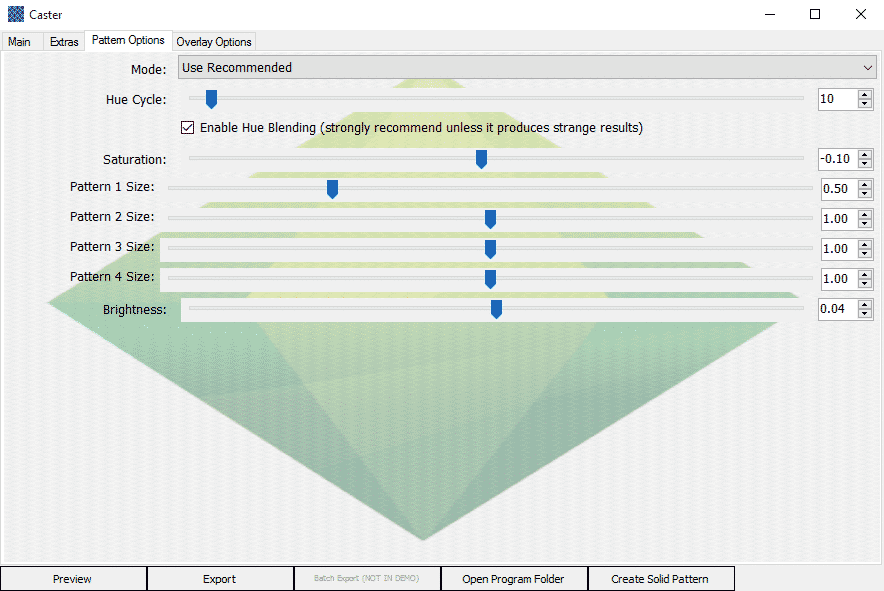
The Sims 4 Custom Content Tool: Caster

Do you ever miss the Create a Style tool from The Sims 3? Well, you’re in luck! Caster is a tool that lets you easily generate custom Create a Sim textures for The Sims 4 which can then be imported into Sims 4 Studio to create custom content. It works in a similar way to The Sims 3’s Create a Style. While the original version of Caster was made last year, this new version is much easier to use, comes with content ready, and blends saturation values to create textures with the same level of detail as the originals.
Furthermore, Caster also lets you easily add logos and stencils which will position themselves automatically.
The full version of the tool isn’t finished yet, but you can now download the demo, which has limited content and doesn’t have all the features yet.
Caster comes with several bases, all patterns from The Sims 3 and three logos from The Sims 3 World Adventures. There will be more content coming with the full version, as well as more features.
For more information and a link to download: http://zerbu.tumblr.com/post/133080591222/caster-create-a-style-for-the-sims-4-demo



The Sims 4 Get Together: Tori Kelly Simlish Recording Session

Check out Tori Kelly perform her single ”Expensive” in Simlish! This song will be featured in the soundtrack of The Sims 4 Get Together.
The Sims 4 Gallery: How to get your creations faved by Maxis

If you’re a creator and like to share your creations with the world using The Sims 4’s Gallery feature, then you probably wondered what does it take to have your creation faved by Maxis, which usually boosts your download rate. These questions written by SimGuruDrake will help you increase your chances in getting a Maxis fave, so make sure you follow them next time you decide to create and upload something!
I’ve been working with our team to get something together for all of you wonderful builders and Sims creators to know our process when providing a Maxis Fave.
I want to first address that yes, we do check lots and Sims that we curate to make sure that they appear in game as they do in the screenshot. There are several things that we check for as we want all players to have the best experience with your creations.
I want to note that we do not enable MOO when checking any lots / rooms.
Households
- Does the household have a backstory? (Not a must have but we really do enjoy reading the stories you create and think that other players do as well.)
- Does the household have custom content? (If so it will automatically be rejected as it is not official Maxis created content.)
- Does the household have more than one look? –Nothing like downloading a Sim who only has their Everyday attire done and the rest were simply forgotten.
Rooms
- When placing the room does it appear as it does in the thumbnail?
- What panning around the room do you notice any flickering?
- When Sims enter the room can they view and use the objects within it?
- Does the room have any custom content? (If so it will automatically be rejected as it is not official Maxis created content.)
Lots
This is where things get tricky. We know a lot of you use the MOO cheat (and we LOVE the amazing things you create with it) but not all users are aware of this cheat. So when we check the lots we do so without enabling cheats.
- When placing the lot does it appear as it does in the thumbnail?
- Are there any floating, missing, or resized objects?
- When panning around the lot do you notice any flickering?
- When going room by room do you notice if there are any objects flickering that used MOO to place them there?
- Can Sims get to every room in the lot?
- Can Sims get out of every room in the lot?
- If there is water can they easily swim in it and get out without issues?
- Can Sims view and use the objects within the lot?
- Does the lot have custom content? (If so it will automatically be rejected as it is not official Maxis created content.)
Additional Questions
- Are you looking to highlight new/unknown creators?
- Absolutely! We like to keep it a mix of new/unknown creators and established creators.
- Do you like to find the unique/unusual or do you like things to be simple?
- Actually we really love both. What we try to do is always keep it a mix, showcase the really crazy and unique ones you come up with and also highlight the more simple homes so that there is always a variety.
- Do you only choose things that would do well on social media/promotional videos?
- The builds we showcase on social are pulled from those we have faved and passed our curation process. We like to do a mixture on there as well though sometimes we do have months where we have themes (example: Halloween for October, we wanted to highlight some of the really amazing spooky homes that were created but also highlight some non-Halloween themed things as well.) We also like to showcase a mixture of new and established builders there as well.
- Does there have to be a specific price range for a build?
- Nope If a higher priced build doesn’t get a fave it means they may have failed one or more of the criteria above.
- Does the build fitting into the landscape help?
- Good question! Since players tend to choose where they want to place the lot and don’t always use the same one that you created it on it doesn’t play a huge factor. BUT what does help with landscaping is actually adding life around the build. Like flowers, bushes, trees, etc. to make it really feel like it’s lived in. It won’t hurt you if you don’t have those things but it really does help
- Besides being nominated in the recommendations thread, what other method can creators go about in order to get Maxis’ eye on their lot? Does Maxis look at any of the showcase threads? Is it a good idea to try to reach out on social media (i.e. Twitter and Facebook)?
- We check out lots that are shared with us on Twitter, Facebook, and Tumblr and even our SimGuru’s pass along lots that are shared with them. We do try to keep up with the showcase / challenge threads that are found throughout the forum.