Home Blog Page 495

Maxis: ”Unannounced Sims Title” in the works!

4

Capture

Maxis team is recruiting new members on their team and they’ve published an application page on EA Careers site to prove it.

They’re looking for someone who will design and create user-facing content in a brand new Sims title using internal scripting tools.

Although it’s not certain which Title are they exactly working on, we can only guess that it’s a new Expansion or Gameplay Pack for The Sims 4. Rachel Franklin announced about a month and a half ago that they’re exploring new features and expansions for The Sims 4.

We’re also exploring new features and some expansion packs for further down the line, and we’re always listening to your feedback to help us decide what to build.

The Sims Team was very active on the forums these last couple of weeks looking for feedback on what Simmers like, dislike, want and need in this game.

In order to work on this Unannounced Sims Game, you need to meet some requirements and responsibilities:

The Role:

As a Technical Designer, you’ll be working with a large (but tight-knit) team of enthusiastic industry professionals from all walks of life. Your job will be to design and create user-facing content in a brand new Sims title using our internal scripting tools.

Duties and Responsibilities

  • Creative Content Design.
  • Design and create compelling and intuitive experiences that unleash player creativity and allow each player to craft a unique game experience.
  • Be resourceful with the tools available to you to implement unique and fun experiences.
  • Actively participate in brainstorm sessions with the design team and document details on the team wiki.
  • Script scalable solutions for content.
  • Create re-usable design patterns for future content creation.
  • Collect and analyze feedback from other designers or producers to identify where gameplay falls short of expectations and iterate on those parts of the design.
  • Collaborate with artists, animators, modelers, engineers, producers, and scripters to find creative and effective solutions to problems.
  • Be proactive.
  • Know the Game and Community. The Sims has a huge community and a long history. Learn and represent their desires and views for past, current, and future projects.

If you’d like to see more details about this job, Click Here!

Tip: SimsVIP; Deligracy

The Sims 4 Custom Content: Keira Dining Set

0

This Set has been brought to you by The Sims Resource member – Angela!

Keira Dining Room. A new Sims 4 diningroom containing the following items in a modern version…
8 sim diningtable, diningroom hutch, Chair, Vases, Plates and Bowls, 3 sizes French Shutters, curtains and decorative cushions.

Click on the picture below to download this Set!

w-600h-450-2519896

Click Here for more information on how to install Custom Content!

The Sims 4: More information about the World Builder!

7

Talented modder @ZerbuTabek found a reference in the source code to ”World Builder Mode” in The Sims 4’s game files!

worldbuildertext

Back in October, we found 2 interesting icons that are possibly related to this Mode.

world1 world2

SimGuruZera asked  on The Sims Forums about what options and features do we want to modify our worlds and confirmed that they’re already working on some of the World Editing features!

Tell us the features you most want to change your World. We have ideas, we have things a spinnin’, but we want to hear from you first hand. What can we do to help you make your The Sims 4 Worlds the best ever?


The Sims 4: Loading Multiple Lots proven as possible?

3

O Sim BR proved that the simplest things can miss our eye!

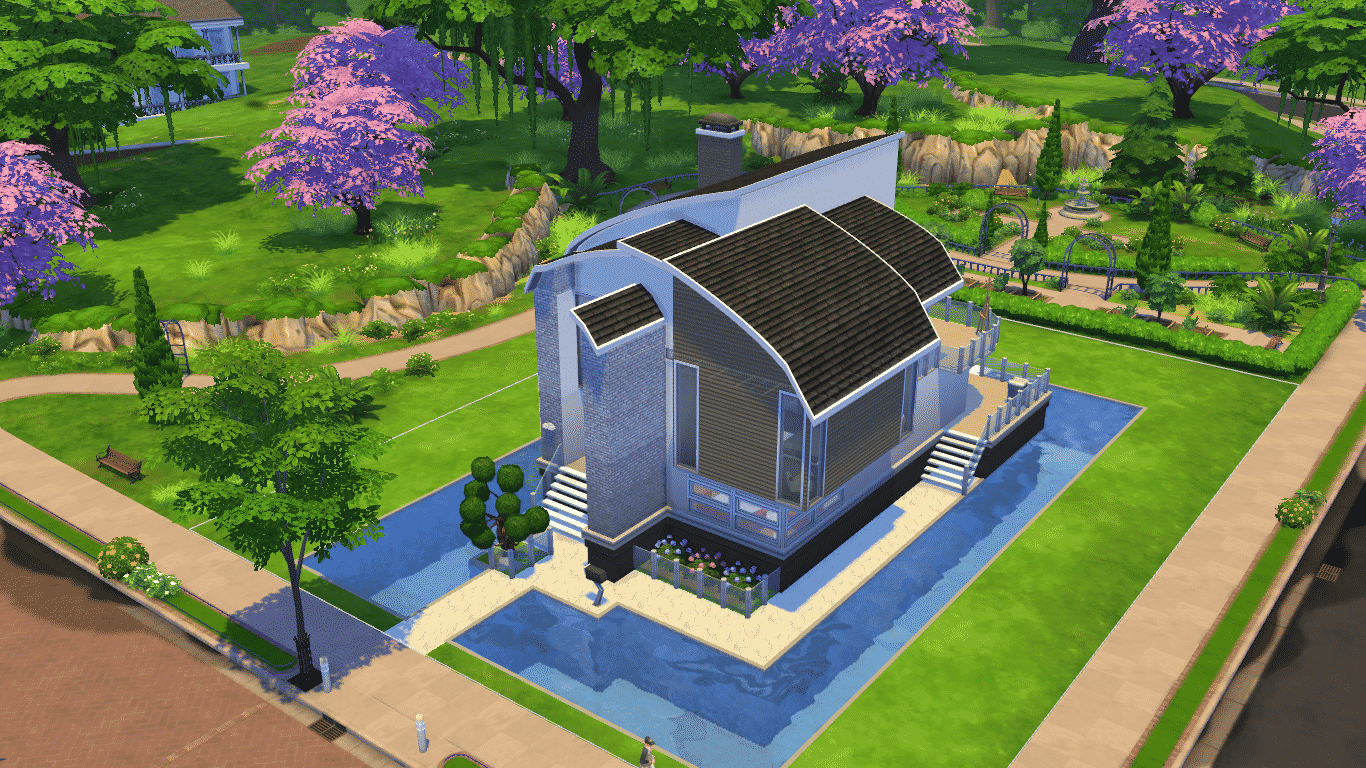
The official screenshot that EA released on 4th of November celebrating the launch of Pools in The Sims 4 includes a rather important detail.

lotsanalysis

In case you didn’t know; the ability to see other Sims being controlled on the lot that your Household isn’t located in or that your Household didn’t visit isn’t possible. When you load a Household, the only area that where you can control Sims and see vibrant surroundings is your Household’s Lot and Public Area in that Neighborhood.

To demonstrate, I loaded the Lot where the Pool House on the picture above is located. I could select all objects and move my Sims around that Lot, but when I tried to select an object from a different Lot, it gives me an option to Visit that Lot which will give me a short Loading Screen. After I have visited that lot, the option to choose objects from my previous objects will only give me a ”Visit” option.

11-14-14_12-16 AM TS4 2014-11-14 00-16-42-53 TS4 2014-11-14 00-16-52-49

It may just be some sort of a debug option that EA has to make this screenshot more vibrant, but whatever it is, you can’t see something like this in retail versions of The Sims 4!

The Sims 4 Tutorial: Building a Pool next to Foundation

1

When trying to build a Pool next to Foundation in The Sims 4, the Pool will automatically shift to a level your foundation is.

TS4 2014-11-13 21-53-11-16

Here’s how to build a Pool next to Foundation without changing the Pool’s level:

First you need to place a Square Pool tile from the Pool menu. Make sure you place it at least 1 tile away from the Foundation. Then, push and pull it using the arrows to the foundation and adjust it’s width with arrows as well.

TS4 2014-11-13 21-53-42-17 TS4 2014-11-13 21-53-54-58

If you’d like to connect your existing Pool with sides of foundation, just add a Square Pool, push & pull it to the foundation and connect it with the existing Pool. This allows you to place one giant Pool around your whole lot!

TS4 2014-11-13 21-54-13-91 TS4 2014-11-13 21-54-27-85

11-13-14_10-06 PM

With this level of customization you can also delete a small part of the Pool next to the Foundation by pressing CTRL + dragging the left mouse click. You can decorate your Pool by adding a ladder and a fence to make the entrance to this type of Pool more ”official”.

TS4 2014-11-13 21-57-09-75

The Sims 4 Mod: ”Musical Chairs” Fix

1

Do you get annoyed with Sims in The Sims 4 constantly changing their seats while communicating with others or having a drink or a snack? Thankfully, Mod The Sims member Shimrod101 made a Mod that reduces this issue.

This mod reduces the amount of moving around from chair to chair or place to place when sims are socializing with other sims. This is achieved by requiring the AI to score 3-4 times higher against any sim in order to push them to move from their current position.

Also the delay is increased before the AI will check any given sim, particularly seated, for desired movement.

Click on the picture below to download this Mod! (requires MTS registration)

MTS_Shimrod101-1479525-LessMusicalChairs

Click Here for more information on how to install Custom Content!

SimCity BuildIt: The New Mayor’s Guide!

0

Via EA Help!

Play online and never miss a thing!
SimCity BuildIt is best enjoyed online Your progress will be preserved (even across multiple devices), you will never miss an update with new content or improvements, and you’ll have a chance to jump on all the great deals in neighboring towns! Don’t worry if your connection gets lost–you can keep playing in offline mode. Just remember to reconnect as soon as you can in order to save the progress you made while playing offline.

Learn more about playing offline.

How do I save my game? Can I play across multiple devices?
There are three very good reasons for connecting through Facebook, Game Center, or Google Play in SimCity BuildIt.

First, you’ll keep your progress even if you switch to a new mobile device. Second, you can continue building your city across as many devices as you like using the same account; just make sure you play online regularly to keep them all in sync. Third, you get to visit all your friends’ cities too. What’s not to love?

Settings icon

Just click on the settings icon on the left of your screen to sign in on one or more account. Learn more about saving your game.

What are Simoleons and how do I get more of them?

Simoleons

Simoleons (§) are everyday currency: They are how your citizens pay their taxes; you receive them as rewards for building and upgrading; they are what you spend and receive in trades and deals. You’ll need Simoleons for things like purchasing different types of buildings or upgrading roads. Simoleons (§) make the SimCity world go round!

Start earning Simoleons by placing residential zones, areas for your citizens to build their homes. As your city expands you’ll have more opportunities to upgrade those homes, collect taxes, complete cargo shipments, make deals, and sell items to other players. Each of these actions will keep the Simoleons rolling in. If things get tight you can also convert your SimCash to Simoleons or purchase Simoleons in the store.

Read More

The Sims 4 Custom Content: GVEN Accessories

0

This set has been brought to you by The Sims Resource member – Severinka_!

Double chain necklace and bracelets in ethnic style.
4 color options

Click on the picture below to download this CAS Set!

w-600h-450-2520707

Click Here for more information on how to install Custom Content!

The Sims 4: 50% off during Black Friday! (Best Buy – US)

0

Best Buy has recently announced their exclusive offers for the annual Black Friday – a day (or two) where every price drastically falls down!

There’s no exception for The Sims 4 in this case. Best Buy will offer the Limited Edition of this game for 50% off! ($29,99).

This offer will be available at Best Buy starting 27th of November to 29th of November. If you still haven’t got the game and really want to purchase it, now’s the right time!

Click on the picture below for more information about this offer!

Capture

Tip: IGN

The Sims 4 Custom Content: Kitchen Alobi Set

0

This Set has been brought to you by The Sims Resource member – ShinoKCR!

here comes the most popular Kitchen I ever made for Sims. Its not converted, all objects are new made. Set has 3 Coloroptions: Dark wood, white, light wood with white tops.

– Counter1 and Counter 2
– Islandcounter 1 and Islandcounter 2
– Cabinet
– Fridge
– Stove in 2 Variations (one with back splash and one without backsplash
– Rangehood like EA’s and Rangehood on a Wall light (shiftable)
– Kitchentools on wall with matching rail
– Sidetable to snap on left or right side
– Barstool

Click on the picture below to download this Set!

w-600h-450-2519436

Click Here for more information on how to install Custom Content!

The Sims 2 to The Sims 4: 126 Floor Conversions (Wood & Linoleum)

Mod the Sims member Elias943 has converted 126 Floor patterns so far from The Sims 2 to The Sims 4!

These Floor Conversions can be found under the Wood and Linoleum sections in Floor Textures panel after you download & install them (requires Mod The Sims registration).

For more information on how to install Custom Content, Click Here!

Click on the picture below to download Wood Floor Patterns!

MTS_Elias943-1478911-Wcoords

Click on the picture below to download Linoleum Floor Patterns!

MTS_Elias943-1479537-Linoleum2

Get The Sims 4 for $35 on Black Friday! (Target)

0

IGN has just announced that Target will offer The Sims 4 for 35 Dollars during Black Friday along with some other Video Games.

This offer will be available on Thanksgiving (27th of November).

Click on the picture below for more deals by Target!

468px-Targetp7

The Sims 4 Simlish Songs Compilation Now Available!

0

972c701b3246af619df20749db83186cbf5f9a08

After releasing a Soundtrack Compilation from The Sims 4, Electronic Arts has decided to release a Compilation of some Simlish Songs from the game as well!

This Compilation can be purchased on iTunes ($9,99) and Amazon ($9,49).

It can also be streamed for free on Spotify and on Deezer.

The Sims 4 – Movember Render!

1

To celebrate Movember, The Sims Team has released a brand new render from The Sims 4!

B183x3hIQAEo7bj

The Sims 4 Custom Content: Lavender Bathroom Set

This Set has been brought to you by The Sims Resource member – Severinka_!

Set of bathroom furniture of the 11 items. Furniture in a futuristic style, with interesting, rounded shapes.
Delicate lavender color in combination with white is perfect for a modern style.
The set includes objects:
sink
shelf next to the sink
wall shelves
tub
small chair
bath towel
mirror
toilet water
parfum
plant (grass) in pot
ceramic tiles with flowers

All furniture is made in one color

To accommodate the large shelf, as I have on the screenshot next to the sink, hold ALT
Tiles with flowers combined with basic tiles from EA
Wall shelf has 5 slots, but you can put a small decoration or 3 slots, or on the other 2 slots

Click on the picture below to download this Set!

w-600h-450-2518268

Click Here for more information on how to install Custom Content!