The Sims UK has posted a new Video Teaser for The Sims 4 Get Together showing off the new Dance Skill. Please note that the date shown in the Teaser below is valid for the UK region.
The Sims 4 Get Together Expansion Pack* comes out worldwide the week of December 7, which means players all around the world will be able to explore Windenburg, customize and join Clubs and try out the new DJ and Dance skills.
But there’s even more stuff to talk about in this expansion pack. Here are 15 reasons we are excited to get together.
Take care of household chores during a Club Gathering. When Sims enter a Club Gathering, they’ll start doing whatever the Club rules tell them to do. So if you tell your Club to garden, repair things, clean things, and cook… then that’s just what they’ll do if you invite them over and start a Gathering. Trust us, they’ll have fun.
Explore haunted locations. There are some wicked ghost happenings in Windenburg. Visit the Von Haunt Estate to learn and see the goings on of the old couple who died among the hedge maze, or head to the local pub for Ghost Night (it’s like Ladies’ Night, except with more ghosts, but… you likely figured that out already).
Create a top tier party atmosphere. There are several new DJ Booths, with multiple ways to customize them. Fill your nightclub with TVs while DJing to see the full effect – the Teleplosion ability lets the DJ command all screens for an epic performance.
Clink glasses with friends and family. The Bar Venue has been completely upgraded to celebrate its European side with new refreshments, food, and the ability to buy a round with friends. There are also themed nights, like Knight Night and Ladies’ Night, so be sure to check back to see all that Windenburg’s Pubs have to offer.
Throw a dance party at the Ruins or the Bluffs. While the Ruins might look like decrepit structures to some, they’re the perfect place to sneak off for a late night get together. A DJ Booth and bar will be provided, but you’ll be responsible for bringing the party.
Manipulate the crowd with your amazing mixes. Highly skilled DJs can use the Feel the Crowd interaction to manipulate their emotions. It’s a great way to see the effect music has on the Sim soul!
Create a Club to rival another Club. Being nice is great and all, but sometimes you just want to stir the pot. Pick a seemingly innocent Club (like the food-obsessed but well-meaning Upper Crusts), then create a new one and set their Club Activities to troll and torment the other. Mischief and mayhem ensue!
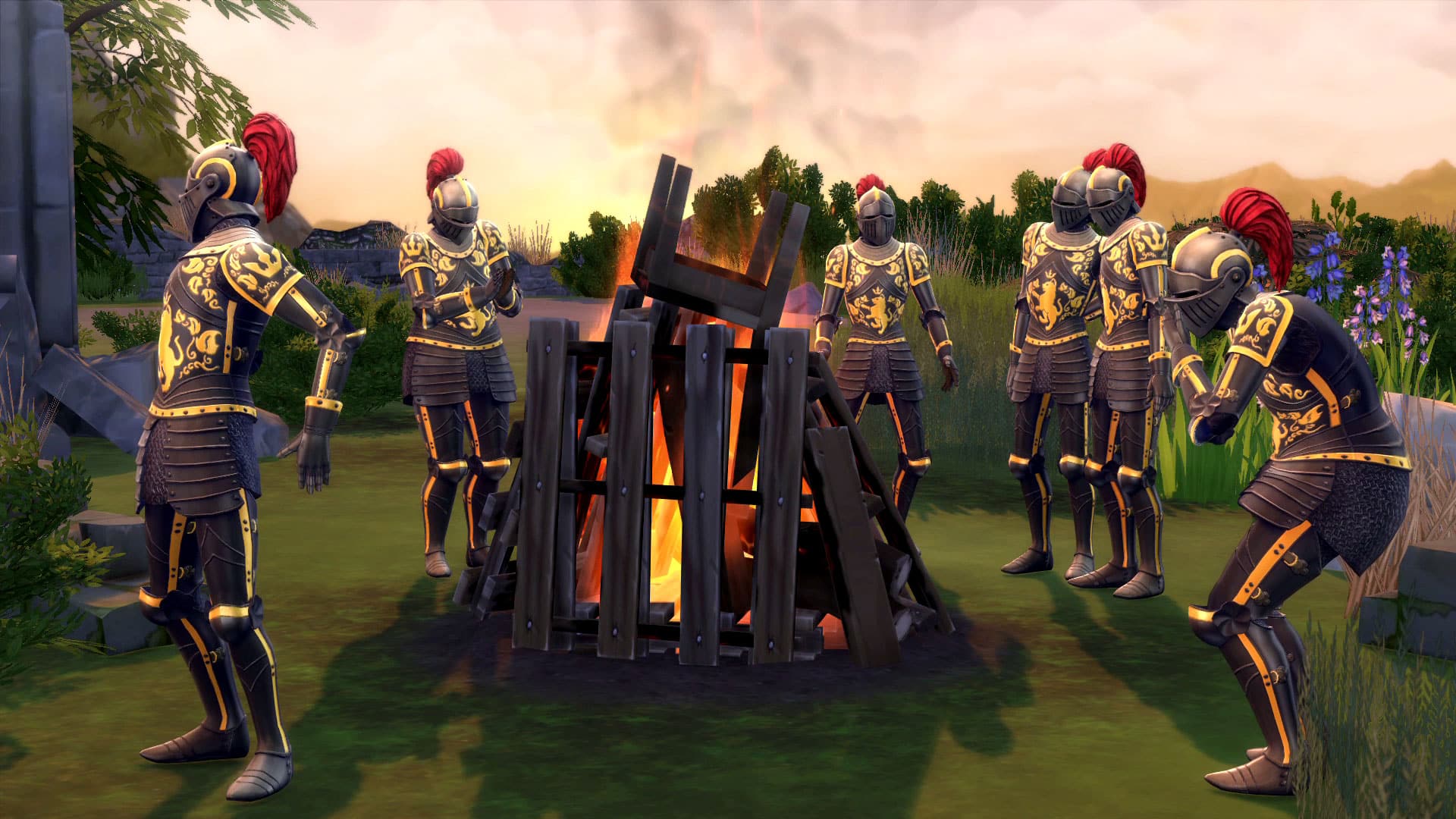
Clank about in a Knight Suit. Goofy costumes are critical additions for any Sims experience. Adorn your favorite trouble maker with an all new suit of armor and clank and cavort about town incognito. Or, grab a drink at Knight Night with a group of similarly armored fools.
Overthrow a Club’s leader. Join a Club that has a leader, befriend them, and talk behind their back. When the moment is right, overthrow them with a Club coup! It’s risky, but oh, the sweet sweet pay off.
Style your poorly dressed neighbors with the Closet. Tired of seeing your neighbors walking around in drab outfits? It’s okay, not everyone has your sense of sweet fashion. No problem! Buy one of the new walk-in Closets, invite them over, then dress them anew.
Dance the night away with your closest friends. Sure, you can dance solo, but few things look cooler than your Sim and their friends dancing perfectly in harmony to some killer music. With the Dance Floor, your Sims can even do organized, synchronized dance moves.
Play new games with your Sims. There are so many ways to spend your leisure time! Send your Sims to the Pub to play arcade games, darts, or foosball. There’s also a new board game that fans of The Sims 2 might recognize: Don’t Wake the Llama.
Max out a skill that challenges your Sim alongside their closest friends. Create a Club, tell them to perform an activity related to the Skill, then spend Club Points to buy Perks to improve the Skill. Your Sims will be masters in no time!
Scandalously skinny dip. Or skinny anything really! Nudity is nothing to be ashamed about, assuming appropriate company. Jump into the pool from the Jumping Platform and let a wardrobe failure go. Who cares? It’s just a little nudity!
Bug the barista for a perfectly mixed caffeine boost. When the late night energy is starting to dip, go to the Café and get a drink to keep the night going. Whether it’s a latte, cappuccino, or Americano, your Sims will be jittering in no time!
And this is just a small taste of what The Sims 4 Get Together has to offer. We’re really excited to see the crazy Clubs you’ll make, the absurd lots you’ll build, and the fun stories you’ll tell in Windenburg.
Via TheSims.com

Deligracy had a chance to interview Lyndsay Pearson (SimGuruLyndsay) and ask her some questions about The Sims 4 Get Together. Check it out!


Do you love to design but get stumped trying to build? Do you want to challenge yourself to decorate a lot that is outside your usual style? Do you have an amazing build that you want to share and see how others decorate? Then this is the challenge for you!
We are looking for Simmers to decorate our house shells and donate their house shells for others to use.
1 – No changing the outside structure of the builds. You can do whatever you want to the interiors and landscaping. You can also change the exterior wall colors and windows/doors of the build. You just cannot change the overall outside structure. Demolishing interior walls and rearranging rooms is allowed.
2 – Custom content is allowed in both the builds and in your house shell donations. If your donation includes any CC then please provide a link to those items.
3 – As soon as we get more entries, then they will be put up to a public vote and the winner gets…..bragging rights!
Come to the forum and join us for some creative fun!

In just ONE WEEK (December 8th), residents of the United States will be getting their hands on The Sims 4 Get Together! If you have any plans to Pre-Order this pack, know that you only have 7 days to do so. But, don’t be afraid if you don’t get the pack on time, because, like the previous Expansion Pack Get to Work, Get Together also won’t be offering any Pre-Order bonuses.
For all the latest news about The Sims 4 Get Together, check out our News Category!


Origin has just updated their ”On on the House” section with a brand new game: Jade Empire!
Click the image below to claim this game for FREE and don’t miss the chance to download and play The Jade Empire before it’s gone!


I love playing board games with my family. My sims seem to love it too! Look at look of pure joy on my sim kid!


The Sims Team shared a new promo video on Facebook showing off clubs in The Sims 4 Get Together!

This is a step-by-step guide on how to build a simple modern house. There are many ways to do it, and of course, many different styles to choose from, but I’ll go for a very simple one, which everyone can do quickly!
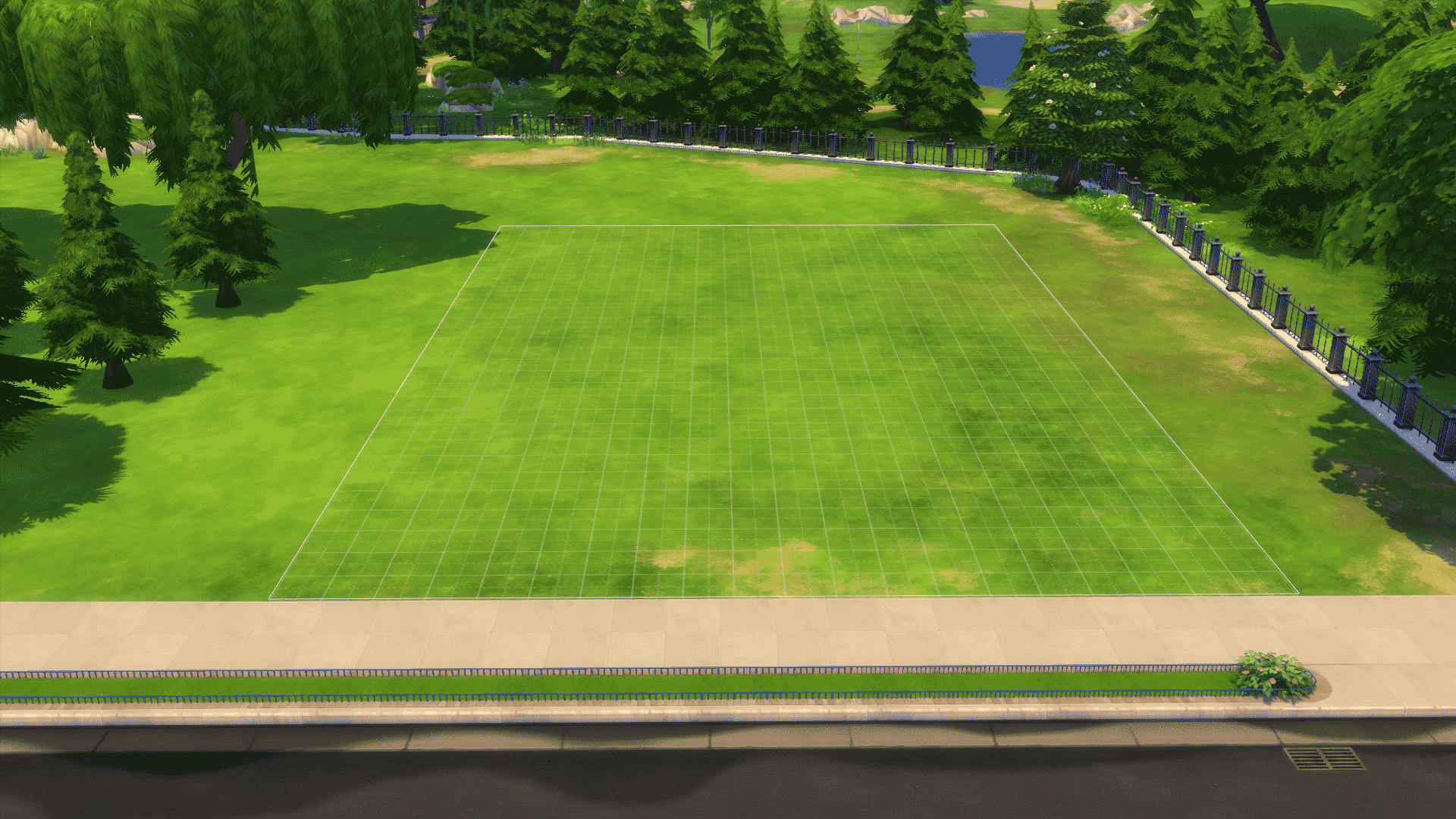
A lot of people pick the biggest lot, because you get an easy overview and plenty of space, but the design will be more fitting to the scenario if it’s the correct size. You should pick a lot-size that fits the size of the house you want to build, so if you’re building a small house, build it on a small lot (Unless you want to do heavy landscaping!)
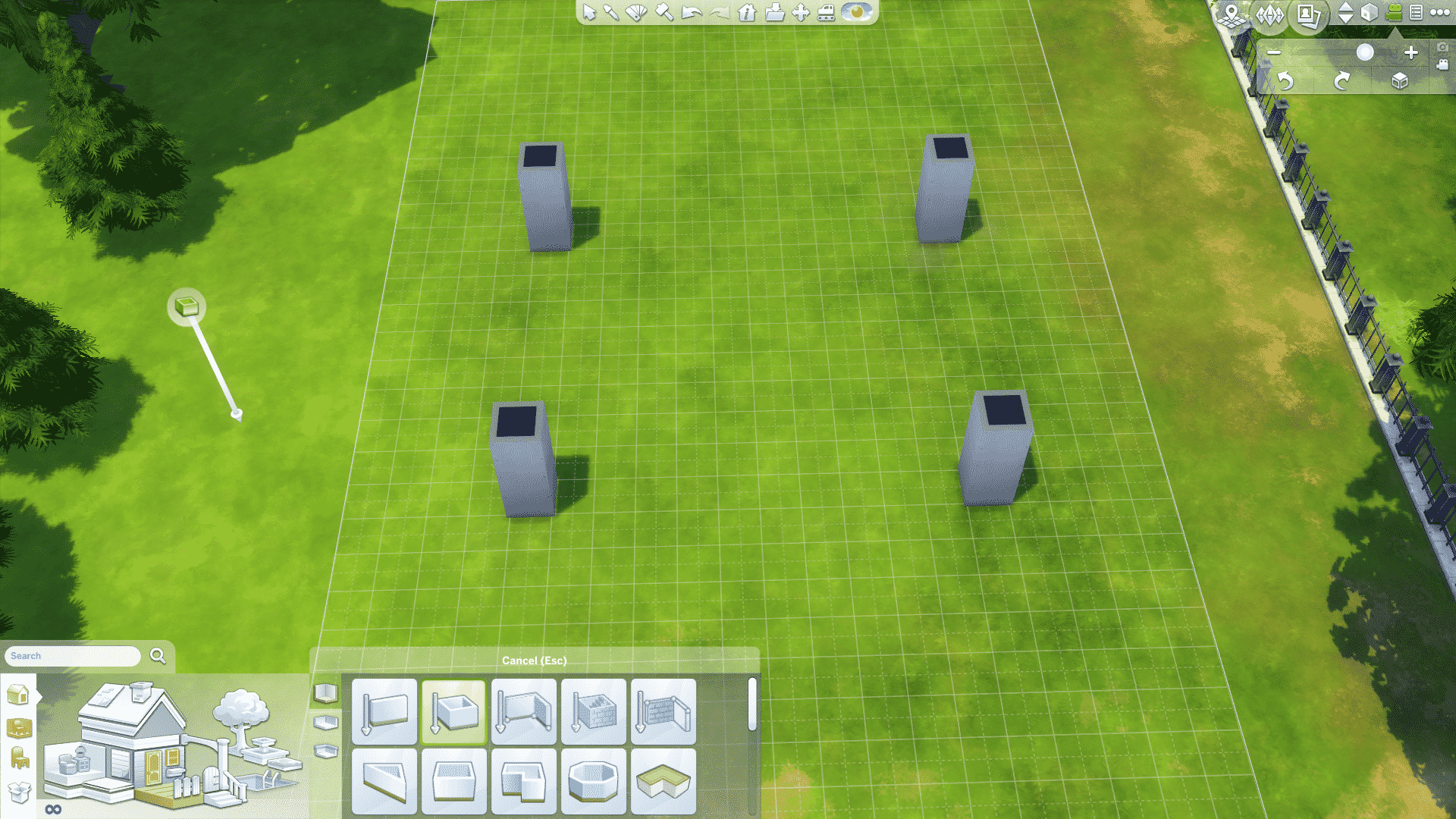
I normally start by using the roomtool to create pillars symmetrically on the lot. So here I’m going to make a simple square house as an example. For different shapes and structures, be thorough to make the pillars perpendicular to one-another, to get a safe result! -Playing around with asymmetry can be really cool, but it’s also a lot more time consuming.

When making the shape, make sure you drag from the inner corner of the pillar and over to the next one, like so:
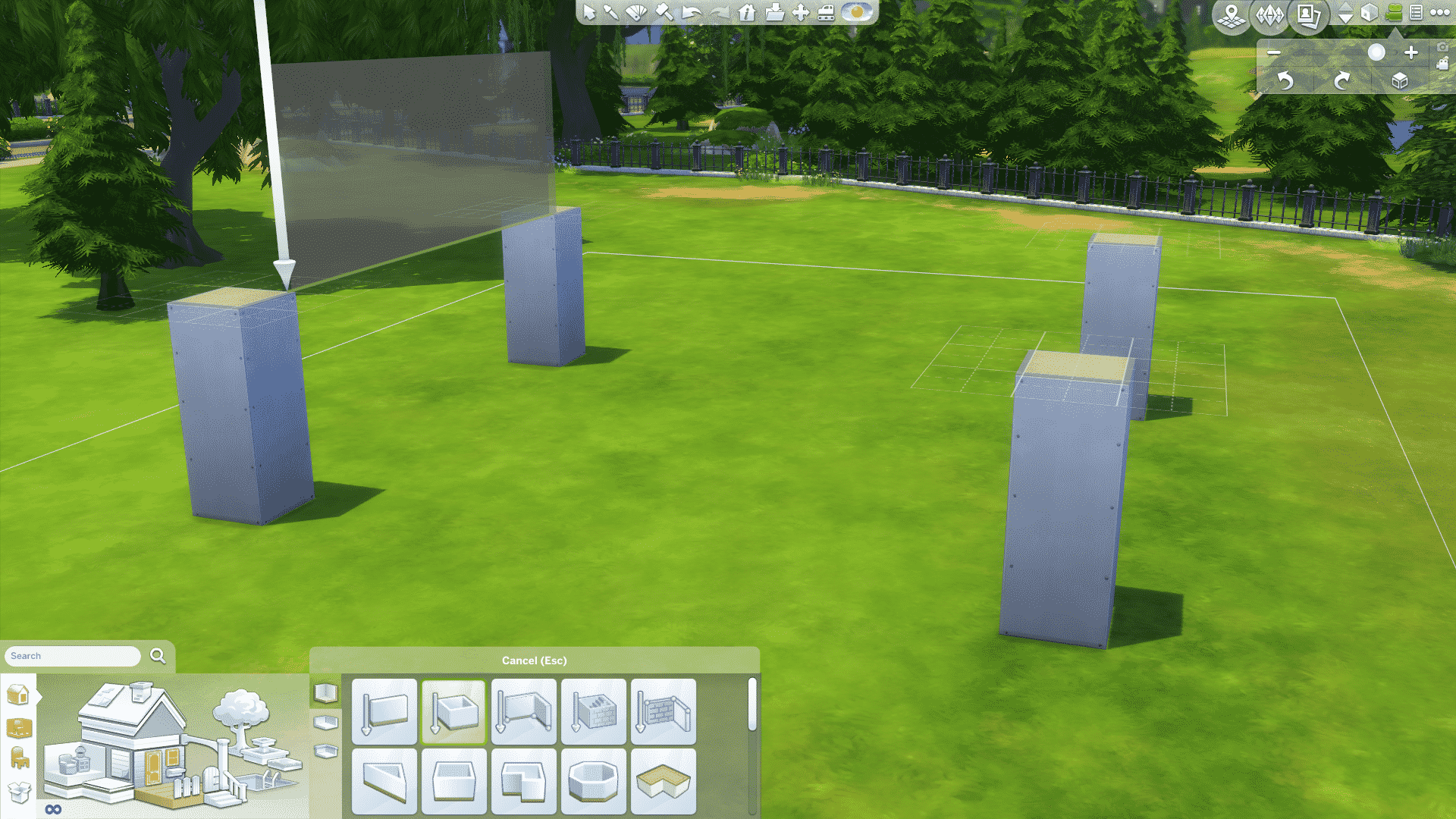
You can do it on the outside too for a more slick and clean look, but this way gives it more depth, and definitely fits small, simple modern houses very well! Also, if you realize that you want to change the shape during, just add more pillars wherever you want, and connect the walls. Like connect the dots, with pillars!
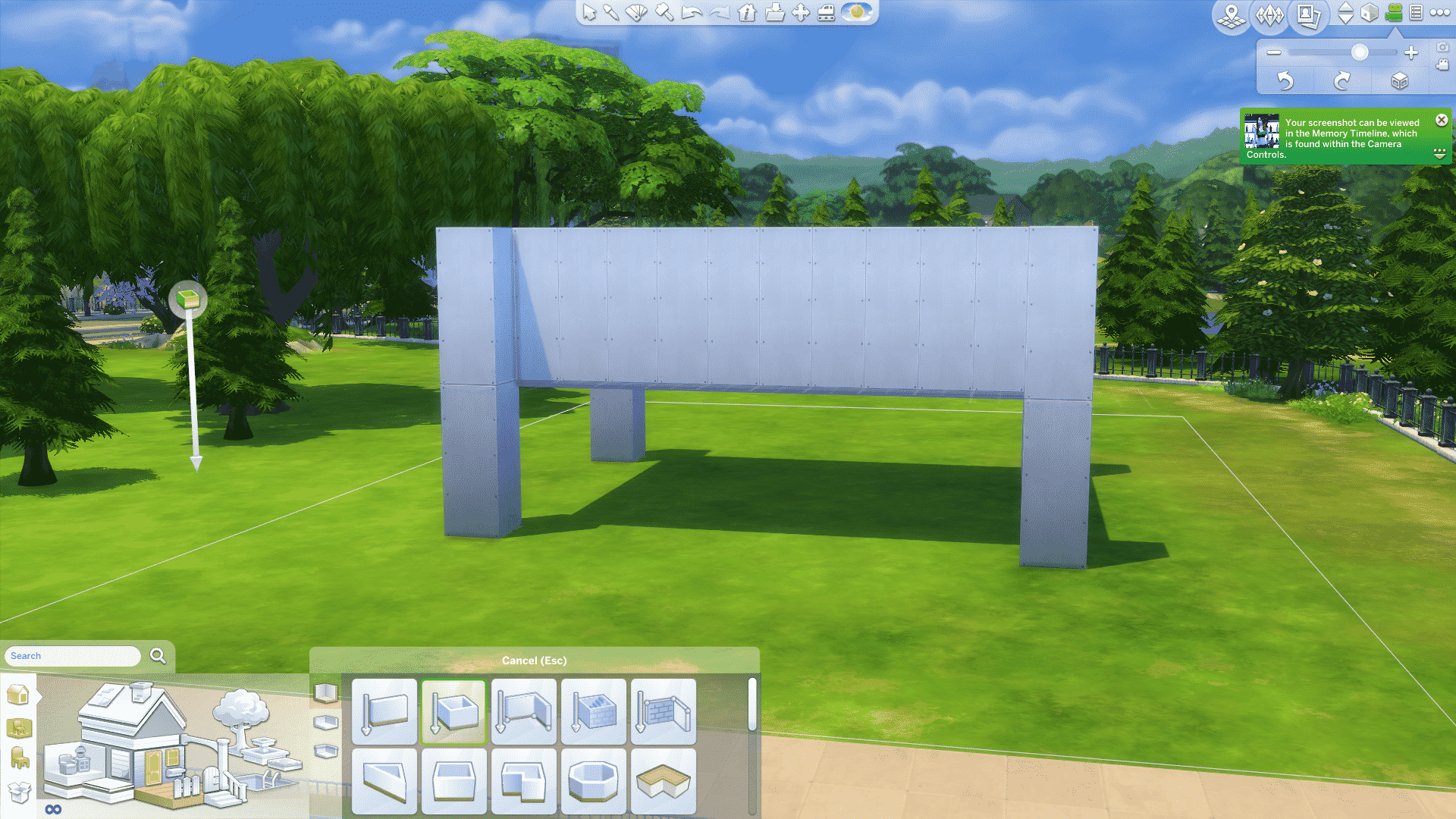
Then continue the pillars on top of the ones you’ve already made, so follow the wall all the way up each floor, and bam, you’ve got yourself a fancy box!
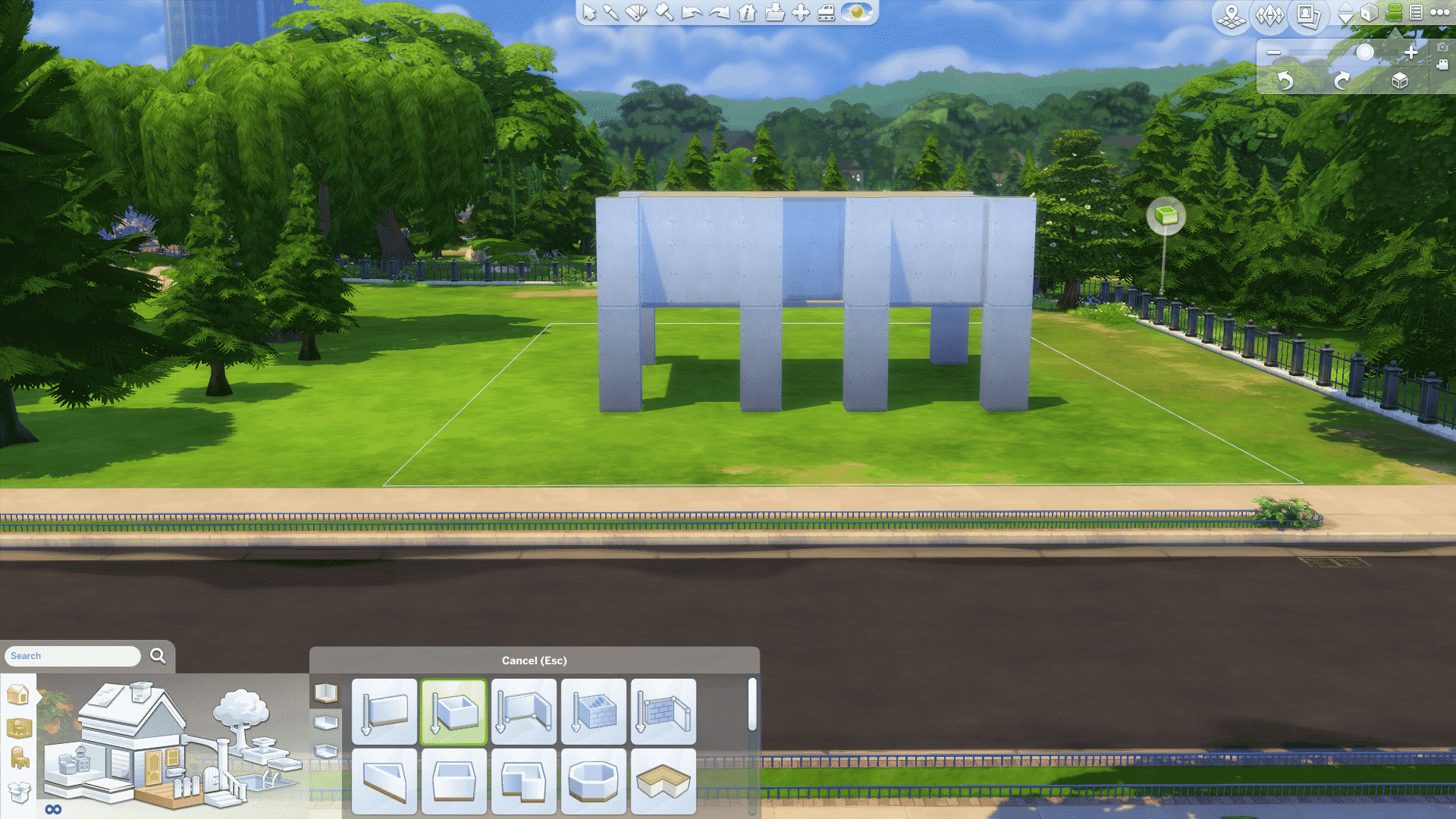
Here you can see I’ve added two extra pillars for aesthetics and pulled the wall back one square where the door is going to be, again: Depth!
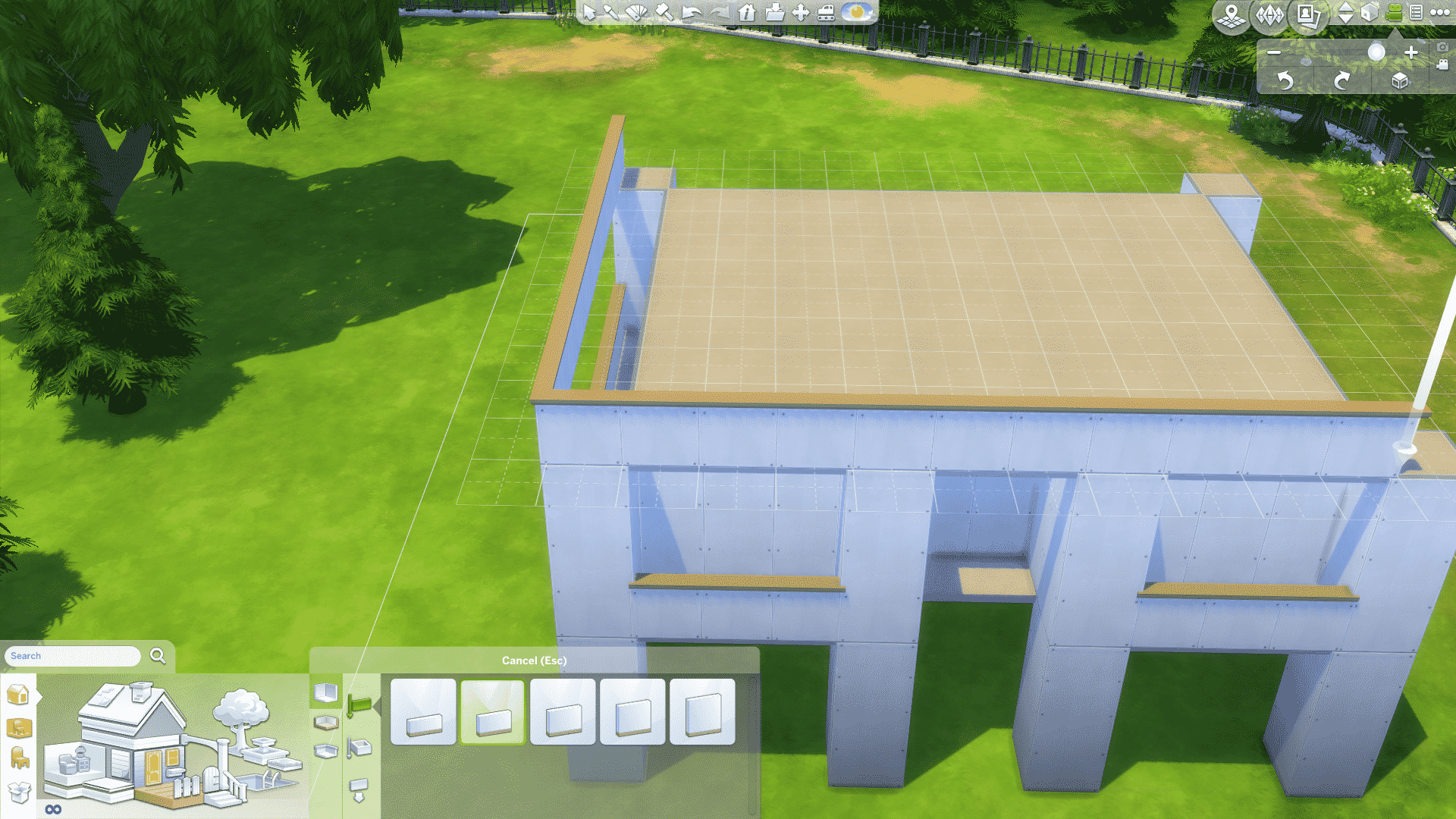
Half-walls are an amazing and simple way to make details on the outside of the structure. Use the half-wall tool and drag on the outer corner of the pillars all the way around the house, and on the roof. That will also create a perfect roof to your house. Flat as flat can be!


Add exterior wall trim to the top of your walls, and half-wall trim to your outside half-walls. A good tip is to colour your house the desired colour before you do this, so you can see what your accent colour is going to be (the colour of all of your details).
Then colour the base and roof of your house in the same colour as your accent colour like so:
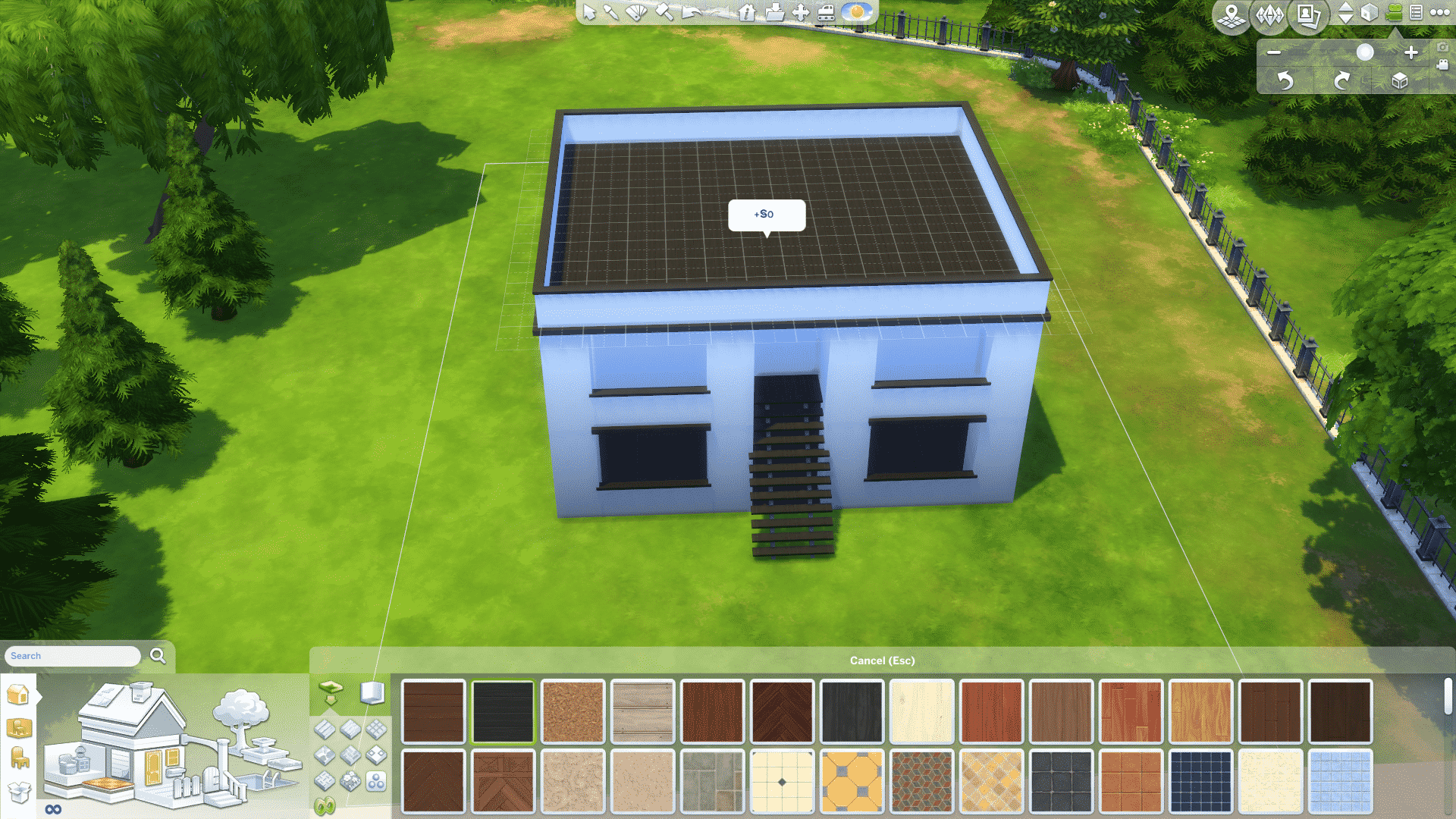
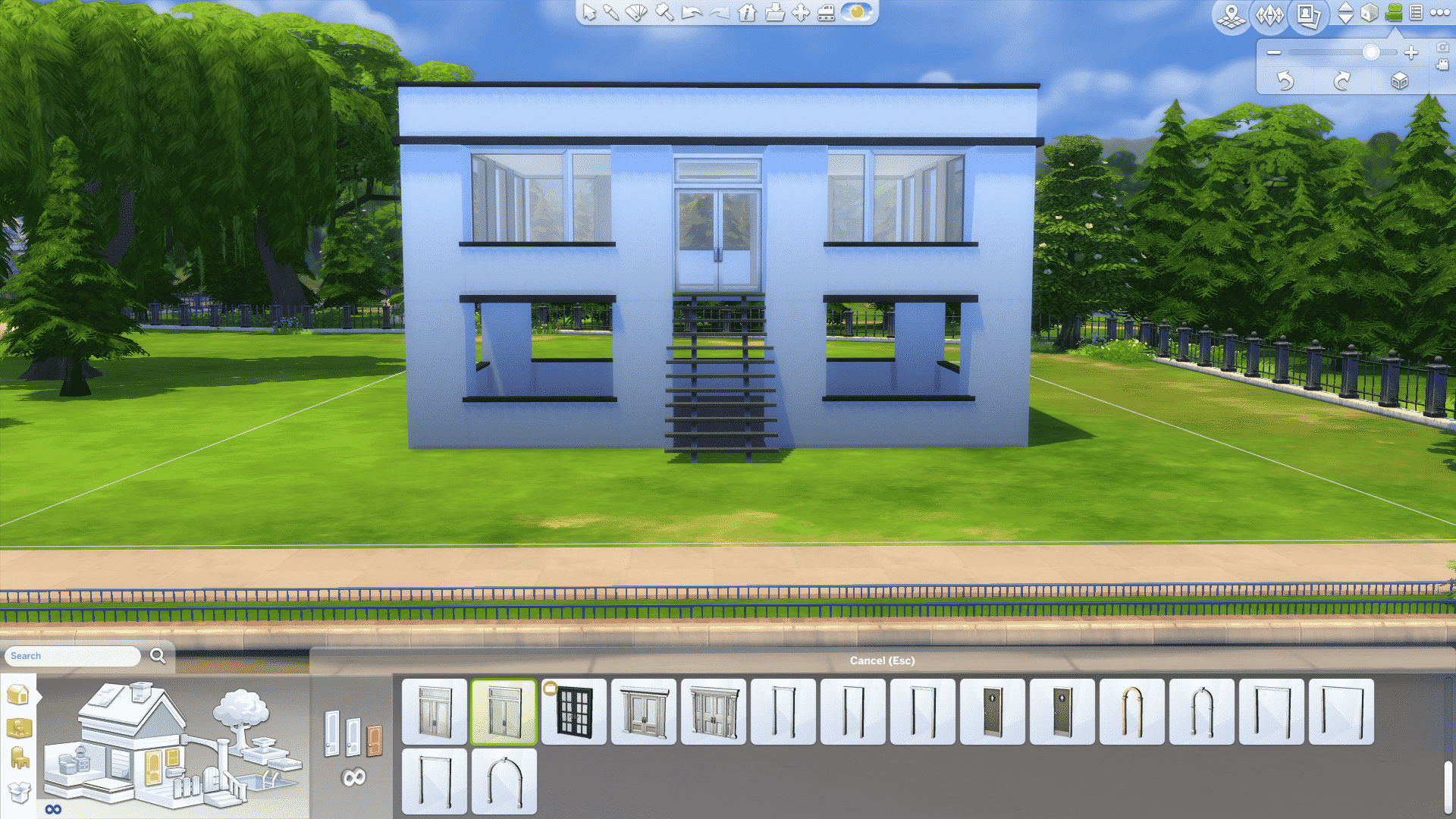
A modern house can have many windows, or none at all! Personally I prefer lots of windows, symmetrically placed on each side of the house. I would recommend having window placement on the front of the house symmetrical, if your stairs are centered.
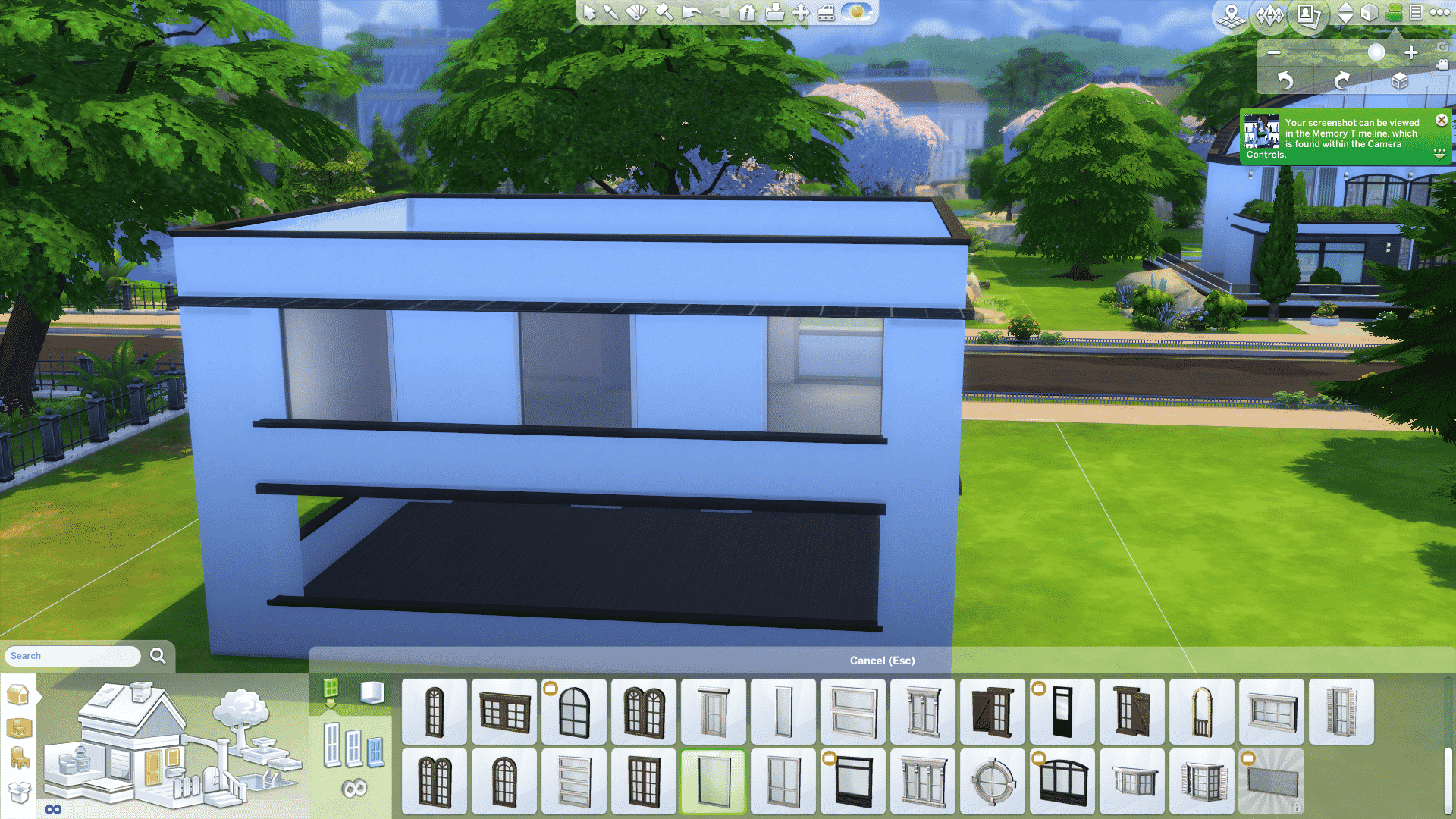
Modern architecture often uses asymmetry with balance items or structures to make it seemingly symmetrical to the eye when it’s in fact not symmetrical at all, but I’ll come back to that in Patio and Path.
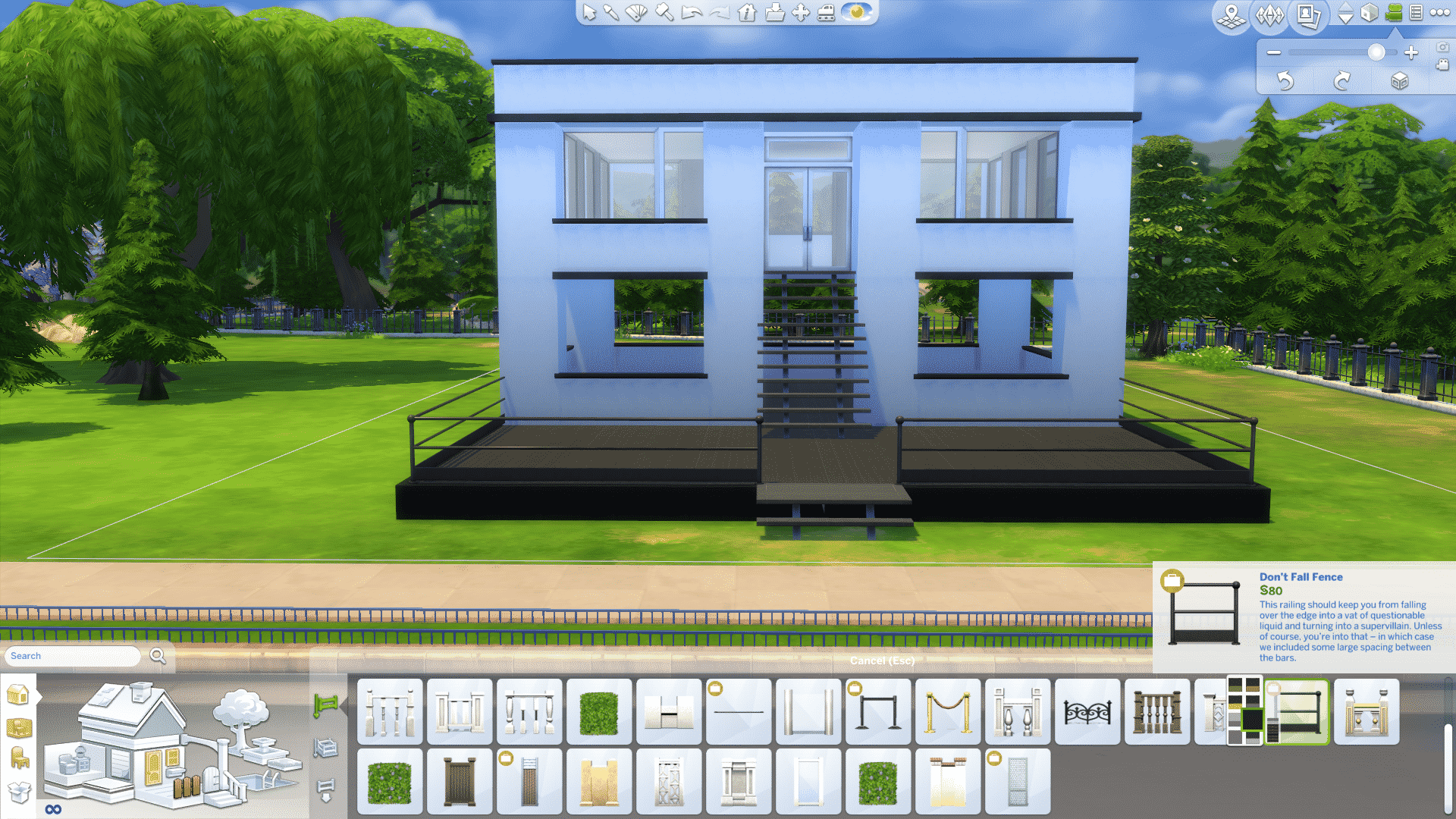
Make a patio from the outer corner of your front pillars, and drag until you find it big enough. Raise it a little bit, and colour it with your accent colour.


Add a fence you like, and pick either the accent colour, or the main colour of your house. Either will work fine!

On this patio I’ve decided to have a pool and seating area because it looks very inviting. It also looks great on The Gallery images if you want to upload your house!


This is an asymmetrical design, with the pool on one side, and balance objects on the other. So the pool is the main focus, and the seating area is the balance. I’ve put a plant in each corner of the seating area to “frame it”, so it follows my square and edge-focused design. I’ve also given the furniture a different colour to make it pop, a softer brown works well with black and white. For a more quirky and extreme look you can play with strong neon colours. Playing with colours is fun!
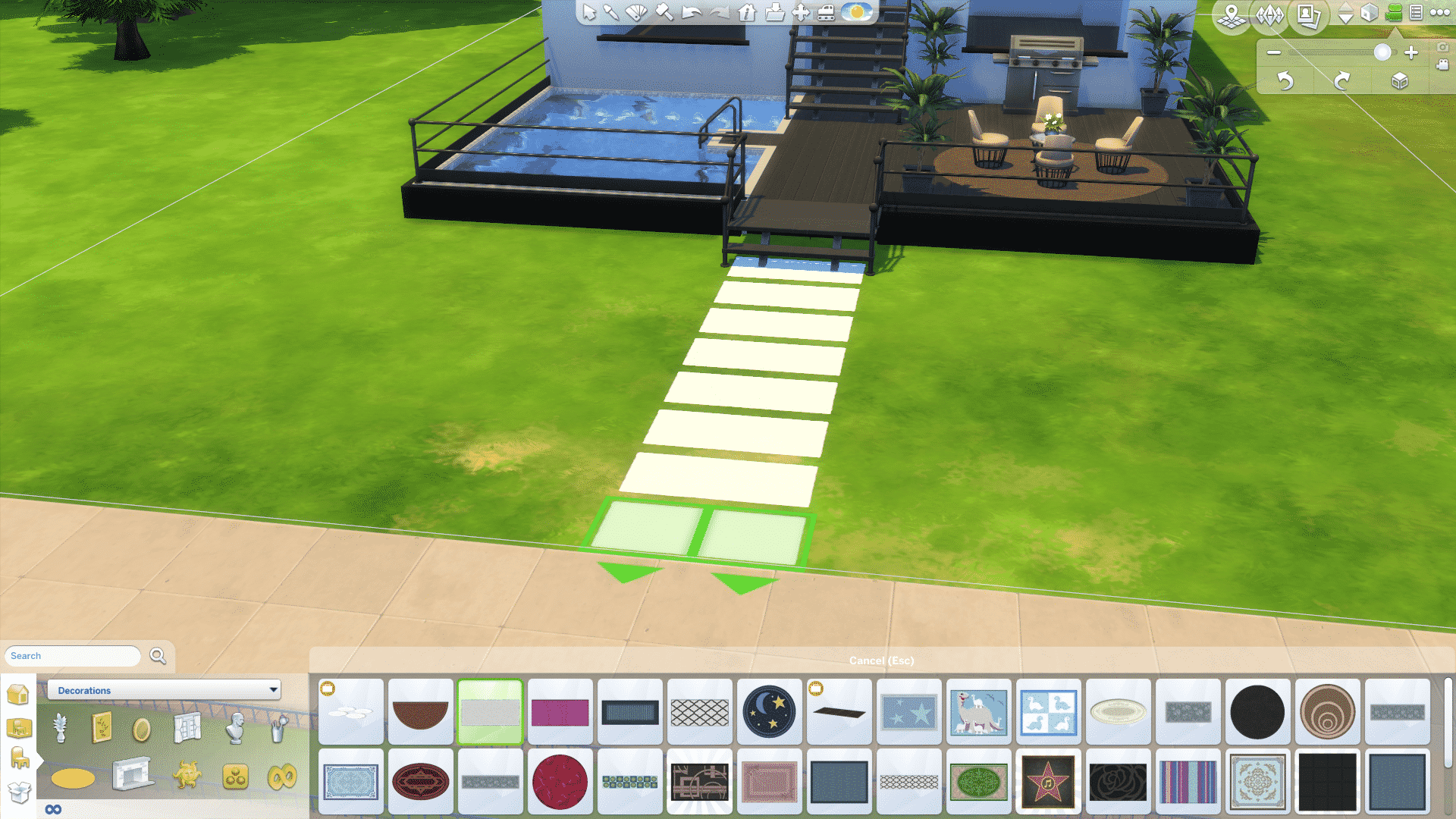
The path I made with carpets, and I’ve chosen the main colour of the house to create contrast. This is a straight simple path, but it’s also quite fun to play around and make curvy paths like this:

Do some gardening, maybe add some fountains and your house should be done!

So far in this series we have looked at technology and programs that are useful if you want to start a Youtube channel, today I am going to give you tips on what content you can include on your new channel to grow and maintain an audience. This is not something people often think about when starting out, but I have found that it is vital to success on the site.
There are so many options when it comes to gaming on Youtube, especially with a game like The Sims that has multiple aspects that enable players to be creative. If you are someone that doesn’t have a lot of time to spend editing and recording let’s plays, then a channel based around the Create A Sim (CAS) aspect of the game might be perfect for you! CAS in itself is something you can do a lot with on your channel especially if you use custom content! CC shopping videos are one of the most popular kinds out there. Creating ‘look books’ or themed styles gives you an opportunity to showcase your fancy editing skills.
If fashion really isn’t your thing then building is another alternative. Again it doesn’t require an awful lot of time however depending on the size and detail within the build the actual process can take much longer than simply creating a sim. All you would need to do is record while you build and speed up the clips during the editing process to avoid an extremely long tedious video. Some creators prefer to then add some voice over to explain their ideas and thoughts and some prefer to just place some music. If you choose the second option I strongly advise that you use tracks that are not restricted by copyright. No Copyright Sounds is a really great place to find thousands of upbeat tracks for all your videos!
Within these two kinds of videos are tags, collaborations and challenges. These are really fun to do once and a while and it is a good chance to interact with other simmers/gamers and put yourself out there. I have created an article on Create A Sim Tags which you can find here! I strongly recommend collaborating with other creators if you want to grow as a Youtuber, not only does this enable you to put yourself out there across other channels, but it really helps you to become part of the simming community which is an incredibly rewarding experience.
Last but not least are let’s plays. Time consuming, hard work and lengthy, these things are a big commitment that people often don’t realize until they actually start one! Before even thinking about planning, you should be completely honest and realistic about how much time you can commit to recording, editing and rendering let’s plays on a daily basis. Its not gonna work if you only upload one lets play, once a week and nothing else. Viewers will become impatient, disinterested and eventually go somewhere else to get their fix of sims content! You have to be consistent. Don’t get me wrong, you don’t need to upload every single day, but often enough that you regularly active and it doesn’t look like you have completely abandoned your channel! Perhaps think about setting up an upload schedule for your subscribers to follow so they know what content is coming when. Personally, I am a very busy person. Juggling a Philosophy degree among many other things while maintaining a Youtube channel is very difficult but there are ways to make it work:
Whatever you chose to do, uploading on a regular basis is vital to growing your audience, no matter what content you choose to post. If you do want to take on an let’s play I have a few tips that will help you keep your subscribers watching:
Tip #1 – Be unique. I cant stress enough how important it is to come up with your own ideas and be original. People don’t want to see the same thing over and over. They want to come to your channel for something they cant get anywhere else!
Tip #2 – Storyline. With a game like the sims you have full control over what you and your sims get up to. According to a recent poll I posted on Twitter, a story line is KEY to maintaining interest.
Tip #3 – DRAMA! Keep your subs on their toes! Bring in that big plot twist they weren’t expecting, an unexpected pregnancy, death, relationship. Be creative!
Tip #4 – Enthusiam – When recording your let’s play, sound like you actually want to be playing the game. There’s nothing worse than listening to someone sound so bored and disinterested in what they are doing.
Tip # 5 – BE YOU! Let your personality shine in your videos. This allows your subscribers to get to know you as an actual person behind that microphone and engage with you in the comments.
My final, most valued tip for growing your Youtube channel is to use social media to the up-most. I would not be where I am now without it, Twitter is fantastic! There is a whole world of simmers out there who regularly communicate through the site. It is by far the best way to get stuck in and meet like-minded people who love the same thing you do, simming! Also, of course you should totally go and check out the forums on The Sims Community Social! Again there are thousands of members who chat and post ideas, photos, challenges and even giveaways! There are even threads dedicated to Youtubers like you and me so head on over there to get started!
That is the end of this very long edition to the series, next time I am going to focus on channel art and how to get your Youtube channel looking the part!

Hey guys! Today I wanted to talk to you about how I do object recoloring. I taught myself how to recolor so I may not do it the easiest way or the way others do it but it makes sense to me. Hopefully, it will make sense to you as well! Recoloring objects is invaluable in a game that lacks a color wheel and with objects that rarely match or are oddly colored. What is up with the white objects in this game? The first thing you are probably going to want to do is remove the dingy color off all that whites, right? I’ll show you how to make your whites brighter.
But first, a little detour into the ethics of custom content creating. The most important thing is respecting the wishes of the original creators. If their rules say “do not recolor” (even if it’s ridiculous to put this on an EA object) or if it says “do not share or alter my meshes” then you CANNOT SHARE IT! Period. End of discussion. Don’t be a stealing jerk. The second most important rule is TEST YOUR STUFF! How many times have you downloaded something because it was too cute for words and then put it in your game to discover it’s broken? Exactly. That’s because the creator couldn’t be bothered to actually play test the item…or they don’t even own the game. Don’t be that person. Work hard at becoming the kind of CC or Mods maker that people can trust because they know you release quality and well tested items.
Lecture over.
Back to the tutorial.
Create a folder on your computer where you will be keeping all your custom content. Your top folder should be something like “Sims 4 Custom Content” and then inside that you will store your goodies. Stuff like the fabric swatches, art work, palettes, etc that you might want to use for your CC should have it’s own folder. Then you will have a folder for your CC WIP and one for when you complete you CC. This is a sampling of some of my folders; as an example:
Sims 4 Custom Content
–Fabrics
–Palettes
–Artwork
–CC Wip
——Name of CC I’m making
–Completed CC
Go shopping! Search for fabrics (I recommend colour lovers for patterns), artwork, palettes. A quick word on artwork, be mindful of the copyrights. I have seen Disney shut people down for using their images. You don’t want to be hit with a copyright infringement over some free CC you are making. Once you have gathered things you like and organized them into their own folder, then you can start the process of doing your first object recolor. This is what a palette looks like, I suggest making yourself a big grid and then filling in each box with colors you like so you can make your own unique color palette.

Now that you’ve got all the prep work out of the way, you can start the recoloring process. Launch S4S and then choose “standalone recolor” found under the “object” button. We will be recoloring a love seat, so I’m going to type loveseat into the search bar at the top. If you know exactly what you want to recolor, type the name in or you can type in the number of the pack to find things faster. The Grand Wickish Pizzazz looks like a good choice, let’s do that one. Select it by clicking on it and then choosing next at the bottom of the screen. Once it is done cloning, name your package.
As you can see, every single color option for that item shows up. What I want to do is give myself more of the light wicker color options since it’s my favorite. So, I will be exporting a couple of the textures. Under the studio tab, click on the texture tab and then choose the texture you want to export. I’m going to export the 4th and the 7th ones.


After extracting the .dds texture, you are going to open Gimp and convert that into a .png image so you can edit it in your graphic program. I am assuming that you do not have Photoshop CS and the DDS plugin installed; if you do then skip this step. Begin by opening the image in Gimp, select OK when it asks you if you want to load DDS. Under the file drop down menu, you are going to select “export as”. Go down to where it says “select file type (by extension)” and then scroll down till you find .png. Select export and make sure you change the compression level to zero. Leaving it at 9 will make your image grainy looking. Click on export in the popup menu.


Load the images you just converted into your graphics program and also load any palettes you made that you want to use for this item. I like to work in layers, so the first thing I will do is make layers of the items in the image. I made a layer of just the brown wicker part of the love seat. I will also make a layer of just the pillow part because I want a solid colored pillow. I made the layers separate images just so I could show you guys what I’m doing. They are actually just placed on top of the main image when doing this.


I want to make the wicker a darker color, so I will use the eyedropper tool and choose one of my palette colors. Next select the color changer tool and select the layer that has the wicker, this is the color I want to change. As you can see, the wicker is now a dark brown. Do this for the other layers changing the colors to whatever you want.


Once you are done changing the colors of your layers, save your texture and then go back to your package in S4S and select the texture tab. This time you will be choosing import. A popup will appear and you select the image you want. Then select the open button. To add more images, click the add swatch on the top right corner. You can also delete images by highlighting it and then clicking the remove swatch button. The more swatches you add, the larger the file becomes. So, try to keep them between 10 – 15. At this point, you can either change the textures or delete them. I deleted them for this tutorial.
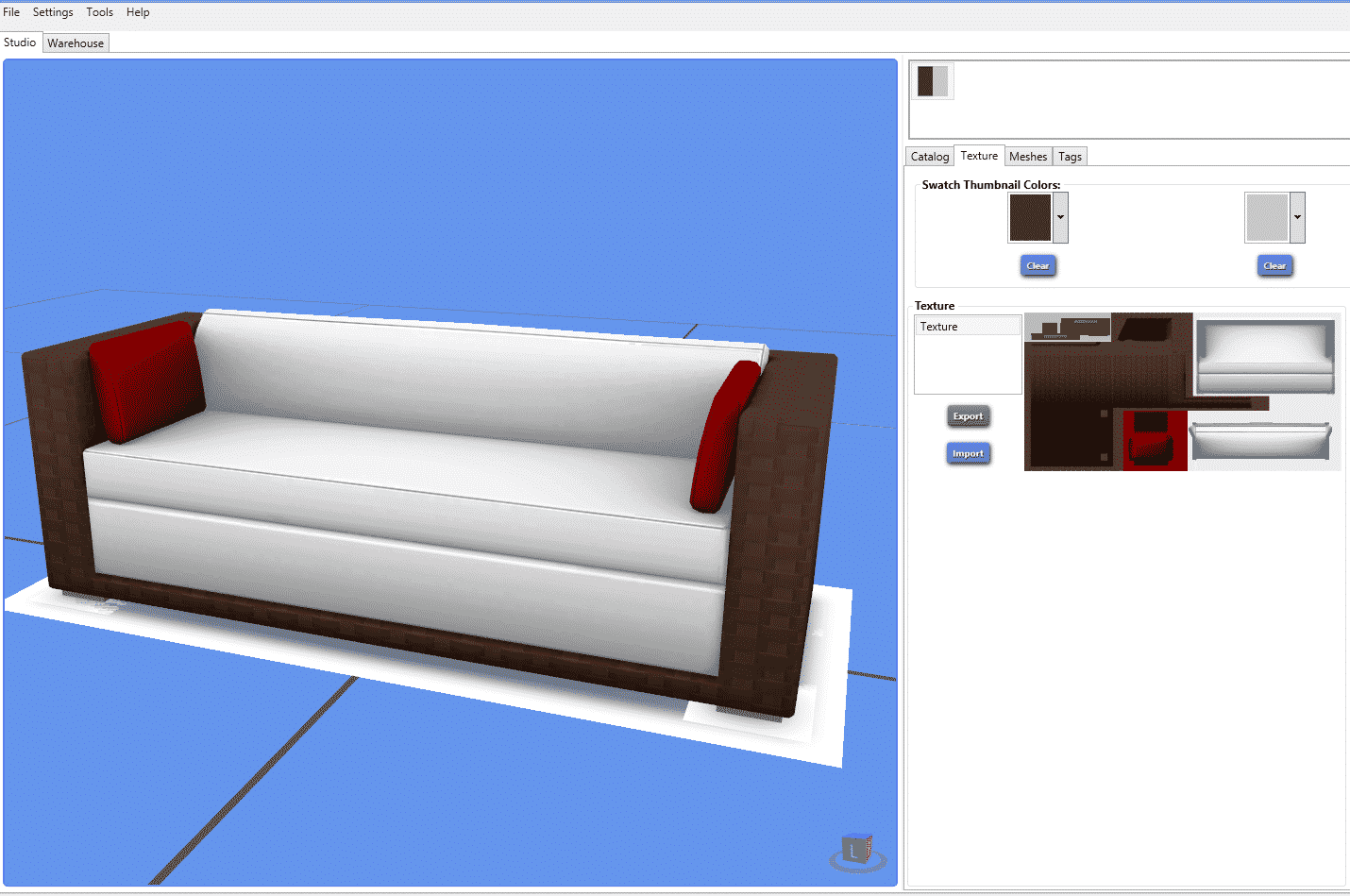
Save your package and then test it out in you game. Please be sure to test your custom content in live mode so you can correct any problems.
Congratulations! You just did your first recolor. This method can be used on CAS items as well. Feel free to reach out to me at the Sims Community Social if you have any questions.

One of the fastest, and arguably most fun, ways to earn magicoins was through dueling. To take part in a duel, you first needed to dive through the magic ‘A Hole in the Ground’ or summon a blimp ride to travel to Magic Town. After arriving you could challenge anyone on the lot to a duel, even the special NPC characters such as the infamous Vicki Vampiress.
Duels consisted of four rounds and five spells. At the beginning of a duel each wizard was randomly barred from using a spell. This was done to increase the challenge as you couldn’t rely on having the same spells available each duel. The challenge of dueling was remembering the spell hierarchy. Each spell was effective against two others and was defeated by the remaining two. If both sims picked the same spell, the round resulted in a draw. In the end, whichever sim won the most rounds was declared the winner and awarded a hefty sum of magicoins.
To increase the levels of nostalgia, the five spells are shown below.


And just in case anyone decides to jump back into The Sims Makin’ Magic after reading this post, here’s the spell pentagram that shows which spells conquer which. Or go it alone and see how much you remember from binge playing it back in the day.


The Sims shared a new video advertisement on Facebook showing off some main features of The Sims 4 Get Together!
Tip: Platinum Simmers

The Sims Team is currently rolling out new ads for The Sims 4 in France, and SimCookie was able to capture these 7 advertisements that contain new renders!