Home Blog Page 511

The Sims 4 Preview: Cheat List & Functions

6

To open up a cheat console, press CTRL+SHIFT+C. Input the following cheat codes you want and press enter!

  • ”Help” – Lists all available commands into the comand console. This will only list cheats available to the players.
  • ”resetSim {FirstName} {LastName}” – Resets the Sim.
  • ”fullscreen” – toggles full screen on or off
  • ”headlineeffects {on/off}” – Hides all headline efects including the plumbob, thought balloons, etc.
  • ”Death.toggle” – Disables Death so that Sims don’t die.
  • ”FreeRealEstate [on|off]” – Can be entered at neighborhood/world. If on, all homes are free while the cheat is active.
  • ”motherlode” – provides 50000 Simoleons
  • ”kaching” – provides 1000 Simoleons
  • ”rosebud” provides 1000 Simoleons”
  • Pressing ”Shift + ]” increases the size of objects
  • ”testingcheats {true/false}” – Enables the use of further cheats
    • Entering ”testingcheats true”, then entering ”cas.fulleditmode” allows all CAS abilities.
    • ”Interaction Cheats are available by Shift+Clicking on objects and Sims once the player types in ”testingcheats true” in the command console.
    • Shift Clicking on Sims –
      • ”Reset Object” which will reset the sim.
      • ”Add to Family” which adds the Sim to the current family.
      • ”Cheat Motive > Make Happy” which sets all motives to full and set mood to Happy.
      • ”Cheat Motive > Disable Motive Decay” which allows all motives to remain static.
      • ”Cheat Motive > Enable Motive Decay” which allows all motives to change.
    • Shift Clicking on objects
      • ”Reset Object”, which will reset the object.
    • Shift Clicking on dirtyable objects
      • ”Make Dirty”, which will make the object dirty.
    • Shift Clicking on already dirty objects
      • ”Make Clean”, which will make the object clean.
    • Shift Clicking on the mailbox
      • ”Reset Object”, which will reset the object.
    • Shift Clicking on the ground
      • ”Teleport Me Here”, which Teleports the selected Sim (make sure you selected the ground, not the carpet!)


Confirmed: No family trees in The Sims 4!

17

The-Sims-4_-Build-Mode-Official-Gameplay-Trailer1-398

Update: This has nothing to do with relationships between Sims in the game. There will still be Brothers, Cousins, Grandfathers etc. (See the Full List). The thing that we won’t have is the Family Tree User Interface that shows all the Sims that are currently living (and who are dead) who belong and/or are a part of that family.

Pic from The Sims 3 Forum

Tyler

Crinrict, SimTimes & @Renssies confirmed that during The Sims 4 Presentation in Germany, SimGuruLyndsay told them that there are NO Family Trees in The Sims 4! Kinda a let down, don’t you think? :/

Capture

The Sims 4 – 15 New Screenshots!

0

Via Everyeye.it! (Thanks TheSims4.it for the find!)

the-sims-4_PC_8129 the-sims-4_PC_7635 the-sims-4_PC_7536 the-sims-4_PC_5259 the-sims-4_PC_4476 the-sims-4_PC_4376 the-sims-4_PC_3629 the-sims-4_PC_3281 the-sims-4_PC_2897 the-sims-4_PC_2162 the-sims-4_PC_1665 the-sims-4_PC_1003 the-sims-4_PC_663 the-sims-4_PC_586  the-sims-4_PC_9170

The Sims 4 Preview: Children, Teens & Parents!

4

Children in The Sims 4 are very…childish. They act like real-life children: they play a lot, get bored easily, love to socialize and are always seeking for attention!

There was a funny scenario that happened in my game; I sent mum and dad by the river to have some private time. They talked about their recent events (you can see that thanks to Sims’ speech bubbles). A child Sim that they had, had a Fine Emotion. Now, this emotion by the looks is neutral, but for children, that emotion means ”Do something ASAP!!!” and so the Sim wanted to check what are her parents doing. She suddenly looked at her father with the ”Why did you leave me for…her” face. She started to talking to him and mum tried to break into this conversation as well.

14

Do you know what the Child did? Absolutely nothing! She ignored her mother who was standing right behind her for 2 whole minutes. What was interesting is that she didn’t even try to re-form the group so that everyone can see each other. This caused her mother to be surprised since she couldn’t talk in the group anymore (really rude from the kid  😐 )

13

I felt really bad for her mother so I sent them all home. I made the Child play the Piano and made her parents sit down and listen. I knew this will be an interesting situation since the Child didn’t have any piano skills. The moment she started playing, her father (who she also had better relationship with) couldn’t stand her piano ”skills” at all. He started looking all furious and got an ”uncomfortable” Emotion. Her mother, who she ignored, seemed to be okay with her playing the piano. I didn’t check her traits but I assume she really likes children!

It was time to check on the Goth family. I sent Mortimer and Alexander Goth to the nearby park and made Alexander play on the Pirate Ship.

16

I started looking around the park and I switched back to Mortimer. He decided to amuse himself and his Child a bit more, so he played as a Sea Monster. He put his hands up and was making a funny ”monster” face. Overall, both of them had a great time and their Happy emotion got boosted.


I didn’t explore Teens and their possibilites that much, but I do know that Cassandra Goth was being a tad mean to her little brother Alexander by scaring him. Sometimes, Sims don’t get scared and laugh together (tends to happen more if Sims are happy), but in this case, since Alexander was just ”Fine”, he got scared and got a bit down. I wondered what will happen next so I sent them down to sit on a park bench. They talked a bit and his bigger sister decided to give him an advice.

7

Even though she was mean to him, she still decided to step up and act as a big sister with responsibilities to her little brother!

SteelSeries Engine 3 now supports The Sims 4 Gear!

5

Jacqpinks found out that the SteelSeries Engine 3 now supports The Sims 4 SteelSeries Peripherals (TS4 Gaming Headset & TS4 Gaming Mouse).

Capture

You can configure both items and change the color of the Plumbob LED Illumination. Both of them have the ability to change the color for each executable file you have (whether it’s a game or a program – doesn’t matter). To do so, click on the gear you want to change, under the Configurations tab you’ll find Default and The Sims 4 In-Game options. To not overwrite any of those 2, click on the ”New” button, name it however you want and add applications that you want to change certain colors.

headset1 mouse1

headset2

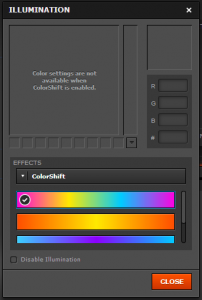
Both Gears also have an option that lets the LED change colors automatically using ColorShift.

mouse3

What’s also cool about this Engine is that it lets you save your mouse click patterns and timings. If you’re playing an RPG or a shooter game, the Macro option is the perfect choice!

macro

Don’t worry about how many memory will this Engine use; after you save your customization settings, click on the X and the engine will run quietly on your taskbar. It only takes 14MB of your Memory, so don’t worry! 🙂

Capture

Here’s what my customization setting looked like on The Sims 4 Peripherals:

Capture

Click Here to download this Engine!


Joystiq: Death kills parents, robs cradle in Sims 4

2
Here’s a tragic – yet heartwarming – tale from The Sims 4as shared with me by the game’s Executive Producer, Rachel Franklin:

“There was a family and they had a baby. And the family died. The Grim Reaper came, but the baby was hungry. So, Grim turned everyone into urns, but before he left, he fed the baby.”

sims4deathbaby

Read More

The Sims 4 – Main Menu Screen Recreation!

1

At The Sims 4 EU Preview, we started off from The Sims 4’s Main Menu Screen. We weren’t able to take screens of it (only in-game screens and videos were allowed), but there were no restrictions in photographic memory  😉

The Main Menu screen is very simple: white background with Sims doing all the crazy things: painting, sculpting, running, talking and such. These Animation/Video backdrops changed every 10-15 seconds.

The plus button below the Play button represents the ”Create New Household” action which, after you finish with creating Sims in CAS, leads you to ”Moving In” screen with Oasis Springs/Willow Creek Map. The Play button just loads the Household you played last.

You can load a saved Game by clicking the floppy disk in the upper right corner. As far as I remember, we had 3-4 Pre-Saves.

recre1 recre2

I noticed that one PC had a disconnected internet. Everything was still the same, except there was now a render on the bottom bar that let you know you’re offline. (Not sure if it exactly said ”You’re Currently Offline” but you get the point).

RECRE3OFFLINE

Please note that these Main Menu Recreation Screens are just a representation of what Main Menu should we expect when the game comes out. It’s not official and it looks much better with Sims moving around!

The ”You’re Currently Offline” Main Menu Screen does not mean that the game requires an internet connection – it just lets you know are you able to use The Gallery or not.

The Sims 4 – Quick Start Guide

1

featuredscan

This Guide was given to us during The Sims 4 EU Preview Event. Text and Screenshots are made by Electronic Arts. Image scans are provided by us.

Controls

Live Mode

Sim/Household Controls

  • Switch to next Sim in household: Space or N
  • Switch to specific Sim: Click Sim portrait
  • Lock camera to Sim: Right-click Sim portrait
  • Center camera on active Sim: Enter

Time Controls

  • Pause Game: P or 0 or ‘
  • Regular/Fast/Ultra Speed: 1/2/3

Camera Movement

  • Move left/right: Arrow Left/Right or A/D
  • Move forward/back: Arrow UP/Down or W/S
  • Move Faster: Hold Shift + Camera Movement
  • Zoom in/out: Z/X or +/-
  • Toggle Map Mode: M

General Controls

  • Undo/Redo: Ctrl+Z/Ctrl+Y
  • Cancel: Esc
  • Toggle cheat window: Ctrl+Shift+C

Build/Buy Mode

Object Placement Tools

  • Rotate Object: ,/. (once object selected)
  • Delete Object: Del or Backspace
  • Off Grid Placement: Alt (while holding object)
  • Off Angle Placement: Alt (while rotating object)
  • Move to Slot: M

Creators

Create A Sim

  1. Get a feel for the new controls by clicking directly on Sims to push and pull their body and facial features. Huge butts and pointy noses are just a tug away.
  2. Follow the Tutorial as it’ll point out things you might otherwise miss, such as Tattoos, the Randomizer or Genetics.
  3. Think of an actor, politician, or a family member, and try to recreate them precisely using the tools. Create Stephen Colbert, Justin Bieber or even President Obama.
  4. Get weird and experiment with odd proportions, skin tones and features to make something hilarious or unique. Challenge: Recreate Jake and Neytiri from Avatar.

1scan

Build Mode

  1. Try out block-based building. Use Styled Rooms to place a kitchen, expand walls and adjust their height, rotate the room and add a foundation. Test the flexibility of the tool by picking up the room and moving around the lot.
  2. Follow the Tutorial to find powerful tools and features you might otherwise miss.
  3. Choose a famous building or your own home to try to build.
  4. Imagine the set of your favorite show (Walking Dead, Arrested Development, evil spy base) and recreate it.
  5. Think of something absurd, like a pyramid or AT-AT Walker and see if you can replicate it (we have).
  6. Browse the Gallery for inspiration from the community.

scan2

scan3

Storytellers

  1. Emotions, seen in the bottom left corner of the interface, are a great prompt for storytelling. Try to play out your Sims’ Emotions as much as possible. Look for the Emotional Whim, the colored thought bubble, for goals related to your Sims’ Emotions.
  2. Socialization is one of our best storytelling features. Sims can socialize about things they are interested in, including Traits, Careers, Skills, Activities and Emotions. Pick fights, fall in love or discuss art at the museum.
  3. Traits, chosen in Create A Sim, strongly define how your Sims act. Use these as opening notes for any chapter to your story. Bob is Evil, therefore, he…
  4. Story ideas include Beauty and the Beast – a hopeless nerd or strange person looking for love. The Evil, career-driven jerk who’ll stomp over everyone to get ahead. Or, the lovable, free-spirited artist who works to make the world around them better. You can play out a Romantic Comedy, Greek Tragedy or any Aaron Sorkin show you can imagine.

scan4

Achievers

scan5

  1. Use Whims, Aspirations and Careers for constant goals that reward you with Satisfaction and Objects.
  2. Experiment with the right mix of Satisfaction rewards (Traits, Potions) to improve your Sims’ capabilities.
  3. Entertainer and Programmer are challenging Careers that require after work efforts to earn promotions.
  4. Try to complete 2 or 3 Aspirations in a normal lifetime for a single Sim. Reneissance Sim or the Popularity ones are quite challenging!
  5. Try to afford the biggest house in the neighborhood, or on the Gallery, without cheats.
  6. Find the secrets we’ve hidden in the world and gather the most tucked away collectibles. Look to the venues!

scan6

Experimenters

  1. Create conflicting Trait pairings for your Household in Create A Sim. Have a house with Good vs Evil Sims, or Hate Children vs Family Oriented.
  2. Challenge yourself to live entirely outside your home lot. Make friends and mooch at their homes. Can you sleep on their couch? Eat their food? You’ll need to be good enough friends to make it work.
  3. Gather objects that convey an Emotional Aura to create rooms that skew the Emotions of Sims. An Anger room? Sadness cave? You can earn these from gaining Promotions in Careers or creating them via the Easel or Woodworking Bench.
  4. Seek alternate ways to earn Simoleons, like programming (Computer), writing (Computer), art (Easel), collection (Explore Venues) or fishing (Explore Venues and the neighborhoods).
  5. See how many lovers can you accumulate, or enemies. Can you make the entire town love or hate you?

scan7

The top left painting, created while angry, can be Viewed to become angry. Or, Enable Emotional Aura to have it convey anger to all nearby Sims. The top right piece conveys Focus. Use the Environment to steer your Sims towards useful, or completely unruly Emotions.

The Sims 4 – 24 New Renders!

1

Via TheSims.com! (Thanks Honeywell for collecting these)

01 - So54FDT 24 - AOEp2Dx 23 - 9LEl8bb 22 - Um6ynPA 21 - E2LmrHB 20 - yZkbHng 19 - SzKLrj6 18 - j9zbGrt 17 - nSLGrhx 16 - WuD3PZD 15 - V1advp6 14 - 6peLzu9 13 - qfAG9Yy 12 - I4i29dB 11 - bAn52o9 10 - cSph5Cp 09 - Nj8VXFL 08 - 2LEtyXP 07 - OIquSOc 06 - m2rbh8s 05 - GwvYqGl 04 - ezlyUzj 03 - oAPhyP0 02 - SudnaRX

The Sims 4 EU Preview Event @ EA Germany! (Introduction)

2

eventpic

It’s time to let the secret out! 😀

Electronic Arts UK invited Sims Community to attend a 4-hour special preview of The Sims 4 at the EA Office in Germany, Cologne! We played the game, met other Community Members, YouTubers and Fansite Administratos, talked with The Sims 4 Producers and Community Managers and got a chance to interview Lyndsay Pearson!

We won’t reveal now who exactly attended the event since I’m not sure do they want to keep it as a surprise or not.

We’ll be releasing The Sims 4 Infos, Screens and Specials throughout the upcoming days, so make sure you check out our Home Page since that’s where all the latest articles will be released!

I hope you’re looking forward to the new articles and pages we’re about to publish!

Here’s a very special screenshot taken in a very special place in The Sims 4. I won’t reveal much about it now (since I don’t have time, but will do later). All I can say is: FOLLOW THE MYST!

TS4PREVIEWSCREEN

The Sims 4 CAS Demo Available For Everyone

5

The Sims 4 CAS Demo is now available to everyone so click the picture below, download it and enjoy!

sims4casdemoeveryone

Kotaku: Adding Pools To Sims 4 Isn’t Easy, Claims EA

0

The Sims 4 isn’t going to launch with pools or toddlers, and people are pretty upset about that. But you know, toddlers are complicated. Makes sense that the developers might want to put that effort elsewhere. Pools, though? They’re just water. How hard could it be?

I asked producer Graham Nardone why it’s so tough to dig a ditch and fill it with water in The Sims 4‘s new engine, and he broke it down. The short answer? The game’s engine, as is, simply isn’t built to support things like digging into ground or Sims easily moving up and down within it.

READ MORE

asiuu9h3eeisokowublx

The Sims 4 Gallery Spotlight : Week 2

After a hectic week with the wave of news coming from the Sims 4 Creator’s Camp, things have calmed down a little bit and I’m able to bring you the Sims 4 Gallery picks from this week! Behold! The hotties!


sc_ccgallery-8

Sophia Benet by LigiaGigli

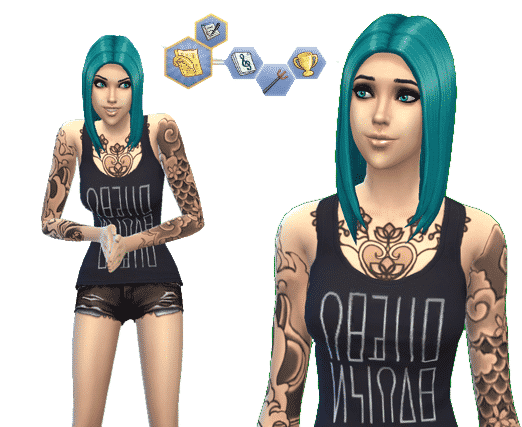
This lovely lady is Sophia Benet, she initially caught my eye because of her beautiful, what I call, mermaid blue hair (a blue with a teal-ish sheen). She’s quite the gal, she is Ambitious, a Music Lover, and rather Evil. Woah! Watch out for this one! She also aspires to become a musical genius, what do you think? Are you going to let Sophia live her dream or will her evil side take over?

sc_ccgallery-7

Derick Smith by kaiomaced

Next, I chose this piece of eye candy, Derick Smith, there was something about his rugged look that made me want to know more about him. This guy is Active and, imagine that, he’s a Bro. Wait, what’s that? It seems like he’s also Insane. That is quite the combo if you ask me. He also has the Bodybuilder aspiration and from the looks of it he’s well on his way. What do you think about Derick?

sc_ccgallery-6

Katy Perry by McFLYnamite

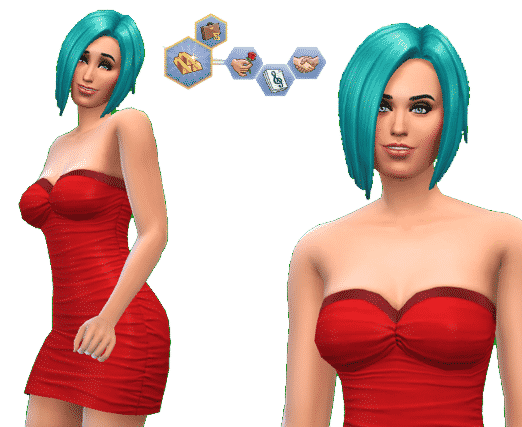
With the last gallery someone suggested that I look up some celebrities and the first that popped into my mind was Katy Perry. (I might have been looking at my copy of Showtime, at the time.) So I took to The Gallery and checked out the swarm of Katy Perry sims and happened upon this one. She’s a Romantic, a Music Lover and Good and she has the aspiration to be Fabulously Wealthy. I think McFLYnamite did a good job, I can really see the resemblance! How about you?

sc_ccgallery-5

Vanilla and Jeff Mocca by Jeckyjellybean

I honestly did a double take when I scrolled over these two Sims on The Gallery, possibly because Jeff was in his undies when I initially saw them, I was nice enough to give him some clothes so he wouldn’t catch cold. Anyway, this household is pretty hot, if you ask me. Vanilla has wonderful curves and she’s a GoodMaterialistic and Romantic Sim and aspires to be  a Mansion Baron.  Jeff on the other hand is a bit more simple, he’s a Bro who is Active and a bit of a Slob, he wants to be a Bodybuilder and I think he already is one! A nice looking pair of Sims we have here.

I’m keeping an eye out for next week’s Sims for the Gallery Spotlight, but give me some suggestions on what you’d like to see!

The Sims 4 – New Video feat. The Cowplant coming tomorrow!

1

Some say love is blind. Learn more about this The Sims 4 love story tomorrow! The Sims

10574460_747732025265870_7051684965770647284_n