Home Blog Page 510

The Sims 4 Review: What’s different from The Sims 3?

37

SIMS4_Logo_Final_rgb

Yes, it’s tactile! Yes, it’s emotional! Yes it’s weird & smart at the same time! But why is The Sims 4 different from The Sims 3 and why should you (or not) purchase it?

reviewnote

We’re about 2 weeks away from the release of this game and a lot of people are on the fence should they get or not get the game. We’re not here to list you all the features, objects and interactions in the game since we couldn’t explore them all at The Sims 4 EU Preview Event and even if we did, it would be better to leave it for September. This review is here to help you out on getting off that fence of indecision.

Please note that all views mentioned on this post are our own!

First thing you’ll notice in the game are probably more loading screens! If you plan to move your Sim around the World much, there are plenty of them that you’ll encounter: Loading Screens for Neighborhoods, Lots inside those Neighborhoods (excluding Public Spaces) and Worlds.

The Sims 4 Review: What’s different from The Sims 3?

At first, this idea might sound awful for The Sims 4, but is it really? On the PC we played The Sims 4 (couldn’t see the specs, all I know is that it’s a Win8 computer), it took 3, 5 and sometimes 10 seconds to load the destination my Sims were headed to. After loading screen disappeared, you could play the lot you selected instantly without any lags or stutters to get your Computer used to it.

Now, let’s go back and see how Loading Screens functioned in The Sims 3

I tested The Sims 3 yesterday with nothing but the Base Game and all updates installed. The main loading screen took 20 seconds and it took me 1 minute to load Sunset Valley.

Were the results same after I installed all the Expansion and Stuff Packs? Absolutely not! It took me 30 seconds just to load the Main Menu and 3-4 minutes to load Sunset Valley.

TS3W 2014-08-18 21-07-51-08

I won’t be using the results for the all EPs and SPs installed since it won’t be fair to compare it to The Sims 4 Base Game.

It also takes some time to load Textures and different Create a Style settings on the Lot after it’s zoomed in. Until they’re all loaded, they sometimes appear as white objects. This is only for a short moment and the time of them loading depends on the Computer’s specs. Huge compliments to The Sims 3 Team for adding so many customization options to the game, but it would take a super computer to make all of that work smoothly and without crashes.

I want to go back to The Sims 4 Loading Screens once again before we close this chapter. Imagine if there were 2 people eating at 2 different buffet tables: one who could eat everything from the table (The Sims 3), and the other one who ate just the things he liked (The Sims 4). Who will get a stomach ache (or in this case, Crash). The answer is, The Sims 3! Why is that so?

When loading a World in The Sims 3, the game loads absolutely everything (Objects, Sims, Lots, Saves) that are included on that World. After playing for some time, you might have a chance for your game to freeze on various situations: Create a Style, switching from Live Mode to Buy Mode and similar or even sending your Sim to another lot. On that freeze, the game puts a lot of pressure on your Computer since it loaded a lot of stuff that’s included in the World you’re currently playing in, which mostly, will make your Game Crash or even make your Computer collapse (watch out for those Blue Screens of Death  😯 ).

The Sims 4 functions very simple in that case: you load a Lot and a Public Lot that’s included in your Neighborhood that you like and it probably won’t put a lot of pressure on your Computer – which will lead to much less Crashes. What’s also cool about loading The Sims 4 is that there are no more loading screens for the Main Menu! You just open the game, skip the intros and voilà – you’re in the Main Menu!

Capture

For me, that’s a huge plus, but let’s see what’s this game is actually made of…

Create A Sim in The Sims 4 is really different from previous Sims Games. Not only that there are new techniques that you can use to create your Sim, but the interface of it is much more simple to use.

There aren’t really any steps that you must follow in order to create your Sim, although things like First Name, Last Name, 1 Trait out of 3 and a Lifetime Aspiration is mandatory.

TS4CAS 2014-07-08 22-23-54-53

The push, pull & twist feature that you can use on your Sim’s face and body is really cool and a lot of manipulation options can be seen from different perspectives. For example: you can adjust your Sim’s posture rotating your Sim so the back can be visible. It really does allow you to create all types of Sims: Beautiful, Charming, Weird, Scary and so on.

TS4CAS 2014-07-08 21-29-57-94

With Create A Sim in The Sims 3, there were lots of manipulation options as well. Still, all those sliders were a bit confusing and you could only edit your Sim’s face (you can also edit your Sim’s body, but there were only 2 sliders, making all the Sims somehow identical in their body looks).

TS3W 2014-08-18 22-21-19-89

Here’s the sad part about The Sims 4 CAS (and somehow the whole game) – it lacks so many color and texture customization options! Hair color, Clothing, Shoes, Accessories, Tattoos – all limited to the presets The Sims Team provided in the game. I always loved how in The Sims 3 I can change the different aspects and areas of my Sim’s clothing.

TS3W 2014-08-18 22-24-16-86 TS3W 2014-08-18 22-25-28-64

The Sims 4’s CAS is not making this ”battle” with The Sims 3 easy with it’s customization options. It’s limited and some clothing don’t even have that much presets. Hopefully they’ll add some presets to the existing clothes we have with Game Updates that they will release (I checked the game’s menu – it has ”Game Updates” feature that redirects to EA Help website).

TS4CAS 2014-08-18 22-44-14-50

Once again, The Sims 4 still wins with the performance compared to The Sims 3. All clothing that there is (there’s much more clothing, hair and other CAS Accessories in The Sims 4 than in The Sims 3 – probably to make up for the loss of CASt) and all hairstyles load right up when you click on them. With The Sims 3 Base Game, you would have to wait 3-4 seconds for everything to load, and for some reason when you click on a hairstyle/clothing, it takes 2 seconds for it to apply on your Sim.

When it comes to Create A Sim, I think both of them have something it’s opponent doesn’t have; The Sims 3 has a wide variety of customization options, while The Sims 4 features much more fun and detail into sculpting your Sim.

Sims need a place to stay, right?

The Sims 4 offers 2 Worlds: Willow Creek (left) and Oasis Springs (right).

Thanks SimFans.de for providing these

249 245

The Map View in The Sims 4 you just saw above couldn’t be more simple (probably because the Worlds are simple as well…maybe too simple…)

Map View in The Sims 3 is 3D and offers a flyover over each area that’s available to visit by Sims.
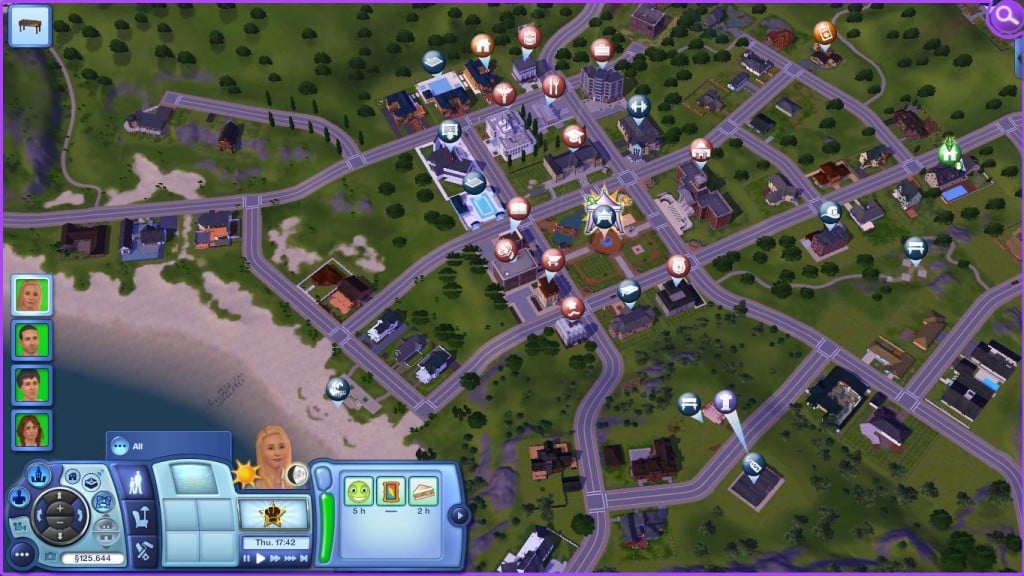
TS3W 2014-08-18 23-21-14-80

Personally, I’m okay with the 2D Map in The Sims 4, but I still love the Map View in The Sims 3 which offers an overview of the whole World.

When moving in, you can choose a Household to merge with, move in an empty lot or move in a furnished/unfurnished house. It’s the same process in The Sims 3 as well, so there aren’t any differences (except User Interface changes).

The Sims 4’s Build Mode is a mixture of The Sims 3’s Buy Mode, Build Mode and brand new in The Sims 4: Room Catalogue. The Room Catalogue lets you place Pre-Built Rooms instantly.

The whole Build Mode is simply pushing, pulling, putting together different rooms and more. Of course, there is a traditional way where you can start down with just 1 wall and then connect multiple walks, making it a room. You can even take a whole building you created, rotate it and place it wherever you want.

The Sims 4_ Build Mode Official Gameplay Trailer(1) 114 The Sims 4_ Build Mode Official Gameplay Trailer(1) 151 The Sims 4_ Build Mode Official Gameplay Trailer(1) 170 The Sims 4_ Build Mode Official Gameplay Trailer(1) 362

In The Sims 3, there are a lot of ways you can build your House or a Community Lot, but that would take for hours. The reason for that is, in case you want to change something onto a Lot you already build (such as center the house), you would have to destroy the whole thing and start again. This is why building in The Sims 4 is much more easy and fun.

TS3W 2014-08-18 22-59-08-22 TS3W 2014-08-18 23-17-03-16

Furnishing a home is yet another meh moment for The Sims 4. The lack of Create A Style Tool doesn’t allow you to change the fabrics, for example, your sofa and change it’s colors however you want. It really wouldn’t be a big deal if they just provided more presets for objects.

Photo by Simply Ruthless

Capture

The producers still found a way how to fill that gap though; the team confirmed that they made over 1000 Objects just for Buy Mode itself. Never before were there so many objects in The Sims Base Game

The outcome of some houses in The Sims 4 is still really amazing. The roofs have much more options now and you can also place Rounded Foundations and Fences. All of this can be done by just pushing and pulling!

TS4_054_PE_HOUSE_01_001 TS4_054_PE_HOUSE_02_001 TS4_054_PE_HOUSE_03_002

It’s still unknown will they ever add one of the most missed features from The Sims 1, The Sims 2 and The Sims 3..

Screenshot-2603

The most important Mode of any The Sims game is definitely Live Mode, and it looks like that’s been The Sims 4’s Team main focus. While playing the game, you’ll notice that Sims are now much more responsive and aware of their environment. Not only that you can Satisfy their Needs and Whims, but now you also have a job to control, and if you want, satisfy their Emotional needs. Sims can have over 15 Emotions, and it’s always fun seeing how they react to Sims with totally different Emotional state than theirs. Happy Sims have a power to cheer up Sad Sims, Angry Sims can ruin someone’s day, Uncomfortable Sims usually have low need bars such as Hungry, Bladder; Bored Sims have their Fun Need bar low and they’ll probably be on the lookout for something exciting.

Another great feature is multitasking! Your Sim can do so much more with it and their Needs and Skills can benefit at the same time thanks to it.

18 3

The Sims 3? Yeah, your Sims may use buffs or moodlets as a replation to Emotions in The Sims 4, but still there will be some inappropriate times when, for example, your Sim gets in a fight and gets a negative moodlet for it. They’ll throw in some Angry Animations here and there, but no Sims or objects will be affected by their buff. The buffs are just there to tell you if your Sim was injured, hurt, sad, hungry and such, otherwise you wouldn’t know a thing.

Here is an example: I made my female Sim’s husband get divorced from her. She did cry out some tears randomly why standing, but you can’t see that while she’s doing an action on an object or interacting with another Sim. They don’t have feelings about what they experienced and went through, they only have moodlets that will fade away really quickly and it will be like her husband didn’t even ask for a divorce. Any action she made afterwards was just rainbow and happiness.

Screenshot-2606

I really love how The Sims 4 Sims are aware of what’s going on in their Environment. I had my Sim play the Computer and suddenly his roomates popped in and had a chat on the bed. He didn’t just ignore them, he started chatting with them as well all while playing his Video Game on the Computer.

10

I tried to make a similar scenario in The Sims 3 but it didn’t work out quite well. I made his Mom and Sister gossip but he didn’t even try and look at them. That whole time he was just waiting there for his command – even though the Free Will was turned on.

Screenshot-2607

When you look at this way, it’s nothing much, he just refused to join the conversation, but when you look at The Sims 3 as a whole, you’ll notice that they’ll never make smart decisions and everything they do is just full of robotic movements and soulless expressions. They don’t care what’s happening around them, all Sims want in The Sims 3 is… success!

That’s right. What I noticed is that most of Expansion Pack we got for The Sims 3 aim for one thing and that’s make your Sim rich and top their Careers. After all, the idea of it just gets boring and there’s no much thing to do after you become one of the best paid Sims in the Town. There’s no point of that when basically no one will admire you and see how proud and confident you are after getting a promotion.

The Sims 4 Review: What’s different from The Sims 3?

The Sims 4 does have that aspect of succeeding in your Sim’s life, but it’s not the main aspect.

The primary goal of The Sims 4 is just making your Sim Happy (or Sad if you want to) without doing so by making money. If your Sim likes money that is possible, but still not the main goal. This game is about socializing with other Sims, seeing how they react to your success or failure, encourage them, make them lose confidence about themselves and so much more! Each Emotion under certain conditions will unlock certain interactions, and it may be hard to get those interactions back since every moment in The Sims 4 is unique and Sims will know that! They remember all the things you did in the past (especially if they’re significant) and do not forget easily. Each Sim day, you’ll encounter at least 1 Sim moment which will trigger your emotions a little bit as well. I found so many funny moments in the game, only this time, everything they did was on purpose, unlike in The Sims 3 where we just laughed at glitches Sims caused.

2 7 9

If you look at The Sims 3, it indeed has some creative features and options that The Sims 4 will never have, but after you create that Sim with unique pattern and color, build them a house with all the unique textures, you’ll have to push the play button once. That’s when you realize that everything you customized on them and the house you built for them, they just won’t care, and that’s when everything you did for them seems unappreciated .

Thanks for reading this Review and I hope you make a choice you find the best!

Let us know in the comment section below what do you think about this Review and make sure you check out our The Sims 4 Preview with more Screens and more info!

Celebrities and their official The Sims 4 Simselves!

2

It’s no wonder that The Sims is a game for everyone! That fact has been confirmed by one of Celebrities who attended the Teen Choice Awards: Jason Derulo, Tyler Blackburn, Louis Tomlinson, Bella Thorne and more! The Sims Team went there to support them and probably advertise The Sims 4 a little bit..

10492946_514922318639046_2899277276747279999_o 10507153_514922345305710_5512594455298314520_o 10563022_514922288639049_7474477561983167873_n 10563161_514922321972379_6569450633433879145_n 10609727_514922355305709_4877923275618776336_n 10373950_514922285305716_2233830861229969032_n 10461990_514922281972383_2262157189090494501_n

Whether it’s their free will to create their Sims or just an advertisement by people from Electronic Arts, it’s still cool to see famous people tweeting about the upcoming Sims game!

The Sims 4 – Main Menu & Map View Look!

2

BeyondSims managed to take a Screenshot and a Video of what The Sims 4’s Main Menu looks like. Although pretty simple, the Main Menu features lots of video loops featuring lots of crazy and unique Sims!

menu

You can check out the look of this Main Menu and also a quick overview of World Maps in The Sims 4 below. For more information about the game, make sure you check out BeyondSims’ Exclusive The Sims 4  Hands-On Preview!

The Sims 4 – Preview by PlatinumSimmers!

1

08-12-14_3-26-AM-792x445

When you start up the game, you begin in the world overview. Here you can either pick an existing family or you can click on an empty lot and chose to create a new family. That is what I did. I chose a lot in Oasis Spring (I could choose between Willow Creek or Oasis Spring on the upper left corner) and then I created a family. The Kessler family! With elder dad Davin, young adult mom Latisha, teenage daughter Skyla and child son Jarrod. And guess what! The elder dad could actually be the dad for the kids! Was so happy about that. I thought they family would move into the house right away but it didn’t. So I had to go to my library to select my newly created family and select moved them into a house they could afford. Later I found out I could have done this all way easier by clicking on ‘create a new household’ before going to the game, but I just excitedly pressed the ‘play’ button.

Next up I started building them a house. So when moving in I chose to bulldoze the lot. But as I wanted to get as much gameplay in as I could. I didn’t focus on making a beautiful home, but rather show some new features. So bear with my design!

Read More

The Sims 4 Let’s Play by EnglishSimmer!

1

Less than 16 days until The Sims 4’s release and people are already releasing Let’s Plays!

EnglishSimmer managed to get her hands on The Sims 4 during Creators Camp and EU Preview Event and have some fun with the game. Here’s an adventure she experienced (and filmed) during that time..

The Sims 4 – 24 Gameplay Videos by Rachybop!

0

Think you’ve seen everything about The Sims 4? Think again!

Rachybop posted 24 Gameplay Videos of The Sims 4 Exclusive Gameplay. Some of them are really short, while some of them have up to 9 minutes of Gameplay footage! Make sure you grab a drink or a quick snack and enjoy these awesome videos that Rachybop has prepared.  😀

The Sims 4 – Pancake Bob’s Tour in United States!

0

10498158_751778158194590_8386377618633596262_o

Electronic Arts is hosting an awesome tour in United States of America; they’ll be travelling around the state to deliver a free pancake breakfast along with some coffee. If you have possibilities to go to this awesome The Sims 4 Promotion, make sure you go and send us some pictures!

Everybody needs a holiday!
…even Pancake Bob!

We’re happy to announce Pancake Bob is hitting the road in search of his personal Holy Grail: 
The most delicious stack of flapjacks the world has ever known.

Seeing as a road trip is hardly as fun by your lonesome, Pancake Bob is inviting YOU along for the ride. Join him in one of five destination cities, as he travels from the East Coast to the West.

He’ll be taking over diners in several major cities, so stop by and say hello!

If you take a photo with Bob and share it via social media (Facebook, Twitter and/or Instagram), the lovable sap will treat you a fluffy tower of gooey goodness:

A FREE PANCAKE BREAKFAST, complete with a cup of coffee.*

See you there!

Click Here for more details about this tour!


Origin: 25% off on SimCity Games!

0

Origin just added SimCity and 3 of it’s editions on a 25% discount. This offer does not apply on Cities of Tomorrow expansion pack and other DLC Packs (although you can purchase the SimCity Plus Edition – SimCity + Cities of Tomorrow for 25% off).

This offer ends on 19th of August!

Click on the picture below to check out these offers!

Capture

Forbes: How Does The Sims 4 Handle Gender And Racism?

5

sims4_1

Simulation games are sold on the accuracy of their representations, but it’s as much the parts they fake that define them. Few games try to simulate more than The Sims games, which recreate every progressive euphemism we have about love, work, and family. And few games feel as self-consciously fake either. The Sims 4 is an extension of the beloved fantasy about life in America, a fandango of shopping, working, defecating, and making woohoo in a suburban utopia where Simolians and skill points make the block go round. In The Sims world even being sad is a source of happiness, with abjection transformed into a slapstick pantomime.

At a demo of the much-anticipated sequel, I asked Maxis ’s PR Manager, Charlie Sinhaseni, about how the studio determines what’s appropriate for inclusion in the game. “We’re not really looking for realism, we’re looking more for believability,” he told me. “It’s kind of a model of life with things like death and aging, but we don’t do things like broken bones and bleeding. It’s just not the kind of thing our game demands.”

One of the special areas of focus in The Sims 4 is improving the Create-A-Sim feature, adding more details to alter the appearance of a Sim with a less stereotypical ways of representing different ethnicities. As he showed me the tool, creating an Asian character that does indeed appear less cartoonish, I wondered if there’d ever been discussions on coding racial awareness into the game systems themselves. Has racism or ethnic group identification ever been something the team has considered building into the game, I ask.

“It gets to the point where it crosses a line,” Sinhaseni told me. “Our game is kind of a caricature of life. We don’t really have a message—there’s no racism message, there’s no tolerance message. We have same-sex marriage in our game. Our Sims will not discriminate based on gender preference whatsoever. But there’s a line where it becomes too real. The only manner of hatred we have in the game is between incompatible Sims, something that’s driven by the traits of the Sim—a hotheaded Sim, or a Sim who hates children.“

Read More


Metro: Should you make the move over to The Sims 4?

0

sims1

Has the chance to create your very own twisted Sim in The Sims 4 create a Sim demo piqued your interest?

The Sims 4 will be in stores in only a few weeks, but reception to the new game has been mixed, largely down to what players feel they will be missing out on.

The Sims 3 has been around for long enough to gather an absolute mass of additional content from the likes of Expansions, Stuff Packs and DLC. The result is that serious Sims players have almost no limits in how they play with the life simulator game.

Making the move over to The Sims 4 will mean losing much of that limitless entertainment. The most highly publicized loss is that of Toddlers and Swimming Pools, which EA have confirmed will not be in the game at launch, but have not ruled out making an appearance down the line, possibly in an expansion or update.

The launch of the Create-A-Sim Demo on Origin is the first chance that many players will have to check out the new, more emotional Sims from The Sims 4, and decide whether or not to spend their money on the game when it launches.

The create a Sim demo is very limited in its scope, allowing the player only to create young adult Sims. There are a nice selection of traits and aspirations available, along with a moderately stocked wardrobe.

Read More

The Sims 4 Preview: Multitasking

3

Multitasking is a brand new feature in The Sims 4 that lets you do multiple interactions at once. The thing I noticed about Multitasking is that when Sims decide to add another interaction to their interaction queue, they won’t stop the thing they did in the first place.

For example; my Sim was reading Handiness Skill book, but his Bladder bar really lowered down, so he decided to go to the toilet. He didn’t put the book he was reading in his inventory. As he rushed to the bathroom, the book was in his hands this whole time. Once he sat on the toilet, he was doing his thing + read the Handiness Skill book at the same time, which means his bladder need bar got higher + his Handiness skill was leveling up as well.

3

Another great example of multitasking I encoutered was my Sim working out in the gym while watching the TV. He wasn’t watching any TV channel though; it was the Cooking Channel, which means his Fitness and Cooking skill was leveling up altogether!

Multitasking isn’t all about focusing on multiple objects though; you can also hang out with multiple Sims and use a certain object at the same time.

So, my Sim decided to play a Computer game. His roomates showed up in his room and decided to chat. I loved seeing how he was throwing a word or two into their conversation every now and then. His relationship with his friends was leveling up, but his Fun Need bar was raising as well!

10

The multitasking feature is really fun and it’s always a pleasure seeing your Sims finding new combinations with that feature.

EA Gamescom 2014 Press Conference Official Replay!

0

The Sims 4 Presentation starts at 24:30

Video Link

The Sims 4 Preview: Emotions & Needs

1

I’m sure you’ve heard this bazillion times, but Emotions do play a big role in The Sims 4! These Emotions are connected and everything you say, do (and don’t do as well when it comes to Needs), your Sim will be affected. Although, the Emotional State won’t change immediately. If your Sim is happy and gets an insult from another Sim, his/her Emotional State will remain untouched if that Sim has high buffs/points for the Happy Emotion.

Here’s what happened in my game; I started a Household with 2 Sims: one that’s good and the other one who’s mischievous (and also has commitment issues).  Both of them started socializing thanks to Free Will being turned on, but I wanted to add a twist in this story. I made the mischevious Sim insult her Husband’s WooHoo abilities. His face and Emotional state quickly changed to Sad, since both of them had the Fine Emotion. When someone has a Fine emotion, that means they’re easily susceptible to changing their Emotional State. I wanted to push the limits a bit further, so I made her use the Joy Buzzer while shaking hands with him. That still didn’t make him Angry since he has a Good trait, but how far will he let his wife do such things to him?

2 1

I knew he had to break at one point, so I made her to insult him. That didn’t work, so I had to do it again, again and again. At that point, he finally realized what was going on and got an Angry Emotion. That’s when things really became spicy; he wanted to get her back by insulting her too, only this time you could see him expressing his Anger loud and clear, unlike the mischevious Sim in red outfit who just followed my commands. Everything became quiet for the next 3-4 Seconds and then suddenly both of them got an Embarrassed Emotion, except there was a small difference: The good husband just got an ”Embarrassed” Emotion, because, he did yell and insult his wife, but he had a perfectly good reason for it, while the mischevious Sim got a ”Very Embarrassed” Emotion. Why though? I assume she had no reason to insult him (since that was my command) and the insults you get from an Angry Sim are much more worse than just regular insults. Both of them ran upstairs all depressed and covered themselves together behind the bed sheets.

20

It was really a funny moment I encountered in the game, but I had to resolve this issue. Normally, Sims who get in a fight will avoid each other for quite some time, but I needed to get them back together quickly. Both of them finally pulled the sheets from their head and then I decided that they should sit down. I started with the ”Flirt” approach but obviously none of them were in the mood for that. I had to get rid of that Embarrassed Emotional state so I made them talk, a lot! After 1 Sim hour of talking, I made the mischevious Sim apologize to her husband for what she did. The husband accepted her apology and both of them got rid of the Embarrassed Emotion. That was a perfect moment to kick in some romance!

19

During this mini-show I didn’t focus at all on their needs, and it was clear they were hungry by looking at their Plumbob and also by the Need UI bar. I sent both of them to eat something, and what was interesting is that her husband, who also Loves Art, picked a plate and decided to outside and look at the painting he made the other day. He was eating and looking at that painting at the same time, and after a couple of seconds he was inspired and got an Inspired Emotion.

It’s really fun how you don’t always have to focus on your Sim’s needs – if you have Free Will turned on, they will find the easiest way to fulfill their needs. They decay much slower, but depending on your Sim’s emotional state, they might also fill slower.

18