This official Discord Quest lets you claim an animated Freezer Bunny!
Were you looking to spruce up your avatar picture on the popular social network Discord? You’re in for a sweet treat!
EA has partnered with this network giant for a limited time Sims 4 Discord Quest in celebration of the latest Lovestruck Expansion release. Allowing you to claim a limited time animated avatar frame featuring your favorite Freezer Bunny!
How do you claim the new avatar frame? Find out in this short tutorial below:
Sims 4 Discord Quest: Claim the Lovestruck Avatar Frame
The rules of the first Sims 4 Discord Quest are very simple – play The Sims 4 for 15 minutes! That’s it.
The requirements revolving this quest however are more complex than the quest itself. The official rules state that the quest could only be primarily found in the area of United States. Even though I’m not from that region and was able to activate the quest easily.
To complete this quest, you’ll need a Discord account and a Discord Desktop App for PC / Mac. That way the program will be able to track your in-game time progress after you open up The Sims 4! Those 15 minutes should pass in no time.
To begin the quest, click this link to activate The Sims 4 Discord Quest on your account. After activating the quest you can open The Sims 4 on PC / Mac while having the Discord program open to track your 15 minutes.
The Lovestruck Quest can be accepted on Discord from July 25, 2024 until July 30, 2024 (11:59pm UTC), during which you have to complete the 15 minute time frame. Once you have completed the Quest by playing 15 minutes of Sims 4 on Discord, you’ll be able to claim the Freezer Bunny Lovebug. The Sims 4 avatar decoration needs to be redeemed by September 30, 2024.
How to Redeem
The official rules on redeeming The Sims 4 Discord Quest reward are easy. Head over to your User Settings by selecting the cogwheel in the lower left corner. Then, navigate to your Gift Inventory and select Claim Reward within the Sims 4 Quest banner.
Will you be trying the latest Sims 4 Discord Quest and winning that Lovebug Freezer Bunny? Let us know what you think of this promotion in the comments below!
EA releases an emergency Sims 4 Update across platforms. Find out what’s fixed!
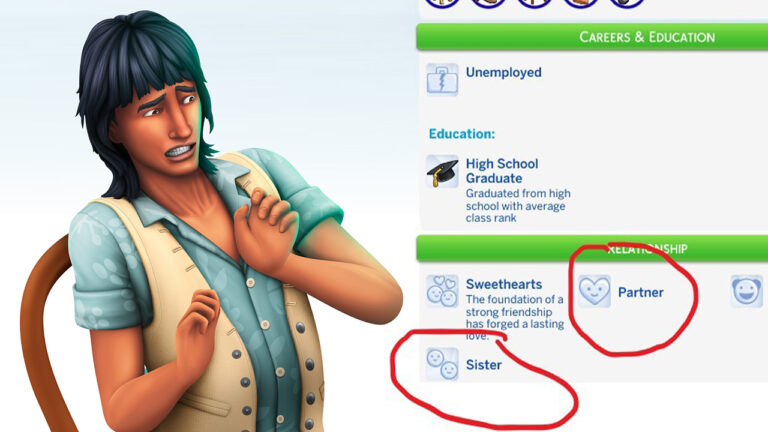
Just a few short days after the release of the big July Patch, EA is back with another Sims 4 Update. This time fixing critical Bugs and Issues that came with July 23rd, 2024 Update which broke several features across Base Game and previous pack releases. Including mean Sims, broken user interface and the return of incestious autonomy between Sims through Neighborhood Stories.
Unfortunately for players, most the game bugs mentioned above haven’t been fixed with this patch. The only feature that got fixed are the Parenthood Character Values menu in the Simology panel. For game fixes beyond that you’ll have to wait a few more days…
What exactly has been fixed in this week’s 3rd patch rolled out? Find out in the official Sims 4 Patch notes below!
The Hotfix Update
Installing the Latest Sims 4 Update
You can get the latest Sims 4 Update on the following official launchers and platforms:
You can download the latest Sims 4 Update by checking for a Patch through the EA App. Or Origin if you play on Mac. If you have Automatic Updates enabled the update will automatically download through your client program. In case your EA App is not working properly ensure you’ve cleared your app cache!
If you play The Sims 4 on Xbox Series X / S and Playstation 4 and 5 you can request a new update by checking for updates under The Sims 4 game in the Main Menu. If you’ve enabled automatic updates the Patch should download right away.
Official Sims 4 Patch Notes
Please note – the update is currently available on PC / Mac. We’re awaiting confirmation about the patch deployment on Xbox and Playstation consoles which should happen very soon.
Sims 4 Patch Game Version: 1.108.329.1020
PC: 1.108.329.1020 / Mac: 1.108.329.1220
Simmers,
Today, we are releasing a quick fix for an issue affecting players who have updated to the most recent patch and have The Sims 4 Parenthood Game Pack installed. The fix is live for PC and Mac. PlayStation and Xbox will follow shortly.
As always, if you have any issues, please share with us on AnswersHQ. This remains our primary source for information to learn and troubleshoot player experiences.
Some players who use Mods have reported that the issue has persisted in their game. Which is most likely due to an outdated version of the UI Cheats Extension Mod. Make sure you grab the latest version of this Mod to ensure you get rid of this issue completely!
As noted in the official Patch Notes, the update has only fixed one bux amongst many reported by the players. We should expect fixes for other reported glitches hopefully soon in the coming days.
Statement from EA
Following this release, we’ve prioritized investigating issues with neighborhood stories & overly mean Sims to provide a resolution as soon as possible.
We know how frustrating game bugs can be, so we appreciate your patience during this time. We’ll continue to keep you posted on updates as we work towards a resolution.
If you’re experiencing the following issues, please provide save files and “me-too” the appropriate AHQ threads:
The 16th Expansion Pack in the series has just come out!
EA and Maxis have just released The Sims 4 Lovestruck Expansion Pack! Making it the 16th Expansion Pack in the series across the last 10 years to come out.
This big DLC package comes packed with new CAS and Build items, along with a new World, Attraction system and other gameplay features for you to explore. The Sims 4 Lovestruck, just like previous Expansion Packs is retailed at $39.99USD, or a price equivalent to your local currency.
For those interested in getting this Expansion Pack, you can find it available on these following official platforms including:
The season of Sims 4 Lovestruck Expansion is almost upon us and that means it’s time for some sweet Romantic Sims 4 CC! We’ve scoured the web hunting down some of the cutest, most romantic date-themed custom content to give you and your Sims the dreamiest date ever.
These dreamy CC sets are perfect for Dates
Whether you’re single or you’ve got a Sims date coming up, these lovely clothing and décor sets are sure to brighten up this romantic occasion for you! From cute makeup to sexy nightwear and romantic decorations, you’ll have everything you need to make dating special for your Sims.
Table of Contents
The Best Romantic Sims 4 CC
Check out these awesome Valentine’s Day sets! You won’t want to skip any of them, trust us! It’s so hard to choose just a few, so why not download them all?
Heart Stomper by 1-800-CUUPID
These high heeled baby doll shoes with heart buckles are not only adorable but as the title suggests, perfect for stomping on a few hearts this Lovestruck era. Go out there and be the merciless heart breaker you know you were born to be with this Romantic Sims 4 CC!
These plates can have a variety of items placed on them to help make Love Day special for your Sims. What’s a romantic picnic in the park without some sweet treats served on romantic heart-shaped plates, after all? How could any Sim resist this charming piece of romantic Sims 4 CC?
For Sims hoping to get a little frisky with someone special on Love Day, this romantic Sims 4 CC is perfect for the occasion. These soft and romantic night clothes with a subtle sexy touch will be sure to put your Sims in the right mood for some lovestruck WooHoo.
If you’re extra like me, you love having your nails done to reflect every season and holiday. These romantic nails do not disappoint in that department! These adorable pink, red, and white nails have a different design on each nail but still match each other perfectly.
For a dreamy touch to your lovestruck makeup look, why not add some hearts to your eye makeup? Guaranteed to make the object of your desire see hearts when they look into your eyes. Literally! And these soft pink colour combinations look so whimsically romantic, too.
Does your sweetheart have an appetite for both good cooking and romance? Why not serve them a nice helping of both by making them their favourite meal wearing this sweetly suggestive apron set? They’ll definitely be hanging around the kitchen for more reasons than one!
We know sexy isn’t everyone’s thing. Valentine’s Day can be just for being cute, too. This outfit is perfect for being as cute as a button this Love Day. It’s a full outfit set featuring a skirt with a hanging coin purse, crop top, and adorable candy heart earrings. What Sim could resist romantic Sims 4 CC as cute as this?
In need of some romantic Custom Content to decorate your table with? This romantic set has you covered! Make the perfect romantic dinner even more special with this full table setting collection. Those cookies look good enough to eat, right?
Nothing is more romantic than a bath filled with flower petals and candles. Your Sims can enjoy each other’s company in the most romantic way possible with this full bathroom décor set, which includes a functional clawfoot tub with decorative water, a slotted bath tray, cart, and lovely champagne set with candles, bouquets, and balloons.
Looking for a perfect balance between cute and sexy this Lovestruck season? This Love Letters Collection is the perfect solution. Featuring lots of heart designs and soft lines, you’ll be able to create just the right balance between adorable and sultry.
Discover every single item variant coming with The Sims 4 Lovestruck!
Lovestruck Expansion Pack is being released in just a few hours, and we’ve already gotten a complete look at all the new Sims 4 Lovestruck Items included within the pack. Every single CAS asset and Build Mode object has been revealed with all the variants available for each item included – so you don’t have to worry about missing out on unique designs and patterns hidden underneath the preset selector.
Down below we’ve included a full gallery of all the new items available with this Pack. From new accessories and fashion to exclusive Pre-Order bonus items. Huge thanks to @anadius for revealing these for us!
The Sims 4 Lovestruck Items (CAS Assets)
The new Sims 4 Lovestruck items included in Create A Sim are vibrant and colorful, with lots of heart patterns and lovey details to go around. There’s a decent balance between new masculine and feminine items this time around, which I’m happy to see!
Considering that this Expansion Pack primarily focuses on Young Adults to Elder life stages, you shouldn’t expect much of novelty for younger life stages. However, players are in treat when they discover all the new costumes, risque fashionable clothing and more for their Adult Sims.
See what’s new in CAS in the gallery down below. You can enlarge the preview by simply clicking on an image preview of your choice!
The Sims 4 Lovestruck Items (Build Objects)
The Sims 4 Lovestruck items in Build Mode follow a similar pattern of colorful designs from Create A Sim. You’ll find plenty of new furniture and decor in the shape of hearts, furniture and seating that’ll spice up your living spaces.
There are also new additions for base building – such as wallpapers, flooring and windows and doors – along with other assets that’ll assist you in creating a playful exterior and base interior of your lot.
Down below is a full list of all the new Sims 4 Lovestruck Build Objects, including each item variant available. Take a look!
We’ll have a complete overview of the new Create A Sim features and Build Mode item descriptions and points that come with each object. Stay tuned to our Lovestruck article category throughout this week for in-depth coverage!
Are you impressed with the catalogue of new Sims 4 Lovestruck items? Share your opinion in the comments below!
It’s only been a few hours since the latest Sims 4 Patch and the community members have already reported bunch of issues they’ve experienced in their games. Of course, no Sims 4 Update goes without an error or two slipping out, especially with an Update the size of this one totaling up to 1.42GB.
We asked our readers on Twitter what have they experienced in their games. From flashing UI Menu, to Sims becoming mean to each other. All the way down to sibilings having romantic interest for one another…again. Here’s the list of some of the most reported issues and bugs that players have experienced:
Certain Glasses are Broken
One of the new Sims 4 Bugs visually destroys some of the glasses available in the game. The addition of new eyelashes seems to have messed around with how some of the glasses look like in The Sims 4.
Certain pairs of glasses from Base Game and previous DLC releases have been misshaped and extruded weirdly on the top area of each pair of glasses.
The addition of two new Neighborhood Stories options with the recent Sims 4 Patch has broken the romantic limits towards family members. Allowing for some awkward autonomous moments that would imply that sibilings or other type of family members can fall in love with each other. All without player input or instruction.
This issue was first reported by Jayrae316 on EA AHQ forums, with several players stating that they’re experiencing the same thing across Desktop and Console platforms.
Image: Jayrae316 on EA AHQ
This issue seems to be happening only if you have the “Romantic Changes” Neighborhood Story activated.
Broken Ceiling Lighting
First reported by @lunar_britney, ceilings have gone weirdly wrong. Specifically, the way they extrude light across it. As reported by the player, sometimes the ceiling lights would show with outdoor lighting indoors – and vice versa.
This graphical Sims 4 Glitch could be accelerated with the work-in-progress that is the development of The Sims 4 for DirectX 11.
Alright – this Sims 4 Glitch is probably the most harmless one in the list. If you’ve applied the new eyelashes onto your Sim – going into Tab + Shift mode for First Person View will show eyelashes at the center of the screen.
Probably just a small oversight from the team, but still funny nonetheless.
If you have The Sims 4 Parenthood Game Pack installed, you might’ve noticed in the Sim Info panel for your Child and Teen Sims that the Character Values category has been glitched out. The entire interface keeps flashing weird colors, and you cannot tell the correct statistics of your Sim’s progress.
This is a known Sims 4 Bug that’s been affecting players across all platforms.
“Since the update my Sims are queuing up a ton of mean interactions for other Sims” – said one of the players in the official EA AHQ forum. Many players have reported that Romantic Boundaries are also not working as they should, making other Sims jealous over open relationships even though they shouldn’t be triggered.
Sims 4 Bugs: The Menu is broken
From Game Settings to switching between CAS, Build and Live Mode, some players are reporting that their entire way of handling and opening menus in The Sims 4 is broken. This Sims 4 Glitch prevents from buttons in the User Interface working as they should, and some are even reporting that it’s greatly affected their way of saving the game. For the worse.
Since I downloaded the new patch, no pop-up windows will open up – I can’t open the settings panel, build mode panel, and then the buttons stop working altogether so I can’t even go back to live mode.
Don’t worry though – a fix is on the way!
These Sims 4 Bugs haven’t been unnoticed by the official Sims 4 development team. EA_Cade, one of the Community Leads working on the game, has been actively reporting and tracking down all the issues that players have experienced.
Their latest statement about these Sims 4 Glitches ensures that a new Sims 4 Patch is on the way. Hopefully fixing these Sims 4 Glitches and making them a thing of the past:
Update: We are currently in the process of testing a fix for the issues reported in this thread that we hope to release as soon as possible.
– EA_Cade
We’ll let you know about the upcoming Sims 4 hotfix patch as soon as it becomes available!
Have you experienced any of these Sims 4 Glitches and Bugs yourselves in the game? Let us know in the comments below. And make sure you let the developers know as well!
The Sims 4 Expansion Pack 17 seems to be aiming at the other side of life.
The next Sims 4 Expansion Pack (Lovestruck) isn’t even out yet and we already have more than enough clues to speculate on the Expansion Pack release after that! With several clues from online creators to actual hints from The Sims developers, we have compiled a list of all the hints leading up to the deadly new Expansion Pack.
Another Sims 4 Expansion Pack coming this year!
A speculated release order of the upcoming Sims 4 DLC was released just last month, with rumors that the next Sims 4 Expansion Pack right after Lovestruck is just two short DLCs away.
Rumored Sims 4 Expansion Pack Release Order
The Sims 4 Lovestruck Expansion Pack
The Sims 4 DLC 83
The Sims 4 DLC 84
The Sims 4 Expansion Pack 17
The Sims 4 DLC 86
The Sims 4 DLC 87
The Sims 4 DLC 88
The Sims 4 DLC 89
The Sims 4 Expansion Pack 18
This information comes from the official game code in the version.ini pack files. However, there’s been no official confirmation as of yet if EA actually follows through with the placeholder pack information or not. Time will tell after the next two DLCs for The Sims 4 release though!
Official Hint from The Developer
Lilsimsie, a popular online creator for The Sims was showcasing the upcoming Sims 4 Lovestruck Expansion Pack during her Early Access Livestream a couple of days ago. During this stream she started showcasing one of the new posters that come with Lovestruck, featuring an Elder Sim running on the treadmill.
“Why are you encouraging Elder Sims to exercise?! Shame!” – Lilsimsie answered to a message from SimGuruNinja, one of the developers who work on The Sims 4 who at the time was lurking in the chat. Shortly after this interaction, the developer shared this cryptic message in the Twitch chat:
But don’t worry. Elders will die better soon.
“What is soon?! What do you know?!” laughed Lilsimsie as she was excited to know more about what could potentially this developer be hinting at.
The chat was already on fire after this message with plenty of Simmers saying “Sims 4 Death Pack confirmed!!”. The developer tried to make reperations by saying “[I]Meant Elder will LOVE better soon! 🙂 <3”. However, the digital footprint remains, and we are one hint richer to figuring out what the next Sims 4 Expansion Pack is about.
Hints from Unofficial Sims Insiders
The rumors about the next Sims 4 Expansion Pack being death related came way before this official hint from the developer. @TheHenfordHen, who’s known on Twitter for ocassionally dropping hints and insider information about future Sims releases has been hinting at the next Expansion Pack after Lovestruck.
Unfortunately though, we couldn’t catch the released tweet on time as it’s been deleted a few days after its posting. But thankfully one of the quote retweets from creator @Simmatically remained online:
“I would DIE for another EP this year.” – Simmatically
Both Sims insiders were dropping hints about the theme of the now known The Sims 4 Lovestruck Expansion months before the pack information even first leaked online. Making these hints more trustworthy.
More Cryptic Hints from SimGuruNova
Back in May 2024, SimGuruNova shared a couple of tweets about her current work-in-progress for the new features she’s working on for The Sims 4. She specified that these hints aren’t related to the upcoming Pack (Lovestruck), implying that the work she’s currently doing is related to a different Sims 4 release.
Is it possible that these hints are related to The Sims 4 Expansion Pack 17? You be the judge:
working on [redacted], and just saved a 30×20 lot 100% full of tons of objects from BG & every pack we've released (not to mention, multiple walls full of things)
one day when I can share, I'll reveal what it looks like lol. just know, I have my work cut out for me 😵💫 pic.twitter.com/ecOcDPVksz
btw I see all you silly billies speculating, this isn't about the upcoming EP that was announced in the roadmap, I didn't work on that one lol (though I AM a big fan of it!) if it was, I would 100% be screwed 😭 this is like foundational work stuff
All the hints we’ve gotten so far aim at the fact that The Sims 4 Expansion Pack 17 is themed around Death. We don’t know the specifics yet or what are the general features of this Expansion, but with everything going around we can say with 99% certainty that it’s Death. Funerals. And maybe even a revamp of the Grim Reaper.
It would make sense to release the next Sims 4 EP around Autumn when major holiday events like Halloween and Day of the Dead take place across the globe. Still, whatever the next Expansion Pack theme turns out to be, we’ll be here to report you first on the news as they become available.
What are your thoughts on all The Sims 4 Expansion Pack 17 clues so far? Let us know your theories in the comments down below!
“The Sims 4 Drop Dead” Expansion Pack name is purely for illustrative purposes of this article and isn’t the official name of this new DLC.
Discover when the latest Sims 4 Expansion releases in your area!
We’re just a few short days away until The Sims 4 Lovestruck release across Desktop and Consoles! The latest 17th Expansion Pack in The Sims 4 Series is set to release for download on July 25th, 2024 for all players who plan to purchase this Pack.
Wondering about the exact moment when you’ll be able to get the Pack in your area? Discover the full release date window in the countdown below!
The Sims 4 Lovestruck Release Details
The Sims 4 Lovestruck Expansion Pack will release at the same time across PC, Mac, Xbox and Playstation supported consoles. The full set date and time for the release of this Expansion Pack is set for July 25th, 2024 at 10AM PT / 7PM CET.
To make things easier for players, we’ve included a handy countdown down below which tells you exactly when you’ll be able to download and play this Expansion Pack. As soon as the timer hits zero the pack should be ready for your enjoyment!
Countdown to The Sims 4 Lovestruck Release
[janky target_time=”1721926800″ color=”#235c82″]
Just like previous Sims 4 Expansion Packs, this one is retailed at $39.99USD, or a price equivalent to your local currency.
If you haven’t already, you can purchase this Expansion Pack from the following official online retail stores including:
The upcoming Sims 4 Lovestruck release features new gameplay mechanisms and features to boost your everyday romance. Including the new Attraction System, ability to arrange your own dates and even discover love through online dating.
The Sims 4 Lovestruck also comes with a brand new world called Ciudad Enamorada, featuring three new neighborhoods packed with 13 lots in total. Two of which are penthouse lots!
This Expansion Pack also comes packed with new Create A Sim and Build Mode items that even revisit some of the most iconic objects featured back in The Sims 1. Yes, we’re talking about the Heart-shaped Bed!
Sims will be able to WooHoo in blankets, or take a trip down the local rabbit hole Hotel to fool around. With more gameplay yet to be discovered in our upcoming gameplay guides!
Order Bonus
If you get The Sims 4 Lovestruck Expansion Pack from June 27th until September 5th 2024, you’re entitled to an extra set of objects in an exclusive Heartbreak Happens digital set. Featuring a new Cry Me A River Eyeliner for Create A Sim, as well as the new Basic Breakup Double Bed and Herbert Heart Plushie in Build Mode.
This early purchase incentive is available for all players across all supported platforms and will be ready for you to download and claim from the Pack’s release until September 5th.
Will you be getting this Expansion?
We want to know if you’re excited for The Sims 4 Lovestruck release. After finding out so much about this pack from the recent developer livestream and checking out the content online for creator previews, do you think that this Expansion Pack is good enough to purchase for its full price on its release day / week?
Let us know your thoughts by voting in this short but sweet community poll down below and see what other players feel about this Expansion Pack!
[totalpoll id=”153601″]
Are you excited for The Sims 4 Lovestruck release? Let us know your thoughts in the comments below and stay tuned for in-depth guides and coverage of the latest Expansion Pack!
Find out what’s been added to The Sims 4 in this Patch Overview!
The big Sims 4 Patch day is finally here! The developers worked hard on adding multiple features to the game across almost every aspect of The Sims 4. From Neighborhood Stories updates to New Hairstyles and Eyelashes in CAS, every player is going to want to utilize these features into their game.
We’re actively working on updating this list with more features and additions as we discover them in-game. For now, here’s what we found!
Romantic Boundaries
There are four new panels available in the “More Details” section under your Sim’s gender icons, including:
This Sim feels jealous if any romantic partner engages in non-physical romance with other Sims. If “Yes” this Sim will have a jealous reaction when a romantic partner engages in non-physical romantic interactions with other Sims. If “No” they may have a minor reaction or no reaction, depending on Personality Traits.
This Sim feels jealous if any romantic partner engages in physical romance (excluding WooHoo) with other Sims. If “Yes” this Sim will have a jealous reaction when a romantic partner engages in physical romantic interactions (excluding WooHoo) with other Sims. If “No” they may have a minor reaction or no reaction, depending on Personality Traits.
This Sim feels jealous if any romantic partner engages in WooHoo with other Sims. If “Yes” this Sim will have a jealous reaction when a romantic partner engages in WooHoo interactions with other Sims. If “No” they may have a minor reaction or no reaction, depending on Personality Traits.
This Sim’s jealousy triggers can change by talking about it with other Sims. If “Yes” this Sim is willing to reconsider their individual Romantic Boundaries on non-physical romance, physical romance, and WooHoo if asked by another Sim. If “No” this Sim is firm on their Romantic Boundaries and cannot be asked to reconsider them.
Eyelashes
There’s a brand new Eyelashes category in The Sims 4 Create A Sim. With two Base Game eyelash extensions that you’ll be able to pick from.
These do not replace the current base eyelashes we have in the game and only “add on” onto the existing ones. If you look closer under the right angle you might even see two pairs of eyelashes stacked one on top of another!
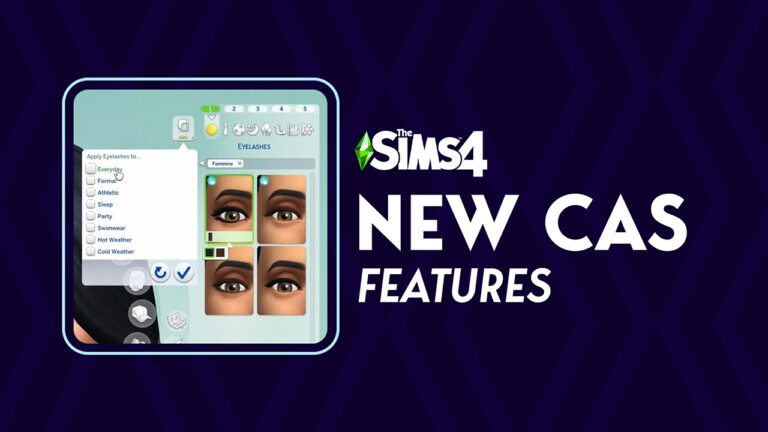
“Apply to All Outfits” in CAS
The newest Sims 4 Patch brings a very useful feature to Create A Sim. Allowing players to apply any accessories, makeup and clothing from one outfit category onto the next with a click of a button!
You’ll be able to select from all different Outfit Categories to choose where you want to reapply your new designs.
New Hairstyles
Hairstyles enthusiasts will be happy to know that there are three new Hairstyles included with the patch. Two masculine and one feminine!
One of the new locks hairstyles for masculine Sims also comes with a new ombre variant:
New Nails and Toenails
French Tips, new Neutral Palettes and Coffin Nails can now be applied to your Sim’s hand nails and toenails!
See the official preview of the new swatches below:
New Neighborhood Stories
The latest Sims 4 Patch has introduced two new Neighborhood Stories that you can manage in Manage Worlds, including:
Friendship Changes – Sims may make friends and either nurture or damage their friendship.
Romance Changes – Sims may start romance and either nurture or damage their relationship.
Round Pools and Fountains
Behold – the ability to create curved pools is finally here in The Sims 4!
You can select three different sizes of round pools that you want to place down. They come in preset sizes, meaning that you can only mix them together with other premade curved pools and / or corner pools. The ability to edit and customize pools with pool trims remain the same for this new pool shape!
Along with the round pools are also round fountains – with the same three sizes you can pick from.
Relationship Preferences Panel
The new Sims 4 Patch introduces a new category to your Sim’s information panel. Adding information about your Sim’s relationship preferences including their sexuality, romantic boundaries and more.
Relationship Interactions
All relationship interactions have now been categorized under one “Relationship” interaction category.
For Rent: Ability to create Residental Rentals on Penthouse Lots
If you have The Sims 4 For Rent Expansion Pack installed, you’ll now be able to create Residental Rental Lots on Penthouse Lots!
Those include Penthouse Lots from San Myshuno from City Living, Ciudad Enamorada from Lovestruck and Britechester from Discover University.
My Wedding Stories: Base Game Weddings are BACK!
Interested in the good old fashioned weddings from 2014 even if you have The Sims 4 My Wedding Stories Game Pack installed? You’re now able to throw Base Game weddings without having to follow through micromanagement that comes along with the said Game Pack.
New Game Options
The new Sims 4 Patch introduces three brand new game options you can activate or deactivate under Options > Gameplay. Those include:
Allow Romantic Invites and Requests
Allows Sims to call and invite your Sim on a Date or to request changing the romantic relationship status with your Sim.
This includes but is not limited to:
All Date Invitations
Romantic Prom Invitations (High School Years)
Being Asked to Become Romantic Partners (High School Years and Lovestruck)
Being Asked to Become Engaged (High School Years and Lovestruck)
Allow Friendly Invites and Requests
Allows Sims to call and invite your Sims to different locations or to request changing the friendly relationship status with your Sim.
This includes but is not limited to:
Child Play Date Invitations
Birthday Party Invitations
Restaurant Invitations (Dine Out)
Bar Night Invitations (Get Together)
Lounge Event Invitations (Get Famous)
City Invitations (City Living)
Friendly Prom Invitations (High School Years)
Ask to be Best Friends (High School Years)
Allow Automatic Breakups
Allows Sims to initate a breakup automatically if they see their Romantic Partner breaking their Romantic Boundaries, or if they are Mean to each other while their Romantic Satisfaction is low.
Safe for Streaming Music Option
The new option under the Music tab in the Game Options is called “Safe for Streaming”. Allowing players, or in this case video creators and livestreamers, to disable any music that might mess with copyright. Those include mostly original songs performed by actual real life artists (such as Bebe Rexha, Carly Rae Jepsen, Charli XCX etc).
You can enable or disable the new option by clicking the button above the music list:
There are A LOT of features we have yet to cover (and that haven’t been mentioned in the Patch Notes)! Refresh this article today for more updates on the new Sims 4 Features added with the latest Sims 4 Patch.
Big new features across CAS, Build Mode and Live Mode are now live!
EA and Maxis have just released a brand new Sims 4 Update across PC, Mac, Xbox and Playstation supported consoles. Big features like Curved Pools, updates to Create A Sim and new Game Options to control your Live Mode experience are well underway and being patched right now into your game!
ARTICLE UPDATE: A second Sims 4 Update has just been deployed across platforms. Possibly to hotfix some of the issues that came with the previous patch that released just a few hours ago.
If you haven’t downloaded the first patch, you’ll only have to download one patch in total.
The Big Features and Big Bug Fixes Update
Installing the Latest Sims 4 Update
You can get the latest Sims 4 Update on the following official launchers and platforms:
You can download the latest Sims 4 Update by checking for a Patch through the EA App. Or Origin if you play on Mac. If you have Automatic Updates enabled the update will automatically download through your client program. In case your EA App is not working properly ensure you’ve cleared your app cache!
If you play The Sims 4 on Xbox Series X / S and Playstation 4 and 5 you can request a new update by checking for updates under The Sims 4 game in the Main Menu. If you’ve enabled automatic updates the Patch should download right away.
Official Sims 4 Patch Notes
Update 7/23/2024
PC: 1.108.289.1030 / Mac: 1.108.289.1230
Console: 1.94
Sul Sul, Simmers! We’re lovestruck to share this abundance of new Base Game features and pack fixes!
What’s New in The Sims 4
Romantic Boundaries
Real life relationships are nuanced and complex! Romantic Boundaries bring some of that into The Sims 4 by enabling you to define the conditions under which your Sims become jealous. These live in Create a Sim alongside the “Gender” and “Sexual Orientation” options in the Identity Panel and you can change them at any point in time.
Does your Sim become Jealous from Non-Physical Romance?Non-Physical Romance consists of social interactions that do not involve physical touch. Examples: flirting and complimenting appearance
Does your Sim become Jealous from Physical Romance?Physical Romance consists of socials that do involve physical touch. Examples: Kissing and holding hands
Does your Sim become Jealous from WooHoo?This applies to WooHoo for Young Adults and older and Mess Around for Teens.
Is your Sim open to changing the factors that cause them to become Jealous?“Yes” means the Sim can be asked in Live Mode to reconsider their feelings surrounding Jealousy for the settings above.
The defaults for all of these will be “Yes” for Sims in your existing games so that you can be the one to decide if you want different behavior. New Sims that the game makes can run the spectrum!
Hiding Relationships
As your Sims are dating or simply going about their daily lives, their Relationship Panel will accumulate more and more Sims. Tired of it being cluttered with random Sims that you met once and have no desire to meet again? Or have an ex that you want to scrub from your contacts? Well, good news! Now you can remove those Sims (who are not members of your household) by selecting them in the Relationship Panel and selecting “Hide Relationship”. Make room for the Sims who really matter!
Neutral Relationship Names
The language for Sims’ relationships now is more neutral to be more inclusive.
“Husband / Wife” → “Spouse”
“Fiancé / Fiancée” → “Engaged”
“Boyfriend/Girlfriend” → “Partner”
One place where you can see this is in Create a Sim. Select the “Identity” button (it looks like three dots) and go to the Household Relationships Panel.
Partner Status
Previously, the Partners relationship could only be established through gameplay. Now you can set it within Create a Sim between two Sims in your household!
Create a Sim
Eyelashes
Eyelashes now have their own category! As you all know, some eye shapes have eyelashes as part of them. Now, Sims can have separate eyelashes applied independently from the shape of the eye! And since they are in their own category, they also are compatible with other accessories such as glasses and piercings. The base game includes two styles of lashes for a more dramatic look for your Sims! Seriously! It’s for everyone. For free. Today. Right now!
“Apply to All Outfits” Button
The days of manually finding and selecting the same accessory, makeup, hat, hair, top, bottom, full-body outfit, or footwear for each outfit are gone! Now you can hit this single button to apply the item to every outfit at once! Love that makeup look you just perfected in your Sim’s Everyday style? Now you can apply it to multiple categories! Found the perfect pair of pants for your party outfit, but applied it to Everyday by accident? You can also select specific categories to copy to, as well! This works on all ages and with all types of Occult Sims. We can’t believe it either. Is today the best day ever?!
Note: Currently, the Apply All Button adds the selected item to your Sim’s outfits. It does not remove outfit pieces – only adds or replaces.
We look forward to any feedback you might have on this new feature, so we can continue to improve it to meet your CAS needs in future releases!
Updated Hairstyles
Is that a new hairstyle or are you just happy to see me? Yes, we are happy to see you and, yes, it is new hair!
Dark and Lovely Hairstyle Partnership
And there’s even more hair! Part two of The Sims 4 collaboration with Dark and Lovely arrives in this update with two color variants of the new loc braids. Check out Dark & Lovely’s – Play In Color, a campaign that champions diversity and inclusion and spotlights the game changers who are redefining the rules in the games industry.
French Tips, Coffin Nails, and Neutral Palettes
We’re excited to bring more nail styles and color palettes! There are new designs for French Tips and Coffin Nails to add flair to your fingertips. We’ve also added more color palettes for everyone to express themselves more freely! A whole new series of nude nails is also available to provide an extensive selection to match natural nail beds.
Build Mode: Curved Pools
Now your pools can have rounded corners! Curved Pools work like Curved Walls—place a corner piece and adjust the sides. Mix and match with regular corners—let your imagination run wild! There also is a new pool light, Oblong Wall Light, that works perfectly on curved pool walls!
Live Mode
Relationship Interactions
A new “Relationship…” category in the Interaction menu now contains actions across the Base Game and a number of packs that directly relate to relationship status such as “Ask to Join Household” or “Become Best Friends”.
Safe Music Streaming
The Music section of Game Options now has a “Safe for Steaming” toggle to play only the music that is safe for streaming The Sims 4! When this is checked, you don’t have to worry about your stream or video running into music copyright issues. We’ll be adding more music with streaming-friendly licensing as time goes on.
Neighborhood Stories
Neighborhood Stories now has two new options within Manage Households: Friendship Changes and Romance Changes. This enables Sims in other households to start and end those types of relationships on their own. You can use the mailbox each day to “Check Recent Neighborhood Stories” for news such as Sims your household knows becoming best friends, breaking up, or getting back together.
Conversation Panel
We gave a new coat of paint to improve the usability of that panel that appears at the top of the screen when your active Sim is in a conversation! Did you know you can do all these things with it?
Select the Sims’ portraits to see…
their mood
their relationship levels (regular and romantic) with your Sim
Select the book icon to see that Sim’s Sentiment with your Sim
Sims in a relationship will no longer receive unsolicited autonomous flirtations from other Sims, unless they have the Noncommittal Trait, of course.
Sims will Dance if the radio is turned on and playing music, but they’ll save their dance moves if the radio is turned off.
Enchanting and Flirty interactions are now only available for Sims who are compatible with the active Sim’s orientation.
Married Sims no longer receive a Want to flirt with Sims who are not their spouse.
Teen Sims will no longer feel jealous around a previous Teen romantic partner who has become a Young Adult.
Jealousy was getting ahead of itself! Those jealousy buffs were wrongly calling an engaged Sim a spouse. We’ve calmed things down and fixed the mix-up!
Upon learning a Sim’s WooHoo interest and opening their Sim Profile, the Sim Profile will no longer say “No One“ even when the sim has a WooHoo interest in Men/Women.
The Knowledge of a Sim’s Sexual Orientation and their Sim Profile will now remove outdated information when that Sim changes their Sexual Orientation in Create a Sim.
The need for fun won’t stop a Sim from enjoying their meal—they’ll finish eating before fulfilling their fun needs.
When multitasking two books being read, the Sim will no longer skip the first book. Now they will read it, put it away, and then go for the second book.
“Make a Move“ now is available between Sims whose marriage was established in Create a Sim.
If a Sim is rejected after asking another Sim on a date, a notification will be given on why they were turned down.
Ghost Sims are now available for “Ask on Date…“ from the Relationship Panel.
Both the Host Sim and the Sim’s date can contribute to the main date goal with one another. Before, only the Host Sim could accomplish the goal.
If a Sim heads off to work or school during an Event, the Event will come to an end. Duty calls!
Planning a Stay Over during an Event at the Sim’s home will bring the Event to a successful close. Time to kick back and relax!
If a Discovery Quest appears during an Event, the Event progress bar will not reset if the Discovery Quest is canceled.
If a Discovery Quest appears during an Event that has Goals and Rewards, your Sims now keep their Event titles and the progress remains visible.
Sims will be able to “Ask on Date…“ without the need for Romantic Relationship. That won’t stop Sims from rejecting the date proposal if things are off though.
When planning an Event, the Plumbob will appear next to the venue choices when scrolling through the available locations.
When planning an Event, the selected venue will appear at the top of the selection list if you navigate away and then back to the venue selection.
When planning an Event, Sims that are preselected will now count as a single entry rather than not being counted.
When planning an Event on console, the tooltip will now inform that a Sim is being changed from a Guest to a Hired Role. Additionally, a tooltip will appear if the Sim being hired for a Role has work scheduled during the Event.
When planning an Event on console, the location image will not appear in the description section of the planning page. Just the description text will appear.
When setting up an Event, the checkmark for each phase such as “Invite Sims” now is on the right side of the button for easier reading.
A Sim now can learn about another Sim’s financial status when they “Get to Know“ that Sim.
Lips are synced so that Sims making out keep their lips on their kissing partner. No more awkwardly talking mid-kiss!
When Sims get steamy in the shower from WooHoo, music now jazzes up the moment.
Sims in more restrictive costumes now kneel instead of sitting cross-legged.
Sims wearing the Hotdog costume will not intersect with their knees while kneeling on the ground.
“Skinny Dip with…“ no longer is available on pools when no other Sims are nearby.
The complete text for a joke falling flat now appears on failed comedy and funny socials, rather than getting cut off in the pop-up.
Mugs and tumblers fit better in Sims’ hands now.
Music will continue to play in Live Mode even if “Next Song“ is selected while the game is paused.
The highlight for newly acquired Sentiments that appears around a Sim’s portrait in the Relationship Panel is removed once the Sim profile is opened.
Unavailable actions in the Interaction menu are easier to read now.
Icons appearing with the music note have been fixed and are now playing in the right direction.
The text of phone call pop-ups now fills the space better.
Shadows no longer are checkered for some platforms.
Placing a lot from the Gallery no longer changes the color of the world on some platforms while the lot is building.
Pressing Alt + Tab in Fullscreen Mode on Windows now opens the Task Switcher for computers with DirectX 11.
Some interactions related to Sims being affectionate, sleeping in bed, reading books, going to other locations, and asking Sims on dates are more performant.
Answering incoming text messages works with both control method types on console (hovering or snapping the cursor).
The correct venue is highlighted in the venue selection when planning an Event from a Sim’s home lot on console.
Build Mode
Cellar stair trim no longer extrudes down to the basement floor when the basement floor is removed.
Walls directly under stairs now properly cut away in ”Walls Cutaway View.’
All “Mega Double Doors“ swatches now include transparent glass.
Bar Backs are included in the “Bars & Bar Backs“ category. Cheers!
When building Pools, Rotate and Copy no longer increase the cost of the Pool.
Large Curved Walls now can be placed on Large Curved Platforms.
Create a Sim
The ability to customize Toddler Toenails has returned. Look at those cute, colorful toesies!
Fingernails no longer clip through the gloves of full-body outfits.
French tip nails (ymAcc_ManiFrenchTip_Beige) have been manicured to no longer intersect with fingers.
Hair texture no longer changes when the Tank Top (yfTop_SDX021BinderRacerback) is applied to a female Sim.
The Simoleons thrown by Sims with the Materialistic Trait in Create a Sim now catch a little more air. Gotta show off the bucks with a bang.
The contrast and font color have been improved for better readability in the Styled Looks section of Create a Sim.
Gallery Server
Viewing creations from Followers should return results more quickly (internet speeds allowing) so you can get straight into browsing all of their shared creations.
Blocked players no longer show up in the Gallery searches.
Simmers on PlayStation and Xbox can see their Profile Showcase uploads in the Gallery again.
Get to Work
Scheduling Events from the Calendar while in Sixam no longer is available—seems like there’s no signal here!
Posing for a picture will look fabulous without creepy zombie teeth cutting into your face.
Sims will no longer ignore your desire to “Make Out with…“ when using the Get Together closets: Perfect Size Closet, Squaring it Square, and Fashionista’s Closet.
Pronouns on the notification for acquiring the Dance Skill and asking about another Sim are now correct.
City Living
Rounded decks, walls, platforms, pools, and fountains can now be placed in Apartments in San Myshuno.
Cats & Dogs
A Sim without the Cat Lover Trait who is watching the sky from the picnic table with another Sim who has that Trait will not spontaneously stare elsewhere besides their partner and the sky.
A Sim with the Cat Lover Trait will no longer slide in animations when sitting close with another Sim.
Interactions for collecting Cat and Dog hair piles are more performant. Every follicle counts!
Sim clothes will no longer remain on when entering Sim tattoo mode in Create a Sim after using Paint Mode or selecting Coat Colors & Patterns on Pets.
If acne is disabled in the Game Options, it will not appear on Sims in Live Mode.
The correct icons now appear in the Action Queue for “Admire Courage“, “Moving Too Fast“, and “Talk about Marriage“ rather than just showing the Sims face.
The Social Bunny icon now looks more social instead of romantic.
Once a Teen Sim becomes a Young Adult, the “Ask a Crush Out“ and “Chat with a Crush“ Wants are no longer available.
The light is back in Sims’ eyes with certain hairstyles (yfHair_EP12WavyFadeOmbre, ymHair_EP12WavyFadeOmbre, and ymHair_EP12WavyFade).
“Talk about Marriage“ now appears in the “Small Talk“ section of the Interaction Pie Menu and won’t always surface to the main Pie Menu interactions.
Benchmark Seating’s preview image now is pink when viewing the pink swatch. I can’t blame it, blue’s a great color.
Growing Together
Even if two Sims have amazing compatibility, romantic interactions won’t always be successful.
Haughty Herringbone Wall and Floor Tile’s color swatch for the gray version now matches instead of being black. Don’t mind it, it was just going through an emo phase…
Teen Sims will only have memories of “First Mess Around“ and will not confuse this with “First Woohoo.“ Teens will have to wait for adulthood for that.
Photobooth pictures will now fit nice and snug inside the Hodgepodge Photo Collage Frames.
The social compatibility icon has been improved in the Relationship Panel to better represent compatibility.
Horse Ranch
If a Sim leaves a conversation while mounted, they no longer blather on indefinitely.
Chestnut Ridge now shows its attractions when considering it for a Vacation. The tourism board wants you to visit for Dreadhorse Caverns, its rare fishing spots, and, of course, the horseback riding!
“Ask about Getting a Horse“ now shows the Friendly interaction icon in the Action Queue rather than showing the Horse Trainer’s face.
Up to eight Sims can enter the Equestrian Center instead of just one to spectate competitions—yeehaw!
If the computer is broken, Sims now have to repair it before they can purchase or rescue a Horse with it.
Horses move more smoothly and navigate more directly at Fast Speed and Ultra Speed.
Horses no longer teleport to their destination when trying to walk backwards in Fast Speed or Ultra Speed.
Foals turn around instead of sometimes going backwards to use objects.
Horses have lots of “locomotion” improvements! They travel more directly to their destination, slow down when going through gates, and stop more smoothly. They walk in and out of narrow spaces and gates (forwards and backwards!) more deftly.
Moreover, autonomous Horse movement is more performant.
Sims on Horses no longer socialize with Sims through walls.
For Rent
Residential Rentals are now available for Penthouse Lots! We were waiting for Residential Rentals to high-rise to the occasion and now they’re ready to be built to your specifications.
Households that do not use utilities such as power and water and owe zero Simoleons will not receive messages that threaten utility shutoff.
When the Property Owner is visiting a Tenant unit on the same residential property, the Sim Picker specifies “Visit Unit…“ rather than displaying “Go Home…“
Deleting and then undoing the deletion of a shared unit wall in a Residential Rental lot that has reached its maximum unit capacity will no longer cause issues with the “Create Unit“ functionality.
Visiting the Property Owner on the same residential property will no longer state that the Property Owner is not home—they can’t escape meeting you now!
Changing the name of the Penthouse Residential Rental will also be reflected in the Property Management Interface and the Lot Name headers.
“Sell Residential Rental“ is specifically used to avoid confusion with commercial businesses when selling residential property.
All versions of Oh So Floral, Oh So Fancy Tile now are shiny.
The Rent shown now is correct based on the unit size and amenities.
When renting a residential unit, a tooltip now specifies “Rent Unit“ before confirming the rental, similar to renting an apartment.
Tenants and Property Owners can now find each other in the Business filter of the Relationships Panel.
The ability to increase and decrease the panel height on console is now available for the Owned Business Panel.
The Unit Selection display for Residential Rentals in Manage Worlds now uses the D-Pad instead of L1/R1 (PlayStation) or LB/RB (Xbox) when changing floor level.
Neighborhood Sims now leave the restaurant after completing the eating of a grand meal and will no longer wait until the restaurant is closed.
Wearing the respectable shirt and vest combo (ymTop_GP03Vest) was cutting off circulation, causing a groove to appear around the Sim’s fingers. The cuffs have since been loosened and the Sim’s fingers are back to normal.
Vampires
Occult rank status for non-household occult Sims can now be seen in the Sim Profile.
Star Wars™: Journey to Batuu
For galactic safety, scheduling Events from the Calendar while in Batuu no longer is available.
We heard that you wanted the option to plan a wedding with the Base Game Wedding Event even when you have My Wedding Stories, so Sims now can choose between “Plan Wedding Event“ from Base Game or “Plan Customized Wedding Event“ from My Wedding Stories when they’re ready to get married.
Sims now stand instead of sitting on the floor from “Please Take Your Seats“ if there aren’t enough chairs.
Werewolves
The Sweater (ymTop_GP12SweaterDecal) no longer distorts at the arm for male Sims when viewing from a distance.
Crystal Creations
When a Sim wears jewelry crafted and charged with the Fire Opal crystal on a Date, completing date goals will count 50% more towards the Date’s score.
Bust the Dust
The “Filth Kills the Fun“ Moodlet now has a unique icon all its own, awww.
Sims no longer get multiple negative Dust Moodlets at the same time.
Industrial Loft
The preview image of the Johnny Zest’s Sweet Revenge Sofa faces the same direction as the other couches in Build Mode.
Urban Homage
The Track Pants (ymBottom_SP50Track and ymBottom_SP50Denim) are now correctly tagged as masculine.
Riviera Retreat
All Riviera Retreat rocks are included in the Rock category in Build Mode.
Essence of Bergamot Planter now exists fully in this realm (it was semi-transparent before).
What is your experience with the latest Sims 4 Update? Join the conversation below!
The Social Event Overhaul Mod lets you create any goaled Event you can imagine!
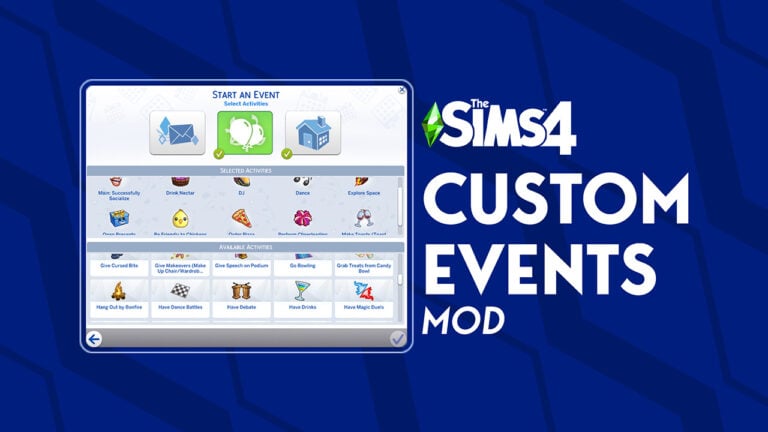
Ever wanted to break the pattern of throwing the same old House Parties and social event gatherings in The Sims 4? The Social Event Overhaul Mod for the game lets you create Custom Events in the game – featuring activities, hobbies and interactions from all the previously released Sims 4 DLC!
This Mod is in development by Zerbu, a talented modder who’s brought plenty of useful Mods in the series through the years. Even creating a unique modded Elementary School experience for child Sims – years before the release of High School Years! Their most recent Mod release is The Sims 4 Schedule Festivals Mod – which lets you organize your calendar and all Worlds Festivals to your liking.
Now, the modder is focusing on developing the Social Event Overhaul Mod which will let you pick any Sims you want, choose activities they want to do together and plan out an Event Location for them. With more updates and features to come after the release of The Sims 4 Lovestruck Expansion Pack.
Creating Sims 4 Custom Events
The Sims 4 Custom Events Mod is currently in its early testing phase. As of now, the mod is borrowing an event planning system from The Sims 4 My Wedding Stories Game Pack. The modder emphasizes that it’s not an ideal solution considering the broken nature of the Game Pack itself. The creator of this Mod shared that instead they plan to replace the Event Planning system with the one that comes with The Sims 4 Lovestruck Expansion. As the upcoming “Create A Date” pack mechanism seems to be a bit more polished than the one from My Wedding Stories.
If you have most of The Sims 4 Packs installed, you can expect over 100 different activities that’ll let you characterize your Custom Event. There are no limits on how many activities you can choose for your Custom Event, but the modder encourages you to pick up to 6 activities. Considering that having more than six would make it extremely difficult to successfully complete an event.
This version only updates the House Party and Dinner Party events from the base game. The full version will update most, if not all, social events across all packs.
Because this is pre-patch, and the activity selection system is only used in My Wedding Stories, which doesn’t have rewards, you cannot see your current medal level while an event is running. Since Lovestruck adds events with actual rewards, hopefully it will update the UI to show it. The medal system is still used in the background, it just isn’t shown in the UI. To reach gold, you must complete the “Main” goal, as well as 6 of the activities you chose.Only completing the main goal will get you bronze, and completing 3 activities will get you silver.
There’s currently no way to set a “minimum” number of required activities. This will become possible in the patch, as shown in the Lovestruck Gameplay Trailer, but isn’t in the game’s code currently. Therefore, it is possible to choose less than 6 activities, but if you do, it will be impossible to get gold, since that’s the amount you need to complete.
The UI during events tends to glitch up at times… not surprising, considering which pack it was made for. Hopefully this will be fixed in the patch.
There may be bugs I haven’t found yet. In fact, since there’s over 100 activities to choose from, it’s very likely at least a couple of them have bugs.
A Complete Social Event Overhaul
Beside the ability to create any Event of your choice, The Sims 4 Social Event Overhaul Mod also brings feature updates to some other aspects of Sims 4 Events, including:
You can invite Sims that anyone in the household knows, not just the initiating Sim.
You can invite any Sim aged Toddler and above for both the host and guests.
You can select Sims from outside the household as the host. This doesn’t change how goals work, but lets you simulate being invited by another Sim.
All Sims in the event will automatically be added to a group. This makes performing “Do X Together” interactions easier.
The “Plan a Social Event” interaction is available for all ages.
The “Plan a Social Event” and “Plan a Wedding Event” interactions start immediately, without waiting for an animation to start and complete.
The test version is bundled with another experimental mod that sorts the social event and activity selection dialog alphabetically. It will probably be released as its own separate eventually, but is included with Social Event Overhaul for now.
As of now, The Sims 4 Custom Events Mod is in its unfinished test version. With more updates, polish and features coming some time after the upcoming Sims 4 Update release. You can already test out the Mod yourself, but beware that glitches and errors might occur as the modder further develops this system.
You can download The Sims 4 Social Event Overhaul through the official creator page linked down below. Simply paste the Mod file contents into Electronic Arts > The Sims 4 > Mods folder and enable Mods and CC in your game options.
Detailed look into The Sims 4 Lovestruck’s most complex features.
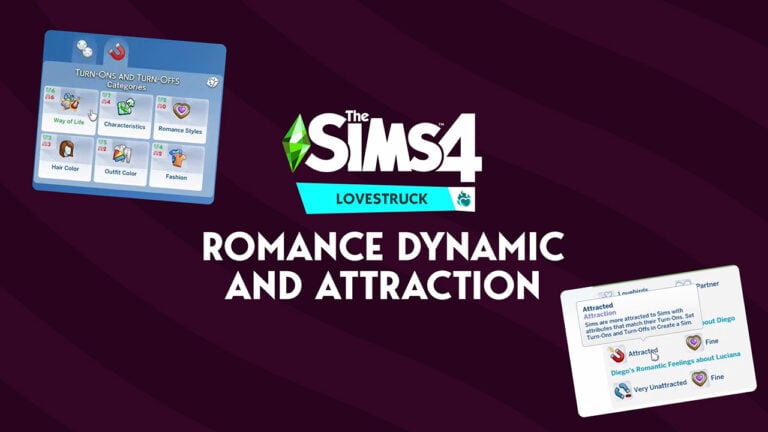
The Sims Team shared a bunch of useful information about The Sims 4 Lovestruck‘s new gameplay mechanics: Romance Dynamics and Turn-Ons and Turn-Offs. As well as how they play out during your gameplay.
You’ll be able to choose from four different Romance Dynamic options to better determine your Sim couple’s autonomy. While your Sim’s Turn-Ons and Turn-Offs will determine how easy will it be to build up the new Romance Satisfaction meter.
Take a look at the detailed overview of these new features below:
Romance Dynamic
Romance Dynamics is Lovestruck’s parallel with Growing Together’s Family Dynamics. It pairs autonomy between romantic partners. So, if you give a couple a steamy dynamic they’ll be all over each other. While a couple with a strained dynamic will be pretty unhappy and not necessarily nice to each other. You can set these in Create A Sim or as you’re playing the game, the game’s gonna suggest one of these based on how you’re playing. It makes a really distinct impact on how relationships look and feel all on their own.
Turn-Ons and Turn-Offs
This is how two Sims feel each other about romantically. You can change these any time by coming back to Create A Sim just like Likes and Dislikes, but there are some key differences between those two.
There are three different types of Turn-Ons and Turn-Offs:
Physical (Hair Color, Outfit Color and Fashion)
Personality (Way of Life and Characteristics)
Romance Styles
The physical Turn-Ons and Turn-Offs accompany all the physical features of your Sims. Well, at least the features that they can quickly change with a quick trip to CAS. Unlike the Turn-Ons and Turn-Offs that we had in The Sims 2, there are no options to choose whether or not your Sim is attracted to more muscles or more love handles, do they have a beard or not and more. It’s purely based off their fashion choice alone.
When it comes to personality, there are two categories including Way of Life and Characteristics. The Way of Life is a category about Skills and different things that are part of a Sims experience. Like for example, being Broke or being interested in Sims that are already taken. The team revealed the full list of Way of Life options, including:
Academic
Arts & Crafts
Broke
Career Minded
Culinary
Drink Making
Engineering
Health & Sports
Highly Skilled
Interpersonal
Media & Technology
Nature
Performer
Self-Employed
Sense of Humor
Slacker
Taken
Wealthy
Characteristics are based off of Sims traits. Some Characteristics options from The Sims 4 Lovestruck merge several traits into one, including the ones from previously released Packs. For example the Ambitious option, which not only includes the Ambitious trait but also Overachiever from High School Years and Generous from For Rent Expansion. The team has only shown the first panel of the Characteristics, but based off of the Traits we currently have in The Sims 4 series, you can already assume what the rest of these Characteristics could look like.
And last but not least, Romance Styles determine how your Sim prefers to engage with romance. These Turn-Ons and Turn-Offs will directly impact changes to your Sim’s romantic satisfaction level. You can choose between five Romance Styles including Affection, Flirting, Gift Giving, Physical Intimacy and WooHoo.
In-Game Preview
Both Relationship Dynamics and Turn-Ons and Turn-Offs can be checked out in the Sim Info Panel. In The Sims 4 Lovestruck Livestream, the developers revealed what the panel looks like with the new Expansion Pack. Your Sims could be unattracted due to the different Turn-Ons and Turn-Offs, but their Relationship satisfaction can still be Fine if you work enough on your Sims’ relationship.
Both attraction and romantic satisfaction is tracked seperately for each Sim. Each Sim could have a different level of attraction or satisfaction in the relationship. In particular, Romance Style Turn-Ons and Turn-Offs are important to consider when engaging romantically as they significally influence changes through a Sim’s satisfaction. Sims who are turned on by a particular romance style will have more romantic satisfaction if this desire is being met. If a Sim is being turned off by a particular romance style will have less satisfaction when engaging in this type of romance.
Ultimately, the combined romantic satisfaction of both Sims in the relationship actually influence the rate at which the romantic relationship fades away. But, if you’re able to keep both your Sims very satisfied in a relationship then it will actually build up over time instead.
Your Sims will also be able to choose to share their preferences and personality information with other Sims in live mode interactions. Either asking for another Sim’s information or sharing your own.
What are your thoughts on the new mechanics coming with The Sims 4 Lovestruck Expansion? Share your comments down below!
The Sims 4 Pools are getting an Upgrade after 10 years!
Maxis has just revealed in their latest official Lovestruck Expansion Livestream that Curved Pools are coming to The Sims 4 Base Game! Yup, free of charge.
You’ll be able to create Curved Pools in the style of Curved Walls that came with The Sims 4 High School Years Update. Simply place down the pre-determined Curved Pool of your choice and mix it with the Corner Pools already available in the game.
See what the team has to say about the new addition:
It’s a new Build Mode feature that’s for Base Game and they work similarly to curved walls. You can make a curved pool as small as 4×4, you can combine them with regular corners of corner pools. We are looking forward to what you all make with these.
One thing I’m really worried about are the possible glitches coming along with them. At least the visual ones. We’ve seen in the official livestream that there are minor shadow visual tears on the corner of the pool captured above. However, a different visual glitch was spotted as well in the official Sims 4 Lovestruck Gameplay reveal:
See the visual tear glitch on the right corner of the pool?
Let’s hope that The Sims Team is actively working on solutions to fix this.
The Free Sims 4 Update packs a lot of useful New Features!
The Sims Team has revealed awesome new features coming to The Sims 4 Base Game for free! You’ll now be able to easily apply all your customization options onto different outfit categories with a click of a button. There are entirely new Romantic Boundaries options allowing you to create Polyamourous Sims, as well as the long-awaited 3D eyelashes.
Here’s everything new coming to The Sims 4 CAS:
Copy-Paste Styles onto Different Outfit Categories
The team revealed that with the new Sims 4 Update, you’ll be able to Copy-Paste styles that you create onto different Outfit categories! Let’s say that you’ve applied Makeup, Glasses and / or Hats onto your Sims and want to repeat the same style on different categories. The new feature lets you select which Outfit Categories you want to repeat your customization!
Romantic Boundaries
Want to create Sims that are not that Jealous of each other if they want to open up their relationship to a 3rd person? Well, now you can do just that!
The new Romantic Boundaries options go far beyond just letting you create Polyamorous couples though. There are 4 new options in the Romantic Boundaries tab, featured in your Sims’ Gender and Sexual Orientation panel.
The new options are:
This Sim feels jealous if any romantic partner engages in non-physical romance with other Sims
This Sim feels jealous if any romantic partner engages in physical romance (excluding WooHoo) with other Sims
This Sim feels jealous if any romantic partner engages in WooHoo with other Sims
This Sim’s jealousy triggers can change by talking about it with other Sims
3D Eyelashes
FINALLY! The game is getting new Eyelashes category under the Makeup section. With two eyelashes coming with The Sims 4 Base Game and two other featured in the Lovestruck Expansion Pack.
Take a first look below:
Relationship Panel Update
You’ll finally be able to create Romantic Relationships now straight from Create A Sim! The new feature lets you create Boyfriends / Girlfriends with the “Partner” option.
The language in the Household Relationship panel has also been updated to be more gender neutral.
What are your thoughts on the new Sims 4 CAS Features? Join the discussion below!
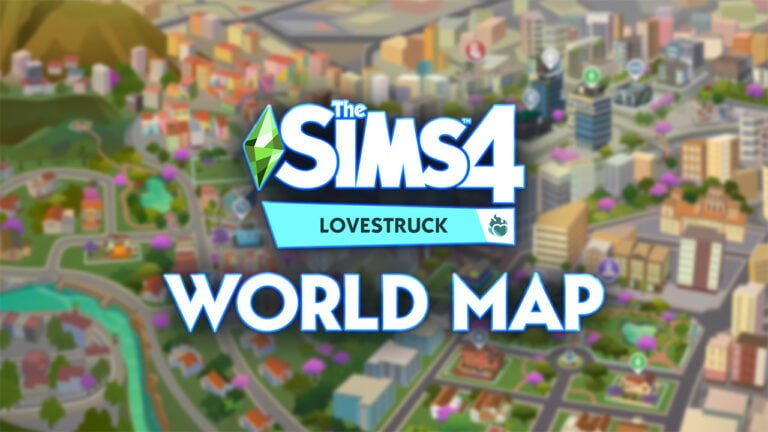
The Sims Team has just revealed The Sims 4 Lovestruck World Map! That’s right, the new world called Ciudad Enamorada has finally been revealed in full. With a look at all three new Neighborhoods and their Lots featured on the Map.
Without further ado, let’s take a deep dive into the World Map:
The Sims 4 Lovestruck World Map
As confirmed in the official gameplay reveal of The Sims 4 Lovestruck, the new world of Ciudad Enamorada will feature thirteen new lots in total. Spanning across 3 different neighborhoods. See the world map below:
The world comes pre-populated with a new Rental Unit, a Park, Gym, Lounge, Nightclub and several new Residental Lots. Including two new Penthouse lots!
The World is seperated into these 3 Neighborhoods: Vista Hermosa, Plaza Mariposa, and Nuevo Corazón. You can learn more about each neighborhood from The Sims 4 Lovestruck World Map in the descriptions shown below:
Nuevo Corazón
The pulsating nightlife of Ciudad Enamorada is the most exciting within Nuevo Corazón. This revitalized city area is where trendy partygoers head for a night on the town, scoping the room for the next potential love interest. Brave into the alluring and mysterious Mirada del Amor, the nightclub known as the hotspot for torrid affaird and passionate practicioners of the romantic arts. Not everyone enjoys the nightlife, though, so for you daytime daters, break a sweat and flex some muscles at the gym SUDOR.
Plaza Mariposa
Plaza Mariposa, the central square of Ciudad Enamorada, is the spot for scenic views and fun date night activities. Visit Media Naranja, the perfect park to stop at for a quick refreshment, or book a captivating getaway at the Villa Calida rental. Excite your date with a romantic gift from Isabela’s Flower Shop, or make a wish at the Fountain of Dreams.
Vista Hermosa
The serene embrace of Vista Hermosa sets the stage for a wide array of romantic experiences. Locals often visit Laguna del Abrazo, a bustling hot spot just a short walk from the renowned Wall of Love, where sweethearts can delcare their love for each other. For those seeking a different type of connection, visit Beso Rapido, a conveniently located motel open 24/7.
The Lots in this World was build in collaboration with several different Mexican creators. From Lot Builders that built Lots for Ciudad Enamorada to Mexican Artists who designed Art, Posters and more featured in the world.
What are your thoughts on The Sims 4 Lovestruck World Map? Join the conversation below!