Home Blog Page 194

The Sims 4: Courtyard Oasis Kit Officially Revealed!

While it might not be much of a surprise, given that the next kit was mistakenly leaked by Microsoft not so long ago, The Sims Twitter has made it official. The Sims 4 Courtyard Oasis Kit will be coming to the game on May 18th on both PC/Mac and console!

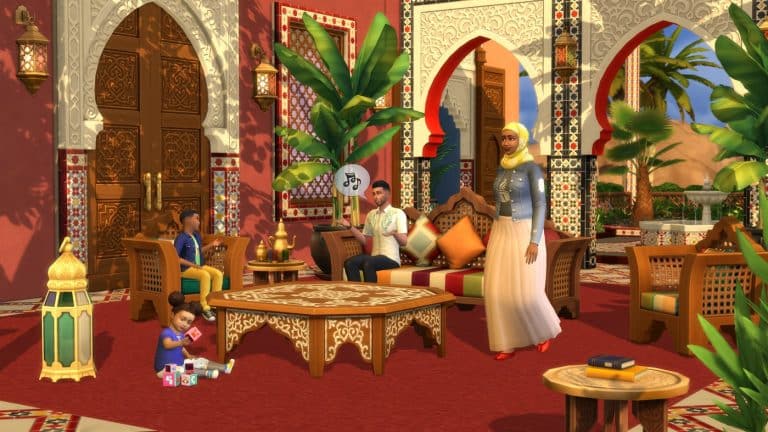
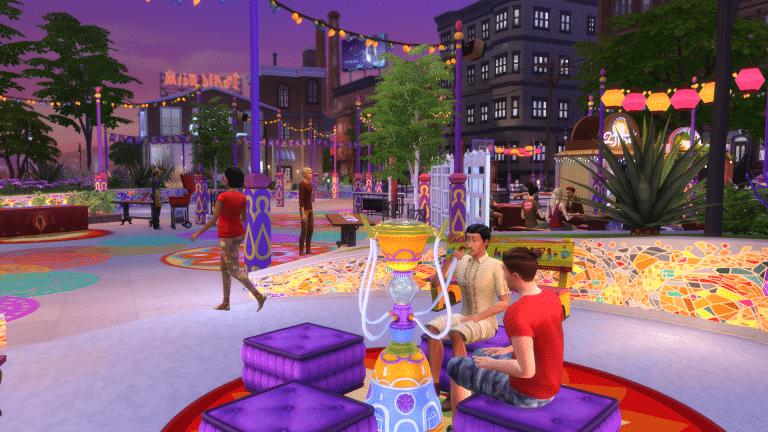
This Build/Buy kit is inspired by Moroccan architecture and features items to build colourful courtyards in your Sims’ homes or anywhere else you might want a bright, cheerful courtyard in the game. It looks like the Build/Buy items are pretty versatile as well and can easily be used in other types of builds.

https://twitter.com/TheSims/status/1392887516769013762

What do you think of the Courtyard Oasis Kit? Let us know in the comments or come chat with us on social media!

The Sims 4 PC & Console: NEW UPDATE + Patch Notes! (May 13th, 2021)

The Sims 4 PC & Console: NEW UPDATE + Patch Notes! (May 13th, 2021)

The Sims Team has released a brand new update for The Sims 4 on PC, Mac, Xbox One and PS4!

To download the latest version of The Sims 4, simply open your Origin program and if the game doesn’t update automatically, right click on The Sims 4 and select ”Update”.

In case you have Mods or Custom Content, the game will automatically disable them for you after first launching The Sims 4 after the update. To re-enable all your Mods and Custom Content, select the Settings option in the Menu and select Settings. Under the ”Other” section you’ll find the ”Enable Custom Content and Mods” option. Check it and restart your game in order for it to take effect!

Patch Notes

PC: 1.74.59.1030 / Mac: 1.74.59.1230
Console: Version 1.41

Heylo Simmers!

Hope everyone is doing great wherever you are in the World. We have a small Game Update for you today, we hope you enjoy it.

Happy Simming!

Chaus Chaus – Dag Dag!

-SimGuruRusskii

What’s New?

As you may have seen revealed in our past Sims 411 Livestream, we added in this update a few new Asian Eye Presets for Female and Male Frames. You can find these in Create A Sim and we hope you love them! In case you missed the Livestream, I have applied my nonexistent photoshop skills and have added them in these patch notes for your enjoyment. See below for maximum visuals!

64qpvgeu6zss.png
p3azd84jm5nl.png
ulily0bk4xrq.png
9oqw8agxl3cr.png
kygb6h09bjfo.png
b15d1bqyxo9t.png

Besides adding these presets we also have updated two hairstyles from our Base Game.

Firstly, we have the gorgeous Hair_MedTexCurls or as we have named it in our Sims 411 blog post, the “Retro Style Large Afro”. Beautiful! I added a few screenshots on how it looks with Female and Male Frames, and Adults, Children, and Toddlers.

dijbpulgz1px.png
e1jcb6vmnxx8.png

Secondly, we have the fab Hair_EF13AfroShort or as we called it the “Short Afro.” I have added below some screenshots with Female and Male Frames – Adults, Children, and Toddlers as well for your reference. I want to note that we noticed that this particular hairstyle with the Black Color Swatch looks a bit Grey in the screencaps below, but we can tell you that we have fixed it already for a future update.

9ifockcvha49.png
hhpw8o2j2f7d.png

Now onto the fixes…

Bug Fixes


Sims 4

  • We fixed an issue with two of our facial hair offerings, the ymFacialHair_BeardThinGoatee, and ymFacialHair_ChinStrap, as they were making Sims faces wider when applied.
  • The Voodoo Doll’s thumbnail in Sims’ Inventories has been fixed so it doesn’t change appearance when used, as it should not.
  • Simmers in Laptop Mode will no longer see glitch textures when the Easel is placed on the Lot. It was like a glitch in the Matrix, just… visually striking.

Get Famous

  • Sims that saw their Transfer Videos to The More Views Video Station interaction drop from the queue while doing other things will no longer have this occur. Because what is technology but helpful? And why shouldn’t Sims shower and transfer their drone footage whenever they want to amirite?

Vampires

  • Vampire Sims will no longer be forever Compelled for a Deep Drink. As much as that sometimes might be what Vampire Sims would be compelled to do, they don’t have to. So it is not something that they probably want to have in their interaction queue forever and all time. Forever is a long time…

Country Kitchen

  • The Country Charm Counter will now look correct when getting dirty, and not quite like… it has been taken out of a post apocalyptic movie set. There is a fine line between dirty, and… well, unrecognizable.

EA Announces EA Play Live 2021

0

EA has announced that EA Play Live will be returning again this year. While traditionally previous events have been held in June, this year the event makes its return on July 22nd, 2021!

While the exact line up for the event as well as timings are yet to be revealed, we will, of course, be covering anything and everything relating to The Sims franchise right here on The Sims Community website and across our social media!

The Sims 4 Laundry List: May 11th, 2021

0

The Sims Team has published the latest Laundry List for The Sims 4. The laundry list addresses some of the most important bugs and issues in the game that the community have reported and that the team has prioritized to fix in time for the next game update.

Take a look at the official post below!

Hi Simmers!

Welcome to the Laundry List where we’ll share a list of the top community concerns that we’re currently investigating and hope to have resolved in the upcoming patch.

These concerns were reported by players who help us continue our work of improving the user experience on a regular basis.

Please note that some topics can be tricky and require an extended investigation on our end, so even though we are actively investigating it’s not a guarantee that we’ll have an immediate fix for it in the upcoming patch.

Also note that this is just a list of the “top” concerns. There are more topics that we saw reported by players that are not listed and being worked on.

So, without further ado, here is a list of the top community concerns we’re currently investigating:

For the month of May, we’ll have two updates to the game.

The first one is going to be on the smaller side, but all good things come in small packages 🙂 Here’s the list of the top community concerns we’re investigating for the first game update:

The second game update is larger and will follow at a later date this month. Here’s the list of the top community concerns we’re investigating for the second May update:

Thanks for all your patience and valuable help! Please continue telling us about any issues you’re experiencing on Answers HQ, we’ll continue to work on improving our transparency, and together we can make this game the best that it can be. Happy Simming!

The Sims 4 to announce “Summer Lineup” on May 17th

5

The Sims 4’s upcoming Kit has accidentally leaked on the official Microsoft Store. You can learn more about the upcoming The Sims 4 Courtyard Oasis Kit HERE!

The leak of course gathered a lot of attention from Simmers that even the official Sims Twitter profile shared a statement regarding the leak.

In their tweet they’ve acknowledged the Kit and said that more should be revealed on May 17th. Interestingly they’ve also shared more information about the upcoming Summer period – stating that it’s going to be…well…lit? Anyways, they’ll be sharing their full summer line-up of upcoming content on May 17th.

Considering that it’s a full line-up we should perhaps expect more than just the Kit that’s been leaked and the Game Pack that they’ve confirmed is also coming.

We’ll make sure to keep you posted on all of this right here on Sims Community!

OFFICIAL LEAK: The Sims 4 Courtyard Oasis Kit

13

UPDATE: The post has been updated with 2 official screenshots!

The official Microsoft Store has leaked the next Kit for The Sims 4!

The Courtyard Oasis Kit leaked with promotional images and the official description of the Kit.

The release date of this Kit is set for May 18th, 2021 according to the official Microsoft Store website.

Description

Turn the center of your Sim’s home into a lush, vibrant space inspired by the riads of Morocco with The Sims™ 4 Courtyard Oasis Kit*! Lounge around the fountain, admire the decorative tiling, and bring your family together in absolute harmony.

KEY FEATURES

Create Your Oasis — Construct a dreamy, stylish courtyard for the family to enjoy. Play with filigree designs, vivid colors, and intricate tile patterns to tie it together, then decorate with hanging lanterns, resplendent textiles, and tropical plants.

Go Natural — Invite a refreshing breeze and bright sunlight into the home with new columns and archways while maintaining your privacy with beautifully latticed wooden windows. It’s the best of both worlds!

OFFICIAL LEAK: The Sims 4 Courtyard Oasis Kit

OFFICIAL LEAK: The Sims 4 Courtyard Oasis Kit

OFFICIAL LEAK: The Sims 4 Courtyard Oasis KitOFFICIAL LEAK: The Sims 4 Courtyard Oasis Kit

Official AMA Discussion: What’s on your mind for the next Sims 411?

0

The Sims is doing an open discussion between developers and simmers on their official Sims Forums!

After May 6th at 6AM Pacific Time you’ll be able to post your feedback about The Sims and what would you like to ask the developers.

The official rules and information about the open discussion are shared below. You can enter the discussion HERE!

Sul sul Simmers!

What’s on your mind for the next Sims 411?

What do you want us to talk about in the next Sims 411?
We’d like to know what’s on your mind when it comes to The Sims, what topics you’re interested in, what your concerns are and what you’d like to chat about with us.

On May 6th starting at 6 AM Pacific Time, we’ll be welcoming your comments during 24 hours in The Sims Forums. We’ll close the conversation after 24 hours and you’ll be able to share any additional comments next time (our team is made of humans, and there’s only so many comments one human can read at a time… :) ).
Closer to the date, we’ll share the link to the forum thread again on The Sims Twitter account and on The Sims Forums.

We appreciate your understanding that

  • this is not a wish list for content requests
    but a place where we can listen to your thoughts without distraction
  • this is not a guarantee we’ll provide an answer in the next Sims 411
    but rest assured that your comment is being read and will be addressed whenever possible
  • this is not a place to report bugs
    but please continue to report bugs on AHQ

THE GOLDEN RULE
We’ll only read comments that adhere to our Positive Play guidelines and our forum rules.

GUIDELINES AND RULES

We’ll only read comments that adhere to our Positive Play guidelines and our forum rules – here are some of the most important points when it comes to giving feedback:

  • Be respectful. We want to hear what you have to say but please be kind and respectful when posting here. Being mean or aggressive as well as cursing and swearing doesn’t help to bring your point across.
  • Keep it game-related and on topic. As we said before, this is not the place to post a wish list and bugs, or talk about those Sims 4 mods that you found.
  • Don’t make things personal. It’s not cool to target other players who may have different opinions or attack SimGurus and other officials. This also means: please no mass taggings.
  • Don’t bully, troll, bait, or derail the conversation. This is never okay – which should go without saying! If you do this, you will be moderated as per our forum rules.
  • Don’t spam or flood this thread. Posting the same thing over and over will not get your question into the Sims 411 but it may lead to moderation.

We’re looking forward to your comments on May 6th on The Sims Forums!

Official AMA Discussion: What’s on your mind for the next Sims 411?

The Sims 4 Kids Bedroom Custom Content Pack out this month!

If The Sims 4 Kids Room – the official Stuff Pack for the game just doesn’t do it for you anymore then don’t worry – there’s a brand new CC Pack releasing this month!

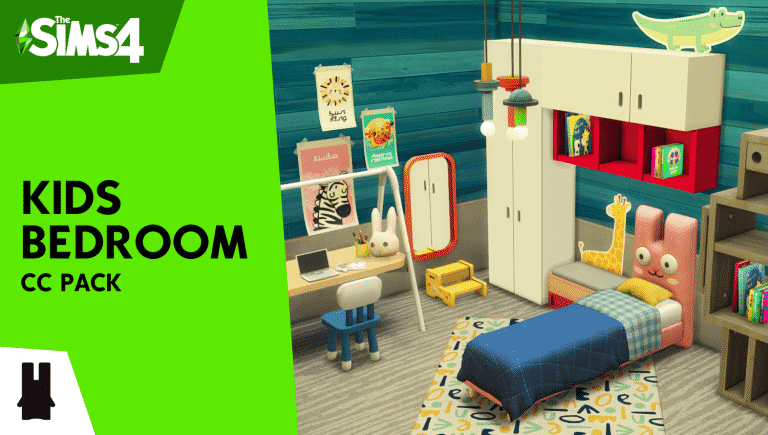
Created by the talented Sixam CC who also brought the Artz Living Room CC Pack in March, the Kids Bedroom Pack focuses on colorful new Maxis Match objects for your Children’s Bedrooms! There are familiar motives such as the Freezer Bunny incorporated with the bed frame, colorful new dressers and cabinets, cute chairs and tables as well as decor and clutter!

The set consists of 46 unique new objects for you to play with and furnish, including both colorful and neutral tones as well so you can use some of the items in adult surroundings too.

The Set is currently available for Early Access on their Patreon Page, with a release for everyone set on May 28th! Check out what the CC set has to offer:

I would like to present you my new Kids Bedroom CC Pack. This cc pack is focused on a variety of modern objects you can use to decorate your Sims’s children bedrooms.

The Sims 4 Kids Bedroom Custom Content Pack out this month!

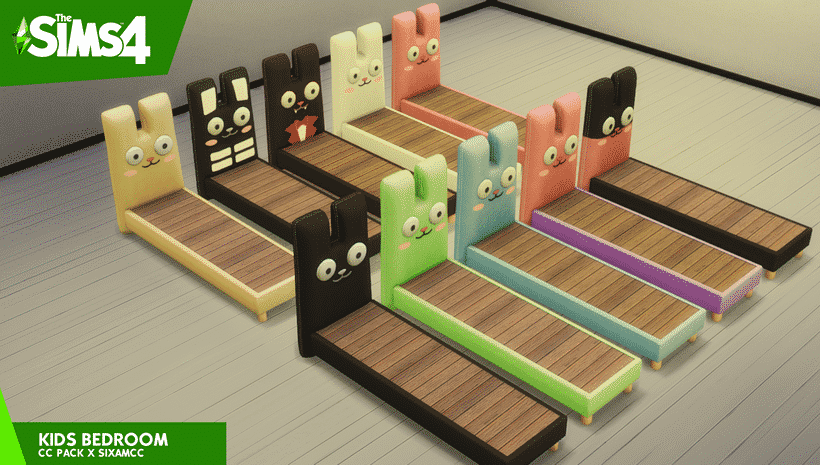
Who doesn’t love this little friend? This new Freezer Bunny frame bed will be the new best friend of your kids and it comes with all of his costumes!

The Sims 4 Kids Bedroom Custom Content Pack out this month!

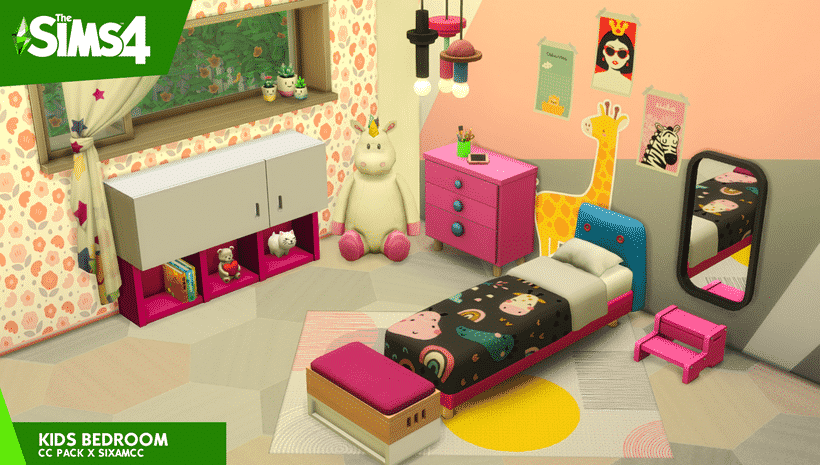
Create the perfect room for your little ones. All the elements in this collection have a touch of color to make it fun.

The Sims 4 Kids Bedroom Custom Content Pack out this month!

Wanted a new bassinet for your babies? say no more, here is a new design that works with the “Invisible Crib Mod”.

The Sims 4 Kids Bedroom Custom Content Pack out this month!

Now your kids will love to make homework in this new set of cute chairs, books and why not? a giant robot made from wood and painted by hand.

The Sims 4 Kids Bedroom Custom Content Pack out this month!

Almost every piece of furniture comes in “neutral” colors so you can use them anywhere else.

The Sims 4 Kids Bedroom Custom Content Pack out this month!

ABOUT THIS LINE:

  • Base game compatible
  • 46 new items
  • New beds & mattresses
  • New bassinet
  • New ceiling lights in all lengths

The Sims 3 Expansion Pack prices have been permanently reduced on Steam

2

A surprising twist has just happened over on the Steam gaming platform. At first I thought that maybe Steam was having a special sale or an offer on The Sims 3 Expansion Pack titles – but I looked more deeper and noticed that all of the Expansion Pack prices have now been permanently reduced!

Before you could get The Sims 3 Expansion Packs both on Steam and Origin for 40USD (or a price equivalent to your territory). However, it turns out that Steam took it to the next level by slashing the prices of The Sims 3 Expansion Packs in HALF – now costing only 20 US Dollars!

The Sims 3 Expansion Pack prices have been permanently reduced on Steam

Unfortunately the collection of The Sims 3 Expansion Pack over on EA’s official platform Origin still has the same $39,99 price tag as before, with Stuff Packs still being $19,99 on both Steam and Origin platforms.

Considering that The Sims 3 has been updated for 64bit Mac OS devices just recently could Maxis still offer support and better, lower prices for this classic? We’ll see!

The Sims 4: Complete Aspirations Overhaul + 25 New Aspirations Mod

1

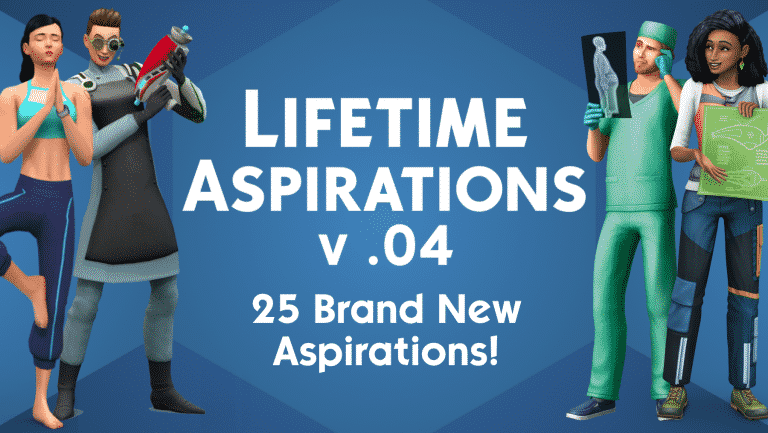
Are you looking for a bit more challenge when completing Aspirations in The Sims 4? Do you want your Sims to stand out more with their fulfilled Aspirations? You’re in luck because there’s a brand new Mod which not only overhauls the existing Aspirations but also adds 25 new ones!

The first part of the Mod was created about a year ago by the talented ky-e modder on ModTheSims. The goal of the Mod was to completely break down and redesign the Aspirations giving them only one, hard to achieve goal, making the Aspirations much harder to achieve, but with bigger Satisfaction Point Rewards.

This mod reworks Aspirations to get rid of their multiple levels/goals. Instead, they now have only one goal. They also all reward the same amount of satisfaction points (5,000). The result is a game which doesn’t just encourage following a single path, and makes Sims feel more individual. It also encourages exploring different areas of the game. I don’t think I’ve played certain careers or done certain activities ever just because they weren’t tied to an Aspiration, and this mod helps alleviate that issue.

Rather than just encouraging your Sims to perform the same set of interactions and goals in order to achieve a certain Aspiration, only one final goal is required – leaving you more space and creativity for fulfilling your Aspiration.

The Sims 4: Complete Aspirations Overhaul + 25 New Aspirations Mod

The Mod got updated just a few days ago with 25 new Aspirations!

These Aspirations revolve around certain Careers that unfortunately never got covered by a specific official Aspiration before. This Mod adds that plus a lot more with hard-to-achieve Career goals and dramatic new relationship Aspirations!

Check out the full list of these Custom Aspirations below! Please note that there are some Custom Aspirations that require certain Packs that come with certain Careers in order for the Aspiration to work and be completed:

  • Hall of Famer – Reach Level 10 of the Fitness Career in the Professional Athelete Track
  • Indie Developer – Have Earned $100,000 in Royalties from Developing Video Games or Apps
  • Undercover Agent – Base Game Deviance – Reach Level 10 of the Secret Agent Career
  • Black Widow – Suffer the Deaths of 3 (Preferably Wealthy) Spouses
  • Mega CEO – Reach Level 10 of the Business Career
  • Star Trekker – Reach Level 10 of the Astronaut Career
  • Getting Around – Woohoo with 30 Different Sims
  • Homewrecker – Convince 20 Married Sims to Leave their Spouses
  • Trend Setter – Reach Level 10 of the Style Influencer career
  • Opinionated – Reach Level 10 of the Critic career
  • Charitable – Reach Level 10 of the Politician career in the Charity Organizer track
  • Media Guru – Reach Level 10 of the Social Media career
  • World Leader – Reach Level 10 of the Politician Career in the Politician track
  • Legally Sim – Reach Level 10 of the Law Career
  • Master Educator – Reach Level 10 of the Education Career
  • Mechanical Genius – Reach Level 10 of the Engineer Career
  • Private Eye – Reach Level 10 of the Detective Career
  • Mad Scientist – Reach Level 10 of the Scientist Career
  • Top Surgeon – Reach Level 10 of the Doctor Career
  • Conservationist – Reach Level 10 of the Conservationist Career
  • Flower Power – Gift 10 Orchid-Scented Flower Arrangements
  • Queen Bee – Have Earned §50,000 from Selling Honey
  • Corporate Worker – Reach Level 10 of the Salaryperson Career
  • Self Care – Do Wellness Activities for 100 Hours
  • Master Chief – Reach Level 10 of the Military Career

Ready to try out the new Aspirations and the Aspiration Overhaul? Click the download button below!

[mks_button size=”large” title=”DOWNLOAD!” style=”squared” url=”https://modthesims.info/d/648717/” target=”_blank” bg_color=”#1e73be” txt_color=”#FFFFFF” icon=”fa-arrow-down” icon_type=”fa” nofollow=”0″]

You can install the mod easily by extracting the .zip contents to Electronic Arts > The Sims 4 > Mods folder. Make sure you enable CC / Mods in your Game Options!

MTS ky e 2010389 NewAspirations

Origin Sale: Save on The Sims 4 Base Game + City Living

Origin is currently having a limited time sale where you can save big on The Sims 4 Base Game, as well as The Sims 4 City Living Expansion Pack which is currently on a trial where you can play the game for free over this weekend!

The Sims 4 Base Game is 75% off and the offer lasts until May 7th at 10AM Pacific Time.

The Sims 4 City Living Expansion Pack is 25% off and also lasts until May 7th at 10AM PT.

This special offer is probably here because of the first ever Pack Trial for The Sims 4. If you don’t have The Sims 4 City Living and want to try it out now’s the time – CLICK HERE to learn more!

11 05 16 1 20 55 AM

The Sims Team responds to criticism over an insensitive Trait Update in The Sims 4

8

On March 23rd, 2021 The Sims 4 got a new update that included Bunk Beds and Trait Improvements. The Trait Improvements that were done in The Sims 4 remained somewhat a mystery – all we got from The Sims Team were a list of traits that got updated and that was basically it.

The community members were quick to figure out some of the changes that were made including new buffs and autonomous behavior of Sims in the game. The changes that were made were a pleasant surprise, but unfortunately we didn’t know the full list up until 2 days ago when the team published their official list of updated traits and their improvements.

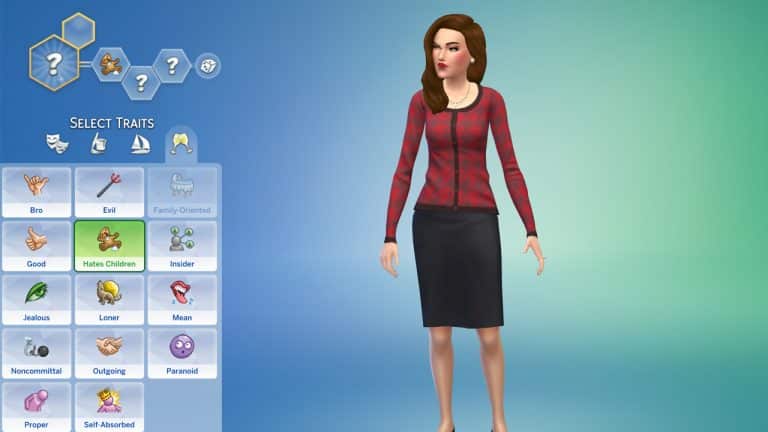
The list includes a detailed breakdown of each and every trait that got updated – including the controversial changes they’ve made to the Hates the Children Trait.

In the original version of the Blog Post they’ve shared that “Asking a Hates Children Sim to Try for Baby has no chance of success unless the Sim is Dazed“.

This was quickly called out by many community members for promoting unconsensual behavior in the game, and rightfully so.

The blog post was later updated to more details about what changes were made with the trait, removing the controversial part from the notes.

Hates Children

  • Sims with the Hates Children trait are very unreceptive to being asked to ‘Try for Baby’.
  • Hates Children Sims will get Tense, then Angry around child Sims, and also move away when they get to the Angry stage.
  • Hates Children Sims will look annoyed when idling in the Tense or Angry buff stages.
  • Hates Children Sims get a Happy ‘Quiet Environment Child-free Zone’ buff if away from children for a time.

However, it seems that the original paragraph they wrote for this trait is still present in the game. The Sims’ official profile wrote a reply saying:

We appreciate you all holding us accountable to our values – especially when we miss the mark! Consent isn’t something to play with, so we’ve updated our language & will correct the trait in an upcoming patch.

The trait is expected to be fully corrected in the upcoming patch for The Sims 4.

The Sims 4: Official List of Updated Traits

2

At the end of March The Sims 4 got an update where several Traits got significant improvements. Whether it was just Sims and their autonomy or new buffs there were plenty of new additions that didn’t get an official explanation what exactly was changed and improved.

Recently The Sims Team released a full release note of all of the Traits that got updated as well as specific changes made to each and every trait! Check out what’s been improved:

What personality traits were updated in the last patch?

Bookworm

  • Bookworm Sims will prefer to choose reading activities autonomously over other Fun actions.
  • NPC Bookworm Sims will be seen carrying books where possible.

Cheerful

  • When a Cheerful Sim socializes with a non-Cheerful / non-happy Sim, that Sim has the chance to get a Tense ‘Cheered to Death’ buff.
  • Cheerful Sims will autonomously try and perk up Gloomy Sims
  • Negative emotional buffs will decay faster than usual when Cheerful Sims are in a Happy mood.
  • Cheerful Sims have a greater chance of success with Friendly socials when in a Happy mood.

Clumsy

  • Clumsy Sims have a chance of failure when engaging in sporting activities like Using a Treadmill, Ice Skating, Snowboarding or Skiing.
  • Clumsy Sims have a chance of stumbling when walking around – this will elicit a response from nearby Sims.
  • Clumsy Sims with higher Handiness have a lesser chance of breaking objects.
  • Clumsy Sims have a small additional chance of breaking certain electronic devices like the Computer, Research Machine, Juice Fizzer, Cupcake Machine, Games Console, Arcade Machine and Popcorn Maker.

Genius 

  • Genius Sims have a chance of a ‘Eureka Moment’ while showering or bathing that gives a small amount of skill for a random skill they already have,
  • Genius Sims get a new interaction ‘Solve Hard Problems’ that helps them build Logic skill.
  • Genius Sims get a new idle where they appear to be pondering / solving problems.
  • Genius Sims will prefer ‘cerebral’ activities like Chess over other more trivial Fun actions.

Gloomy

  • Gloomy Sims will choose to autonomously Mourn, or act in a gloomy way (like sighing to themselves) more often.
  • Gloomy Sims will get an Inspired ‘Spectral Influence’ buff when in proximity to Ghosts.
  • Gloomy Sims get Sad moods prolonged if they see Cheerful Sims doing cheerful things, and also react in disgust.
  • Gloomy Sims have an increased chance of waking up in a Sad mood.

Glutton

  • Glutton Sims will autonomously choose to grab snacks more often.

Good

  • Good Sims get a new interaction ‘Help Out’ that reduces negative mood duration on another Sim in a negative mood.
  • Good Sims have a lower chance of choosing to do Mean or Mischief actions autonomously.
  • Good Sims will autonomously choose to react negatively to seeing Mean actions being performed.
  • Good Sims are more likely to choose to do Friendly actions autonomously.

Goofball

  • Goofball Sims are more likely to autonomously choose Mischief or prank activities like Prank Toilet.

Hates Children

  • Sims with the Hates Children trait are very unreceptive to being asked to ‘Try for Baby’.
  • Hates Children Sims will get Tense, then Angry around child Sims, and also move away when they get to the Angry stage.
  • Hates Children Sims will look annoyed when idling in the Tense or Angry buff stages.
  • Hates Children Sims get a Happy ‘Quiet Environment Child-free Zone’ buff if away from children for a time.

Hot Headed

  • Hot Headed Sims who get pranked have a greater chance of getting Angry.
  • Having other Sims Enthuse about things can make Hot Headed Sims Angry.
  • Hot Headed Sims get Angry if they lose career performance.
  • Hot Headed Sims won’t be targeted by other Sims as for Mischief actions.
  • Hot Headed Sims get Angry at failed romance attempts (giving or receiving).

Jealous

  • Jealous Sims get a new interaction “Talk through issues” which gives a chance of a reduced duration of negative Buffs from less serious Jealous buffs.
  • Jealous Sims get a reduction in the duration of less serious Jealous buffs.
  • Jealous Sims are now less sensitive to time spent away from their SO.

Mean 

  • Mean Sims will autonomously laugh at other Sims misfortune.
  • Mean Sims are more likely to choose to do Mean actions (like Kick Over Trash Can) autonomously.

Neat

  • Neat Sims are more likely to autonomously choose to do cleaning actions more frequently.
  • Neat Sims will try and clean things that aren’t dirty autonomously.

Noncommittal 

  • Asking a Noncommittal Sim to ‘Try For Baby’ has a very low chance of success.

Perfectionist

  • Perfectionist Sims will get an increased chance of Masterclass crafted objects, and will react favorably when they do.
  • Perfectionist Sims may choose to autonomously repeat some crafting actions (like Painting) numerous times.
  • Perfectionist Sims who create any Masterwork have a high chance of gaining a Focused ‘In The Zone’ buff which has a chance to increase the quality of another crafting interaction.
  • If they do achieve a better quality during this buff, they gain an Inspired ‘Focused Payoff’ buff.

Ambitious

  • Ambitious Sims will autonomously mock Goofball Sims for Goofball actions.

Slob

  • Slob Sims will autonomously mock Neat Sims for cleaning things.

The Sims 4: Official Statement on the Simulation Lag

6

The Sims Team has released an official statement regarding the Simulation Lag in The Sims 4 in their latest Sims 411 blog post.

In case you don’t know what a Simulation Lag is, it’s an issue where Sims would become unresponsive to certain interactions that you set them to do and just stand around for a few seconds until they finally respond.

The issue has become more persistent over the last few years and many have wondered when is The Sims Team going to address it and fix it.

In their latest statement they’ve acknowledged the issue and stated they’re actively working on fixing the issue. However, they will need your help with sharing the save game files and information on the Simulation Lag that occured in your game. They’ve also shared a workaround how to make the issue occur less often which you can all check out down below!

When will the ‘Simulation/Autonomy Lag’ be fixed? 

We’re on it! Particularly, what we’re doing right now is identifying what the root cause of this issue is. That means, we’re investigating what specific actions during gameplay do lead to the lag? This is the first step we need to take because the simulation/autonomy lag is not the actual issue, it’s rather a symptom that can have dozens of different causes. If the lag has happened in your game, you’ve probably experienced the following most common manifestations of this symptom:

  • Sims standing around doing nothing
  • Sims not doing anything on their own (with free will set to max)
  • Sims take forever to do a given command
  • Time jumping backwards after fast forwarding to Ultra Speed. The Sims will usually freeze while fast forwarded.
  • Sims come home late from school
  • FPS Drops

Once we identify what specific actions and circumstances lead to the lag, we’ll know what we need to work on. And the best way to find out, is by analysing your save files! The more save files we can analyse the higher the chance we’ll be able to find the cause soon. That said, please continue your awesome support and keep sending us your save files whenever you experience the lag!


How to share your save files 

Please provide the following information when sending your save files. You can send your info through this form or DM SimGuruNick directly on AHQ.

  • Basic Information about your computer (CPU, Operating System, Amount of RAM, Graphics Card, Hard Drive Space). This is not to blame your computer for the issue but to see what kinds of systems this issue is occurring on)
  • How big is your save game ?
  • Does the issue also occur on a new save for testing purposes
  • Video of the issue happening. Just upload to youtube and post the link in this thread. You don’t need to list it
  • Please add the following files to a .rar or .zip archive and share with QA
    These files can all be found in the following folder: DocumentsElectronic ArtsThe Sims 4

    • lastException.txt (if it exists. If there is more than one, please include all of them.)
    • lastUIException.txt (if it exists. If there is more than one, please include all of them.)
    • Config.log
    • the entire saves folder

Things you can try in the meantime 

  • Empty out your Sims inventories (all households you have ever played)
  • Reduce the amount of objects in your house
  • Play in a smaller house with less art pieces and stuff lying around
  • If you over-clocked your computer, check how it goes if you revert that.
  • Once the freezing occurs, try saving your game (save as), go to your options and back or press M or to go to the world map and back
  • Lower Graphics settings
  • If you play with higher resolution than 1920×1080, try lowing to 1920×1080
  • Go to the Audio settings and remove the check next to Enable Mood Sting
  • Make sure you fulfill the minimum requirements of the game
  • Reduce the amount of mods and cc you use
  • Start a new game (completely shut down the game, then restart it and start a new save game)
  • Move your Sims to a new game

The Sims 4 City Living is FREE for Trial this Weekend!

0

Just a few days ago we reported on The Sims Team planning to do Pack Trials for The Sims 4 where you’ll be able to play with a certain Pack for free for a limited time and try it out!

Today EA officially announced that their first Pack for Trial – The Sims 4 City Living Expansion Pack, is completely FREE for playing from today, April 30th at 10AM PT until May 3rd at 10AM PT. This offer is only available through Origin for PC and Mac players.
The Sims 4 City Living is FREE for Trial this Weekend!

During this period you’ll be able to play with all of the pack features and items that come with it. EA has shared more details about the Trial and how you can play with City Living this weekend in the official F.A.Q. that you can check out below.

For more information on The Sims 4 City Living check out our City Living Articles! You can get the City Living Trial from Origin HERE!

When does The Sims 4 City Living Trial take place?

The Sims 4 City Living Trial will be available between the following dates and times:

  • Start: Friday, 30th April 2021 – 10:00AM PDT / 17:00 UTC
  • End: Monday 3rd May 2021 – 10:00AM PDT / 17:00 UTC

During this time, you will be able to play as much City Living as you like.

What do I need to know about the City Living Trial?

There are a few prerequisites to using the City Living Trial.

You must:

  • Have the most up to date version of The Sims 4 installed on your PC/Mac
  • Have the most up to date version of Origin installed on your PC/Mac. EA Desktop is not currently supported by the City Living trial.
  • Claim the City Living Trial through the Origin client, Origin.com or from The Sims 4 Main Menu.

Can I run the City Living Trial on my PC/Mac?

If you have the latest version of Origin and your PC or Mac meets The Sims 4 minimum and recommended system requirements then you can take part in the City Living Trial

PC: https://www.ea.com/games/the-sims/the-sims-4/faqs/base-game#faq-base-game-pc

Mac: https://www.ea.com/games/the-sims/the-sims-4/faqs/base-game#faq-base-game-mac

Can I play the City Living Trial with The Sims 4 Legacy Edition?

No, while City Living is compatible with the Legacy Edition, it does not support the City Living Trial.

Can I play the City Living Trial on my PlayStation or Xbox?

At this time we are currently only supporting the City Living Trial on PC/MAC.

Can I play the City Living Trial with an EA Play subscription?

Yes. If you have an active EA Play or EA Play Pro subscription for PC, you can download The Sims 4 from Origin, claim the City Living Trial and play with the pack content.

Can I play the City Living Trial with The Sims 4 Trial?

Yes. If you do not currently own The Sims 4, you can claim the 48 hour trial from Origin and the City Living Trial and try out everything in one go.

What can I use in the City Living during the Trial?

You will be able to use every part of City Living including San Myshuno where you can discover new neighborhoods and festivals.  If you are more of a creative Simmer then all of the pack content is available to you in CAS and Build mode.

Why does it ask me to Restart The Sims 4 when switching between Trial Saves and my existing Saves?

The Sims 4 will ask you if you want to restart your game so that it can include or exclude the City Living Trial from your current session.

Selecting to restart when going back to a non-trial save will keep the City Living Trial on your PC/Mac for when you want to come back to the trial later. When you want to play with City Living again, load a saved game or start a new trial save and you’ll be asked to restart the game so that City Living can be included in your session for as long as the trial is available.

Can I use my saves with the Trial?

Yes. If you want to put City Living into saved games you have already created, you can. Simply select your Save from the LOAD screen on the Main Menu and when asked if you want to PLAY WITH TRIAL? Select Yes, Start as New Trial Save. Once you do that, The Sims 4 will make a copy of your save to use with the trial and lets you save your progress without affecting your original saved game files.

I created a new Trial save based on my existing save, how do I tell the difference?

If you load an existing save while using the City Living Trial, we will copy your save and rename it for you so that it can be identified as a Trial save. Once you have loaded your save, you can hit Save to finish applying the Trial to your save game. If you do not save your session, you will still have a Trial save but it will not use City Living and you will be able to use the save without the Trial content.

What happens to my Trial Saved Games when the trial ends?

Your saves created while using the City Living Trial will still be available after the trial ends. If you choose to add City Living to your collection, you will be able to pick up where your saves left off.

The Trial has ended. Now what?

City Living will stay installed on your machine and if you purchase City Living, you will be ready to start playing with your content straight away.

PC Steps

  • If you have decided that you do want to remove City Living Trial from your PC follow these quick steps.
  • Find your The Sims 4 installation directory (Default C:Program Files (x86)Origin GamesThe Sims 4
  • Look for a directory called EP03
  • Select the directory, Right Click and select Delete
  • This will move City Living to your Recycle Bin
  • Right click on Recycle Bin and select Empty Recycle Bin to free up disk space
  • If you decide to purchase City Living in the future, you will need to re-download the pack from Origin or EA Desktop.

Mac Steps

  • If you have decided that you do want to remove City Living Trial from your Mac follow these quick steps.
  • Find your The Sims 4 Packs directory (usually located in the same place as The Sims 4.app, which is located in ~/Applications by default)
  • Look for a directory called EP03
  • Select the directory, Right Click and select Move to Trash
  • This will move City Living to your Trash
  • Right Click on the Trash, and select Empty Trash to free up disk space
  • If you decide to purchase City Living in the future, you will need to re-download the pack from Origin