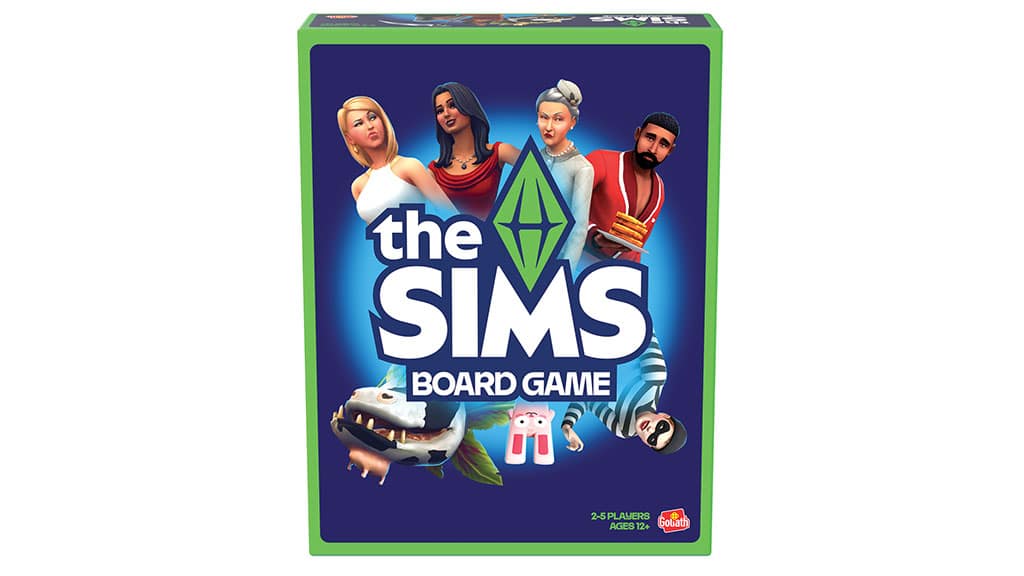
Today, some new findings have been uncovered about The Sims Board Game. Including a refreshed box cover, an unlocked Press Release from Brandgenuity and the official suggested retail price.
Official Press Release
An official Press Release about The Sims Board Game comes from Licenseglobal. Who published the release on February 28th, 2025. It could mean that some information about the release date has been changed since the press release, so don’t take the wording about “coming this fall” too literall.
Goliath Games has announced a new partnership with “The Sims” franchise to create the first board game based on “The Sims,” one of the best-selling video game franchises of all time.
Slated for release in fall, “The Sims” board game will capture the spirit of creativity, self-expression, and gameplay that has made the video game a global, pop culture phenomenon.
“We’re honored to be selected as a partner to create the first-ever board game for ‘The Sims,’” says Jochanan Golad, chief executive officer, Goliath. “It’s an incredible opportunity to collaborate with EA to bring a new innovative way to live The Sims. This partnership represents a perfect blend of Goliath’s expertise in creating engaging physical games and ‘The Sims’’ legacy as a multi-generational cultural and gaming icon.”
“We’re excited to work with incredible partners like Goliath, who are delivering the perfect immersive board game experience,” says Lyndsay Pearson, vice president franchise creative, “The Sims.” “This is another way to expand ‘The Sims’ world and engage our incredible fanbase as we grow The Sims entertainment platform.”
New Sims Board Game Cover Art and Price Details
An updated box cover art for The Sims Board Game has been spotted on the ToyBook.com website, with a MSRP price set for $19.99USD and a suggested age rating set for 12+.
Gamers can celebrate the 25th anniversary of The Sims on the tabletop instead of the screen. This new board game is said to bring the “storytelling and fun” of The Sims into the physical world.
Our friends at AlalaSims have spotted the same new Board Game cover in a higher resolution. Check it out below:
There’s currently no information about the precise release date. But we’ll get to know more as we approach July. Or as more retail stores put The Sims Board Game up. As it was mentioned in the Press Release, this game plans to be distributed in a lot of physical and online game stores worldwide!
What are your thoughts on the new board game findings? Join the discussion below!
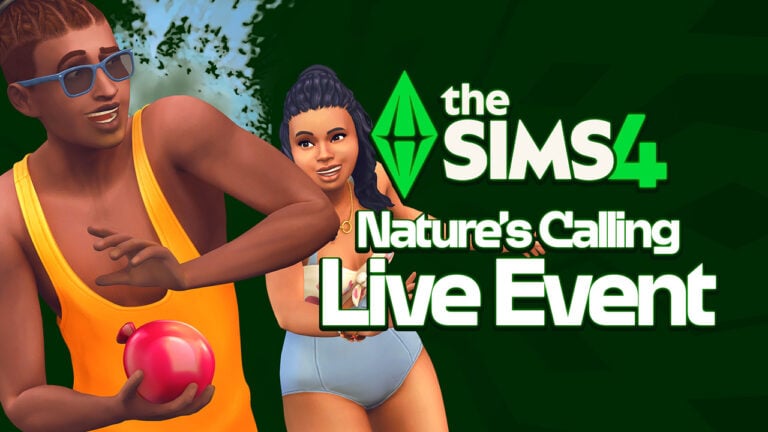
The Sims Team officially announces the next Sims 4 Live Event, starting this June!
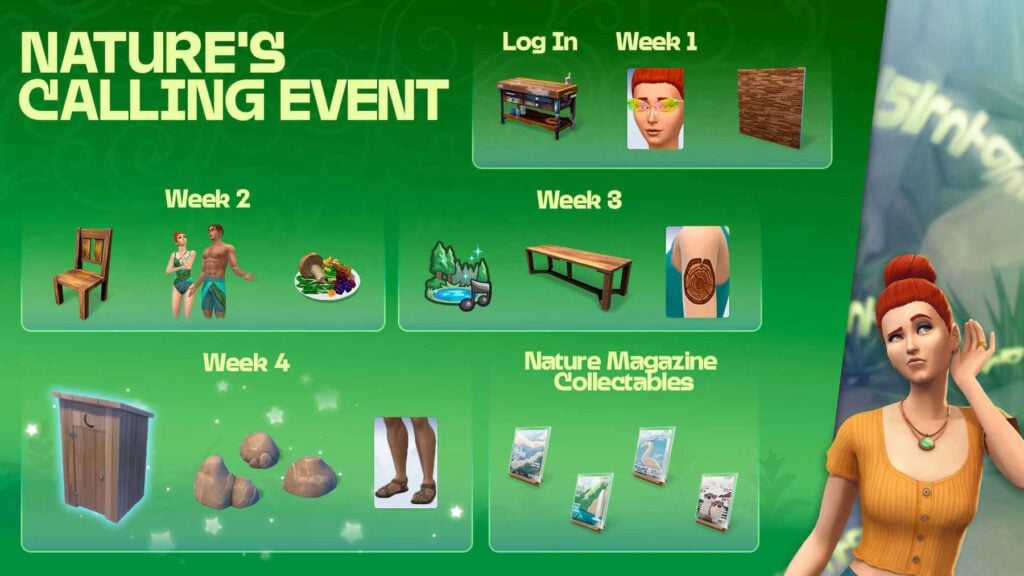
EA and Maxis have just released an official blog for The Sims 4 Nature’s Calling Event, which is set to begin on June 24th, 2025. The official Dev Diary steps into the first prizes and rewards, as well as the title and tale that resembles very much of The Sims 4 Enchanted By Nature Leak.
You be the judge! Learn all about the new event in the official blog post below. Plus, check out some cool game icons of the new character Dahlia Fern, uncovered by @lunar_britney on Twitter.
The Sims 4 Nature’s Calling Limited Event Details
Event Introduction
Follow the whispers on the wind and unlock new woodworking and nature-themed rewards, including the new Reclaimed Woodworking Table, just for logging in!
Get ready for a free, limited-time Event that begins on June 24, 2025 at 9 a.m. PST and ends on August 5, 2025, where you’ll need to venture into the great outdoors and hone your handiness skill to discover a long-hidden secret of nature.
One fateful day, you hear a faint voice as you step outside. The voice is fleeting and is soon gone, as if carried away by the wind itself. Still, you long to hear it again, and so you journey forth to discover the source of the whispers. Your adventure will be rewarded throughout the Event with new free items such as The Wooden Throne outhouse. This new off-the-grid toilet can be the perfect place for Sims to handle their business out of doors, or even a spot for a little restroom rendezvous!
How Does it Work?
Open Live Mode with an existing or new Household. Your Sim will soon hear barely audible whispers in the wind, encouraging them to spend time outdoors and get in touch with nature, all with the hopes of hearing the mysterious voice again. As you progress, you’ll spend more time outdoors, level up your handiness with new woodworking recipes, and uncover the mysteries of nature. The more Quests you complete, the more Event Points and rewards you’ll earn.
The Event will run for six weeks in total, with two new and exciting Quests each week for the first four weeks. The final two weeks of the Event is a grace period, where Simmers can catch-up, continue completing Quests, and claiming their rewards.
How to take part in the Nature’s Calling Event:
Make sure you’re online. Log in to your EA account.
Enter Live Mode, where you’ll see the first pair of Quests, which start with a pop-up. In Live Mode, access the Event Screen by clicking on the Event Icon!
Earn Event Points by completing Quests and Goals. As you earn Event Points, you’ll be able to claim new rewards.
Claim your rewards through the Event Screen in the Main Menu or Live Mode by selecting Claim. Note: You must be in Live Mode to claim Consumable rewards.
Claimed rewards will be available in Build Mode, Create a Sim, your Sim’s Personal Inventory, or the Household Inventory. Filter to view Event rewards using the Event Rewards filter. Find this under the Special drop-down in both Create a Sim and Build Mode. For more help with claiming rewards, check out our EA Help article.
Each week, two new Quests will be available. Complete these Quests to earn more Event Points and unlock new rewards!
Nature’s Calling Optional Goals
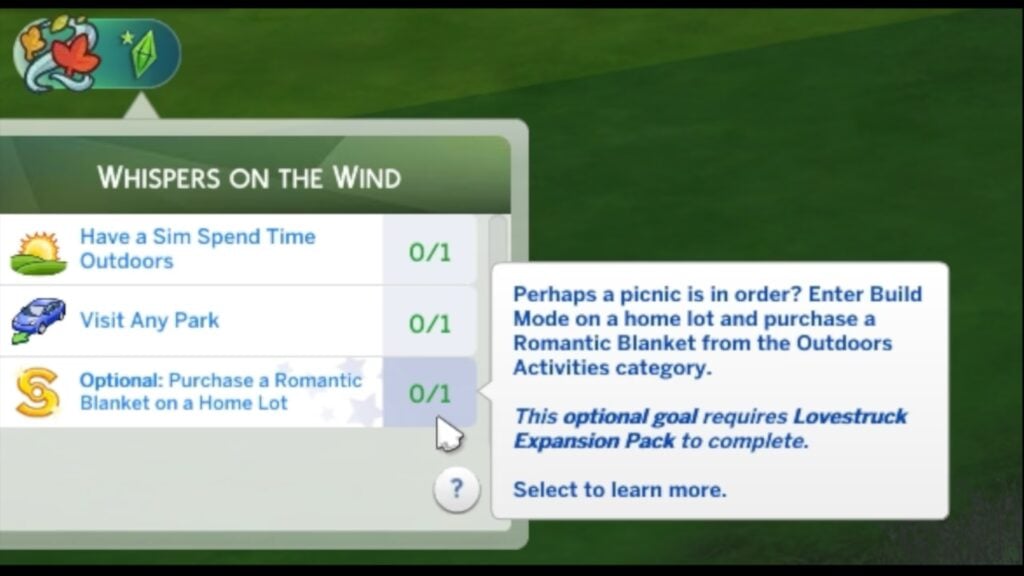
Throughout the Nature’s Calling Event, you’ll have opportunities to earn extra Event Points through Optional Goals. These Optional Goals require you to own certain The Sims 4™ Expansion Packs in order to complete them. But fret not! None of these goals are required to complete the Nature’s Calling Quests and all non-consumable rewards will be earnable by all Simmers. Completing these goals will simply award bonus Event Points, allowing you to unlock rewards slightly faster and claim additional consumable rewards. These Optional Goals will be clearly denoted in the Quest panel.
Note: Simmers who own the featured Expansion Packs will not be required to complete Option Goals in order to complete Quests. However, if all of the Required Goals for a Quest are completed prior to the completion of an Optional Goal, the Quest will be completed, and the Optional Goal will be lost, along with its associated Event Points. We recommend that Simmers prioritize the Optional Goals first before moving on to the Required Goals for a Quest.
Expansion Packs featured in the Nature’s Calling Event Optional Goals include:
The Sims™ 4 Cats & Dogs
The Sims™ 4 Snowy Escape
The Sims™ 4 Horse Ranch Expansion Pack
The Sims™ 4 Lovestruck
Week 1
Do-it-yourself with the Reclaimed Woodworking Table! Look fly while rocking the Odonata Glasses. Give your living space a rustic makeover with the Reclaimed Wood Wall!
Reclaimed Woodworking Table
Odonata Glasses
Reclaimed Wood Wall
Touch Grass Weekly, Issue #1 (New Collectible!)
Week 2
Start honing your woodworking skills with the Reclaimed Wood Dining Chair woodworking recipe. Then go take a dip in the local pond while wearing the new Flowing Fronds Swimwear, and refuel with the Foraged Feast food recipe!
Reclaimed Wood Dining Chair woodworking recipe
Flowing Fronds Swimwear
Foraged Feast food recipe
Touch Grass Weekly, Issue #2
Week 3
Unwind with the soothing sounds of the Nature Soundscapes radio station. Impress guests with your new handmade Reclaimed Wood Dining Table as you show off your new Rings of Growth tattoo!
Nature Soundscapes radio station
Reclaimed Wood Dining Table woodworking recipe
Rings of Growth tattoo
Touch Grass Weekly, Issue #3
Week 4
Answer the other call of nature with The Wooden Throne outhouse! Bring a little bit of nature to your backyard with the Cove Stones decorative rocks set. Then set out for a hike in your rugged new Trail Sandals!
The Wooden Throne outhouse
Cove Stones decorative rocks
Trail Sandals
Touch Grass Weekly, Issue #4
FAQ
Do I need to log in to my EA account?
A: Yes, by logging into your EA account, you save your Event progress and the rewards you earn from this Event to the account. That way, if you ever need to install The Sims 4 again, you simply need to log back in to gain access to your rewards!
Are SDX releases still expected this year?
A: Sims Delivery Express drops aren’t going away, but we’re always looking for new and novel ways to deliver gameplay, as well as objects and clothing to add to your Sims’ lives. You can still expect SDX releases throughout the year as well as new Events to engage with The Sims 4 throughout the seasons.
What if I log in and don’t see the Event?
A: The Event starts on 6/24/25 at 9 a.m. PST and ends on 8/5/25. Please make sure you are online and logged into your EA Account. If you still do not see it, you may need to restart The Sims 4 or disable any UI mods you have installed.
Event Quests may also appear minimized for new players and players with Emily Guidance enabled.
To help new players focus on learning, Events appear minimized for the early stages of the game.
To jump into the Event immediately, click on the Event Goals widget (the little plumbob) in the top left.
The Nature’s Calling Event will be available to players until 8/5/25. While no new Quests will be added after 7/22/25, players can still complete Quests and claim any Event Rewards that they’ve earned but not yet claimed from the Event Screen. Rewards must be claimed by 8/5/25 or be lost.
Will this be available to Everyone?
A: Yes! Nature’s Calling Event will be available to everyone starting June 24th, and you won’t need any Packs to participate.
What are Event Points?
A: Event Points are a limited-time measurement for the Nature’s Calling Event that allows you to claim free rewards. As you earn Event Points, you progress along an experience track and can claim rewards along the way.
How do I earn Event Points?
A: Each Objective in a Quest gives Event Points. Mousing over the Quest will have a tooltip telling you how many points you will earn. Completing the entire Quest nets additional Event Points. Once you have enough, you can claim rewards.
Do I have to spend Event Points?
A: Your Event Points are a cumulative total. When you claim a reward, you still stay at the same Event Point total, so your Event Points aren’t actually “spent.”
What happens if I have leftover Event Points?
A: The Nature’s Calling Event offers a finite number of rewards. If you claim them all and still have Event Points, don’t worry! Your Event Points cannot be used for anything other than the Nature’s Calling Event and will expire when the Event is over.
Can I still complete the Event if I start late?
A: Yes, the Event will run for 6 weeks. If you start late, you will have access to all the previous week’s Quests.
What are Optional Goals?
A: Optional Goals are Quest Goals that require you to own a specific The Sims 4™ expansion pack to complete. As the name suggests, these Quest Goals are optional and not required to complete the Event Quests.
Please also note that the expansion pack must also be installed for the Optional Goal to be completed.
Can I complete the Event without completing the Optional Goals?
A: Yes. All Event Quests are completable without completing the Optional Goals. All non-consumable rewards will be earnable without completing Optional Goals.
What are the rewards for completing Optional Goals?
A: Simmers that complete the Optional Goals will be rewarded with bonus Event Points, which will allow them to claim additional consumable rewards such as Simoleons, Aspiration Points, and potions.
Can I purchase the expansion pack required for an Optional Goal after receiving the Optional Goal?
A: Yes. As long as the Optional Goal is still active and the Weekly Quest it is part of has not yet been completed, you can purchase the expansion pack required for an Optional Goal. Just make sure to complete the Optional Goal prior to completing the Weekly Quest.
Additionally, if you do not own the expansion pack required for an Optional Goal, clicking on the Optional Goal from the Live Mode Quest Panel will show you where to purchase the expansion pack.
Can I go back and complete the Optional Goals after completing the Event?
A: No. Once a Weekly Quest is completed, the Optional Goals in that Weekly Quest will be lost. We recommend that Simmers complete the Optional Goals before completing the Weekly Quest.
What are your thoughts on The Sims 4 Nature’s Calling Event? Let us know in the comments below and stay tuned on Sims Community for all the latest updates on The Sims 4 Live Events!
EA releases a brand new game update for The Sims 4.
There’s a new The Sims 4 Update across PC, Mac and Console platforms including Xbox and Playstation. The newest Sims 4 Patch addresses community concerns and reports from the latest Sims 4 Laundry List. We’ll be updating the post as we find out more about the Patch.
Find out what’s been improved and added in the official patch notes below:
The Fixes & Performance Update
Table of Contents
Installing the Latest Sims 4 Update
You can get the latest The Sims 4 Update on the following official launchers and platforms:
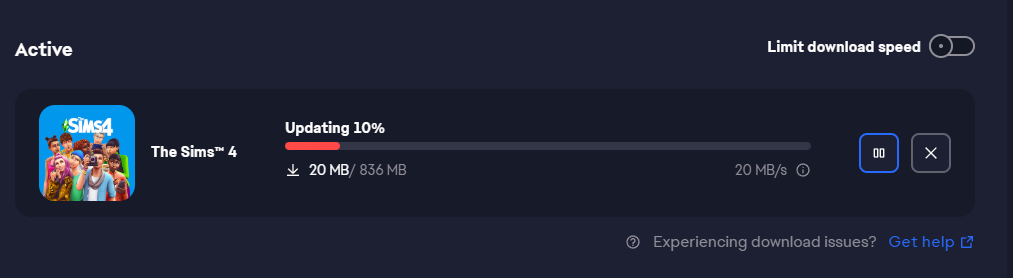
You can download the latest Sims 4 Update by checking for a Patch through the EA App, Steam or Epic Games launcher for Desktop. If you have Automatic Updates enabled the update will automatically download through your client program. In case your EA App is not working properly ensure you’ve cleared your app cache!
If you play The Sims 4 on Xbox Series X / S and Playstation 4 and 5 you can request a new update by checking for updates under The Sims 4 game in the Main Menu. If you’ve enabled automatic updates the Patch should download right away.
Official Sims 4 Patch Notes
Update: 5/27/2025
PC: 1.115.216.1030 / Mac: 1.115.216.1230
Console: 2.13
Note: The PlayStation and Xbox versions of today’s update ran into an issue during final testing and will be delayed. We are working hard to get this update to our console Simmers as quickly as possible. Thank you for your patience!
Sul Sul Simmers!
Today’s update is primarily aimed at preparing the game for the upcoming Nature’s Calling Quest Event, which begins on June 24. In addition, we’ve addressed some issues with the Sleek Bathroom and Sweet Allure Creator Kits, and fixed a particularly pesky routing error impacting fishing spots in Sulani that was called out in our most recent Laundry List.
Happy Simming!
-The Sims 4 Team
What’s New in The Sims 4
Created a toggleable on-screen guide for new players to access through the Emily Guidance to quickly reference game controls.
Improved Goals UI elements to streamline player experience through various situations, events, holidays, and discovery quests.
Bug Fixes & Updates
Performance Updates
In this patch, we’ve made several optimizations to enhance your gameplay experience.
Improved lot loading times by up to 10%.
Increased frame rates, with up to 22 FPS gain in Laptop Mode.
Enhanced performance on consoles and PC with smoother graphics.
Streamlined game elements, saving over 18 MB in memory usage for improved performance.
Optimized game processing for faster load times.
Threaded rendering improvements for better gameplay.
Fixed graphical bugs for a more stable visual experience.
Base Game
Fixed an issue that allowed Sims with the Kleptomaniac Trait to steal high value items when their Mischief Skill was lower than required.
Island Living
[EA Forums] Addressed an issue causing routing errors when using fishing spots in Sulani.
Businesses & Hobbies
The Orphée Noah song “Stuff That I Like” inadvertently used an older version of the song. This has been updated to use the correct, final version of the song.
Sleek Bathroom
[EA Forums] The Throne of Stone toilet’s back plate is now properly hidden when placed against a wall.
[EA Forums] The Olive You Forever plant now shows correct visibility when rotated.
The Wave Goodbye Privacy Screen now shows swatches on all glasses.
Rock Solid Faux Walls can now be placed side by side.
Sweet Allure
The color of the tights (yfAcc_TightsSP64CK006Bow) will remain consistent regardless of the skin tone of the Sim wearing them.
Fixed visual glitch on the backs of Sims’ legs when wearing the skirt (yfBottom_SP64CK006Skirt).
Fingernails no longer clip into a Sims finger when wearing the Layered Sweater (ymTop_SP64CK006LayeredSweater).
Fixed armpit indent/clipping issue seen on masculine frames in the blazer (ymTop_SP64CK006Blazer)
The update is around 830MB on Windows PC
MacOS System Requirement Update
Additionally, it has been revealed that The Sims 4 Base Game has updated minimum system requirements for MacOS. Which are now the following:
The Mac OS specs have also been updated:
Mac OS version: macOS 10.15 (Catalina), with Metal support.,
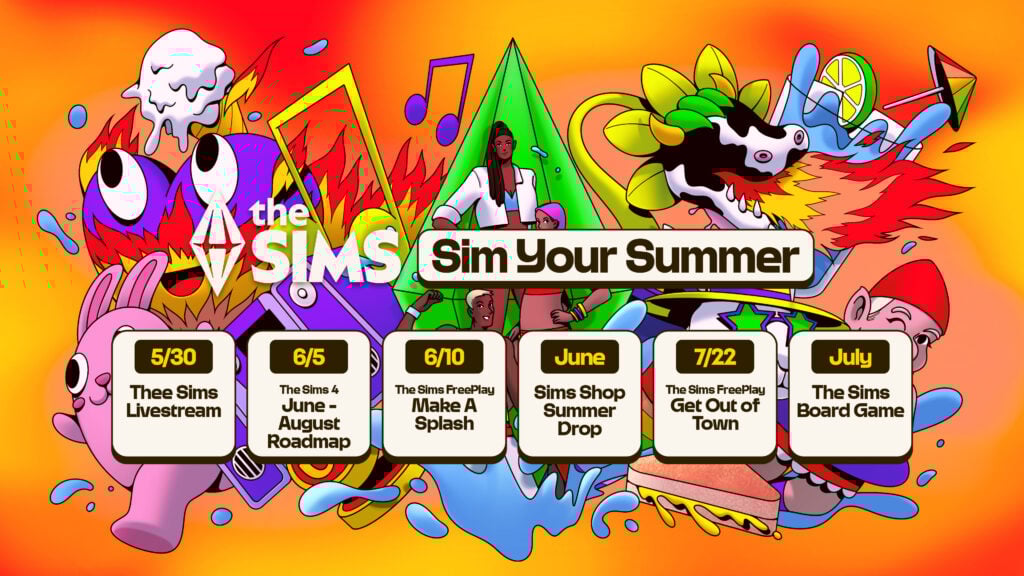
See the first glimpse at what’s to come this Summer for The Sims Franchise!
It’s here – our first look at The Sims Roadmap for Summer 2025! Electronic Arts and Maxis have released a special preview for what’s to come in the coming weeks and months.
As noted, there are going to be seperate Roadmaps for The Sims Franchise and The Sims 4 Series. For The Sims Franchise you can see below that we’re getting general updates to The Sims FreePlay, The Sims Board Game confirmation and much more. The Sims 4 Roadmap is getting its reveal on June 5th, 2025 and will last until the end of August!
Take a first look at The Sims Roadmap Summer 2025 edition:
The Sims Roadmap for Summer 2025
It’s getting real hot in The Sims! This summer, turn your simple “what if? ‘s” into “well, that escalated.” Build it. Push it. Break it. Woohoo in it. Make the improbable possible in The Sims.
Create the perfect moment for your Sims, whether it is to simply unwind and relax in the great outdoors, host an ultimate backyard barbecue that may require a mop and an apology, or give your Sim a summer glow up and a Summer fling to match.
Whether you’re soaking up the sun, touching grass, or throwing parties that rock ‘til the break of dawn – there are no rules, only possibilities. Why just dream it when you can Sim it? Sim it and See.
As the summer continues, there will be The Sims 4 updates and much more to uncover, with our next roadmap coming on June 5.
What are your thoughts on the first Roadmap Drop? Stay tuned on Sims Community for all the latest breaking news and updates on The Sims Franchise!
Sims 4 African Savanna World Mod Takes You To an Unrepresented Part of The Sims World!
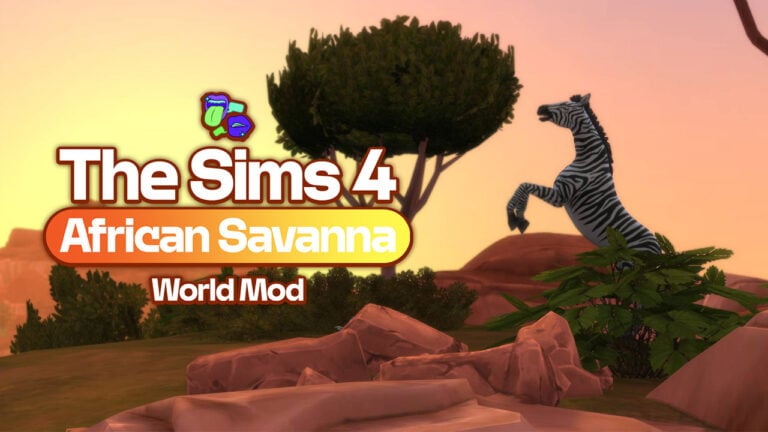
Last month, Modder Nando (@haus_of_nando on Twitter) gave us our very first look at The Sims 4 African Savanna World Mod. Simmers have been begging for even a crumb of African representation in The Sims 4 and the franchise as a whole. So far, the only world that has taken inspiration from the continent is Al Simhara from The Sims 3 World Adventures, inspired by the deserts of Egypt and the banks of the River Nile.
Nando has taken a new approach, focusing on the savanna landscapes encompassing 13.5 million km2 of the African continent. The savanna is characterised by its sweeping flat grasslands and little rainfall per year. That’s not to mention its iconic wildlife! Nando has replicated this perfectly by using Moonwood Mill from The Sims 4 Werewolves Game Pack as a base. Check out the trailer below!
The Sims 4 African Savanna World Mod replaces the existing world of Moonwood Mill with a gorgeous African savanna-inspired landscape. Complete with a remote village, a built-up town area, and a small campsite complete with safari jeeps.
The Mod pack was made in consultation and collaboration with three Simmers from across several African nations. Rodney Ochieng, MyshunoMD, and Momo’s Mojo have all assisted in the creation of this beautiful world to make it as authentic as possible.
Transform your Sims’ world with the African Savanna Mod! Explore vast landscapes, encounter exotic wildlife, and build in a new surrounding. Perfect for storytelling, gameplay, and building in a whole new vibe.
You’ve been making world mods for The Sims 4 for quite some time now. How did you get started and teach yourself the ropes?
It’s actually insane as I’ve recently realized that I’ve been doing world mods for 10 years now. When I started doing world mods there weren’t any tools out back in the days besides Sims4Studio which made it hard to understand everything at first but I’ve looked through the existing game files and played around with them. I experimented A LOT. I’ve probably rebooted my game like thousands of times to see if any of my changes affected the game. And after a while I got the hang of it.
What compelled you to create the African Savanna world mod?
Honestly? The lack of representation has always been the driving force behind my world mods. My father was born in Mozambique and besides the Egyptian world in The Sims 3 World Adventures the Sims team never touched the African continent again. It’s honestly a shame because the entire content is so diverse and provides a lot of different areas of exploration.
Tell us a little about the process. How do you like to make a plan, and how do you go about creating world mods?
Every process is different for me. Usually I start asking the community which world theme they might be interested in. Then I start a lot of research, not just environmental but also music, cultural, etc. I listen to a lot of new music whilst working on the worlds. Then I choose an existing world, scrape off all existing assets and retexture everything. Then comes the foliage and places of interest.
You worked with three Simmers from across the African continent, Rodney Ochieng, MyshunoMD, and Momo’s Mojo. What advice did they give you, and how did their insight help you with development?
I’ve done my visual research up front mostly but they really helped me give some ideas to make the place look diverse, lush and inspired by lake Victoria and its surrounding area. The biggest topic of discussion has been the name for the mod itself and in the end we narrowed it down to African Savanna. It’s vague enough but on point as it reflects many areas within the Savanna biome.
What advice would you give to those who are looking to get into modding, or more specifically, world modding?
Experiment! I know a lot of people would say that you should be learning by doing tutorials or reaching out to modders. Whilst that may help mostly you have to just experiment around. Change some values here and there, have fun and play around with it and have no objective at first. We often get stuck with one idea of what we want to accomplish and we fail because we’re still lacking the skillset. Starting without a plan will bring out the best results. Trust me!
Can you share any ideas you have for future projects with us?
I just heard that Sixam was quite small and you can’t really live there as a Sim. Maybe that should be changed soon?
And finally – What is your dream Sims 4 collab or Expansion idea?
If The Sims Team is ever open for it, I would LOVE to collab with them on a unique world experience. Besides the obvious IKEA collab I would really love to see hotels return and an expansion pack surrounding shopping centers with escalators.
When And Where Can I Download It?
The Sims 4 African Savanna World Mod is available on Nando’s Patreon and will be publicly available on June 20th for all to play! Make sure to check out Nando’s other world mods, and a massive thank you to him for sitting down with me for the interview!
What are your thoughts on The Sims 4 African Savanna World Mod? Let us know what you think in the comments below, and stay tuned to The Sims Community for all the latest Sims 4 Mods updates!
If you’ve ever spent an unhealthy number of hours building your dream mansion in Oasis Springs or felt a strange emotional attachment to a Sim named after your dog, then brace yourself: The Sims is releasing an official Plumbob headband today! And it’s the kind of merch drop that has fans buzzing.
Yes, we’re talking about that iconic, hovering green diamond—the one that floats above your Sim’s head, signalling everything from their emotional state to their need for a bathroom break. Now, you can wear it on your own head, in real life.
Table of Contents
Why This Is a Big Deal (Especially for Longtime Simmers)
For two and a half decades, the Plumbob has been the silent mascot of The Sims universe. It’s quirky, instantly recognisable, and a cultural icon in gaming. Plenty of die-hard fans have made DIY versions for cosplay or TikTok, but this is the first time we’re getting an officially licensed version straight from Maxis and EA.
Whether you’re attending your first fan convention or just want to make your next Zoom call slightly more surreal, this headband is both a statement piece and a love letter to the franchise’s devoted community.
What We Know About the Headband So Far
From the sneak peeks circulating online, the headband is lightweight, easy to wear, and true to the in-game design. The Plumbob itself? A vibrant green gem-shaped beacon of Simmy energy, mounted neatly atop a clear or discreet band that blends into your hair. It’s the kind of thing that says, “Yes, I micromanage the lives of digital people, and I’m proud of it.”
The cost is £29.00 GBP / $38.00 USD and we have three different colours. Black, brunette, and blonde! The Plumbob is 5 inches and includes LED lights; the battery is rechargeable and lasts up to 24 hours on just one charge!
How to Snag the Official Plumbob Headband
The headband officially drops today and will be available through The Sims’ merchandise store. That said, considering how quickly Sims merch tends to sell out—looking at you, Bella Goth-inspired streetwear—it’s probably smart to be online the moment it goes live.
Product Details and Features
Introducing The Sims Official Plumbob Headband – the perfect accessory for hardcore Simmers and fans! Whether you’re streaming, recording, or just hanging out with fellow Simmers,
Plumbob is 5in (12.7cm) tall with LED light inclusions
Rechargeable battery, lasts up to 24 hours on one charge!
Includes USB-C charging cord and drawstring storage bag
WARNING: Product contains small parts and a pointed end. Not suitable for children under 3 years old
Due to shipping regulations pertaining to products containing lithium ion batteries, we are unable to ship more than two headbands per order.
Let’s be honest: The Sims is more than just a game. For many, it’s a creative outlet, a storytelling sandbox, even a virtual escape. And in a world where fandom is increasingly about identity, this headband is a fun, wearable way to show you’re part of something bigger. Plus, it’s just plain cool.
So come Friday, don’t be surprised if your social feed is suddenly flooded with green diamonds and grinning Simmers. The Plumbob is rising—and it’s never looked better. What are you waiting for? Get one or maybe two!
Will you be getting one? Let us know in the comments!
It’s a quiet Saturday morning, maybe it’s raining outside, and you get the itch to boot up The Sims 4 for a cosy gaming session. You’ve not played for a little while, as life has just got in the way (as it has a habit of doing), but you feel inspired to dive into a new household in an entirely fresh save file because who doesn’t love that clean, ‘start-of-the-game’ feeling that faintly whiffs of 2014 nostalgia?
Skipping forward a few hours, you’re three cups of tea down and you’ve finally left CAS and Build/Buy mode having made the most gorgeous Sim and house to match. You press play in Live mode, and before you know it, you’ve closed the game and pulled up your favourite Sims streamer to watch them play instead.
Maybe you make it a few hours or even days of playing with this household, but because it doesn’t spark joy, it is ultimately tossed into the digital graveyard of abandoned save files.
As a Sims 4 player, does this sound familiar?
You, feeling defeated, because you just abandoned your 112th save file 🙁
This (potentially toxic?) cycle is one that has become all too familiar to me more recently, which I don’t doubt has had something to do with the fact The Sims 4 is officially over ten years old.
After a few months of experimentation though, I think I have finally landed on the method that has helped me crawl out of the cycle.
And that has been starting a Forever World in The Sims 4.
So today, let’s explore:
Table of Contents
What is a Forever World in The Sims 4?
Recently, the concept of a ‘Forever World’ has gained popularity over in the Minecraft community. The idea is simple: you create one world and stick with it. No restarting when boredom strikes or when a shiny new update drops. Instead, you commit to this single save file, returning to it after breaks and continuing your journey over time.
Transitioning this idea to The Sims 4, a Forever World takes the form of one single save file, where you rotate between as many households as you like. There is a huge amount of freedom in this as you could follow very strict rotation rules, or spend an in-game year in one household before deciding to make a new one.
Almost mirroring the classic legacy challenge’s ten-generation goal, a Forever World encourages consistency and dedication. It’s about seeing how far you can go when you get deeply immersed in your gameplay.
Like The Sims 4, Minecraft has been around for a long time (since 2009… somehow?!), and is similarly open-ended. Excuse the South Park reference, but the “punch the tree to get the wood, get the wood to build a cabin” … get bored and start again reflex is a deeply-engrained one.
So, the Forever World offers a different path: one that values deep exploration, creativity, and the opportunity to leave a lasting imprint on a save file.
Why You Need A Sims 4 Forever World…
As you can hopefully see, the idea of a Forever World isn’t just for Minecraft, but instead also makes perfect sense for The Sims 4. Here’s why committing to a single, long-term save file and playing rotationally could completely transform how you experience the game:
The game feels fresh again.
The Sims 4 was released back in 2014. After over a decade of playing, many of us long-time players are looking for new ways to engage with this game that we know inside and out. A Forever World gives that sense of freshness and continuity that many of us crave.
You curb the early game trap.
Just like in Minecraft, The Sims 4 hooks you with that exciting sense of early-game progression: starting from nothing, building up skills, climbing careers, etc. But often, once challenges appear or your interest dips, it’s tempting to just start over. A Forever World encourages you to push through and find new creative ways to stay engaged.
You’ll build a richer, more meaningful world over time.
In your Sims 4 Forever World, every new household you make deepens the history and sense of life in your save file, which is often missing when you boot up a brand new world for the first time. So, even if you get bored with the household you’re currently playing, you can absolutely start a new one in the same save. But right from the jump, they’ll share and contribute to a world with stories already in motion, adding layers of lore and connection that make gameplay more rewarding.
It gives you permission to progress slowly.
A popular pitfall which many players fall into when starting a new save file is that you can get so wrapped up in wanting to add a bunch of new sims, lots, and lore before getting to make your first household that you actually play with. With a Forever World though, you can play knowing that you’ll eventually get around to doing all of that ‘world admin’ work because you have all the time in the world.
A Sims 4 Forever World gives you permission to gradually get to these extra tasks as and when they feel relevant to your current gameplay, thus lessening the ‘start-up energy’ required to get into live mode. It doesn’t matter if everything isn’t perfect immediately, you know you’ll get to it over time.
Not everything has to be perfect immediately in your Sims 4 Forever World!
How To Set Up Your Sims 4 Forever World
If you’ve read this far, I am going to assume that I’ve done an okay job of convincing you to start your own Sims 4 Forever World. But you’re next question is likely, ‘yeh, but how do we get started?’
So here is how you could set up your Sims 4 Forever World:
1. Load up Sims 4 and start a new game from the main menu.
You can start in any season you like if you have the Seasons pack installed.
2. Head straight into the options menu and check that you are happy with your aging settings.
I like to keep my game set to normal lifespan, and only have aging enabled for my active household. That way, my other households that I am rotating between don’t grow old and die when I am not playing them.
My Sims 4 Forever World aging settings
3. Similarly, check that you are happy with your Neighbourhood Stories settings.
I like to have mine entirely disabled as a save file can turn into a MESS if you are playing for a long time without keeping an eye on things. Forget to tweak Neighbourhood Stories or aging options early on, and you might find the Goth household have been evicted and now has ten dogs and five extra babies. The last thing you want is for your Sims 4 Forever World to be overrun with non-sensical households!
4. Consider getting started in one specific world or neighbourhood.
This step is optional, but if you are anything like me, you may get overwhelmed in this game very easily! To reduce these feelings, consider focusing all your energy on one world or neighbourhood to start with. You will be playing in this save for a long time, so there’s plenty of time to expand into new areas. You can of course visit other worlds, but you might not play in them consistently for now.
5. Consider adding any new NPC sims or community lots.
If you are a wizard in CAS or just fancy sprucing up the default save file, you may want to add in a few extra sims who you won’t directly play with, but that will pop up around the world. If you are only focusing on one world or neighbourhood, you’ll likely want to place those sims and lots here.
6. Design your first household!
Now that your world is in ship-shape, its finally time to make your first household! You may want to play with a household that already exists, create a new friend or family member of a pre-existing sim, or create your someone entirely new.
IMPORTANT NOTE!
The Sims 4 can be volatile at times, especially with the For Rent game-corrupting ghouls still at large for the time being. A critically important step with playing in a Sims 4 Forever World is to use the Save As function regularly an addition to the typical Save button.
This creates a brand new file, rather than over-riding the old one each time! That way, if you run into a corruption, you can easily go back to a previous file and pick up where you left off. Depending on how frequently you play, I would suggest doing this at the end of every play session or so.
What Sims 4 Forever World Progress Can Look Like…
If you are feeling a little overwhelmed by ideas when it comes to getting started with your own Sims 4 Forever World, let me give you a peek into mine.
When I started my Forever World a few months back, I decided to start in Willow Creek’s Foundry Cove neighbourhood. It’s basic, I know – but there’s a strong nostalgic charm to it that pulls me back every time.
I decided that I wanted to transform this area into a container home neighbourhood gradually, to fit in with the shipping district you can see behind Crick Cabana.
Willow Creek’s industrial area
I started playing with Summer Holiday, having moved her out of the BFF household, and got to work with building her a home spa business using the Businesses & Hobbies pack. While I was having a great time with her, I decided to add an aged-up Cassandra Goth to the neighbourhood too. I had her join the science career, and I’ve had a great time turning her into an alien-obsessed lab tech who sells snake oil serum from her front yard in her free time.
Cassandra Goth working on her roof-top rocket in my Sims 4 Forever World
While I’ve not played out his story a whole lot just yet, I have also added Bert Pancakes to this neighbourhood. This is Bob Pancakes’ more ambitious and outgoing brother who is determined to run a world-class waffle stall and eventually open a restaurant.
My last, and most recent addition has been Jade Sycamore, my founder for the Very Veggie challenge which Lilsimsie published this month. Due to their aligned hobbies and interests, Jade and Summer recently became a couple and moved in together!
Jade and Summer in my Sims 4 Forever World
While I have exclusively focused on this neighbourhood so far, I have so many ideas for what to do with the rest of my Sims 4 Forever World, but as I mentioned earlier, I feel content knowing that they can wait until I am ready to play them. Here’s a few pictures to show the progress I’ve made in Foundry Cove so far.
A week into my Sims 4 Forever World
Adding new households into my Sims 4 Forever World
Fall arrives in my Sims 4 Forever World
Adding my Very Veggie Legacy household to the neighbourhood!
If you want to see more from my Sims 4 Forever World, check out this video on YouTube.
I am quite loose with when I rotate between my households, my decision is almost entirely based on ‘who do I fancy playing with today’ and ‘how much time do I have this play session?’. But, if you want to find a much more comprehensive guide on playing rotationally in The Sims 4 – check out this article next!
In the meantime, let us know what you think of starting a Sims 4 Forever World below!
Krafton announces changes to their Content and Mod Release Roadmap.
The InZOI Content Update and ModKit tools scheduled for May 2025 will have to wait for a few more weeks before their official release. As announced in today’s developer update from Krafton, the InZOI Update is now scheduled for mid June 2025.
The new release will cover May 2025 Feature Updates along with the ModKit release for Modders and CC creators to create their own custom content. The team has also stated that they’re looking into improving your Zoi’s emotional, facial and behavioural expressions.
InZOI Content Update and ModKit Delay
InZOI Statement on Update Delay
Hello, Creators.
Kjun here.
Today, I’d like to explain how your valuable feedback is being reflected in the game and also share an update regarding the schedule change for the update initially planned for May.
1. Player Feedback Channels
Your feedback is always our most important starting point.
We review feedback and bug reports submitted through channels like Discord, Steam, and customer support (CS) on a daily basis. We don’t just collect opinions — we also examine the context of the feedback and how many players have had similar experiences.
Although we cannot implement every suggestion immediately, we prioritize them based on frequency and impact. For bugs, we assess whether the issue is unresolvable by the player or whether it frequently disrupts immersion. We will continue to clarify this prioritization process and improve how we communicate with you around how feedback is reflected in the game.
2. Update Delay and Additional Modding Details
We sincerely apologize to those who were waiting for the May update.
The update that was originally planned for the end of May, including the modding system, has been postponed to mid-June. We felt there were still areas that needed improvement, and we wanted to prioritize quality over speed. Although the schedule has shifted, we are working to deliver content that’s truly satisfying.
There have also been some misconceptions circulating about the ModKit since we shared early details. We’ve spent a long time internally exploring the best structure to support modding, and based on your feedback, we realized we needed to explain it more clearly.
The ModKit is a tool designed to help you create mods. Its purpose is to make it easier to create mod content and allow for more flexible sharing.
While inZOI includes a built-in CurseForge integration, we’ve broadened support so that creators can share mods in two ways:
You can upload your mod to CurseForge and install it through the in-game Mod Browser.
Or, you can save the mod locally and move it to the Documents\inZOI\Mods folder to use it manually.
This system aims to support creative freedom and expression, not just mod sharing.
We believe inZOI is only complete when enhanced by the creativity of each individual creator. Our goal is to provide an open and supportive environment for everyone to bring their worlds to life.
The June update will include the following modding features:
A convenient tool to edit or replace graphics for set outfits and furniture
Developer-accessible JSON files to customize game settings and logic
Sample projects that demonstrate how to create clothing, hairstyles, furniture, and interactions
For beginners, we’re also offering the CAZ Wizard tool specifically for set outfit modding. This helps new modders get started more easily.
While data-based modding is possible for all outfit types beyond sets, we are preparing a separate tutorial guide due to its structural complexity. We plan to continue expanding support so creators of all skill levels can participate.
Some features — including scripting — won’t be available at the initial ModKit launch, as development is still ongoing.
We ask for your understanding and promise to deliver a high-quality ModKit as soon as possible.
3. Game Content Improvements
Alongside modding, we are also working to improve how Zois express emotions and show personality in the June update.
During our work on emotional stability in the April update, we discovered some unexpected side effects. Currently, some Zois freeze or fail to reflect emotions through facial expressions or behaviors — this will be addressed in June.
We also heard feedback that Zois sometimes lack distinctiveness in their behavior. We’re adding emotion-based conversations and reactions, so that even the same actions vary depending on emotional state.
For example, a sad Zoi might ‘cry in the bathroom.’ Certain interactions may be more or less likely depending on mood, and even eating may differ based on emotions or needs.
This is just the beginning. We want Zois to develop unique personalities over time, and respond more naturally based on their emotional state.
We are committed to evolving this system long-term.
We can’t wait to see what kind of worlds you create with inZOI. We truly support and celebrate your imagination. To everyone who’s been waiting for the May update — thank you, and we’ll be back with the June update very soon.
The Sims 4 is well known for is wide array of additional downloadable content. From Expansions to Game Packs as well as Stuff Packs to Kits, however, have you ever found yourself wanting more or that something was missing? Well, that’s where these The Sims 4 Kit Addons come in.
Created by some of the many talented and wonderful custom content creators, these smaller content kits build on areas and themes from many of our favourite The Sims 4 Kits.
So, stick with us as we share with you some of our favourite The Sims 4 Kit Addons you can add to your games right now!
The Sims 4 Kit Addons (CC) List
The Sims 4 Restoration Workshop Kit
Pack Name: Restoration Workshop Kit Mini Kit
Creator: SixamCC
Required Packs: Restoration Workshop Kit
The Restoration Workshop Mini Kit from SixamCC is the perfect companion to the base Kit. This addon Kit takes six of the clutter objects from the original Kit and made them standalone objects, added appliance slots to the two Workshop Shelves, the Craft-Master Toolkit and Tool Titan are now functional objects allowing Sims to purchase upgrade parts from them and the Cluttered Tinkerer’s Table now doubles as a working Woodworking Table and comes in two variants!
The Comfy Gamer Plus Addon from IllogicalSims adds several more options to expand on the base Kit. The addition of more computers with extra monitors, new desks with increased storage options and two new shelving options.
This Casanova Cave Kit Addon from Heybrine gives players two more shelving options, a TV panel with additional shelf space, a new coffee table, love seat and new accent chairs, all of which feature the same colour pallet as the original The Sims 4 Casanova Cave Kit.
Featuring twenty-one more objects to expand and create the best party spot for your Sims, Peacemaker-ic has taken a number of the objects in the base Kit and transformed them into something you can use in any Lot Type! From more snack clutter, punch station, ribbon banners and more, level up your party with this fun collection of The Sims 4 Kit addons.
Featuring twelve objects, The Sims 4 Kitchen Clutter Unleashed allows you to add finer clutter details to your Sims’ kitchens alongside the use of a one tile trolley which, allows additional storage for your Kitchen’s too!
These are just some of the many The Sims 4 Kit Addons available for players to add to their games. From those that expand on Build Buy Mode to Create a Sim the possibilities are endless.
Do you have a favourite The Sims 4 Kit or even a Sims 4 Kit Addon? Let us know!
Ever wished your Sims could experience more realistic health challenges? I’ve spent months using a mod that completely transforms the game’s simplistic health mechanics into something truly immersive!
The Sims 4 Healthcare Redux Mod Guide
What is The Sims 4 Healthcare Redux?
The Sims 4 Healthcare Redux Mod, created by talented modder “adeepindigo,” is hands down the most comprehensive health system mod available for The Sims 4. Updated as recently as April 2025, this game-changing modification introduces everything from common colds to life-threatening emergencies, complete with a fully realized healthcare system.
I remember when my Sim first developed asthma after moving into a dusty apartment – suddenly I was managing inhaler prescriptions and avoiding triggers like I do in real life! That’s the level of detail we’re talking about here.
Why Your Sims Need This Mod
Let’s be honest – the base game + Get to Work approach to health is laughably simple. Your Sim gets sick, takes medicine, and poof – they’re magically better in a few hours. Where’s the drama in that?
The Sims 4 Healthcare Redux creates consequences for poor health management while providing numerous tools to maintain your Sims’ wellness. It transforms a forgettable aspect of gameplay into something you’ll actually need to pay attention to (in the best possible way).
Key Features That Will Transform Your Gameplay
Natural Immune System: Every Sim is Unique
Right from installation, Healthcare Redux assigns each of your Sims a random immune system level – Weak, Normal, or Strong. This isn’t just a label; it directly impacts how often your Sims get sick and how long those illnesses stick around.
My household’s teen with a weak immune system catches practically everything that goes around, while his strong-immune-system mother rarely sniffles. It creates such a realistic dynamic!
Diseases: From Annoying Colds to Deadly Infections
This mod doesn’t mess around when it comes to diseases. We’re talking about:
Deadly diseases like Bacterial Meningitis and Tuberculosis that can actually kill your Sim if not treated properly
Infectious diseases including the common Cold, Sinusitis, Gastroenteritis, and more
Unique disease progression with three stages and corresponding symptoms
Different treatment approaches – viral illnesses can be managed at home, but bacterial diseases require prescription antibiotics
That time my Sim developed Tuberculosis after ignoring a persistent cough for days? Let’s just say the hospital bill made me regret not getting that vaccine during his well visit!
Chronic Conditions: Long-Term Health Management
Some Sims are just dealt a more challenging health hand. Healthcare Redux introduces chronic conditions that persist indefinitely:
Anemia
Anxiety
Asthma
Arthritis (Adults/Elders only)
Eczema
Insomnia
Migraines
Seasonal Affective Disorder
Kidney Disease
Diabetes
Hypertension
Each condition requires specific management techniques and medications. My Sim with migraines has to take preventative medicine and sometimes needs to lie down in a dark room when triggers hit. It adds such a realistic layer to everyday play!
Allergies: Achoo!
Allergies add another dimension to health management. Your Sims can develop:
Bee allergies (potentially life-threatening!)
Pet dander allergies (sorry, cat lovers)
Seasonal/general allergies (bring on the tissues)
Having a Sim with pet dander allergies in a household with a cat creates genuine gameplay challenges. Do you rehome the beloved pet or manage the allergy with medications? These are the kinds of meaningful choices that make simulation games great.
Injuries and Medical Emergencies: When Things Go Seriously Wrong
The Sims 4 Healthcare Redux dramatically expands on injuries and introduces legitimate medical emergencies:
Random childhood injuries – because kids will be kids
Sports injuries that can require casts or surgery
Life-threatening emergencies including Heart Attacks, Aneurysms, and Anaphylaxis
Surgical conditions like Appendicitis that require immediate hospital intervention
I nearly lost my elder Sim to a heart attack when he overexerted himself gardening! The frantic rush to get him to the hospital created one of the most emotional gameplay moments I’ve experienced.
Prenatal healthcare with specialized OB/GYN doctors
Pregnancy complications including Preeclampsia, Pregnancy-Related Anemia, and Gestational Diabetes
Prenatal vitamins to support healthy fetal development
Postpartum health challenges including baby blues and postpartum depression
Postpartum hemorrhage – a rare but serious complication
My Sim’s pregnancy journey with twins and gestational diabetes created a realistic storyline that had me truly invested in her health outcomes. The mod transforms pregnancy from a simple waiting game to a meaningful health journey.
Comprehensive Healthcare Services: Just Like Real Life
The Healthcare Services Menu: Your Health Hub
The mod integrates seamlessly with your Sim’s phone, adding a Healthcare Services menu that lets you:
Schedule doctor’s appointments
Book therapy sessions
Arrange hospital visits
Set up vaccination appointments
Try alternative treatments like acupuncture
For little ones, you’ll need to click directly on infants and toddlers to schedule their care – just like you’d need to take special steps for children in real life!
Medications and Treatments: There’s a Pill for That
Managing medications becomes a genuine gameplay mechanic with:
Age-appropriate vitamins for preventative care
Over-the-counter medications for symptom management
Prescription medications that require doctor visits
Specialized treatments for specific conditions
Vaccinations that provide protection against deadly diseases
The online pharmacy system lets you purchase medications right from your Sim’s phone once prescribed. I’ve found myself creating little medication schedules for my Sims with chronic conditions!
Doctor and Hospital Visits: No More Magic Cures
The Sims 4 Healthcare Redux implements several types of medical visits:
Preventative well visits (recommended every 21 days)
Diagnosis appointments when your Sim feels unwell
Specialist consultations for allergies or chronic conditions
Alternative treatments like acupuncture
Sports clinic visits for injuries
OB/GYN appointments for pregnancy care
For serious conditions, hospital visits become necessary for procedures ranging from tonsillectomies to kidney transplants.
Health Insurance: Bills, Bills, Bills
Just like in real life, healthcare costs money! The mod’s sophisticated insurance system includes:
Basic Insurance – standard coverage for employed Sims
Premium Insurance – better coverage for white-collar professionals
Government Insurance – the best rates for government workers
Employment changes affect your coverage, with Sims who lose their jobs having just 36 hours to find new employment before losing their insurance. I’ve had to make some tough career decisions to maintain my Sims’ coverage!
Getting Started: What You Need to Know
Required Game Packs
The bare minimum you need is:
The Sims 4 Base Game
Get to Work expansion pack
Optional Packs That Enhance the Experience
While not strictly necessary, these packs enhance various features:
Seasons (for Seasonal Allergies and Seasonal Affective Disorder)
Cats and Dogs (for Animal Dander Allergy)
Snowy Escape (for improved injury mechanics)
Bust the Dust (for allergy and asthma features)
Spooky Stuff (for medication animations)
Eco Living (for allergy and asthma features)
Mod Compatibility
Good news! Healthcare Redux plays nicely with other popular health-related mods:
Compatible with Private Practice
Works alongside Slice of Life (SOL)
Integrates with the creator’s own GTW Health Overhaul mod
Frequently Asked Questions
How do I install Healthcare Redux?
Installation is straightforward:
Download the required core files and any desired modules
Ensure you have the Base Game and Get to Work expansion
Place the mod files no more than one folder deep in your Mods directory
Download and install any required dependencies
What if the mod isn’t working?
Try these troubleshooting steps:
Check that the mod and dependencies are installed correctly
Ensure you have the latest version compatible with your game
Try a clean save to rule out conflicts
Temporarily disable other UI mods to check for conflicts
Reinstall if problems persist
Can I customize which features are active?
Absolutely! The mod is modular, so you can install only the features you want. Just want pregnancy complications? You can do that! Only interested in the disease system? That works too!
Are there cheats available?
Yes! Enable testing cheats, then shift-right-click your Sim to access “Healthcare Redux Cheats” where you can manually add conditions, diseases, or allergies for storytelling purposes.
My Experience: Why I Can’t Play Without This Mod
After playing with Healthcare Redux for months, I can’t imagine returning to the base game’s simplistic health system. The mod creates meaningful gameplay consequences and storytelling opportunities that simply don’t exist otherwise.
When my elder Sim developed hypertension, his daily routine changed to include medication management and avoiding certain foods. When my toddler caught an ear infection, the frantic doctor visit felt like a genuine parenting moment. These small details create a rich tapestry of realistic life simulation that The Sims 4 desperately needs.
Is it occasionally inconvenient when your Sim develops the flu right before a big promotion? Absolutely! But that’s life, and that’s what makes this mod so special – it brings the unpredictable challenges of health management into your gameplay in ways that feel meaningful rather than arbitrary.
Conclusion: A Must-Have for Realism Enthusiasts
If you’re the type of player who craves depth and realism in your Sims experience, Healthcare Redux isn’t just recommended – it’s essential. The mod transforms health from an afterthought into a central gameplay mechanic that affects every aspect of your Sims’ lives.
While it does add complexity to gameplay, the systems are intuitive enough that you’ll quickly adapt to managing your Sims’ wellbeing. The payoff in storytelling opportunities and emotional investment is absolutely worth it.
Have you tried The Sims 4 Healthcare Redux? What health challenges have your Sims faced? I’d love to hear your stories in the comments below!
Ready to transform your Sims’ health experience with Healthcare Redux: The Ultimate Health System Mod for The Sims 4?
You’ve made your Zoi, from their physical appearance, to their outfit, to their trait and life goals. They’ve moved in and you’ve done what you can with the starting funds provided (Or with the money cheat!) to build or renovate a home. Now what? Learn about InZOI Careers and how to find a job that fits your Zoi and their life goals perfectly!
Complete InZOI Careers Guide
How does your Zoi get a job?
Does your Zoi have dreams of their name in lights over a giant stage, or are they searching for something part-time so they can focus on other ambitions? Either way, finding a job is easy, using the Career app on their smartphone! Underneath the Recruitment tab, you can view all of the jobs available in your Zoi’s town, what positions they can apply for, and the current availability of those positions.
Note: If a job position is filled, you will receive a pop-up notification to alert you. You can then decide if you would like the other Zoi, usually the newest employee in that position, to quit so your Zoi can be hired.
Congratulations; You got the job! Once your Zoi has been hired into the career of their choosing, the Career app will default to show them their qualifications, work schedule, and other information about their current position. You can still access recruiting through a tab in the bottom left of the phone screen if you want your Zoi to get a different job.
InZOI Careers: How Do They Work?
Once your Zoi has a job, they’ll be assigned a schedule. What your Zoi does during these hours are based on whether the job is Part-Time or Full-Time, but also whether or not it is an On-Site/Active or Off-Site/Rabbithole job. Most jobs are between three days and five days of the week, varying depending on the career and whether or not is On-Site or Off-Site.
On-Site or Active jobs are jobs where your Zoi will commute to work and you will follow them there. They will be given tasks during different hours of their shift to complete and progress in their career. The tasks vary based on the career. Since there is more opportunity to complete tasks in these careers that directly contribute to progression, you tend to move up in the ranks a lot quicker.
Off-Site or Rabbithole jobs are jobs where your Zoi will commute to work and you will not be able to actually play as them while they are working. There are a few ways to influence your Zoi’s work day. Next to their portrait, you can choose what task they should be working on that day. You will also receive chance cards randomly that will ask you how you want your Zoi to respond or act in that situation, with a chance of job progression. However, the best way to progress in your Zoi’s career is to just get to work on time, work the entire shift, and avoid missing days entirely.
No matter the job type, your Zoi will typically leave one hour prior to the beginning of their shift to account for travel time, especially since they walk, drive, or take public transport all the way there. So if your Zoi is scheduled for a 9AM shift, they will usually leave home at 8AM.
Both Bliss Bay & Dowon
While most jobs, especially any on-site jobs, are dependent on the location, there are currently six InZOI careers that are available whether you live in the metropolitan Dowon or the coastal Bliss Bay.
Attorney
Themis & Jones Law Firm in Bliss Bay/JUSTICIA Law Firm in Dowon
Junior Lawyer
Age(s): Young Adult -> Middle-Aged
Tuesday, Wednesday, Thursday
9AM-3PM
M450 per day
Senior Lawyer
Age(s): Young Adult -> Middle-Aged
Tuesday, Wednesday, Thursday
9AM-3PM
M1,164 per day
Partner Lawyer
Age(s): Young Adult -> Middle-Aged
Tuesday, Wednesday, Thursday
9AM-3PM
M2,040 per day
Developer
Blue Moon Soft in Bliss Bay/DW Soft in Dowon
Junior Developer
Age(s): Young Adult -> Middle-Aged
Tuesday, Wednesday, Thursday
9AM-6PM
M414 per day
Senior Developer
Age(s): Young Adult -> Middle Aged
Tuesday, Wednesday, Thursday
9AM-6PM
M999 per day
Lead Developer
Age(s): Young Adult -> Middle-Aged
Tuesday, Wednesday, Thursday
9AM-6PM
M1,845 per day
Reporter
Bliss Bay Times in Bliss Bay/Mirror of the Times in Dowon
Reporter
Age(s): Young Adult -> Middle-Aged
Monday, Wednesday, Friday
9AM-6PM
M405 per day
Editor
Age(s): Young Adult -> Middle-Aged
Monday, Wednesday, Friday
9AM-6PM
M765 per day
Editor-In-Chief
Age(s): Young Adult -> Middle-Aged
Monday, Wednesday, Friday
9AM-6PM
M1,665 per day
Soldier
Navy in Bliss Bay/Military Manpower Administration in Dowon
Trainee/Corporal
Age(s): Young Adult -> Middle-Aged
Monday, Wednesday, Friday
9AM-6PM
M279 per day
Officer/Captain
Age(s): Young Adult -> Middle-Aged
Monday, Wednesday, Friday
9AM-6PM
M675 per day
General/Colonel
Age(s): Young Adult -> Middle-Aged
Monday, Wednesday, Friday
9AM-6PM
M1,827 per day
University Professor
Bliss Bay University in Bliss Bay/University of Youngsung in Dowon
Assistant Professor
Young Adult -> Middle-Aged
Tuesday, Wednesday, Thursday
9AM-3PM
M342 per day
Full Professor
Young Adult -> Middle-Aged
Tuesday, Wednesday, Thursday
9AM-3PM
M930 per day
Distinguished Professor
Young Adult -> Middle-Aged
Tuesday, Wednesday, Thursday
9AM-3PM
M1,920 per day
Bliss Bay
Bliss Bay is a coastal city set in an alternative universe United States, primarily inspired by Los Angeles with an active pier, long sandy coastlines, and modern architecture.
Bliss Bay Exclusive Part-Time Jobs
There are currently two part-time jobs in Bliss Bay, both requiring you attend three days per week and both are On-Site, meaning they are active and you play through them.
Most active careers include tasks in the morning and tasks in the afternoon. To progress in the career, tasks must be completed in a timely manner as they are limited to the half of the shift they are provided in.
Surf Shop Employee
Posey’s Surf Shop
Cashier
Age(s): Young Adult -> Middle-Aged
Monday, Thursday, Friday
9AM-6PM
M360 per day
Tasks Include (But are not limited to)
Change Into Uniform
Watch The Counter
Organize Shelves
Clean Tables
Restock Items
Manager
Age(s): Young Adult -> Middle-Aged
Monday, Thursday, Friday
9AM-6PM
M918 per day
Tasks Include (But are not limited to)
Change into uniform
Inventory checks
Check customer feedback
Order items
Check sales records
Fast Food Employee
Golden Apple Burger
Cashier
Age(s): Young Adult -> Middle-Aged
Tuesday, Wednesday, Thursday
9AM-7PM
M270 per day
Tasks Include (But are not limited to)
Change into uniform
Watch the counter
Clean store floor
Ask if customers enjoyed their food
Bliss Bay Exclusive Off-Site Careers
There are currently three full-time off-site careers in Bliss Bay, meaning that your Zoi will travel to the location but they will be unplayable while at work and not visible. Most require that you work three days per week.
While your Zoi is attending an offsite event, such as a off-site career or school, you can click the briefcase icon next to their photo on the right side of the screen to select which task you would like them to work on. While hovering over a task, the game will show you what you will gain or lose from performing it.
American Football Player
Bliss Bay Nautilus
Backup Player
Young Adult -> Middle-Aged
Tuesday, Wednesday, Thursday
9AM-3PM
M264 per day
Starting Player
Young Adult -> Middle-Aged
Tuesday, Wednesday, Thursday
9AM-3PM
M864 per day
All-Star Player
Young Adult -> Middle-Aged
Tuesday, Wednesday, Thursday
9AM-3PM
M1,998 per day
Gangster
The Westside Hustler
Rookie
Age(s): Young Adult -> Middle-Aged
Tuesday, Wednesday, Thursday
9AM-6PM
M360 per day
Underboss
Age(s): Young Adult -> Middle-Aged
Tuesday, Wednesday, Thursday
9AM-6PM
M666 per day
Boss
Age(s): Young Adult -> Middle-Aged
Tuesday, Wednesday, Thursday
9AM-6PM
M2,169 per day
Office Worker (Bliss Bay)
Plutus Finance
Intern
Age(s): Young Adult -> Middle-Aged
Tuesday, Wednesday, Thursday
9AM-3PM
M378 per day
Analyst
Age(s): Young Adult -> Middle-Aged
Tuesday, Wednesday, Thursday
9AM-3PM
M900 per day
Portfolio Manager
Age(s): Young Adult -> Middle-Aged
Tuesday, Wednesday, Thursday
9AM-3PM
M1,881 per day
Bliss Bay Exclusive Active Careers
While the previous Part-Time jobs listed were also On-Site/Active, as is typical with all Part-Time jobs in InZOI currently, these are specifically Full-Time careers in Bliss Bay that are On-Site/Active.
Amusement Park Convenience Store
Bliss Bay Amusement Park Convenience Store
Cashier
Age(s): Young Adult -> Middle-Aged
Monday, Wednesday, Friday
10AM-8PM
M310 per day
Tasks Include (But are not limited to)
Change into work outfit
Clean the store
Watch the counter
Restock refrigerator/snack shelf
Fill brochure stand
Amusement Park Field Worker
Bliss Bay Amusement Park
Field Worker
Age(s): Young Adult -> Middle-Aged
Monday, Wednesday, Friday
10AM-8PM
M760 per day
Tasks Include (But are not limited to)
Change into work outfit
Clean the amusement park
Inspect ride entrance
Amusement Park Office Worker
Bliss Bay Amusement Park Office
Office Worker
Age(s): Young Adult -> Middle-Aged
Monday, Wednesday, Friday
10AM-8PM
M380 per day
Tasks Include (But are not limited to)
Change into work outfit
Write promotional copy
Handle complaints
Analyze visitor data
Office Team Lead
Age(s): Young Adult -> Middle-Aged
Monday, Wednesday, Friday
10AM-8PM
M1,550 per day
Tasks Include (But are not limited to)
Change into work outfit
Order items
Create a report
Manage budget
Furniture Store Employee
Mackenzie Furniture Store
Cashier
Age(s): Young Adult -> Middle-Aged
Tuesday, Thursday, Friday
9AM-6PM
M360 per day
Tasks Include (But are not limited to)
Change into work outfit
Clean store tables/floor
Guard the counter
Watch the front desk
Manager
Age(s): Young Adult -> Middle-Aged
Tuesday, Thursday, Friday
9AM-6PM
M918 per day
Tasks Include (But are not limited to)
Change into work outfit
Guard the counter
Manage customer feedback
Order items
Dowon
Dowon is a busy city in InZOI, inspired by metropolitan cities in Korea. While it is similar to many real-world crowded cities, it has a lot of open air sections that can include specialty outdoor spaces, public parks, and the Ullim Temple.
Dowon Exclusive Part-Time Jobs
Like Bliss Bay, Dowon has two exclusive Part-Time jobs available, and both are Active/On-Site as well.
Convenience Store Employee
AZ Convenience Store
Cashier
Age(s): Young Adult -> Middle-Aged
Monday, Wednesday, Thursday
9AM-6PM
M360 per day
Manager
Age(s): Young Adult -> Middle-Aged
Monday, Wednesday, Thursday
9AM-6PM
M918 per day
Deli Employee
Dowon Deli
Cashier
Age(s): Young Adult -> Middle-Aged
Wednesday, Thursday, Friday
9AM-7PM
M540 per day
Dowon Exclusive Rabbithole Careers
These are careers exclusive to Dowon, specifically Full-Time and Off-Site/Rabbithole careers. These careers will have your Zoi away for 3-5 days per week and often have multiple ranks to allow for progression.
Office Worker (Dowon)
Aramir Group
Secretary
Age(s): Young Adult -> Middle-Aged
Monday, Wednesday, Friday
9AM-6PM
M378 per day
Chief Secretary
Age(s): Young Adult -> Middle-Aged
Monday, Wednesday, Friday
9AM-6PM
M900 per day
Director
Age(s): Young Adult -> Middle-Aged
Monday, Wednesday, Friday
9AM-6PM
M1,881 per day
Pro Gamer
DG Esports
Amateur Gamer
Young Adult -> Middle-Aged
Tuesday, Wednesday, Thursday
9AM-6PM
M264 per day
Pro Gamer
Young Adult -> Middle-Aged
Tuesday, Wednesday, Thursday
9AM-6PM
M864 per day
Legendary Gamer
Young Adult -> Middle-Aged
Tuesday, Wednesday, Thursday
9AM-6PM
M1,998 per day
Street Soldier
Dowon Solutions
Muscle
Age(s): Young Adult -> Middle-Aged
Tuesday, Wednesday, Thursday
9AM-6PM
M360 per day
Crew Manager
Age(s):
Tuesday, Wednesday, Thursday
9AM-6PM
M666 per day
Boss
Age(s):
Tuesday, Wednesday, Thursday
9AM-6PM
M2,169 per day
Dowon Exclusive Active Career(s)
These careers are fully Active/On-Site, allowing you to follow your Zois to work and complete tasks to help them with their performance in work, allowing for quicker progression through the careers ranks.
Adam Entertainment Planning Team
Adam Entertainment
Employee
Age(s): Young Adult -> Middle-Aged
Monday-Friday
9AM-6PM
M198 per day
Team Lead
Age(s): Young Adult -> Middle-Aged
Monday-Friday
9AM-6PM
M450 per day
CEO
Age(s): Young Adult -> Middle-Aged
Monday-Friday
9AM-6PM
M1,296 per day
Adam Entertainment Idol
Adam Entertainment
Employee
Age(s): Young Adult ONLY
Monday-Friday
9AM-6PM
M198 per day
Team Lead
Age(s): Young Adult ONLY
Monday-Friday
9AM-6PM
M450 per day
CEO
Age(s): Young Adult ONLY
Monday-Friday
9AM-6PM
M1,296 per day
Firefighter
Dowon Fire Station
Trainee Firefighter
Age(s): Young Adult -> Middle-Aged
Monday, Tuesday, Thursday, Friday
9AM-6PM
M297 per day
Lieutenant
Age(s): Young Adult -> Middle-Aged
Monday, Tuesday, Thursday, Friday
9AM-6PM
M594 per day
Captain
Age(s): Young Adult -> Middle-Aged
Monday, Tuesday, Thursday, Friday
9AM-6PM
M693 per day
Battalion Chief
Age(s): Young Adult -> Middle-Aged
Monday, Tuesday, Thursday, Friday
9AM-6PM
M1,197 per day
Assistant Chief
Age(s): Young Adult -> Middle-Aged
Monday, Tuesday, Thursday, Friday
9AM-6PM
M1,395 per day
How to get promoted?
With longer lifespans, achieving the highest rank in your Zoi’s chosen career path can be quite a grind. Your speed of progression heavily depends on what type of job your Zoi actually has. On-Site careers tend to progress faster because you actually have specific tasks to do that slowly chip away at your promotion progression bar. However, the most important tip to getting promoted in an Off-Site career is to make sure your Zoi is actually at work; That they get to work on time, and they stay for the entire duration of their scheduled shift.
Excluding careers with only one rank, On-Site careers can progress in a level within a few days, while Off-Site careers can take a week or longer to get a promotion.
Can you hear the bells? They’re ringing loud and clear as we’re entering wedding season! While we wait for the perfect season for our weddings in real life, our Sims wedding season is basically all the time.
As I’ve been planning my own wedding, I found myself looking at Sims 4 Wedding CC and wanted to put together a list of my favorite finds! Let’s take a walk down the aisle together (in this case the aisle is this post) and check out some perfect Build/Buy and CAS content that’ll make your Sim’s big day absolutely perfect.
The Sims 4 Wedding CC Spotlight Table of Contents
PRECIOUS PROMISES – Wedding CC Pack by Charly Pancakes and Pierisim
The Precious Promises Wedding CC pack is a collab betweenCharly Pancakes and Pierisim. I can’t emphasize enough how absolutely perfect this pack is! You can design the wedding of your Sims dreams with beautiful string lights, canopies, candles, flowers and more. I use items from this pack almost all the time for general decor as well.
Boho Wedding CC Set (Part 1 & 2) by Syboulette
If you’re aiming for a boho themed wedding for your Sims, look no further than the Boho Wedding Set by Syboulette! With soft shades, florals and rattan furniture, your Sims are bound to have a beautiful wedding with this set. Part 1includes an edible and decorative cake, long tables and candles. Part 2 includes a beautiful heart shaped wedding arch, rugs, a wedding sign and a bar!
Bridgerton Wedding Sims 4 CC
I hope I’m not the only one absolutely enthralled with Bridgerton! This CC setby Syboulette brings the charm of Bridgerton to your game and your Sims wedding will definitely be the talk of the ton and in the latest edition of Lady Whistledown. I love that this set comes with beautiful floral pieces that makes the area look oh-so romantic. Complete the venue with gorgeously detailed place settings and a drink cart!
Wedding Arches! by Dudley’s Trailer
These Wedding Arches by Dudley’s Trailer are such classic additions to your game and can suit any wedding style you’re going for. My personal favorite is the Romantic Marble! You can style these any way you like to make it the wedding of your Sims dreams.
CC creators Serenity and Caio collaborated on this gorgeous Sims 4 wedding CC collection (and thrilled the Sims community when we found out they were partners in real life!) Serenity’s part includes 14 stunning pieces and Caio’s partincludes 6 more. This collection includes gowns, pantsuits, veils, gloves and more.
Strangers In The Night by Surely-Sims
This CC set by Surely-Simssurely brings the vintage elopement vibes and I. Am. Obsessed! If you’re not looking to do a big fancy wedding but still want matrimonial vibes, this set is perfect for you. This set comes with 25 iconic pieces, including 3 mini dresses for the feminine bride and 8 new tops and 2 matching bottoms for the masculine groom.
RSVP Collection by Sentate
This bridal collection by Sentateis in constant use by my Sims for bridal, formal or party wear! This Sims 4 Wedding CC collection features styles that can match any Sim’s personality, from long, lacy gowns to short sequin dresses. They also come in a whopping 25 different swatches that Sentate uses across their creations, so mixing and matching their different CC can create the ultimate wedding look for your Sims.
[KK] Basic Suit Set by KK’s creation
While The Sims 4 gives a good selection of suits to mix and match for our grooms, sometimes we want something that has a little more depth to it. This Basic Suit Set by KK’s creation looks very stylish and dapper and comes in several different color swatches.
A Tale Of Love Ring Collection (Part 1-3) by Glitterberry Sims
Your Sims will never run out of engagement and bridal ring options with these 3 ring collections from Glitterberry Sims! From classic diamonds, to vintage, to colored stone and a plain band, your Sims will find a ring that suits them perfectly. Part one includes 5 beautiful rings, part two includes 5 more and part three includes the final 4 rings.
Pledging My Love Couples Rings by eggsims
These wedding rings by eggsims come in 4 different swatches for bands with white and gold or silver and black with gold or silver accents. They give a unique touch for your Sims if you want them to have stylish and modern bands with a pretty twist!
I hope you all love this little collection of The Sims 4 wedding CC! Let us know in the comments if you’d like to see more posts like these. Happy wedding planning!
EA has a brand new Sims 4 Laundry List! See the fixes coming in the next Game Patch.
Electronic Arts and Maxis have just released a brand new The Sims 4 Laundry List. Showcasing a list of bugs and issues that should be resolved within the next Sims 4 Game Update.
The list includes a number of game fixes and investigations for issues such as weather indoors. Which currently is still a work in progress.
EA also released a statement talking about how they discover and resolve bugs in a transparent letter we’ve included below.
Table of Contents
The Sims 4 Laundry List & Fixes Statement
Welcome to the Laundry List where we share the top community concerns that we’re currently investigating and hope to resolve in an upcoming patch.
As it’s been a year since we first announced our team dedicated to tackling technical issues, we wanted to provide you with a quick update on their progress. Over the past 12 months we’ve provided 7 dedicated Laundry Lists, fixed hundreds of issues, both new and older, with a focus on those most impacting the community. We’ve been pleased to make meaningful improvements, and recognize that this work continues. Over the coming months, we will continue to experiment with new ways to provide more transparency into the top issues we’re working on and make it easier to get that info via our Discord. This starts today, as we’ve seen lots of great questions from the community and wanted to address many of them by sharing what goes into this process from start to finish.
🐞 Issue is Discovered & Verified
When a player reports an issue via our EA Forums, a friendly Community Manager or EA Forums superuser will see if help can be provided through troubleshooting and alternative methods to try, confirming if the game is working as intended, or if this may be an issue related to mods. If not, they’ll check whether the issue has already been reported to merge it with an existing thread or start a new one. A ticket is then made for our Quality Assurance (QA) team to review. They may need to collect more information from players to reproduce the bug on their devices, which is critical for the next steps and why we always encourage players to provide as much specific detail as possible when reporting an issue.
Our Sims teams are also discovering and reporting issues internally that get documented alongside player reported issues. Due to the wide variety of freedom with The Sims 4, plus the randomness and variation in playstyles and player options, it’s impossible to truly test every possible scenario. This means that some issues may only appear in specific environments, and while we strive to address as many as we can prior to launch, we appreciate your understanding. When QA is able to reproduce the issue, they will file a ticket for an engineer to review and give it a severity rating, which can depend on how many votes it has received and how disruptive to gameplay the issue is for players. Your votes matter!
🔎 Fix is Investigated & Created
A team of engineers will be assigned to work on an issue and figure out the cause. The scope, type, and risk of bug fixes can vary wildly, from relatively simple fixes through to complete code system restructures. Given the almost infinite variations of devices, operating systems, unique combinations The Sims 4 content installed, unique gameplay styles, and mods downloaded, it can be no small feat to identify the root cause!
Once the engineer understands what’s causing the technical issue, they can start to plan how to best resolve it. Fixes can bring their own unique challenges, such as accidentally introducing more issues, which is the last thing we want to do. When the engineer has created a fix, the QA team comes back into the mix, to test each fix before it’s released to ensure the fix works as intended across all platforms.
🚀 Fix is Deployed to Players
If that all looks good, the code is then submitted for review for final approval. Once approved, it’s scheduled to be deployed during a specific release. We understand that with each update, there’s the potential to disrupt your gameplay, and so our team takes care to group as many fixes together as possible to limit downtime.
This essential yet often behind-the-scenes work involves collaboration across multiple teams. We prioritize issues based on both the reports and votes from the community, as well as the bugs identified by our QA team. Thank you for your continued reports and votes on what issues you want us to address!
Sims 4 Laundry List – May 20th Fixes
Here’s the player reported issues we’re investigating for our next update:
There are other issues that do not have an EA Forum thread that we’re also working on. Please note that some topics can be complicated to replicate and require an extended investigation on our end, so even though we are actively reviewing, it’s not a guarantee that we’ll have an immediate fix for it in the upcoming patch. This includes the following top voted issues:
Issues Impacting Save Files
Status: 🐞 8+ related issues have been discovered, some require more player info to reproduce
Thanks for all your patience and valuable help in reporting! Please continue sharing with us any issues you’re experiencing on The Sims 4 EA Forums. We’ll continue to check in, and together we can make this game the best that it can be.
Next Sims 4 Update Release
We assume that the next Sims 4 Game Update is set to release in the next 7 days. Also potentially helping prepare the game for the next Enchanted by Nature Roadmap!
We’ll make sure to keep you posted about The Sims 4 Update release as soon as it drops right here on Sims Community.
A Complete List and Walkthrough of The Sims 4 Skills.
The Sims 4 has been around for almost eleven years and has enhanced the game through several expansion packs, game packs, stuff packs, and kits, adding new skills for our Sims along the way.
There are 69 Sim skills in total, which include 4 Child-only skills, 5 Toddler-only skills, and 4 Horse skills.
The Sims 4 skills list is ever-growing, but read on below for the most up-to-date info.
The Sims 4 Skills Guide
All About the Major Skills
Major skills have 10 levels total, and can be unlocked by Teens, Young Adults, Adults, and Elder Sims. Children can also unlock a handful of skills, such as Charisma, Photography, Video Gaming, etc.
Icon
The Sims 4Skills
Recommended Mood
Tips to Unlock
Notes
Acting Get Famous Expansion Pack
Confident
Unlock this skill by selecting the Practice Acting interaction on a mirror.
Archaeology Jungle Adventure Game Pack
Focused
Unlock this skill by reading a skill book and authenticating artifacts.
Baking Get to Work Expansion Pack
Inspired
Use the fridge to select the Bake interaction, or use the Whipped Dream Cupcake Factory.
*Charisma Base Game
Happy
Use the Practice Speech interaction at a mirror or talk to another Sim.
Comedy Base Game
Playful
Practice Jokes with the microphone or perform Funny social interactions.
Cooking Base Game
Inspired
Ue the fridge or stove to select the Cook, Make a Meal, or Serve a Meal interaction. Your Sim can also use the grill and select the Grill interaction.
DJ Mixing Get Together Expansion Pack
Focused
Use a DJ booth to select the Practice interaction.
Fabrication Eco Lifestyle Expansion Pack
Focused
Use the fabricator machine or the Candle Making Station to unlock and increase this skill.
*Fishing Base Game
Focused
Select the fishing sign at a nearby pond to use the Go Fishing interaction.
Some waters are too rough to fish in for Sims with lower Fishing Skill levels.
Fitness Base Game
Energized
Workout with any exercise machine or equipment, Go on a Jog, or Go Swimming to unlock the skill.
Flower Arranging Seasons Expansion Pack
Inspired
Use the Violets are Blue Flower Arranging Table to unlock and increase the skill. Your Sim can also trim a Bonsai Tree to increase this skill.
Gardening Base Game
Focused
Plant a seed, water a plant, or harvest a plant. Your Sim can also trim a Bonsai Tree to increase this skill.
Gemology Crystal Creations Stuff Pack
Focused
Use the Gemology Table to unlock and increase the skill.
Gourmet Cooking– Base Game
Inspired
Select the Cook a Gourmet Meal interaction on a fridge or a stove.
Your Sim must have level 5 Cooking Skill to unlock the Gourmet Cooking skill
Guitar Base Game
Inspired
Select a guitar to use the Practice interaction.
Handiness Base Game
Focused
Repair broken appliances, upgrade appliances.
Herbalism Outdoor Retreat Game Pack
Focused
Identify mysterious plants or Brew Herbal Remedies to unlock this skill.
*Horse Riding Horse Ranch Expansion Pack
Confident
Ride a horse to unlock this skill.
*Knitting Nifty Knitting Stuff Pack
Inspired
Use the Yarn Basket to select the design to knit and unlock the skill.
*Logic Base Game
Focused
Practice Chess, Look Through a Telescope, and Study Fossils to unlock this skill.
*Mischief Base Game
Angry
Prank other Sims, or use Mischief social interactions.
Mixology Base Game
Inspired
Use a bar to select the Practice Making Drinks interaction.
Painting Base Game
Inspired
Use an easel to practice painting.
Parenting Parenthood Game Pack
Focused
Complete Parenting social interactions such as Influence to, Teach To Say Please and Thank You, and Teach to Say Sorry.
*Photography Get to Work Expansion Pack
Inspired
Use the phone to take selfies and pictures, purchase a Camera to take higher quality pictures, add filters to pictures.
*Piano Base Game
Inspired
Use a Piano to select the Practice interaction.
*Pipe Organ Vampires Game Pack
Inspired
Use a Pipe Organ to select the Practice interaction.
Pottery Businesses & Hobbies Expansion Pack
Inspired
Mold a Lump of Clay, use a Pottery Wheel to Craft New Ceramic and unlock the skill.
Programming Base Game
Focused
Use a computer to access the Programming interactions.
Research & Debate Discovery University Expansion Pack
Focused
Use the Electromagnetic Research Archive Machine and the Darling Debater Podium Set to increase this skill. Your Sim can also Practice Debate in the mirror.
Robotics Base Game
Focused
Use the Robotics Workstation to unlock this skill.
Rock Climbing Snowy Escape Expansion Pack
Focused
To the North of the Bunny Slopes on Mt. Komorebi, use the small starter wall to unlock this skill.
Rocket Science Base Game
Focused
Buy a rocket and select the Build interaction.
Romance Lovestruck Expansion Pack
Flirty
Complete flirty social interactions.
*Singing City Living Expansion Pack
Inspired
Click on your Sim to select the Practice Singing interaction, use a microphone to Practice Singing
Skiing Snowy Escape Expansion Pack
Energized, Confident
Unlock this skill by selecting the Ski interaction on the the slopes on Mt. Komorebi in Yukimatsu.
Snowboarding Snowy Escape Expansion Pack
Energized, Confident
Unlock this skill by selecting the Snowboard interaction on the the slopes on Mt. Komorebi in Yukimatsu.
Tattooing Businesses & Hobbies Expansion Pack
Inspired
Use the Digital Sketchpad to Design Tattoos, Offer Tattoos to other Sims (for free, or a price).
Vampire Lore Vampires Game Pack
Energetic
Use a bookcase or computer to select the Research Vampire Lore interaction.
The Vampire Lore skill has 15 levels total
Veterinarian Cats & Dogs Expansion Pack
Focused
Use the exam table and surgery machine to unlock the skill.
*Video Gaming Base Game
Focused
Use the Video Games interaction on the computer, play on a gaming console, or use a gaming mat.
*Violin Base Game
Inspired
Use a violin to select the Practice interaction.
Wellness Spa Day Game Pack
Focused
Use the meditation stool to Meditate, the yoga mat to Practice Yoga, or the massage table to Give a Massage to unlock this skill.
Writing Base Game
Inspired
Use the computer to select the Writing interaction and choose what to write and unlock this skill. Your Sim can also use a Private Journal to for this skill.
The Sims 4 Skills: Major
*Available for Child Sims and older
Your Guide to Minor Skills
Minor skills have 5 levels total and are just what your Sim needs to find their next hobby. Keep on reading to learn a few tips how to unlock these skills.
Icon
The Sims 4 Skills
Recommended Mood
Tips to Unlock
Notes
*Bowling Bowling Night Stuff Pack
Focused
Visit a bowling alley and select a Ten Pin Adrenaline bowling lane to use the Bowl interaction.
*Cross-stitching Cottage Living Expansion Pack
Focused
Purchase the Make It Sew Cross-Stitch Kit from Build Mode or Hoops from the Garden Shop in Henford-on-Bagley and use the Stitch from Pattern interaction.
Dancing Get Together Expansion Pack
Confident, Energized
Turn on a stereo or music player and select the Dance interaction, select the Practice Moves interaction on a full-sized mirror.
Entrepreneur High School Years Expansion Pack
Confident
Complete Odd Jobs, complete Freelancer gigs, use an instrument to Play for Tips at public lots, sell food at food stalls, sell outfits on Trendi, sell items on Plopsy, sell books, license songs, sell paintings to unlock this skill.
Juice Fizzing Eco Lifestyle Expansion Pack
Focused
Use the The Afizzionissimi Fizzing Station to unlock this skill.
*Media Production Get Famous Expansion Pack
Inspired
Use the Mix Master Music Station or the More Views Video Stations to unlock this skill.
*Medium Paranormal Stuff Pack
Energized
Use the Seance Table to Communicate with Ghosts and unlock this skill.
Nectar Making Horse Ranch Expansion Pack
Focused
Use the Rootin’ Fruit’n Nectar Maker to Craft Nectar and unlock this skill.
*Pet Training Cats & Dogs Expansion Pack
Energized, Inspired, Focused
Teach Commands to pets to unlock this skill.
SelvadoradianCulture Jungle Adventure Game Pack
Confident
Socialize with Selvadoradian locals, eat Selvadoradian food, and view the Madre Cosecha.
Thanatology Life & Death Expansion Pack
Focused
Look up Historical Deaths on a bookshelf and use a computer to Read Theories to unlock this skill.
The Sims 4 Skills: Minor
*Available for Child Sims and older
Developmental Skills for Child Sims
Children have unique skills to help them focus on growing up while they enjoy childhood. Each of these skills has a max of 10 levels, and will unlock a corresponding adult skill when your Child ages up.
Icon
The Sims 4 Skills
Recommended Mood
Tips to Unlock
Notes
Creativity
Inspired
Draw shapes on the Activity Table, use a Dollhouse to Play with Dolls, Play Pretend with other Children, the Tiny Tot Treehouse, or the Private Journal to unlock the skill.
Reaching level 3 of the Imagination Skill as a Toddler will automatically unlock level 1 of the Creativity Skill as a Child, while reaching level 5 as a Toddler will unlock level 2 of the Creativity Skill.
Mental
Focused
Play chess at a chess table, use the kids Science Set, play with a Doctor’s Play set to unlock this skill.
Reaching level 3 of the Thinking Skill as a Toddler will automatically unlock level 1 of the Mental Skill as a Child, while reaching level 5 as a Toddler will unlock level 2 of the Mental Skill.
Motor
Energized
Ride a bike, Play On the monkey bars, play Hopscotch, Practice Typing on a computer, or practice riding a bike to unlock this skill.
Reaching level 3 of the Movement Skill as a Toddler will automatically unlock level 1 of the Motor Skill as a Child, while reaching level 5 as a Toddler will unlock level 2 of the Motor Skill.
Social
Confident, Playful, Happy
Use a tablet or computer to Chat in the Kids Chatroom or put on a show with the Punchinello’s Theater of Fine Puppetry to unlock this skill.
Reaching level 3 of the Communication Skill as a Toddler will automatically unlock level 1 of the Social Skill as a Child, while reaching level 5 as a Toddler will unlock level 2 of the Social Skill.
The Sims 4 Skills: Child
The Fundamental Toddler Skills
Similar to Child Sims, Toddlers in the Sims 4 also have unique skills aimed at growing up successfully. Each of these skills has a max of 5 levels. If your Toddler Sim reaches level 3 or 5 of all of their skills, these will transform into different skills when your Toddler ages up to a Child.
Icon
The Sims 4 Skills
Recommended Mood
Tips to Unlock
Notes
Imagination
Playful
Play in the Tiny Tot Treehouse, Use the Blocks play table, or have a Parent use the Read Toddler Book interaction.
Thinking
Happy
Use the Shapes interaction on Blocks to build thinking skill, or a parent can Teach Basic Needs with Flash Cards.
Movement
Excited
Stack Blocks to build the movement skill, or a parent can use the Teach to Walk interaction. Walking around also unlocks this skill.
Communication
Happy
A parent can use the Teach to Talk interaction or the Teach Animal with Flash Cards interaction. Toddlers can also try to talk to unlock this skill.
Potty Training
Happy
Use the Potty Help interaction to ask older Sims to Potty Train your Toddler. Toddlers with the Independent Trait can use the Go Potty interaction to practice the skill on their own.
This skill only has 3 levels.
The Sims 4 Skills: Toddler
Horses Skills
The Sims 4 Horse Ranch Expansion Pack introduces horseback riding, so naturally, the Horses have their own set of skills too! These Sims 4 Skills max out at level 10.
Icon
The Sims 4 Skills
Recommended Mood
Tips to Unlock
Notes
Agility
Energized, Confident
Select the Practice Barrels interaction on the Horse Barrel.
Endurance
Energized
Select the Go on Relaxed Ride, Go on Energized Ride, or Go on Intense Ride horse interaction to unlock this skill.
Jumping
Confident
Use the Horse Jump to select the Practice Basic Jumps interaction to unlock this skill.
Temperament
Confident
Socialize with your horse, use the Brush Mane interaction, or use Clean Hooves interaction.
The Sims 4 Skills: Horses. These skills are exclusive to the Horse Ranch Expansion Pack.
How to Level Up
Aside from actually practicing the skill, each skill has its own unique interactions that will help your Sim level up, but there are also some generic ways your Sim can level up almost any skill.
Reading
Interact with a bookcase to purchase and read books to boost your skills. To level up, your Sim can learn levels 1-4 from Volume 1, levels 5-7 from Volume 2, and levels 8-10 from Volume 3.
Researching
Use the Research interaction under the Web category on the computer to research different skills. This doesn’t include the complete list of the Sims 4 skills, but will allow your Sims to level up several skills such as Romance and Gardening. For some skills, your Sim needs to be at least level 2 in order to use the web to research.
Sit in on Skills Classes
The phone offers the Sit in on Skills Class interaction, allowing your Sim to pay 250 Simoleons to sit in on a skill class for their desired skill. This is an easy way to make sure one Sim is still working on their skill while you’re focusing on a different Sim in your household. If your Sim is in a bad mood when they attend the class, their skill may not increase much.
Moods
Moods have a large impact on gameplay in the Sims 4. Moods influence how your Sims interact with other Sims, how they perform at work, and more. Positive moods, such as Happy, Energized, and Playful, will have a positive impact on skill building. Negative moods such as Angry, Tense, and Uncomfortable, will have a negative impact on skill building.
Each skill has a recommended mood to boost your Sims’ skill level. For example, an Inspired Sim will learn the Tattooing Skill at a quicker rate and create higher-quality tattoo designs. On the other hand, Uncomfortable Sims will struggle or refuse to learn the Tattooing Skill, and create poor tattoo designs.
Mentoring
In the Sims 4, your Sim can lean on their community and ask to be mentored by Sims with higher skill levels with the Offer Mentoring interaction. Sims mentored by others with higher skills will learn their skill at a quicker rate than when they practice their skill alone. Similarly, Toddler and Child Sims can level up their skills quickly when they learn with an older Sim through interactions like Help with Blocks.
The Sims 4 Businesses & Hobbies Expansion Pack introduced the ability to host or attend Skill Classes and added more mentorship interactions. Use the whiteboard to access the lecture interactions.
Traits
Personality traits in The Sims 4 dictate your Sims’ reactions, moods, interactions, needs, and so much more. They play a large role in honing skills.
Some traits will influence specific skills, such as the Dance Machine trait, which will help your Sim increase the Dancing Skill. Other traits have a general impact on skills. For example, Adventurous Sims will get bored practicing skills over and over, while Overachiever Sims will gain skills twice as fast.
Here is a quick list of some traits that will help your Sims level up their skills:
Cringe: Build Comedy, Mischief, and Video Gaming Skills faster.
Genius: Builds the Logic Skill quicker.
Inspired Explorer: Build skills quicker outside of the home lot.
Lovebug: Build the Romance, Charisma, and Photography Skills quicker.
Morning Sim: Build skills quicker when practicing in the morning.
Muser: Builds skills quicker when Inspired.
Night Owl: Build skills quicker when practicing at night.
Overachiever: Build skills twice as fast.
Romantically Reserved: Builds the writing and Logic Skills faster than normal.
What other traits in the Sims 4 have you noticed help your Sims build their skills?
Cheats
If your Sim doesn’t have the time to work their way through their skills, they can always cheat their way to the top! Some of the Sims 4 skills have different formats for their cheats, but generally, you can use these formats:
While this list of the Sims 4 Skills could change by skills being updated, added, or even removed in the future, this is the complete list of skills so far. Are there any skills you hope the Sims team will add one day? Let us know below!
Are Fairies the next Pack for The Sims 4? New listing surfaces online!
It hasn’t taken a lot after the new Sims rebrand speculation for the community to get talking about the next Sims 4 Expansion Pack. The Sims 4 Enchanted By Nature title has hit the Instant-Gaming website for selling game codes and keys. With a release date set for this July and first alleged features mentioning Fairies, improved gardening and more.
Let’s take a look at the entire listing and what we know so far:
The Sims 4 Enchanted by Nature Surfaces Online
The first news about The Sims 4 Enchanted by Nature Pack comes from website Instant Gaming. Which listed this Expansion Pack title today on their website.
The listing doesn’t contain any real official images, and moreover includes AI generated image placeholder and possibly even an AI generated description. However, this wouldn’t be the first time that Instant Gaming got an Expansion Pack name leak right. Life & Death, For Rent and other pack titles all leaked the same way.
Leaked Description of The Sims 4 Enchanted by Nature (Unofficial)
Step into nature and let it touch every part of your Sim’s life—bring the outdoors inside with Potted Plants, or live fully off the land by developing Natural Living Skill to rest, eat, and bathe comfortably under the sky.
Sims not taking care of themselves may end up manifesting in Ailments, which can be healed at an Apothecary table. Diving deep into the new Gardening and Foraging finds to craft potions or protect Sims from occults. Apothecaries may end up becoming a Naturopath who helps other Sims as their daily job.
As Sims explore the new world, they may discover Fairies, just beyond their normal everyday life. Fairies can be mischievous and give Sims Ailments, or become a Fairy who enhances nature, helps in the garden, and instantly blooms plants.
For Sims who just want to bask in the beauty of nature and grow new magical plants, or gather ingredients to enchant any plant to care for them, there’s a lot of new life to help with the chores.
The Next Sims Pack is an Expansion Pack
Although not directly confirmed through Instant-Gaming, we know that the next Pack release for The Sims 4 will definitely be an Expansion Pack release. Along with this leak aligning today it’s almost certain that Fairies will be brought to the game in an Expansion Pack, rather than a Game Pack.
The alleged release date for The Sims 4 Enchanted by Nature Expansion is set for July 10th, 2025 across Desktop and Consoles. Although not confirmed by official retail stores yet.
We should expect to know more about the contents of this Expansion Pack when EA and The Sims Team announce the next roadmap for The Sims 4. Until then, stay tuned on Sims Community to be the first to know when The Sims 4 Enchanted by Nature gets revealed!