Home Blog Page 340

The Sims 4 Cats & Dogs: 12 interesting facts about Brindleton Bay

Sims Camp 2017 trip has been sponsored by EA!

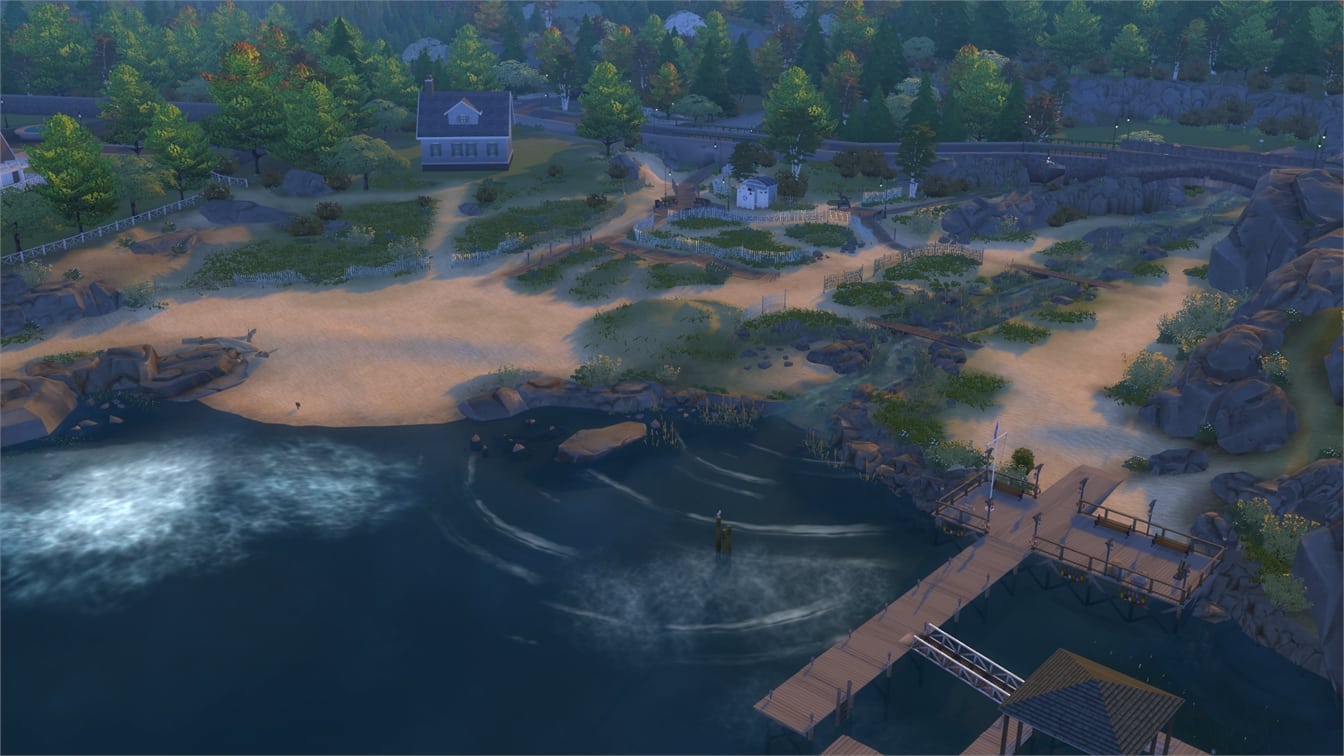
The Sims 4 Cats & Dogs Expansion Pack comes with a new world called Brindleton Bay – a world inspired by New England and some other coastal areas as well. There are plenty of new additions that come with this world, both cosmetic and functional.

Take a look at 12 interesting facts about this world:

There are 4 neighborhoods in this world but each neighborhood is HUGE with plenty of space for outdoor fun with your pets!

The Sims 4 Cats & Dogs: 12 interesting facts about Brindleton Bay

Whiskerman’s Wharf comes with a fire pit and some chairs for memorable memories for your Sims (and pets!)

The Sims 4 Cats & Dogs: 12 interesting facts about Brindleton Bay

Some neighborhoods like Cavalier Cove have a boat that you can use to travel between neighborhoods and worlds.

The Sims 4 Cats & Dogs: 12 interesting facts about Brindleton Bay

Sable Square has a rural area where vehicles will pass by every now and then which will raise dust.

The Sims 4 Cats & Dogs: 12 interesting facts about Brindleton Bay

FISH MARKET!

The Sims 4 Cats & Dogs: 12 interesting facts about Brindleton Bay

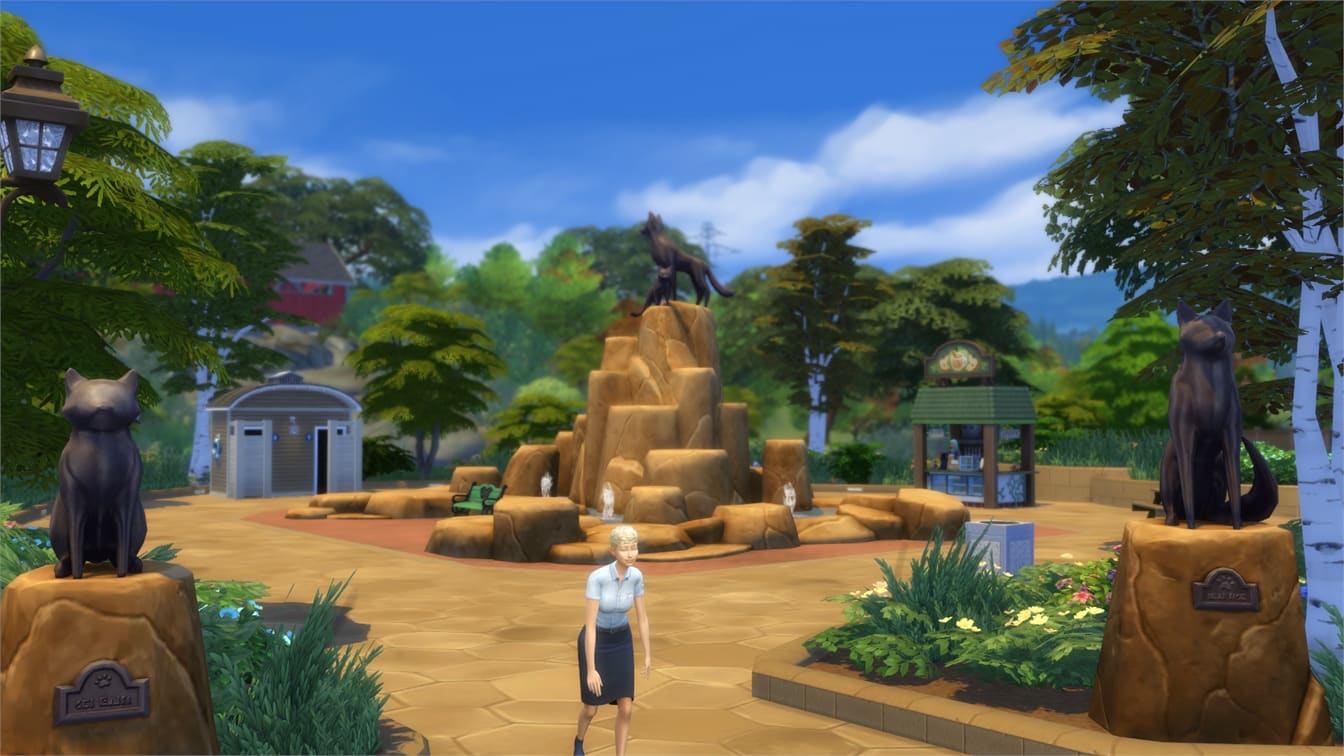
There are huge cat and dog statues in Sable Square. (Also notice that Pet Treats stand?)

The Sims 4 Cats & Dogs: 12 interesting facts about Brindleton Bay

The Sims Blog: Explore The New World Of Brindleton Bay!

0

Via TheSims.com!

Hey there, Simmers!

With The Sims 4 Cats & Dogs* releasing on November 10, not only does this pack introduce some new four-legged friends, but a whole new world for you to explore as well!

Introducing Brindleton Bay, a charming coastal town full of cool new outdoor activities for you and your pets. We can’t wait for you to get your paws on it, so let’s take a look at some of the fun and delightful neighborhoods you and your new pets can discover together.

The Sims Blog: Explore The New World Of Brindleton Bay!

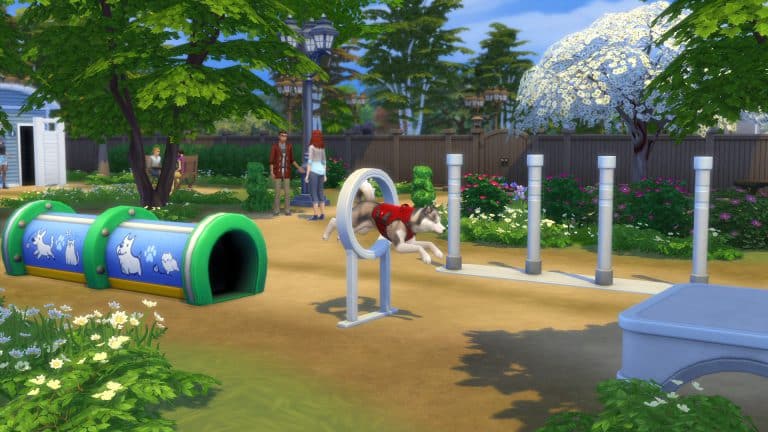
First, you can start your day off in Sable Square, where you can take your canine companion on a nice walk through the center of town while chasing after flocks of birds, and make a quick stop by Pupperstone Park to test your dog’s agility with a new pet obstacle course.

Ah, but maybe you’re looking for something a bit more… feline? Look no further than Whiskerman’s Wharf – a cat’s dream neighborhood and home to the Bay’s resident cat lady, Catarina Lynx. Send your cat hunting in the bushes and they may bring back some feathers they “found” for you. Be careful though! Birds aren’t the only animals hiding in the bushes and your pets may find themselves in a losing battle against a squirrel or skunk!

Regardless of which destination you choose, follow up your relaxing morning by curbing your appetite for adventure at Cavalier Cove. A sprawling coastal neighborhood, Cavalier Cove is full of little nooks and crannies for you and your pet to explore. (Who knows what mysterious treasures your dog will uncover digging on the beach!)

Not in the exploring mood? Not to fret! Bring a pet toy from home and use the open space to play a game of fetch.

The Sims Blog: Explore The New World Of Brindleton Bay!

Finally, as the day comes to a close, head on over to Deadgrass Isle. Population: PETS! Not a single human lives on the island, making it the perfect place to befriend a stray cat or dog. Build a strong enough bond, and you can adopt them into your family! But before you head out, make sure to climb to the top of the lighthouse and watch that beautiful Brindleton Bay sunset.

Now, a bunch of you builders have been asking if there will be a good variety of lot sizes in The Sims 4 Cats & Dogs. Fear not! Brindleton Bay will have lots in a multitude of sizes, including 20×15, 20×20, 30×20, 30×30, 40×30, 40×40, 64×64, and four of those lots will be empty. So get ready to build!

And that’s a wrap on our quick tour of Brindleton Bay, a whole new world tailor-made for cats, dogs, and the Sims that own them. From feline antics at the Wharf, to canine adventures at the Cove, Brindleton Bay is full of new and exciting activities for you to enjoy when The Sims 4 Cats & Dogs launches November 10th! We can’t wait to see what new architectural treasures you construct.

The Sims 4: Plenty of Bug Fixes Coming

0

Improved build tools and other new features are not the only thing that will be coming with the upcoming November update. SimGuruNick, a quality analyst for The Sims 4 has confirmed that a majority of bugs listed down below are supposed to be fixed in the upcoming update.

Here are some of the bugs that @MarvelFanSMASH provided to SimGuruNick:

The Sims 4: List of new features coming in November Update

Sims Camp 2017 trip has been sponsored by EA!

With some help from the wonderful folks from DotSim and L’UniverSims we were able to compile a list of some of the new features that are coming with the Content Update before the release of The Sims 4 Cats & Dogs Expansion Pack.

NOTE: Information mentioned down below is from September 2017 from a software that was not final. Things are subject to change and we do not guarantee that every feature listed below will be available in the upcoming content update.


  • New roof types with a different number of sides. There are 5-sided, 6-sided, 8-sided and round roofs.
  • New sliders that will help you modify the shape of a roof.
    • New sliders will be available on each roof type, letting you change their shape (for example you can make roofs that are “wavy”)
The Sims 4: List of new features coming in November Update
DotSim.pl

You can unlock additional curvature points by pressing Shift + S.

Screens by Fezet

  • Ability to add overhangs

The Sims 4: List of new features coming in November Update

  • New roof trims

The Sims 4: List of new features coming in November Update

  • After you start a new game you will be first directed to the World Menu, not Create A Sim.
  • Sim Cap Limit Feature

The Sims 4: List of new features coming in November Update

  • Households are now categorized with “Favorite” and “Other”. Favorite households will be prevented from being culled / removed.
  • Possibility to make objects smaller using the Shift + [ keys.
The Sims 4: List of new features coming in November Update
DotSim.pl
  • Vampires and Aliens are under the new “Occult” category in Create A Sim.

The Sims 4: List of new features coming in November Update

Sims Camp 2017 trip has been sponsored by EA!

15 interesting facts about Cats and Dogs in The Sims 4

Sims Camp 2017 trip has been sponsored by EA!

Cats and Dogs in The Sims 4 Cats & Dogs Expansion Pack are the most intelligent creatures I’ve witnessed in The Sims Franchise! From bringing the food bowl to their master whenever they feel hungry to scheming evil attacks, Cats and Dogs will adapt quickly to the world of The Sims 4.

Here are some interesting facts about them:

They’re your couch’s best friend.

15 interesting facts about Cats and Dogs in The Sims 4

Dogs are able to chase a flock of birds.

15 interesting facts about Cats and Dogs in The Sims 4

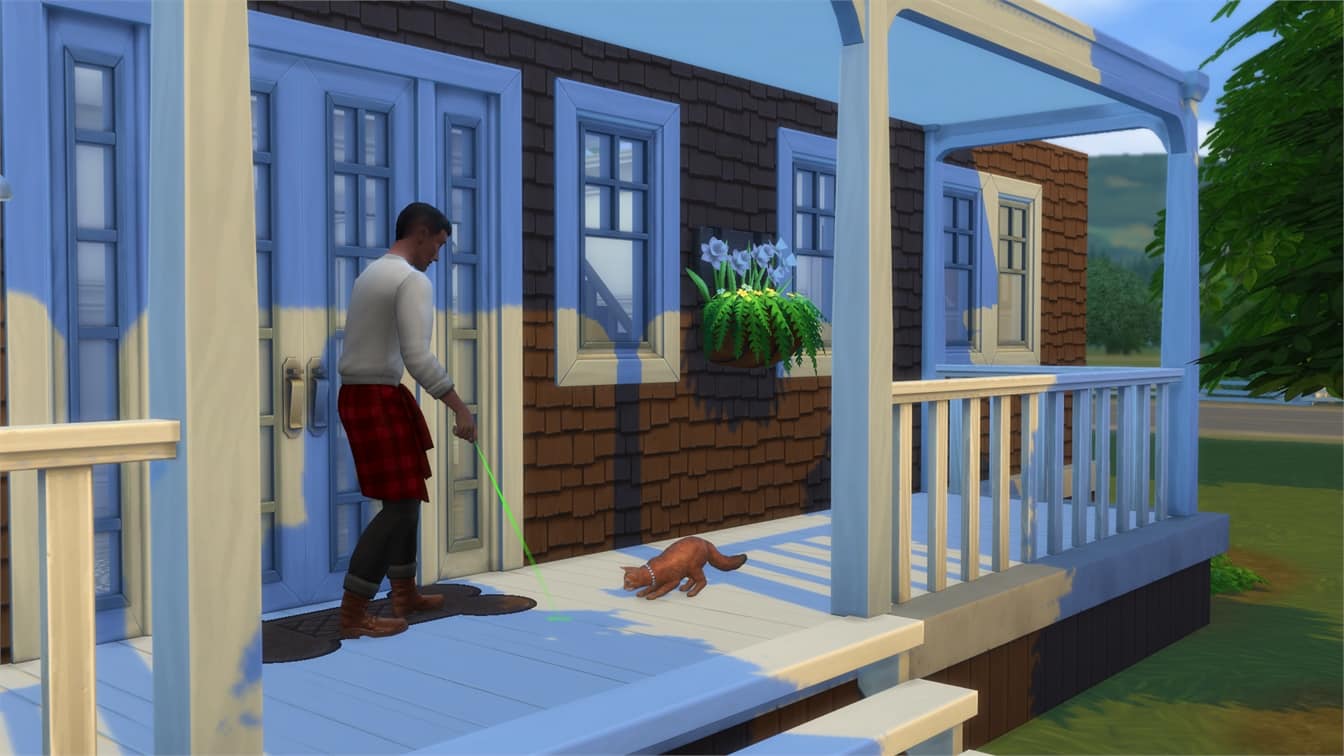
Cats get easily obsessed over lasers.

15 interesting facts about Cats and Dogs in The Sims 4

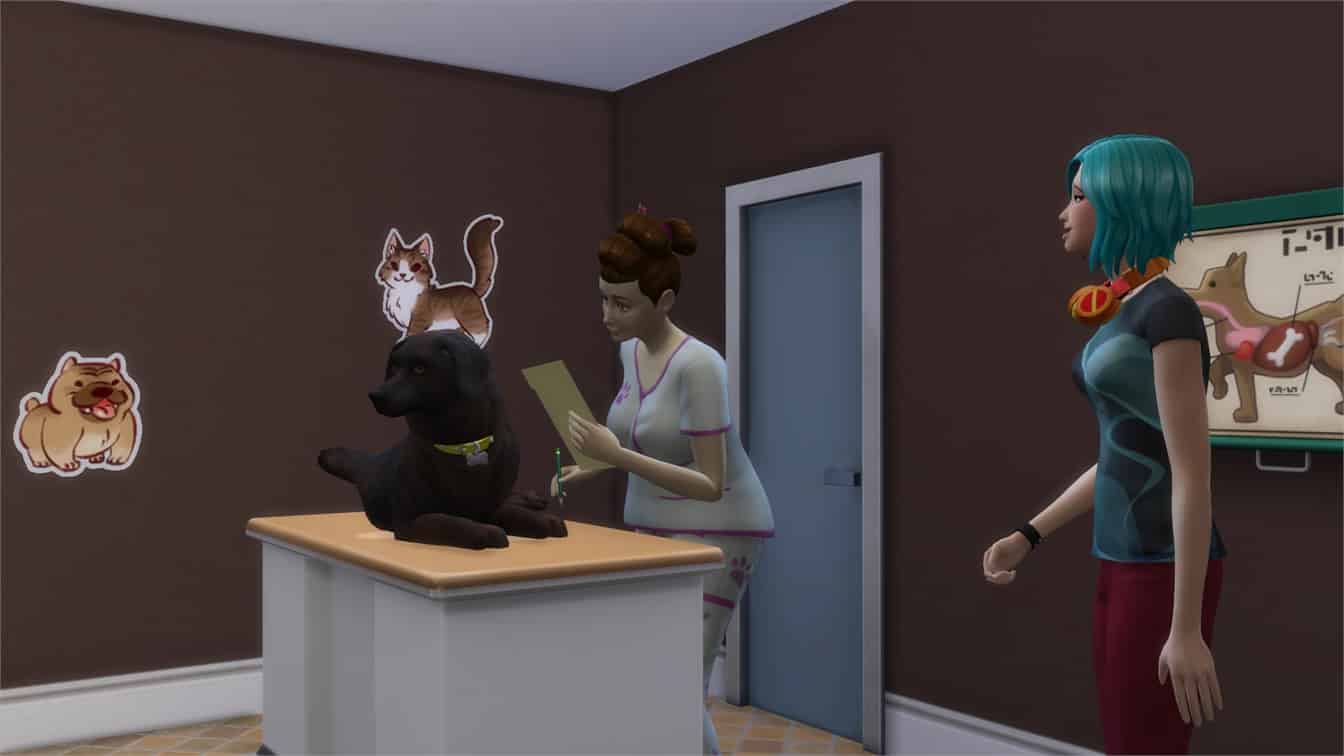
Both cats and dogs can get stressed out when being examined at the Vet. Make sure the veterinarian calms them down regularly!

15 interesting facts about Cats and Dogs in The Sims 4

Some cats are pure criminal masterminds.

15 interesting facts about Cats and Dogs in The Sims 4

The Sims 4 Cats & Dogs: Brindleton Bay Interactive Map Overview

Sims Camp 2017 trip has been sponsored by EA!

The Sims 4 Cats & Dogs Expansion Pack comes with a brand new world called Brindleton Bay. This world is packed with 4 neighborhoods, 3 of which feature 5 lots and 1 which features 1 lot.

Down below you can check out our interactive overview of Brindleton Bay’s map which features information about Lot Sizes and Types. As you might’ve noticed there are also special icons for each neighborhood just like with City Living’s San Myshuno and so we also included name and description for each neighborhood.

[ult_hotspot main_img=”id^67629|url^https://simscommunity.info/wp-content/uploads/2017/10/Screenshot-227.png|caption^null|alt^null|title^Screenshot (227)|description^null”][ult_hotspot_items icon=”Defaults-map-marker” icon_size=”12″ icon_color=”#c12c2c” icon_style=”advanced” icon_border_style=”solid” icon_color_border=”#c12c2c” icon_border_size=”2″ icon_border_radius=”500″ icon_border_spacing=”” tooltip_custom_color=”#1e73be” tooltip_custom_bg_color=”#ffffff” tooltip_width=”” tooltip_animation=”glow” tooltip_continuous_animation=”glow” glow_color=”#ffffff” hotspot_position=”37.117903930131,32.88343558282209″ tooltip_custom_border_size=”border-style:solid;|border-width:2px;border-radius:3px;|border-color:#1e73be;”]Name: Brindleton Pawspital
Lot Type:
Vet Clinic
Size: 40×30[/ult_hotspot_items][ult_hotspot_items icon=”Defaults-map-marker” icon_size=”12″ icon_color=”#c12c2c” icon_style=”advanced” icon_border_style=”solid” icon_color_border=”#c12c2c” icon_border_size=”2″ icon_border_radius=”500″ icon_border_spacing=”” tooltip_custom_color=”#1e73be” tooltip_custom_bg_color=”#ffffff” tooltip_width=”” tooltip_animation=”glow” tooltip_continuous_animation=”glow” glow_color=”#ffffff” hotspot_position=”30.455103711790393,34.844708588957054″ tooltip_custom_border_size=”border-style:solid;|border-width:2px;border-radius:3px;|border-color:#1e73be;”]Lot Type: Empty
Size: 30×20[/ult_hotspot_items][ult_hotspot_items icon=”Defaults-map-marker” icon_size=”12″ icon_color=”#c12c2c” icon_style=”advanced” icon_border_style=”solid” icon_color_border=”#c12c2c” icon_border_size=”2″ icon_border_radius=”500″ icon_border_spacing=”” tooltip_custom_color=”#1e73be” tooltip_custom_bg_color=”#ffffff” tooltip_width=”” tooltip_animation=”glow” tooltip_continuous_animation=”glow” glow_color=”#ffffff” hotspot_position=”23.730895196506548,37.544095092024534″ tooltip_custom_border_size=”border-style:solid;|border-width:2px;border-radius:3px;|border-color:#1e73be;”]Lot Type: Unoccupied Residental Lot
Size: 30×30[/ult_hotspot_items][ult_hotspot_items icon=”Defaults-map-marker” icon_size=”12″ icon_color=”#c12c2c” icon_style=”advanced” icon_border_style=”solid” icon_color_border=”#c12c2c” icon_border_size=”2″ icon_border_radius=”500″ icon_border_spacing=”” tooltip_custom_color=”#1e73be” tooltip_custom_bg_color=”#ffffff” tooltip_width=”” tooltip_animation=”glow” tooltip_continuous_animation=”glow” glow_color=”#ffffff” hotspot_position=”24.37227074235808,27.973542944785272″ tooltip_custom_border_size=”border-style:solid;|border-width:2px;border-radius:3px;|border-color:#1e73be;”]Lot Type: Occupied Residental Lot
Size: 40×40[/ult_hotspot_items][ult_hotspot_items icon=”Defaults-map-marker” icon_size=”12″ icon_color=”#c12c2c” icon_style=”advanced” icon_border_style=”solid” icon_color_border=”#c12c2c” icon_border_size=”2″ icon_border_radius=”500″ icon_border_spacing=”” tooltip_custom_color=”#1e73be” tooltip_custom_bg_color=”#ffffff” tooltip_width=”” tooltip_animation=”glow” tooltip_continuous_animation=”glow” glow_color=”#ffffff” hotspot_position=”34.85262008733624,20.85697852760736″ tooltip_custom_border_size=”border-style:solid;|border-width:2px;border-radius:3px;|border-color:#1e73be;”]Name: Pupperstone Park
Lot Type:
Park
Size: 40×30[/ult_hotspot_items][ult_hotspot_items icon=”Defaults-map-marker” icon_size=”24″ icon_color=”#c12c2c” icon_style=”advanced” icon_border_style=”solid” icon_color_border=”#c12c2c” icon_border_size=”2″ icon_border_radius=”500″ icon_border_spacing=”” tooltip_custom_color=”#1e73be” tooltip_custom_bg_color=”#ffffff” tooltip_animation=”glow” tooltip_continuous_animation=”glow” glow_color=”#ffffff” hotspot_position=”38.213018558951966,23.43366564417178″ tooltip_custom_border_size=”border-style:solid;|border-width:2px;border-radius:3px;|border-color:#1e73be;”]

Sable Square

The cultural center of the city, Sable Square is ideal for cats and dogs alike. These people love their pets so much, they’ve built a monument to them right in the middle of town![/ult_hotspot_items][ult_hotspot_items icon=”Defaults-map-marker” icon_size=”12″ icon_color=”#c12c2c” icon_style=”advanced” icon_border_style=”solid” icon_color_border=”#c12c2c” icon_border_size=”2″ icon_border_radius=”500″ icon_border_spacing=”” tooltip_custom_color=”#1e73be” tooltip_custom_bg_color=”#ffffff” tooltip_width=”” tooltip_animation=”glow” tooltip_continuous_animation=”glow” glow_color=”#ffffff” hotspot_position=”64.8505731441048,16.07170245398773″ tooltip_custom_border_size=”border-style:solid;|border-width:2px;border-radius:3px;|border-color:#1e73be;”]Lot Type: Empty
Size: 40×30[/ult_hotspot_items][ult_hotspot_items icon=”Defaults-map-marker” icon_size=”12″ icon_color=”#c12c2c” icon_style=”advanced” icon_border_style=”solid” icon_color_border=”#c12c2c” icon_border_size=”2″ icon_border_radius=”500″ icon_border_spacing=”” tooltip_custom_color=”#1e73be” tooltip_custom_bg_color=”#ffffff” tooltip_width=”” tooltip_animation=”glow” tooltip_continuous_animation=”glow” glow_color=”#ffffff” hotspot_position=”73.27715611353712,24.53796012269939″ tooltip_custom_border_size=”border-style:solid;|border-width:2px;border-radius:3px;|border-color:#1e73be;”]Name: Club Calico
Lot Type:
Lounge
Size: 40×30[/ult_hotspot_items][ult_hotspot_items icon=”Defaults-map-marker” icon_size=”12″ icon_color=”#c12c2c” icon_style=”advanced” icon_border_style=”solid” icon_color_border=”#c12c2c” icon_border_size=”2″ icon_border_radius=”500″ icon_border_spacing=”” tooltip_custom_color=”#1e73be” tooltip_custom_bg_color=”#ffffff” tooltip_width=”” tooltip_animation=”glow” tooltip_continuous_animation=”glow” glow_color=”#ffffff” hotspot_position=”71.076692139738,34.96740797546013″ tooltip_custom_border_size=”border-style:solid;|border-width:2px;border-radius:3px;|border-color:#1e73be;”]Name: Salty Paws Saloon
Lot Type:
 Bar
Size: 20×15[/ult_hotspot_items][ult_hotspot_items icon=”Defaults-map-marker” icon_size=”12″ icon_color=”#c12c2c” icon_style=”advanced” icon_border_style=”solid” icon_color_border=”#c12c2c” icon_border_size=”2″ icon_border_radius=”500″ icon_border_spacing=”” tooltip_custom_color=”#1e73be” tooltip_custom_bg_color=”#ffffff” tooltip_width=”” tooltip_animation=”glow” tooltip_continuous_animation=”glow” glow_color=”#ffffff” hotspot_position=”63.615584061135365,35.70360429447853″ tooltip_custom_border_size=”border-style:solid;|border-width:2px;border-radius:3px;|border-color:#1e73be;”]Lot Type: Occupied Residental Lot
Size: 20×15[/ult_hotspot_items][ult_hotspot_items icon=”Defaults-map-marker” icon_size=”12″ icon_color=”#c12c2c” icon_style=”advanced” icon_border_style=”solid” icon_color_border=”#c12c2c” icon_border_size=”2″ icon_border_radius=”500″ icon_border_spacing=”” tooltip_custom_color=”#1e73be” tooltip_custom_bg_color=”#ffffff” tooltip_width=”” tooltip_animation=”glow” tooltip_continuous_animation=”glow” glow_color=”#ffffff” hotspot_position=”60.01978711790393,41.96127300613497″ tooltip_custom_border_size=”border-style:solid;|border-width:2px;border-radius:3px;|border-color:#1e73be;”]Lot Type: Unoccupied Residental Lot
Size: 20×20[/ult_hotspot_items][ult_hotspot_items icon=”Defaults-map-marker” icon_size=”24″ icon_color=”#c12c2c” icon_style=”advanced” icon_border_style=”solid” icon_color_border=”#c12c2c” icon_border_size=”2″ icon_border_radius=”500″ icon_border_spacing=”” tooltip_custom_color=”#1e73be” tooltip_custom_bg_color=”#ffffff” tooltip_animation=”glow” tooltip_continuous_animation=”glow” glow_color=”#ffffff” hotspot_position=”50.11599344978166,30.67292944785276″ tooltip_custom_border_size=”border-style:solid;|border-width:2px;border-radius:3px;|border-color:#1e73be;”]

Whiskerman’s Wharf

A favorite hangout for the Bay’s feline citizens, who can often be found climbing around down at the docks. Whiskerman’s Wharf is also enjoyed by fishermen and tourists alike.[/ult_hotspot_items][ult_hotspot_items icon=”Defaults-map-marker” icon_size=”12″ icon_color=”#c12c2c” icon_style=”advanced” icon_border_style=”solid” icon_color_border=”#c12c2c” icon_border_size=”2″ icon_border_radius=”500″ icon_border_spacing=”” tooltip_custom_color=”#1e73be” tooltip_custom_bg_color=”#ffffff” tooltip_width=”” tooltip_animation=”glow” tooltip_continuous_animation=”glow” glow_color=”#ffffff” hotspot_position=”43.729530567685586,49.69133435582822″ tooltip_custom_border_size=”border-style:solid;|border-width:2px;border-radius:3px;|border-color:#1e73be;”]Lot Type: Occupied Residental Lot
Size: 64×64[/ult_hotspot_items][ult_hotspot_items icon=”Defaults-map-marker” icon_size=”12″ icon_color=”#c12c2c” icon_style=”advanced” icon_border_style=”solid” icon_color_border=”#c12c2c” icon_border_size=”2″ icon_border_radius=”500″ icon_border_spacing=”” tooltip_custom_color=”#1e73be” tooltip_custom_bg_color=”#ffffff” tooltip_width=”” tooltip_animation=”glow” tooltip_continuous_animation=”glow” glow_color=”#ffffff” hotspot_position=”39.741402838427945,62.82016871165644″ tooltip_custom_border_size=”border-style:solid;|border-width:2px;border-radius:3px;|border-color:#1e73be;”]Lot Type: Unoccupied Residental Lot
Size: 20×20[/ult_hotspot_items][ult_hotspot_items icon=”Defaults-map-marker” icon_size=”12″ icon_color=”#c12c2c” icon_style=”advanced” icon_border_style=”solid” icon_color_border=”#c12c2c” icon_border_size=”2″ icon_border_radius=”500″ icon_border_spacing=”” tooltip_custom_color=”#1e73be” tooltip_custom_bg_color=”#ffffff” tooltip_width=”” tooltip_animation=”glow” tooltip_continuous_animation=”glow” glow_color=”#ffffff” hotspot_position=”30.069596069868997,66.50115030674847″ tooltip_custom_border_size=”border-style:solid;|border-width:2px;border-radius:3px;|border-color:#1e73be;”]Lot Type: Empty
Size: 30×20[/ult_hotspot_items][ult_hotspot_items icon=”Defaults-map-marker” icon_size=”12″ icon_color=”#c12c2c” icon_style=”advanced” icon_border_style=”solid” icon_color_border=”#c12c2c” icon_border_size=”2″ icon_border_radius=”500″ icon_border_spacing=”” tooltip_custom_color=”#1e73be” tooltip_custom_bg_color=”#ffffff” tooltip_width=”” tooltip_animation=”glow” tooltip_continuous_animation=”glow” glow_color=”#ffffff” hotspot_position=”28.5139192139738,57.78949386503067″ tooltip_custom_border_size=”border-style:solid;|border-width:2px;border-radius:3px;|border-color:#1e73be;”]Lot Type: Empty
Size: 30×20[/ult_hotspot_items][ult_hotspot_items icon=”Defaults-map-marker” icon_size=”12″ icon_color=”#c12c2c” icon_style=”advanced” icon_border_style=”solid” icon_color_border=”#c12c2c” icon_border_size=”2″ icon_border_radius=”500″ icon_border_spacing=”” tooltip_custom_color=”#1e73be” tooltip_custom_bg_color=”#ffffff” tooltip_width=”” tooltip_animation=”glow” tooltip_continuous_animation=”glow” glow_color=”#ffffff” hotspot_position=”32.29394104803494,76.68519938650307″ tooltip_custom_border_size=”border-style:solid;|border-width:2px;border-radius:3px;|border-color:#1e73be;”]Lot Type: Occupied Residental Lot
Size: 40×40[/ult_hotspot_items][ult_hotspot_items icon=”Defaults-map-marker” icon_size=”24″ icon_color=”#c12c2c” icon_style=”advanced” icon_border_style=”solid” icon_color_border=”#c12c2c” icon_border_size=”2″ icon_border_radius=”500″ icon_border_spacing=”” tooltip_custom_color=”#1e73be” tooltip_custom_bg_color=”#ffffff” tooltip_animation=”glow” tooltip_continuous_animation=”glow” glow_color=”#ffffff” hotspot_position=”43.12909388646288,75.21280674846625″ tooltip_custom_border_size=”border-style:solid;|border-width:2px;border-radius:3px;|border-color:#1e73be;”]

Cavalier Cove

Known for its hiking trails and sprawling coastal properties, Cavalier Cove is the perfect place to go exploring or chase seagulls with an adventurous pup![/ult_hotspot_items][ult_hotspot_items icon=”Defaults-map-marker” icon_size=”24″ icon_color=”#c12c2c” icon_style=”advanced” icon_border_style=”solid” icon_color_border=”#c12c2c” icon_border_size=”2″ icon_border_radius=”500″ icon_border_spacing=”” tooltip_custom_color=”#1e73be” tooltip_custom_bg_color=”#ffffff” tooltip_animation=”glow” tooltip_continuous_animation=”glow” glow_color=”#ffffff” hotspot_position=”81.77538209606988,82.94286809815951″ tooltip_custom_border_size=”border-style:solid;|border-width:2px;border-radius:3px;|border-color:#1e73be;”]

Deadgrass Isle

Once the site of a mysterious shipwreck, the Deadgrass Isle is now home to the world famous Brindleton Light and the city’s largest population of indigenous strays. Lately, however, there have been some rumors about strange visitors after sundown…[/ult_hotspot_items][ult_hotspot_items icon=”Defaults-map-marker” icon_size=”12″ icon_color=”#c12c2c” icon_style=”advanced” icon_border_style=”solid” icon_color_border=”#c12c2c” icon_border_size=”2″ icon_border_radius=”500″ icon_border_spacing=”” tooltip_custom_color=”#1e73be” tooltip_custom_bg_color=”#ffffff” tooltip_width=”” tooltip_animation=”glow” tooltip_continuous_animation=”glow” glow_color=”#ffffff” hotspot_position=”65.97980349344978,70.67101226993864″ tooltip_custom_border_size=”border-style:solid;|border-width:2px;border-radius:3px;|border-color:#1e73be;”]Name: Deadgrass Discoveries
Lot Type:
 Museum
Size: 30×30[/ult_hotspot_items][/ult_hotspot]

Sims Camp 2017 trip has been sponsored by EA!

The Sims 4: Sim Cap Limit Feature coming with Upcoming Update

Sims Camp 2017 experience has been sponsored by EA!

During this year’s Sims Camp we had a chance to get our hands on The Sims 4 Cats & Dogs Expansion Pack, including the latest build of The Sims 4 that was available at that time.

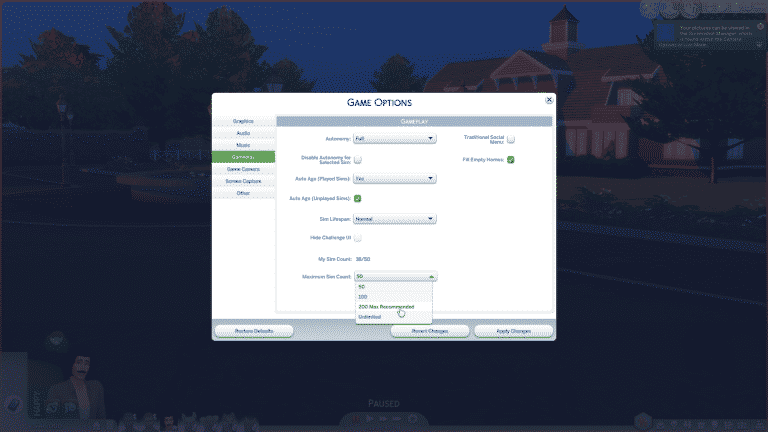
We noticed a brand new tool in The Sims 4 Game Settings that can help reduce all your issues with Sims being culled in the game.

There’s a “cap limit” for Sims in each save game. The current version of The Sims 4 has a maximum amount of 180 Sims allowed in one save game but with The Sims 4 Cats & Dogs’ free content update you’ll get 4 different options:

  • 50
  • 100
  • 200
  • Unlimited

The Sims 4: Sim Cap Limit Feature coming with Upcoming Update

There is something you need to know when choosing the unlimited option. The game itself will let you know that the game engine might run into a few hiccups here and there as you progress in your save game which will only make it more difficult to load the save game and jump between the loading screens.

The Sims 4: Sim Cap Limit Feature coming with Upcoming Update

Don’t want to lose your favorite households but also think that your computer can’t handle the “unlimited” option? You can pick households in the Household Manager and pick the ones you like as your favorite ones. The ones you marked as your favorite will not be culled when exceeding the Sim cap limit.

The Sims 4: Sim Cap Limit Feature coming with Upcoming Update

Sims Camp 2017 experience has been sponsored by EA!

The Sims 4 Cats & Dogs: Brindleton Bay Exclusive Overview

0

We got a chance to play The Sims 4 Cats & Dogs Expansion Pack during Sims Camp 2017. For our first gameplay video I’ve decided to showcase the entire world of Brindleton Bay.

Want to learn more about Cats & Dogs? Head over to our Cats & Dogs News Category for all the latest info!

The Sims 4 Cats & Dogs: Exclusive First Impressions / Gameplay by SimsCampers

Sims Camp 2017 trip has been sponsored by EA!

During Sims Camp 2017 we were able to capture exclusive footage of The Sims 4 Cats & Dogs. This last embargo lets us give you all the needed information and footage about general gameplay of The Sims 4 Cats & Dogs Expansion Pack as well as our first impressions of the game.

Down below you’ll see a list of articles and videos published by other SimsCampers (including us) that you can watch and read.

After each event atendee adds new footage we’ll update this post so make sure you have this post bookmarked for new footage and info!

Articles

Videos

The Sims 4 Cats & Dogs: 7 New Screens of Cats and Dogs

2

SimGuruEmory is still recreating your favorite cats and dogs in The Sims 4 Cats & Dogs Expansion Pack. Here are 7 new screens from the game that he shared!

The Sims 3: Steam Halloween Sale

0

If you are still looking to add a few more packs from The Sims 3 to your collection then you are in luck! As part of the Steam Halloween Sale ALL expansion packs and stuff packs are a massive 75% off! Be quick as the Halloween Sale is only on until 10AM PDT on 1st November 2017!

The Sims 3: Steam Halloween Sale

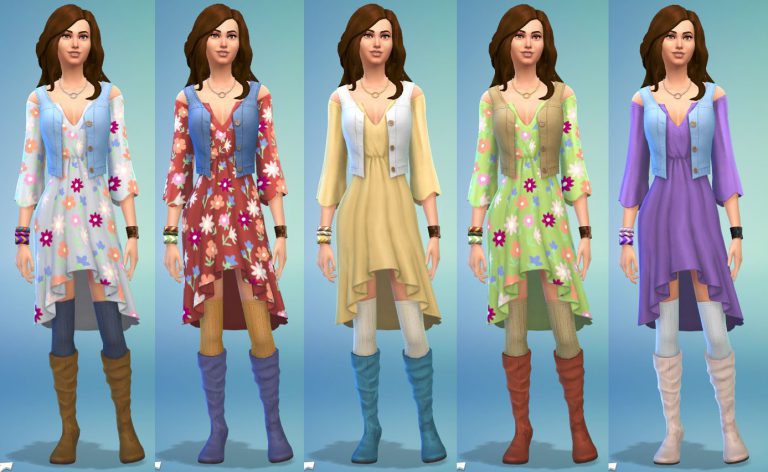
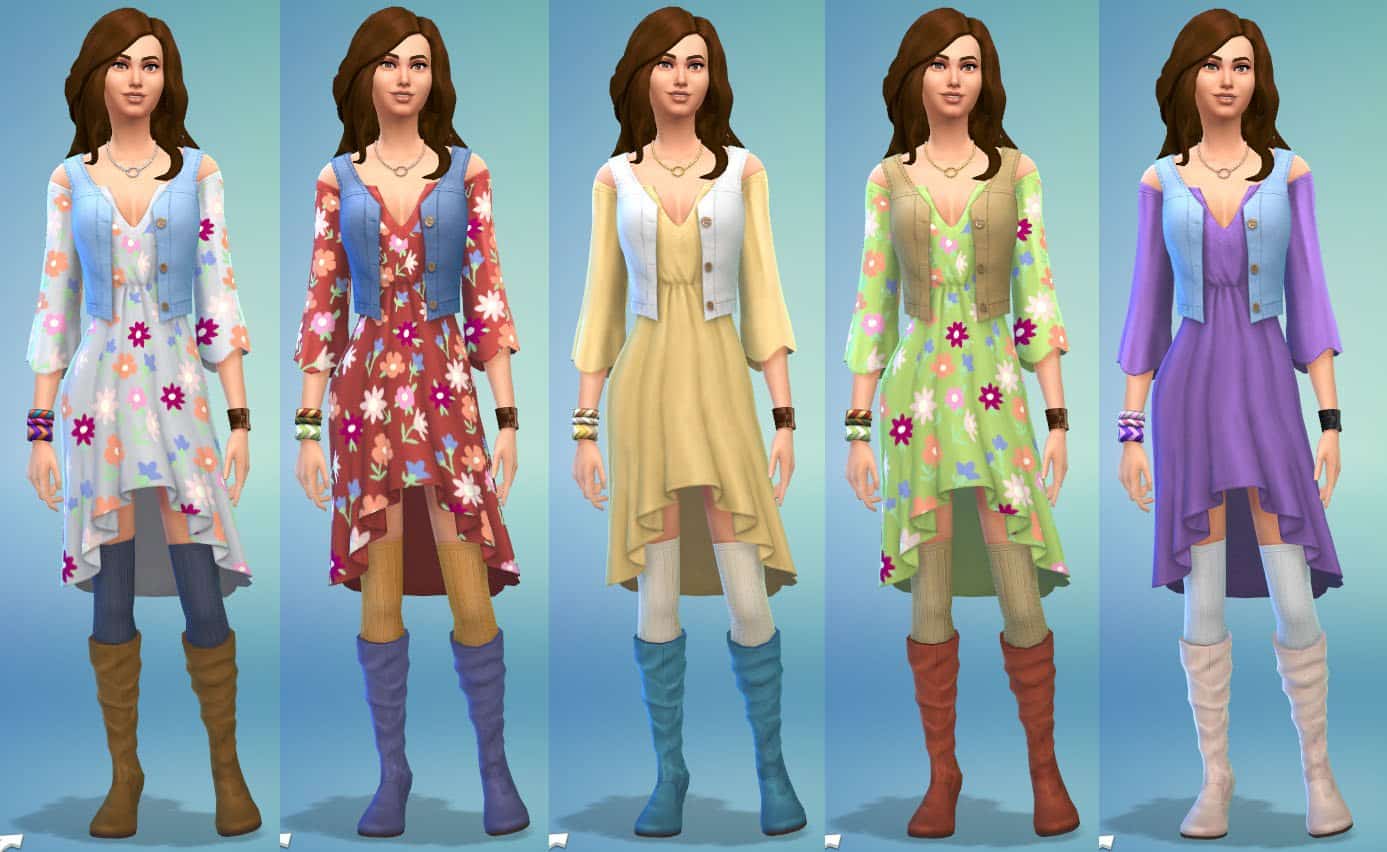
The Sims 4 Laundry Day Stuff: First Look at Styled Looks and Rooms

3

SimGuruRad, one of the producers on The Sims 4 who’s responsible for Styled Looks in CAS and Styled Rooms in Build Mode has shared 2 new screenshots. These screens showcase the first styled looks for rooms and outfits in The Sims 4 Laundry Day Stuff Pack.

To top it all off, she even gave you an opportunity to vote and pick the name for the Room and Outfit Styled Looks. You can find the polls embedded below the screens.

Being the Architect in The Sims 4: Ludwig Mies van der Rohe

Hi, I’m Jason Sterling. Everyone who designs a structure within the Sims game is an architect. Whether you consider your work good or bad, simple or elegant, experienced or novice you are still an architect. This series of articles will highlight individual architects from the past. A person that was responsible for establishing and defining a revolution of the discipline. Each article will also demonstrate how you can be that architect and execute their style within the game. In this article will we focus on the work of  Ludwig Mies van der Rohe.

Ludwig Mies van der Rohe; born Maria Ludwig Michael Mies; March 27, 1886 – August 17, 1969) was a German-American architect. Along with Le Corbusier, Walter Gropius and Frank Lloyd Wright, he is widely regarded as one of the pioneers of modernist architecture. Mies was the last director of the Bauhaus, a seminal school in modern architecture. He accepted the position to head the architectural school at the Illinois Insitute of Technology in Chicago. Mies sought to establish a new architectural style that could represent modern times just as Classical and Gothic did for their own eras. He called his buildings “skin and bones” architecture. He is often associated with his quotation of the aphorisms, “less is more” and “God is in the Details”. (Information sourced directly from Wikipedia. The full article is located here: Mies van der Rohe Article )

A great deal of what we consider modern corporate and residential building can be traced back to the work of Mies van der Rohe. He developed and ultimately popularized the idea of completely open spaces and using glass and steel to divide interior volumes. The ubiquitous presence of steel frame buildings clad in plate glass curtain walls are directly tied to the influence of this legendary architect. Following are several examples of his work. #1. S.R. Crown Hall – #2 Barcelona Pavilion – #3 A. Seagram Building/ B. Westmount Square – #4 Neue Nationalgalerie (The New National Gallery- Berlin)

Being the Architect in The Sims 4: Ludwig Mies van der Rohe

I’m going to illustrate executing this style in the Sims 4 below.

You can also see a video walk-through of the build here:

Youtube Closed Roof Soffit Tutorial / Twitch Closed Roof Soffit Tutorial

Being the Architect- Mies van der Rohe: 

Building the National Gallery Part 1:

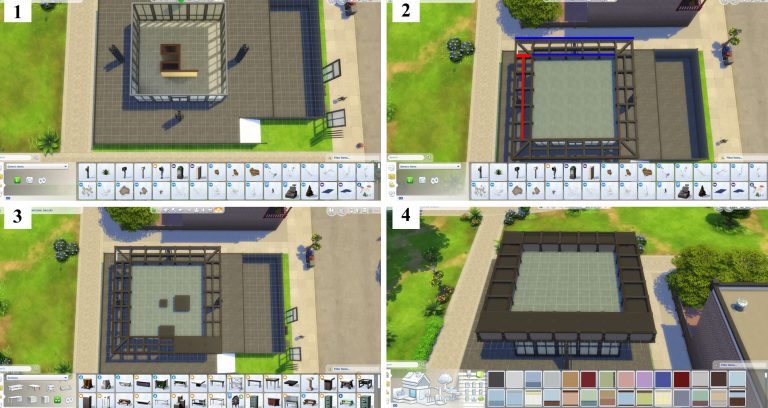
All you need, with the exception of walls, to execute this look are the five items below- A. Tall Slate Tile/ B. Glacemaster 1700C/ C. Tic-Tac-Tiles Pedestal/ D. Concrete Victorian Fence/ E. The Action Item/ (#1) The original that I’m following above sits on a base as shown below. The courtyard is used as a sculpture gallery. You can build something of this sort but it’s not necessary. (#2) This is a simple build. I’ve done a square 10×10 box with the highest wall height. Then, “I’ve placed The Action Item” door in the center on one side. I’ve covered the rest of the exterior with the “Glacemaster 1700C” windows. (#3) Next we’ll use the “Tall Slate Tile” to create support columns. (#4- continued in box #1 below)

Being the Architect in The Sims 4: Ludwig Mies van der Rohe

Building the National Gallery Part 2:

Next, merge the tall tiles together as shown. (#1) Start the overhanging roof by creating the exterior framing walls highlighted in blue, using the medium, short half wall. In the space between these two constructs use the “Concrete Victorian Fence” to create the interior braces for the soffit highlighted in red. Once these have been built remove the flooring in the spaces to expose the ground beneath. (#2) We will fill in the soffit space with a faux roof created by using the “Tic-Tac-TilesPedistal”. Double their size by pressing the “]” button on the keyboard while holding the item. Then, slide the item into place as shown. (#3) Once in place, press “Alt” and the “9” button to raise the object until it creates a flush roofing look. (#4) This also works for creating single space soffits with an un-upsized pedestal.

Being the Architect in The Sims 4: Ludwig Mies van der Rohe

The finished structure is below.

Being the Architect in The Sims 4: Ludwig Mies van der Rohe

I hope you’ve enjoyed this article and the history we are all, even when unwittingly, participating in every time we design and build within the Sims. Remember every time you look at a steel framed office tower with a curtain glass wall you are looking at Mies van der Rohe. If you have any questions regarding this article please post them below. Do you have any builds you’d like to share? Please feel free to post those below as well. We would love to see them! Thank-you for reading.

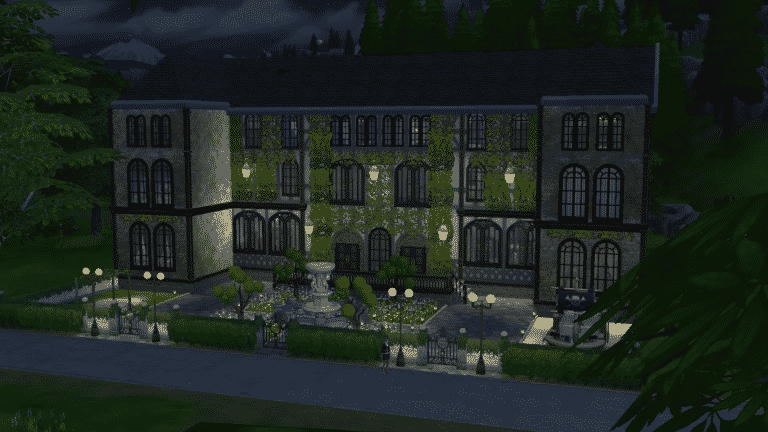
How to Add Boarding Schools to The Sims 4

Have you ever wished you could send all those kids taking up space in the house somewhere else for a while? Maybe you’re playing a Perfect Genetics challenge and need more space in the house because you haven’t had a child with perfect genes yet. Maybe you’re just sick and tired of cleaning up after half a dozen messy rugrats. Whatever your reasons, I have the solution. Ship the kiddos off to boarding school!

Not possible, you say? Oh, ye of little faith! I’m going to show you how to have a fully functional boarding school in The Sims 4. The best part? No add-on packs, custom content, or mods required!

How to Add Boarding Schools to The Sims 4

What You Will Need

  • At least the base game of The Sims 4. Add-ons and custom content can help make your boarding school look nicer but aren’t necessary.
  • Some building skills or alternatively, access to the Gallery.

Build It and They Will Come

  1. First, you need a boarding school for your Sim children to attend. Pick any lot in any world you want and build one. If you don’t want to bother with building, download one from the Gallery. Your boarding school can be as simple or as fancy as you want but it should have 8 beds and at least the basic necessities Sims need to live (toilet, shower, fridge, etc). Since lots of children will be living there, you may want to add toys for them to play with. It’s a good idea to add things that a school would have, too, like a classroom and library.
  2. Now that you have the building ready, it needs at least one adult Sim living in it. Someone has to educate all those children, after all! You can make a Sim yourself in CAS, download one from the Gallery, or just grab a random townie and stick ’em in the boarding school, whatever floats your boat. The school will likely be too expensive for your adult Sim to afford with just $20k so bring up the cheat menu on the world screen with CTRL+SHIFT+C and type “freerealestate on” before you have your Sim purchase and move into the building.
  3. The boarding school is now ready to take in new students! You can move children and teens over to the boarding school via Manage Worlds. Since a lot of people are still unfamiliar with this process, I’ve got screenshots to help.

Adding the Students

In your household with the child you want to send to boarding school, go to Manage Worlds. You’ll be taken to the world select screen. In the top right corner, select Household Management.

How to Add Boarding Schools to The Sims 4

You’ll be shown all your played households here by default but you can see all your unplayed households too by clicking the Unplayed tab at the top. Both your active household and your boarding school household should be here but if it isn’t, just look under Unplayed. Select your active household with the child you want to send to the boarding school.

How to Add Boarding Schools to The Sims 4

You’ll be taken to this screen where you can see all your household’s details. Select Transfer Sims Between Households.

How to Add Boarding Schools to The Sims 4

Now find your boarding school household in the Select A Household section on the right and select that household.

How to Add Boarding Schools to The Sims 4

Select your child Sim that you want to move to the boarding school and select Transfer Sim(s).

How to Add Boarding Schools to The Sims 4

Voila! Your child Sim is now living at your boarding school and being taught and cared for by the adult Sim there.

Some Things to Keep in Mind

  • This exact same method also works for orphanages and nursing homes. Just build a nursing home or orphanage instead and move babies, toddlers, and elders over in the same way.
  • You can send up to 7 children/teens to the boarding school before the household is full. After that, you’ll have to place another boarding school with a new educator in the world for more children and teens to attend.
  • Teens won’t move out of the boarding school on their own when they become young adults, but you can easily move out young adult Sims yourself with the Manage Households menu.
  • It’s a good idea to check up on the boarding school every once in a while so you can either move out young adult Sims or replace the educator with a younger one when they reach elderhood. If your educator dies of old age while there are still children in the house, the game will delete the children and they will disappear from your family tree with no tombstone or urn as if they never existed. This is easily prevented by just replacing the educator when you notice they’ve gone grey.

Recommended (But Not Required) Mod

  • Deaderpool’s MC Command Centre mod can do a variety of things to make running a boarding school easier. It can raise the maximum household limit so your boarding school can hold more than seven students at a time. It can prevent the game from deleting “orphaned” children when your elder educator dies. You can also flag your educator to never age, marry, procreate, or move out of the boarding school. This will ensure that you’ll never have to replace or manage your educator after you initially place him/her in the boarding school.

Just for Fun

  • Try giving uniforms to the kids and teens at your boarding school!

Not a Builder? No Problem!

Look for SnarkyWitch on the Gallery and search for Savant Boarding School in my catalogue! It has everything a group of students need to work, live, and play. Savant Boarding School is CC-free!

The Sims 4 Cats & Dogs: Vet Clinic Livestream YouTube Replay

0

For those who have issues or just prefer watching content over YouTube we’ve added The Sims Team’s official The Sims 4 Cats & Dogs Vet Clinic Livestream from Twitch onto our YouTube Channel.

The original livestream with the chat can be found here!