Home Blog Page 448

The Sims 4 #TeamTrick vs #TeamTreat Challenge: #TeamTreat Wins Round One!

0

The Sims Team has announced that #TeamTreat won the first round of The Sims 4’s #TeamTrick vs #TeamTreat Challenge.

On the left are the doors that belong to #TeamTrick and on the right are the doors that belong to #TeamTreat, which we’ll receive in The Sims 4’s upcoming update.

DoorsBoth_v1

The Sims 4: How to Personalize Your Paintings with Screenshots

9

Hey guys! Today I wanted to talk about a way you can make your Sims game feel unique and personal by using your screenshots as paintings.

Tools needed:

Step 1

Create a folder on your computer where you will be keeping all your images for this project.

Step 2

Open up S4S and select “standalone recolor” under the object icon.

Step 3

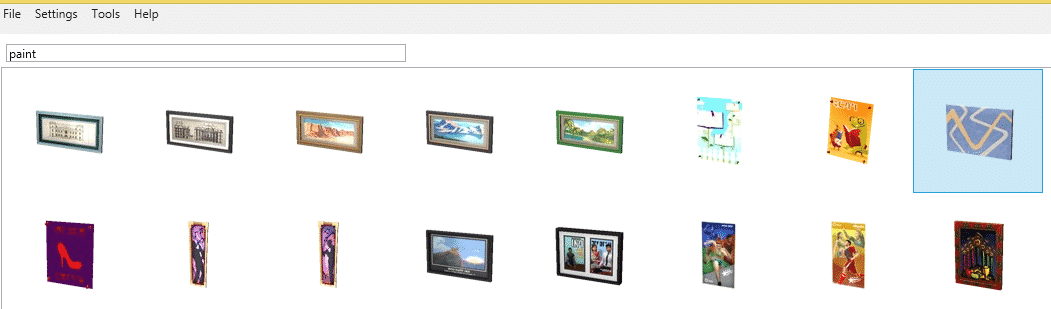
Search for paintings in the menu bar by typing in paint; for this tutorial we will be using the one I highlighted in the screenshot but you can use any size you want.  Click the next button on the bottom right corner and label your package anything you want.

painttutorial1

Step 4

Now you are going to extract your .dds image so you can use it as a template for your screenshots from your game.  Select the texture tab, highlight texture, then click export.  Name the texture anything you want.

painttutorial1a

Step 5

After extracting the .dds texture, you are going to open Gimp and convert that into a .png image so you can edit it in your graphic program.  I am assuming that you do not have Photoshop CS and the DDS plugin installed; if you do then skip this step.  Begin by opening the image in Gimp, select OK when it asks you if you want to load DDS.  Under the file drop down menu, you are going to select “export as”.  Go down to where it says “select file type (by extension)” and then scroll down till you find .png.  Select export and make sure you change the compression level to zero.  Leaving it at 9 will make your image grainy looking.   Click on export in the popup menu.

painttutorial1c painttutorial1d painttutorial1e

Step 6

Now comes the fun part!  Load the image you just converted into your graphics program and also load your favorite screens.  You will be copy/pasting these over the EA image.  You may need to do some crop work and resizing to get it just right.

These are the end results of the screens I chose for this tutorial.  Notice that I did not cover the edges with images, I left those as is.

LMPPainting2c LMPPainting1c

Step 7

Now you are going to load these back into S4S so they will show up in your game.  Open up the package in S4S and select the texture tab.  This time you will be choosing import.  A popup will appear and you select the image you want.  Then select the open button.  To add more images, click the add swatch on the top right corner.  You can also delete images by highlighting it and then clicking the remove swatch button.  The more swatches you add, the larger the file becomes.  So, try to keep them between 10 – 15.  Also, just for variety make sure you use different size paintings.  Once you are finished adding your swatches, click save and you are done.  Now all that is left for you to do is test it out in your game.

painttutorial1f

Step 8

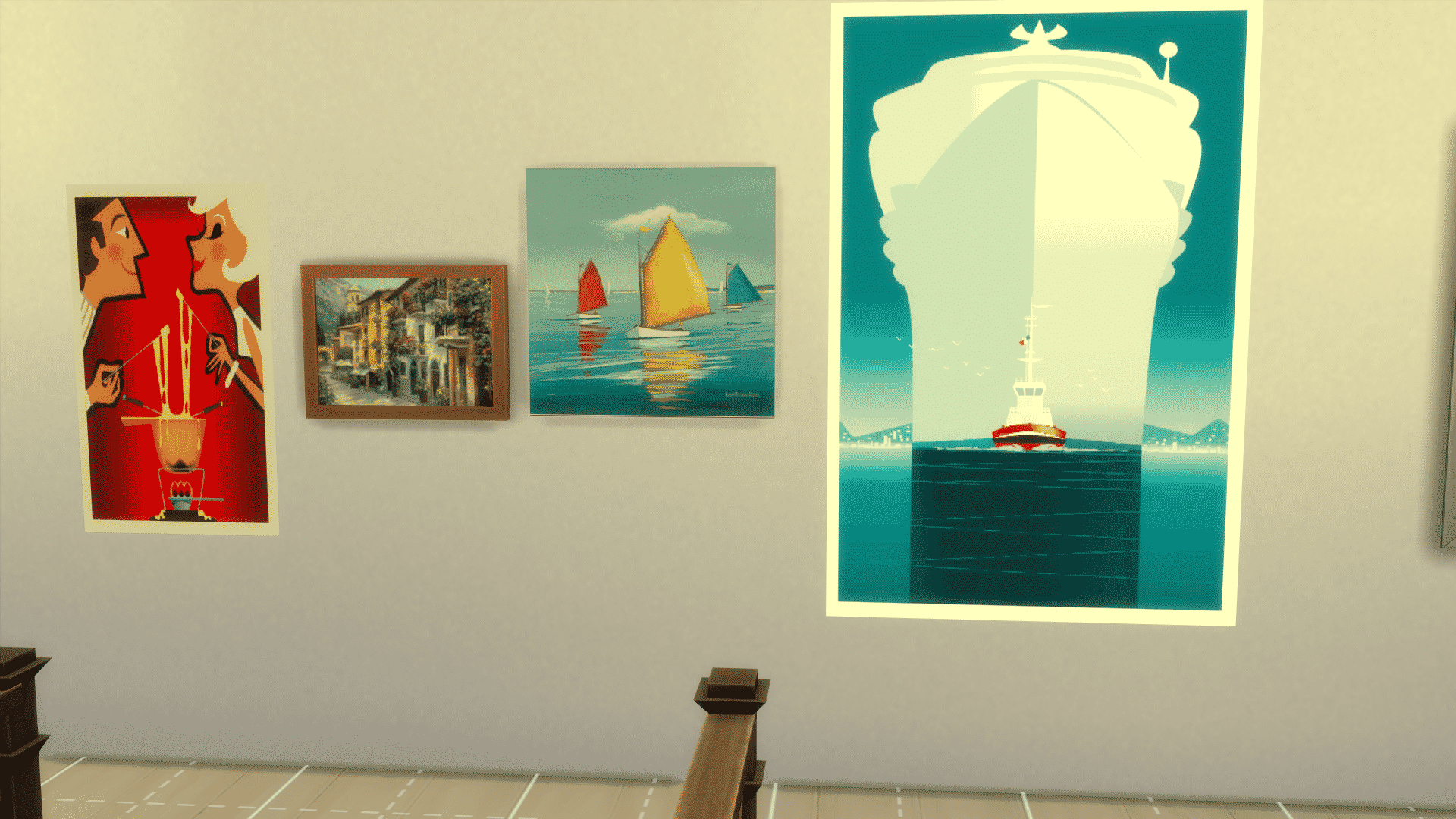
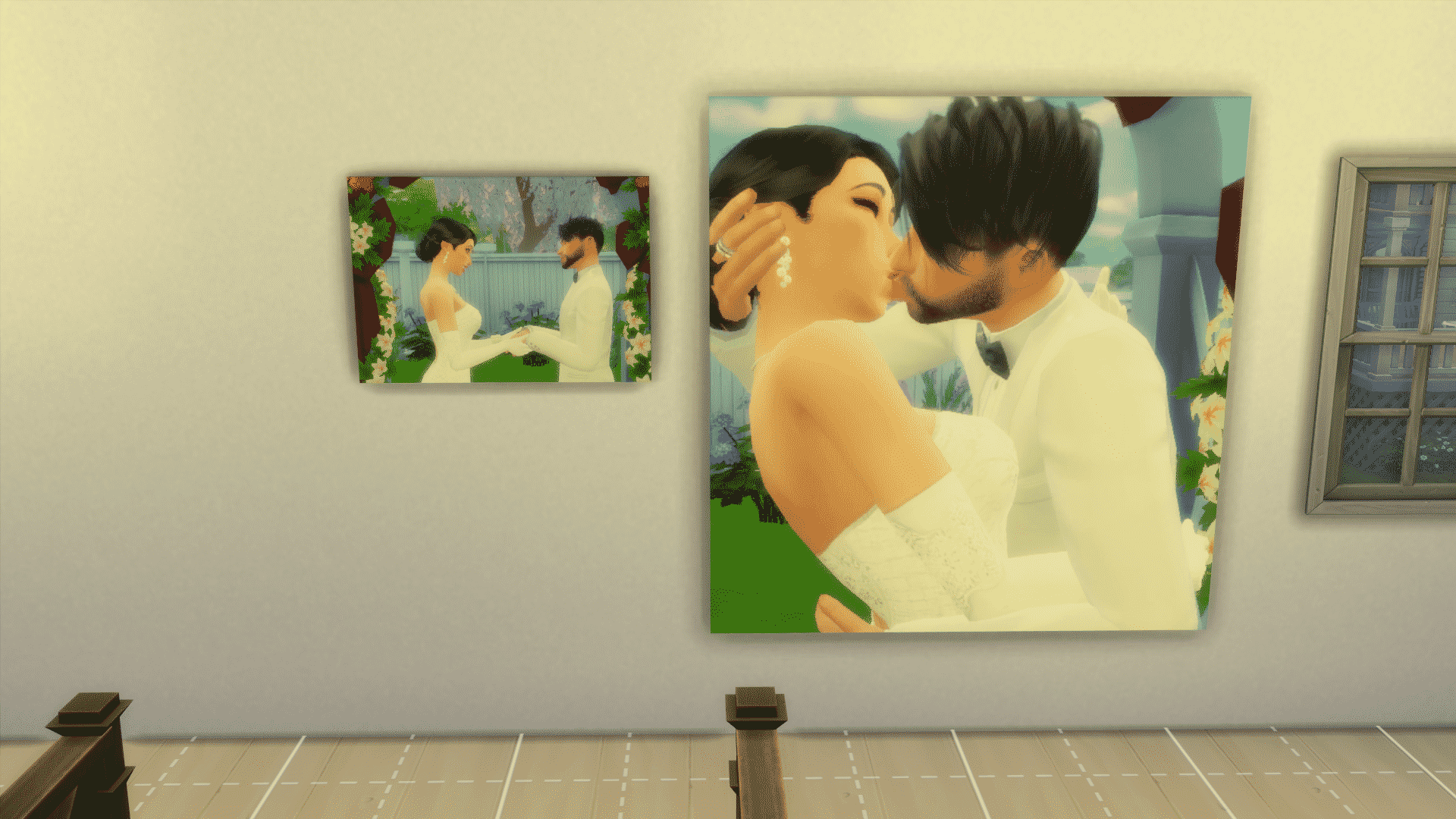
Test it out in game and make sure it’s what you wanted.  You may need to do some editing till you get used to where the edges of the paintings should be.  These are some that I have done.  Pretty cool, right?  Since the photography skill doesn’t allow you to take actual family photos this is an easy way for you to stage your Sims (including that baby that can’t be taken to the studio) and then hang their family portrait on your Sims walls.  As you can see from the last screen, this method can be used to change your paintings and posters as well.

10-24-15_11-15-11 AM 10-24-15_11-13-50 AM 10-24-15_11-16-47 AM

The Sims 4 Gallery Spotlight: Spooky Houses and Venues (Part 2)

header_logo_en

Welcome to our seventh interactive The Sims 4 Gallery Spotlight! In this Spotlight, we’re featuring, once again, some of the most creative Spooky Houses and Venues created by Simmers.

Hover over the pulsing plumbobs to see screenshots of marked areas. Pulsing plumbob that’s on the left bottom corner contains all the info (and download link) of the lot.

To see more of our previous Gallery Spotlights, CLICK HERE!

[ult_hotspot main_img=”40994|https://simscommunity.info/wp-content/uploads/2015/10/10-24-15_12-53-22-AM.jpg”][ult_hotspot_items icon_type=”custom” icon_img=”37721|https://simscommunity.info/wp-content/uploads/2015/08/plumhotspot.png” img_width=”26″ tooltip_custom_color=”#1e73be” tooltip_custom_bg_color=”#ffffff” tooltip_width=”500″ enable_bubble_arrow=”off” tooltip_continuous_animation=”on” hotspot_position=”40.99591988130564,63.345158597662774″ tooltip_custom_border_size=”border-style:solid;|border-width:2px;border-radius:5px;|border-color:#81d742;”]
10-24-15_12-53-33 AM

[/ult_hotspot_items][ult_hotspot_items icon_type=”custom” icon_img=”37721|https://simscommunity.info/wp-content/uploads/2015/08/plumhotspot.png” img_width=”26″ tooltip_custom_color=”#1e73be” tooltip_custom_bg_color=”#ffffff” tooltip_width=”500″ enable_bubble_arrow=”off” tooltip_continuous_animation=”on” hotspot_position=”52.52225519287834,32.26992904841403″ tooltip_custom_border_size=”border-style:solid;|border-width:2px;border-radius:5px;|border-color:#81d742;”]

10-24-15_12-53-57 AM

[/ult_hotspot_items][ult_hotspot_items icon_type=”custom” icon_img=”37721|https://simscommunity.info/wp-content/uploads/2015/08/plumhotspot.png” img_width=”36″ tooltip_custom_color=”#1e73be” tooltip_custom_bg_color=”#ffffff” tooltip_width=”500″ enable_bubble_arrow=”off” tooltip_font_size=”14″ tooltip_continuous_animation=”on” hotspot_position=”86.58058681672026,3.25497287522604″ tooltip_custom_border_size=”border-style:solid;|border-width:2px;border-radius:5px;|border-color:#81d742;”]
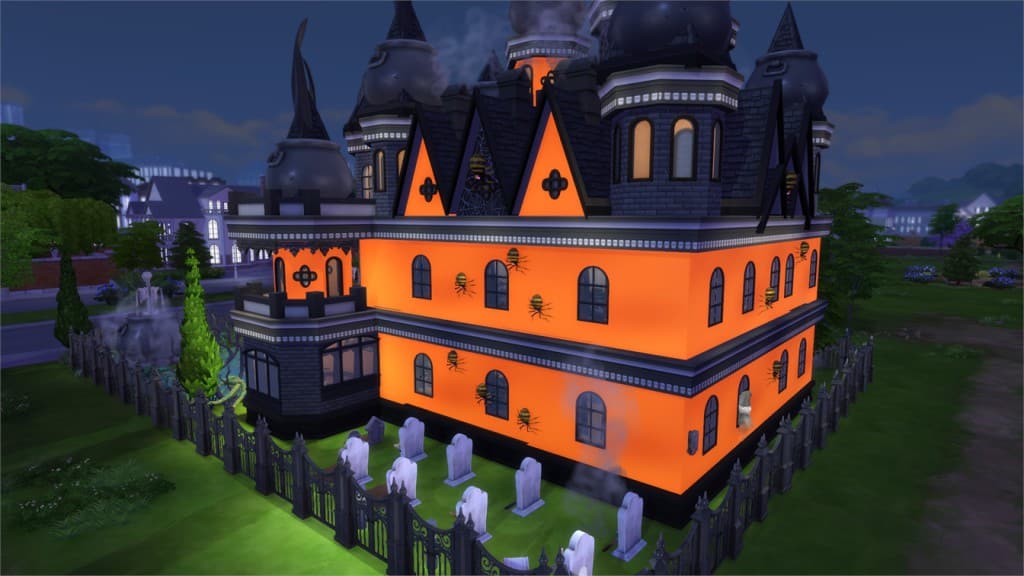
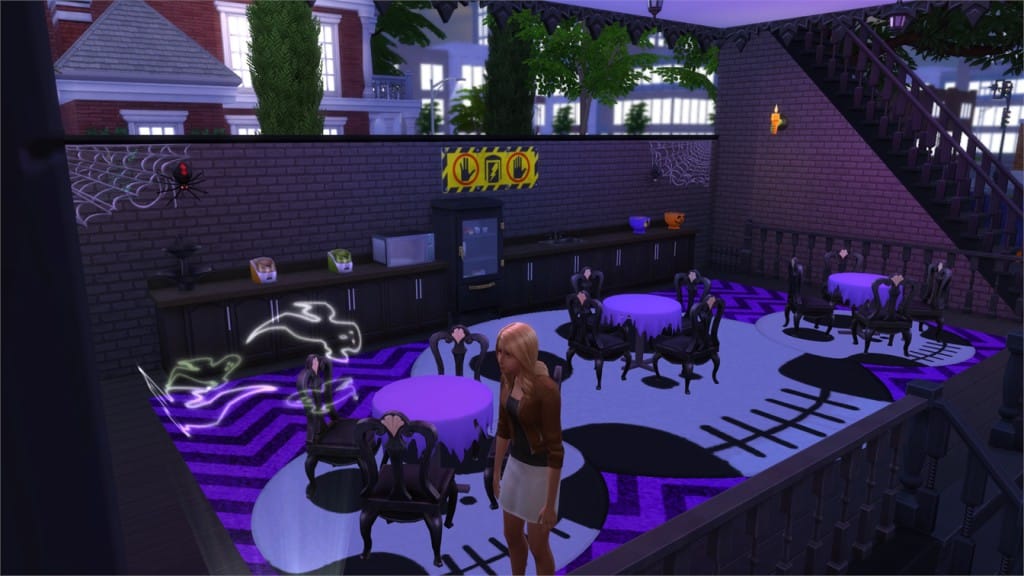
Spooky Park (Download Here)

by ladyloial

Value: §193,102
Size: 40×30
Lot Type: Park
Required Packs: Outdoor Retreat, Get to Work, Luxury Party, Cool Kitchen, Spooky Stuff[/ult_hotspot_items][/ult_hotspot]

[ult_hotspot main_img=”40997|https://simscommunity.info/wp-content/uploads/2015/10/10-24-15_12-59-36-AM.jpg”][ult_hotspot_items icon_type=”custom” icon_img=”37721|https://simscommunity.info/wp-content/uploads/2015/08/plumhotspot.png” img_width=”26″ tooltip_custom_color=”#1e73be” tooltip_custom_bg_color=”#ffffff” tooltip_width=”500″ enable_bubble_arrow=”off” tooltip_continuous_animation=”on” hotspot_position=”28.041543026706233,83.82460350584307″ tooltip_custom_border_size=”border-style:solid;|border-width:2px;border-radius:5px;|border-color:#81d742;”]

10-24-15_12-59-50 AM

[/ult_hotspot_items][ult_hotspot_items icon_type=”custom” icon_img=”37721|https://simscommunity.info/wp-content/uploads/2015/08/plumhotspot.png” img_width=”26″ tooltip_custom_color=”#1e73be” tooltip_custom_bg_color=”#ffffff” tooltip_width=”500″ enable_bubble_arrow=”off” tooltip_continuous_animation=”on” hotspot_position=”53.746290801186944,63.20690734557596″ tooltip_custom_border_size=”border-style:solid;|border-width:2px;border-radius:5px;|border-color:#81d742;”]

10-24-15_1-00-19 AM

[/ult_hotspot_items][ult_hotspot_items icon_type=”custom” icon_img=”37721|https://simscommunity.info/wp-content/uploads/2015/08/plumhotspot.png” img_width=”26″ tooltip_custom_color=”#1e73be” tooltip_custom_bg_color=”#ffffff” tooltip_width=”500″ enable_bubble_arrow=”off” tooltip_continuous_animation=”on” hotspot_position=”55.17896884272997,40.46327212020033″ tooltip_custom_border_size=”border-style:solid;|border-width:2px;border-radius:5px;|border-color:#81d742;”]

10-24-15_1-00-27 AM

[/ult_hotspot_items][ult_hotspot_items icon_type=”custom” icon_img=”37721|https://simscommunity.info/wp-content/uploads/2015/08/plumhotspot.png” img_width=”36″ tooltip_custom_color=”#1e73be” tooltip_custom_bg_color=”#ffffff” tooltip_width=”500″ enable_bubble_arrow=”off” tooltip_font_size=”14″ tooltip_continuous_animation=”on” hotspot_position=”86.58058681672026,3.25497287522604″ tooltip_custom_border_size=”border-style:solid;|border-width:2px;border-radius:5px;|border-color:#81d742;”]
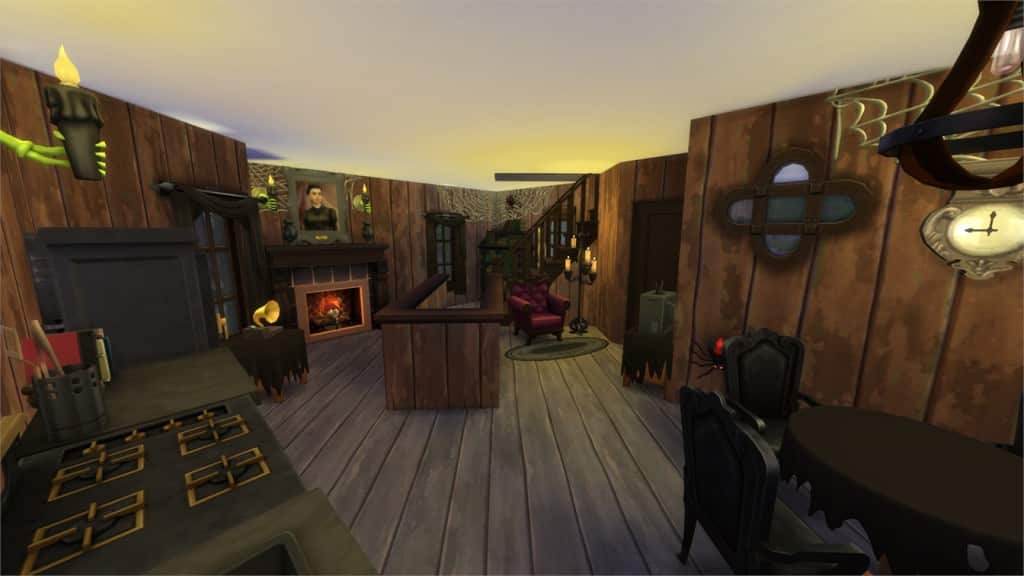
Temple Of Doom (Download Here)

by RABOOSKI

Value: §510,244
Size: 40×30
Lot Type: Residental Lot
Required Packs: Outdoor Retreat, Get to Work, Luxury Party, Perfect Patio, Spa Day, Spooky Stuff[/ult_hotspot_items][/ult_hotspot]

[ult_hotspot main_img=”41001|https://simscommunity.info/wp-content/uploads/2015/10/10-24-15_1-03-18-AM.jpg”][ult_hotspot_items icon_type=”custom” icon_img=”37721|https://simscommunity.info/wp-content/uploads/2015/08/plumhotspot.png” img_width=”26″ tooltip_custom_color=”#1e73be” tooltip_custom_bg_color=”#ffffff” tooltip_width=”500″ enable_bubble_arrow=”off” tooltip_continuous_animation=”on” hotspot_position=”56.98256676557863,50.208681135225376″ tooltip_custom_border_size=”border-style:solid;|border-width:2px;border-radius:5px;|border-color:#81d742;”]

10-24-15_1-03-36 AM

[/ult_hotspot_items][ult_hotspot_items icon_type=”custom” icon_img=”37721|https://simscommunity.info/wp-content/uploads/2015/08/plumhotspot.png” img_width=”26″ tooltip_custom_color=”#1e73be” tooltip_custom_bg_color=”#ffffff” tooltip_width=”500″ enable_bubble_arrow=”off” tooltip_continuous_animation=”on” hotspot_position=”42.06695103857567,48.94616026711186″ tooltip_custom_border_size=”border-style:solid;|border-width:2px;border-radius:5px;|border-color:#81d742;”]

10-24-15_1-03-52 AM

[/ult_hotspot_items][ult_hotspot_items icon_type=”custom” icon_img=”37721|https://simscommunity.info/wp-content/uploads/2015/08/plumhotspot.png” img_width=”26″ tooltip_custom_color=”#1e73be” tooltip_custom_bg_color=”#ffffff” tooltip_width=”500″ enable_bubble_arrow=”off” tooltip_continuous_animation=”on” hotspot_position=”26.414132047477747,47.94449081803005″ tooltip_custom_border_size=”border-style:solid;|border-width:2px;border-radius:5px;|border-color:#81d742;”]

10-24-15_1-04-50 AM

[/ult_hotspot_items][ult_hotspot_items icon_type=”custom” icon_img=”37721|https://simscommunity.info/wp-content/uploads/2015/08/plumhotspot.png” img_width=”26″ tooltip_custom_color=”#1e73be” tooltip_custom_bg_color=”#ffffff” tooltip_width=”500″ enable_bubble_arrow=”off” tooltip_continuous_animation=”on” hotspot_position=”14.183048961424333,50.78255425709516″ tooltip_custom_border_size=”border-style:solid;|border-width:2px;border-radius:5px;|border-color:#81d742;”]

10-24-15_1-05-25 AM

[/ult_hotspot_items][ult_hotspot_items icon_type=”custom” icon_img=”37721|https://simscommunity.info/wp-content/uploads/2015/08/plumhotspot.png” img_width=”36″ tooltip_custom_color=”#1e73be” tooltip_custom_bg_color=”#ffffff” tooltip_width=”500″ enable_bubble_arrow=”off” tooltip_font_size=”14″ tooltip_continuous_animation=”on” hotspot_position=”86.58058681672026,3.25497287522604″ tooltip_custom_border_size=”border-style:solid;|border-width:2px;border-radius:5px;|border-color:#81d742;”]

Beware the Swamp Witch (Download Here)

by wrathofcath

Value: §163,802
Size: 30×20
Lot Type: Residental Lot
Required Packs: Outdoor Retreat, Get to Work, Perfect Patio, Spa Day, Cool Kitchen, Spooky Stuff[/ult_hotspot_items][/ult_hotspot]

[ult_hotspot main_img=”41006|https://simscommunity.info/wp-content/uploads/2015/10/10-24-15_1-09-44-AM.jpg”][ult_hotspot_items icon_type=”custom” icon_img=”37721|https://simscommunity.info/wp-content/uploads/2015/08/plumhotspot.png” img_width=”26″ tooltip_custom_color=”#1e73be” tooltip_custom_bg_color=”#ffffff” tooltip_width=”500″ enable_bubble_arrow=”off” tooltip_continuous_animation=”on” hotspot_position=”58.03505192878339,58.349853923205345″ tooltip_custom_border_size=”border-style:solid;|border-width:2px;border-radius:5px;|border-color:#81d742;”]

10-24-15_1-09-56 AM

[/ult_hotspot_items][ult_hotspot_items icon_type=”custom” icon_img=”37721|https://simscommunity.info/wp-content/uploads/2015/08/plumhotspot.png” img_width=”26″ tooltip_custom_color=”#1e73be” tooltip_custom_bg_color=”#ffffff” tooltip_width=”500″ enable_bubble_arrow=”off” tooltip_continuous_animation=”on” hotspot_position=”32.43230712166172,75.4251878130217″ tooltip_custom_border_size=”border-style:solid;|border-width:2px;border-radius:5px;|border-color:#81d742;”]

10-24-15_1-10-16 AM

[/ult_hotspot_items][ult_hotspot_items icon_type=”custom” icon_img=”37721|https://simscommunity.info/wp-content/uploads/2015/08/plumhotspot.png” img_width=”36″ tooltip_custom_color=”#1e73be” tooltip_custom_bg_color=”#ffffff” tooltip_width=”500″ enable_bubble_arrow=”off” tooltip_font_size=”14″ tooltip_continuous_animation=”on” hotspot_position=”86.58058681672026,3.25497287522604″ tooltip_custom_border_size=”border-style:solid;|border-width:2px;border-radius:5px;|border-color:#81d742;”]

Haunted Halloween Home 3 (Download Here)

by Ritpit01

Value: §175,519
Size: 40×30
Lot Type: Residental Lot
Required Packs: Outdoor Retreat, Get to Work, Luxury Party, Spa Day, Cool Kitchen, Spooky Stuff[/ult_hotspot_items][/ult_hotspot]

[ult_hotspot main_img=”41009|https://simscommunity.info/wp-content/uploads/2015/10/10-24-15_1-14-39-AM.jpg”][ult_hotspot_items icon_type=”custom” icon_img=”37721|https://simscommunity.info/wp-content/uploads/2015/08/plumhotspot.png” img_width=”26″ tooltip_custom_color=”#1e73be” tooltip_custom_bg_color=”#ffffff” tooltip_width=”500″ enable_bubble_arrow=”off” tooltip_continuous_animation=”on” hotspot_position=”15.866097922848665,65.56239565943238″ tooltip_custom_border_size=”border-style:solid;|border-width:2px;border-radius:5px;|border-color:#81d742;”]

10-24-15_1-15-03 AM

[/ult_hotspot_items][ult_hotspot_items icon_type=”custom” icon_img=”37721|https://simscommunity.info/wp-content/uploads/2015/08/plumhotspot.png” img_width=”26″ tooltip_custom_color=”#1e73be” tooltip_custom_bg_color=”#ffffff” tooltip_width=”500″ enable_bubble_arrow=”off” tooltip_continuous_animation=”on” hotspot_position=”53.68137982195845,46.053318030050086″ tooltip_custom_border_size=”border-style:solid;|border-width:2px;border-radius:5px;|border-color:#81d742;”]

10-24-15_1-15-19 AM

[/ult_hotspot_items][ult_hotspot_items icon_type=”custom” icon_img=”37721|https://simscommunity.info/wp-content/uploads/2015/08/plumhotspot.png” img_width=”26″ tooltip_custom_color=”#1e73be” tooltip_custom_bg_color=”#ffffff” tooltip_width=”500″ enable_bubble_arrow=”off” tooltip_continuous_animation=”on” hotspot_position=”50.301372403560826,52.8980592654424″ tooltip_custom_border_size=”border-style:solid;|border-width:2px;border-radius:5px;|border-color:#81d742;”]

10-24-15_1-15-31 AM

[/ult_hotspot_items][ult_hotspot_items icon_type=”custom” icon_img=”37721|https://simscommunity.info/wp-content/uploads/2015/08/plumhotspot.png” img_width=”26″ tooltip_custom_color=”#1e73be” tooltip_custom_bg_color=”#ffffff” tooltip_width=”500″ enable_bubble_arrow=”off” tooltip_continuous_animation=”on” hotspot_position=”51.93341988130564,31.19522120200334″ tooltip_custom_border_size=”border-style:solid;|border-width:2px;border-radius:5px;|border-color:#81d742;”]

10-24-15_1-15-46 AM

[/ult_hotspot_items][ult_hotspot_items icon_type=”custom” icon_img=”37721|https://simscommunity.info/wp-content/uploads/2015/08/plumhotspot.png” img_width=”36″ tooltip_custom_color=”#1e73be” tooltip_custom_bg_color=”#ffffff” tooltip_width=”500″ enable_bubble_arrow=”off” tooltip_font_size=”14″ tooltip_continuous_animation=”on” hotspot_position=”86.58058681672026,3.25497287522604″ tooltip_custom_border_size=”border-style:solid;|border-width:2px;border-radius:5px;|border-color:#81d742;”]

Spooky Overgrown Mansion (Download Here)

by LordSwoosh

Value: §712,408
Size: 50×50
Lot Type: Residental Lot
Required Packs: Get to Work, Perfect Patio, Spa Day[/ult_hotspot_items][/ult_hotspot]

[ult_hotspot main_img=”41014|https://simscommunity.info/wp-content/uploads/2015/10/10-24-15_1-22-01-AM.jpg”][ult_hotspot_items icon_type=”custom” icon_img=”37721|https://simscommunity.info/wp-content/uploads/2015/08/plumhotspot.png” img_width=”26″ tooltip_custom_color=”#1e73be” tooltip_custom_bg_color=”#ffffff” tooltip_width=”500″ enable_bubble_arrow=”off” tooltip_continuous_animation=”on” hotspot_position=”62.147626112759646,42.2787979966611″ tooltip_custom_border_size=”border-style:solid;|border-width:2px;border-radius:5px;|border-color:#81d742;”]

10-24-15_1-22-20 AM

[/ult_hotspot_items][ult_hotspot_items icon_type=”custom” icon_img=”37721|https://simscommunity.info/wp-content/uploads/2015/08/plumhotspot.png” img_width=”26″ tooltip_custom_color=”#1e73be” tooltip_custom_bg_color=”#ffffff” tooltip_width=”500″ enable_bubble_arrow=”off” tooltip_continuous_animation=”on” hotspot_position=”38.91413204747774,43.95085559265443″ tooltip_custom_border_size=”border-style:solid;|border-width:2px;border-radius:5px;|border-color:#81d742;”]

10-24-15_1-22-50 AM

[/ult_hotspot_items][ult_hotspot_items icon_type=”custom” icon_img=”37721|https://simscommunity.info/wp-content/uploads/2015/08/plumhotspot.png” img_width=”36″ tooltip_custom_color=”#1e73be” tooltip_custom_bg_color=”#ffffff” tooltip_width=”500″ enable_bubble_arrow=”off” tooltip_font_size=”14″ tooltip_continuous_animation=”on” hotspot_position=”86.58058681672026,3.25497287522604″ tooltip_custom_border_size=”border-style:solid;|border-width:2px;border-radius:5px;|border-color:#81d742;”]

Hester’s Halloween Shop (Download Here)

by thetideschanging

Value: §96,917
Size: 20×20
Lot Type: Retail
Required Packs: Outdoor Retreat, Get to Work, Spooky Stuff[/ult_hotspot_items][/ult_hotspot]

[ult_hotspot main_img=”40991|https://simscommunity.info/wp-content/uploads/2015/10/10-24-15_1-23-33-AM.jpg”][ult_hotspot_items icon_type=”custom” icon_img=”37721|https://simscommunity.info/wp-content/uploads/2015/08/plumhotspot.png” img_width=”26″ tooltip_custom_color=”#1e73be” tooltip_custom_bg_color=”#ffffff” tooltip_width=”500″ enable_bubble_arrow=”off” tooltip_continuous_animation=”on” hotspot_position=”75.07418397626114,40.854549248747915″ tooltip_custom_border_size=”border-style:solid;|border-width:2px;border-radius:5px;|border-color:#81d742;”]

10-24-15_1-23-45 AM

[/ult_hotspot_items][ult_hotspot_items icon_type=”custom” icon_img=”37721|https://simscommunity.info/wp-content/uploads/2015/08/plumhotspot.png” img_width=”26″ tooltip_custom_color=”#1e73be” tooltip_custom_bg_color=”#ffffff” tooltip_width=”500″ enable_bubble_arrow=”off” tooltip_continuous_animation=”on” hotspot_position=”51.74795994065282,34.07502086811352″ tooltip_custom_border_size=”border-style:solid;|border-width:2px;border-radius:5px;|border-color:#81d742;”]

10-24-15_1-24-07 AM

[/ult_hotspot_items][ult_hotspot_items icon_type=”custom” icon_img=”37721|https://simscommunity.info/wp-content/uploads/2015/08/plumhotspot.png” img_width=”36″ tooltip_custom_color=”#1e73be” tooltip_custom_bg_color=”#ffffff” tooltip_width=”500″ enable_bubble_arrow=”off” tooltip_font_size=”14″ tooltip_continuous_animation=”on” hotspot_position=”86.58058681672026,3.25497287522604″ tooltip_custom_border_size=”border-style:solid;|border-width:2px;border-radius:5px;|border-color:#81d742;”]

Trick or Treat? Bakery (Download Here)

by leeloo86

Value: §143,952
Size: 30×20
Lot Type: Retail
Required Packs: Outdoor Retreat, Get to Work, Perfect Patio, Spa Day, Spooky Stuff[/ult_hotspot_items][/ult_hotspot]

The Sims 4: #TeamTrick Shirts by GrimSuruDoi

If you’re cheering for #TeamTrick in The Sims 4’s latest Challenge, then these T-Shirts are perfect for you!

T-Shirts that you can see below are made for Sims of all ages, from Children to Elders!

Created by GrimSuruDoi, one of the devs on The Sims 4!

Download

teamtrickshirt1 teamtrickshirt2

The Sims 4 Get Together: Arcade Machine Screenshot

0

Hello everyone!

I got really excited about this new item in Get Together and wanted to share this with all of you, check out this arcade machine:

0sfq53dikzb0

Looking forward to sharing more with you in November!

SimGuruDrake

Tip: AquaSimmer

The Sims Video Spotlight: #6

0

scplaylogo

Welcome to another Sims Video Spotlight where I aim to bring you the best video content from our community!

The Sims 4 | 10 Minute House Build Renovation

By Simming With Abbi

To kick us off this week is a super fun speed renovation of a house Abbi made in her another 10 minute build challenge. The style is urban/modern and very lovely, but does use some custom content. You can find it on the gallery under the same name.

[vc_video link=’https://www.youtube.com/watch?v=0JXB8uoYC3I’]

The Sims 4 | Speed Build: Tuscan Vineyard (No CC)

By XFreezerBunnyX

Our second build today is one of my personal favourites, it definitely reminds me of Monte Vista in The Sims 3 and I think this is such a great use of the tools we have in The Sims 4 so far, and this is the first of its kind that I have seen yet. If you want to see something other than a modern build, consider this!

[vc_video link=’https://www.youtube.com/watch?v=MqsWCGwVyjA’]

The Sims 4 | Room Build: Elegant Bedroom

By BasicSimmer

The last build video this week is short and sweet, BasicSimmer creates such a lovely bedroom in a really creative way. This is perfect for any elegant, princess-y sim in my opinion, and as far as I can see it seems custom content free, aside from a few pack items.

To download this room, search the username, BasicSimmer99, on the gallery.

[vc_video link=’https://www.youtube.com/watch?v=Dw4JkxXPx7c’]

Let’s Play | The Sims 3: Late Night

By ThatSweetSimmer

Our Let’s Play this week is focused around the Late Night expansion pack for The Sims 3. ThatSweetSimmer is great to listen to and at keeping you entertained! The quality is perfect and I think it’s definitely deserving of being spotlighted this week, keep it up!

[vc_video link=’https://www.youtube.com/watch?list=PLr3L1epiRrvI_P6lju_awGhpqucxjNcb3&v=EWTJnFxT8aY’]

The Sims 4 | Create A Sim: Mostly Ghostly Tag

By ToffeeChocolate

In the spirit of Halloween, I felt it most fitting to include this wonderful unique tag this week. The aim is to make a ghostly family and give them a backstory, I love the idea of having a full blown ghost family to try new gameplay with, and it’s a great way to get your imagination going. If you participate in this tag make sure you share on the gallery with the appropriate tag below!

RULES:
1. Make a ghost (kill some sims) or download one (or many) off the gallery and edit them to your liking.
2. Create a backstory and share to the gallery with #mostlyghostly
3. Tag more people to participate!

You can download her ghosts from the gallery, her Origin ID is simmerkmmake sure you check “Include Custom Content”!

[vc_video link=’https://www.youtube.com/watch?v=_gLdL6equYw’]

The Sims 4 | Create A Sim: Awareness Tag – Breast Cancer

By Jenni Simmer

My favourite tag of the month, is the Awareness Tag created by Jenni Simmer herself. It is to raise awareness for any cause or illness of your choosing through a sims video – the one rule being that you link to a website that talks more about the cause of your choice. As it is Breast Cancer Awareness month, Jenni decided to pick breast cancer. I think this is a wonderful tag for its meaning and individuality, and hopefully it will aid in spreading the word about a myriad of things.

Feel free to create your own and join in, pick anything you have a personal connection to, whether you know somebody who has been through something or you yourself – spread awareness!

[vc_video link=’https://www.youtube.com/watch?v=TedlYCDFTi8′]

Thank you for reading, I hope you found something to enjoy and partake in and seeing as next week is Halloween, if you have any themed videos, be they Builds, Let’s Plays or Create A Sim’s, feel free to send them to me and I may add them in for the occasion!

Origin Shocktober Sale: 85% Off on Selected Titles

0

Like we mentioned yesterday, Origin’s latest Sale is now live, featuring Battlefield 3, Dragon Age: Origins, Medal of Honor: Warfighter, The Witcher & The Witcher 2 and Ammo 2033.

Click below to check out this offer!

shocktobersale

Playing with Effects in The Sims 4

From all The Sims games so far, The Sims 4 probably has delivered the biggest amount of visual effects, and it did an amazing job. But, some visual effects are really hard to get and only occur ever so often. That’s why Andrew’s Studio come up with a great Mod!

The Studio Effect Player Mod lets you pick any effect from a list of over 6000 visual effects and play them via a simple object.

To get started, Download the Mod here, extract the .zip content and start up your game. Don’t forget to also download the list of Visual Effects that can be found on the bottom of the site.

You start off by searching for the Studio Effect Player in Build Mode. You can place as many Effect Players as you want!

TS4 2015-10-11 22-52-10-50

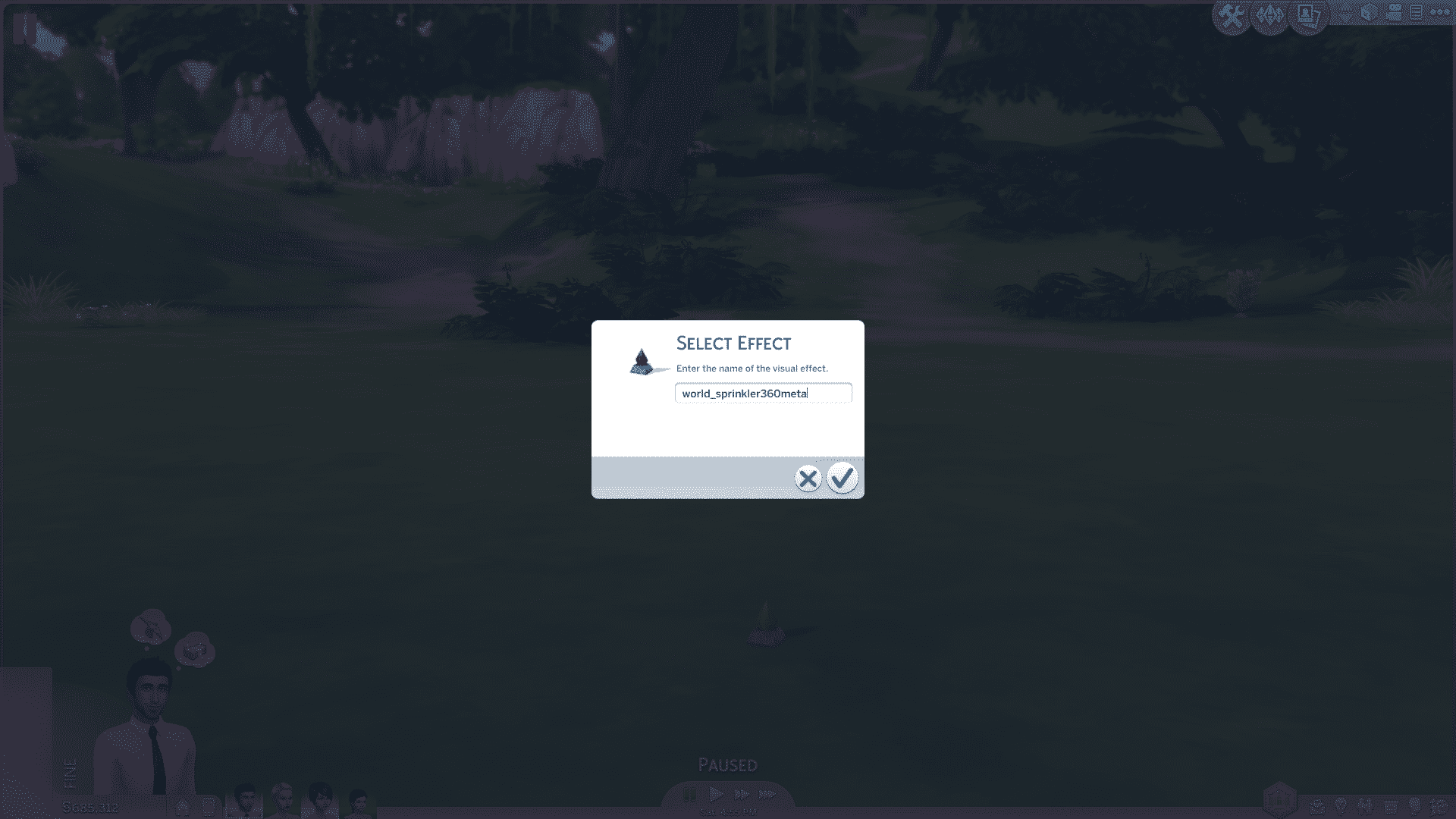
Then in Live Mode, click on the Effect Player and select ”Select Effect”.

You paste the effect code in this section!

TS4 2015-10-11 23-39-48-26

After you’ve pasted your code, press the check button and the effect you pasted will start emitting!

TS4 2015-10-11 23-39-57-90

But, there are a few cases where the Effect Player object just doesn’t go along with the actual effect. That’s when you should consider placing another Effect Player object on the lot. While the first Effect Player emits the effect, click on the second Effect Player and select ”Hide Others” which will hide all other Effect Player objects except the one you used to hide them.

TS4 2015-10-11 23-40-11-38 TS4 2015-10-11 23-40-19-41

This Mod really lets Storytellers and Machinima makers create richer and better content!

Some of my examples.

10-22-15_7-08-37 PM 10-22-15_7-19-01 PM

For a better explanation on how to implement the code and hide the Effect Players, check out our video below!

[vc_video link=’https://www.youtube.com/watch?v=TvP5TKr8oFM&feature=youtu.be’]

WARNING: Take extra caution when reading rumor posts!

0

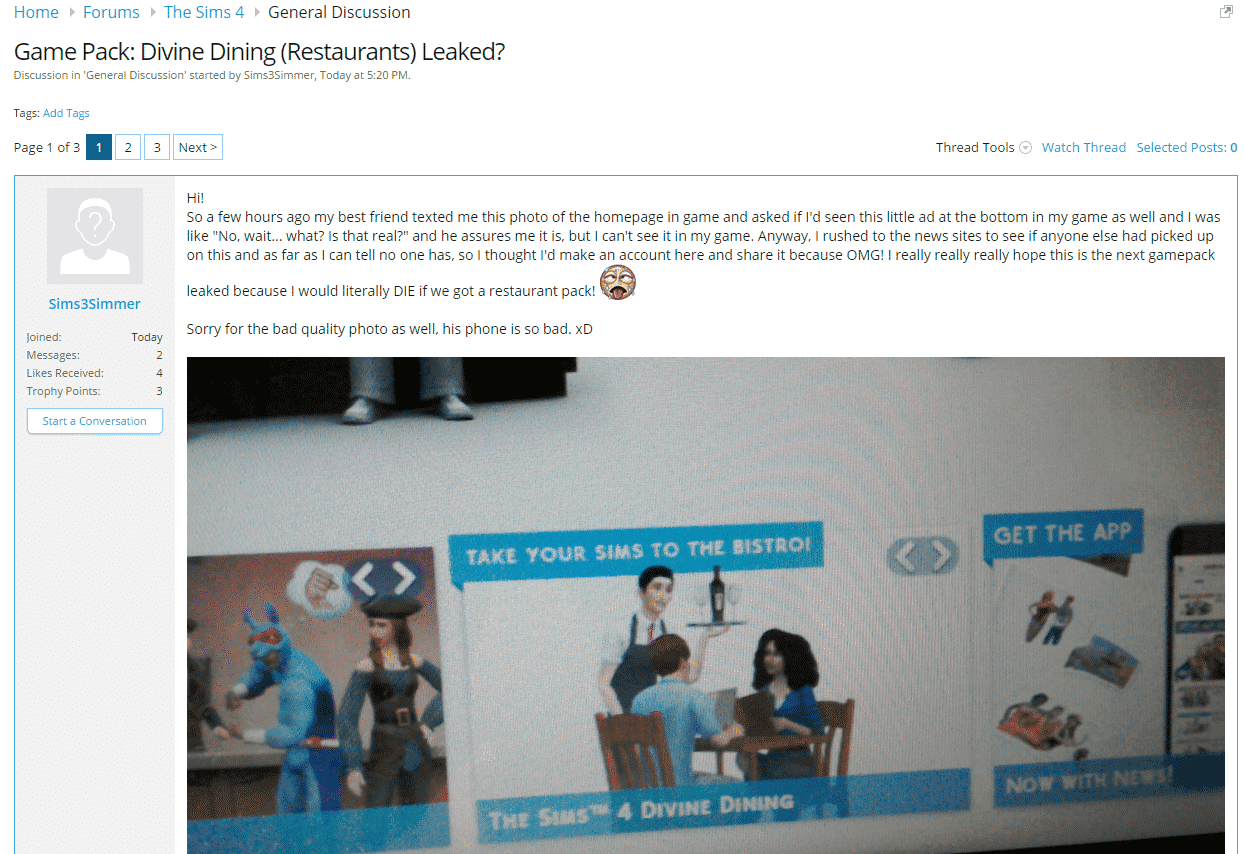
You probably read on Sims Community Social about a possible Game Pack called Divine Dining (if not, you can check out the post here).

Obviously, the Game Pack was confirmed as fake by EA, but rumors like these always bring false hope to Simmers who are looking forward to content like this.

I’d just like to let everyone know who got upset by this fake rumor that someone had clear intention to create this kind of rumor. The person created his account and just a few minutes after, the rumor was posted. After doing some research, it turned out that the IP of the Divine Dining poster is the same person who wanted to start the Star Wars Stuff Pack rumor.

picsocialfake

I don’t want to shoot the messenger for doing this (I honestly don’t know who the person behind these accounts is), but I would like to let everyone know to take extra caution when reading rumor posts like these. Until we confirm the validity of the rumor that was either posted on our site or sent to us, don’t raise your hopes.

I know that The Sims news drought is affecting a lot of simmers, but please stay patient just a little bit more, November is just a few days away, and that’s when real news should start flowing (Get Together news). Until then, make sure you join the latest Halloween Challenge created by The Sims Team! There are 3 new objects to earn!

Happy simming!

– Jovan, SC founder

The Sims 4: #TeamTrick vs. #TeamTreat Challenge!

The Sims Blog has just announced a brand new challenge and its just in time for halloween! Here are all the details you need to know about below:

Remember, Remember, the 23 of October

Pirates or ninjas? Half-full or half-empty? That sparkly vampire guy or that shirtless werewolf guy? For eons, these arguments have echoed in the halls of academia and internet forums, with millions choosing a position and arguing it vehemently. But there’s one debate so polarising it eclipses all others… trick or treat?

And soon, you’ll be asked to choose a side in this timeless debate. The #TeamTrick vs. #TeamTreat Challenge kicks off in The Sims 4 on October 23 and runs through October 31! It’s not all fun and games, though – there are items on the line! You’ll be working on unlocking new decorated doors, fantastic fish, and awesome storage chests! If you choose to participate, you’ll play a role in which items get unlocked – will it be the creepy #TeamTrick items, or the playful #TeamTreat versions? That’s up to The Sims 4 community.

TS4_TRICKorTREAT_HERO

Two new interactions (Trick and Treat) are temporarily available in The Sims 4 for all players, and you’ll need to choose between them to help unlock different items in the game. If you’re on #TeamTrick, you’re going to want to task your Sim with tricking everyone in sight, while Sims on #TeamTreat will be handing out sweet treats to the Sims they meet.

Here’s how it’ll work:

•         There are #TeamTrick and #TeamTreat versions of each item: #TeamTrick has a demonic door, a skeletal fish in a spooky bowl, and an interactive chest; and #TeamTreat has a lion door, a candy fish in a delicious bowl, and a usable chest of its own.

•         Every three days, the two sides are trying to make their team’s version of the item the winning one. In the end, only one of each version will make it into the game!

•         Whichever side wins (that is to say, if there are more Trick interactions or Treat interactions) will end up getting their version added to the game in early November.

•         Everyone gets the items – your actions are choosing which items are actually added!

Want the sweet Candy Fish? You’d better hope #TeamTreat wins during that period, otherwise everyone will be hanging out with the Skeleton Fish instead. The cool Demonic Door? That’s a #TeamTrick item, so you’ll need to trick for that one. The chests are assigned to the different sides, too.

Which side will you choose? Head onto Twitter, Instagram, Facebook, and Tumblr using #TeamTrick and #TeamTreat to show your allegiance, and spread the word if you want to unlock the items associated with your side.

The full details are below, and we’ll keep this article updated as the results come out.

CHALLENGE 1: OCTOBER 23 – OCTOBER 25 – The Stoar the Bearded or Edgar the Generous Door

DoorsBoth

CHALLENGE 2: OCTOBER 26 – OCTOBER 28 – The Bones or Gummie Fish Bowl

FishBoth

CHALLENGE 3: OCTOBER 29 – OCTOBER 31 – The Buyers Beware or Ornate Beauty Storage Chest

trickorTreat

The Sims 4: First Render of a Toddler?!

16

UPDATE: SimGuruLyndsay gave a statement about this unique render:

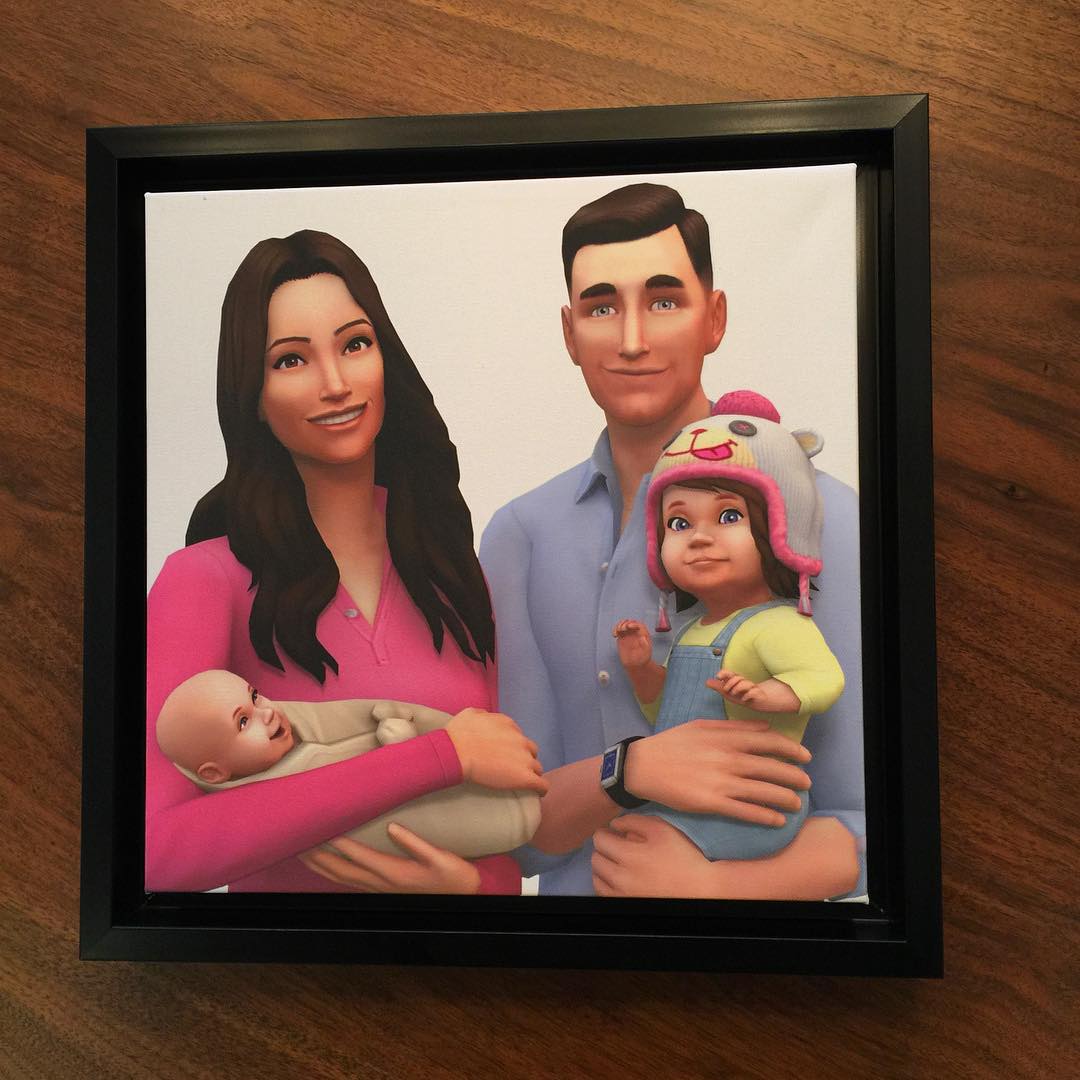
The unique piece of art of our CEO & his family as Sims was crafted by our team to celebrate the birth of his new baby.

lyndsay

Angelique Wilson, wife of Andrew Wilson, Electronic Arts’ CEO,  shared this The Sims 4 Render on her instagram accountWe went to check the liability of this information with Sims Domination and it turns out this post is still live on her Facebook profile, from where we got this instagram link!

Please note that this could only be a render dedicated to Andrew Wilson and his family, but for the first time ever, we have an actual idea of what Toddlers could look like in The Sims 4!

12093309_1516800481966903_2145147865_n

toddlerproofCRytYl_WoAEZrQK

Tip: SimsDomination

Why I use The Sims 4 for Storyboarding

People play The Sims 4 for many different reasons. Some enjoy to create and participate in community challenges, such as the 100 Baby Challenge, where others play it for interior design and fashion purposes. Personally, one of the main reasons that I play The Sims 4 is for the purpose of character creation and storyboarding.

When the game was released it opened up a whole new world of sliders, making the customisation of your Sims more unique than previous generations did, and so this was perfect for simmers who wished to add a little extra flair to their Sims. And so after the initial stage of playing for the sake of playing, I realised that this new software could be used for so much more.

For the past two years, a friend and I have spent our time drafting a book together, and drew pictures of our characters by hand in order to get a better feel of who we were writing about. But with the Sims 4, we could create them in a way that really showcased their personalities. We could suddenly choose what hairstyles and outfits would go with different scenes in the story, and then later, act out those scenes and see how the characters would react.

The Sims 4 has become so much more than just a game for me, and has turned into one of my most trusted sources of inspiration when it comes to creative writing. I would highly recommend this method to other writers, especially ones who struggle to find inspiration for their characters. Create your own inspiration!

The Sims 4 can be used to create concept art for storyboarding and character creation as well as just pure fun!

The Sims 4 can be used to create concept art for storyboarding and character creation as well as just pure fun!

The Sims 4 Get Together: New Screenshot featuring Sheep!

4

By popular demand, here are the adorable tiny FX sheep in the Windenburg countryside.

– SimGuruLyndsay

CRuDCm_UwAAO02V

The Sims 4 Get Together: New Info from SimGurus

0

gettogetherlogo

SimGurus shared new info about The Sims 4 Get Together after releasing the ”How Windenburg was built” blog.

*UPDATED 19/10*