Home Blog Page 339

The Sims 4 Cats & Dogs: Exclusive First Impressions / Gameplay by SimsCampers

Sims Camp 2017 trip has been sponsored by EA!

During Sims Camp 2017 we were able to capture exclusive footage of The Sims 4 Cats & Dogs. This last embargo lets us give you all the needed information and footage about general gameplay of The Sims 4 Cats & Dogs Expansion Pack as well as our first impressions of the game.

Down below you’ll see a list of articles and videos published by other SimsCampers (including us) that you can watch and read.

After each event atendee adds new footage we’ll update this post so make sure you have this post bookmarked for new footage and info!

Articles

Videos

The Sims 4 Cats & Dogs: 7 New Screens of Cats and Dogs

2

SimGuruEmory is still recreating your favorite cats and dogs in The Sims 4 Cats & Dogs Expansion Pack. Here are 7 new screens from the game that he shared!

The Sims 3: Steam Halloween Sale

0

If you are still looking to add a few more packs from The Sims 3 to your collection then you are in luck! As part of the Steam Halloween Sale ALL expansion packs and stuff packs are a massive 75% off! Be quick as the Halloween Sale is only on until 10AM PDT on 1st November 2017!

The Sims 3: Steam Halloween Sale

The Sims 4 Laundry Day Stuff: First Look at Styled Looks and Rooms

3

SimGuruRad, one of the producers on The Sims 4 who’s responsible for Styled Looks in CAS and Styled Rooms in Build Mode has shared 2 new screenshots. These screens showcase the first styled looks for rooms and outfits in The Sims 4 Laundry Day Stuff Pack.

To top it all off, she even gave you an opportunity to vote and pick the name for the Room and Outfit Styled Looks. You can find the polls embedded below the screens.

Being the Architect in The Sims 4: Ludwig Mies van der Rohe

Hi, I’m Jason Sterling. Everyone who designs a structure within the Sims game is an architect. Whether you consider your work good or bad, simple or elegant, experienced or novice you are still an architect. This series of articles will highlight individual architects from the past. A person that was responsible for establishing and defining a revolution of the discipline. Each article will also demonstrate how you can be that architect and execute their style within the game. In this article will we focus on the work of  Ludwig Mies van der Rohe.

Ludwig Mies van der Rohe; born Maria Ludwig Michael Mies; March 27, 1886 – August 17, 1969) was a German-American architect. Along with Le Corbusier, Walter Gropius and Frank Lloyd Wright, he is widely regarded as one of the pioneers of modernist architecture. Mies was the last director of the Bauhaus, a seminal school in modern architecture. He accepted the position to head the architectural school at the Illinois Insitute of Technology in Chicago. Mies sought to establish a new architectural style that could represent modern times just as Classical and Gothic did for their own eras. He called his buildings “skin and bones” architecture. He is often associated with his quotation of the aphorisms, “less is more” and “God is in the Details”. (Information sourced directly from Wikipedia. The full article is located here: Mies van der Rohe Article )

A great deal of what we consider modern corporate and residential building can be traced back to the work of Mies van der Rohe. He developed and ultimately popularized the idea of completely open spaces and using glass and steel to divide interior volumes. The ubiquitous presence of steel frame buildings clad in plate glass curtain walls are directly tied to the influence of this legendary architect. Following are several examples of his work. #1. S.R. Crown Hall – #2 Barcelona Pavilion – #3 A. Seagram Building/ B. Westmount Square – #4 Neue Nationalgalerie (The New National Gallery- Berlin)

Being the Architect in The Sims 4: Ludwig Mies van der Rohe

I’m going to illustrate executing this style in the Sims 4 below.

You can also see a video walk-through of the build here:

Youtube Closed Roof Soffit Tutorial / Twitch Closed Roof Soffit Tutorial

Being the Architect- Mies van der Rohe: 

Building the National Gallery Part 1:

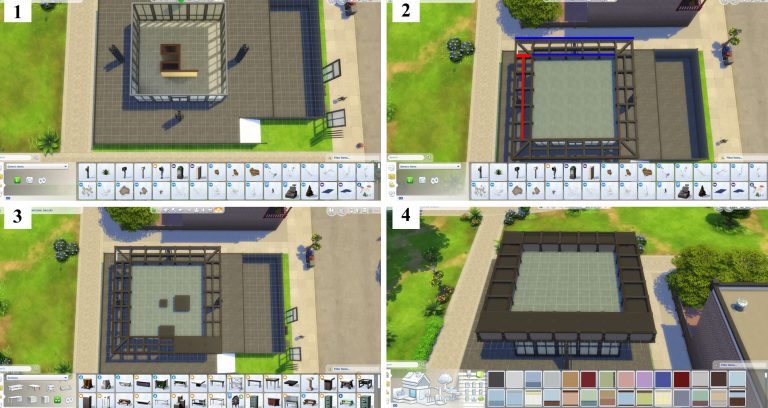
All you need, with the exception of walls, to execute this look are the five items below- A. Tall Slate Tile/ B. Glacemaster 1700C/ C. Tic-Tac-Tiles Pedestal/ D. Concrete Victorian Fence/ E. The Action Item/ (#1) The original that I’m following above sits on a base as shown below. The courtyard is used as a sculpture gallery. You can build something of this sort but it’s not necessary. (#2) This is a simple build. I’ve done a square 10×10 box with the highest wall height. Then, “I’ve placed The Action Item” door in the center on one side. I’ve covered the rest of the exterior with the “Glacemaster 1700C” windows. (#3) Next we’ll use the “Tall Slate Tile” to create support columns. (#4- continued in box #1 below)

Being the Architect in The Sims 4: Ludwig Mies van der Rohe

Building the National Gallery Part 2:

Next, merge the tall tiles together as shown. (#1) Start the overhanging roof by creating the exterior framing walls highlighted in blue, using the medium, short half wall. In the space between these two constructs use the “Concrete Victorian Fence” to create the interior braces for the soffit highlighted in red. Once these have been built remove the flooring in the spaces to expose the ground beneath. (#2) We will fill in the soffit space with a faux roof created by using the “Tic-Tac-TilesPedistal”. Double their size by pressing the “]” button on the keyboard while holding the item. Then, slide the item into place as shown. (#3) Once in place, press “Alt” and the “9” button to raise the object until it creates a flush roofing look. (#4) This also works for creating single space soffits with an un-upsized pedestal.

Being the Architect in The Sims 4: Ludwig Mies van der Rohe

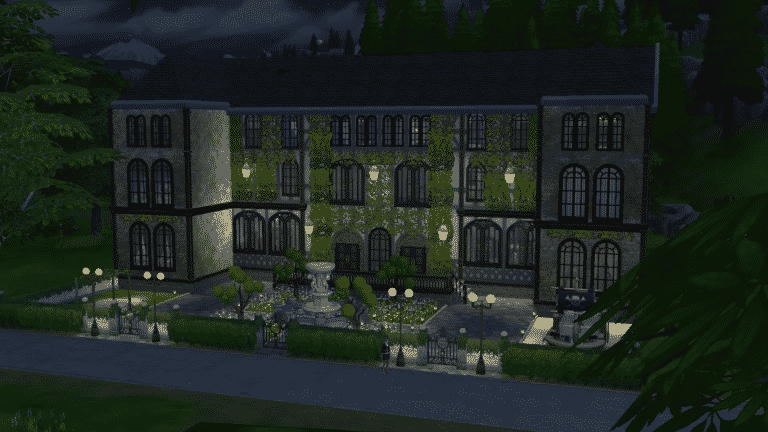
The finished structure is below.

Being the Architect in The Sims 4: Ludwig Mies van der Rohe

I hope you’ve enjoyed this article and the history we are all, even when unwittingly, participating in every time we design and build within the Sims. Remember every time you look at a steel framed office tower with a curtain glass wall you are looking at Mies van der Rohe. If you have any questions regarding this article please post them below. Do you have any builds you’d like to share? Please feel free to post those below as well. We would love to see them! Thank-you for reading.

How to Add Boarding Schools to The Sims 4

Have you ever wished you could send all those kids taking up space in the house somewhere else for a while? Maybe you’re playing a Perfect Genetics challenge and need more space in the house because you haven’t had a child with perfect genes yet. Maybe you’re just sick and tired of cleaning up after half a dozen messy rugrats. Whatever your reasons, I have the solution. Ship the kiddos off to boarding school!

Not possible, you say? Oh, ye of little faith! I’m going to show you how to have a fully functional boarding school in The Sims 4. The best part? No add-on packs, custom content, or mods required!

How to Add Boarding Schools to The Sims 4

What You Will Need

  • At least the base game of The Sims 4. Add-ons and custom content can help make your boarding school look nicer but aren’t necessary.
  • Some building skills or alternatively, access to the Gallery.

Build It and They Will Come

  1. First, you need a boarding school for your Sim children to attend. Pick any lot in any world you want and build one. If you don’t want to bother with building, download one from the Gallery. Your boarding school can be as simple or as fancy as you want but it should have 8 beds and at least the basic necessities Sims need to live (toilet, shower, fridge, etc). Since lots of children will be living there, you may want to add toys for them to play with. It’s a good idea to add things that a school would have, too, like a classroom and library.
  2. Now that you have the building ready, it needs at least one adult Sim living in it. Someone has to educate all those children, after all! You can make a Sim yourself in CAS, download one from the Gallery, or just grab a random townie and stick ’em in the boarding school, whatever floats your boat. The school will likely be too expensive for your adult Sim to afford with just $20k so bring up the cheat menu on the world screen with CTRL+SHIFT+C and type “freerealestate on” before you have your Sim purchase and move into the building.
  3. The boarding school is now ready to take in new students! You can move children and teens over to the boarding school via Manage Worlds. Since a lot of people are still unfamiliar with this process, I’ve got screenshots to help.

Adding the Students

In your household with the child you want to send to boarding school, go to Manage Worlds. You’ll be taken to the world select screen. In the top right corner, select Household Management.

How to Add Boarding Schools to The Sims 4

You’ll be shown all your played households here by default but you can see all your unplayed households too by clicking the Unplayed tab at the top. Both your active household and your boarding school household should be here but if it isn’t, just look under Unplayed. Select your active household with the child you want to send to the boarding school.

How to Add Boarding Schools to The Sims 4

You’ll be taken to this screen where you can see all your household’s details. Select Transfer Sims Between Households.

How to Add Boarding Schools to The Sims 4

Now find your boarding school household in the Select A Household section on the right and select that household.

How to Add Boarding Schools to The Sims 4

Select your child Sim that you want to move to the boarding school and select Transfer Sim(s).

How to Add Boarding Schools to The Sims 4

Voila! Your child Sim is now living at your boarding school and being taught and cared for by the adult Sim there.

Some Things to Keep in Mind

  • This exact same method also works for orphanages and nursing homes. Just build a nursing home or orphanage instead and move babies, toddlers, and elders over in the same way.
  • You can send up to 7 children/teens to the boarding school before the household is full. After that, you’ll have to place another boarding school with a new educator in the world for more children and teens to attend.
  • Teens won’t move out of the boarding school on their own when they become young adults, but you can easily move out young adult Sims yourself with the Manage Households menu.
  • It’s a good idea to check up on the boarding school every once in a while so you can either move out young adult Sims or replace the educator with a younger one when they reach elderhood. If your educator dies of old age while there are still children in the house, the game will delete the children and they will disappear from your family tree with no tombstone or urn as if they never existed. This is easily prevented by just replacing the educator when you notice they’ve gone grey.

Recommended (But Not Required) Mod

  • Deaderpool’s MC Command Centre mod can do a variety of things to make running a boarding school easier. It can raise the maximum household limit so your boarding school can hold more than seven students at a time. It can prevent the game from deleting “orphaned” children when your elder educator dies. You can also flag your educator to never age, marry, procreate, or move out of the boarding school. This will ensure that you’ll never have to replace or manage your educator after you initially place him/her in the boarding school.

Just for Fun

  • Try giving uniforms to the kids and teens at your boarding school!

Not a Builder? No Problem!

Look for SnarkyWitch on the Gallery and search for Savant Boarding School in my catalogue! It has everything a group of students need to work, live, and play. Savant Boarding School is CC-free!

The Sims 4 Cats & Dogs: Vet Clinic Livestream YouTube Replay

0

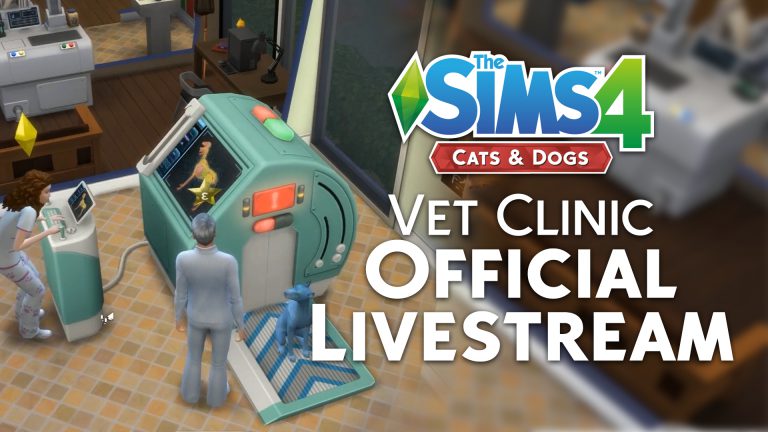
For those who have issues or just prefer watching content over YouTube we’ve added The Sims Team’s official The Sims 4 Cats & Dogs Vet Clinic Livestream from Twitch onto our YouTube Channel.

The original livestream with the chat can be found here!

EA Poland and The Sims 4 Cats & Dogs are helping Animal Shelters

1

Electronic Arts Poland is teaming up with two YouTubers to raise money and awareness about Cat and Dog shelters in Poland – and what better way to do it than through The Sims 4 Cats & Dogs gameplay!

Here’s an English translation provided by the lovely DotSim:

The Sims 4 is supporting cats and dogs! Starting 27.10, we will have voting on our The Sims social media channels. In this voting you are going to choose two animal shelters from a list of 10 animal shelters located in Poland. Cats and dogs from two shelters which are our finalists will obtain all resources they need to improve taking care of the animals. Two final shelters will have their leaders – #TeamGramPaula and #TeamAdriannaSkon. Both teams will friendly fight for money for their shelters. The more views they will get from The Sims 4 Cats & Dogs livestreams, the more money shelters will have.

Voting for two shelters ends on 7.11. Livestreams are planned for 10-14.11.


This means that EA Poland plans to donate a certain amount of money according to how many people are going to watch livestreams hosted by YouTubers GramPaula and Adrianna Skron on EA Poland’s official channel.

EA Poland and The Sims 4 Cats & Dogs are helping Animal Shelters

The Sims 4 Cats & Dogs: Thumbnail Overview of ALL 260 Build Mode Objects

4

The Sims Team’s latest The Sims 4 Cats & Dogs Expansion Pack Livestream showed more than just the Vet Clinic features. The team was going through some of the new build mode objects that come with this pack and we managed to extract every single object thumbnail that was shown in the Cats & Dogs Build Mode objects category!

Please note that wallapapers, floors and some other actual build mode features and objects are not present in this overview.

The Sims 4 Cats & Dogs: Thumbnail Overview of ALL 260 Build Mode Objects

The Sims 4 Cats & Dogs: Brindleton Bay World Icon

0

After showing off the Brindleton Bay World Map, The Sims Team has also quickly shown the Brindleton Bay World Icon.

Down below you can see what the icon looks like while normal and while being hovered.

The Sims 4 Cats & Dogs: Brindleton Bay World Icon

The Sims 4 Cats & Dogs: Vet Clinic Livestream Recap + Q&A

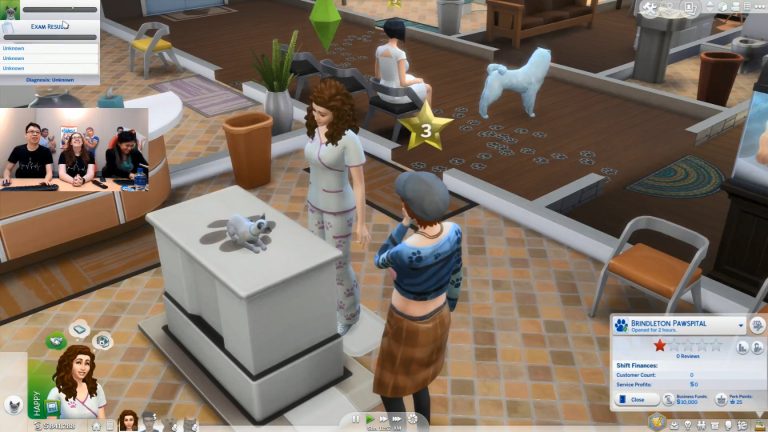
The Sims Team hosted another livestream for The Sims 4 Cats & Dogs Expansion Pack, this time covering details about Vet Clinic Gameplay. We collected all the important information about the pack that were mentioned during the livestream, as well as information that was mentioned in the Q&A session in the Twtich Livestream Chat.

  • Animals will be taken away if they’re neglected.
  • Sims cannot be allergic. The Sims Team wanted a positive spin so the game has new traits cat lover and dog lover.
  • There’s no option to sell puppies and kittens via a store but you can sell via phone if your pet has too many.
  • Sickness for pets happens randomly.
  • Pets will react when being treated badly.
  • There are different exam rooms in the pre-made Vet Clinic.
  • You can lock doors specifically for Cats and specifically for Dogs
  • You can manage your Vet Clinic employees.
  • There’s a new Vet Skill.
    • It’s the most important skill. It affects how quickly and effectively Sims will treat Pets.
  • There’s a Vet Check-In Podium object which Sims will use to check-in their Pets at the Vet Clinic.
  • When customers check in they’ll get a star rating, something like in The Sims 4 Dine Out Game Pack.
  • Sims will have opinions about your Vet Clinic just like Sims can have opinions about Restaurants in The Sims 4 Dine Out.
  • You can greet patients warmly, impatiently and a regular greet patient interaction.
  • There’s a “the Vets here are great with Pets” opinion for Sims.
  • There’s a stress-level user interface for Pets.
  • There are plenty of exam interactions which will help you determine the illness of a pet.
  • There are treatment interactions. The more exams you do the more accurate your diagnosis for a pet is.
  • Different sicknesses have a different amount of symptoms.
  • There are around 20 different pet sicknesses.
  • Pets will get stressed when you exam on them. You can also calm them which will let you continue with exams in case they get too stressed out.
  • There are Rainbow Poop and Rapid Heartbeat symptoms.
  • At the end of exam your Vet can get money for curing a pet successfully by using an interaction on the pet owner.
  • Pets won’t take their treatment if they’re too stressed out.
  • You can set uniforms for Vet Clinic employees.
  • There are price markups which will determine the pricing of your Vet Clinic treatments and advertisement packages which will let you encourage more Sims to visit your Vet Clinic in exchange for cash.
  • You can visit the Vet Clinic with your Pet in order to cure that Pet without having to own a Vet Clinic first.
  • There are sickness treats that you can craft which can make Pets sick.
  • The surgery station can be used at any part of the exam process. It’s used for very rare and high-level sicknesses of your Pet.
  • Pets will get the cone of shame after each surgery process and have a sad walkstyle while wearing it.
  • The dogs can die of ripe old age. The vet is just telling the sim that the dog had a long and fruitful life and it is time to let go.
  • There are 2 types of exam tables:low-end and high-end.
  • There are 5 different wall decals that can be unlocked by progressing through the Vet Clinic Skill.
  • There are Vet Vending Machines where you can store bars, taffy and more for your pets. Sim customers will be able to buy things from the Vet Vending Machines.
  • You can only put treats in the Vet Vending Machines.
  • There’s at least one pre-built Vet Clinic in your game Library.
  • There are Vet Clinic Customer Reviews as well as Employee Reports telling you how well you did during the work time of your clinic.
  • You can’t run a Vet Clinic from your Home Lot.
  • There’s a “golden poop” and “rainbow poop” pet sicknesses. Pets who poop out golden poop will also poop out golden bars of certain sizes. You can sell the golden bars for a huge amount of simoleons.
  • There are age-up and age-down treats that you can use to manipulate the age of your pets.
  • There’s a special bonus for Pets giving birth at the Vet Clinic.
  • You can build relationships with Pets and their owners through treating a Pet.

The Sims 4 Cats & Dogs: Brindleton Bay World Map

13

The Sims Team has finally shown the Map for Brindleton Bay – a new World coming with The Sims 4 Cats & Dogs Expansion Pack.

Check out that beautiful map!

The Sims 4 Cats & Dogs: Brindleton Bay World Map

The Sims 4 Cats & Dogs: Vet Clinic Livestream (REPLAY)

1

The Sims Team will be doing a livestream of The Sims 4 Cats & Dogs Expansion Pack. For this first livestream they’ll be covering the Vet Clinic aspect of the game.  It starts at 11AM PT / 8PM CET / 7PM BT.

We’ll be posting a replay of the livestream for those who miss it. We know how confusing it is to convert the time zones above to your time zone so we also included a countdown to the livestream down below!

The Sims 4 Cats & Dogs: Teen Vet Screenshot

0

SimGuruEmory shared a new screenshot from The Sims 4 Cats & Dogs Expansion Pack, showing off Cassandra Goth taking some responsibility as a vet!

The Sims 4 Cats & Dogs: Teen Vet Screenshot

The Sims 4 Cats & Dogs: New Screenshot of a Sick Pupper

0

SimGuruHouts shared a new image of a poor pupper in The Sims 4 Cats & Dogs Expansion Pack that looks terribly ill. One like – one prayer for this doggo. 🙁

The Sims 4 Cats & Dogs: New Screenshot of a Sick Pupper