Nordhaven World In The Sims 4 Businesses & Hobbies
As confirmed in the latest Official Blog post, the New World coming with The Sims 4 Businesses & Hobbies Expansion is titled Nordhaven. And features two Neighborhood areas: Gammelvik and Iverstad. Thanks to the EA App features we know that there will be 12 new Lots in total!
Looking at the architecture of this pack and the World Map itself, it seems the new World is inspired heavily by the Scandinavian cities and towns in Europe. Which shouldn’t come as a surprise – considering that this is the first Sims 4 Expansion Pack to be developed by the Maxis Europe team!
Lot Sizes
The official Lot Sizes from the new Nordhaven World have leaked thanks to a discovery by @CBXSims!
Gammelvik:
15×20
20×20
20×20
20×20
30×20
50×40
Iverstad:
15×20
20×20
20×20
30×20
50×40
50×40
At the moment we’re still collecting critical information about the next Expansion Pack release. Stay tuned on Sims Community for more updates very soon!
EA releases the official Trailer for The Sims 4 Businesses & Hobbies EP.
The Sims Team has just dropped a brand new reveal trailer for their upcoming Expansion Pack titled The Sims 4 Businesses & Hobbies. Check out the first look at the new features and gameplay coming March 6th, 2025 across Desktop and Consoles!
The Sims Soundtrack goes on Vinyl! See the first variants and availability.
EA Music distribution is ready to dip its toes into releasing a Sims Vinyl for its official first hard copy Soundtrack release. Starting with an entire collection of Sims Soundtrack from The Sims 1 in 2000 all the way to The Sims 4.
Official The Sims 25th Anniversary Vinyl Front and Back Cover
There are going to be limited time copies of different vinyl pressings, so make sure you’re introduced carefully to each shop and variant availability.
Table of Contents
The Sims Vinyl Soundtrack: North America and International Releases
The Sims Vinyl Soundtrack is going to get released in over a dozen different online retailers supplying new CD and Vinyl releases. The collaboration comes between EA Music and Enjoy The Ride, who later distribute the orders to select retailers.
First uncovered by @alejandrosvinyl on X, there will be five different Sims Vinyl variants for North America and five different variants in International stores, including:
The Sims Vinyl Soundtrack and all of its 10 variants will hit the stores worldwide starting February 7th, 2025 when the Pre-Sale Opens. Time of the pre-sale start is set at 9AM PT / 6PM CET.
We plan to update this article with product links as they become available!
The Sims Vinyl: 25th Anniversary Soundtrack Features
Sul Sul! Enjoy The Ride Records, in partnership with Lakeshore Records & EA Music, proudly presents The Sims 25th Soundtrack!
For 25 years, the music of The Sims has been the soundscape of creativity and curiosity, from the first brick placed in Build Mode to the last outfit perfected in Create-a-Sim. Now, for the first time on vinyl, you can experience the iconic compositions that have shaped generations of Sims players.
Featuring unforgettable tracks by Jerry Martin, Mark Russo, Mark Mothersbaugh, Steve Jablonsky, and Ilan Eshkeri, this special collection spans The Sims, The Sims 2, The Sims 3, and The Sims 4 — including the legendary theme songs and beloved Build, Buy, and CAS melodies.
This limited-edition 2xLP vinyl is housed in a beautifully designed gatefold jacket, celebrating The Sims’ 25th birthday. With only 10,000 copies available across 10 colorful variants, this release is as unique as your Sim’s next big adventure. Don’t miss out on this collector’s dream!
On Sale Friday at Noon ET at EnjoyTheRideRecords.com
EA announces Restoration Workshop, Golden Years and Kitchen Clutter Kits.
The newest Motherlode Season Roadmap reveal has given us lots to talk about the next Business & Hobbies EP. But also find out what’s next for The Sims 4 Kits releases!
The Roadmap reveal has confirmed three new Sims 4 Kits titles including Restoration Workshop, Golden Years and Kitchen Clutter. And along with the Kits names are the first potential clues for their theme. Let’s see!
New The Sims 4 Kits
The Sims 4 Kitchen Clutter Kit
One of the three upcoming Sims 4 Kits is called Kitchen Clutter Kit. Which by the name we can already tell it’s going to be a Build Mode exclusive Kit!
The Roadmap has shown an illustrative image of what the Kitchen Clutter Kit might pride in features. Including pots & pans, mittens and oven top clutter and more.
The Sims 4 Golden Years Kit
The Sims 4 Golden Years Kit could be the first Elder-only Kit release for The Sims 4! The teaser has revealed a cute illustration of a granny, with a thread yarn on the right. This could be a CAS Kit, could be a Build Kit or potentially a mixed Kit release!
The Sims 4 Restoration Workshop Kit
This one is so hard to crack down because what exactly are we restoring in the first place? And why is there a tire wheel in the teaser for one of the new Sims 4 Kits titled Restoration Workshop?
So many questions that we don’t have much answers to, other than this preview teaser from The Sims Team:
New Sims 4 Kits Release & Info
All three The Sims 4 Kits are set to release on May 1st, 2025 at 10AM Pacific Time. Considering that each Sims 4 Kit is priced at $4.99USD, you’re looking at spending 15USD (or a price equivalent to your local currency). If you want to get all three Sims 4 Kits on release day that is.
There’s still a lot waiting for us in the store during The Sims 4 Motherlode Season. Including both Paid and Free! Stay tuned on Sims Community to be the first to know.
Your full Live Event walkthrough to earning Week 1 Rewards in The Sims 4!
Electronic Arts have started their celebrations in The Sims 4 Base Game with their Limited Time Blast From The Past Event. Lasting from February 4th, 2025 until March 18th, 2025 for all players who have The Sims 4 on PC, Mac, Xbox or Console.
The latest event encourages Simmers to follow along a throwback Sim character from The Sims 3 Into The Future named Emit Relevart. Your mission will be to stay informed on the News, spread acussations around town and help Emit regain all his Time Capsules.
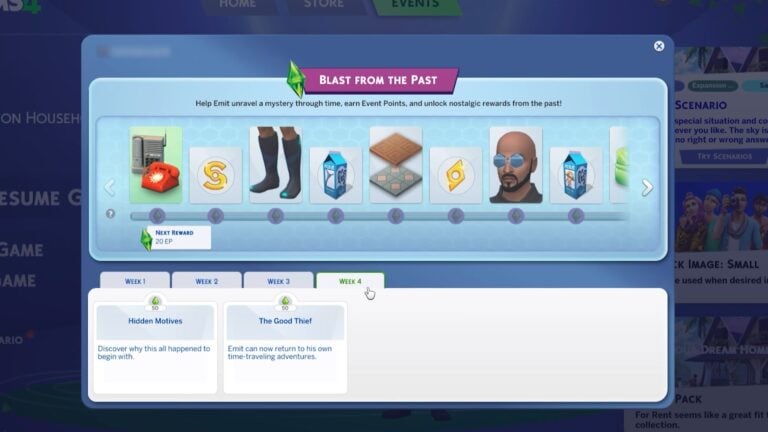
The event is spread across four weeks, with each week unlocking new Quests that come with Event Points. That you can later use to spend in The Sims 4’s Event Menu for Bonus Reward Items and Boosts.
In this article, we’ll be covering an entire walkthrough of two new Quests, as well as all Reward Items for Week 1. Let’s dig into it all!
Table of Contents
A Strange Visitor Quest
The Sims 4 Blast From The Past Live Event Quests will get triggered the moment you step into Live Mode. Either through a New Game or loading up your old one. After a few Sim seconds, you’ll be greeted with a notification about A Strange Visitor:
A brilliant flash and resounding boom echo through the town, sparking curiosity and rumors.
A mysterious figure appears, both familiar and strikingly different. Could this enigmatic visitor be linked to the disturbance? Unravel the mystery in the “Strange Visitor Quest”…
Quest Steps
Tune In to the News for 15 Minutes (25 Event Points) – You might find more details about the situation on the news. Select Watch Channel then Watch News on any TV for breaking updates.
Check Emit’s Social Media Profile (15 Event Points) – Could it really be Emit? Checking his social media profile on a Computer might confirm it. Did he have blue hair, after all?
You can check his profile under Social Networking from any Computer.
Ask other Sims about Emit (25 Event Points) – Blue hair, believer in time travel…who else could it be but Emit Relevart? Maybe others might know more.
Select Ask about Emit on other Sims. (Make sure to introduce yourself first, if you haven’t already)
Travel to Magnolia Blossom Park in Willow Creek (15 Event Points) – It certainly seems Emit is here, with the sightings reported pointing to Magnolia Blossom Park in Willow Creek. Use the Phone Menu to select Travel and go there.
Introduce Yourself to Emit Relevart (15 Event Points) – You arrived at Magnolia Blossom ark in Willow Creek. Now, find Emit! With his bright blue hair, he shouldn’t be too hard to spot.
Select Emit and choose an introduction.
Emit’s Introduction in The Sims 4 Blast From The Past Live Event
Hey Sim, great to meet you! Why yes, I am Emit Relevart! Technology expert and time traveler extraordinaire!
I’ve been jumping around through time on a bit of mystery, and I’m kind of stuck. Have you noticed any unexplained missing items around here? I’m trying to figure out what’s going on.
Ask Emit Relevart about the Missing Items (15 Event Points) – Emit’s been found! And he mentioned something about missing items. That sounds intriguing! Select Ask about Missing Items on Emit.
You can find him at Magnolia Blossom Park, or select the Social category on the Phone to Invite Over Emit.
Ask 3 Other Sims about Missing Items (25 Event Points) – If there are items missing, someone else must have noticed! Select Ask about Missing items on other Sims to learn if they’ve seen or heard anything.
Missing Clues Quest
As the mystery of missing items deepens, your Sim keeps searching for answers. With each missing item, their anxiety grows. What could truly be missing?
Continue the “Missing Clues” quest to uncover these mysteries and more…
Quest Steps
Refresh Your memory in The Sims Archives (25 Event Points) – Some of those items mentioned sound familiar, like they might be found in the archives of Sims.
Select Play Game and then Play The Sims Archives on a Computer to refresh your memory.
Find the Special Time Capsule (35 Event Points) – To uncover a time capsule, search for rocks or dirt mounds ready to be dug up. Remember to look closely for when and where they appear.
Explore areas like parks, and seek out rocks with crystals or dirt mounds, and select Dig for Special Time Capsule.
My personal recommendation to completing this Sims 4 Blast From The Past Quest step is to travel to the Magnolia Blossom Park in Willow Creek. Where you’ll find plenty of Crystal Rocks laying around the park.
Open the Special Time Capsule (15 Event Points) – Now that the Special Time Capsule has been found, it’s time to open it! Go to your inventory, find the Special Time Capsule, and select Open. (If you no longer have the Special Time Capsule, it can be replaced at a mailbox)
Read the IOU (15 Event Points) – Why was the note in a time capsule, and what is this all about? Open your inventory and find the IOU Note, then select Read IOU. (If you no longer have the IOU Note, it can be replaced at a mailbox)
Report Back to Emit (25 Event Points) – The discovery in the archives of the capsule and the note – someone is clearly leaping through time and taking items! Select Report about Time Capsule on Emit.
Accuse 3 Sims of Being a Time Traveler (25 Event Points) – Maybe you can uncover the time travelling thief hiding in plain sight by pretending that you already know their identity! Select Accuse of Being a Time Traveler on 3 different Sims.
Ponder Time Travel (25 Event Points) – There has been a lot going on today. Hidden time capsules, a cryptic note, random accusations towards your neighbors of the near-impossible. That’s a lot to ponder.
Find a Shower, and select Ponder Time Travel. (You can also use a Bathtub or Toilet!)
Sims 4 Blast From The Past: Week 1 Rewards
The Sims 4 Blast From The Past Live Event contains several new exclusive rewards, as well as boost rewards like Satisfaction Points. Here’s what you can claim for completing two quests during Week 1:
The Fun-Fun Inflatable Set, Part One
Missing Sim Milk Carton
The Future’s So Bright “Sun” Glasses
25 Satisfaction Points
The Yesterday Flooring Set
Missing Sim Milk Carton (The Kraken)
Relevart Time Walkers Shoes
500 Simoleons
Retro Deco Phone Set
Reward Overviews
Missing Sim Milk Cartons
There are two missing Sim Milk Cartons included with this week’s Sims 4 Blast From The Past Live Event. Including Pit Beast, Dweller In The Dark and Ginny, Former Pirate and Sheriff variants.
These Missing Sim Milk Cartons are also a new category in the Collections Menu. Where you can keep track of all 6 that you’ll unlock throughout the Live Event.
New Items in Build Description
New Flooring in Build Mode Description
The Fun-Fun Inflatable Set, Part One
Retro Deco Phone Set
Spiral Parquet
Retro Edwardian Tile
The Future’s So Bright “Sun” Glasses
Relevart Time Walkers Shoes
The second week of The Sims 4 Blast From The Past Live Event is expected to begin on February 11th, 2025 at 9AM Pacific Time. We want to help you keep track of progress – so simply tune into the countdown below, which should tell you exactly when Week 2 of New Quests should begin.
Countdown to Week 2 of The Sims 4 Blast From The Past Live Event
How did you find the first week of the latest Sims 4 Blast From The Past Event? Too hard or too easy? Let us know in the comments below and bookmark our Sims 4 Live Event Updates for Week 2 content!
The official new Roadmap for The Sims 4 Motherlode Season is here!
Maxis studios is warming up for another Roadmap of Content Releases for TS4. With The Sims 4 Motherlode Season being the next on the list, we finally know what to expect in the coming months from the team. Let’s dive into the Roadmap!
Table of Contents
Official The Sims 4 Motherlode Season Roadmap
The new Sims 4 Motherlode Season Roadmap is officially out, finally confirming the Businesses & Hobbies Expansion Pack. Along with a Release Date set for March 6th, 2025. There are going to be 3 new Sims 4 Kits as well on May 1st, 2025, as well as a special unannounced surprise set for February 25th, 2025.
Here’s everything from The Sims 4 Motherlode Season that you should expect from February to May 2025:
The official Sims Website confirmed additional suspicion in regards to new content coming with the Motherlode Season. Confirming that new Sims 4 Base Game content updates are also expected as a part of the current new Roadmap.
Hit the motherlode with a new expansion pack, base game updates, and more. Come back soon for more!
As we’ve been reporting before, there are possibly more Sims 4 surprises awaiting for us during The Sims 4 Motherlode Season. Such as the Pre-Patch for The Sims 4 Businesses & Hobbies Expansion Pack, which should deliver some new Base Game Features and Improvements.
What are your thoughts on the latest Sims 4 Motherlode Season Roadmap? Let us know your thoughts in the comments down below!
Here’s the first video teaser and what to expect from this Sims 4 EP announcement:
The Sims 4 Businesses & Hobbies: Tattoo Parlor Teaser
The first teaser for The Sims 4 Businesses & Hobbies Expansion Pack surfaced across The Sims social networks. Showing a Sim getting a Tattoo in what seems to be a Sim Tattoo Shop!
We don’t know anything else about the next Expansion Pack other than its Business & Hobbies official title. And now the seeming fact that we’ll be able to run our own Tattoo Shops!
Full Reveal Date
The Sims 4 Businesses & Hobbies Expansion Pack will be fully revealed with a Reveal Trailer, Official Assets and The Sims Blog on February 6th, 2025 at 8AM PT / 4PM BT / 5PM CET. Down below you’ll also find the official countdown to the Trailer Premiere!
What are you hoping to see in the official pack announcement? Let us know your thoughts and stay tuned for all the latest Sims 4 Businesses & Hobbies News!
New Sims 4 Content Release lineup to be announced this week. Including the Business & Hobbies EP!
The Sims Team is already looking at a very busy week with switching from The Sims 25th Anniversary Celebrations to The Sims 4 Motherlode Season Roadmap. And we already have a first teaser for the upcoming change!
Check out the first teaser we have for the upcoming Season:
Table of Contents
First The Sims 4 Motherlode Season Teaser
The first teaser for The Sims 4 Motherlode Season was spotted on the official Sims social accounts:
The first Roadmap teaser contains an illustration of a Freezer Bunny running away from a huge Simoleon coin. Take a look:
What to Expect
It’s already been leaked that the next Expansion Pack for The Sims 4 is titled Businesses & Hobbies. The pack’s full announcement day and release date will be revealed on February 6th, 2025. No other information has been shared yet concerning the Expansion Pack information, other that it will have a “Set Up Shop” Preorder Bonus.
Motherlode Season Begin Date
The new Roadmap for The Sims 4 won’t cover just the new Expansion Pack. There are more DLC types and potential Sims 4 Updates that usually get revealed during Roadmap announcements.
To make things easier for you, we’ve included a handy countdown until the beginning of The Sims 4 Motherlode Season. The Season Reveal is expected to happen on February 6th, 2025 by 9AM PT / 5PM BT / 6PM CET.
Countdown to The Sims 4 Motherlode Season Reveal
[janky target_time=”1738861200″ color=”#235c82″]
What do you expect to see get revealed during The Sims 4 Motherlode Season? Join the discussion below and stay in the loop for all things The Sims!
There’s a new update for The Sims 1 and The Sims 2 on Windows PC!
EA and Maxis have just dropped a new Sims 1 and Sims 2 Rerelease Patch for Windows PC players. The newest version of the update brings fixes to The Sims 1 and The Sims 2, as well as promises for future patch resolutions coming soon.
We hope you’ve been enjoying revisiting The Sims and The Sims 2! It’s been super exciting seeing all the joy and enthusiasm from our community for these classic games. We’ve also been focused on the reports of technical issues that some players have had, and have been diligently working to address them. We wanted to say thank you to the community for sharing your detailed reports via the forum to help us improve these games.
– The Sims Legacy Team
February 4, 2025 Patch Notes:
The Sims 1 Patch Notes
Fixed Issues:
Alt+Tab or Alt+Enter can sometimes cause a crash
Alt+Enter can sometimes cause the Windows title bar to be hidden
Alt+Enter can sometimes not toggle between full screen and windowed modes
On some systems, The Sims can appear to launch and then immediately exit (no splash screen displayed)
The Sims should now launch in most situations
In some cases where there is an underlying graphics issue, The Sims will display a message
Some players are unable to click on various parts of the neighborhood map
The travel screen, when traveling between neighborhoods/worlds, can sometimes appear garbled or glitched
The Sims might crash if you are not on the default neighborhood, interact with another Sim, and then save
When using Alt+Enter to cycle window and zoom sizes, the HUD could be clipped. At this zoom level, The Sims will now instead clip from the top of the screen.
In some situations in windowed mode the title bar might not be visible
The Family friends counter could sometimes not be visible
General Notes:
Several players have had problems (e.g. walls, floors, objects not showing up; game not launching; other oddities) that are addressed by updating graphics drivers to the latest versions. Please make sure your drivers are up to date.
The Sims game window is of a fixed size that can’t have its basic properties changed after it has launched. Moving the window from a monitor to another with a different, lesser resolution can lead to unexpected results, possibly even crashes. If you want to run The Sims on that second monitor please use the option “-monitor:<num>” to force it to launch on the other monitor. “0” is your primary monitor, a second monitor is “1” and so on. We are investigating adding this as a menu option in the future.
In some situations, players have noted that music only plays in Live mode. Please check your computer sound options and make sure that everything is properly configured (e.g. on a 5.1 surround system make sure that your center speaker is functioning).
You might be prompted to “Enable the help system” every time you return to a house. This is the game trying to have you complete the tutorial. This will continue to happen until you complete the tutorial.
The Sims 2 Patch Notes
Fixed Issues:
Alt-Tab or Alt+Enter can sometimes cause a crash
Some players on EA App received an error message indicating that certain needed files were corrupt
The game would sometimes crash after creating a family
The game sometimes launched at a small resolution (800×600) and then scaled that small format to fill the entire monitor
In certain situations the game will launch and then immediately show a “DirectX” error, requiring use of the “-w” option to work around the problem
Sometimes a Sim (or multiple Sims) would disappear after the player moves to another lot or neighborhood, or after leaving and rejoining the game despite saving
Sometimes non-adult Sims (children, pets) would disappear
Some interactions that result in a transferable reward (e.g. a dog returns from work) can cause the game to crash
Addressed some infinite loading screen issues
General notes:
Several players have had problems that are addressed by updating graphics drivers to the latest versions. Please make sure your drivers are up to date.
Remember that the “boolProp testingCheatsEnabled” cheat will cause the game to periodically show various dialogue boxes with debugging information in them. The cheat is working as expected.
We are investigating an issue where during certain cinematic events (such as Alien Abduction), the Sim can be reset and the event fails. While we are investigating this, you can work around the issue by making certain there are no other Sims on the lot to observe the event.
While some issues may not be listed here, they may still be in the process of being addressed. Some topics can require an extended investigation on our end, so even though these fixes may be in active review, it’s not a guarantee that we’ll have an immediate fix for it in the upcoming patch.
Thank you for playing these games that are such a storied part of our history – starting 25 years ago! Please continue to share and report any issues on our forums, and join our official Discord community for tips, tricks, and news!
Dag dag,
The Sims Team
Downloading the new Sims 1 and Sims 2 Rerelease Updates on EA App
Stay tuned for more updates and patch drops in The Sims Franchise on Sims Community!
There’s a new Sims 4 SDX Drop for Desktop and Consoles!
Electronic Arts and Maxis have released a brand new The Sims 4 SDX Drop across Desktop and Console supported platforms. The newest content rollout for The Sims 4 SDX introduces new Create A Sim items and Build Mode swatches.
What else is new? Find out in the official Sims 4 Sims Delivery Express notes below:
The New CAS Items and Build Swatches Drop
Table of Contents
How to download and install the latest Sims 4 SDX
With Sims 4 SDX (Sims Delivery Express) you are able to download new CAS Content, Build Mode Content and small bug fixes and improvements into your game. All straight through The Sims 4! Simply open up The Sims 4 and your game should automatically check for new content.
If not, go into Game Options > Sims Delivery and Check for new Content. This method of bringing new Sims 4 SDX content into your game works both on PC and Consoles! Note that you will have to restart your game in order to obtain new content. You can select “Yes, Restart Now” for the game to restart automatically for you.
Official Sims 4 SDX Drop Previews
EA stated that this is “Just one of the free content releases coming this year in The Sims 4”. Meaning that you should expect more Free Content Features to the game soon this year!
What’s your experience like so far installing and playing the latest Sims 4 SDX Drop? Join the conversation below!
Frequently Asked Questions and first steps to completing the event!
EA and Maxis have released the official guide to The Sims 4 Blast From The Past Event, going live on February 4th at 9AM PT.
Table of Contents
The Sims 4 Blast From The Past Event: Official Introduction
A mysterious figure has blasted into town and needs your help! Someone is “borrowing” from the past, and your help is needed to unravel the mystery through time! You’ll be rewarded for your efforts throughout the Event, with one being the Surprise Birthday Cake. Hide inside and jump out to surprise and delight the gathered Sims with this delicious birthday treat!
How Does it Work?
Open Live Mode with an existing or new Household. After a short wait, A Strange Visitor will appear piquing your curiosity to investigate!
The Event will run for six weeks, with two exciting Quests each week. Your journey begins by discovering who the Strange Visitor is, and learning of the missing objects from the past! As the weeks progress, you’ll continue to dig deeper into the mysteries of time, attempt your own journey through it, and unravel the motives of the time thief! The more Quests you complete, the more Event Points and rewards you’ll earn.
Make sure you’re online. Log in to your EA account.
Enter Live Mode, and you’ll see the first pair of Quests, which start with a pop-up. In Live Mode, you can access the Event Screen by clicking on the Event Icon!
Earn Event Points by completing Quests and Goals. As you earn Event Points, you’ll be able to claim new rewards.
Claim your rewards through the Event Screen in the Main Menu or Live Mode by selecting Claim. Note: You must be in Live Mode to claim Consumable Rewards.
Claimed rewards will be available in Build Mode, Create a Sim, or your Sim’s Inventory. You can filter to view Event rewards with the Event Rewards filter under the Special category in both Create a Sim and Build Mode. For more help with claiming rewards, check out our EA Help article.
Each week, two new Quests will be available. Complete these Quests to earn more Event Points and unlock new rewards!
The Blast from the Past Event will have four weeks of Quests and two extra weeks at the end, so there’s plenty of time to catch up and complete it!
Claim the Blast from the Past Rewards to create a futuristic-inspired Sim who loves to lounge in their inflatable couch, or toss on Dina Caliente’s iconic little black dress and hit the light-up dance floor while listening to some retro classics! Rest assured, your claimed rewards are stored on your EA account, so you do not need to worry about losing them.
Week 1
Relax in your Fun-Fun Inflatable chair! Sport your new Future’s So Bright Sun Glasses while admiring your Retro Deco Phone Set.
Retro Deco Phone Set
Relevart Time Walkers
The Yesterday Set floor tiles
The Future’s So Bright “Sun” Glasses
The Fun-Fun Inflatable Set, Part One
Week 2
Wake up on time with the functional Get Up! Alarm Clock, put on your Emit inspired outfit and Bow Tie while preparing a feast at the Bigger Gatherings Banquet table.
Get Up! Alarm Clock
Be “The Emit” full body outfit
Bigger Gatherings Banquet
The Relevart Neck Stabilizer bow tie
Week 3
Make time for an iconic look by getting dolled up in the Dina Caliente LBD (Little Black Dress) while listening to some New Retro Station Songs or get comfy on your Fun-Fun Inflatable couch, while you contemplate your next “grab” for the Sticky Fingers aspiration.
The Fun-Fun Inflatable Set, Part Two
Dina Caliente’s LBD
New Retro Station Songs
Sticky Fingers aspiration
Week 4
Make sure to celebrate with the Surprise Birthday Cake, and jump out to share the fun! While in a party spirit, don’t forget to get out on The ElectroDance Floor to dance the night away!
Surprise Birthday Cake
The ElectroDance Floor
FAQ
Do I need to log in to my EA account?
A: Yes, by logging into your EA account, you save your Event progress and the rewards you earn from this Event to the account. That way, if you ever need to install The Sims 4 again, you simply need to log back in to gain access to your rewards!
What about SDX releases, I thought those were provided free content and updates!
A: Sims Delivery Express drops aren’t going away, but we’re always looking for new and novel ways to deliver gameplay, as well as objects and clothing to add to your Sims’ lives. You can still expect SDX releases throughout the year as well as new Events to engage with The Sims 4 throughout the seasons.
What if I log in and don’t see the Event?
A: The Event starts on 2/04 at 9 a.m. PST and ends on 3/18. Please make sure you are online and logged into your EA Account. If you still do not see it, you may need to restart The Sims 4 or disable any UI mods you have installed.
The Blast from the Past Event will be available to players until 3/18. While no new quests will be added after 3/04, players can still complete quests and claim any event rewards that they’ve earned but not yet claimed from the Event Screen. Rewards must be claimed by 3/18 or be lost.
Will this be available to Everyone?
A: Yes! The Blast from the Past Event will be available to everyone starting February 4th, and you won’t need any Packs to participate.
What are Event Points?
A: Event Points are a limited-time measurement for the Blast from the Past Event that allows you to claim free rewards. As you earn Event Points, you progress along an experience track and can claim rewards along the way.
How do I earn Event Points?
A: Each Objective in a Quest gives Event Points. Mousing over the Quest will have a tooltip telling you how many points you will earn. Completing the entire Quest nets additional Event Points. Once you have enough, you can claim rewards.
Do I have to spend Event Points?
A: Your Event Points are a cumulative total. When you claim a reward, you still stay at the same Event Point total, so your Event Points aren’t actually “spent.”
What happens if I have leftover Event Points?
A: The Blast from the Past event offers a finite number of rewards. If you claim them all and still have Event Points, don’t worry! Your Event Points cannot be used for anything other than the Blast from the Past Event and will expire when the Event is over.
Can I still complete the Event if I start late?
A: Yes, the event will run for 6 weeks. If you start late, you will have access to all the previous week’s Quests.
Do you plan on participating in the official Sims 4 Blast From The Past Live Event? Let us know in the comments below!
Join The Sims Team as they celebrate the 25th Anniverssary of The Sims Franchise with an official 25 Hour Livestream! The official guest list includes singers Doja Cat and Latto, internet celebrities Trixie & Katyie, Dan & Phil and more. As well as our favorite Sims celebrities – Plumbella, SpringSims, SimTimes and others included in the list below:
The official Sims 25 Livestream begins on February 4th at 2PM PT / 10PM BT / 9PM CET. Or, simply click the play button to the livestream to discover when it begins in your area!
From 100 Baby Challenge to Off The Grid – see some of the most popular Sims 4 Challenges in the community!
Since the Sims 4 was released in 2014, an ever-growing community of sims players have been finding new ways to play in the form of self-imposed Sims 4 challenges. These challenges vary in difficulty and format, but many have become so widely known amongst sims players that they can now be considered iconic!
This article will cover 10 of the most well-known challenges that have been brought to the game by sims players since the inception of the Sims 4.
Table of Contents
Multi-Generational Sims 4 Challenges
The Sims 4 challenges tend to fall into two categories: multi-generational challenges, and single generational challenges. Multi-generation challenges (also known as ‘legacy challenges’) begin with a single sim, and follow them to their death, at which point an heir takes over, and becomes to new focus of gameplay.
10 Generation Legacy
First up in this category of challenges is the classic 10 generation legacy challenge! For this challenge, the player starts with a single sim and must follow their story through them and their heirs for a total of 10 generations.
It’s perhaps no surprise that this is an iconic challenge, as it is programmed into the game! Upon completing the 10th generation, the player will receive an in-game achievement, titling them a ‘Legacy Player’. Though this isn’t perhaps the most challenging of gameplay, many simmers have taken it a step further by making detailed spreadsheets and score systems to keep track of each generation; their aspirations, love interests, heirs and achievements.
Alphabet Legacy
A simple twist on the usual legacy challenge; the founding sim’s name must begin with the letter ‘A’, and each heir that follows must take on the next letter of the alphabet. This challenge spans 26 generations, so requires a little more commitment!
To make the theme more encompassing, each generation may follow the theme of their corresponding letter, where the founding Sim, the letter ‘A’, must be an astronaut, the following generation, letter ‘B’, must be a baker, ‘C’ must be a comedian, and so on.
This challenge will also result in an ‘Alphabet Legacy’ achievement in-game for completing 26 generations.
Decades Challenge
This Sims 4 challenge sees 13 generations of sims make their way through history, from the 1890s all the way to the 2010s! There are various restrictions on this challenge, depending on the level of historical accuracy players wish to contend with. For example, to be fully emerged in the time, the world – buildings and townies – must be altered and adapted periodically so the architecture and fashion suit the time period of the current generation. Technology (except where unavoidable) is strictly prohibited until the appropriate time period. Creative ways of simulating historic events can also be included, such as using a cowplant to determine whether sim returns from serving in a war or not.
Not So Berry Sims 4 Challenge
This challenge encourages players to use careers and colour schemes that may not have otherwise – beginning with mint, each of the ten generations in this legacy represents a different colour and has a unique career and aspirations to achieve. Whilst this challenge may be a little more difficult to follow to a tee if the player does not have all the expansion packs it requires, its variety makes it easy to adapt and can be used as a starting point to explore more aspects of Sims 4 gameplay.
Nightmare Legacy
A chaotic twist on a regular Sims 4 legacy challenge, players must set their sims to ‘short lifespan’ and randomise every new sim’s traits. Whilst it may be a blessing to not have to struggle through the hectic infant and toddler life stages for very long, completing aspirations and saving money for the next generation can be difficult when each sim’s life is so short!
Lengthening or shortening lifespans can also be used as a way to adapt other legacy challenges to suit individual playstyles.
Single Generation Sims 4 Challenges
Single generation Sims 4 Challenges focus on the life of a single sim. They can make their life more difficult, place them at risk of death, or just be a fun starting point to create the founding sim of a legacy challenge!
100 Baby Challenge
This challenge is fairly self-explanatory – the player must make a single sim the parent to 100 babies within their lifetime! Traditionally, this challenge is done by making a sim that can get pregnant and having them try for a baby with every townie possible until they have had a total of 100 babies. These babies must be looked after until they become young adults, at which point they may move out and make room for more babies. To make it more difficult, children must reach a minimum of an A grade in school before they can age up!
Variations on this sims 4 challenge could include having as many twins and triplets as possible, or having science babies or adopting. But whatever the method, the household is sure to be busy, and infants and toddlers must have their needs met or they’ll be taken away and the challenge will be failed!
Black Widow
Jealousy, heartbreak and murder – the black widow Sims 4 challenge is a little darker than some others on this list! The player must start with a materialistic sim who must not have a job of their own. Rather, they must make all their money through seducing and marrying a total of 10 different people, who each meet an untimely demise after getting married.
Although it’s not possible for a sim to commit murder in the game, it’s very possible to ‘accidently’ set the house on fire by leaving cooking on the stove, and to have a sim not escape in time…
The black widow is than left with all the wealth of their late spouse and is free to move on and marry someone else!
Rags To Riches
Often used as the starting point for a legacy sims 4 challenge, players must start their sim on an empty lot with 0 simoleons. The sim can make money in any way they like, but no cheats are allowed! To make this even more difficult, players may start their sim on the largest lot possible – this way, the lot taxes will be higher, and it will be more difficult to build a stash of simoleons over time.
Runaway Teen Sims 4 Challenge
Similarly to the rags to riches challenge, the player’s sim must start with 0 simoleons on an empty lot. However, the sim must be a teen! Teens, unlike adult sims, are not able to get full-time jobs, and must attend school. The goal of this challenge is to survive to young adulthood, build a home, and obtain an A in school!
Alternatively, to play into the storyline of a runaway teen, the sim must skip school (to simulate avoiding being reported as a runaway), not socialise with any adults, and cannot have a part time job either. This makes the challenge much harder, but also offers some good story-telling opportunities, as the player must think about how this sim will deal with the loneliness and financial struggles of living on their own at such a young age.
Off The Grid
By enabling the lot challenge ‘off the grid’, players eliminate most electronics and plumbing from their sim’s day-to-day life. This can make living difficult, as sims won’t be able to use computers, most bathtubs, showers and toilets, or electric lighting! Since off the grid living was introduced as a gameplay feature, this challenge has become popular amongst many sims players, not only for the opportunities it provides sims in finding a new way of living, but its potential in being used alongside other challenges such as the decades challenge to aid historical accuracy.
Challenge Variations
All the sims 4 challenges listed, no matter how iconic, aren’t without room for variation – they can be a fantastic way to find inspiration and discover new ways to play the game, and most importantly, must be fun! Players are free to alter challenges and follow and break rules as they wish.
For example, instead of a 100 baby challenge, a player could have their sim’s goal be only 10 babies, but each one must be raised entirely differently – one raised in isolation, one raised to be a star student, whilst another skips school entirely, and so on. The off the grid challenge could be taken a step further by having the sim grow all their own food as well, which combined with the Seasons expansion pack, could be quite tricky most food does not grow year-round! The rags-to-riches challenge could tell the story of Cinderella, or the black widow challenge could omit killing spouses and instead trap them in a basement to produce paintings which the player’s sim sells to maintain their wealth! Popular variations on legacy challenges include 12 generation zodiac-themed challenge, or the Disney Princess challenge where each generation must follow the stories of Disney princesses.
Whatever the player’s taste, there is sure to be a challenge in this list that suits them – there is a reason they have become so iconic!
Your guide to new gameplay features and items in Arnie’s Luminova Mod Pack!
Like many do in the modern age, I have a few smart devices throughout my home. An Amazon Fire TV with an integrated Alexa assistant (Or, as I call her, “Glorified Lightswitch”), and a few smart plugs here and there. And despite the prevalence of smart tech in our everyday life, the closest we have in The Sims 4 is the ‘Lin-Z Smart Speaker’ that came with an update in 2018… that is until now.
Some of you may know Arnie’s work including his open-world mod Brookheights, World Edit, or the LUX Lights Mod Kit. Arnie is nothing short of a modding genius. He is always bringing something new and exciting to The Sims 4 and loves to stretch the boundaries of the game engine. We previously covered The Sims 4 Luminova Mod Kit’s reveal last month and since then this Mod Kit has entered early access over on Patreon. With the early access period underway, let’s take a look at all the new gameplay features and how you can incorporate this smart tech into your Sims life.
Table of Contents
Catalogue Overview
Take a look below at the objects featured in this Mod Kit.
Object Swatches
Most objects in this Mod Kit come with multiple swatches, including many with animated lights and screens.
Smart Thermostat
Smart Home Panel
Smart Blinds – Fabric (x1)
Smart Blinds – Fabric (x2)
Wall Integrated Blackout Roller Shutters (x1)
Wall Integrated Blackout Roller Shutters (x2)
Privacy Translucent Smart Blind
Smart Air Purifier
Future’o Clock
TV Smart Backlight
(No TV)(With TV)
Neo Smart Hub
Bedside Clock
Smart Switch
Smart TV
Smart Fridge
Gameplay Walkthrough
So you’ve installed The Sims 4 Luminova Mod Kit… what now? If you open up Build/Buy Mode and search “Arnie” in the search bar you will see all the new objects featured in the pack. Let’s take a look at each object in the Mod!
Smart Thermostat
Owners of The Sims 4 Seasons will be familiar with the EcoDisc 51M-5 Thermostat that allows you to set the internal temperature to either a cooler or warmer setting. The Smart Thermostat works the same but features colour-changing light effects that match the temperature you have set and can be controlled with the Smart Home Panel and the Smart Hub.
Smart Panel
The Smart Panel is the first of three smart home hubs you can add to your Sim’s living spaces that allow you to control every aspect of the Mod Kit. From here you can control lights, blinds/shutters, and air purifiers and access everything that is normally available via Lin-Z in the Base Game.
Smart Blinds
The Smart Blinds, as well as the shutters, can be opened and closed either directly by your Sims or all at once via a Hub device. The blinds are fully animated when individually closed, however when commanded to all close at once the animation will not play. The blinds will block out most light and will automatically close at 10 pm and open at 6 am. The blinds and shutters both come in 1-tile and 2-tile variants and fit most windows in the game. The shutters are integrated into the walls and are usable on windows of most sizes including rounded windows.
Smart Air Purifier
The Smart Air Purifier will give your Sim the ‘Fresh as a Breeze’ +1 Happy Moodlet for 10 hours. For players with the Bust The Dust Kit the Air Purifier will clean dust from the room it is placed in. There are two modes: Normal Mode and Quiet Mode.
Future’o Clock
The Future’o Clock is the first of two clocks included in this Mod Kit. You can set an alarm for that room at any time of the day or night and it will wake any sleeping Sims up. You can also control blinds, air purifiers, and thermostats from this clock.
TV Smart Backlight
The TV Smart backlight can be added behind the Smart TV included in the Mod and comes in 5 different fully animated colour variants. Unfortunately, these cannot be turned on and off and do not fit behind any other in-game TV. You can place these anywhere and could be used as a backlight for a bed or bookshelf as well. Make sure to enable ‘BB.Moveobjects on‘ when placing this behind your TV.
Neo Smart Hub
The Neo Smart Hub is the second of three main Hubs available. Similar to the Smart Panel this device can be used to control all devices in your home and has the ‘Ask Neo’ function, allowing you to chat with the AI, similar to how an Alexa or Google Home would work in the real world.
There are several options when interacting with the Neo Smart Sub. You can order services and deliveries, play music, control lights, and also control all of the smart devices available in the Mod Kit.
Bedside Clock
Similar to the Future’o Clock, the Bedside Clock can be placed on many surfaces due to its small object footprint. You can set alarms to wake Sims and it can also be used to control smart devices in the home.
Smart Switch
The third and final smart hub. The Smart Switch is a compact version of the Smart Panel and has all the same functionality, as well as a fully animated screen.
Smart Fridge
And finally, the Smart Fridge. This technologically advanced fridge can be used as a regular fridge with the added bonus of being able to control all smart devices from it. The animated screen on the front is a nice touch, however any smart home interactions your Sim does on it will be done via the phone and not via the fridge.
Release Info
The Sims 4 Luminova Mod Kit is currently available in early access over on Arnie’s Patreon. The Mod is set for public release on February 14th2025, the perfect mod to explore if you don’t have any Valentine’s Day plans.
Make sure to check out Arnie’s amazing trailer for The Sims 4 Luminoiva Mod Kit:
Final Thoughts on The Sims 4 Luminova Mod Kit
Arnie’s modding talent cannot be understated. Back in 2020, Arnie took the Sims community by storm with his excellent open-world mod ‘Brookheights’ and the ‘Farmland’ Mod in 2021. Now he is back and is showing no sign of slowing down with the latest release: The Sims 4 Luminova Mod Kit.
I often find myself forgetting about the existence of the Lin-Z smart speaker that was introduced back in 2018. 7 years and I still find myself rarely using it, or even remembering it exists. In 2025 so many devices in our home are considered ‘smart’, and according to a recent YouGov survey, 30% of adults in the UK use a digital assistant daily. So it’s about time this gets expanded upon in The Sims 4.
The mod kit felt overwhelming at first as I familiarised myself with each object and how they synergised with one another. I quickly found myself testing out the smart blinds and shutters on as many windows as I could and finding new ways to improve my gameplay experience. As with many early access mods, there are a few aspects that I’m sure will be ironed out and expanded on in the public release and future updates. When interacting with the new AI “Neo” Sims will still say Lin-Z and interact with it the same as they would with existing devices in-game. Many may not be aware of the hidden interactions available with Lin-Z once your Sims attain a high relationship with the device. Once reached your Sim can create wakeup routines, and this would be a nice addition to the devices in this mod. Arnie has already gone on record to say he plans to add more features to the Smart TV and have more cross-mod integration with the Plumfruit Mod. I cannot wait to see what Arnie’s modding future holds for us and I can see myself using this Mod Kit in the future.
We will make sure to update this page once the Mod is publically released on February 14th. What are your thoughts on the Kit? Join the discussion below and stay tuned for future updates on The Sims 4 Mods!
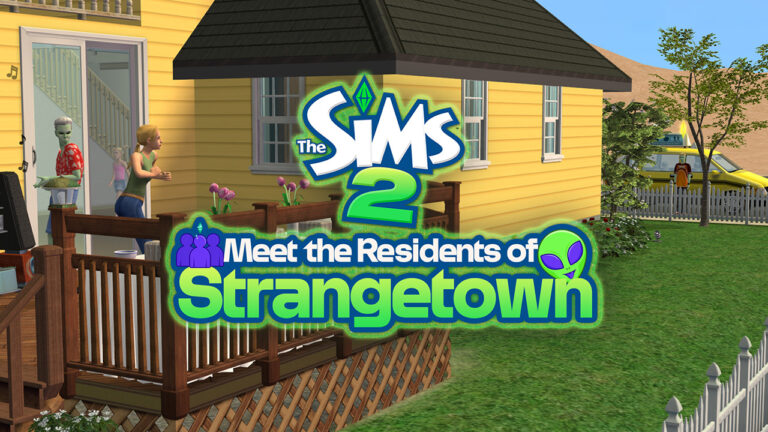
Beloved Sims 2 Strangetown, referenced in The Sims 4 StrangerVille, and Life & Death is the OG of Sims conspiracy theory/alien/Grim Reaper-based drama Galore. The Sims lore describes it as:
Truth-seekers move to Strangetown hoping to discover the secrets the town holds. Do aliens live among us? Do missing Sims mysteriously appear here? In this town nothing is what it seems.
The missing Sims? Aliens? The preview image might suggest someone special wearing the iconic red dress, that someone being Bella Goth. While her family still lives in Plesantview, Bella’s presence (or lack of it) looms over The Sims 2 Strangetown. Where is she and how is she connected to the strange townies is better understood if we take a better look at all the residents, but if you’re anxious to know what really happened, Plumbella on YouTube made a video explaining her faith.
Strangetown is the home of five premade families and two bin homeless families, and all of them are chaotic and iconic in their own right – run-of-the-mill family drama, human experimentations, kidnapping, unrequited love, and MURDER! But Sims can always relax in two community lots on The Road to Nowhere, an abandoned “government facility” shopping center, and of course the Strangetown Spa.
Pro tip: Keep an eye on lot addresses and their incredible subtlety. Also, be sure to click the family connections to get a better insight.
Table of Contents
The Sims 2 Strangetown Households
The Beaker household
What experiments are the highly secretive and less than neighborly Loki and Circe Beaker performing on poor Nervous Subject? Will this secrecy affect Circe’s career ambitions?
The Beakers reside in a two-story mansion at 1 Tesla Court. The address implies high-minded intellectual residents, but at what cost? This huge mansion has a tiny room in the basement with a sad single bed, a computer, and a bookshelf. It is also the sad home of Nervous Subject, aka Nyon Specter, whose parentage inspired the Grimborn trait in The Sims 4: Life and Death.
Some of the fun items in this household include The Eclectic and Enigmatic Enegrizer, Simsanto Inc. Biotech Station, SensoTwitch Lie Finder, and TraumaTime “Incision Precision” Surgical Training Station.
Loki BeakerAs soon as he perfects his latest invention, Loki is sure to get the recognition he knows he deserves. In the meantime, he keeps himself busy by trying to assemble a nuclear reactor out of common household items.
Circe Beaker Circe knows 238 different ways to make someone scream, and none of them are nice. She enjoys taxidermy and collecting coat hangers.
Nervous SubjectHis hobbies include twitching and blinking a lot.
.
The Curious family
In search of truth and mystery, the Curious brothers got more than they were “expecting.” Can Pascal, Lazlo, and Vidcund cope with their new roles as cosmic parents?
The Curious Family lot can be found on a hill in 2 Cover Up Road and there’s nothing sketchy about that, especially having read the family description and their personal connections.
All three Curious brothers are scientists, lusting after knowledge with a keen interest in astronomy and botany.
Items of interest on their lot are a potty and a green baby crib.
Pascal CuriousNo matter what happens, Pascal believes there is a logical explanation for everything. In his free time, he practices home psychoanalysis and collects conspiracy theories.
Vidcund Curious Serious and exact, Vidcund strives to fit the universe into a nice tidy package. He has an unnatural fondness for African violets.
Lazlo CuriousNot as studious as his older brothers, Lazlo got his degree in Phrenology. He likes to call phone psychics and spends hours trying to bend forks with his mind.
The Specter Family
Who is buried in Olive Specter’s garden? Will the mysterious, aging outcast leave her fortune to her niece Ophelia, or, as rumored, to an unnamed heir?
13 Dead End Lane is the home of the Specter Family – Olive Specter and her niece Ophelia Nigmos. Olive’s son Nervous lives with the Courious family and who is his father you ask? Not Olive’s late husband Ichabod Specter, who’s buried alongside her other exes: Rigger Mortis, Hugh Thanasia, and Earl E DeMise, to name a few.
Olive SpecterOlive will stop at nothing to get what she wants. She spends her time collecting mushrooms, sharpening sticks, and excavating her yard.
Ophelia NigmosOphelia’s hobbies include hypochondria and monitoring the air quality. She worries about the future… and the past… and the present.
The Smith family
It’s the Smith family from Sims 2! After a fruitful career, Pollination Technician 9 has retired to his favorite planet. But can his son Johnny make friends and fit in, or is this family just too strange for Strangetown?
Located in the quiet lot 101 Road to Nowhere, The Smith household looks pretty average at first. Two parents and two kids, the only thing is that one of the parents is THE Pollination Tech#9 Smith (also known as PT9), whose extensive genealogy implies his hardworking career as a pollination technician. Jenny Smith, on the other hand, comes from a long line of xenophiles, as her maiden name is Curious, and her full siblings include the Curious brothers. The drama unfolds with her half-siblings – Lola and Chloe Smiths (The Singles household, found in the family bin). Those two are Jenny’s half-sisters AND step-daughters, since their father is, of course, Pollination Tech#9 Smith.
Pollination Tech#9 SmithThe only thing PT9 loves more than his lawn is his family. When he is not spending time with his children, he enjoys clipping coupons and staring up at the sky.
Jenny SmithJenny loves having a career, but she wishes she could spend more time with her family, and maybe make some new friends. She really likes green.
Johnny SmithJohnny dreams of being the hero that rides in on a white horse, or at least a cool sports car.
Jill SmithWhen Jill closes her eyes, she sees dolphins. She has her heart set on becoming a deep sea welder someday.
The Grunt Family
Tank has always lived under the hard thumb of his father, General Buzz Grunt. In this domesticated boot camp, can Tank prove his worth to this demanding Dad?
The Grunt Family, led by the authoritarian hand of the family patriarch, General Buzz Grunt, resides on the 51 Road to Nowhere. Their house is almost identical to the house on the 57 Road to Nowhere, but the “Area 51” pun had to be made somewhere.
General Buzz Grunt has many feuding relationships with other residents of The Sims 2 Strangetown. He obviously hates aliens and also Olive Specter (his late ex-wife Lyla Grunt died under mysterious circumstances on her lot) and tries to teach his sons to do the same, using various BootCamp items in the backyard, but it’s only working for his eldest son Tank, since the other two have different ideas.
General Buzz Grant The General likes to have his clocks set to military time. He used to enjoy barbershop quartet singing, but that is classified information.
Tank GrantTank Grunt wants to be just like his old man. He spends his days lifting heavy things, dodging imaginary bullets, and being bigger than the other guy, but deep down inside, he wonders if anyone really knows who he is.
Ripp GrantRipp totally doesn’t care what you think of him. He is going to do whatever he wants to do, which is mostly what everyone else is doing.
Buck GrantMore than anything else, Buck wants to be a pet stylist to the stars. He spends a lot of time wondering why his father never seems to notice him.
Community and Unoccupied Lots of The Sims 2 Strangetown
94 Road To Nowhere
Renowned for its vast swimming pool and soothing baths, the Strangetown Spa is the perfect pit-stop on the journey for truth.
88 Road To Nowhere
Keep it real with a trip to the local shopping center. In this abandoned “government facility” Strangetown Sims find comfort in clothes, food, and entertainment.
57 Road To Nowhere
73 Road To Nowhere
91 Road To Nowhere
Liked our Sims 2 Strangetown overview? Stay tuned for more coming soon to our Sims 2 Guides category!