


The new quick fix Sims 4 Update has arrived!
The Sims Team has announced yesterday that they'll be delivering a new Sims 4 Update across Computers and Consoles, fixing three key issues including:
- Resolving a memory crash that could occur when traveling.
- Addressing a bug that could cause manual saves to overwrite the wrong save slot.
- Fixing an issue with stuck countdowns for school and careers.
The team expects minimal affect to Mods and Custom Content with the latest update release.
The latest Patch for The Sims 4 is available to download right now across PC, Mac, Xbox and Playstation supported platforms. Here are the official release notes and information:

The Hotfix Update
Table of Contents
Installing the Latest Sims 4 Update
You can get the latest The Sims 4 Update on the following official launchers and platforms:
- PC: EA App, Origin, Steam, Epic Games
- Mac: Origin, Steam
- Playstation: PS4 and PS5
- Xbox: Xbox One and Xbox Series X / S
You can download the latest Sims 4 Update by checking for a Patch through the EA App, Steam or Epic Games launcher for Desktop. If you have Automatic Updates enabled the update will automatically download through your client program. In case your EA App is not working properly ensure you've cleared your app cache!
If you play The Sims 4 on Xbox Series X / S and Playstation 4 and 5 you can request a new update by checking for updates under The Sims 4 game in the Main Menu. If you've enabled automatic updates the Patch should download right away.
This Sims 4 Update is quite a big one and changes some core fundamentals in autonomy and CAS. Brace yourself for the impact of some of the current mods breaking and ensure your Mod creators have released a new version to match the latest game patch.
There’s also a handy official guide to Mods and CC maintenance, as well as backing up your Saves! Click here to learn all about healthy upkeep of your The Sims 4 files.

Official Sims 4 Patch Notes
Update 8/4/2026
PC: 1.126.77.1020 / Mac: 1.126.77.1220
Console: 2.37
Sul Sul, Simmers!
We’ve got an update for you today that covers Autosave and Marketplace, alongside a few other fixes from community reports.
As always, thanks for playing, building, and creating in The Sims 4!
- The Sims 4 Dev Team
Memory Boost
- [EA Forums] Thank you to everyone who shared save files. While this patch doesn't include additional changes for this issue, testing on player-submitted saves confirmed that Memory Boost resolves a memory-related crash that could occur when traveling after loading a save, though longer load times may still occur and similar but separate issues continue to be investigated in their own threads.
Autosave & Save Reminder Updates & Fixes
- The Save Reminder Frequency Default is now set to be “Every 2 Hours” instead of “Off.”
- There is now more consistent visual feedback that an Autosave is occurring when exiting Build Mode or Traveling.
- We’ve addressed some issues where Autosave and Save Reminder timers would reset when traveling, causing them to not match the selected timing option.
- [EA Forums] We addressed an issue where manual saves could inadvertently override each other. This was happening when loading an Autosave Slot of a previously played manual save and then manually saving in the new save, because it would always save against the last manually saved manual save slot - even if it was a different save slot than the one currently loaded.
Marketplace
- Fixed an issue that could cause Discover menu tabs to misalign and show empty sections.
- A “Something Went Wrong” error should no longer appear when transitioning from the Gallery to a Marketplace page of a Kit or Pack that is no longer available.
- Fixed a Japanese text issue for PlayStation Simmers.
Basegame
- [EA Forums] The countdown timer for Careers, School, and After School Activities is fixed and no longer stuck showing 0 minutes.
- This update contains a fix for crashes relating to caching.
- [EA Forums] We rebuilt thumbnails, which should address an issue for unentered premade houses on the map screen that were still showing roof edges from the previously fixed roof issue. This can still be addressed for all other lots by loading into the lot and leaving - we unfortunately aren’t able to force a thumbnail update for these lots since the data is saved locally.
For Rent
- [EA Forums] Lot Taxes are no longer missing for Residential Rentals on Bills.
Author Release Notes
The update is around 516MB on Mac platforms.
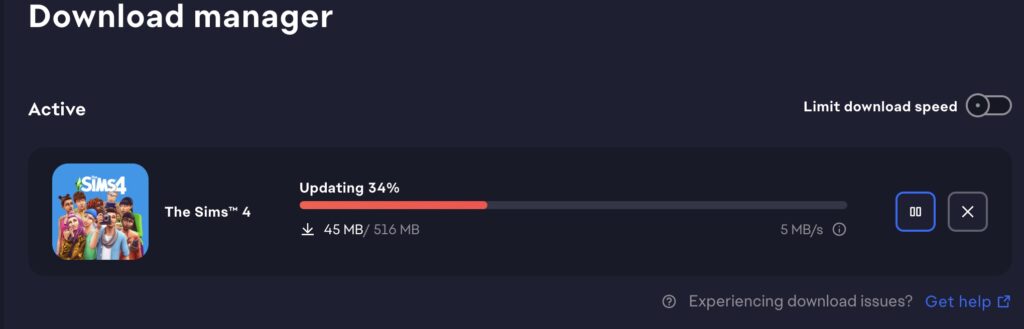
What has your experience been so far downloading and playing with the latest Sims 4 Update? Let us know in the comments and stay tuned for more Sims news coverage!

12 Comments
Please fix the Sims eating at the table in restaurants and at home they never stay seated to eat. In restaurants they keep talking to Sims they don’t know and at home they just sit wherever they please. This has been going on for a while now and no one address this problem.
Anyone have the bug where your Sims suddenly get reset and won’t go to school/work even if you click the button?
Thank goodness! I’ve been dreaming of a fix for this forever! Trying it out now…
Aww, it’s still not working for me. Error Code: 109:92dbf8ec:46f48a5c
“It is recommended that you relaunch the game.”
Please fix the rebirth bug.
please fix the game properly the marriage bug is still happening when I marry my sims it goes straight back to partner so annoying
Please fix the seating at restaurants my goodness its been going on for years now. Also high school years is very buggy. Wedding pack and rental please fix what customers really paid for. Its just so much i can go on. Everytime yall say there’s an update hmmmm…Ive been playing Sims since Sims 2, can we go back to a time where an update is really fixing please I beg you? Thank you
this new update broke my mods file and my mods aren’t opening anymore i cant even play it..
complete failure to lauch after the update.. i am so sick of never being able to play this game. i have removed everything – old saves, mods, cc everything – and still not working
I have been building and keeping this save I have for 9…9…..NINE NINNNNNNNE YEARS and its completely unplayable. NINE DAMN YEARS. DO you understand or care at all what kind of TIME investment we put in this game? Goes so beyond money and TIME is MONEY . Not a single save will load since the last update, it either crashing trying to go into a lot or loads forever. I am not new to this whole broken sims update fiasco, I have recovered and saved my saves and rebuilt and rebuilt and rebuilt for NINE years and this time you finally broke me. There is no excuse for this shallow level of customer concern. You just took 9 years of my life and said ” get over it and try again on a new save. ” I have never wished for a company’s failure than I wish for yours because you don’t care about my save why the ever livin hell should I want anything but the worst for your company? Even writing this is useless I just have no where to vent and that’s all I can do is vent because NOTHING else will happen .
Reply to sam
Im truly sorry for the lost of your save. I can hearbthe hurt and frustration threw your words. I really hope your able to play your forever save again soon.
Do you people not know that Sims Community is NOT affiliated with EA? They can’t fix anything.
Welcome to Sims Community!
Our community is about connecting people through open and thoughtful conversations. We want our readers to share their views and exchange ideas in a safe space.
In order to do so, we've created a simple set of rules that will improve your experience. Simply put, keep it civil.
Your post will/might be rejected if it contains:
User accounts will/might be blocked if we notice:
So, how can you be a power user?
Thanks for reading our community guidelines. Please note that we're aware of certain issues with Sign In / Log In and Create Account / Email Confirmation issues. We're working behind-the-scenes on a new Account Creation process. Thank you for your patience and remember - freedom of speech is not freedom of reach