

UK retailer GAME now has The Sims 4: Seasons available to pre-order for £34.99!

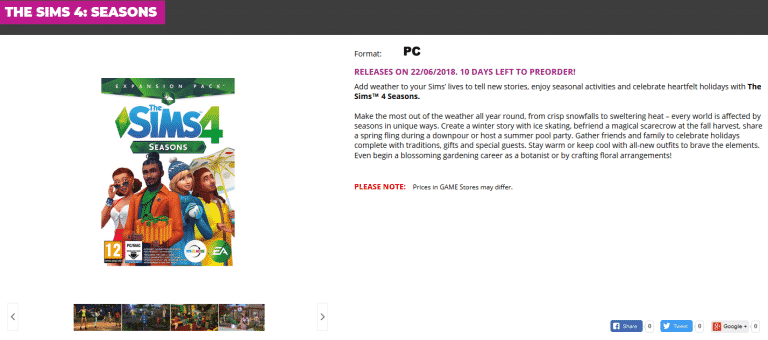
UK retailer GAME now has The Sims 4: Seasons available to pre-order for £34.99!

SimGuruGrant shared a new poll yesterday on his Twitter wanting to know what Simmers thought the most important feature would be if The Sims team created a farming expansion. Check out the poll on Twitter and let us know what you think as well in the comments!
Let’s do a poll for EA Play. Many of you hit us up for a FARMING expansion. What is the single most important feature you would want? You have two days – vote.
— Grant Rodiek (@SimGuruGrant) June 11, 2018
With EA Play now in full swing many fans have had the opportunity to get hands on with the new Seasons expansion for The Sims 4. We have rounded up all the information into one handy article for you.
As originally reported by the Brazilian fan site SimClub, they have shared a couple of screenshots as well as a few bits of information that they gathered from the short time of playing the upcoming Seasons expansion for The Sims 4.


But that’s not all. Xmiramira also shared a couple of images the of the new Scout Badges on her Snapchat (thank you Kai for the screenshots). Also Mod The Sims user Hiabara shared some more details on Mod The Sims.

From what we know, your Sims will earn their Scout badges through completing certain tasks.
The ever so lovely RoryPlays_ shared a quick little tweet showcasing snow falling in the game and it looks so magical!
It’s snowing at EA Play! Standing here playing #TS4Seasons and it’s AAAMAAAAAAZING!!!
If you’re coming to EA Play, come by @TheSims booth to get HANDS ON Seasons!! pic.twitter.com/LYABmWHDiH
— RoryPlays at EA Play (@RoryPlays_) June 9, 2018
As well as what we have already mentioned above fans who have attended EA Play have shared their experiences with the expansion and one user on Reddit who goes by the name of BTEAMNORTH
I am actually really pleased with the way weather turned out. The effects are beautiful.
I love love the calendar too. 😍 I did notice that if you plan an event from your phone, it doesn’t give you the option to plan in the future. (Which is dumb) maybe it’ll be patched? I’m so excited to build. REALLY excited to add The Sims 4 Seasons to my game. 😬😬😬😬
Disappointed that there are virtually no new wall or floor options.. but those GLASS ROOFS. 😍😍😍😍😍
THEY’RE PERFECT.
If anyone has any questions, let me know! I dont think I saw everything, but I enjoyed what I saw!
— Someone asked if I had a Twitter: @BBTeamNorth
Has this got you excited for The Sims 4 Seasons? We can’t wait to be able play the expansion.
SimGuruDuke has shared on Twitter that The Gallery will be coming to The Sims 4 on Console’s in the next patch! Although it looks as though it is not the full Gallery that PC users have access to currently it is still a great start for console players. Hopefully the full version of the Gallery will be added in the future.
Wanted to share a preview of a new thing coming to console in the next update. Thx to @catloverplayer for the clever idea. Also, tag @SimGuruLegacy if you have suggestions for other content to bring over. pic.twitter.com/tcOKAUmZvI
— Michael Duke (@SimGuruDuke) June 10, 2018

It’s that time of year again! EA Play is right around the corner and we will be covering all things related to The Sims 4 and The Sims Mobile right here on Sims Community!
Now EA Play’s Live show kicks off at 11am PDT (7pm GMT, 8pm CET, 2pm EST) where we will see EA showcase many of their upcoming games as well as big reveals and maybe even a few surprises.
Of course, if you can’t make it to EA Play in Hollywood you can, of course, catch everything that is happening on EA.com, YouTube, Twitter, Facebook and Instagram. EA will be streaming the event on YouTube so make sure you don’t miss out!
With yesterday’s Holidays gameplay trailer reveal we asked on our Twitter and Facebook page what holidays you are planning on creating in The Sims 4 Seasons. We’ve had a look through them and chose some of our favourite ones from the responses.
I’m going create with Independent Day for Autumn, Christmas Eve for wrap presents before Christmas Day and Boxing Day for Winter and anything for Spring and summer have some events, and I don’t forgot create with birthday to my families Sims, of course!
— Sebastian Cunliffe (@Seblikesims3) June 7, 2018
— Derek Johnson (@DerekJohnsonTS) June 7, 2018
I’m going create with Independent Day for Autumn, Christmas Eve for wrap presents before Christmas Day and Boxing Day for Winter and anything for Spring and summer have some events, and I don’t forgot create with birthday to my families Sims, of course!
— Sebastian Cunliffe (@Seblikesims3) June 7, 2018
This tradition is in all of my holidays.
— George Pigula (@SimGuruGeorge) June 7, 2018
Llama appreciation day 😂😂😂
— Eden 🍑 (@edenfaith_x) June 7, 2018
New Year’s Day 🎇
Valentine’s Day ❤️
St. Patrick’s Day ☘️
Easter Day 🐇
Mother’s Day 👩👧
Memorial Day 🇺🇸
Father’s Day 👨👦
Independence Day 🎆
Halloween Day 🎃
Thanksgiving Day 🦃
Christmas Day 🎄— ☀️ Jeremia Lecato 🏝️ (@JeremiaLecato) June 7, 2018
Grilled cheese holiday.
— Aqua Sims (@aqua_sims) June 7, 2018
When we took to our Facebook page and asked the same question we had some more responses to a National Tea/Coffee appreciation day, Pool Parties and a Skate Party amongst many others. From what we already know there are going to be countless possibilities to make each holiday unique and stand out from others.
Also let us know if you have any more ideas for your own unique holidays for your Sims join in the conversation on Twitter, Facebook or in the comments below.


Yesterday we received a new event quest to unlock the new ‘Internet Icon’ hobby for Sims Mobile! This new hobby was inspired by EA Game Changers.
We have a little less than 3 days to unlock this hobby. There are two ways to unlock the Internet Icon hobby. You can complete a quest line with 18 quests or buy the ‘Internet Icon Heirloom Pack’ for $9.99 (USD).

Completing both the quest or buying the pack with reward you with the “Antique Webcam” heirloom.

The Heirloom is the required to unlock the “Fledgling Streamer Station” to start playing the new hobby!

Below are the 18 quests needed to be completed in order to unlock the Internet Icon hobby.
Take a Shower and click the blue Event.
Tap any Sim who is not a stranger and tap the blue Event. If the Sim is a stranger, introduce yourself first.
Tap any Sim you are not already friends with and tap “Begin A Friendship”. Once you complete that event you’ll be prompted to select a story.
Go to any party and earn three stars by interacting with other sims.
Complete Hobby events or send your Sims to work to earn Simoleons.
Tap on friends or family and trigger the pink Events to complete this.
Tap on a couch or loveseat to begin this event. Your sim will be transported to Market Square. The event takes 8 hours to complete, or you can fast-forward it for 93 Sim Cash. This is not linked to the Fashion Designer career, you can use any Sim.
You just need to START a hobby, you don’t need to do anything else.
Tap on a couch or loveseat to begin this event. Your sim will be transported to Downtown. The event takes 8 hours to complete, or you can fast-forward it for 93 Sim Cash.
Complete everything in your daily to do list.
Tap on a couch or loveseat to begin this event. Your sim will be transported to Downtown. The event takes 8 hours to complete, or you can fast-forward it for 93 Sim Cash.
Complete everything in your daily to do list.
Complete any interactions with other sims to earn Sim Tickets, go to Parties, or watch ads.
Tap on a couch or loveseat to begin this event. Your sim will be transported to Market Square. The event takes 8 hours to complete, or you can fast-forward it for 93 Sim Cash. This is not linked to the Fashion Designer career, you can use any Sim.
Buy three new pieces of clothing.
Tap on a couch or loveseat to begin this event. Your sim will be transported to Downtown. The event takes 8 hours to complete, or you can fast-forward it for 93 Sim Cash.
These are the little sub-missions that pop up at levels 3, 5, 7, and 10 of any career or hobby. You need to complete any two. Doing two of the Level 3 ones on different sims works fine.
Tap on a couch or loveseat to begin this event. Your sim will be transported to Market Square. The event takes 8 hours to complete, or you can fast-forward it for 93 Sim Cash. This is not linked to the Fashion Designer career, you can use any Sim.
To go along with the Xbox and PlayStation Sales, the PC Version of The Sims has gone on sale along with Expansion Packs, Game Packs, and Stuff Packs! Expansion Packs are around 50% Off!
Check your Origin Client to see Prices for your currency.

What are you going to buy in the sale? Let us know in the comments!
With the release of the Seasons Game Play Trailer, the Sim Guru’s were back on Twitter to answer some more questions! We’ve compiled a list to make it easier for you to read:
This post contains a whole new batch of information regarding this pack. For more information and tweets check out Part 1 , Part 2 and Part 3 of our SimGuru Q&A tweet compilation!
I think Holidays are VERY cool. one of our pillars for the pack is that Sims anticipate the future, that there is a sense of time passing. The calendar lets you celebrate key moments, tell stories, and create a “year” for your Sims. https://t.co/KyeF7weGMg
— Grant Rodiek (@SimGuruGrant) June 7, 2018
They block the rain! https://t.co/uCF0TPRB7r
— Grant Rodiek (@SimGuruGrant) June 8, 2018
I’ll have to semi-dodge this question as we’ll discuss it more in the future.
Wait. That was a full dodge. https://t.co/Iup2QXavMw
— Grant Rodiek (@SimGuruGrant) June 7, 2018
— Grant Rodiek (@SimGuruGrant) June 7, 2018
For the record, the name is …. pic.twitter.com/yVsay37v0H
— George Pigula (@SimGuruGeorge) June 8, 2018
Yup, the pre-made holidays can be renamed and traditions can be customized.
— SimGuruNeel (@SimGuruNeel) June 7, 2018
Not impossible, but it’s a huge undertaking to update existing worlds. We had to do it to make seasons work anyway, so we took the opportunity to do some extra little things too.
— Aaron Houts (@SimGuruHouts) June 7, 2018
I wouldn’t exactly say it’s like clubs as some of the holiday traditions have unique content that can only happen during the holiday.
— Megan G (@SimGuruMegs) June 7, 2018
There are changes to the public spaces when the seasons change.
— Megan G (@SimGuruMegs) June 7, 2018
Yes, by default there are some holidays that will happen!
— Megan G (@SimGuruMegs) June 7, 2018
Not by default, but you could make a holiday for each day of summer where everyone has work and school off.
— Megan G (@SimGuruMegs) June 7, 2018
Gift giving is not limited to holidays!
— Megan G (@SimGuruMegs) June 7, 2018
Traditions are far more broad than club activities, which are very specific, so I don’t think it would actually make sense to add more of them. I am having a hard time even thinking of something that could be added in a future pack that would make sense for a new tradition.
— Megan G (@SimGuruMegs) June 7, 2018
I would imagine Prom to be more similar to an event like the Birthday Party. I think when you get a chance to see how the holidays play, you’ll see that they play differently from events and club gatherings.
— Megan G (@SimGuruMegs) June 7, 2018
Yes, if Father Winter is a tradition for the holiday, he’ll magically appear when the hour strikes!
— Megan G (@SimGuruMegs) June 7, 2018
You’ll be able to create your own Halloween holiday!
— Megan G (@SimGuruMegs) June 7, 2018
I’m not sure what you mean, he is a part of the Winterfest holiday which will be on the calendar by default. Or you could create your own holiday where he appears.
— Megan G (@SimGuruMegs) June 7, 2018
You’ll be able to make a holiday where you can remember those who have passed on.
— Megan G (@SimGuruMegs) June 7, 2018
Sorry, not explaining this well. We did create specific traditions for things that make sense for holidays. However, I cannot think of anything we could add in a future pack that would require its own tradition instead of being part of a broad tradition.
— Megan G (@SimGuruMegs) June 7, 2018
I don’t think we said that! I specifically told people that we would never do that!
— Megan G (@SimGuruMegs) June 7, 2018
There is a difference between weather and seasons. All the worlds have seasons, but their weather will be different.
— Megan G (@SimGuruMegs) June 7, 2018
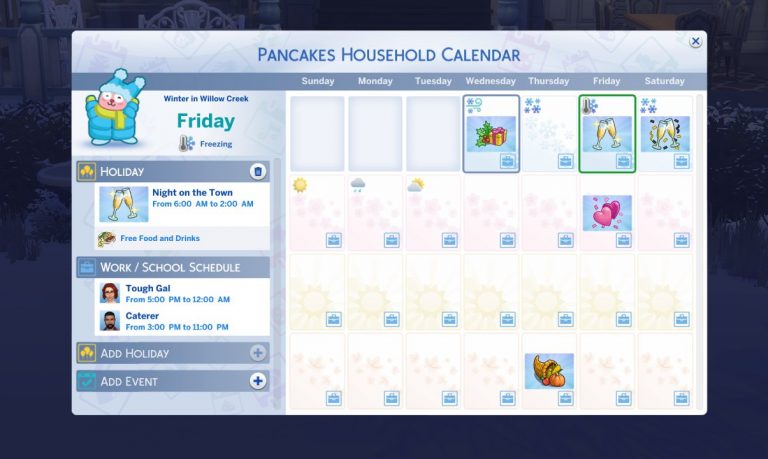
After teasing us yesterday, SimGuruEmory has revealed to us what the household calendar’s will look like with a quick look at Bob & Eliza Pancakes calendar. As you can see from the image that SimGuruEmory shared all the information you need to know about upcoming holidays, your households work & school schedule, the upcoming days weather and also the temperature can all be found on the screen. You can also add more holidays and events to the household calendar. Let us know what you think in the comments below.


SimGuruLegacy tweeted out earlier today that The Sims 4 base game and selected Game Packs/Stuff Packs are now on sale for Xbox One and PlayStation 4 players. The offer looks to be running from today until the 18th June 2018. If you haven’t already picked up The Sims 4 on consoles now is the perfect time!
The Sims 4 is on sale right now for both PlayStation 4 (40% off) on the NA Store – https://t.co/mLHlp07Wfz and Xbox One (60% off) globally – https://t.co/sBpFz5ttQ9
— SimGuruLegacy (@SimGuruLegacy) June 7, 2018
With a new gameplay trailer for The Sims 4 Seasons released earlier today, here are a few of our favourite reactions to the trailer! Don’t forget you can check out the trailer here.
in the sims 4 seasons you can make your own holidays so guess who’s making shinee’s debut a national holiday
— minho’s teefies ️ (@hqminkey) June 7, 2018
Omg I can’t get over the trailer reaction for the Sims 4 seasons and making a holiday!!!!! pic.twitter.com/cROA6meyun
— Lex (@Lex85031057) June 7, 2018
i left class to watch the sims 4 seasons trailer i’m truly an A+ student
— ☆ (@rosyjihyo) June 7, 2018
Omggg the sims 4 seasons is looking so good ! I can’t wait !
— ウェンディ~ (@CatBulgarWendy) June 7, 2018
My favorite thing from the new #TheSims4 Seasons trailer has to be that wall with plants, it instantly caught my eye. Big love! + seeing fall & winter in The Sims 4 made me super nostalgic for The Sims 2. pic.twitter.com/FsA4HyA647
— Mei (@simswithmei) June 7, 2018
I honestly can not wait! This pack is just going to be so wonderful and magical!
What are you all looking forward to the most.
For me its customising holidays and all of those wall plants!! ❤️❤️#TheSims4Seasonshttps://t.co/C2kYMPoyrT
— RubyStar92 (@RubyStar92) June 7, 2018
oh my goodness…toddlers can make snowmen in the sims 4 seasons??? pic.twitter.com/MZ0YIsoni8
— Cait (@PrissyCait) June 7, 2018
2 weeks and 1 day until @TheSims 4 Seasons comes out! Time needs to fly FASTER!! This is what I’ve been waiting for!
— RainbowsEyeCosplay (@CreepyRainBoe) June 7, 2018
Me after watching new video of the sims 4 season: pic.twitter.com/uIajDA3U13
— #SaveShadowhunters (@fruiteabae) June 7, 2018
So many things are happening on June 22. The sims 4 seasons, escape the night season 3, and panic! At the disco’s pray for the wicked is being released. Also it’s opening day for our summer show. Crazy.
— Megan (@Lamegcrosse) June 7, 2018
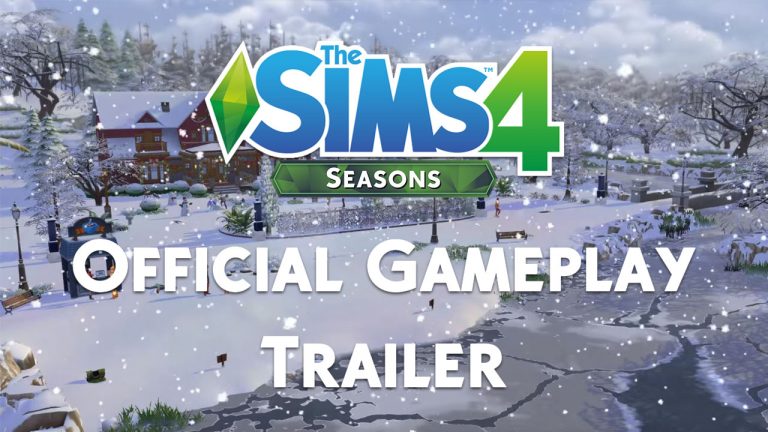
The Sims Team has just posted a Game Play Trailer! Watch below and watch this space for a full trailer breakdown!
Let us know what you’re most excited about in the comments below!
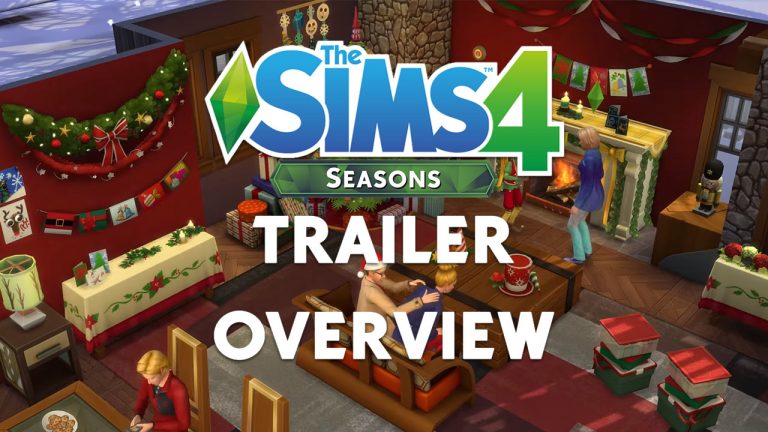


 Winter:
 Holidays
 Other
Other Build & Buy