Home Blog Page 360

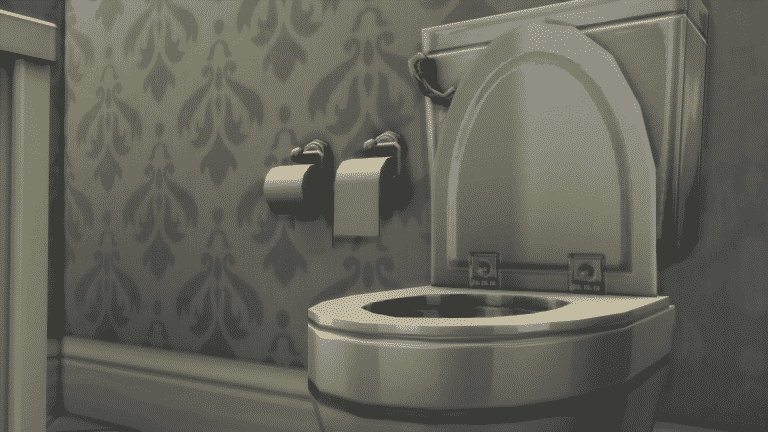
People think this newly-added Toilet Paper object swatch is hinting at Pets

This completely confirms that anything in The Sims 4 can now be taken as a hint for Pets Expansion Pack…and we love it!

The Sims Forum member Izzeh96 pointed out that there’s a brand new swatch (3 new swatches to be exact) for a toilet paper holder object in The Sims 4 Base Game. In case you didn’t know, The Sims 4 had a toilet paper holder object since its release. However, these 3 new swatches seem to be added just recently to the game. People are reporting that they haven’t seen the “under roll” version of the toilet paper until recently.

Down below you can see the 2 versions of the toilet paper: toilet paper placed over and under.

Now, how does the abomination that is toilet paper placed under has anything to do with Pets? Well, people who own pets (especially cats) place the toilet paper under so that cats and/or dogs can’t unroll the toilet paper so easily.

People think this newly-added Toilet Paper object swatch is hinting at Pets

Whether or not the “under roll” version of the toilet paper is hinting at pets or just joking about the great toilet paper roll debate I’m going to use the quote by The Sims Forum member OEII1001The under roll is a crime against humanity.

In case you didn’t know, information about The Sims 4 Pets has been leaking for quite some time. So far we know about the possible release date and their possible appearance in the game. You can find all of information about it HERE!

Every world in The Sims 4 remade by lilsimsie

Sims 4 Reimagined

Youtuber lilsimsie managed to redo every single world in The Sims 4 in form of a save file. This means that there are new households and lots that have either been improved or completely redone. Existing households and their lots remain untouched while lots that are empty have been filled with new lots, households and venues.

Installing lilsimsie’s custom save is easy but please make sure you have made a backup of your save files just in case. After downloading lilsimsie’s save file, go to Electronic Arts > The Sims 4 > saves folder and extract the content there.

NOTE: If you have plenty of save files in your game then make sure you rename the numbers of lilsimsie’s save file. For this article I had to rename the last 2 digits on lilsimsie’s save from Slot_00000065 to Slot_00000080.

Every world in The Sims 4 remade by lilsimsie

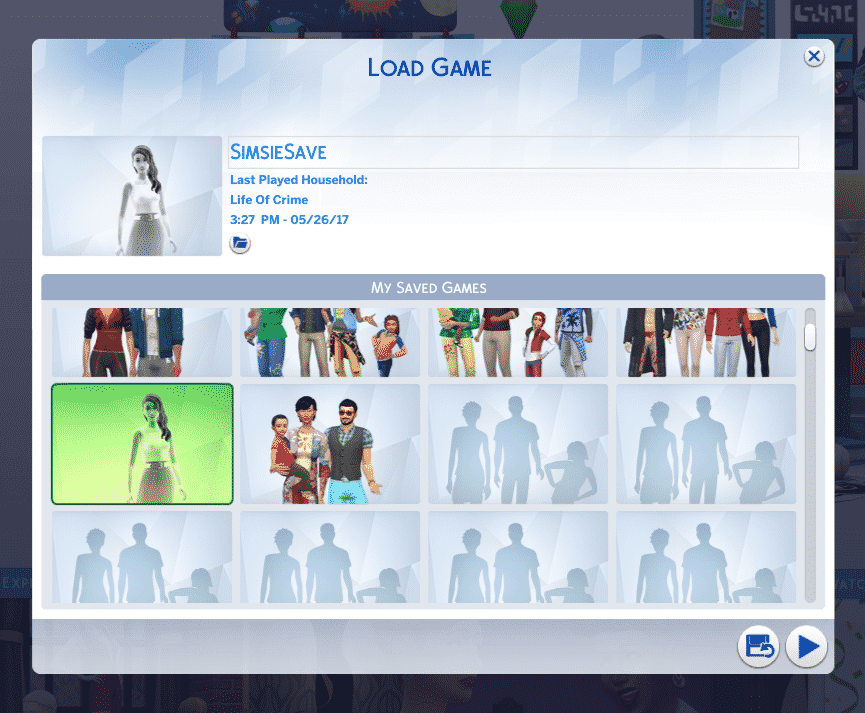
Now, load up your game. You should see a thumbnail of a ghost Sim with the “SimsieSave” save file name.

Every world in The Sims 4 remade by lilsimsie

Venues and lots have all been updated with lot traits!

Every world in The Sims 4 remade by lilsimsie

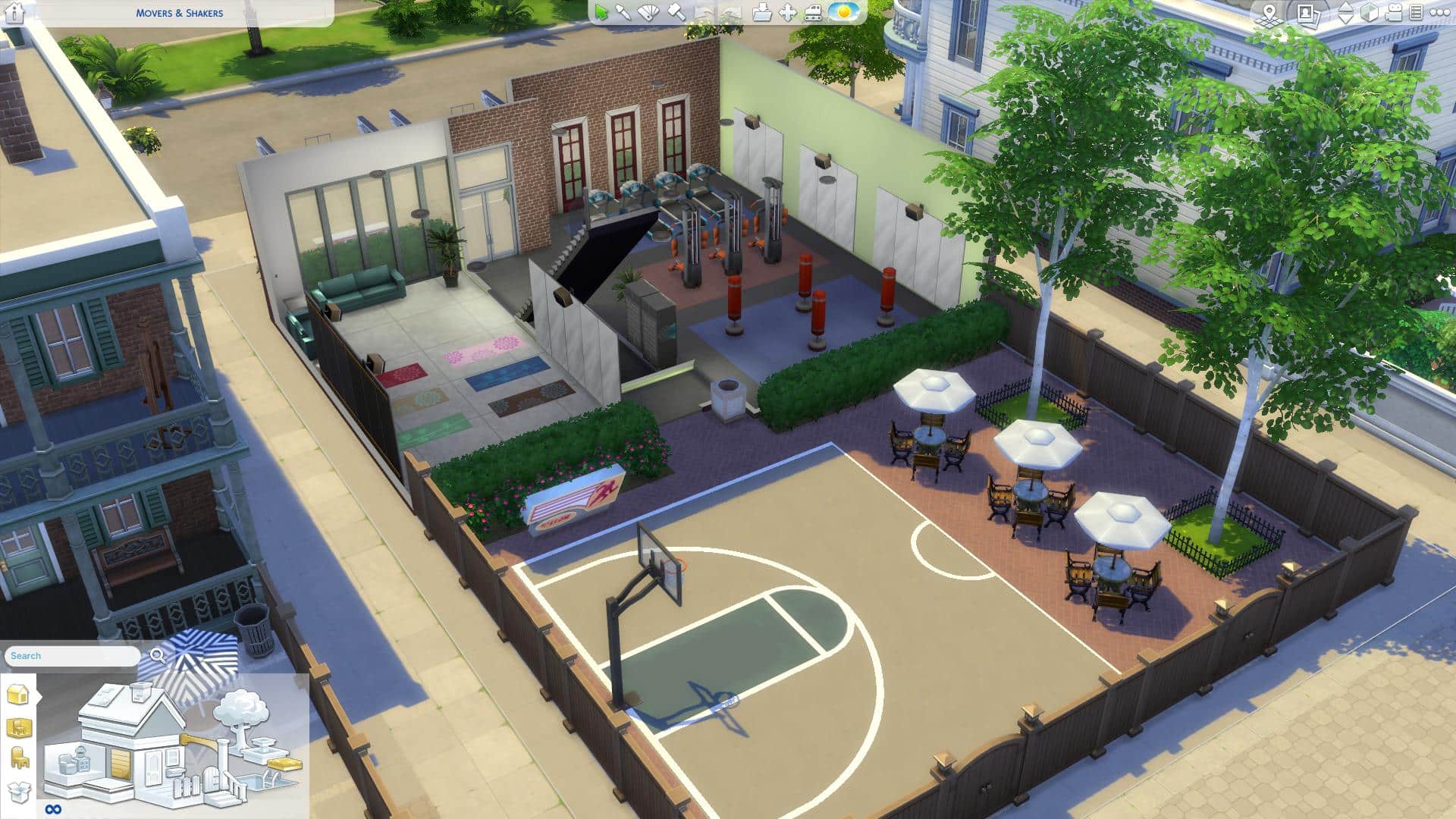
Venues and households now include content from previously released Packs. For example, the Movers & Shakers Gym in Willow Creek now has a basketball court outside (from City Living) and Yoga mats inside (from Spa Day).

Every world in The Sims 4 remade by lilsimsie

Oasis Springs, along with new households and remade venues now has a Bowling Alley!

Among plenty of new households there’s an Oakes Household who are crazy for bowling. These new Sims all have their backstories, skills, relationships, careers and yes, even clubs from Get Together.

Every world in The Sims 4 remade by lilsimsie

You don’t have to worry about repopulating and rebuilding Newcrest from scratch – it’s now full of life!

Worlds from Expansion and Game Packs are not left out:

This save file includes content that’s been released over the last 3 years (both paid and free). You’re going to need all Sims 4 Packs released prior May 27th, 2017 in order for this save file to work properly. In case you’re missing out on a few packs content from those packs simply won’t appear in game or will be replaced with a base game item.

Are you ready to explore new households and venues and continue the stories that lilsimsie has started off? Press the download button below to get this save file!

[mks_button size=”large” title=”DOWNLOAD!” style=”rounded” url=”http://lilsimsie.tumblr.com/post/161135681100/simsies-starter-save-file-download-i-went-in-and” target=”_blank” bg_color=”#1e73be” txt_color=”#FFFFFF” icon=”” icon_type=”” nofollow=”0″]

Make sure you check out lilsimsie’s 30-minute video tour of her save file for insight and behind the scenes scoop!

The Sims 4 Console: SimGuruDrake talks Gamescom and Gameplay Footage

2

We’re all eager to learn more about how The Sims 4 will look on Xbox One and PS4. However, it seems we might have to wait some time before we get to see how things will function on consoles.

SimGuruDrake confirmed that, although The Sims 4 will be playable on Gamescom, attendees won’t be able to record any footage of the gameplay. So if there are any impression articles or videos about The Sims 4 Console after Gamescom they’re going to be just explanatory.

She reassured that we’ll be getting console gameplay footage at a later date.

The Sims Blog: SimGuru Spotlight – SimGuruDuke

0

Via TheSims.com!

It’s an exciting time to be a simmer, and an even more exciting time to be a SimGuru! With the announcement of The Sims™ 4 on XBOX One and PlayStation® 4 we just had to sit down with our newest SimGuru, SimGuruDuke!

The Sims Blog: SimGuru Spotlight – SimGuruDuke

Can you give us a brief introduction to yourself? 
Hey everybody, I’m super excited to join the Gurus. I have worked at Maxis for the past 11 years. I started as a Gameplay engineer on The Sims 3, when we were still designing the game. I then worked as a Development Director on The Sims 4, in charge of both the Gameplay Engineering and Design Teams. In my free time, I enjoy running, gaming, and traveling.

What do you do on The Sims 4 now?
I’m currently the Senior Producer on The Sims 4 for Xbox and PS4. We are working hard to make sure this is the best console game we have ever released for The Sims, and I’m thrilled to help bring the game I love and worked on for years to console players. I personally prefer to play on console, and I can’t wait to do so this Fall – even though I already get to (the perks of working at Maxis).

What made you interested in becoming a SimGuru?
I really wanted to share with the community more about the console project. You guys have been asking for this for ages, and I want to hear what can make it great and also share our progress with all of you. Also, this community has always been so unique, it is unlike any other gaming community I know of.

What do you love most about The Sims franchise?
All the creative choices, and none of the judgment. I love that I can tell any story I want from one day to another. I love that there is no right way to play the game. There is just the way I want to play today. That freedom creates the perfect escape. I also love that even if I have a story in mind, the game always has a couple twists in store for me. That surprise really keeps it interesting.

What’s your favorite ice cream flavor? 
Peanut Butter Cup

More than 100 Custom Traits for The Sims 4

There are so many custom traits for The Sims 4 that you can find all over the internet so I came to an idea to compile some of the most useful traits that you can find. These traits function almost like every other trait: some give certain benefits for skills, careers etc, some disadvantages and they’ll determine the whims of your Sims.

Installing these custom traits is pretty easy. After downloading a .package file trait just place it in the Electronic Arts > The Sims 4 > Mods folder. Make sure you’ve enabled Mods / CC in your game!

Traits shown below are listed in alphabetical order. We’re not responsible in case these traits get removed or abandoned by their creators!

Make sure you keep track of custom traits on Mod The Sims because you can expect new ones to pop out every now and then.

You can share your own Custom Traits on Sims Community Social and we’ll make sure to add them here!

Single Traits:

Trait Packs:

The Sims 4 Console: Perfect Patio Pre-Order Trailer

The Sims Team has released a pre-order trailer for The Sims 4 on Xbox One and PS4. By pre-ordering any of 2 editions for The Sims 4 for Consoles, you receive The Sims 4 Perfect Patio Stuff Pack completely free!

You can pre-order the game on Amazon:

The Sims 4 Behind The Scenes with Girls Who Code

1

Girls Who Code spend a day at Maxis to learn about The Sims 4 Development

Girls Who Code, a non-profit organization with a mission to close the gender gap in technology and video gaming industry, had a chance to visit Electronic Arts at Redwood Shores. More specifically – they had a chance to spend their day at the Maxis studio and see what goes in the development of The Sims 4.

The tour revolved around the game development circuit, which consists of:

  • Design
  • Art & Animation
  • Implementation
  • Beta to Final
  • Live Business
  • Marketing

They also had a chance to pitch some of their own ideas to the team and design an Expansion Pack for The Sims 4. In the video above you can also see two developers: Manu Sharma and Megan Ginter (also known as SimGuruMegs on Twitter) explaining their role in The Sims Studio.

Creating a Customizable Above Ground Pool in The Sims 4

10

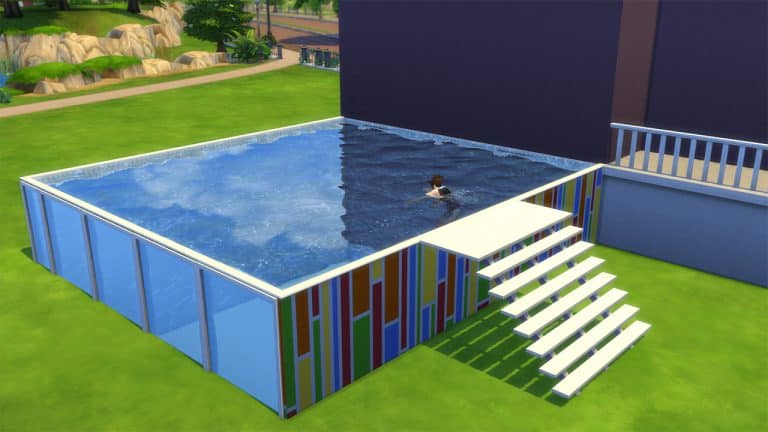
In this tutorial you’ll be learning how to create an above ground pool with windows in The Sims 4! Before we continue please note that you’ll need The Sims 4 City Living Expansion Pack in order to create this type of pool.

You can already place pools on foundations. However, what you can’t do is place windows on the sides of each foundation and add wallpapers (and not foundation textures) to it.

Follow these simple steps in order to create a customizable above ground pool in The Sims 4:

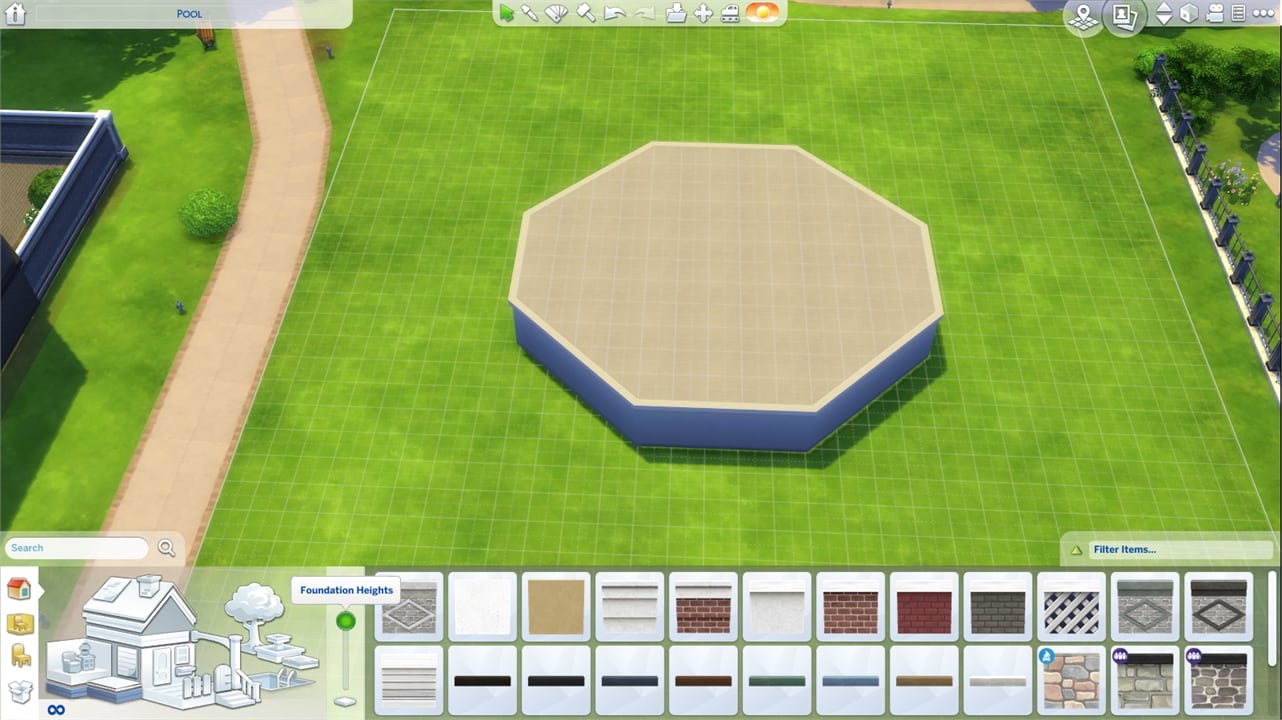
Step 1: Build a pool shaped deck with foundation at max height:

Creating a Customizable Above Ground Pool in The Sims 4

Step 2: Draw a pool to cover the entire deck!

Creating a Customizable Above Ground Pool in The Sims 4

Step 3: Open the Cheat Console by pressing CTRL+SHIFT+C. Input the cheat code testingcheats true, then type bb.showhiddenobjects to show debug items and press enter. Select this foundation from City Living:

Creating a Customizable Above Ground Pool in The Sims 4

Step 4: Drop down to the basement level and select a wallpaper for the exterior of the pool and apply.

Creating a Customizable Above Ground Pool in The Sims 4

Step 5: Select a wallpaper for the pool interior!

Creating a Customizable Above Ground Pool in The Sims 4

Step 6: Select a tile for the pool floor.

Creating a Customizable Above Ground Pool in The Sims 4

Step 7: Move back to ground level and add a ladder of your choice. You can even add windows if you’d like!

If you want to add a deck, draw a deck that matches the side of the pool, but keep it one space away. You then can select that deck and move it into place next to the pool:

Here’s the end result:

Creating a Customizable Above Ground Pool in The Sims 4


Huge thanks to Steve Storm who found out about this neat little trick. You can find some of his builds HERE!

The Sims 4 Build Mods by PlasticBox

There are plenty of items in The Sims 4 that you’re not able to use in Build Mode such as objects, fences and plants that you can find in certain neighborhoods. Modder plasticbox released a couple of mod releases which “liberates” these objects and lets you use them in build mode.

Here’s a full list of liberated items that you can get on Mod The Sims:

Considering these objects require a mod to be unlocked, each liberated object is treated as a mod in game, meaning that it’s going to have a “Mod” tag if you plan to use these liberated objects for your build and share it to The Gallery.

Plasticbox also has a couple of other mods / build objects which are either redesigns or new creations for build mode. Diagonal fireplaces, maxis match fences and stone walls, windows, doors and more! Make sure you check out his full catalog of objects HERE!

The Sims 4 Build Mods by PlasticBox

Custom Harvestables for The Sims 4

Feel like The Sims 4 is missing out on some harvestable plants that you’d love for your Sims to grow and nurture? Simmers icemunmun and plasticbox took the matter in their own hands and created custom harvestables for The Sims 4!

The great thing about these harvestables is that they completely match with The Sims 4’s art style. You’ll feel like they’re a part of your game!

Here are all the custom harvestables by icemunmun and plasticbox that you can get:

icemunmun:

plasticbox:

You can only find them using Custom Content filter in build mode.

Custom Harvestables for The Sims 4

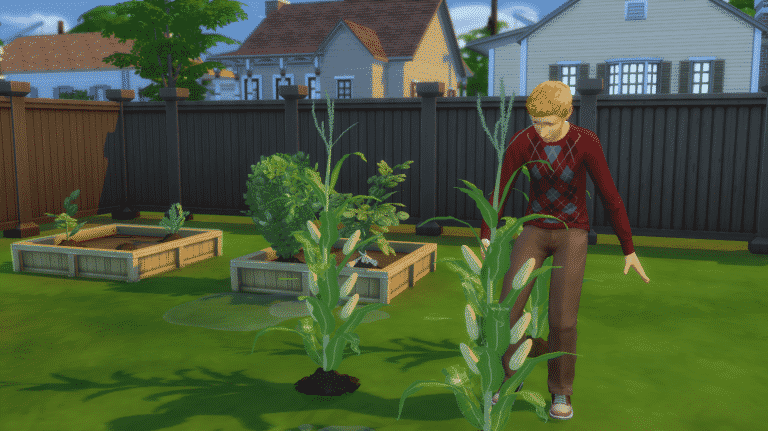
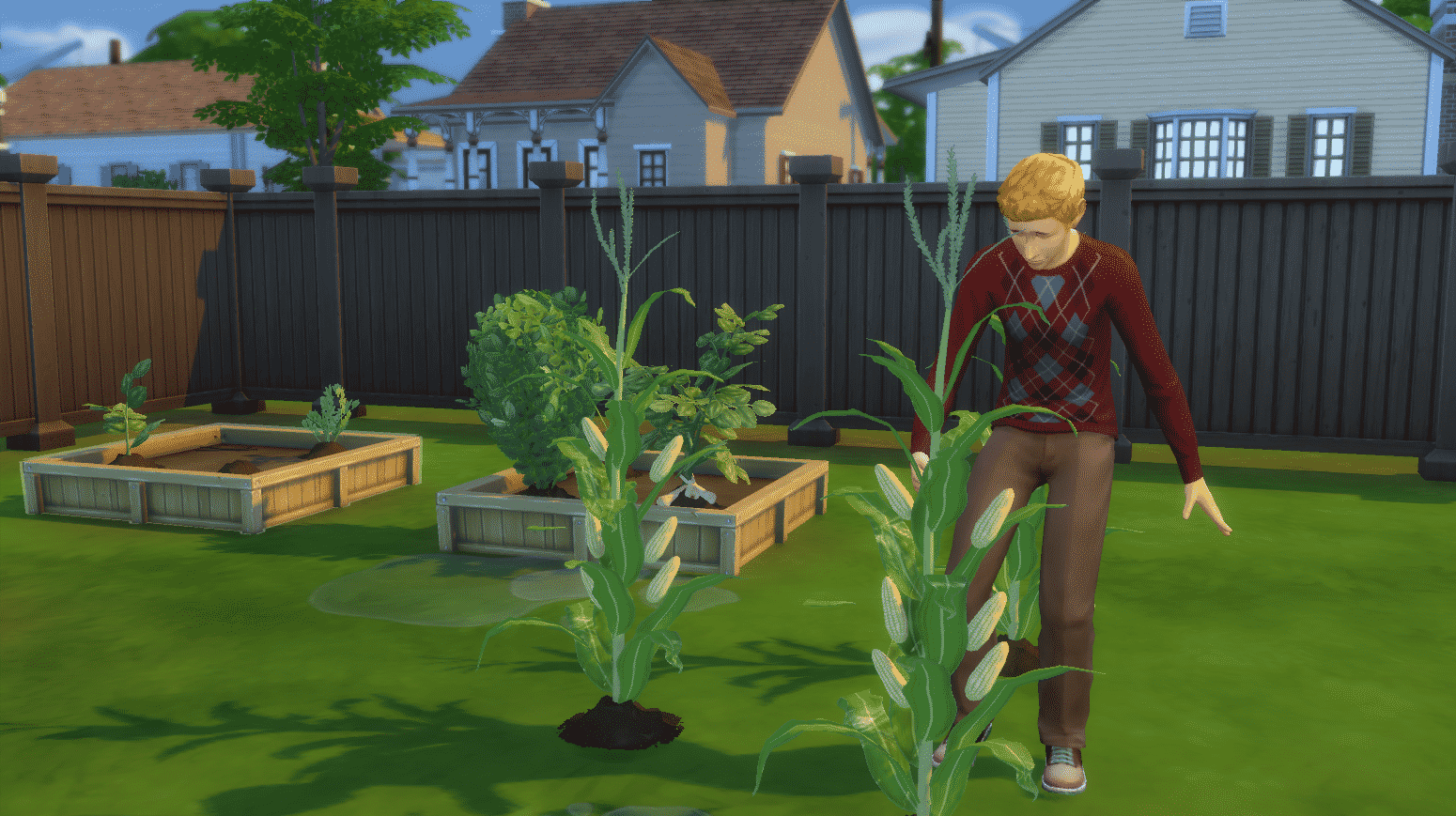
Place the produces/seeds on planter boxes in order to plant them. Harvestables that already appear grown in thumbnails in build mode can only be grown on free land. Want to grow a corn stalk? Just place it on grass and nurture it like every other plant!

Custom Harvestables for The Sims 4

Some plants have integrated gameplay into them. You can use corn in your inventory for making popcorns with the popcorn maker from Movie Hangout Stuff. The cocoa bean is involved in various recipes which involve chocolate and so on.

Mods for The Sims 4 that will improve the overall Gameplay and Visuals

There are some things in The Sims 4 that could be improved like lightning, Sims behavior and more. In the list down below we’ll be showcasing such mods. Some fix the gameplay, some improve it and some change the way certain things function in the game.

All mods down below are tested on the day of this post being published!

No Culling

Sick and tired of unplayed households being removed from the game? This mod fixes that!

Mods for The Sims 4 that will improve the overall Gameplay and Visuals

No Video Distortion

TV screens will no longer distort when you speed up your game. This is just a visual improvement but still means a lot.

Mods for The Sims 4 that will improve the overall Gameplay and Visuals

No Fade Trees and Streetlamps

Another visual improvement mod which prevents trees and streetlamps from fading when you move your camera near them.

Mods for The Sims 4 that will improve the overall Gameplay and Visuals

Experiences Mod Pack

This mod is an absolute game changer! It turns emotions into skill experiences. Being in a certain emotional state will level up your lifetime emotional experience which can later further boost other moods. Your household’s financial situation can also influence the way they behave. There’s also a new aspiration, 2 new party types and changes to aging that come with this Mod Pack.

Mods for The Sims 4 that will improve the overall Gameplay and Visuals

More Columns in CAS

With more packs and content coming to The Sims 4 it’s harder to see all the items in Create A Sim with only 2 columns. This mod lets you expand the user interface to 3 or 4 columns!

Mods for The Sims 4 that will improve the overall Gameplay and Visuals

My 6 must-have Mods for The Sims 4

I’m not one of those CC or Mod addicted simmers that have hundreds of files in their Mods folder, however there are a few mods for The Sims 4 that I can’t play the game without.

To download these mods just click on the headlines linked below!

1) Enable Debug Cheats Mod

This mod is a great tool for my articles and tutorials. It lets me change my Sim’s emotions, fill their needs, level up skills and much more. The mod itself doesn’t add new gameplay – it just enables the debug cheats that are already available in the game files.

My 6 must-have Mods for The Sims 4

2) More Club Members

For screenshots with multiple Sims I use this mod which lets me add more than 8 Sims to a club. For this mod you’ll need The Sims 4 Get Together EP in order for it to function properly.

My 6 must-have Mods for The Sims 4

3) Magnolia Promenade Map Override

I’m a bit annoyed with how innacurate the original map of Magnolia Promenade is so I got this mod that “fixes” it.

4) Luumia’s Body Hair

I find this mod absolutely essential for The Sims 4. The body hair is done beautifully and it matches just right with Maxis’ Sims 4 art style.

My 6 must-have Mods for The Sims 4

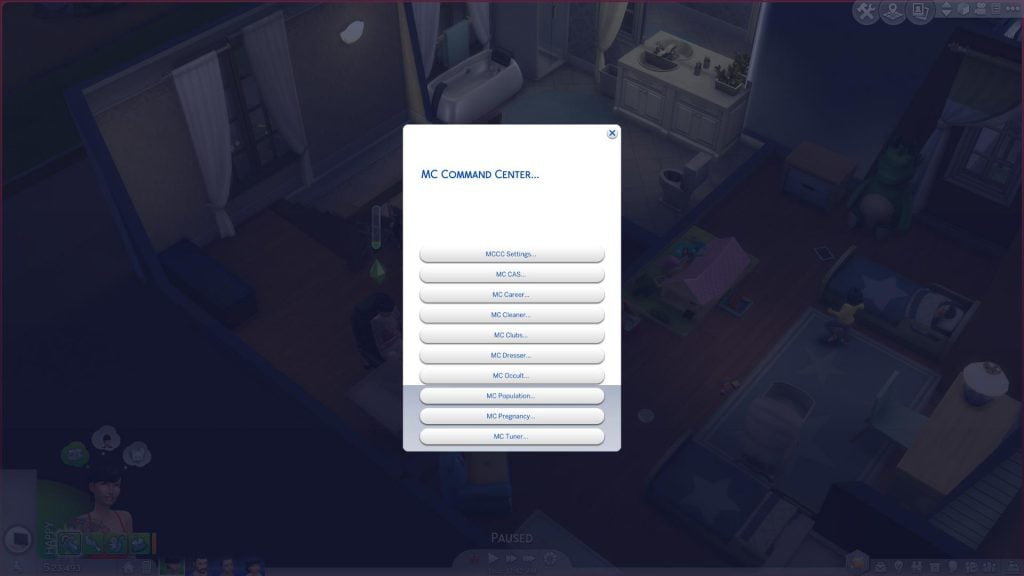
5) MC Command Center

A must-have mod for all control freaks out there. You get to change the autonomy of your Sims, prevent culling, the way your Sims interact, the way your neighborhood acts and much, much more.

My 6 must-have Mods for The Sims 4

6) UI Cheats Extension

This mod adds a lot of cheats in the user interface of The Sims 4. Want to change the current time in your Sims 4 game? Just right click on the time! Want to remove an undesirable buff? Just right click on it!

My 6 must-have Mods for The Sims 4

It’s time for a new Themed Week: Mods Week starts now

Our third themed week – Mods Week, begins now!

From July 31st to August 6th we’ll be posting articles that are related exclusively to mods for The Sims 4. This means that we’ll be publishing all kinds of roundups, spotlights and playthroughs of mods.

If you have any mods that you want to share with us feel free to do so on our Mods Forum on Sims Community Social.

To keep track of our Mods Week posts, check out the Themed Week Tag!

It’s time for a new Themed Week: Mods Week starts now

Everything you need to know about The Sims 4 for Consoles

After 6 years since the last Sims console release (The Sims 3 Pets), The Sims is coming back to a new generation of consoles. In about 3 months you’ll be able to play The Sims 4 in the comfort of your couch. The game is making its worldwide debut on Xbox One and Playstation 4 on November 17th, 2017.

Many players are wondering how exactly will this game work and if there are going to be any differences from the PC version. To sum up all of the answers to your questions, here’s everything you need to know about The Sims 4 for consoles:

1) It’s the same experience as The Sims 4 for PC. Well, almost…

There won’t be anything new in this console version like we had in previous console games (different stories, worlds, objects and so on). The Sims 4 for Consoles will give you the same experience as The Sims 4 for PC, minus The Gallery feature. The console version will bring the in-game game hub which we yet have to learn more about…

2) Updates

The Sims 4 for consoles will immediately come with all the updates and update content that have been releasing to The Sims 4 PC for the past 3 years. Not only that but the team plans to release new updates periodically, just like with the PC version.

Everything you need to know about The Sims 4 for Consoles

3) There will be cheats

Unlike with previous console games which only came with a limited amount of cheats, The Sims 4 for consoles will bring almost every cheat from PC.

4) PC Packs will make their way to the Console

For the first time in the console history of The Sims there are going to be various packs sold for a console game. The Sims 4 will offer some of your favorite Expansion, Game and Stuff Packs that are currently available on PC. These packs will be available some time after the launch. There’s currently no information if all of the packs will make their way to consoles but we’ll get more information about DLC in the coming months…

Everything you need to know about The Sims 4 for Consoles

5) This doesn’t (and won’t) affect the development of The Sims 4 for PC

A different team called Blind Squirrel is helping Maxis port the game to Xbox One and PS4, meaning that there won’t be any resources taken away from The Sims 4 PC development.

6) If you have TS4 on PC then you’re not missing out on anything

The sole purpose of The Sims 4 arriving to consoles is that more people get to enjoy the game. Not everyone owns a PC or is interested in spending money on expensive graphic cards, storage, and other hardware when they can just get a $400 console (an estimate of the current price of Playstation 4 on Amazon).

7) Editions

The Sims 4 for consoles comes in 2 editions: Standard Edition and Deluxe Party Edition. The standard edition comes with just the standard game while the Deluxe Party Edition comes with all the content shown below:

Everything you need to know about The Sims 4 for Consoles

8) If you’re pre-ordering, you’re pre-ordering a finished game

Unlike with most games that you pre-order and get disappointed at the first day of the game’s launch due to lacking features (The Sims 4 PC in the first few weeks of the release is a perfect example), The Sims 4 for consoles is going to be a complete experience just like The Sims 4 PC version that is today. Plus, by pre-ordering any of the 2 editions you get The Sims 4 Perfect Patio Stuff completely free! If you miss the pre-order you’ll be able to buy Perfect Patio Stuff after the launch.

Everything you need to know about The Sims 4 for Consoles

By pre-ordering the Deluxe Party Edition you get to play the game 3 days earlier, starting November 14th!

9) All these editions and pre-orders are confusing

Here’s the edition comparison chart created by EA that’ll help you out:

Everything you need to know about The Sims 4 for Consoles

10) EA Access members get to try the game much earlier

You’ll be able to try the trial of The Sims 4 on November 9th if you’re a member of EA Access, a subscription service which lets you play multiple games for just $5 a month.

The Sims 4 Console: Michael Duke talks about performance, controls and more

1

Michael Duke (now known as SimGuruDuke on Twitter) who works as a producer on The Sims 4 for Xbox One and PS4 has answered some of the comment questions written on the PS4 Blog. Check out what he has to say about performance, controls, graphics and more:

Question: Will it be multiplayer? Even if it’s 2-player on free play mode I would be content!

Michael: The Sims 4 is single player.


Question: How will this work with all of the expansion and stuff packs that are currently on PC? Will they be up for download at the same price at some point?

Michael: We are still working through what packs to bring over when. We should have more news in the future. I would love to hear from players about what they want to see first.


Question: Personally id prefer something like say Ni-Oh, where we have the option to pick between resolution or performance. Also it sounds like we can expect stuff and expansion packs on consoles now?

Michael: The Ni-Oh suggestion is a great idea, thx! As for DLC, our plan is to port the content over, but I don’t have details on the what and when just yet. We are working on it.


Question: Wonder how the loading times are for Sims on console…

Michael: It is a priority for me as well. In the end you guys are the judge. I will be curious to hear what folks think after getting hands on at Gamescom next month.


Question: Will the console port have direct control like sims 2 on the ps2 had, or just point and click?

Michael: We debated direct control. In the end, we felt the point and click version did a better job of enabling the gameplay that makes the Sims 4 great.


Question: There is only ONE thing that would make me consider getting/buying a SIMs game.. and thats if they were online “open world” i.e I have my Sims in my house..

Michael: The Sims 4 on Console is not open world. That said, you may enjoy our newest mobile game once it launches.


Question: Will the game have the same control and interface of PC version? Will the game run at a stable framerate?

Michael: We have not finalized controls yet, still iterating. We are hard at work on performance to achieve our goal of making the best Sims Console game ever. As for Graphics, is is too soon for me to guarantee something, but we have a lot of ambition on that front. 🙂