

Excited for tomorrow’s The Sims 4 Get Together Clubs Trailer? Here are 10 High Quality Screens from the Teaser Trailer to get you going!
Click the images below to enlarge them!

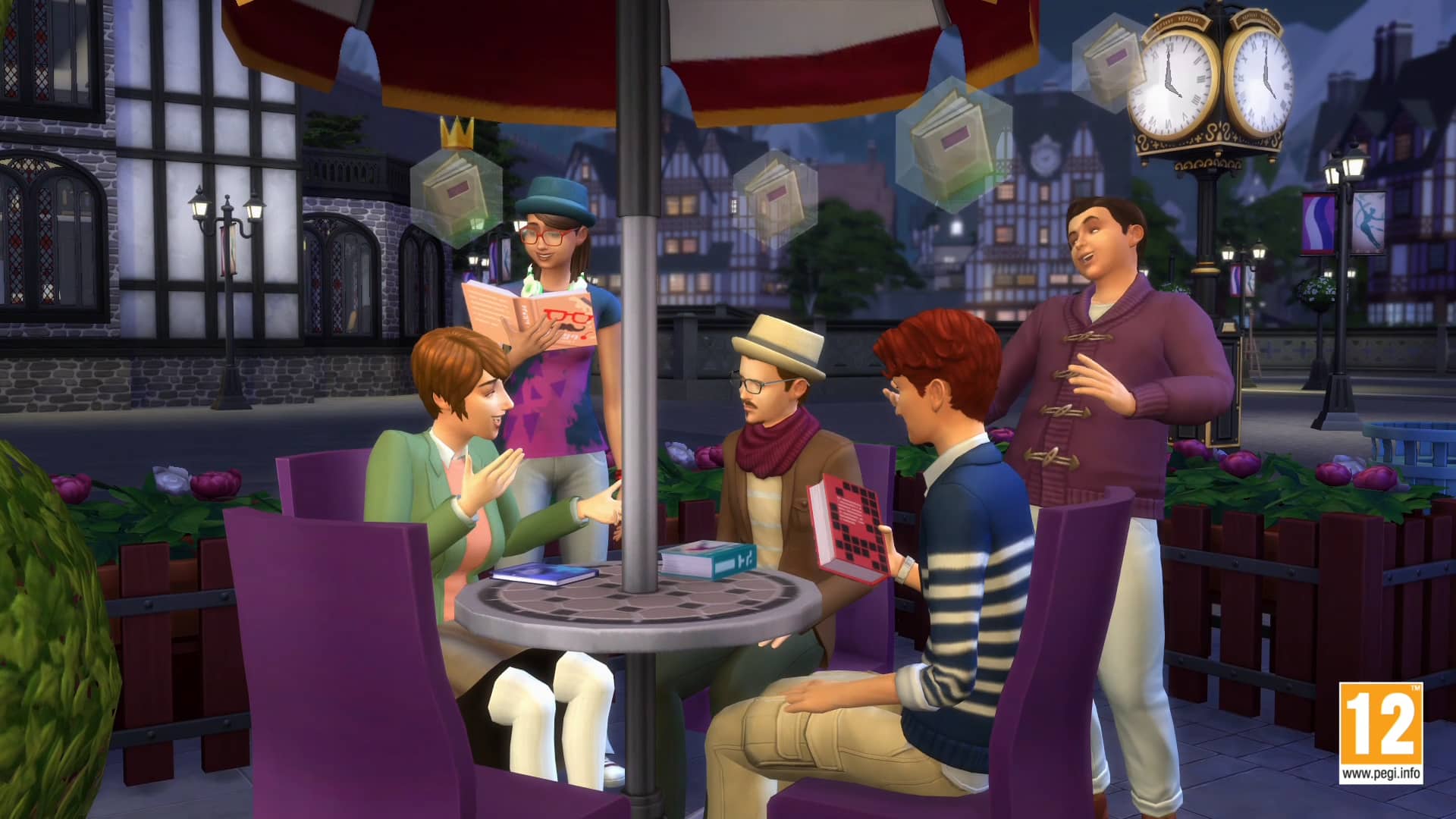


Source: DotSim
Excited for tomorrow’s The Sims 4 Get Together Clubs Trailer? Here are 10 High Quality Screens from the Teaser Trailer to get you going!
Click the images below to enlarge them!
Source: DotSim

As it has been mentioned previously, a brand new trailer for The Sims 4 Get Together will be released tomorrow. In the meantime, The Sims official Twitter account has tweeted a short teaser of what’s to come.


Welcome back to another week of The Sims Video Spotlight! As it is Halloween, this post is certainly influenced by the theme – we’ve got some great spooky builds, Create A Sim videos and more from the community!
First up this week is a wonderful Halloween living room build. It’s perfectly decorated for a Spooky Party if you ask me, I know my sims would be having a blast in there tonight!
Moving on to the kitchen, here is another themed room build. This is one is an instant favourite of mine as I love how well the kitchen blends into the dining room. It has a classic, old feel to it and is perfect for Halloween.
Our last build video today is truly stunning. It is so interesting and unique, the layout adds so much character to the building and it makes me really look forward to when we may get more themed worlds in The Sims 4.
Moving on to Create A Sim videos, we begin with a short and sweet, basic Halloween costume for a teenager. She’s adorable!
https://www.youtube.com/watch?v=4Wr_KcXVEtE
For a more full-on look, here is Emily from the Corpse Bride. She is so well done, I just had to include her because not only is it different it’s very well made.
Next we have this beautiful vampiric sim, I think Starry did a great job as she has such a classic, sultry look to her.
https://www.youtube.com/watch?v=RRHlbiOWi-w
Onto the last Create A Sim video, I found this and deemed it almost necessary to include this week. This doll looking sim is indeed creepy, I certainly wouldn’t want her showing up in my sims houses at night that’s for sure! But she is beautiful and very well made, all the custom content used to make her has been listed in the description of the video!
https://www.youtube.com/watch?v=0y6bajL9lNY
For those of you who are into play based videos, these last two are just that. We begin with CaptainSauce throwing a Spooky Party, showing items and custom content in a pretty hilarious way. I thoroughly enjoyed watching this and I think you will too!
Our final video this week is something a little different, a recent update for The Sims Freeplay is Halloween themed and I found this video playing through it. If you’re interested in this or you play the game yourself I recommend watching this!
Thank you for reading guys and I hope you have a wonderful Halloween – if you celebrate it! Remember to always stay safe if you go out anywhere, or you know, it’s extra safe to stay inside and play The Sims, right? 😉

Ready for some Winter fun? SimCookie is currently creating an awesome Mod for The Sims 4 that will cover TS4 Worlds in snow!
We don’t have info on when will this Mod be available, so make sure you follow SimCookie on their Twitter page for regular updates about this Mod!


Andrew’s Studio Effects Player mod has allowed The Sims Forums member mrnhmath to find several interesting VFX inside The Sims 4 game files.
There are a couple of Visual Effects that are named Shower_WooHoo, with some variations at the end of the code.

We wanted to test these codes inside the game using the Effects Player and to our surprise, all the Visual Effects for Shower WooHoo are working properly!
[vc_video link=’https://www.youtube.com/watch?v=lXIIE5PX34c&’]
As we don’t know when when did they add Shower WooHoo VFX codes in The Sims 4 we can’t really tell if it’s a leftover from one of the early projects on TS4 or if it’s a feature waiting to be re-introduced in the game.
Tip: SimCookie

Magic is one of the most polarizing aspects in every sims game. This is do in part to some simmers preferring to keep their games as realistic as possible, while others prefer more fantastical gameplay. Below are some of the best, most unique and hilarious uses of magic in all of The Sims series.
The Sims Makin’ Magic

I don’t know how many of you played The Sims and had a gardening family, but it was tough. Not only did it take long, but it was a real mood killer and your sims needed constant upkeep in between watering, weeding, and harvesting. With the perfect garden spell, the entire garden was magically grown to full size.
But that’s now why this spell makes it to number five on the list. That honor goes to the backfire of this spell. If you have any previously enchanted gnomes on your lot, they will instead destroy your garden and attack your sim. And who doesn’t love watching their sim get a swift kick to the shin by a garden gnome?
The Sims 3 Supernatural

Technically this isn’t a spell or charm, as it’s a potion, but it still deserves to be on the list – especially since the actual spells from Sims 3 were lame. Once a sim consumed this potion they were able to use the midas touch on objects to morph them into solid gold. Not only does this increase the objects value, but it looks awesome too.
By the way, this can also be used on other sims as well. So if you think your neighbor is super attractive you can go ahead and make a solid gold statue out of them.
The Sims Makin’ Magic

No one likes to work. With clone drone, you don’t have to. Spawn an exact replica of yourself and send them off to work to take care of the monotonous aspects of life while you chill at home on the sofa watching movies. Just be careful with this one because if it backfires your clone may explode and burn your entire house to the ground.
Laziness comes with its own set of risks.
The Sims Makin’ Magic

Are you tired of getting weird stares from people every time you refer to your dog as your child? End those stares by actually turning your dog into a human and prove all of those naysayers wrong. You’ll still have an extra mouth to feed, but at least this way it’s a mouth that can feed itself.
However you probably still shouldn’t refer to the new human as your child either, I guess it’s still creepy.
The Sims 2 Apartment Life

Do you wish their were more hours in the day? Is the car pool on its way, but you still need an extra skill point? Tempus Interruptus is here for you. Now you can take care of anything with no rush at all. If you have a family full of witches then everyone can make use of it. If you’re the only witch around then you not only get those extra hours, but you get to laugh at your lame relatives that are frozen in time.
So go ahead and add more hours to your day.
The Sims 2 Apartment Life

There’s no other spell as vile as Tabula Rasa. You force amnesia on your worst foes so they completely forget all of their memories and relationships. Now they’ll feel completely alone in this world. It didn’t make the list because I literally can’t think of a time to ever use this spell because it’s so dastardly.
The Sims Makin’ Magic


I had to include enchant on this list because it’s a purely comical spell. With it you can morph lawn flamingos into showgirls and garden gnomes into gardening experts. However, a nectar press on your lot means the enchanted gnome will actually be an alcoholic that refuses to do anything other than swim in the nectar.
So how about you guys? What are some of your favorite magical spells, charms, and potions from any of The Sims games?

The Sims has posted a hintful image (what seems to be a small cut from a full render) with the following quote:
“Broken fridge? Again? Yep. I can swing over on Tuesday. Alright, see you then.”
Could this mean that Repairman NPC will be returning in this Tuesday’s update? Time will tell!
Until then, join the discussion about this hint on SC Social!

UPDATE: TheSims.com updated their The Sims 4 Get Together FAQ page with an information about the ESRB rating:
What is The Sims 4 Get Together rated?
The Sims 4 Get Together is rated T for Teen by the ESRB.
Since the announcement, The Sims 4 Get Together’s rating always stated RP (Rating Pending). That means that features that The Sims Team has been working on were still in progress, development and/or creation
Today, The Sims 4 Get Together finally got it’s 12+ PEGI rating, meaning that The Sims Team will no longer work on creating new features for the game. We should expect a real flow of Get Together news starting next week!
Source: EA DE

The Sims Team has announced that #TeamTreat won the second round of The Sims 4’s #TeamTrick vs #TeamTreat Challenge.
On the left is the #TeamTrick fishbowl and on the right is the #TeamTreat fishbowl, which we’ll be getting in The Sims 4’s upcoming update.

Along with the 25% off offers on some of The Sims 4 Packs, The Sims 4 Base Game is now also on Sale, 40% off!
If you’re planning to purchase the Base Game, make sure you purchase the Standard Edition, because for today only, Digital Deluxe Upgrade is free of charge! (Click Here to learn more)
Click below! Offer ends on 3rd of November, 2015.

UPDATE: The Sims France confirmed that this offer is valid till 3rd of November at 19PM CET.
If you already have purchased The Sims 4 Base Game (including the Limited Edition), you can now upgrade your The Sims 4 Base Game to Digital Deluxe for FREE!
To claim your free Digital Deluxe Upgrade, CLICK HERE and press ”Add To Cart”.

In the Checkout, find the Promo Code section and type: SIMSUPGRADE. Then press Apply and Proceed to Checkout, after which you’ll be granted your free Upgrade to The Sims 4 Digital Deluxe!
Tip: Sims Online


December is about a month away and you’re probably wondering: Where’s all The Sims 4 Get Together info?!
Fear not, SimGuruDrake confirmed that we should be expecting official new information about this Expansion Pack NEXT WEEK!

Tip: SimCookie

Don’t Get Jealous
Have you noticed your Sims acting a little different recently? Maybe a little more… jealous? You’re not going crazy – your Sims might seem a more aware of their romantic surroundings after last month’s Update. We’re always working on improving The Sims 4, from fixing issues to adding new features. We recently added the Jealous Trait, but we also made some changes to the way jealousy works as part of improvements we’re making to the way Sims react to the world around them.
Feeling Emotional
Emotions in The Sims 4 makes Sims feel more believable. When you see a Sim get dumped, become Sad, and slink dejectedly away to go cry in their bed, you really feel for them. But at the same time, if a Sim doesn’t seem to notice what should be an important life experience happening around them, things start to feel off.
With that in mind, we set out to improve the reliability and responsiveness of Sims’ Reactions. The Reactions system is what we use to make Sims aware of, and able to react to, things around them. So, marker in hand, we found a white board and started designing some solutions.
Paying Better Attention
The first reaction we wanted to focus on was Jealousy. After all, how believable is it if a Sim can cheat on their significant other right in front of them without provoking a response? The key to the reaction is to grab the spouse of a cheating sim and focus their attention on the cheating going on right in front of them.
In the past, some reactions were only being triggered if a Sim was actually facing the event. This led to awkward situations like Sims being completely unaware of their spouse WooHooing with someone else, literally behind their back. We improved this so that Sims can better see (and hear) the things around them, rather than requiring line of sight. Sorry, adulterous Sims, you’re going to need to be a little sneakier moving forward.
It’s also key to have different strengths of jealous reaction. After all, a spouse that is only flirting with another Sim should get a mild, disappointed response from their significant other, but a spouse kissing another Sim should get quite a bit stronger response – perhaps even a slap!
These dramatic moments make our Sims feel more aware of their environment, and give us great opportunities to empathize with them.
Jealous By Nature
After improving the reliability and feel of jealousy reactions, we realized it was a great opportunity to allow players to create Sims that careeven more about those situations. A Trait seemed like the perfect way to get these dramatic moments to occur even more often, and with even more fireworks!
These Sims feel very strongly about being around their significant other whenever possible. Sometimes even innocent conversations can set them off, and when they feel slighted, they take things even more personally.
So there you go! We hope you’ll have fun playing with the Jealous Trait, and let us know about all the romantic hijinks your Sims run into.
Via TheSims.com!


Hey guys! Today I wanted to talk to you about mod making. I’m assuming that you’ve never made a mod so we are going to make an easy one just to get you used to the process. In a later tutorial, I’ll show you how to check your mod after an update to make sure it still works.
Make a folder dedicated to modding. Inside this folder should be sub-folders. I’ll show you what mine looks like but set yours up in a way that makes sense to you. Below is the structure of my modding folder with the top line being the main folder:
Sims 4 Mods
–Mods WIP
—–Name of Mod
–Extracted Resources
–Patch 9_24 (this is the date of the latest patch)
–Issues
Now you are going to extract those resources from Sims 4. Begin by launching S4S and then you will click on the tools tab and select “extract tuning”. At the bottom of the popup window, make sure the “use sub-folders” and “extract all” boxes are checked. Do not have the “use EA naming” box checked. Click on the export button and select the folder you want to extract to (the one I labeled extracted resources for example). The process takes a fair amount of time, so be patient and leave the program alone. It took almost 10 minutes for mine, so go grab something to drink or two.


You are ready to make your first mod! I don’t know about you guys but I get really annoyed when my Sims stop an action I directed them to do so they can go get a drink….when they aren’t even hungry! So, let’s put a stop to that nonsense by making a “no auto drink” mod. Begin by making a new folder inside your “Mods WIP” folder and labeling it “No Auto Drink”. What you are going to do next is go to your “extracted resources” folder and then in the search box type in drink. You are going to get almost 500 results! It may look overwhelming; however, with time you will come to recognize what files you need and which ones you don’t. I suggest poking around in the files and just seeing what they do. Also, you can open existing mods and see what they’ve changed to help you better understand the process.
Now that I’ve scared you; let’s make this easier. Type in GrabDrink, the results are more manageable. See what a difference it makes if you have a better idea of the file you will be modifying?

Select the fridge_GrabDrinkAutonomously.InteractionTuning and cooler_GrabDrinkAutonomously.InteractionTuning XML files. Copy them (do not cut because you don’t want to do any editing to your master files!) and then paste them into the “No Auto Drink” folder you created inside your Mods WIP folder.
Go to your “No Auto Drink” folder and double click on the fridge_GrabDrinkAutonomously.InteractionTuning, you may need to instruct it to use notepad ++ to open this file. The very first section is what you will be modifying. Do you see where it says amount and base_change? That’s what determines your Sims need to get a drink.
<V t=”statistic_change”>
<U n=”statistic_change”>
<T n=”amount”>6.67</T>
<U n=”chance”>
<T n=”base_chance”>100</T>
Let’s change it to:
<V t=”statistic_change”>
<U n=”statistic_change”>
<T n=”amount”>0</T>
<U n=”chance”>
<T n=”base_chance”>0</T>
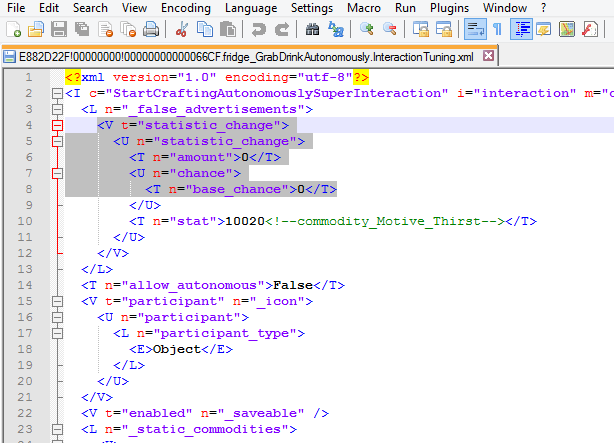
Now save your file and let’s move on to the other file that controls Sims need to constantly get a drink.
Double click on the cooler_GrabDrinkAutonomously.InteractionTuning and you are going to make the same edits. You can even copy/paste what you edited on your other file to this one, if you wanted.
<V t=”statistic_change”>
<U n=”statistic_change”>
<T n=”amount”>2.5</T>
<U n=”chance”>
<T n=”base_chance”>100</T>
Let’s change it to:
<V t=”statistic_change”>
<U n=”statistic_change”>
<T n=”amount”>0</T>
<U n=”chance”>
<T n=”base_chance”>0</T>
A quick little note about coding. Do you see how each line is closed with a / something?
Example:
<U n=”chance”>
<T n=”base_chance”>100</T>
</U>
Think of those like punctuation marks or periods at the end of a sentence. You need to make sure when you are editing and adding lines that every line is properly punctuated. Failure to do so will result in errors. If you are careful and only change the amounts, then you shouldn’t run into any issues. However, if you start getting really ambitious and adding in lines from other resources? Then please pay attention to those closing lines.
Side trip into coding land over. Go ahead and save this file as well and we are now ready to move onto the final stage of making your first mod. Exciting, right? Well, it was for me when I made my “Kiss Neck” mod. I was so pleased with myself for days, still am. You will be too when you conquer this.
Open up S4S and select “Tools” and then you will select “Empty Package”. In the popup window, name your package. I suggest naming it with your initials and then what the mod does. I labeled mine HSNoAutoDrinks. Please be mindful of using characters like _ & { ] and spaces, it takes computers longer to process these characters and therefore it could eventually slow down your game.
After saving your mod, you will click on the “batch import” button and then scroll to where you put those XML files. They should be inside that folder in your Mods WIP folder, being organized makes this process easier. Once you have selected all your resources, click on the open button. After ensuring that all your files have been placed into your package, save it. TADA! You just made your first mod. Congratulations.


Test your mod if you plan on releasing it. Please don’t release untested and broken stuff into the community. A fun suggestion is to have other Simmers test it and give you screenshots so you can include them when you release your mod. After you have finished testing your mod, move the entire folder over to your folder that is labeled for the latest patch. These are mods that you know work with that patch release.
A little tip: Did you notice the green writing? That is the name of that resource item. This information comes in handy if you want to use that resource in another mod or you are trying to figure out what to modify. It’s why I suggested poking around in the resource folder and reading. The more you study the files, the clearer they become and the easier it will be for you to make your own mods or update an outdated one.
A note on updating outdated mods: Most modders don’t want you to do that. I suggest sending them a note and asking. If you have not heard back in a reasonable amount of time (weeks) then go ahead and do the update but make sure you state that it is NOT YOUR mod and that you will remove it if the original creator objects. Link to the original mod. I have many mods (40 to be exact) that I have updated for my own personal use and won’t share because I didn’t make them.


