

Heads up: Halloween starts in just one week! Don’t forget to make spooky Sims and Houses and upload them to The Gallery.
Click on the picture below to download this Set!

Click Here for more information on how to install Custom Content!
Heads up: Halloween starts in just one week! Don’t forget to make spooky Sims and Houses and upload them to The Gallery.
Click on the picture below to download this Set!
Click Here for more information on how to install Custom Content!

Click Here for more information on how to install Custom Content!
This is an asian yet contemporary living room consisted of finest quality furniture. This living room is the perfect choice for those Sims who are looking for cozy but stylish furniture. Let them sink into the lovely loveseat or the comfy living chair and enjoy their day.
Click on the picture below to download this Set!

SimCity BuildIt has got unlocked on Google Play a week ago for New Zealand and Australia, but now players from Canada are reporting that they can now download the game and play it as well!
If you’re from Canada/New Zealand/Australia and own an Android phone that has decent specs, then click on the picture below to download SimCity BuildIt!

Halloween is only about a week away! This Pumpkin Patch Set of Objects created by sim_man123 for The Sims 4 will go perfectly for decorating your House for Halloween.
For more information on how to install Custom Content, Click Here!
A few simple items to help your sims get read for Autumn! This set features a hay bale that can be used as a table, a wagon (also a table), and two sizes of pumpkins – each with three recolors.
Click on the picture below to download this Set!

Creative The Sims Resource member Severinka published her set of 7 Asian-themed objects for The Sims 4!
For more information on how to install Custom Content, Click Here!
Set of bedroom furniture in Asian style. This set will be an indispensable Addendum for your oriental home.
The set includes: bed, dresser, table, bonsai, wall sculpture – the coin of happiness, vases, partitions.
Click on the picture below to download this Set!

With The Sims 4’s latest update, Invisible Lights from The Sims 3 World Adventures update are now back to The Sims 4 as well!
To add invisible lights into your Room, open Build Mode and enter the bb.showhiddenobjects cheat. Select filters and choose Content > Debug.
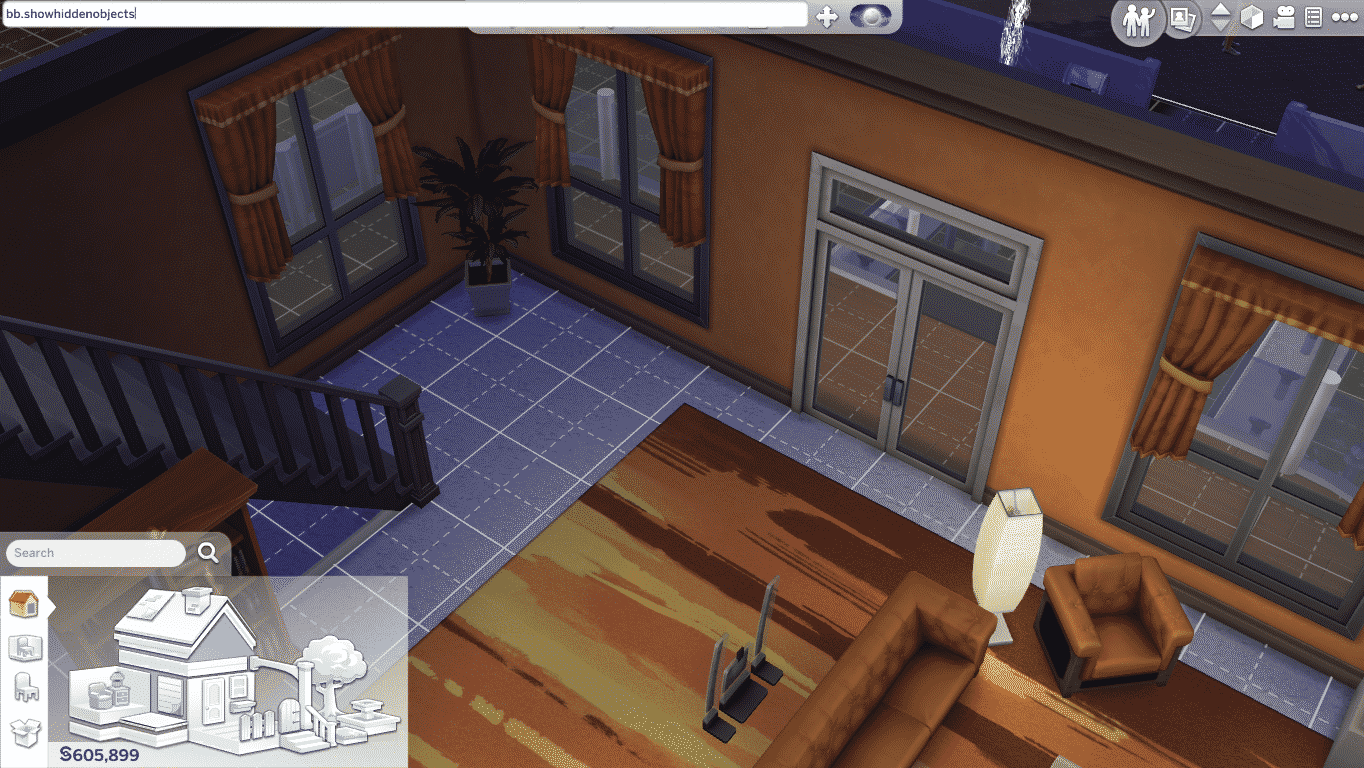
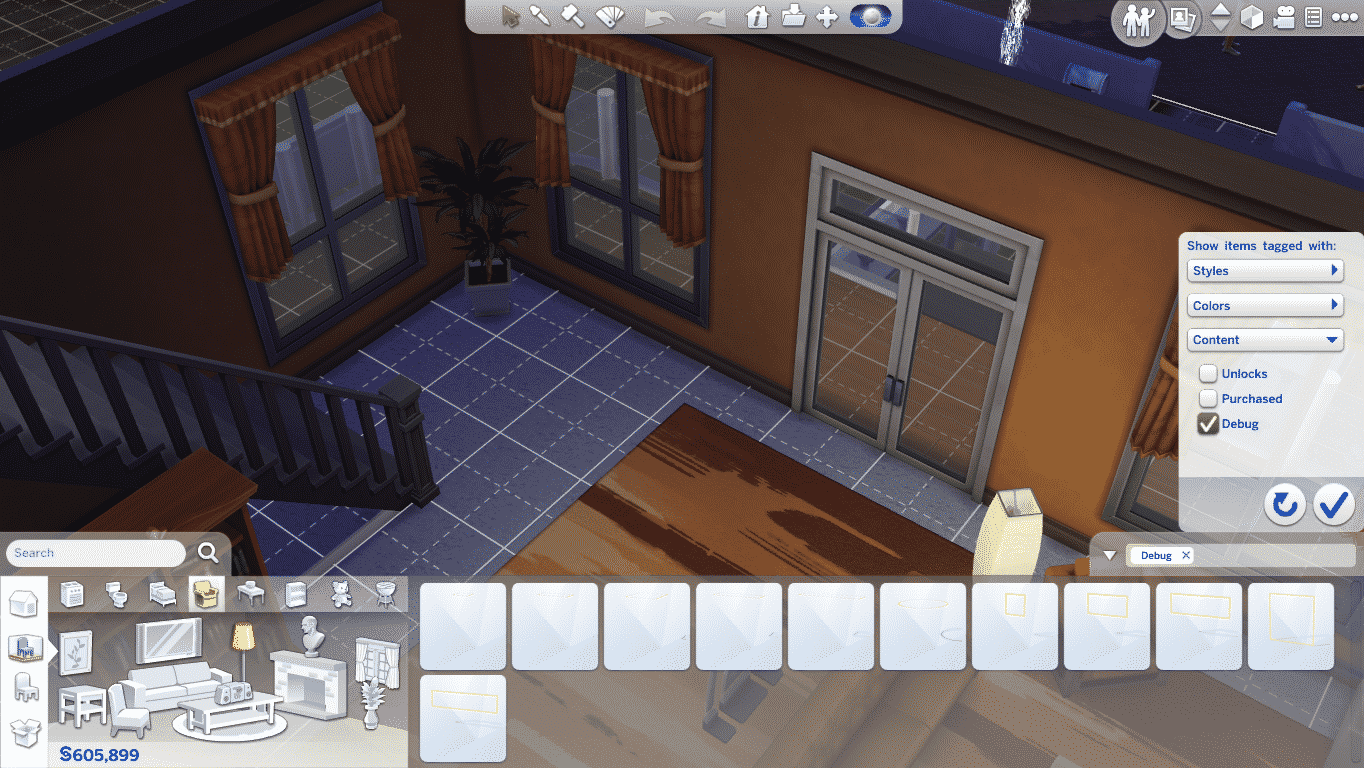
You can plop any Invisible Light you want into your room. There are all sort of sizes for a ceiling and wall/floor invisible lightings.
After you’ve finished adding invisible lights, the yellow outline on each lighting will disappear and all you’ll see in Live Mode is light without the light source.


To update your The Sims 4 game to the latest version, simply open your Origin and the game will automatically update for you!
Update: 10/21/2014 – Version 1.0.797.20
Hello Simmers, readers of patch notes, and other developers who just happen to be searching the internet for examples of how other teams are writing up their release notes!
We had a few issues we felt needed to be addressed sooner rather than later, and have tackled them in today’s patch! Many of these issues were brought forth by the community through the forums. We thank you for your efforts, your posts, and your focus in helping us create a better experience with The Sims 4.
Some bugs you might be keen to know were fixed: The “Eye and jaw width looks funky” bug! The “I can’t get married if my fiancé died” issue! And the “My Sims can’t age up anymore” bug.
The other issues which we have fixed are detailed below, and we are always dedicated to fixing performance and gameplay blocking issues in order to provide the best gaming experience possible. Please keep posting on the forums. We do read them and we are tracking issues that you are finding. Thank you!
Crashes / Performance
Tuning
UI / Text


SteelSeries recently published their new video for The Sims 4 Gaming Gear and with that they gave us a full set of TS4 Peripherals to give away to one lucky Simmer!
To enter this giveaway, all you have to do is write a few sentences in the comment section below on why would you like to win these Peripherals.
The winner will be chosen randomly via random.org. We’ll make sure to provide a screenshot after we choose the winner.
This giveaway ends on 28th of October, 2014 (21:00 – GMT +01). The winner will be announced on October 31.
Before entering this giveaway, please note:
Good luck to all of you who are entering this Giveaway! 🙂

Origin is selling The Sims 4 and The Sims 4 Digital Deluxe for 30% off it’s original price! This offer is valid for all of those living in USA or UK.
This offer will expire on 24th of October, 2014!
Click on the picture below to check out this offer!

With the latest The Sims 4 Patch that released on 01/10/14, 2 interesting icons were added into the game files.
By the looks of those 2 icons, it seems that The Sims Team is working on features to load, delete, and probably create/build new Worlds!

That’s not all though. SimGuruZera posted today on The Sims Forums asking about what feature would we like to see that would help us shape and change our Worlds. This post also confirms that they are currently working on new features for editing worlds!
Tell us the features you most want to change your World. We have ideas, we have things a spinnin’, but we want to hear from you first hand. What can we do to help you make your The Sims 4 Worlds the best ever?
Give your feedback HERE!

There are so many ways to customize your experience in The Sims 4, including the ability to edit a lot.
Here’s a step-by-step guide for editing in The Sims 4.
We’re going to use Sandtrap Flat in Oasis Springs as our example. Let’s say I want to do something with it other than leave it as a Residential Lot. What if I want to make it a Library?
Go to Oasis Springs, click Sandtrap Flat, and look at the options in the contextual menu. From the top, you can:
1. Move in a New Family
2. Free Build. You have no money restrictions, though you’ll need enough money to move in.
3. Click the … for More and change the Lot Type. This is what we’ll click for our library.

@SimmerNick sent us some of the first in-game screens of SimCity BuildIt!
These screens show the first tutorial you’ll get when entering the game, as well as some of the options to build and optimize your City.


Magic is appearing in Sim Town! Get the help of Sim Town’s resident Wizard and conjure up new spells to save your neighborhood from impending doom. Summon your enchanted broomstick and hold on to your wand; magical mysteries and mayhem are just around the corner!


