



The first beta version of SimSearch for The Sims 4 Gallery is here.
EA has announced today the first iteration of The Sims 4 Simsearch feature for The Gallery. Introducing a new way of using text-to-image and cross-language search filters to look for the creation you want more quickly.
We first reported about SimSearch coming to The Sims 4 back in November 2025, when some of the first features accidentally leaked to the public. Now, we have a first official introduction to how the feature works:

Sul Sul, Simmers!
Today, when you head into The Gallery, you may notice new search functionality. SimSearch introduces two new features, Cross Language and Image Search, designed to improve how you search and discover content. These new features are currently in Beta so we’re still fine tuning the experience, but starting today, they are available for Simmers who want to try them out.
- Cross-Language (Beta)
- This search option combines and expands on the Item Name and Hashtag searches by also integrating Description text for any matches. As well as looking through different text fields, the search will look at other supported languages to return results where the creator may not speak your set language. This means that if you were to search for “Big Red House,” you would also see results such as Spanish – “Gran Casa Roja,” French – “Grande Maison Rouge,” and German – “Großes Rotes Haus,” all without needing to know additional languages yourself. This allows us to surface more of the creativity on The Gallery which may have been hidden to you in previous searches.
- Results will also be appended by related results acting as “things you may also like” which will open up discoverability for Simmer uploads that may be of interest to you but that you didn’t specifically search for.
- Text-to-Image (beta)
- Initially, this search is limited to Lots and Rooms. Households will not be available while we continue to work on the feature.
- This new search function goes beyond text matching your search criteria with the image you see in The Gallery. If you were to search for “fireplace” you should see results where there is a fireplace or a camp fire within the images. For best results in this example, you can then use the Lots and Rooms filters to narrow in on more suitable results for your needs.
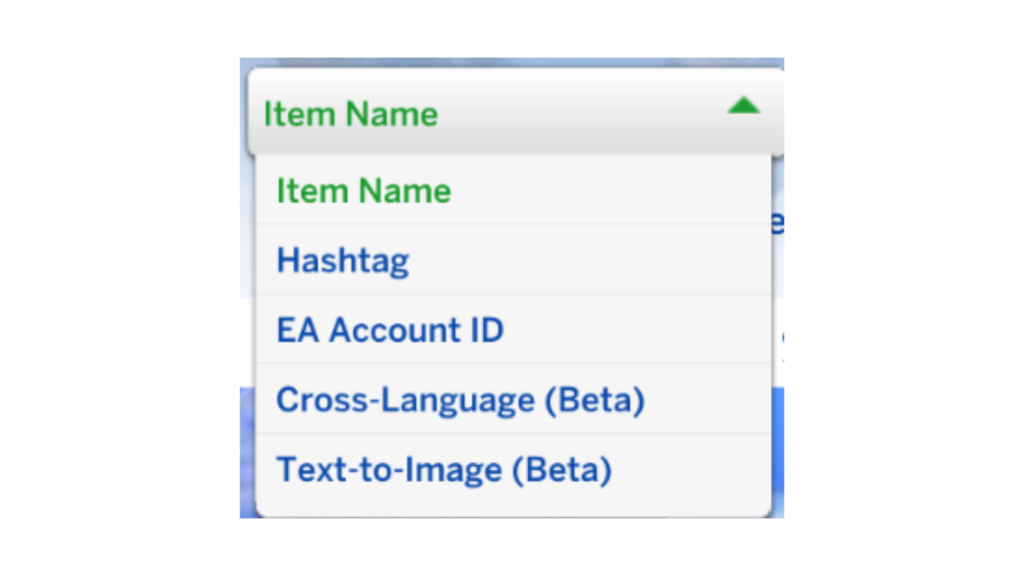
These new options are currently in “Beta” as we test the functionality. As such, there may be results in the new searches that do not meet your expectations or desired results which we would love to hear from you about to improve the results. While we are in Beta, the new search options will be available only in The Sims 4 game client while we gather your feedback and hear about your experiences. Eventually we will look to add the search options to the Web Gallery for a seamless searching experience. The new searches are in addition to the existing Item Name, Hashtag and EA Account ID searches that you currently see in the Gallery.
Some areas we are working on while in Beta, and taking on your feedback, for these new search options include:
- The Sort By section in the Gallery does not work against the two new search options. This is due to how we are running our queries and the order we get the results in. This does have the added benefit of potentially exposing results from new creators and uploads you may never have seen before.
- The Text-to-Image search currently uses an OR operator so you will get better results from single word searches. We are looking to expand this to an AND operator in the future. This means that at launch if you were to search for Cozy Fireplace, you would get results representing Cozy and results representing Fireplace mixed together. In the future, Cozy Fireplace could be combined in the search to get more precise and customizable results.
Head to the EA Forums or Discord to share your feedback. As SimSearch is in Beta, we will continue to refine the feature over time and we would love to hear your input.
If you are ever browsing in-game or on the Gallery webpage and encounter any inappropriate content or comments, report it by selecting the flag icon. For more information on content guidelines and how to flag Gallery content, head over to EA Help.
What do you think about The Sims 4 Simsearch feature being introduced to The Gallery? Let us know your thoughts in the comments below and stay tuned for more Sims News!













I detest ““things you may also like”. That why like, whatever you search, you get a result or two on YouTube or most places and the rest is unrelated things they want to push.
Look how carefully they avoid using the word “AI” even though these features clearly use it
oop clock !
I can’t feed my infants on the console anymore
To be fair, the cross language part is a good thing as the game is sold in all these languages so this will browsing the gallery more accessable so props to that.