


New Hotfix Patch has been released for The Sims 4 across Computers and Consoles.
The Sims Team announced late last week that they'll be releasing a new Sims 4 Update to fix some priority issues and bugs, including CAS, eye dropper tool and controller scrolling issues. The patch shouldn't be a big one like last week's, considering it's just a hotfix release for Computers and Consoles.
Find out what's been improved in the patch notes release below:
Table of Contents

The Hotfix For A Quality Of Life Update
Installing the Latest Sims 4 Update
You can get the latest The Sims 4 Update on the following official launchers and platforms:
- PC: EA App, Origin, Steam, Epic Games
- Mac: Origin, Steam
- Playstation: PS4 and PS5
- Xbox: Xbox One and Xbox Series X / S
You can download the latest Sims 4 Update by checking for a Patch through the EA App, Steam or Epic Games launcher for Desktop. If you have Automatic Updates enabled the update will automatically download through your client program. In case your EA App is not working properly ensure you've cleared your app cache!
If you play The Sims 4 on Xbox Series X / S and Playstation 4 and 5 you can request a new update by checking for updates under The Sims 4 game in the Main Menu. If you've enabled automatic updates the Patch should download right away.
This Sims 4 Update is a small hotfix release and shouldn't have any big impact on your Mods and / or Custom Content installed in your save files.
If you want to make sure everything is properly secured there’s a handy official guide to Mods and CC maintenance, as well as backing up your Saves! Click here to learn all about healthy upkeep of your The Sims 4 files. If you're still experiencing a specific game issue make sure you report it to The Sims Team over on EA Forums.

Official Sims 4 Patch Notes
Update: 5.21.2026
PC: 1.124.63.1020 / Mac: 1.124.63.1220
Console: 2.34
Sul Sul Simmers!
We have been gathering and reviewing your reports and feedback since our last release and while we have more development ongoing, we have a number of trending issues resolved in this update.
For Simmers on PlayStation and Xbox, we are aware of reports regarding the Gallery becoming unresponsive and the team is working as quickly as possible on resolving these issues for an upcoming update.
- The Sims 4 Team
Base Game Update
- [EA Forums] Opening clothing categories in Create a Sim wasn’t jumping to the clothing currently being worn by your Sim, this has been addressed, making it easier to get that perfect look by knowing which pack a clothing item came from.
- [EA Forums] Using the eyedropper tool in Build Mode will take you to the Build catalog listing for that item.
- [EA Forums] During Gallery uploads, players could encounter a timeout error. This has been addressed and should no longer occur.
Console
- [EA Forums] Controller using Simmers reported that scrolling within Create a Sim was failing when entering different categories. The scrolling behavior has been addressed and you should be able to navigate properly once more.
Author Release Notes
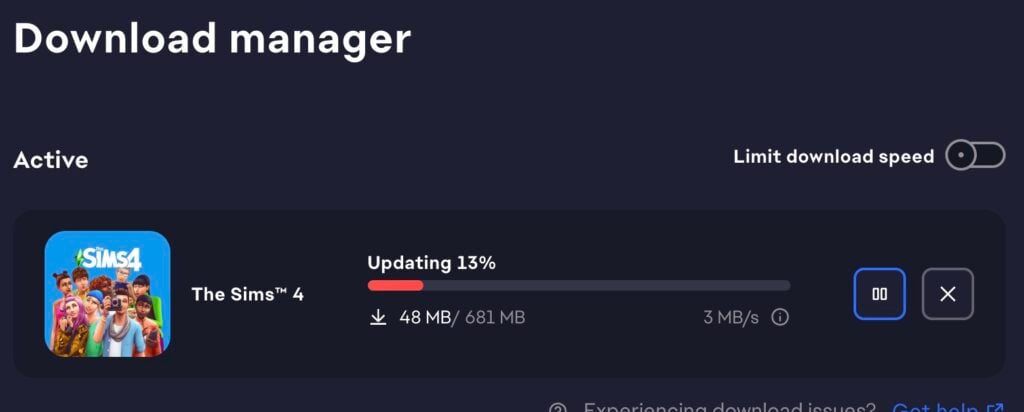
The update is 680MB on Mac devices.
What's your experience with the newest Sims 4 Update out for Computers and Consoles? Let us know in the comments down below and make sure you stay tuned to Sims Community for the latest Sims updates!
29 Comments
So sick of this! Just let us own the software like the old days and decide if we want updates.
Reply to Trisha
Then find another game to play?
I hope they fix this black photo issue cuz prior before the hundreds 150 Plus update my photos and everything are included was fine after that update my photos went black so I’m hoping that this hot fix fix that been real iffy about opening my legacy file cuz I was devastated I’m on nine of generation of the veggie Legacy right now and I have photos and artwork that was ruined and I immediately close the game and refuse to open it so I hope it’s fixed
Did they fix doctor career and pet adoption or whatever they broke last time?
Please fix the “contains new items” bug for cas and build mode
CONSOLE STILL CANNOT DOWNLOAD TATTOOS FROM GALLRRY!!!!!!
It would be nice if there weren’t like a dozen items give or take that are invisible or that look broken when indoors but are fine outdoors… (Mortimer’s bookshelf, double high school locker and other two grid lockers, some end cupboard pieces, etc… anyone else have this issue?) And the severe lag when needing to do an edit on a residential rental lot… I played for months without any mods or cc and a fresh tan folder (entirely deleted and let it rebuild) after the update at the start of the year and all these issues were there in my brand new save… And still are. And then some of the items in cas can’t be copied to other outfits (horns from fairy pack, etc…) which is tedious to reapply to each… Some of these “issues” they’re fixing were not in my game that I saw or were so minor I didn’t think much of them… Was having an issue with the gallery though so I look forward to seeing if that’s really fixed.
i did the update today 21/05/26 and i can not open the game i have try everything
Reply to karen
me neither
Reply to karen
Same I keep getting this now every time I try an login
Reply to karen
I HATE that it forces me to update because this. Here, I have an afternoon ahead of me I was really excited to play. And that darn “WE SEE YOU’RE BACK ONLINE GRRRRR” aggro message comes up despite my trying to see my laptop disconnected from wifi to prevent this. I have auto update disabled, but it never matters bc the EA app itself hates us. I don’t like being FORCED to do something to play the game. I always prefer to wait a few weeks to update.
I noticed a frustrating issue with the cats and dogs pack where I tried to make my sim give their filthy dog a bath but they would just pick them up, stand there, and put them down like they would with babies. I had to cheat my dogs hygiene need
Reply to Destiny
yes small dogs and cats have had this issue for a week. dang that means it wasn’t fixed.
Reply to Boone
Yes. THIS! I can’t play because my dog has been sprayed by a skunk. They wont bath it. Cheats wont so anything. Constant bad moodlet 🙁
Just updated today, and now I’ve got a flickering box on the left bottom side with an ‘X’ but no idea what it is, because it’s not showing. Game worked fine last night before this latest update 🙁
It will not let me allow script mods after the update. I will enable it, apply changes and per usual it says to restart the game. I restart it and it says the same “disabled mods” prompt.. This is very infuriating.
Game’s still crashing while saving progress on console
Well, for me the patch was good because it fixed the annoying bug when selecting items both in cas/bb. So far so good, glad they fixed it so fast.
People asking if the sims fixed “this issue and that issue” in this hotfix patch should really just learn to read the patch notes that are literally listed in this post. I swear people have lost the ability read or use common sense.
I’m back to not being able to drag plates and trash to garbage/sink. I havent downloaded the hot-fix yet, but I don’t see it addressed. Is anyone else having this issue??
Every update comes with problems yall need to make sure that everything is good before dropping these kits and packs and updates cause yall causing a lot of problems with simmers trying to enjoy playing the game but we can’t because it’s always a glitch going on …. Pc , or console do better please and thank you
Reply to Latisha
Who are you talking to? This website is a fan run website and not an official sims webstire.
Why is the update almost 1GB? It’s 0.68GB Does that seem crazy to anyone else??
Are they always that big??
Like I’m lucky I have a terabyte but dude that sucks for the toasters.
Reply to Remy
Sometimes they are that big yes, but it’s not adding 1GB of data, the patch contains 1GB of data that alters the files.
This hotfix corrupted all of my saved games quite honestly, I am tired of having to delete years of saved game data. I even took two days almost completed a Bridgerton house this is just bullpoop and it honestly saddens me to the point of not wanting to play anymore.
Please fix the pets!! Getting stuck and cant adopt, I missed the chihuahua I wanted 🙁
Oh look the update broke the Sims again. *Puts another mark on the tally sheet* Won’t even open now. Good Job EA
Gallary still not working and freezing on console. What was the point of the update if the thing you were fixing is still not working. Oh, right. I forgot EA hates its players, and they don’t check their own work after creating a said update.
Ironic. EA created an update to fix what was wrong and they end up breaking the whole game.
Welcome to Sims Community!
Our community is about connecting people through open and thoughtful conversations. We want our readers to share their views and exchange ideas in a safe space.
In order to do so, we've created a simple set of rules that will improve your experience. Simply put, keep it civil.
Your post will/might be rejected if it contains:
User accounts will/might be blocked if we notice:
So, how can you be a power user?
Thanks for reading our community guidelines. Please note that we're aware of certain issues with Sign In / Log In and Create Account / Email Confirmation issues. We're working behind-the-scenes on a new Account Creation process. Thank you for your patience and remember - freedom of speech is not freedom of reach