


Autosave and new quality of life improvements are here!
The Sims Team has just released a brand new The Sims 4 Update across PC, Mac, Xbox and Playstation supported consoles. Releasing the new Autosave and Save Reminders Features and Quality of Life improvements and bug fixes.
If you haven't caught up to the previous Sims 4 Laundry List released last week, here's a total summary of everything new added in today's update release:

The Autosave Update
Table of Contents
Installing the Latest Sims 4 Update
You can get the latest The Sims 4 Update on the following official launchers and platforms:
- PC: EA App, Origin, Steam, Epic Games
- Mac: Origin, Steam
- Playstation: PS4 and PS5
- Xbox: Xbox One and Xbox Series X / S
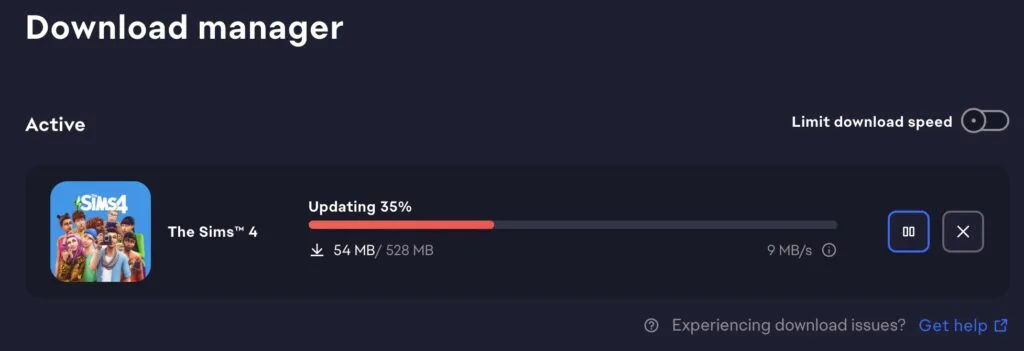
You can download the latest Sims 4 Update by checking for a Patch through the EA App, Steam or Epic Games launcher for Desktop. If you have Automatic Updates enabled the update will automatically download through your client program. In case your EA App is not working properly ensure you've cleared your app cache!
If you play The Sims 4 on Xbox Series X / S and Playstation 4 and 5 you can request a new update by checking for updates under The Sims 4 game in the Main Menu. If you've enabled automatic updates the Patch should download right away.
This Sims 4 Update is quite a big one and changes some core fundamentals in autonomy and CAS. Brace yourself for the impact of some of the current mods breaking and ensure your Mod creators have released a new version to match the latest game patch.
There’s also a handy official guide to Mods and CC maintenance, as well as backing up your Saves! Click here to learn all about healthy upkeep of your The Sims 4 files.

Official Sims 4 Patch Notes
Update 7.21.2026
PC: 1.126.58.1030 / Mac: 1.126.58.1230
Console: 2.36
Sul sul, treasured Simmers with precious digital lives.
Save Gnome here. Yes. That Save Gnome. The one entrusted with the sacred duty to protect your progress. AT ALL COSTS.
The Sims 4 now has Autosave across all platforms!
It works quietly and vigilantly. You may notice a gentle little “Autosaving” message while you play.
That’s me.
Dutifully guarding.
Preventing tragedy.
But wait! I have more!
There are also… SAVE REMINDERS. Completely configurable, just like the new Autosave options. Turn them on, and I shall appear at intervals of your choosing to gently firmly lovingly insist that you save your game. All it takes is one click. Sweet, beautiful security.
While I was polishing your save files, we also made some memory improvements for smoother gameplay and addressed a few community-requested fixes.
Now for another bit of good news! We've added free, culturally inspired accessories influenced by Caribbean, Indigenous, Latin American, and South Asian cultures. You'll find eight new Starter Sims in Create a Sim and the Gallery wearing them. They are ready for you to shape their stories.
Coach is back! We know you loved the first drop, so we partnered with Coach again to bring 4 brand new items in the Coach Repurposed Capsule, bringing even more timeless style to your Sims. Head to the Marketplace to download it for free!
Then, for the musically-inclined Sims who enjoy listening to their favorite songs, or getting in “tune” with their creative spirit (pun intended) - it’s time to turn on the stereo, strike some keys, and strum a guitar to your favorite melody with The Sims 4 Music Den Kit. This retro-futurist inspired space is sure to be the ultimate sonic sanctuary.
Now then. Open your game. Build boldly. Style freely. Live dramatically.
And always remember:
Save often.
- The Save Gnome
What’s New?
AutoSave and Save Reminders
From big life moments to everyday chaos, every Sim story deserves to be saved. Today, we're introducing AutoSave and Save Reminders to help protect your progress while you play.
Whether you're spending hours in Build Mode or guiding your Sims through their next adventure, these new features make it easier to keep your stories safe so you can focus on what comes next.
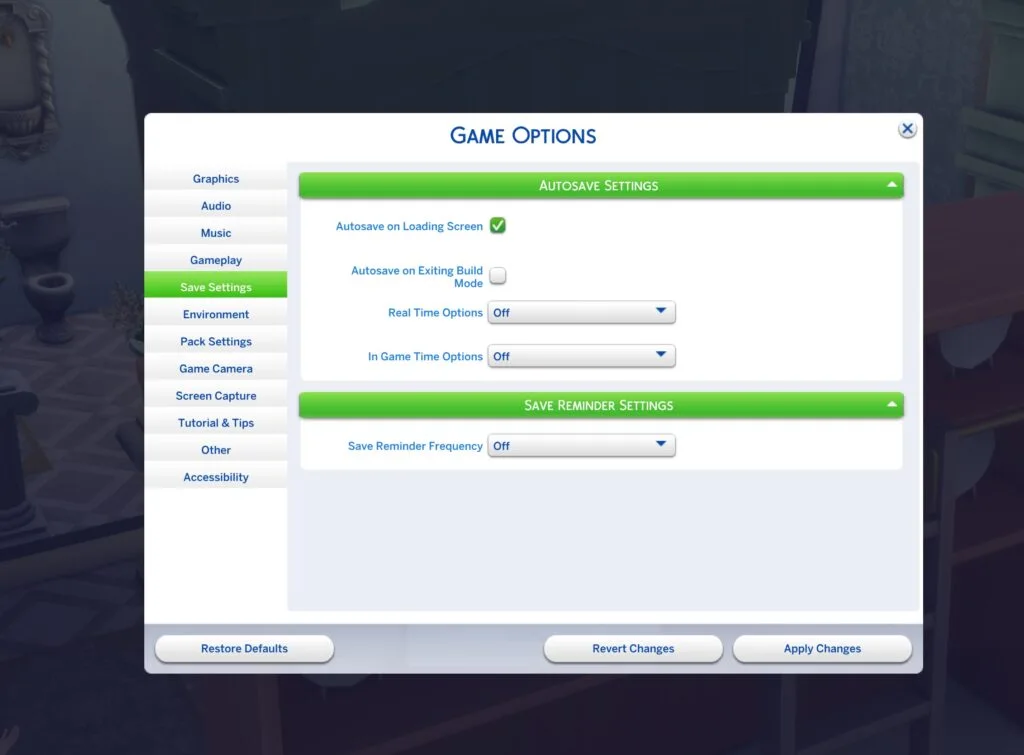
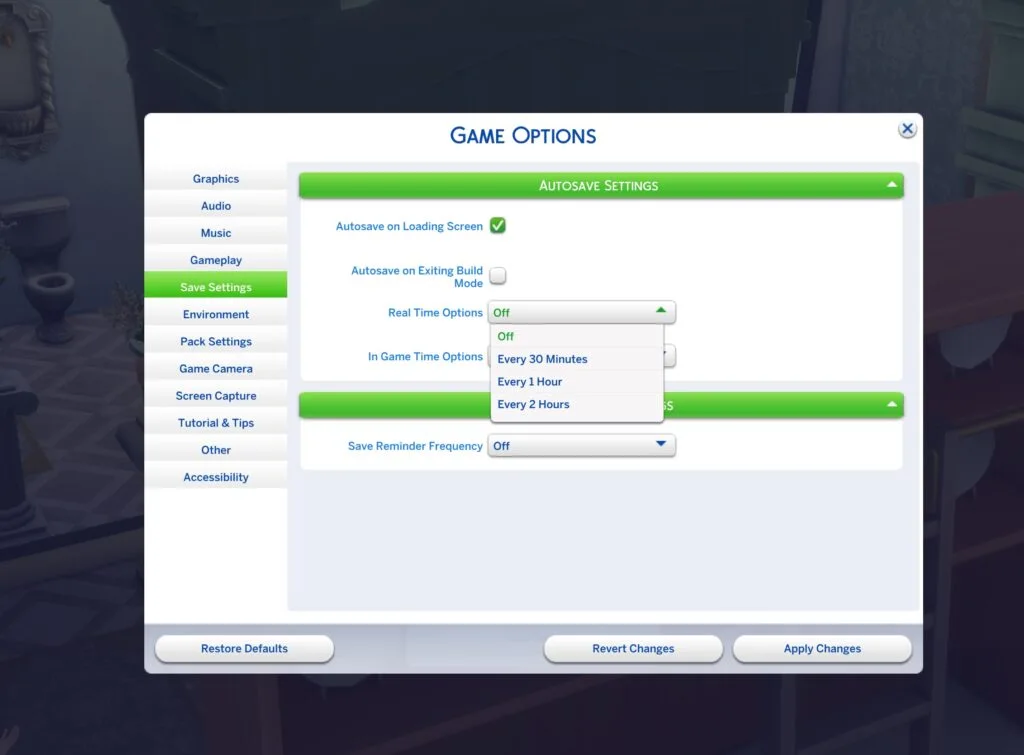
AutoSave works quietly in the background, automatically creating save points at key moments while you play. You can customize when AutoSave happens in Save Settings, with options like saving after traveling between lots, after a period of playtime, or at important gameplay milestones. If you'd rather stay in control, Save Reminders like the friendly (or slightly grumpy) gnome notification below can prompt you to create a manual save at the frequency you choose. Together, these features help reduce the risk of lost progress while giving you the flexibility to save the way you want.

Two grumpy save-reminder gnomes in red hats and glasses, each holding up a blue floppy-disk icon, in a playful, chaotic style
Memory Boost is Coming to all Platforms
Whether you're playing with a bustling household, building your dream home, or returning to a save that's been with you for years, smoother gameplay means more time enjoying your stories. That's why we're introducing Memory Boost in today’s update across all platforms.
Memory Boost improves how The Sims 4 manages memory while you play, helping deliver a smoother experience with reduced lag, improved frame rates and responsiveness, shorter loading times, and a lower risk of memory-related crashes.
Players may notice the biggest improvements during longer play sessions, in large households, on highly decorated lots, and in older save files. While Memory Boost isn't a dedicated save repair feature, it can also improve save stability and help reduce some memory-related save issues.
8 New CAS Starter Sims & Accompanying Accessories
In our continued efforts to increase diversity and representation within The Sims, we’ve expanded the pool of Sims that appear when you first enter Create a Sim, because every story starts with a Sim.
Inspired by Caribbean, Indigenous, Latin American, and South Asian cultures, we’ve added eight Sims and eight culturally inspired accessories to bring more variety to the stories you create from the very beginning. The eight new accessories (one for each new Sim) feature details such as turquoise jewelry, bangles, cowrie shell bracelets, and woven bracelets.
These additions bring heartfelt touches to these new Sims, while adding more exciting accessory options for you to express your Sims’ unique style and personality.
For those eager to welcome these new faces into their world, you can also download them directly from the Maxis Gallery page.
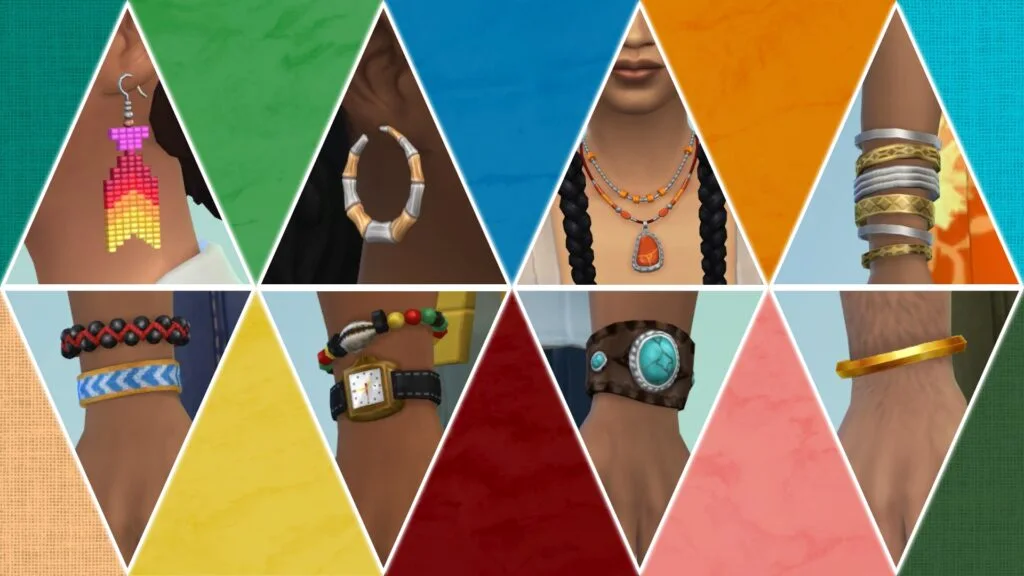
A screenshot showing off eight new accessories (earrings, necklace, and bracelets) in a fun, brightly-colored, triangle motif
Introducing The Sims 4 Music Den Kit
For music lovers, this kit lets you set up the perfect space to listen and chill or lock in and hone your skills.
Design a retro-futuristic sonic sanctuary with soundproofing panels, bold furniture, wall records, and display instruments. Then, check out the sleek new keyboard, violins, and guitar to help your Sims refine their craft.
Whether kicking back by the stereo or starting on the path to becoming a Musician, this kit strikes the perfect balance between substance and style.
Get 200 Moola included with the Music Den kit if you buy before October 22.
More Notification Improvements
Last Patch, we added a new Festival Notifications Toggle in the Options Menu. In this update, we’re adding “Nordhaven Hobby Meetups” as an additional option that is available to toggle off.
We've also removed the "Sugary Cravings" and other Businesses and Hobbies Expansion Pack related notification pop-ups to help further reduce TNS spam.
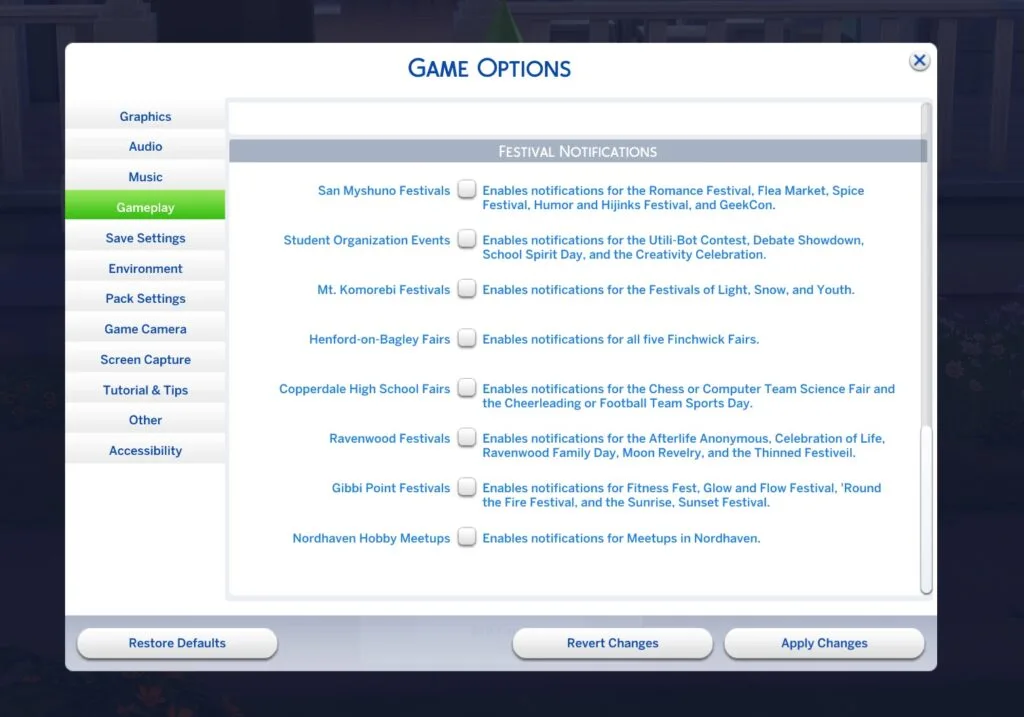
An image of the Sims 4 Game Options menu that shows all Festival Notifications, including the new Nordhaven Hobby Meetups toggle, which reads, “Enables notifications for Meetups in Nordhaven"
Marketplace Quick Buy Now Available on PlayStation!
The Quick Buy feature detailed in our June 29th update is now available for Simmers on PlayStation consoles.
New Swatches for the Stove, YumCooker (Used)!
For players who own the City Living Expansion pack, we’ve added a few new swatches per your feedback. In the past, we added new swatches to the Basegame YumCooker stove, but we didn’t update the grungy City Living Expansion version. We’ve now added the same swatches (but grungy) to the City Living YumCooker (Used) stove. Enjoy!
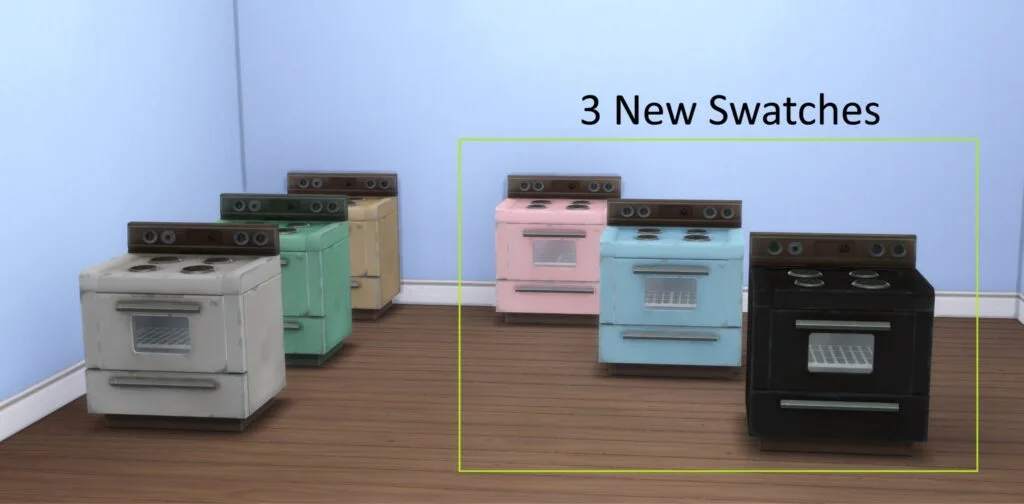
An image of the Sims 4 City Living Expansion Pack’s “The YumCooker (Used)” oven. On the left, the image shows the three original swatches in yellow, green, and grey that came with this oven. On the right, are the three new swatches in the colors: pink, light blue, and black. They are highlighted with a square with the words, “3 New Swatches” overhead.
Fixes for Most Voted Issues:
- [EA Forums] We've done extensive testing around ‘Corrupted Lots appearing in saves with a lot of Residential Rentals.’ This has been the top “Save Corruption” issue reported that we’ve been tracking. Using Memory Boost (which is now available for all players with this patch) we are no longer able to reproduce this issue on any of the saves we've collected. As we’ve addressed all other reports in this EA Forums thread, we’ll be closing the thread, but are watching for more feedback since reports like this are very hardware dependent and might vary depending on user setup.
There are some remaining visual issues we’ve noticed with the UI when a player had mods installed in a previous save but then removed them. - [EA Forums] We’ve resolved an issue where parts of a roof, or entire roof sections, could disappear when viewing upper floors in Build Mode. Roof pieces should now remain visible and render correctly regardless of the selected floor level.
- [EA Forums] We addressed a crash that could occur after playing for a few Sim hours relating to caching.
- We fixed a game crash that could occur after interacting with a Sim that was a member of the active Household.
Technical Notes for Modders:
| Patch Note | Note for Modders |
| We've removed the "Sugary Cravings" and other Small Business related TNS pop-ups from Business and Hobbies to help furtherreduce TNS spam. | Removed the loot from Motive_Hunger |
| Last patch we added new Festival TNS Toggles in the Options menu. For this patch, we added a new one for Nordhaven Hobby Meetups. | Added the new option to festival_notification_options_tuning and the test itself onto DialogDramaNode_HobbyMeetup |
| We've done testing around Corrupted Lots appearing in saves with a lot of Residential Rentals. Using Memory Boost (which is now available for all players and activated) we are no longer able to reproduce this issue on any of the saves we've collected. | The issue is fixed by enabling memory boost mode. With memory boost we can decode larger data blocks than before. |
| Enabled memory boost mode for all platforms, including PC, Mac, Xbox and PlayStation. | Memory boost is forced to be enabled for all platforms, including PC, Mac, Xbox and PlayStation. With memory boost we can decode larger data blocks than before. Also removed memory boost related UI toggle from the option menu. |
| We fixed a game crash that could occur after interacting with a Sim that was a member of the active Household. | This fix updates internal Sim cache and Sim state handling to better validate incomplete or invalid cached Sim build data during gameplay interactions and extended play sessions. It improves cleanup and failure handling around cached Sim appearance-related state so bad cache states are handled safely instead of asserting and crashing. Mods that manipulate Sim appearance, outfit/state rebuilds, or other flows that force cached Sim data to refresh should review this area. No tuning, catalog, UI, or Python assets were changed, and QA marked the fix as retroactive. |
| We addressed a crash that could occur after playing for a few Sim hours relating to caching. | This fix improves internal handling of cached Sim build/state data in cases where gameplay progresses for several in-game hours and a save reaches an invalid or incomplete Sim cache state. The update adds safer validation, cleanup, and failure handling around cached Sim appearance/build data so those bad states are less likely to escalate into asserts or crashes during normal play. Mods that interact with Sim appearance data, outfit/build refreshes, attachment updates, or other lifecycle-sensitive Sim cache flows should review this area. No tuning, catalog, UI, or Python assets were changed. |
| In the past, we added new swatches to the YumCooker Basegame stove. We’ve now added the same swatches to the City Living YumCooker (Used) grungy variant stove. | Added new variants to the YumCooker (Used) model. |
Author Release Notes
Main Menu Addition
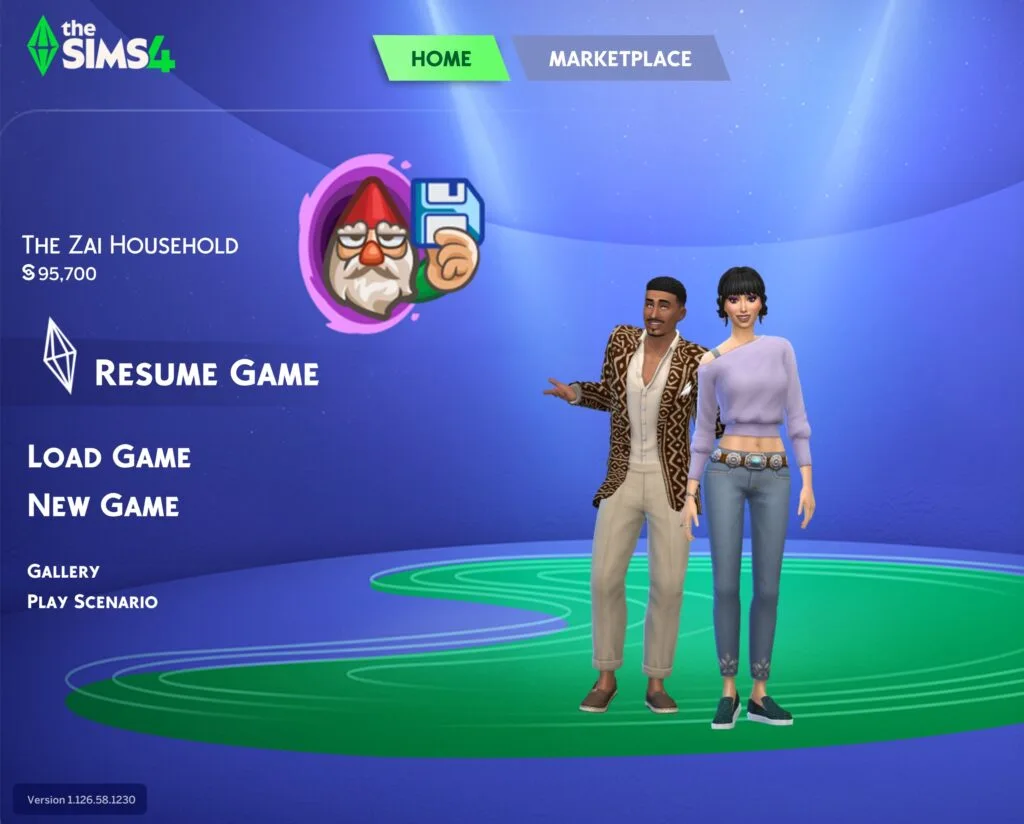
The Save Reminder gnome is now featured in The Sims 4 Main Menu.
Upcoming Free Coach CAS Release Marked As Kit
It appears that the upcoming ongoing free collaboration with The Sims and Coach is marked as a CAS Kit internally in the game files. Check out the official description and icon extracted by @lunar_britney:
The Sims™ 4 Coach RePurposed Capsule is designed for a new season of stories, where pre-loved materials are reimagined through Coach craftsmanship into unique pieces for a modern wardrobe. CAS kit marked as SP87
@lunar_britney

Filesize
The update is 528MB on Mac platforms.
Here's your first look at all The Sims 4 Autosave and Save Reminder features included with this update:
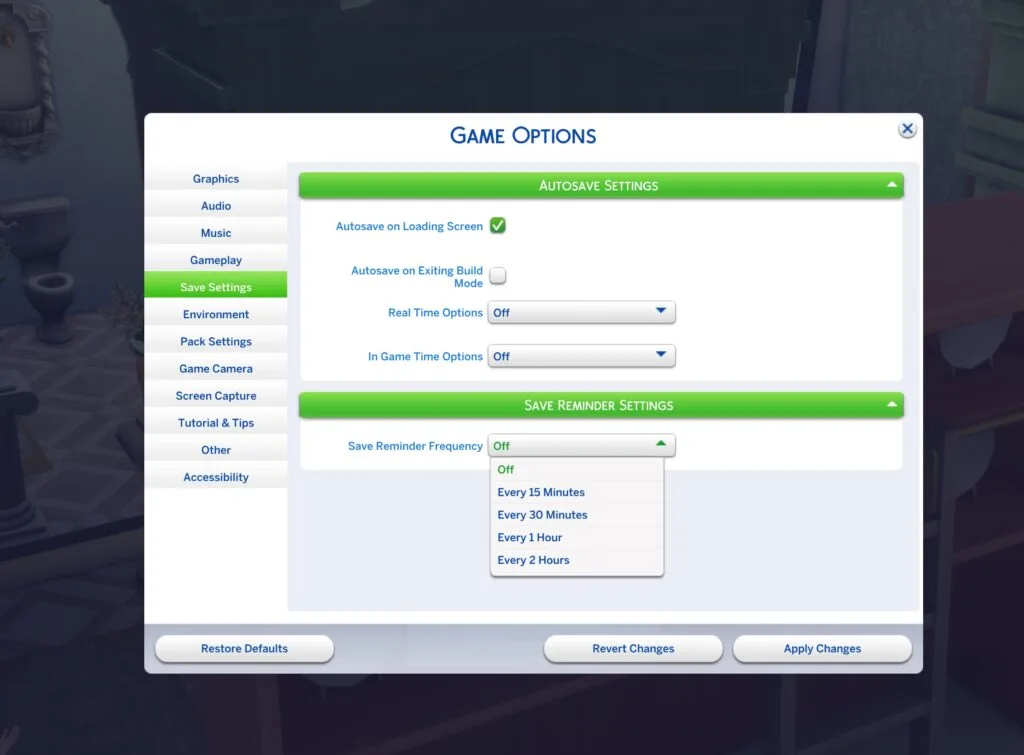
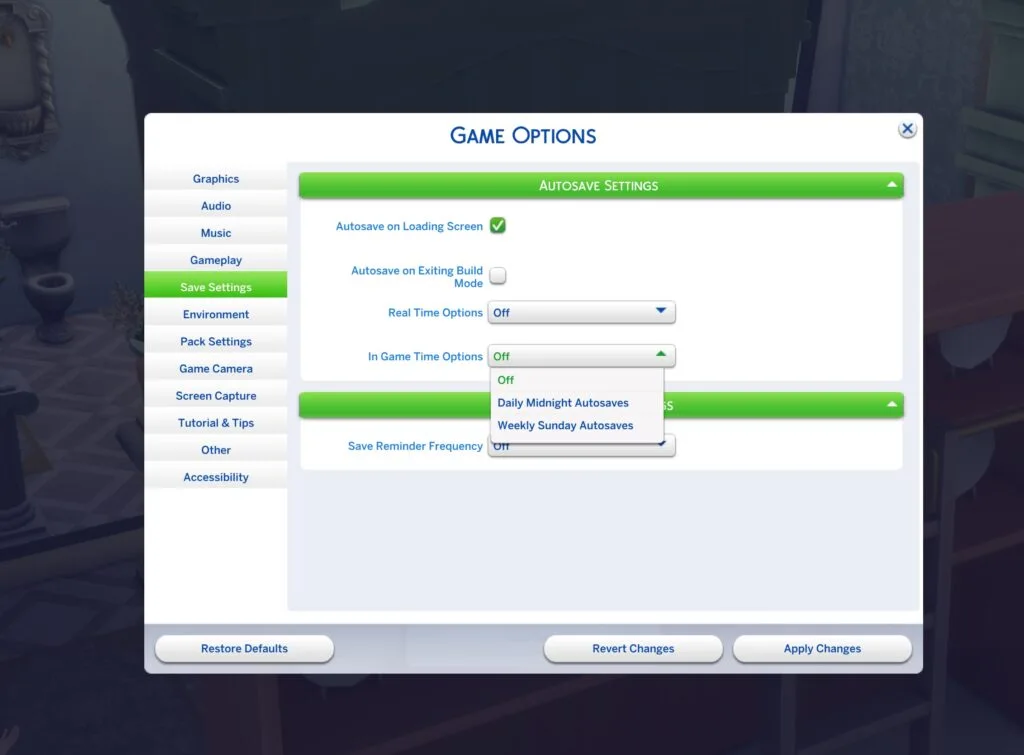
What is your experience so far with downloading the latest Sims 4 Update? Let us know in the comments below and stay tuned to Sims Community for more Sims coverage!
19 Comments
Excited about the new accessories. And that the grungy version of the YumCooker has all the swatches.
And finally we have autosave.
my game wont turn on now yay!
You mention in this article that this update changes some major things in autonomy and also in CAS but there’s no mention of that in the official patch notes?
Am I missing something?
I wonder what broke this time around…
Get 200 moola included…so they can show investors that players “purchased” more of it? Maybe even tempt people into spending it on the marketplace? Hilarious.
hahahaaha They totally messed and screwed up once again! Give up guys.
Meanwhile, they still need to fix a broken CORE GAMEPLAY feature from Life and Death that broke either last patch or the patch before. Being unable to use the rebirth feature the way it’s supposed to be used is a huge issue. I’d rather they have fixed that first, being a core gameplay feature that can cause many lost gameplay hours for folks who don’t realize it’s an issue, over something like rooftops, being a visual feature that can be corrected at a later date and is just an eyesore.
Did you fix the glitch where newly Weds become unmarried after loading screen
What about the issue with chunks of the roof missing? Lol
Bonjour, depuis la MAJ, mon jeu ne s’ouvre plus (je suis sur l’application EA depuis mon PC) je n’ai pas et n’ai d’ailleurs jamais eu de mods ni de CC. C’est indiqué “Réparation nécessaire, certains fichiers sont corrompus, mais une simple réparation devrait régler le problème”. J’ai réparé plusieurs fois, même via les trois petits points. J’ai redémarré l’application + ordi et ça ne marche toujours pas. Quelqu’un a t il le même problème ? Que pourrai-je faire s’il vous plaît ?
I do not have no Save Settings Tab in Menu on the PS5.
Add strollers and maybe walkers for infant toddlers
Can’t open the game now because it says there is a trojan. What a surprise lmaooo. Even if it’s a false positive, I’m not running it. Every time there’s an update I expect to see more broken things than before, now the launcher is f’ed. Can’t I just play the damn game with no drama one damn time? How many weeks is this going to take now?
The game doesn’t open and says there’s a trojan in the launcher! Shocker!!
After updating the game just continues to say it needs repaired. I guess that’s the end for now for me. I just started playing again, and if it breaks the mods there’s no point either.
did they fix the thing where you can’t interact with small dogs?
Cool! Please fix the glitch where the gallery will suddenly freeze up and then say that nothing was found even on no settings. Also when I put things down in build mode they will disappear and I cant place anything down. Both of these only are fixed when I restart the game. I’ve tried everything to get this fixed. I’ve seen other people having the same issue on the forum.
PLEASE!!!! For the love of all sims!!! Please fix the broken career panel UI on Xbox where sims who marry into royalty have their career info pushed to the right out of view. It’s completely unusable and is ruining my legacy save gameplay. I haven’t been able to advance that save since March and I haven’t wanted to play at all because of it. Please fix it
Every time i go into my game on xbox keeps crashing no matter what I do nothing workss
Welcome to Sims Community!
Our community is about connecting people through open and thoughtful conversations. We want our readers to share their views and exchange ideas in a safe space.
In order to do so, we've created a simple set of rules that will improve your experience. Simply put, keep it civil.
Your post will/might be rejected if it contains:
User accounts will/might be blocked if we notice:
So, how can you be a power user?
Thanks for reading our community guidelines. Please note that we're aware of certain issues with Sign In / Log In and Create Account / Email Confirmation issues. We're working behind-the-scenes on a new Account Creation process. Thank you for your patience and remember - freedom of speech is not freedom of reach