Home Blog Page 290

The Sims 4: Scheduled Gallery Maintenance

0

SimGuruKate tweeted out earlier today that The Sims team would be taking The Gallery down for some much-needed maintenance.e. This round of maintenance is scheduled to start at 11 PM PT  time today (7 AM UK time on Wednesday 6th) and may last for up to forty-eight hours. During this time all online features will be unavailable. SimGurus will confirm the work has been completed via Twitter.

The Sims 4: How to run a Batch Fix with Sims 4 Studio

Are you tired of seeing random townies using custom content you didn’t assign to them? Are you having issues with objects not doing what they are intended? Well we can fix some of your problems easily, thanks to Sims 4 Studio.

In this tutorial we will be going over how to apply batch fixes to Create-a-Sim and Build/Buy mode.

Please be sure to READ CAREFULLY before you run a batch fix. If you are unsure of what you are clicking, reference this guide.

Step 1

Install Sims 4 Studio!

If you are unsure on how to install S4S please read this guide here: Learning Your Tools: S4S

In the “Learning Your Tools: Sims4Studio” guide I will walk you through the install process and setting up the program for first time use.

Step 2

Now that you have Sims 4 Studio installed, launch the program.

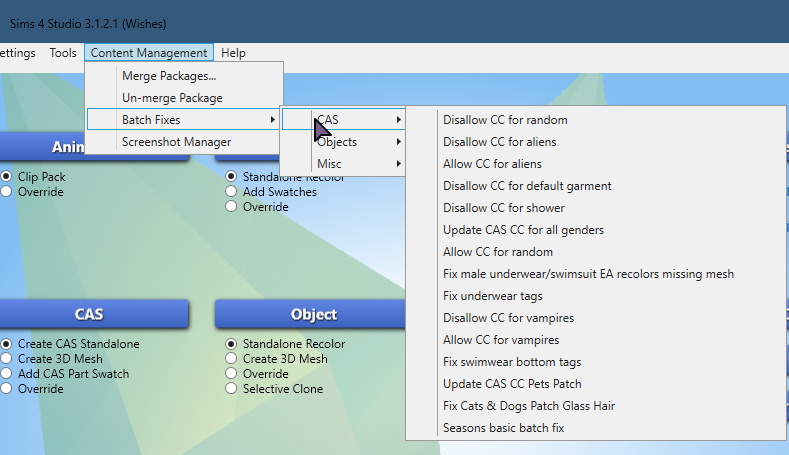
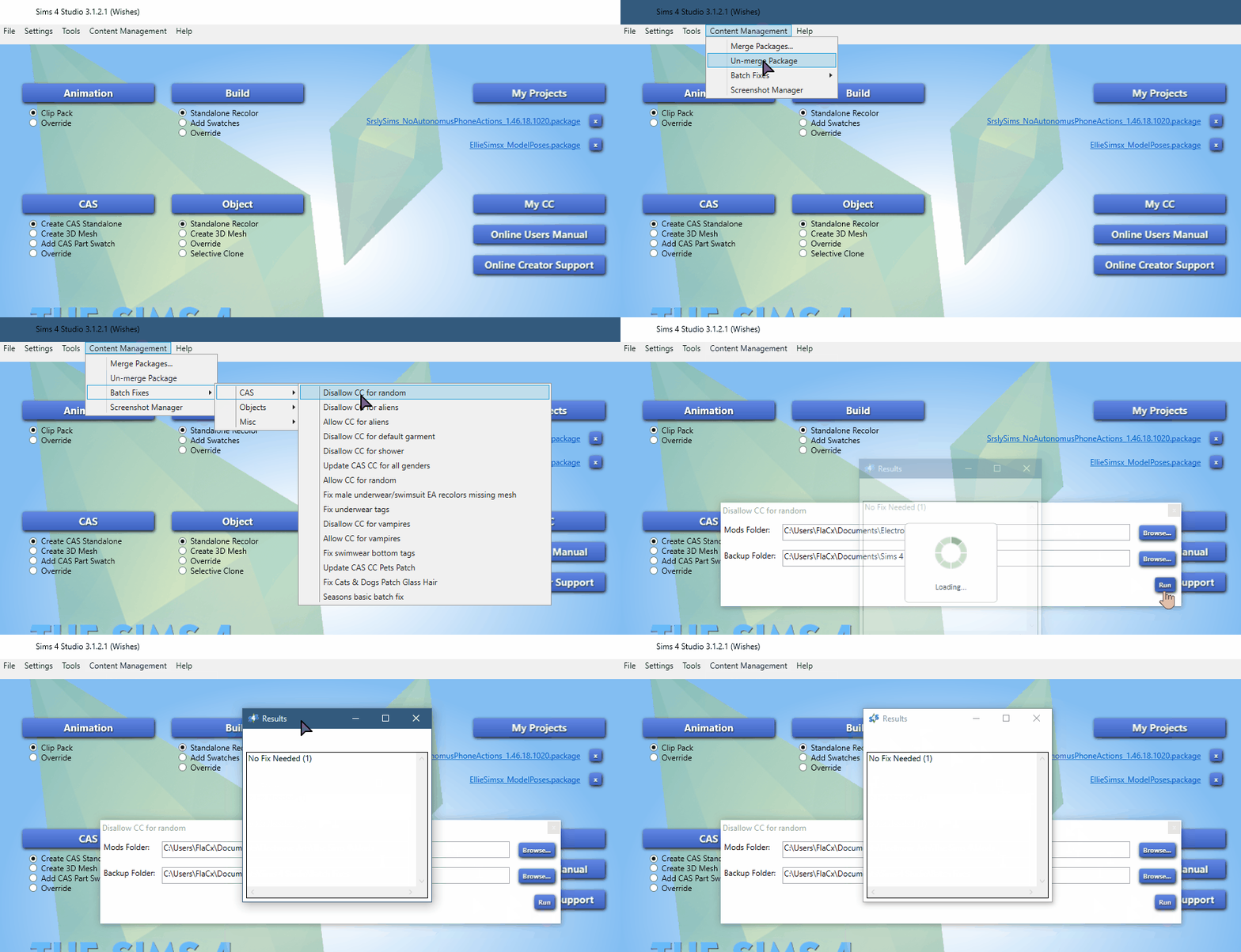
On the top navigation panel go to: Tools > Content Management > Batch Fixes


You will now see three options listed under Batch Fixes: CASObjects, and Misc.

These are the categories of fixes currently available for The Sims 4.

Lets go over each of the them, and their function.

Create-a-Sim Batch Fixes

CAS Batch Fixes – These will fix many errors caused by game updates to CAS + CC errors.

2018 09 01%2B15 20 57 Window

  • Disallow CC for random* – CC will not be used on townies, or game generated sims.
  • Disallow CC for aliens – CC will not be available for Aliens in CAS.
  • Allow CC for aliens – CC will be available for Aliens in CAS.
  • Disallow CC for Default – This fixes any CC item stuck on your sim in their “nude” outfit.
  • Disallow CC for shower  This fixes any CC items stuck on your sim in the shower. If this is a problem, and this batch fix does not fix it. Check out: “Reset Baiting Outfit“.
  • Update CC for all genders – This will allow male to use female clothes and vice versa.
  • Allow CC for random – CC will be used on all townies, or game generated sims.
  • Fix male missing mesh – This fixes the underwear/swimsuit bottoms that may be invisible.
  • Fix underwear tags – Some undergarmets are not tagged as underwear, this will fix that.
  • Disallow CC for Vampires – CC will not be available for Vampires in CAS.
  • Allow CC for Vampires – CC will be available for Vampires in CAS.
  • Fix swimwear bottom tags – Some swimwear are not tagged as swimwear this will fix that.
  • Update CAS CC Pets Patch – Fixes bugs caused by Pets that alter your custom content.
  • Fix Cats & Dogs Patch Glass Hair – Fixes the glass hair bug, caused by the pets patch.
  • Seasons basic batch fix – Adds the hot/cold tag to all CC, with the seasons patch.

Color Code Priority:

  1. Green = Run batch fix often
  2. Yellow = Run if you own those packs.
  3. Red = Run at your preference. 

*NOTE: If you are using CC for random, this can cause lag in the game. IF you are experiencing lag issues with many sims in one area having custom content you may want to run t”Disallow CC for Random”.

NOTE: IF YOU USE DEFAULT REPLACEMENTS

DO NOT RUN: Disallow CC for random or Disallow CC for Default 

If you are using default replacement skin/eyes/hair/etc. Find those items and remove them from your mods folder temporarily while you run the batch fix.

Once you are done place your default back into your mods folder. 

If you run these commands with your defaults installed they will be turned off!

Object Batch Fixes

Object Batch Fixes – These will fix many errors caused by game updates to Build/Buy mode objects.

2018 09 01%2B15 21 35 Window

  • Fix dishwasher slots – Allows dishwashers to be placed into old CC counter tops.
  • Fix Dining Tables… – Adds a tag for CC dining tables/chairs to be functional with dine out and parenthood.
  • Fix single beds..– Adds monsters under the bed to CC single beds.
  • Fix CC Light tuning – Fixes CC lights that no longer alluminate or give “Script Called” errors when placed.
  • Update CC counters for toddlers – Fixes the tuning on CC counters for the free toddlers life state patch.
  • Update CC bookcases for toddlers – Fixes the tuning on CC bookshelves for the free toddlers life state patch.
  • Update CC TV’s… – Adds all cc TV’s to be able to use the City Living video game consoles.
  • Fix objects for cats & dogs – Allows pets to sleep on furniture and interact with items.

Color Code Priority:

  1. Green = Run batch fix often
  2. Yellow = Run if you own those packs.
  3. Red = Run at your preference. 

Step 3

Run all of the batch fixes in GREEN.

Run all of the batch fixes in YELLOW if you own those packs.

Only run the batch fixes in RED if you are 100% sure you want to use those items.

NOTE: If you do happen to run a batch fix on something you did not want to change. There is a backup of the .package files that were changed in: DocumentsSims 4 StudioBatch Fixes

If you have a lot of custom content installed the batch fix process can take quite some time. Just wait until it is finished.

Here is a gif example of me running a batch fix on my game:

gif

Step 4 

Clear you game cache. If you are unsure how check out my tutorial: “How to ensure a Healthy Game!“. This will walk you through clearing your cache step by step as well as other tips and tricks to run your game smoothly with CC and Mods.

Step 5

Start up your game and enjoy it!

The Sims Mobile: Rockin’ Rocket Heirloom Quest Video Walkthrough

0

Want to know what it takes to complete The Sims Mobile’s latest Heirloom Quest that unlocks a whole new career? Check out our latest walkthrough video!

The Sims Mobile: Rockin’ Rocket Heirloom Quest Walkthrough

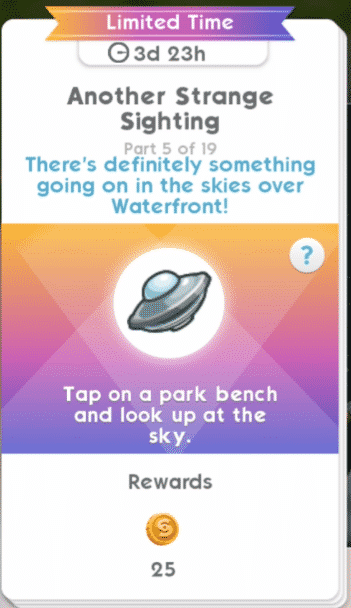
The Sims Mobile introduces a brand new career with their Limited-Time Rockin’ Rocket Heirloom Quest! After completing this limited 4-day quest you’re able to enjoy the brand new Space Explorer Career that you can play with in the Science Facility in Waterfront.

There are 19 parts of the Rockin’ Rocket Heirloom Quest that you need to complete in 4 days. Here are all the parts:

  • Part 1 – Tap on a bed and dream of space.
  • Part 2 – Tap on a sofa and read about space.
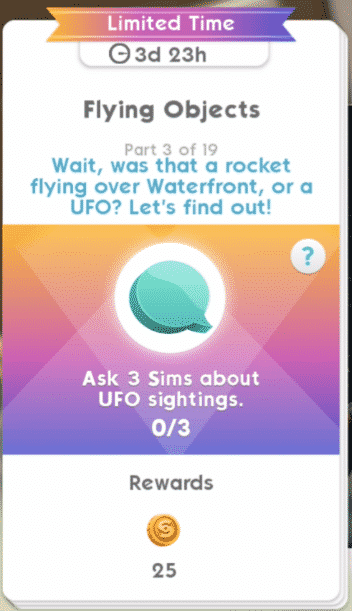
  • Part 3 – Ask 3 Sims about UFO sightings.
  • Part 4 – Earn 650 Simoleons.
  • Part 5 – Tap on a part bench and look up at the sky.
  • Part 6 – Complete all LlamaZoom tasks and collect rewards.
  • Part 7 – Tap on a Sim and complete the It’s Just Rocket Science event. (8 hour event)
  • Part 8 – Tap on a table and apply for astronaut training.
  • Part 9 – Tap on a Sim and complete the Get In Shape event. (8 hour event)
  • Part 10 – Complete all LlamaZoom tasks and collect rewards.
  • Part 11 – Tap on a table and keep filling out more paperwork.
  • Part 12 – Complete all LlamaZoom tasks and collect rewards.
  • Part 13 – Tap on a Sim and complete the Get in Shape event. (8 hour event)
  • Part 14 – Complete all LlamaZoom tasks and collect rewards.
  • Part 15 – Tap on a Sim and complete the It’s Just Rocket Science event. (8 hour event)
  • Part 16 – Tap on a mirror and practice interview answers.
  • Part 17 – Tap on a Sim and complete the Get in Shape event. (8 hour event)
  • Part 18 – Complete all LlamaZoom tasks and collect rewards.
  • Part 19 – Tap on a Sim and complete the It’s Just Rocket Science event. (8 hour event)

The Sims Mobile: Rockin’ Rocket Heirloom Quest WalkthroughThe Sims Mobile: Rockin’ Rocket Heirloom Quest WalkthroughThe Sims Mobile: Rockin’ Rocket Heirloom Quest WalkthroughThe Sims Mobile: Rockin’ Rocket Heirloom Quest WalkthroughThe Sims Mobile: Rockin’ Rocket Heirloom Quest WalkthroughThe Sims Mobile: Rockin’ Rocket Heirloom Quest WalkthroughThe Sims Mobile: Rockin’ Rocket Heirloom Quest WalkthroughThe Sims Mobile: Rockin’ Rocket Heirloom Quest WalkthroughThe Sims Mobile: Rockin’ Rocket Heirloom Quest WalkthroughThe Sims Mobile: Rockin’ Rocket Heirloom Quest WalkthroughThe Sims Mobile: Rockin’ Rocket Heirloom Quest WalkthroughThe Sims Mobile: Rockin’ Rocket Heirloom Quest WalkthroughThe Sims Mobile: Rockin’ Rocket Heirloom Quest WalkthroughThe Sims Mobile: Rockin’ Rocket Heirloom Quest WalkthroughThe Sims Mobile: Rockin’ Rocket Heirloom Quest WalkthroughThe Sims Mobile: Rockin’ Rocket Heirloom Quest WalkthroughThe Sims Mobile: Rockin’ Rocket Heirloom Quest WalkthroughThe Sims Mobile: Rockin’ Rocket Heirloom Quest WalkthroughThe Sims Mobile: Rockin’ Rocket Heirloom Quest Walkthrough

Completing this event will grant you the Rockin’ Rocket Heirloom. With this Heirloom you have access to Space Explorer build objects that you can place down in the Science Facility in Waterfront.

The Sims Mobile: Rockin’ Rocket Heirloom Quest Walkthrough

Placing down the Observatory will grant you access to start the Space Explorer Career.

The Sims Mobile: New Waterfront Concept Art

0

SimGuruAzure has shared some new concept art pieces from The Sims Mobile’s latest Waterfront Update.

Howdy Simmers! Does anyone want to see some concept art of the Wellness Center? Emily? Both?

Full disclosure – I did not make this art! I got it from our amazing concept artist Amy. She’s not on twitter so I will share this for her.

The concept phase is a really fun part of game dev. It’s where the imagination can go crazy and possibilities are endless!

The Sims Mobile: New Waterfront Concept Art

We wanted to add careers that were different and fun so we realized that the venue would have to be more than just a gym. A Wellness Center could cover fitness and more!

During the concept phase Amy puts loads of items into the space to tell the story of the venue’s potential. We never end up making everything but it does inform our choices when our designers craft careers and stories.

The Sims Mobile: New Waterfront Concept Art

We always want to add fun little touches to the game. Amy concepts some of those as well! Sometimes special ideas stick, like this little dude! We made sure that he would make it into the game for players to find.

The Sims Mobile: New Waterfront Concept Art

Venue concepts are fun but my favorite concept art always revolves around characters like Izzy or Emily!

A lot went into Emily. We had so many discussion about every detail, like her shirt color…

The Sims Mobile: New Waterfront Concept Art

Orange won! Another piece of concept that I LOVE is the art that helped us hone in on what Emily’s personality would be like.

The Sims Mobile: New Waterfront Concept Art

The personality concept helps inform the way Emily speaks and her animations!

Here comes the last bit of concept art! One of the biggest debates we had over Emily was about her hair…

Should her hair be in a high bun? Does that look too neat? Emily is a woman on the move! Add more pencils and pens!!!!!!!

The Sims Mobile: New Waterfront Concept Art

My fav feedback note: “…No one clips their barrette like that”

Rest assured, in-game Emily clips her barrettes like the rest of us. That’s it for today folks! Happy Simming!

LIVE: First Official Guru Garage Livestream

1

Today is the day when SimGurus do their first ever Guru Garage Livestream! This livestream is going to be 2 hours of pure gameplay by the developers of The Sims 4 including SimGuruRomeo, SimGuruKate and some other Gurus.

The livestream will focus specifically on Get Together and Clubs. It begins on August 31st at 8PM CET / 7PM BT/ 11AM PDT!

For more information about the new marketing strategy that The Sims Team has planned up on Twitch, Click Here!


The Sims Mobile: First Look at the Space Explorer Career

0

The Sims Mobile Team released a small update for the game just a few hours ago which is around 30MB. Although the update doesn’t make any significant changes, it does add a new heirloom to the game called the Rockin’ Rocket. With this Heirloom you’ll be able to unlock the Rocket Science Career Story, and with it the Space Explorer Career itself.

The Sims Mobile: First Look at the Space Explorer Career

Considering that the heirloom has been added just recently we could be expecting the hunt for this heirloom to go live in the next few days. Until then, enjoy this preview of the Space Explorer Career, as well as a first look at the objects and chapters that you’ll get to unlock with the  Rocket Science Story!

The Sims Mobile: First Look at the Space Explorer Career

The Sims 4 Console: Release Date for Upcoming Update Announced

6

SimGuruLegacy has confirmed the release date for the upcoming update for The Sims 4 on Xbox One and PS4!

The update is expected to come with many game changing features that are both exclusive to console players such as Library improvements and additions, save game improvements as well as integration of free content that’s available on The Sims 4 for PC / Mac including Glass Roofs, Gardening Overhaul, Caribbean Content Update and more.

The update is scheduled for release on September 6th at 10am Pacific, a week before the release of The Sims 4 Get Together on consoles!

The Sims 4: SimGuruNinja changes Avatar featuring Unreleased Content

3

SimGuruNinja, a game developer working on The Sims 4 has published a new avatar on Twitter featuring a hairstyle that’s currently not available in the game’s catalogue.

To further prove that I went in the game and compared all the hairstyles available in the game (including all the released packs) + disabled the gender filter. However, no hairstyle was close to the hairstyle that SimGuruNinja has on his avatar.

The Sims 4: SimGuruNinja changes Avatar featuring Unreleased Content

The avatar was present on SimGuruNinja’s Twitter Profile for about an hour until it got taken down and replaced with a base game hairstyle.

In case you don’t know, SimGuruNinja developed a few Game Packs as well as Expansion Packs for The Sims 4. Could the hairstyle above be a part of an upcoming EP / GP? Time will tell!

The Sims 4 Get Together is coming to Xbox One and PS4 on September 11

The Sims Team has just announced that The Sims 4 Get Together Expansion Pack will finally be making its way to Xbox One and PS4 consoles on September 11th!

Get Together is the 4th Expansion Pack coming to Consoles with only Seasons left to make its way.

The Sims 4 Get Together is coming to Xbox One and PS4 on September 11

The Sims Mobile: Making of the Juicer Object (Concept to Completion)

0

SimGuruBeth, a Lead Object Modeler for The Sims Mobile, has shared an entire process of how the Juicer Object that can be found in Waterfront’s Wellness Center came to life. Check her process from concept to completion down below!

Hi! For those who don’t know, I’m Beth – the lead Object Modeler on The Sims Mobile. I help my team create our furniture and venues. Now that Waterfront is out (yay!), I want to share an example of how we take an object from concept to the final model.

The Sims Mobile: Making of the Juicer Object (Concept to Completion)

After designs for a feature are final, the concept artist provides a callout for us to work with. I begin figuring out how it can work for our animators and within our limitations. I create a ‘block model’ to get a sense of scale/placement that will work.

The Sims Mobile: Making of the Juicer Object (Concept to Completion) The Sims Mobile: Making of the Juicer Object (Concept to Completion)

Next, I start work on the final model by getting the basic shapes blocked out before adding smaller details. Then I check to see if I can reuse anything we’ve made before. Work smart, not hard! It adds consistency to our world and our art style.

The Sims Mobile: Making of the Juicer Object (Concept to Completion)

Finally I’ll start texturing. I’ll start by adding base shadows and highlights, and work on everything in grayscale – this helps keep good values on the final piece. Once I’m all done I’ll start deciding which parts will change colors with the variant options.

The Sims Mobile: Making of the Juicer Object (Concept to Completion)

Once the model is done, I add it to the game. It’s our job to ensure it all works in game before submitting any work. Then it’s tested and we wait for release. There’s a lot involved in making it all look good as a final product! Hope you enjoyed my part of Making of Waterfront.

The Sims Mobile: Making of the Juicer Object (Concept to Completion) The Sims Mobile: Making of the Juicer Object (Concept to Completion)

The Sims 4 Gallery Spotlight: Affordable & Luxury Homes

The Sims 4 Gallery Spotlight: Affordable & Luxury Homes

In this Spotlight we’re featuring both affordable and luxurious homes for your Sims that feature multiple packs of content.

Hover over the pulsing plumbobs to see screenshots of marked areas. Pulsing plumbob that’s on the left bottom corner contains all the info (and download link) of the lot.

To see more of our previous Gallery Spotlights, CLICK HERE!

[ult_hotspot main_img=”id^77963|url^https://simscommunity.info/wp-content/uploads/2018/08/08-25-18_12-54-57-AM.jpg|caption^null|alt^null|title^08-25-18_12-54-57 AM|description^null”][ult_hotspot_items icon_type=”custom” icon_img=”id^39525|url^https://simscommunity.info/wp-content/uploads/2015/09/plumbob2.png|caption^null|alt^null|title^plumbob2|description^null” img_width=”38″ tooltip_custom_color=”” tooltip_custom_bg_color=”rgba(255,255,255,0.01)” tooltip_width=”400″ tooltip_position=”right” enable_bubble_arrow=”off” tooltip_continuous_animation=”on” hotspot_position=”58.7950327510917,51.77914110429448″]

The Sims 4 Gallery Spotlight: Affordable & Luxury Homes

[/ult_hotspot_items][ult_hotspot_items icon_type=”custom” icon_img=”id^39525|url^https://simscommunity.info/wp-content/uploads/2015/09/plumbob2.png|caption^null|alt^null|title^plumbob2|description^null” img_width=”38″ tooltip_custom_color=”” tooltip_custom_bg_color=”rgba(255,255,255,0.01)” tooltip_width=”400″ tooltip_position=”right” enable_bubble_arrow=”off” tooltip_continuous_animation=”on” hotspot_position=”34.85262008733624,52.02453987730061″]
The Sims 4 Gallery Spotlight: Affordable & Luxury Homes

[/ult_hotspot_items][ult_hotspot_items icon_type=”custom” icon_img=”id^39525|url^https://simscommunity.info/wp-content/uploads/2015/09/plumbob2.png|caption^null|alt^null|title^plumbob2|description^null” img_width=”52″ tooltip_custom_color=”#1e73be” tooltip_custom_bg_color=”#ffffff” tooltip_width=”450″ tooltip_position=”right” tooltip_continuous_animation=”on” hotspot_position=”89.61858624454149,3.190184049079755″ tooltip_custom_border_size=”border-style:solid;|border-width:2px;border-radius:5px;|border-color:#81d742;”]

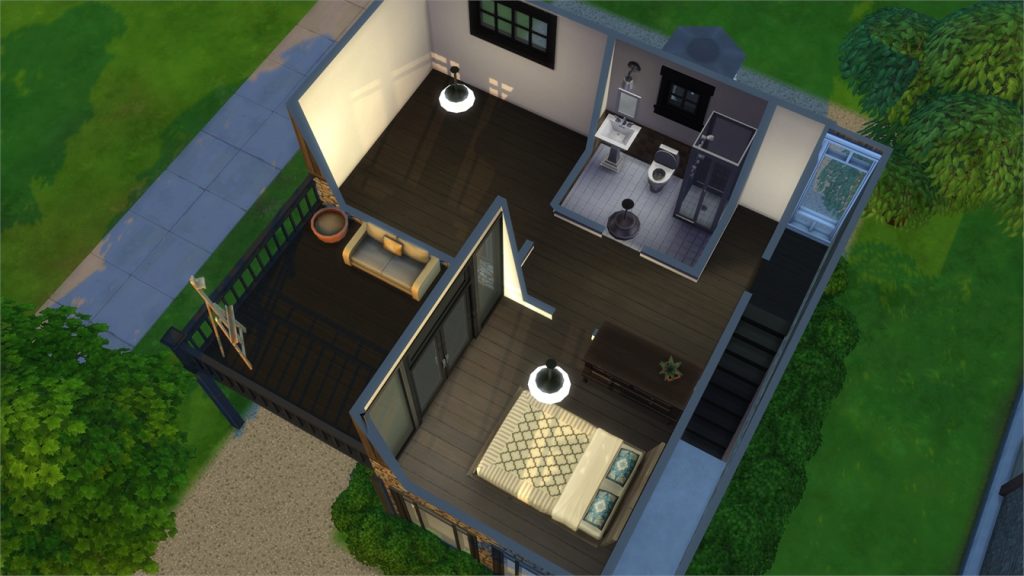
Let’s Start a Family (Download Here)

by CIMTHABESTB247

Value: §17,274
Size: 20×15
Lot Type: Residental Lot[/ult_hotspot_items][/ult_hotspot][ult_hotspot main_img=”id^77924|url^https://simscommunity.info/wp-content/uploads/2018/08/08-25-18_1-02-55-AM.jpg|caption^null|alt^null|title^08-25-18_1-02-55 AM|description^null”][ult_hotspot_items icon_type=”custom” icon_img=”id^39525|url^https://simscommunity.info/wp-content/uploads/2015/09/plumbob2.png|caption^null|alt^null|title^plumbob2|description^null” img_width=”38″ tooltip_custom_color=”” tooltip_custom_bg_color=”rgba(255,255,255,0.01)” tooltip_width=”400″ tooltip_position=”right” enable_bubble_arrow=”off” tooltip_continuous_animation=”on” hotspot_position=”53.05676855895196,48.466257668711656″]

The Sims 4 Gallery Spotlight: Affordable & Luxury Homes

[/ult_hotspot_items][ult_hotspot_items icon_type=”custom” icon_img=”id^39525|url^https://simscommunity.info/wp-content/uploads/2015/09/plumbob2.png|caption^null|alt^null|title^plumbob2|description^null” img_width=”38″ tooltip_custom_color=”” tooltip_custom_bg_color=”rgba(255,255,255,0.01)” tooltip_width=”400″ tooltip_position=”right” enable_bubble_arrow=”off” tooltip_continuous_animation=”on” hotspot_position=”28.404748908296945,49.4478527607362″]

The Sims 4 Gallery Spotlight: Affordable & Luxury Homes

[/ult_hotspot_items][ult_hotspot_items icon_type=”custom” icon_img=”id^39525|url^https://simscommunity.info/wp-content/uploads/2015/09/plumbob2.png|caption^null|alt^null|title^plumbob2|description^null” img_width=”52″ tooltip_custom_color=”#1e73be” tooltip_custom_bg_color=”#ffffff” tooltip_width=”450″ tooltip_position=”right” tooltip_continuous_animation=”on” hotspot_position=”89.61858624454149,3.190184049079755″ tooltip_custom_border_size=”border-style:solid;|border-width:2px;border-radius:5px;|border-color:#81d742;”]

The Water House 2.0 (Download Here)

by CIMTHABESTB247

Value: §188,885
Size: 30×20
Lot Type: Residental Lot[/ult_hotspot_items][/ult_hotspot][ult_hotspot main_img=”id^77926|url^https://simscommunity.info/wp-content/uploads/2018/08/08-25-18_1-05-54-AM.jpg|caption^null|alt^null|title^08-25-18_1-05-54 AM|description^null”][ult_hotspot_items icon_type=”custom” icon_img=”id^39525|url^https://simscommunity.info/wp-content/uploads/2015/09/plumbob2.png|caption^null|alt^null|title^plumbob2|description^null” img_width=”38″ tooltip_custom_color=”” tooltip_custom_bg_color=”rgba(255,255,255,0.01)” tooltip_width=”400″ tooltip_position=”right” enable_bubble_arrow=”off” tooltip_continuous_animation=”on” hotspot_position=”54.26787663755459,56.56441717791411″]

The Sims 4 Gallery Spotlight: Affordable & Luxury Homes

[/ult_hotspot_items][ult_hotspot_items icon_type=”custom” icon_img=”id^39525|url^https://simscommunity.info/wp-content/uploads/2015/09/plumbob2.png|caption^null|alt^null|title^plumbob2|description^null” img_width=”38″ tooltip_custom_color=”” tooltip_custom_bg_color=”rgba(255,255,255,0.01)” tooltip_width=”400″ tooltip_position=”right” enable_bubble_arrow=”off” tooltip_continuous_animation=”on” hotspot_position=”34.347707423580786,56.56441717791411″]

The Sims 4 Gallery Spotlight: Affordable & Luxury Homes

[/ult_hotspot_items][ult_hotspot_items icon_type=”custom” icon_img=”id^39525|url^https://simscommunity.info/wp-content/uploads/2015/09/plumbob2.png|caption^null|alt^null|title^plumbob2|description^null” img_width=”52″ tooltip_custom_color=”#1e73be” tooltip_custom_bg_color=”#ffffff” tooltip_width=”450″ tooltip_position=”right” tooltip_continuous_animation=”on” hotspot_position=”89.61858624454149,3.190184049079755″ tooltip_custom_border_size=”border-style:solid;|border-width:2px;border-radius:5px;|border-color:#81d742;”]

Modern Estate (Download Here)

by mwn2002

Value: §211,327
Size: 40×30
Lot Type: Residental Lot[/ult_hotspot_items][/ult_hotspot][ult_hotspot main_img=”id^77929|url^https://simscommunity.info/wp-content/uploads/2018/08/08-25-18_1-10-19-AM.jpg|caption^null|alt^null|title^08-25-18_1-10-19 AM|description^null”][ult_hotspot_items icon_type=”custom” icon_img=”id^39525|url^https://simscommunity.info/wp-content/uploads/2015/09/plumbob2.png|caption^null|alt^null|title^plumbob2|description^null” img_width=”38″ tooltip_custom_color=”” tooltip_custom_bg_color=”rgba(255,255,255,0.01)” tooltip_width=”400″ tooltip_position=”right” enable_bubble_arrow=”off” tooltip_continuous_animation=”on” hotspot_position=”52.234579694323145,47.11656441717791″]

The Sims 4 Gallery Spotlight: Affordable & Luxury Homes

[/ult_hotspot_items][ult_hotspot_items icon_type=”custom” icon_img=”id^39525|url^https://simscommunity.info/wp-content/uploads/2015/09/plumbob2.png|caption^null|alt^null|title^plumbob2|description^null” img_width=”38″ tooltip_custom_color=”” tooltip_custom_bg_color=”rgba(255,255,255,0.01)” tooltip_width=”400″ tooltip_position=”right” enable_bubble_arrow=”off” tooltip_continuous_animation=”on” hotspot_position=”37.54093886462882,46.62576687116564″]

The Sims 4 Gallery Spotlight: Affordable & Luxury Homes

[/ult_hotspot_items][ult_hotspot_items icon_type=”custom” icon_img=”id^39525|url^https://simscommunity.info/wp-content/uploads/2015/09/plumbob2.png|caption^null|alt^null|title^plumbob2|description^null” img_width=”52″ tooltip_custom_color=”#1e73be” tooltip_custom_bg_color=”#ffffff” tooltip_width=”450″ tooltip_position=”right” tooltip_continuous_animation=”on” hotspot_position=”89.61858624454149,3.190184049079755″ tooltip_custom_border_size=”border-style:solid;|border-width:2px;border-radius:5px;|border-color:#81d742;”]

Los Gallardos Villa (Download Here)

by blackrosemakridu

Value: §261,985
Size: 50×50
Lot Type: Residental Lot[/ult_hotspot_items][/ult_hotspot]

The Sims 4 Jungle Adventure: Conquering the Temple

The Sims 4 Jungle Adventure is packed with amazing new content. From a new, gorgeous destination world to new skills, foods, collectibles, and all new exploration features, it’s no wonder Simmers can’t get enough of Selvadorada, but any savvy jungle explorer knows that the best rewards lie far away from the bustling cantina. For the truly dedicated adventurers, there is only one place that will push their skills to the limit: the hidden temple.

The Sims 4 Jungle Adventure: Conquering the Temple

This ancient temple buried deep in the wild jungles of Selvadorada will challenge your Sims like nothing else in the jungle, but with great challenges comes great rewards. If your Sims can survive the perils that lurk inside the temple, incredible treasures await them. If not, the Grim Reaper may be making a trip to Selvadorada to collect your Sim.

Luckily, we’ve compiled a few tips and tricks to help you reach that coveted treasure chest that lies beyond the temple’s defences.

Come Prepared

The number one thing any good adventurer knows is that having the right supplies on you can mean the difference between life and death. You’ll be battling your way through hordes of dangerous pests, sharp brambles, and all manner of wild perils before you even make it to the temple in the first place. If you don’t have the right supplies, your adventure could be over before it even begins.

The Sims 4 Jungle Adventure: Conquering the Temple

Stock up on everything the vendors are selling before you head out into the jungle. Here is a list of must-haves to get you through the jungle and the temple.

  • Liquid Rush
    • This handy energy drink will help keep your Sims awake and alert. Perfect for overnight excursions into the jungle. It doesn’t replenish very much energy, however, so I recommend stocking up on as much of these as you can get your hands on. If you have Outdoor Retreat installed, you can also opt to bring a tent with you to catch some Zs on the go.
  • Grilled Cheese Ready to Eat
    • Don’t get caught in a trap because your Sim’s stomach was growling! Pack plenty of these ready-made preserved snacks to keep your Sims’ hunger at bay.
  • Waterfall in a Bottle
    • The jungle is big, and dirty, and full of things that will make your Sims stinky and sweaty. Pack a few of these to keep them feeling fresh on their adventures.
  • Omiscan Machete
    • Do you want to pull apart sharp brambles with your bare hands? Yeah we didn’t think so. That’s not very smart. You know what is smart? Hacking at those brambles with a machete! Buy a few of these, because they have a tendency to break.
  • Pest Repellents
    • There are many different kinds of repellents you can buy for different kinds of pests. Plasma Bat Bait (bats), Guzmania Pollenis Flower (bees), Drake’s Fire Quencher (fire ants and other insects that pack a hot punch), Dr. Parker’s Spider Repellent (spiders), Lightning Insulation Powder (fireflies and other electrical pests). Not all of these will be available for purchase at the same time so either wait around a while or just buy as many of these as you can and hope for the best.
  • Hazard Safeguards
    • Pests aren’t the only thing your Sims need to watch out for. There are plenty of other dangers to guard against, too. Faraday Fizz will cure electrocution effects and Fire Foam extinguishes a Sim that has caught fire. These are especially important inside the temple where electrical and fire traps lurk around every corner.

Look Before You Touch!

The worst thing you can do in the temple is rush ahead without paying attention to your surroundings. The ancient Omiscans put subtle clues in their traps for a reason; only the most inquisitive, careful Sims will be able to pass through these traps unharmed. Every time you enter a new room in the temple, before you do anything, examine everything that can be examined. With high enough archaeology skill, your Sim will be able to find the correct switch to activate to safely disarm the trap blocking the way to the next room.

The Sims 4 Jungle Adventure: Conquering the Temple

If your Sim isn’t very experienced with archaeology, examine everything anyway. Your Sim will build archaeology skill for next time and they’ll at least be able to eliminate a few of the bad options, increasing your odds of choosing the correct switch. If you still make a bad choice, well… you did stock up on supplies before heading out, didn’t you?

Learn to Adapt

The temple’s biggest mystery is its ability to completely rearrange its layout every time your Sims visit it. Each time you enter the temple, an entirely new set of challenges awaits you. This means that you won’t be able to go through the temple once, memorize all the correct switches and just repeat the same combinations over and over again. Traps reset randomly so you never know what to expect. The correct switches last time likely won’t be the right switches this time.

Don’t assume you know the way forward just because you’ve been to the temple once before. Always stay on your toes, be on your guard and don’t touch anything until you’ve thoroughly examined every switch possibility. Some temple layouts even require you to swim your way to the next room so keep your Sims fit, knowledgeable, and ready for anything.

Use the Buddy System

The Sims 4 Jungle Adventure: Conquering the Temple

While it’s certainly possible to conquer the temple with just one Sim, two heads are always better than one. If you take a friend or family member with you, you’ll have two people with differing skills who will be good at tackling different obstacles. Just like in real life, having someone else with different skillsets around can be a valuable asset to the whole team. In any case, if the worst happens and one of your Sims perishes inside the temple, you still have another Sim to press on and tell the story of their partner’s demise when they return home.

Collect that Bone Dust!

See all those piles of dust lying around the temple? They look pretty worthless, don’t they? Don’t be fooled! This seemingly useless dust could save your Sim’s life. If your Sim isn’t so lucky and ends up with a nasty curse or injury from the temple’s traps, they can take that bone dust back to the cantina and ask one of the locals to make an antidote for you using the bone dust. Most temple-caused illnesses, injuries and curses will take some time before they become deadly so do your best to press on and collect those riches at the end of the temple before you flee back to the safety of the cantina. Just keep an eye on those moodlets to gauge how long is too long.


Do you have any other helpful advice for Simmers taking on the hidden temple? Leave a comment below or tell us about it on your favourite social media platform!

The Sims Mobile: All About LlamaZoom Tokens

If you’ve logged into The Sims Mobile today, chances are you’ve noticed some pretty big changes. For one thing, the waterfront is now open, bringing with it two brand new careers, but that’s not all. The ticket system has been completely overhauled!

Previously, the game was bogged down with so many tickets, players couldn’t even keep track of them all. There were 9 different types of tickets including super and luxe tickets. Players found it frustrating that they were often forced into doing things they weren’t interested in exploring just to get some of the rarer tickets to exchange for what they actually wanted.

The Sims Mobile: All About LlamaZoom Tokens

Take a look at all the tickets in the game previously:

  • Heirloom Tickets
  • Super Heirloom Tickets
  • Luxe Heirloom Tickets
  • Home Tickets
  • Super Home Tickets
  • Luxe Home Tickets
  • Sim Tickets
  • Super Sim Tickets
  • Luxe Sim Tickets

Having all these tickets just made the game more complicated than it needed to be. The latest update makes this clunky system a thing of the past, reducing the number of tickets in the game to just Heirloom Tickets and the new LlamaZoom Tickets.

All About LlamaZoom Tickets

LlamaZoom Tickets have now replaced the super and luxe Home and Sim Tickets. The regular Home and Sim Tickets have been replaced by the standard simoleon. You’ll also notice that the Daily To-Do List has been replaced by the LlamaZoom menu. That’s right, the To-Do List is no more!

The Sims Mobile: All About LlamaZoom Tokens

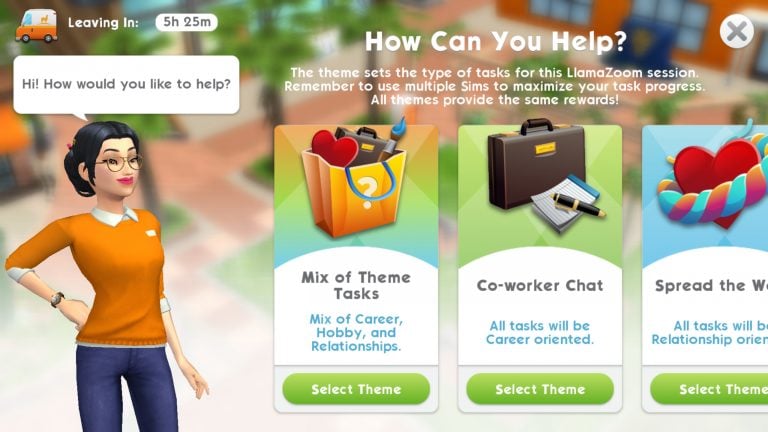
Instead of doing the same set of tasks over and over again every day, you now get to choose from a selection of tasks that will reward you with the new LlamaZoom Tickets. After playing through the LlamaZoom tutorial that introduces you to the new LlamaZoom NPC, Emily, you will be able to choose between four types of LlamaZoom quests:

  • Co-worker Chat
    • All tasks will be career oriented
  • Spread the Word
    • All tasks will be relationship oriented
  • Product Insights
    • All tasks will be hobby oriented
  • Mix of Theme Tasks
    • Mix of career, hobby, and relationships

This new selection of LlamaZoom tasks allows you to choose how you want to play instead of forcing you to focus on things you’re not interested in just to get the rewards. If you’re working on your Sim’s career, you might decide to do the Co-Worker Chat LlamaZoom tasks. If you’re working up the courage to propose to that special someone, the Spread the Word tasks might be of more interest to you. Or, if you like to explore a bit of everything, the Mix of Theme Tasks is always an option. This gives players much more freedom to play the game their own way while still enjoying all the rewards and benefits.

The Sims Mobile: All About LlamaZoom Tokens

The new LlamaZoom tasks also allow players to spend more time playing the game and less time waiting. The old To-Do List refreshed once every 24 hours. Once players completed the To-Do List, they’d have to wait until the next day to complete the To-Do List again, which was the same set of tasks every day. The LlamaZoom tasks refresh every 4 hours so players have the opportunity to complete tasks of their own choosing multiple times a day, but don’t worry; you have 8 hours to complete a set of LlamaZoom tasks. The tasks won’t refresh and erase your progress if you don’t finish them in 4 hours.

The LlamaZoom Tutorial

Does all of that sound overwhelming to you? Don’t worry, we understand that change can be tough, but thankfully you’ll be introduced to the new LlamaZoom system with a quick and easy tutorial. Once you play through the tutorial, you’ll see that the LlamaZoom system is a huge improvement over the old stale To-Do List and excessive tickets.

The first time you open your game after updating, your Sim will inform you that someone has parked a truck outside your house. They’ll suggest that you go see who it is.

When you tap on the truck, you’ll be introduced to a spunky new NPC named Emily. It’s Emily’s first day on the job, but her truck has broken down. She thinks she knows how to fix it, but will need your help to make the necessary repairs. What is Emily’s job? Why, she gives out LlamaZoom tickets, of course!

Emily will ask you to do a few simple tasks that can be completed from home. These tasks shouldn’t take you very long. It only took me a few minutes without using any cupcakes or SimCash. Once you finish these tasks for Emily, she will thank you for your help. She’s officially back in business because of you!

Now that Emily has things up and running again, she can offer you a set of tasks every four hours and reward you with LlamaZoom tickets for completing them. You’ll be able to choose your own set of tasks every four hours, but if you’re feeling impatient, you can use SimCash to speed things up.

How To Use LlamaZoom Tickets

So what do LlamaZoom Tickets do, exactly? Why is it worth your while to earn them? LlamaZoom Tickets replace the old Home and Sim tickets so they are used for the same things you used to use Home and Sim tickets for. You’ll need LlamaZoom Tickets to purchase certain high-end items in the Build/Buy Catalogue. You can also use LlamaZoom Tickets to open up new venues and careers.

Now that you’re a LlamaZoom expert, hop back into your game and introduce yourself to Emily! She’s always looking for people to offer her a helping hand and the LlamaZoom Tickets she gives out will be worth your while.


What do you think of the new LlamaZoom Tickets? Leave your thoughts in the comments or give us a shout on your favourite social media platform!

The Sims Mobile: Waterfront Update Walkthrough

After the long wait, Waterfront has been unlocked in The Sims Mobile’s latest update today. Considering this is a major update (360mb+ in-game) so make sure you will have good internet connection to not miss out new things.

The Sims Mobile: Waterfront Update WalkthroughThe Sims Mobile: Waterfront Update Walkthrough

Note that in this update, not only Waterfront is the main-focus but a brand-new feature LlamaZoom is also introduced.

What is LlamaZoom?

Guess what, no more Daily To Do List! Instead we have the LlamaZoom feature which will allow you to take on special challenges multiple times daily. See that LlamaZoom truck in front of your house? Click on it! (or other access would be the LlamaZoom button located on the bottom-right corner of the screen, in UI).

The Sims Mobile: Waterfront Update Walkthrough

A new character Emily will be the instructor in this new feature. She is the one giving you tasks to complete daily. You will earn extra Simoleons and XP within a timeframe, along with bonus rewards and LlamaZoom Tokens.

The Sims Mobile: Waterfront Update Walkthrough

Note: new quest will appear after you click on ‘Select Theme’.


LlamaZoom Tokens

Version 12.0.0 of The Sims Mobile is bringing us to a brand-new experience with the LlamaZoom Tokens which replaces all your Home and Sim Tickets. Instead of having different tickets like we used to have before, the new LlamaZoom Tokens can be used to purchase both home items and clothing. LlamaZoom Tokens is earned by completing LlamaZoom Tasks.

The Sims Mobile: Waterfront Update Walkthrough

Waterfront

Now to the most exciting part: WATERFRONT!

The Sims Mobile: Waterfront Update Walkthrough

It finally happens. Waterfront after months remained as a locked district has now been released. It comes with a beautiful city theme right along the coast, and the two new venues which will unlock new career stories: The Wellness Center and The Science Center.

The Wellness Center

Discover the path to enlightenment as a wellness guru, and learn that not everything is what it seems on the surface….

To unlock The Wellness Center, you will need: 4 LlamaZoom Tokens + 11500 Simoleons. Unlock this venue will give you access to a new career story: Must Be Something in the Water.

The Sims Mobile: Waterfront Update Walkthrough

The Science Center

Dive deep into the world of a marine biologist, searching for a new species in a high-tech research lab. Will your research provide the next great breakthrough?

To unlock The Science Center, you will need: 4 LlamaZoom Tokens + 11500 Simoleons. Unlock this venue will give you access to a new career story: Rumblings from the Deep.

The Sims Mobile: Waterfront Update Walkthrough

Level Cap Increased

The max player level in the game has been increased to Level 50.

Unlocking Districts and Venues Changes

Unlock Venues in the order of your choice.

Collection Updates

This update also comes with better organisation and new thumbnails in Home Collection.

The Sims Mobile: Waterfront Update Walkthrough