The latest update for The Sims 4 seems to have affected the outcome of the screenshots we take in the game. They’re now much more blurred and don’t provide so much details to things like skin details and the overall background.
I’ve taken a screenshot using The Sims 4’s screenshot tool and taken another screen using Windows 10’s Windows Key + Print Screen Key feature to take screenshots. The difference that you can see down below are drastic:
The Sims 4 ScreenshotWindows 10 Screenshot
It’s unclear what’s causing this issue other than the fact that it surfaced with the latest update for The Sims 4. Multiple folks in the community have complaining about this issue meaning that it’s caused by nothing else but the latest update.
We’re hoping that The Sims Team will resolve the screenshot issue very soon considering that plenty of simmers depend on it.
I was a bit skeptical about The Sims 4 Console ever since the announcement that the game will be porting over all the current (and future) array of packs from The Sims 4 PC / Mac. The reason for that is the fact that Playstation 4 and Xbox One both have dated RAM (8 GB) and GPU (around 1.8 TFLOPS). Considering both consoles have released in 2013 I was really curious to see how The Sims 4 would handle multiple packs.
Now in August 2018 with more than a half amount of packs already ported over to Console (3/5 Expansion Packs, 3/6 Game Packs and 8/14 Stuff Packs) The Sims 4 still runs as smooth after the original Console launch – maybe even better with performance updates that were patched in over the last few months.
Going into Live Mode and actually playing the game is a smooth experience that doesn’t differ much from an experience you would get by playing The Sims 4 on PC. Sure, The Sims 4 Console still doesn’t support CC / Mods or The Gallery (just yet) but the content and gameplay that you’re actually paying for is delievered rather smoothly.
There are a few things I ran into while playing The Sims 4 Console with all current packs that differ from the experience on The Sims 4 PC. For example, loading screens tend to be longer than what I’m used to on my PC. However, that’s to be expected considering that I’m using a Samsung SSD 850 which has abnormal writing / reading speeds compared to the regular SATA disk drive that my PS4 Pro has.
It’s worth mentioning that playing The Sims 4 Console on Xbox One X and PS4 Pro will help you with cutting down the loading time speeds, but that’s basically all there is to playing The Sims 4 Console on these “upgraded” consoles.
I’ve spent quite a few Sim Days playing The Sims 4 on Console and the performance hasn’t changed. The Sims 4 Console had a major issue in the beggining where the game would tremendously lag after playing for a few days. However, that’s no longer the case and with multiple packs installed it’s running like you would expect it to run.
I even tried to “challenge” my console by playing with larger households and larger homes. Still, the game is running surprisingly well with no issues or stutter. After getting the hang of all the controls and hot keys that work quite differently on console I’ve found out that the game is truly playable and a much better experience from what I’ve played back in November 2017 where the game would freeze in the most unreasonable situations.
I’m quite interested to see how well will The Sims 4 Console support the rest of The Sims 4 Packs. The Sims 4 Seasons Expansion Pack has been released on PC last month which means there’s probably still a few months to go until this pack makes its way to the Console. Still, if The Sims 4 Console can run Cats & Dogs which turned up the requirements for The Sims 4 on PC without any problems then I’m hopeful that Seasons wouldn’t be much of a difference.
SimGuruKate has posted a thread on The Sims Forums explaining more the road ahead for The Sims 4 as well as their marketing and communication strategy and The Sims Team’s presence on Twitch:
First I want to say thank you to all who tuned in to today’s livestream to check out the update to the Gallery! We hope you all enjoy the new look and feel to the Gallery. The Gurus have been working hard on this for quite some time and as SimGuruGrant said, this is the first of a number of future updates to the Gallery.
Second, if you stayed until the end you may have caught me briefly talking about some upcoming initiatives for The Sims on Twitch. Since we know not everyone could tune in, I wanted to share a little bit more about our plans for Twitch in the coming months. You’re definitely going to be seeing us a lot more!
Beginning in August we plan to launch a new stream series called the Guru Garage. Every two weeks you’ll be able to tune in on a set day/time to hang with the Gurus and chat with them as they play The Sims for two hours. You’ll be able to ask them questions, get to know them a little more, and maybe even have a bit of an impact on what they will be doing on the stream. We will be switching up the SimGurus so one stream you may see SimGuruRomeo and SimGuruNinja, and the next it might be SimGuruGrant and SimGuruKimmi. This stream series is all about having fun and playing The Sims with SimGurus, who also love the game.
Then beginning in September we will be launching a new monthly series called Maxis Monthly. Each month, on a set day/time, you’ll be able to tune in for an hour “talk show” hosted by me! During this hour we will recap what happened in The Sims over the previous month, host interviews with members of the Dev. Team (learn a little more about their job and what they do), showcase cool community creations, and even give a peak at what will be coming in the next month.
We will also continue to do livestreams for updates/patches and releases, though these will likely be bit of a surprise and will be announced 72 hours in advance. Like I said, you’re definitely going to be seeing a lot more of us.
We are working on finalizing the schedule for our first series of Guru Garage and Maxis Monthly livestreams and we will share here once it is complete so that you can get everything on your calendar and tune in for those streams you are interested in.
We are so very excited about the future of The Sims and bringing more consistent and frequent communication with the Community.
Today’s livestream about The Sims 4 Gallery brought a bit more information outside the realm of The Gallery. SimGuruGrant has talked a little bit about the future of The Sims 4 as well as what they have in plan for The Gallery in the coming months, while SimGuruKate announced what we can expect in the next few weeks in terms of communication, livestreams and their new “Maxis Monthly” segment which is replacing the quarterly teasers. Check out what they said:
SimGuruGrant
We plan to keep supporting The Sims 4 for 3+ years. I know I’m thinking about stuff for 3+ years out. We’re doing some nice investments on what we’re up to.
This is the first foundational step out of many Gallery updates coming up this calendar year.
As we said at the top of the stream we’re actually planning more updates for The Gallery, some big ones later this year. I can’t talk about them yet; they’re in progress, they’re pretty cool and we have a lot more plans down the road for The Gallery like in years out. Because we have to port these changes to the Console we want to make sure that we have the changes finished on the PC first so that we don’t have to go constantly back and forth.
We plan, hoping to support The Gallery on console as well. We want to make sure that we get things settled a little bit on the PC first so that we’re not doing the work 3 or 4 times.
We know a lot of you who use the gallery who wish you could upload your own pictures, your own thumbnails. We know this…winky face. That’s all I can say about that.
SimGuruKate
We’re gonna be working on some really cool things. We’re gonna be looking at doing bi-weekly streams here on The Sims Twitch with our awesome SimGurus where we’re actually gonna be popping in and playing the game and chilling out with you guys for a couple hours every two weeks. This is just gonna be something fun that we can do where you can get to know our Gurus a bit better and you can watch us and enjoy the game like you guys are enjoying the game.
We’re also gonna be starting something called “Maxis Monthly” where we’re gonna be doing a 1-hour show every single month probably around the end of the month where we’re gonna do a recap of all of the awesome things that happened in The Sims over the last month; showcase some awesome player-created content both in The Gallery and in the community as a whole and talk about what might be coming up in the next month. We’re hoping to kick all of this off starting in September. We might start a little bit here in August but definitely look for these things to be coming in September and we’ll be sharing a big schedule with you guys so that you can bookmark your calendar and make sure you can tune in for the streams that you want to watch.
The Sims Team has released a brand new Update for The Sims 4 on PC and Mac!
To download the latest version of The Sims 4, simply open your Origin program and if the game doesn’t update automatically, right click on The Sims 4 and select ”Update”.
In case you have Mods or Custom Content, the game will automatically disable them for you after first launching The Sims 4 after the update. To re-enable all your Mods and Custom Content, select the Settings option in the Menu and select Settings. Under the”Other” section you’ll find the ”Enable Custom Content and Mods” option. Check it and restart your game in order for it to take effect!
Patch Notes
UPDATE: 07/31/2018 – PC 1.45.62.1020/ Mac 1.45.62.1220
Hello Summers!
Hopefully the weather isn’t too hot in your neck of the woods, because then you’d be…Simmers. *cough*
In addition to several fixes and tweaks to improve your game experience, we’ve overhauled the Gallery! This is something we’ve been working on for a while and is the first step to keep enhancing the Gallery to make it an incredible platform for this community to share its creations.
Read below to find out what we changed with the Gallery as well as various improvements throughout the game.
Gallery Update
Our goal with the Gallery is to shift the focus towards the creators making incredible content and make it easier to download the content.
We’ve re-arranged the content images so that you can now Follow the creator, Favorite the content, and download the content on the front page.
We’ve moved the Search bar and popular hashtags front and center.
Popular Now is the default filter, which means you should see more fresh, different content.
We’ve renamed and re-arranged the tabs. You now have Gallery, for content, News to find out who is uploading and sharing content, your Profile (with your name), and your Library, to see your downloaded content.
We’ve updated the art and visuals throughout the Gallery.
You can now download and place Lots and Rooms from the Gallery even if you begin in Live mode. Hurray! At last!
Just a reminder in case you haven’t used the Gallery before: The Gallery will not download custom content or mods to your machine. There is a filter to see items created with custom content, but it will not install the custom content for you. So, you can rest assured that items downloaded from the gallery will not break your game.
The Sims 4
You can now move Easels into your inventory and Live Drag them, which means you can paint out and about in the world! Be sure to pick up your easel before you leave!
Removed unnecessary “seams” that appeared when wearing some full body toddler outfits.
Sims should now use the closest counter to prepare Garden Salads of any portion size.
Sims should now use the closest sink to wash dishes.
Sims should now only use a single Kitchen space to prepare a meal, even on Lots with multiple kitchens.
Get to Work
The “Ask About Suspect” interaction is now available during an APB event in the detective career.
Get Together
You can now select Hot and Cold Weather attire via the Closet.
Sims who belong to an Infamous Club no longer get the Intimidated by Fame moodlet at a gathering.
Seasons
The temperature in the Kiddie Pool is now consistent with other pools. Sims will get the “Uncomfortable Chilled” moodlet, but won’t immediately begin freezing to death.
Vampires are now protected from the Sun when using an umbrella, though it probably gives things away, wouldn’t you say, Vlad?
Decorations no longer clip through the rooftops when viewing a Lot in Free Camera mode.
Electronic objects will now function properly during the rain, assuming they are indoors and beneath a roof.
Sims will no longer freeze to death while playing basketball in cold weather. One could say that as a result of their skillful play, they’re on fire.
Father Winter has been banned from all Clubs and will no longer appear when adding Sims to a club. Seems Father Winter has been naughty.
Pets will no longer stretch bizarrely while Sims are opening presents.
The Sing Together… interaction is now available on the Kinara, Menorah, and Holiday Trees when a Holiday Tradition is active.
The Flower Bunny no longer appears on random holidays and events, which is good, because Flower Bunnying is a full time job and they were really slacking.
Sims with the Responsible Trait now have their Daily Tasks automatically completed for the Gardening Career. R-E-S-P-O-N-S-I-B-L-E doesn’t quite have the same ring to it. Sorry, Aretha.
Sims who die while skating now die like you’d expect them to die. There was some weirdness, but now there isn’t. Just good ‘ol standard death.
Sims were sometimes slipping indoors while walking TO a mud pile, which is silly. They now slip and fall like you’d expect.
Sims disturb their bees less frequently. We told them to buzz off.
Plants pollinated by bees will now evolve more quickly, which is how they bee better.
Facial hair now appears while the Hot and Cold Weather filters are active.
Banana, palm, and fern trees no longer drop leaves.
While using the randomize function with a mannequin you can now see Hot and Cold Weather options appear.
We fixed various typos in the Scouting Career. Apparently our Scouts didn’t earn the spelling merit badge…
Handiness Whims are now completed when Handy Sims work on the Sprinklers and Weather Controller.
Jungle Adventure
Vegetarian safe options purchased from local vendors are now actually vegetarian safe.
Purchasing items from a vendor now contributes to the Jungle Explorer Aspiration progress.
Perfect Patio Stuff
Broken Sparks visual effects now go away once you repair a Hot Tub.
Backyard Stuff
Birds will once again appear when a bird feeder is placed.
Vintage Glamour Stuff
The vanity table should now apply makeup appropriately once more.
Laundry Stuff
Clothing should no longer disappear after hung on the Model T Clothesline.
UPDATE: The stream has ended! You can catch the replay down below.
The Sims Team is doing a special livestream on Twitch on July 31st at 8PM CET / 7PM BST / 11AM PDT to discuss the latest update for The Sims 4 Base Game on PC that will go live an hour before the stream.
SimGuruKate also confirmed that she will talk about the new communications plan and strategy about sharing information at the end of this livestream so make sure you stay tuned!
The Playstation Store in Europe currently has most of The Sims 4 on a sale that is running until the 22nd August 2018. The only packs that are not included in this sale will be the new Cats & Dogs expansion, the Parenthood Game Pack and the Kids Room Stuff Pack. With savings ranging from 10% to nearly 60% off some packs this is a sale not to miss out on!
Click on the images below to visit the PlayStation store!
One of the most highly anticipated expansion packs for The Sims 4 on PC has finally made it’s way over to Xbox One and PlayStation 4. If you are a long time Sims player then you know how much fun having pets is in your game and this is no different.
If you are new to The Sims 4 on consoles you can check out our Getting Started in The Sims 4 Console article here.
What’s new with The Sims 4 Cats & Dogs?
Explore the beautiful new world of Brindleton Bay (or as we like to call it, Brindleton Bae).
Let your imagination run wild in Create A Pet and create your own unique Cats & Dogs.
The new Veterinarian skill will help your Sims to learn everything they need to know to help Cats & Dogs who are sick.
Run and own your own Vet Clinic.
Get your Sims to train your pets and improve their Pet training skills.
And of course, there is so much more to discover!
Create A Pet
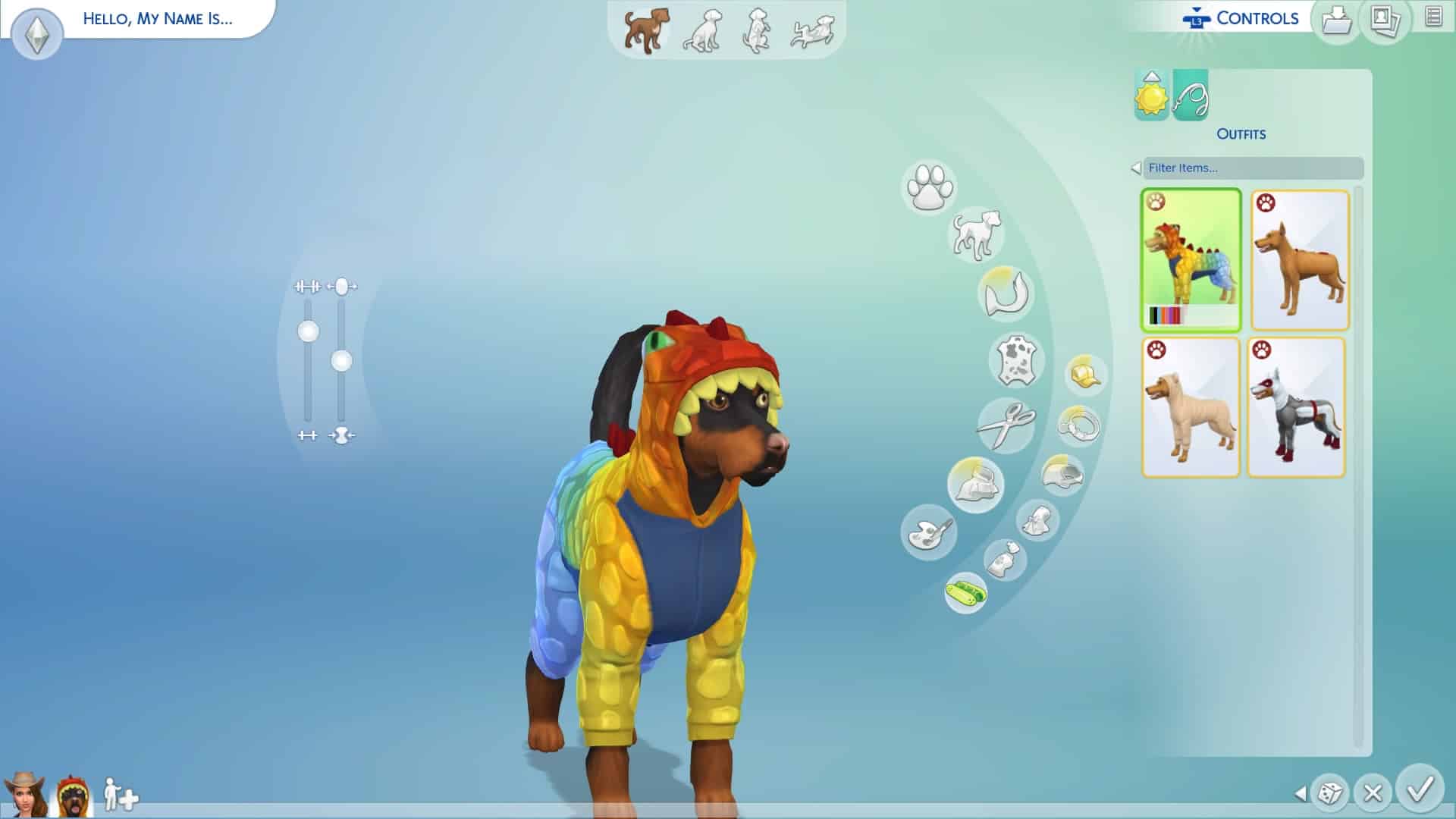
Create A Pet is similar to Create A Sim but not at the same time. The new features in Create A Pet give you the freedom create the Cat or Dog you’ve always wanted. Also if you really want you can have a Fox or Racoon as a pet. Simply head to the bottom left-hand corner of the screen and go to add a Sim. Click on the paw print and then choose the option you want from there.
You can customize almost every aspect of your Cat or Dog from eyes, nose, ears to fur length, the colour of their fur and even their outfits. You can even mix breeds together using the Breed Mixer to get some interesting results. Also, you can paint your pet’s fur. You can keep it simple or make your Cat or Dog look like another animal or even a Pokemon if you wish. Also, like in Create A Sim you can fine-tune and manipulate your Cat or Dog to look just how you want them to be.
The Sims™ 4 20180730205046
The Sims™ 4 20180730210000
The Sims™ 4 20180730211332
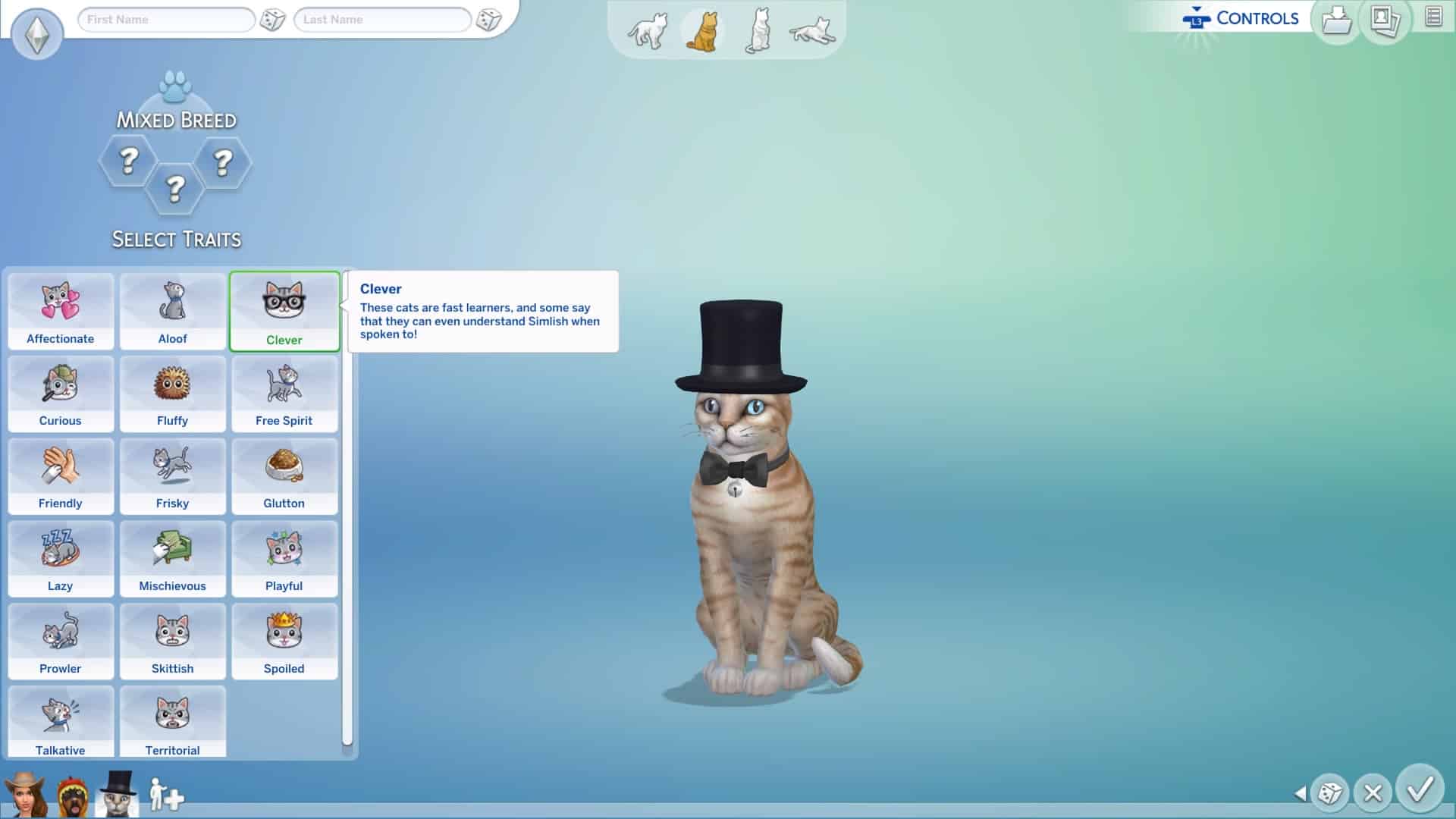
Traits! There are plenty of new Cats & Dogs specific traits that will help shape your pet’s personality. You can mix and match the traits to create your perfect companion.
The Sims™ 4 20180730211350
The Sims™ 4 20180730211434
We have a full step by step guide on the basics of creating your perfect Cat or Dog companion which can be found here. That’s not all we also have an overview video on our YouTube channel of all the different breeds that can be found in the game which you can find here. Also an overview of all the pawsome outfits your Cats or Dogs can wear that you can find here.
Create A Sim
As with any new pack for The Sims 4 on console, you will be seeing lots of brand new items in Create A Sim for Sims of all ages. New hairs, new traits and new clothing. Is your Sim a Cat lover? You can give them cat ears and wear items of clothing with cat patterns over it. Does your Sim love taking photos of Cats & Dogs and then posting them on Simstagram? No problem there’s an outfit for that too!
The Sims™ 4 20180731121039
The Sims™ 4 20180731120916
The Sims™ 4 20180731120832
The Sims™ 4 20180731120746
The Sims™ 4 20180731120517
The Sims™ 4 20180731120653
With a new expansion comes new aspirations for your Sims and The Sims 4 Cats & Dogs is no exception. Friends of the Animals is the new addition and by choosing this aspiration your Sim will get the bonus trait of having a higher relationship value with animals to start with. If you complete the aspiration you will earn the Animal Whisperer trait which allows you to train and discipline animals more easily and also build relationship quicker.
That’s not all! Your Sims can choose from having either the Cat Lover or Dog Lover trait as well or if you really want have both!
Brindleton Bay
Brindleton Bay is the beautiful brand new world that comes with The Sims 4 Cats & Dogs Expansion Pack. Packed full of lovely neighbourhoods and gorgeous views Brindleton Bay is perfect for exploring with your companion.
The new world is broken down into a few smaller neighbourhoods each with its own tail to tail (see what we did there?) You have three neighbourhoods in which your Sims can live with their Cats & Dogs and one Feature Lot which you can explore.
The new neighbourhoods that we have our Sable Square, Whiskerman’s Wharf, Cavalier Cove and the mysterious Deadgrass Isle. Check out our interactive map to find out more about Brindleton Bay here.
Buying Vet Clinics & The New Veterinarian Skill
The Sims 4 Cats & Dogs adds the brand new Veterinarian skill that your Sims level up. This goes perfectly in hand with your Sims now being able to run and own your own Vet Clinic. If you have played The Sims 4 Dine Out Game Pack on either console or PC it will be similar to owning your own restaurant. Hire staff, treat patients, improve your Sims skills and knowledge, earn perk points and hit that five-star Vet clinic rating!
Getting started is easy. Simply head to the bottom right-hand corner of the user interface and find the cash register icon. Simply click on it and it should give you an option to buy a Vet Clinic. You will then be taken to the world menu where you can then select the world and location of the Vet Clinic you wish to buy. There is a pre-made Vet Clinic in Brindleton Bay already that you can buy or you can create your own in any other world.
You can check out the replay of The Sims 4 Cat & Dogs live stream from the PC launch where the SimGurus went into detail about the Vet Clinic gameplay by clicking here.
Adopting Pets
Of course, if you want to continue playing your existing family in The Sims but want them to also have a Cat or Dog you can simply adopt a Cat or Dog the from your Sims phone or computer. It costs two hundred Simoleans to do so and then you will have a visit from the adoption agency where your Sim(s) can interact with the Cat or Dog and see how your Sims get on. If you want to adopt them then you can do so there and then or if you don’t think they are the right pet you can change your mind and choose a different pet instead.
Pet Training
Improve your Cats or Dogs skills and discplines by getting your Sims to train them. Whether it is teaching them to sit, roll over or go to the bathroom outside or even running one of the training courses at home or travel to one pre-made in the world like Pupperstone Park.
The Sims™ 4 20180731124828
The Sims™ 4 20180731125153
You can also check out the full in depth guide we made all about the Pet Training Skill here.
Build Buy Mode
Likewise, with Create A Sim Build/Buy mode has lots of exciting new objects for us to use in our lots. in fact there are over 200 new build mode objects added with this expansion pack. These range from Vet Clinic objects to toys and beds for your pets. Wall decorations and a laser destroying litter box for cats.
You can check out the full overview of Buy Mode objects here.
Lot traits
In Build/Buy Mode you will also notice that you will be able to add some Cats & Dogs themed Lot traits as well. There is a total of six new lot traits which range from Cat and Dog Hangout, Breeding Ground, Training Ground and also Cat & Dog-Friendly.
That’s it for our Getting Started article for The Sims 4 Cats & Dogs on Xbox One and PlayStation 4. Don’t forget you can find out more about The Sims 4 on console by visiting our dedicated section on our site here and also our Cats & Dogs section which you can find here! Also, let us know what you think of The Sims 4 Cats & Dogs finally being playable on consoles!
Gamescom, an annual event attracting hundreds of gamers every year allowing people to witness the latest announcements and experience upcoming games is being held this year as well in Cologne, Germany. EA has confirmed that they’ll be joining this year’s Gamescom.
Gamescom was a home of two Sims 4 pack announcements: The Sims 4 Get Together Expansion Pack and The Sims 4 Cats & Dogs Expansion Pack. Because of The Sims’ tendency to appear at Gamescom’s Press Conference every now and then we reached out to SimGuruKate to find out if The Sims 4 will be present this year. She confirmed that this year The Sims 4 won’t be joining this year’s Gamescom stage.
The Sims 4 Seasons Expansion Pack has been released just a month ago so it’s no wonder The Sims Team is having a cool down before another major announcement. However, note that there’s still a vague confirmation by EA Poland that this year has another Game Pack / Expansion Pack in store for The Sims 4. With Seasons being released in the middle of 2018 that leaves plenty of time for another Expansion Pack release. However, nothing’s fully confirmed and for now we’re just speculating when it comes to a second Expansion Pack for this year.
The Sims Team has released a brand new Update for The Sims 4 for Console devices – Xbox One and PS4!
Patch Notes
UPDATE: 07/30/2018 – v1.09
Hello Simmers!
This is a small update to address an issue that we appeared to introduce in the last update and had a number of reports of through our community channels.
General Issues
We added a bunch of cool new community made creations into My Library for all console players to enjoy. That was, unless you were unlucky enough to not be able to get into My Library to check them out. Thanks to all of those Simmer reports, everyone should be able to access My Library and enjoy those community creations.
Origin Access’ premium membership called Origin Access Premier is now available for everyone with an Origin account!
Premier Membership gives you even more games to play for a monthly ($14.99) or annual ($99.99) payment. With Premier you’re able to have a full access to EA’s latest games as well as receive early (and full) access to EA’s upcoming games such as FIFA 19, Anthem and so on.
Compared to the Basic Membership which is $3.99 a month you also get a full access to Expansion Packs, DLCs and other content available for select games.
For The Sims 4 you get an access to a special The Sims 4 Bundle which includes The Sims 4 Base Game, The Sims 4 Dine Out Game Pack and The Sims 4 Kids Room Stuff Pack.
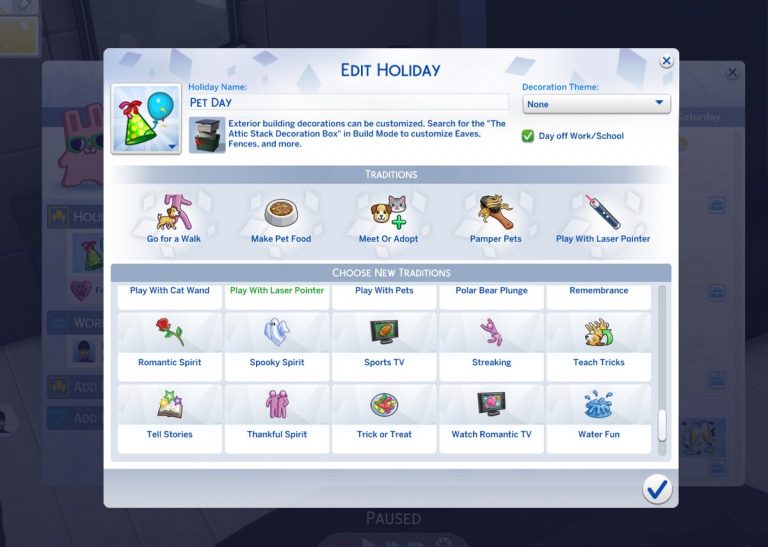
With the release of The Sims 4 Seasons I was hoping that this Expansion Pack would allow us to pick traditions for multiple packs that we’ve received over the years. However, the only tradition that we got was the Fireworks tradition with The Sims 4 City Living.
Considering that The Sims 4 Cats & Dogs adds 2 new animals to play with many were left disappointed that there are no traditions that would encourage our Sims to play with our beloved pets in the game. However, a talented modder @icemunmun was able to create multiple traditions that revolve around playing with and taking care of your pets!
Some of these pet traditions include:
Feeling the Love
Play With Cat Wand
Play With Pets
Go for a Walk
Make Pet Food
Meet or Adopt
Pamper Pets
Play With Laser Pointer
Teach Tricks
DjN58UhXcAAUmfX 1
DjTSfNHW0AIQdSG
DjTSfNJW4AA9U71
We’re not sure if there are going to be more pet traditions included but even these 9 traditions that this modder has made are more than enough to create a perfect Pet Holiday!
There’s no information when these mods will come out but the modder has stated that she’ll release them soon as she needs to do a bit more testing.
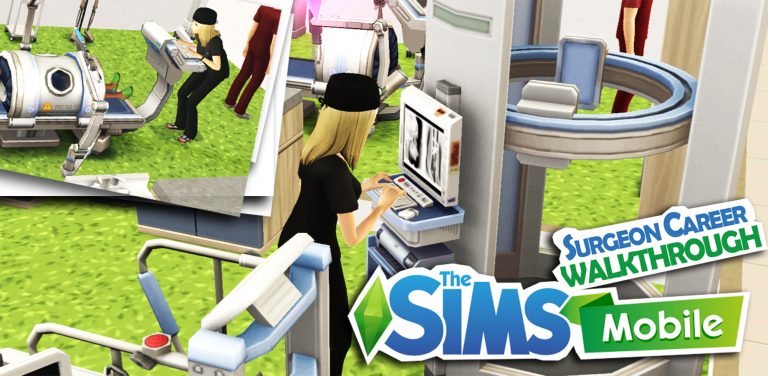
It’s been more than a week since the new surgeon career pack came out. Here is more information about the Mysterious Benefactor career story and the rewards you can get.
Getting Started…
Once you acquire the Medical Injector Heirloom, the first quest of the Surgical Precision will appear, you will need to complete this to start the next quest.
To complete this quest, go to Market Square and place the Surgery Table in the Medical Centre.
Then a new quest will appear, to complete this quest, get one of your sims to start The Mysterious Benefactor story.
The Mysterious Benefactor Career Story
Story chapters and rewards can be viewed in Career Stories.
You can also view the rewards in Build/buy mode.
There are 10 levels for this career, equipment will be unlocked at certain levels. You will need to reach level 10 to be able to get all rewards. Here is the break-down of the levelling up process.
Start at level 3
Chapter 1 Pre-op-servation Surgeon completed à unlock Surgically Clean Hallway Table (career collection in Home Build/Buy) → complete a special career event to start the next story chapter: Opine Specialist.
Start at level 4
Unlock Surgeon career Object for Medical Centre: Surgical Light (in surgeon Career Build/Buy at Medical Centre, Market Square).
Start at level 5
Chapter 2 Opine Specialist completed → unlock Surgically Fresh Fronds (career collection in Home Build/Buy) → complete a special career event to start the next story chapter: Trauma Surgeon.
Start at level 7
Chapter 3 Trauma Surgeon completed → Unlock Surgeon career Object for Medical Centre: X-Ray Machine (in surgeon Career Build/Buy at Medical Centre, Market Square) → complete a special career event to start the next story chapter: Extraction Specialist and unlock the Surgical Cross Section (career collection in Home Build/Buy).
Start at level 9
Unlock Surgeon career Object for Medical Centre: Illuminated X-Ray (in surgeon Career Build/Buy at Medical Centre, Market Square).
Level 10
Chapter 4 Extraction Specialist completed. Finally, you will need to start a special career event to become Surgical Conspiracist and finish the last chapter of the story → unlock Patient’s Comfort (career collection in Home Build/Buy).
With the eagerly anticipated Cats and Dogs expansion pack for The Sims 4 pawing it’s way onto Consolesvery soon there is sure to be a new wave of players joining the Simming community. If you are someone who has just picked up The Sims 4 on Xbox One or PlayStation 4 recently here’s a look at how to get started and also welcome to the community!
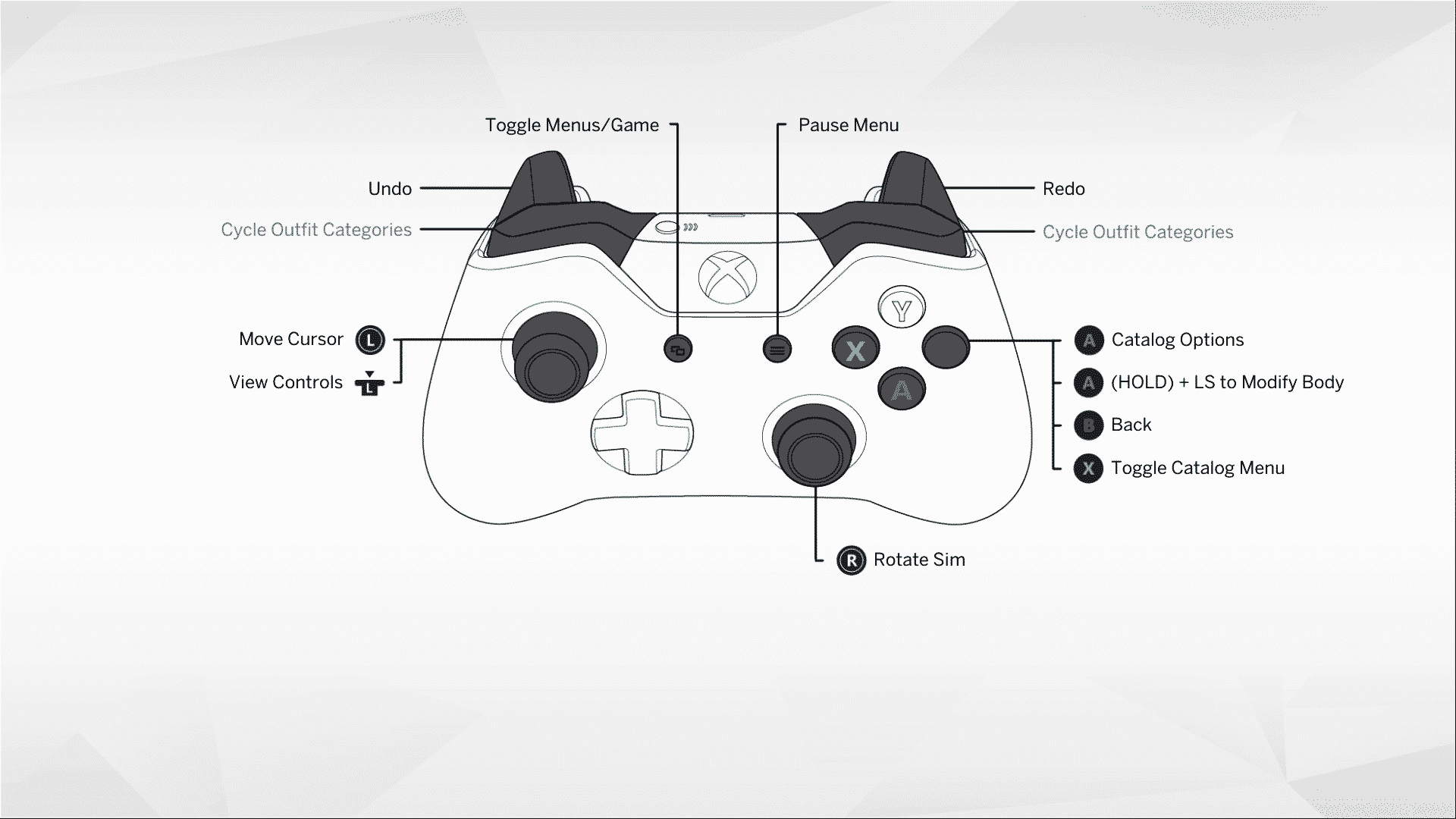
Controls
Starting off with any new game is sometimes difficult if you don’t know what the controls are. Luckily The Sims 4 on console has made sure that the game’s controlls are never to hard to find. Simply just click L3 if you are on PlayStation 4 or by pressing the L stick if you are on Xbox One and the controls will pop up on screen. Of course depending on what mode you are in will mean the controlls will vary slightly.
PlayStation 4 Controls
The Sims™ 4 20180729154240
The Sims™ 4 20180729153958
The Sims™ 4 20180729154832
Xbox One Controls
29 07 2018 16 37 32
14 11 2017 21 14 02
29 07 2018 16 37 31
Create A Sim
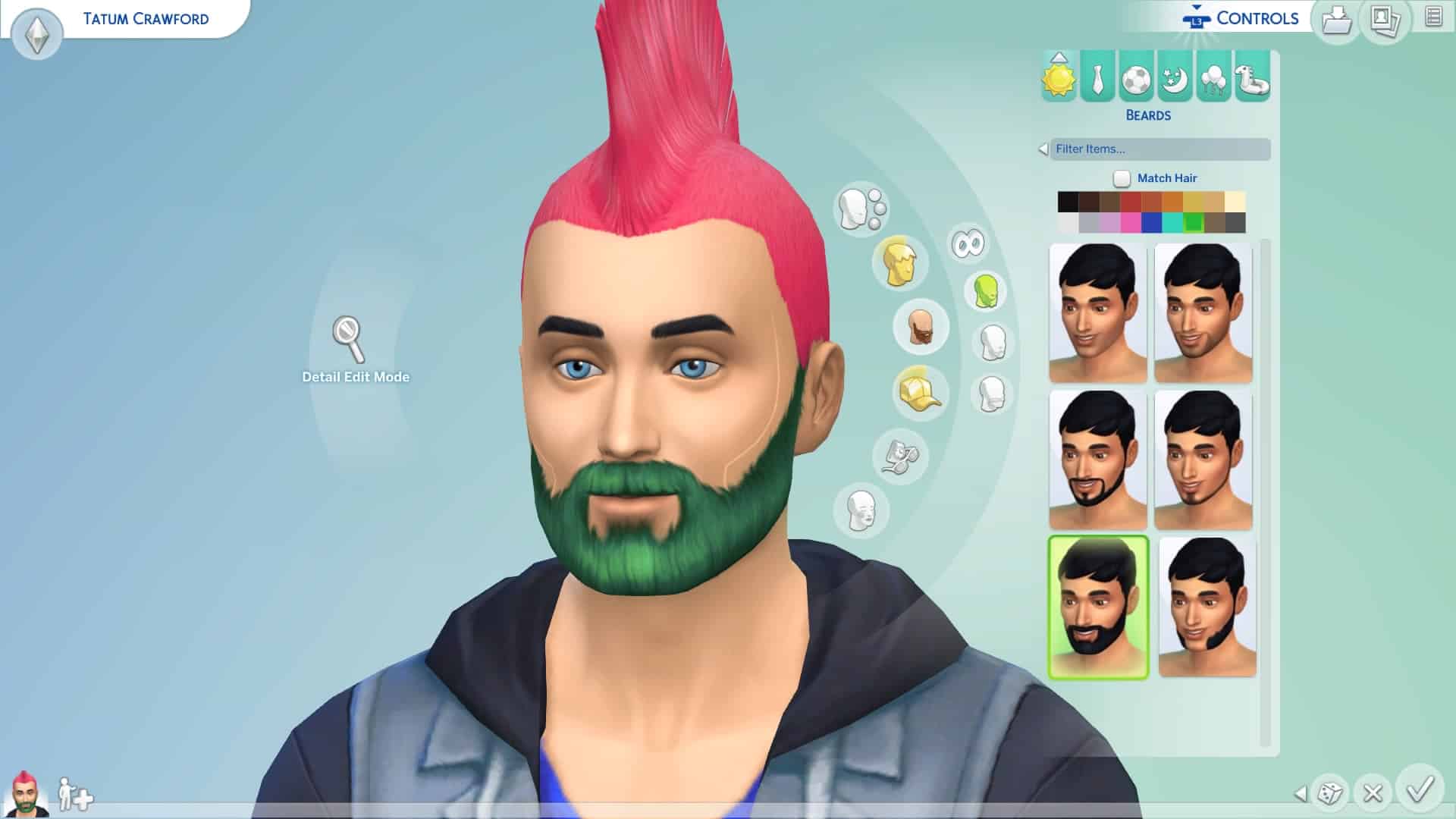
The first thing you need to do is Create a Sim or even a Family if you want. Now the game does provide you with in game tutorials along the way to help you out but if you have ever played The Sims before you’ll have an idea of what creating a Sim is all about. Create A Sim on The Sims 4 console takes creating Sims to a whole new level. You can modify so much to make even the most unique Sims. With many different clothing styles to choose from the possibilities are endless.
Of course if you don’t feel up to making your own Sim just yet you can load up your Libray and select a pre-made Sim/Family and jump straight into the game.
The Sims™ 4 20180729154025
The Sims™ 4 20180729153947
Moving Your Sim Into A Lot
Once you’ve created your Sim(s) the next task is to move them into a home of their own. You can choose from Willow Creek, Oasis Springs or even create your own home in the empty Newcrest world.
The Sims™ 4 20180726184713
The Sims™ 4 20180726184723
For this article I moved my pre-made Sim into Nookstone which can be found in Oasis Springs. The home does already have a few baisic objects to get your Sim started while you save up money to make it more your own. Don’t let that stop you from going into build mode and changing up the colours, moving objects around or adding one or two more items depending on how many Simoleans you have left.
Build Buy Mode
Like in The Sims 4 on PC you’ll find Build/Buy Mode located in the top right hand corner of the screen. From here you can esaily navigate your way around and make changes to your home. Build/Buy Mode is broken down into a few different subsections. Build, objects by room, objects by function and household inventory at the bottom.
While you are in the Build/Buy Mode you will also see at the top of the screen on the left the name of your lot. You can also change it to whatever you feel is suitable. However if you click on the house with the “i” on it just before the lot name another menu will open. Here you will find a bit more infromation about the lot but also where you can see the lot traits. You can havea maximum of three per lot and these range from Bracing Breezes and Fast Internet to Teen Hangout and Private Dwelling. You will find that some of the additional downloadable content will also add new lot traits to the list as well.
Building in The Sims 4 on console can seem a little tricky at first but once you have gotten use to the controls building is pretty straightforward.
Live Mode
This is where you could say the magic happens. Control your Sims’ lives, fill their needs, join in with the Welcome Wagon, become the best in your career, make firends with your neighbours, start a family and so much more. It really is up to you how you play The Sims!
Also don’t forget you can take your Sims and explore the world. Not just the one you start in but any that you have available. Visit your friends or a Community Lot. There are plenty of places for your Sims to explore. Maybe even a few secret hideaways too.
My Library
Have you made a Sim, a family or even a lot that you want to save for later or place into another world? Simply save to your Library and you can place the Sim or lot anywhere you want without any issues at all. You will also find pre-made Sim families and lots here as well. To save something to your Library just find the little icon which is a folder with a downward pointing arrow and follow the screens. Make sure you give your creations a description and hit save.
Cheats
One question you are probably asking yourself is how do I go about using Motherlode and other cheats in the game? Don’t worry we’ve got that all covered in a handy article which you can find here.
One PlayStation 4 you activate the cheat command box by holding R1, R2, L1 and L2 at the same time and if you are playing on Xbox One you can access the menu by pressing RB, RT, LB and LT all at the same time.
You can also find a full list of cheats for The Sims 4 by checking out this article here. (Please be aware that not all cheats will work on PlayStation 4/Xbox One but you will be able to use Motherlode to your hearts content perfectly fine!)
Now one of the most important things to know is to remember to save regularly. Simply hit the options button on your PlayStation 4 controller or the Start button on your Xbox One controller and hit save. This menu will also be where you can find the game options and also some in game Lessons if you get stuck at any point.
Don’t forget we have a whole section of our website dedicated to The Sims 4 on Console where you will find the latest news and information on the latest game patches and releases. You can find all that and more by clicking here.