Home Blog Page 380

Project Urbz Reboot

14

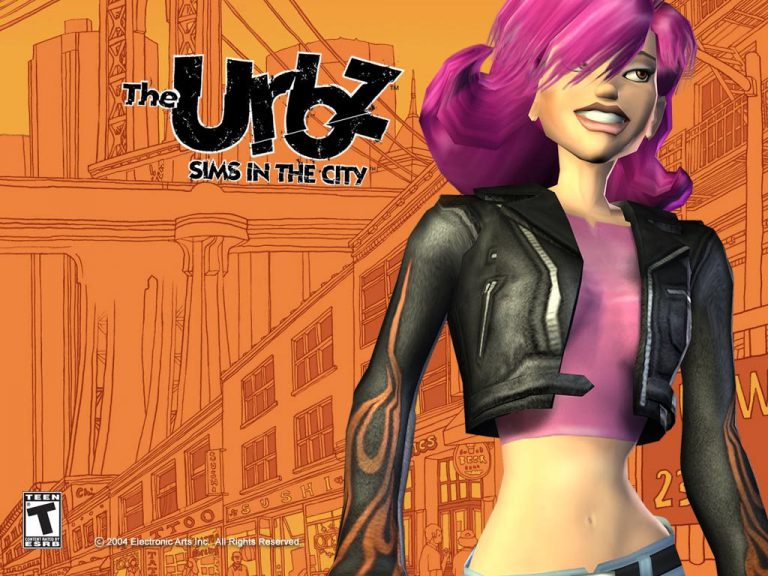
In Novemeber 2004 Electronic Arts released the hugely popular The Urbz: Sims In The City. The game was avalaible for Xbox, Gamecube, PlayStation 2, GameBoy Advance and Nintendo DS. The Urbz was the third game from The Sims franchise to be released on consoles. The game also featured popular music group The Black Eyed Peas who proivided several songs to the game which were all translated into Simlish and members of the group also appeared as Urbz to.

Fast forward thirteen years to 2017 and several Twitter users HazzaPlumbob, KC89901 and ErykNolan have started a community project entitled Project Urbz Reboot but what excatly is project all about?

An image pinned on the offical Project Urbz Reboot Twitter account goes into a bit more detail about what the project is all about and how the community can get involved.

Project Urbz RebootLet us know what you think about this community driven project and also what you would like to see from the team behind the Project Urbz Reboot!

The Sims 4: Own Other Types of Venues and earn Simoleons with this Mod!

12

Mod The Sims member LittleMsSam has come up with a mod for The Sims 4 that we’ve been waiting for since the release of The Sims 4 Get to Work Expansion Pack!

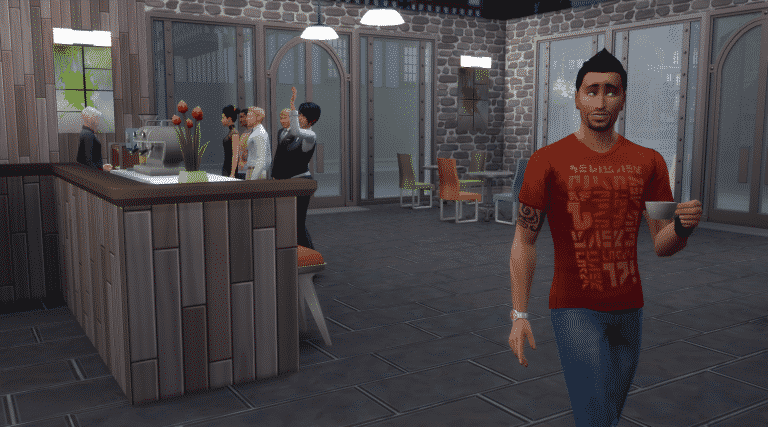
This Mod lets you purchase any type of venue and earn revenue from various factors and objects you’ve placed on it. For example, if you purchase a coffee shop, you’ll be earning simoleons with each coffee order.

The Sims 4: Own Other Types of Venues and earn Simoleons with this Mod!

To purchase a venue of your choice simply find any computer on your lot and select the Household option.

The Sims 4: Own Other Types of Venues and earn Simoleons with this Mod!

The Mod is still being worked on so we can expect more interesting stuff to influence our revenue.

To download the mod, click on the download button below! You can install it by extracting the .rar content to Electronic Arts > The Sims 4 > Mods folder. Make sure you have mods and CC enabled in your game options!

[mks_button size=”large” title=”DOWNLOAD!” style=”rounded” url=”http://modthesims.info/download.php?t=592824″ target=”_blank” bg_color=”#1e73be” txt_color=”#FFFFFF” icon=”fa-arrow-down” icon_type=”fa” nofollow=”0″]

The Sims 4 Eco Living Stuff: Pick An Art Style!

46

The Sims Team wants you to pick an art style for The Sims 4 Eco Living Stuff that YOU voted for!

Last week, we announced a brand new project where those of us here at Maxis will work hand in hand with all of you in the community to create a new Stuff Pack that represents players’ desires. After counting votes from Sims players across the world, you’ve selected “eco living” as the theme for the upcoming Stuff Pack that we’ll be developing together. Today we start the next major step in development, as we’re asking you to help select this pack’s art style.

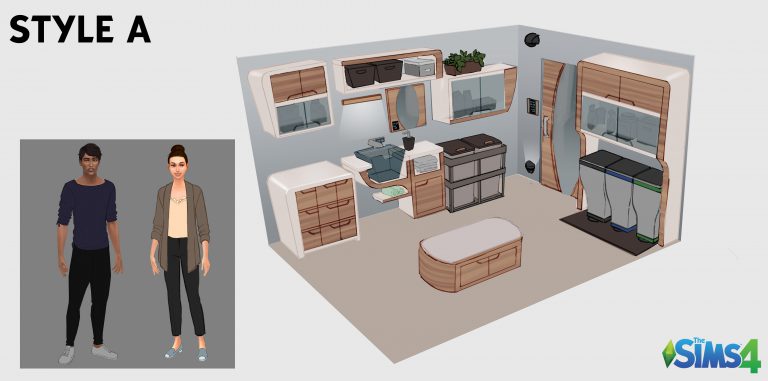
If you’re just discovering this project today, then welcome! There are many decisions still to be made where your input will help shape what we create. What you’ll see in the survey below is what we call a “pack brief.” It starts with our Art Director, who gathers reference images and works with our concept artists to sketch the rough “room views” that you’ll see. These room views represent a slice of the furniture, décor, and clothing we hope to offer within this pack. It’s important that we select an art style before we task our concept artists with creating a full set of content. On a typical Stuff Pack, the Art Director would meet with Producers and Designers and we’d come to a decision as a group regarding the art style we want to move forward with. But as with everything on this project, we want your choices to guide us forward.

After we gather the results of this art style vote, our concept artists will start to draw a variety of objects and clothing that fit the art style that you’ve selected. The Objects & Clothing Vote, which starts May 19th, is where you’ll see the result of our concept artist’s work, and you’ll choose your favourite objects and pieces of clothing that will be included in this Stuff Pack. As a reminder, here’s the full schedule of upcoming votes. Come back on these dates and make your voice heard!

•   Art  Style Vote (April 11th – April 13th): Select between proposed art  styles for the pack, which will guide our concept artists in the objects  and clothing they create.
•   Objects  & Clothing Vote (May 19th – May 22nd): Browse through the concept  art we’ve drawn for the pack, and select your top choices to help us  determine which objects and pieces of clothing are included.
•   Feature  Vote (June 24th – June 27th): Select the top gameplay feature(s) you want to have included in the pack.
•   Pack  Icon Vote (Spring): Peruse different icons and select the one that will  appear in the pack’s box art and within the in-game catalog.
•   Pack  Title Vote (Spring): Select a title that best summarizes the pack’s  atmosphere and content.

In between votes, you’re invited to engage in discussion and respectful debate in SimGuruGraham’s Corner on our official forums. Here you can chat with fellow players, ask questions to the dev team, and discover behind the scenes information regarding the pack’s progress from the developers.

VOTE HERE!

The Sims 4 Build: Urban Commercial – Build Up Not Out!

Hi, I’m Jason Sterling. If you’re like me the arrival of bowling alleys and the impending release of another Stuff Pack and Game Pack leaves you asking “where do I put all of this”. It can seem after several generations of Legacy play and a voracious building habit that there just isn’t enough space. One solution is to follow the urban commercial model of  “Build UP Not OUT!”

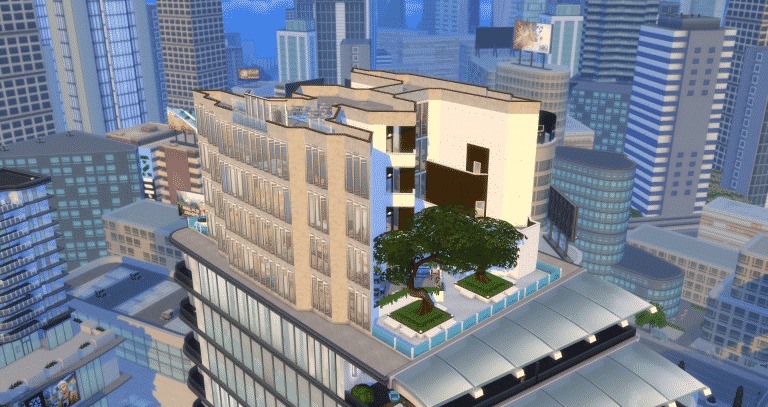
For this example I’ve chosen a penthouse lot in San Myshuno. It will act as the commercial hub in the sky for the surrounding region. Once built the lot type can be changed in build mode depending on the desired use. I’ve also listed some ways of replicating a more mixed use environment allowing your sim to enjoy several services at once without having to switch lot types. Since it’s a high rise venue I have eschewed the stairs and placed elevators on each floor for transport. There’s a quick tutorial at the bottom outlining how to place them.

SKY MALL

My example here is a type of “lifestyle center” so the emphasis isn’t primarily on retail but on services instead. The building contains a public library, cafe, retail space, spa, gym, bowling alley, arcade, restaurant, nightclub and karaoke bar with the “Hanging Gardens” of San Myshuno rooftop park acting as the foundation around it. When I start a design like this I think about which activities complement each other before designing the layout. For instance pairing a café in a bookstore or even in the public library works well. Matching bowling alleys with video arcades or the spas with a gym is also excellent. You can fit your restaurant with a lounge/ bar area too. Sims will often use the objects nearby in these cases. You can see the solutions I used in this build illustrated below.

The Sims 4 Build: Urban Commercial – Build Up Not Out!

I think of the bottom two floors as the “daytime” family style floors. As you exit the elevator on arrival, there’s a cafe that provides refreshments for both the bowling alley and the library. There’s easy access to the park, the playground and an al fresco, cafe dining area. On the second floor I directly attached a video arcade to the bowling alley. Then, I placed a boutique retail outlet above the library with a small “kiosk” style space for a local artist to display their work for sale in the elevator lobby.

Floor One

The Sims 4 Build: Urban Commercial – Build Up Not Out!

Floor Two

The Sims 4 Build: Urban Commercial – Build Up Not Out!

Often, when I am using the first two floors, I set the lot as a “retail”. In this way I can have my sim shop. I can also select to hire a barista, a bartender or even a massage therapist allowing sims to partake of those activities. The library, arcade, park and bowling alley all work as they should no matter the lot type. This gives the structure a mixed use feel and ability.

It does come at a cost though. Hiring the NPCs for the jobs listed or the cooking station from Dine Out is an extra charge to your sim. I rebate the cost of hiring NPCs back to my sims account USING THE FOLLOWING CHEAT: Press CTRL/SHIFT/C at the same time to open the cheat dialog box. Then enter “TestingCheats On”. Following that enter “Money” followed by a space and the amount you’d like to give your sim. See the picture below. I choose a thousand dollars in this example as it was one hundred dollars each to hire a barista and a bartender and eight hundred dollars to hire a “chef”.

The Sims 4 Build: Urban Commercial – Build Up Not Out!

On the top two floors, three and four, I’ve gone a little more adult and focused on activities that extend later into the night as well. The third floor contains the combination Spa and Gym. It’s something of a transitional floor in my mind. A day spa is traditionally thought of as a daylight activity while gyms often run 24 hours a day. The fourth floor contains the combined restaurant and nightclub/lounge. There is a rooftop Karaoke “stage” connected directly to the lounge area below.

Floor Three

The Sims 4 Build: Urban Commercial – Build Up Not Out!

Floor Four

The Sims 4 Build: Urban Commercial – Build Up Not Out!

When I am using primarily the top floor I most often have the lot set as a restaurant. The bartender for the lounge will show up automatically. Like with retail, I can easily hire baristas for the café and massage therapists for the spa if I want those without changing the lot designation. And like the bottom two floors Karaoke, bowling ect. will function on any lot.

This set up is not the “perfect solution” of course. As I’ve illustrated above setting the lot to certain designations allows you to use it more easily as a mixed use lot. In the end, though not every feature is available from say the Spa or the Restaurant without the lot being set as those types. For example, you want to visit the Spa with all the attendant NPCs. Then have lunch upstairs in the restaurant, also with all the NPCs. You’ll have to enter build mode and switch the designation from Spa to restaurant in between use which is clumsy. As well, it takes a while for the different NPCs to arrive. So, it’s not perfect but it works okay, I do like the real world feel of a multi-use structure and it saves space. Instead of 4 or 8 lots I’ve used just one.

The three things to remember when creating and using a multi-discipline lot:

  1. Combine lot types together in ways that make real world sense
  2. Stack your build as opposed to spreading it
  3. Use the money cheat to simulate a mixed use area by hiring NPCs whereever possible while not costing your sim their hard earned money.

Multi-Floor Functional Elevator Build Tutorial

Placing functional elevators on each floor of your penthouse lot is perhaps the easiest build trick I’ve ever stumbled on. You start with the first elevator- the ONE unit you are technically allowed per lot. You frame it in with walls as usual, creating a room around it. (Grid Picture 1) Then you click on the room bringing up the move/copy options for it. Copy the room. (Grid Picture 2) Then proceed to each floor above that you wish to reach by elevator and place the copied room. The elevator is copied and placed as well. I always align my placement with the unit below for realism but you can place it anywhere. Just like in Star Trek- lol. (Grid Picture Three). Finally exit out of build mode as usual by going to manage worlds. (Grid Picture Four)
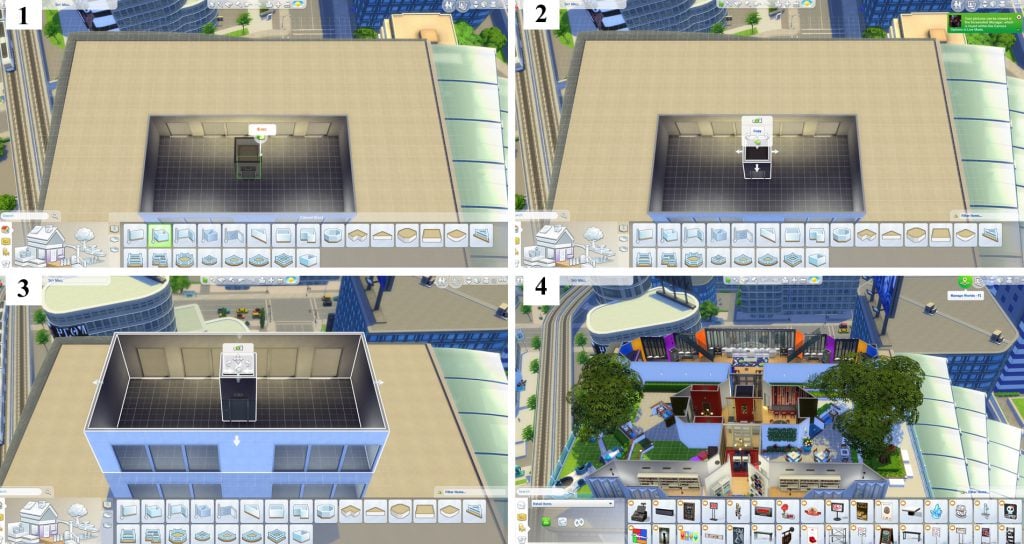
The Sims 4 Build: Urban Commercial – Build Up Not Out!
There is a caveat to this technique. If you have entered “build mode” from “live mode” and would like to return to live mode (Grid Picture 1) you will be blocked and receive the warning  shown below. (Grid Picture 2) You can go around the block by going to options (Grid Picture 3) and selecting “Manage Worlds” from that menu. (Grid Picture 4) However, you then have to re-select the sim you were playing from the manage worlds screen leading to an additional loading screen. This is not a huge obstacle but it’s a bit tedious. The good news is that after the initial build you have to make alterations rarely so the issue is not often.

The Sims 4 Build: Urban Commercial – Build Up Not Out!

Multiple floor elevators will only function in a fully proper form on penthouse lots. You can save elevators to your library and place them on any lot. When doing this they will only work as the initial spawn point for when your sim arrives home and obviously as decoration for story telling. When placing them on standard apartment lots they will work to go from floor to floor in a two or three story apartment. However, your sim will also spawn directly into their apartment bypassing the elevator in the hall when placing them in such a fashion. I do encourage you to play around with it though and see how it works for you.

I hope you’ve enjoyed this article and the accompanying tutorial. If you get the build bug to create your own multi-use lot please feel free to post pictures and links here to share with others and please join me next time.

There a video version of this tutorial on my Youtube channel if you would like to see it in that fashion here: https://youtu.be/6KXCNTxTApk

The Sims 4 Create a Stuff Pack: ECO LIVING WINS!

SimGuruGraham has confirmed on Twitter the winner of the first round of community voting which is Eco Living!

The Sims 4 Create a Stuff Pack: ECO LIVING WINS!Eco Living Stuff – Adopt new home technologies to help your Sim with domestic responsibilities and live an eco-friendly life. Potential areas of focus include laundry, home technology, and solar energy.

The next round of voting begins on 10th April where the community will be able to determine the pack’s art style.

You can find out more about what happens to the packs that didn’t make it through the first round and more about the community driven stuff pack here in SimGuruGraham’s forum post.

The Sims 4 Bowled Over Build Challenge

Build Challenge, bowling night stuff pack, sims 4 build challengeHey Simmers!

I’d like to formally invite you to participate in a build event centred around the new Bowling Night Stuff Pack! Twitch has helped me get the word out about the Bowled Over Build Challenge by spotlighting some awesome content creators and their livestreams from now until the 12th of April!

See full list of creators and their promotion here!

Rules

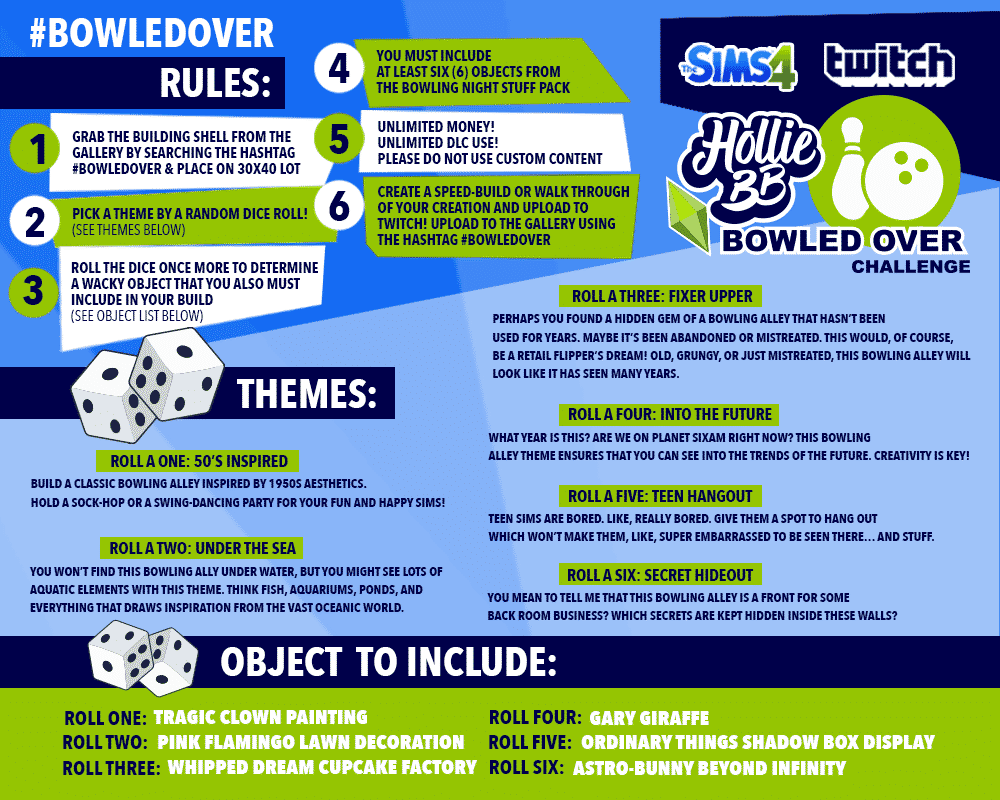
The rules are pretty simple! Grab the build shell from the gallery by searching the hashtag #bowledover and place it on a 40×30 lot. This is a challenge with a chance component, so you’ll roll the dice twice to determine both your theme and a silly base-game item to incorporate (see graphic below).

Do whatever you want with the shell and get creative! Landscape, add a foundation, use cheats or as much DLC as you want. Include at least six items from the Bowling Night Stuff Pack, and custom content is not permitted.

When you’re all done, upload it to the gallery using the same hashtag, and if you’re feeling really creative, you can create a video walkthrough or a speedbuild and upload it to Twitch!

Build Challenge, bowling night stuff pack, sims 4 build challenge

I look forward to seeing what the community comes up with! Which theme would you most like to work with? Let me know in the comments!

Check out my daily livestreams on twitch.tv/holliebb

The Sims 4: April – June 2017 Quarterly Teaser Predictions

If you’ve not yet seen The Sims team have finally released the quarterly teaser for Spring/Summer, probably the most anticipated 15 second clip in existence, and this one is a good one. I’m going to be looking at some of the main features we could see.

Please note that the name of the packs written below do not represent the actual names of these packs. We’ll learn more about the packs as we get closer to the release.

The Sims 4 Family Themed Game Pack (Spring 2017)

So let’s start with the first pack it shows, a brand new game pack with a family-orientated theme. Requested by so many this will hopefully give a boost to the stuff our Sims can do together. The best example to compare it to would be The Sims 3 Generations, this expansion pack brought new activities our families could do together and it’s this sort of stuff we could see.

Expanding Schools

School takes up so much of our Sim children and teenagers time so it would only make sense we would be able to follow them to school and help them ace any tests and make sure they don’t get pummeled in gym class. Having our Sims deal with mountains of school work and unfair teachers could be a great aspect, although this should be a completely optional feature similar to following our Sims to work.

Another fun feature we could be getting could be private schools, something we’ve not seen done properly since The Sims 2. Inviting the headmaster over to schmooze him into giving our Sims children and teenagers a place in a successful school.

Daycare

This is something already in game, when adults go off to work we’re given the option to send any toddlers and babies to daycare, but this is where the fun ends. This could easily be expanded upon, being able to run our own daycare or even following our toddlers to make sure they don’t get up to too much trouble.

Afterschool Activities

Another great feature they could add would be afterschool activities, allowing our children and teens to earn extra marks and make sure their grades are as high as possible. Hopefully if something like this was added we would be able to watch them do the actual activities rather than them disappearing and returning a couple of hours later. This would go great with an expanded school system.

Pre-teens

Although this may seem like quite a far-fetched idea we could easily get a new life state, just 3 months ago we got toddlers. Pre-teens would suit this pack very well although it would be a lot of work just for a game pack, it would also most likely have to be patched in to the game to make sure they are expanded upon in the future.

The Sims 4 Fitness Themed Stuff Pack (June 2017)

The next is a fitness orientated stuff pack, the teaser didn’t really give much away other than a few new pieces of furntiure and some new CAS items but let’s have a look at what features they might have.

New Equipment

Hopefully as well as new versions of existing equipment we can get some new stuff we’ve never seen before like rowing machines and a bicycle machine. Expanding upon the many exercise machines we already have would be a great addition to the game.

More Sports

At the moment we’ve  just got basketball in game but this could easily be expanded with stuff such as football and baseball, this would link in very well with the family orientated game pack adding in even more gameplay aspects.

The Sims 4: Family GP + Fitness SP HQ Icons

@Herr_Sims has recreated The Sims 4 Family Game Pack + The Sims 4 Fitness Stuff Pack icons. If you’re a creator these are perfect for video thumbnails and featured images!

To download them, simply click on a desired icon and select the ”Download” button on the bottom left corner.

The Sims 4: Family GP + Fitness SP HQ Icons The Sims 4: Family GP + Fitness SP HQ Icons

The Sims 4: Fitness-Themed Stuff Pack coming this Summer!

32

The Sims Team has teased the 11th Stuff Pack for The Sims 4 which seems to be revolving around Fitness!

Although the Pack name is not known yet, we can expect more information about this Stuff Pack as we get closer to Summer. Heads up that this quarter lasts until the end of June!

Make sure you check out more from the quarterly teaser and stay tuned on all the latest news!

The Sims 4: Family-Themed Game Pack coming this Spring!

38

The Sims Team has just confirmed in their latest Quarterly Teaser that the fifth Game Pack for The Sims 4 will be family-themed!

We don’t have a specific name of this pack but we can speculate about what the pack can bring.

Thiis Game Pack is expected to release this Spring and we can expect more information as we get closer to the release date.

The Sims 4: NEW QUARTERLY TEASER! (April – June 2017)

20

The Sims Team released a brand new Quarterly Teaser for The Sims 4, showcasing all the new content coming to The Sims 4 in April, May and June 2017.

The Sims 4: How to Enable Custom Eyes for Toddlers

The Sims 4: How to Enable Custom Eyes for Toddlers

Hey guys,

I was recently asked on my tumblr how I enabled custom eyes for toddlers.  The easiest way to do this is to go back to the creator and see if they updated them.  If they are no longer active, then you can follow the below steps (note:  that this will also work for skin details like freckles, moles, blush, scars but not full body skins).

Version 1 (the easiest one):

Open the package with Sims4Studio and then navigate to categories.  Right on top, there will be a toddler box.  Select that and then select apply to all swatches.  You might get a pop-up message that says something about it needing to be updated.  Select OK (or yes, I can’t remember which one it says).  Select a different eye color to make sure they all have toddlers enabled.

Scroll to the bottom and save.

That’s it!

The Sims 4: How to Enable Custom Eyes for Toddlers

Version Two (the not so easy one):

You open the package and you see the below.  Without getting into all the details of the differences between the two, it can still be enabled for toddlers.  It just takes a little more work.

The Sims 4: How to Enable Custom Eyes for Toddlers

So, what you are going to do is select the line that says “CAS part” and then click the box that says “toddler”.  You will do this for every single CAS part.  This is why I said it’s a little harder but just because it’s tedious.

Once you’re done, save the package and viola!

Done!

The Sims 4: How to Enable Custom Eyes for Toddlers

The Sims 4: Bowling Night Custom Content Showcase

The Sims 4: Bowling Night Stuff Pack may have only come out last week but custom content creators are already creating some exciting new Bowling Night content for us to add to our games!

*Please note that all custom content featured in this post is Maxis Match*

Bowling Night Stuff Sofa Mesh Edit by Chillissims

The Sims 4: Bowling Night Custom Content Showcase

Mutant League Bowling Shirts by SimDoughnut

Bowling Night Stuff Hair Recolours by WildlyMiniatureSandwich

Glitter & Gold Mesh Edit by Dustflwr

MysteriousDane’s Bowling Night Jeans Edit Recolour by Purrsephone

To use these in your game you will need to download the mesh by MysteriousDane here.

Bowling Night High Waisted Shorts Recolour by Purrsephone

To find more Bowling Night Custom Content you can check out Lana’s Sims 4 Find blog alternatively you can check out some other great sources via our list here.

The Sims: 17 Years of Weirdness

If you’ve ever played any of The Sims game you will know it is full of fun tidbits and interesting quirks that arguably make it one of the best and most successful game franchises ever, if not slightly weird. From the very first game that started it to the latest expansion pack, I’m going to be looking at some of the best from the series.

The Sims – Prank Calls

Probably one of the creepiest aspects is the terrifying prank calls your Sims receive when trying to get on with their lives, they weren’t all bad though ranging from a mild “Do you canoe?” to a slightly scarier “They’re coming soon. Maybe you should think twice about opening the door.” but I think we can all agree which one was the worst one of all.

The Sims: 17 Years of Weirdness

The Sims 2 – Social Bunny

If you managed to get your Sims social need fully depleted then you’ll remember the Social Bunny, one of the many NPC’s found in The Sims 2. This one-eyed giant bunny was there to help put your Sims back into a good mood, even better is that if multiple Social Bunny’s are active they can actually socialise with each other, be careful though as if they are the same colour sparks may fly!

The Sims: 17 Years of Weirdness

The Sims – Tragic Clown

Very similar to the Social Bunny, this misunderstood NPC was summoned by having a portrait of him as well as your Sim having a low social need. His main job is to make Sims feel better, problem is he wasn’t too happy himself leading to some hilarious antics, at least he tries. The Tragic Clown makes an appearance in almost all The Sims expansion packs as well as The Sims 4.

The Sims: 17 Years of Weirdness

The Sims 3 – Fruity Genders

Everyone loves to be in control, our Sims are no different, in The Sims 3 if you want to sway the gender of your Sims baby all you have to do is eat either apples for a boy or watermelons for a girl. Quite a handy feature you can even go one step further and make your Sim listen to childrens music while pregnant for a higher chance of multiple babies!

The Sims: 17 Years of Weirdness

The Sims 2 – Death by Satellite

One of the many ways to die in The Sims 2 is by a falling satellite. All your Sims had to do was cloudgaze and there was a 1% chance that a falling satellite would crush them, killing them instantly. On the bright side if you sold the debris you could earn a cool §1,999, although with a depleting value sell it quick.

The Sims: 17 Years of Weirdness

The Sims 2 – Back From the Dead

Since The Sims 2 there have always been ways to bring a Sim back to life after they have died, though each game offers new ways to do this some are harder than others. It’s questionable if you count ghosts and zombies as back to life but hey, they can do most of the stuff normal Sims can do, they just don’t breathe. Never skimp when it comes to bringing Sims back to life, you never know what you might get in return.

The Sims: 17 Years of Weirdness

The Sims 4 – Hidden Lots

One of the many fun activities you can do in The Sims 4 is locating the few hidden lots within the game, one of which means talking to a tree, I’m sure that looks normal to passing Sims. It can be quite tricky to locate these hidden lots if you don’t know exactly where to look. These fun places contain loads of exclusive collectibles which can earn a Sim a few extra simoleons, plus they are absolutely stunning.

The Sims: 17 Years of Weirdness

The Sims FreePlay: Day Care Update Trailer

4

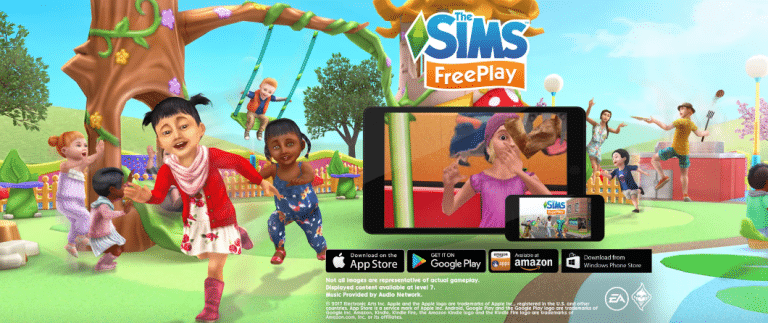
The Sims FreePlay is getting a brand new Day Care Update in the coming hours for Android and iOS. Before the update comes out take a look at the trailer!