Home Blog Page 422

The Sims 4 Tutorial: How to Get Same-Sex Couples Pregnant

No Mods Required!

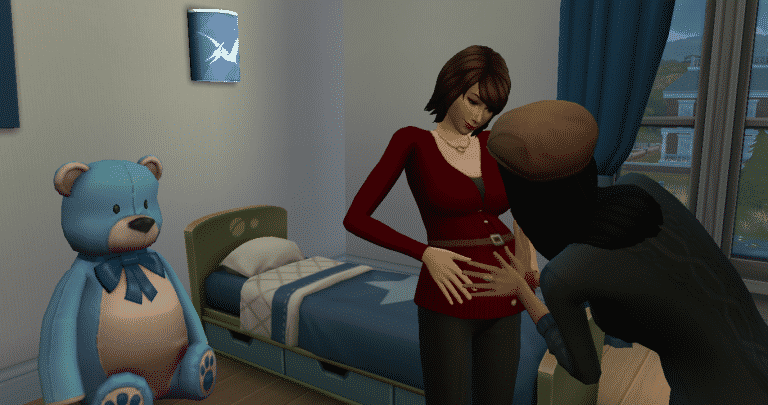
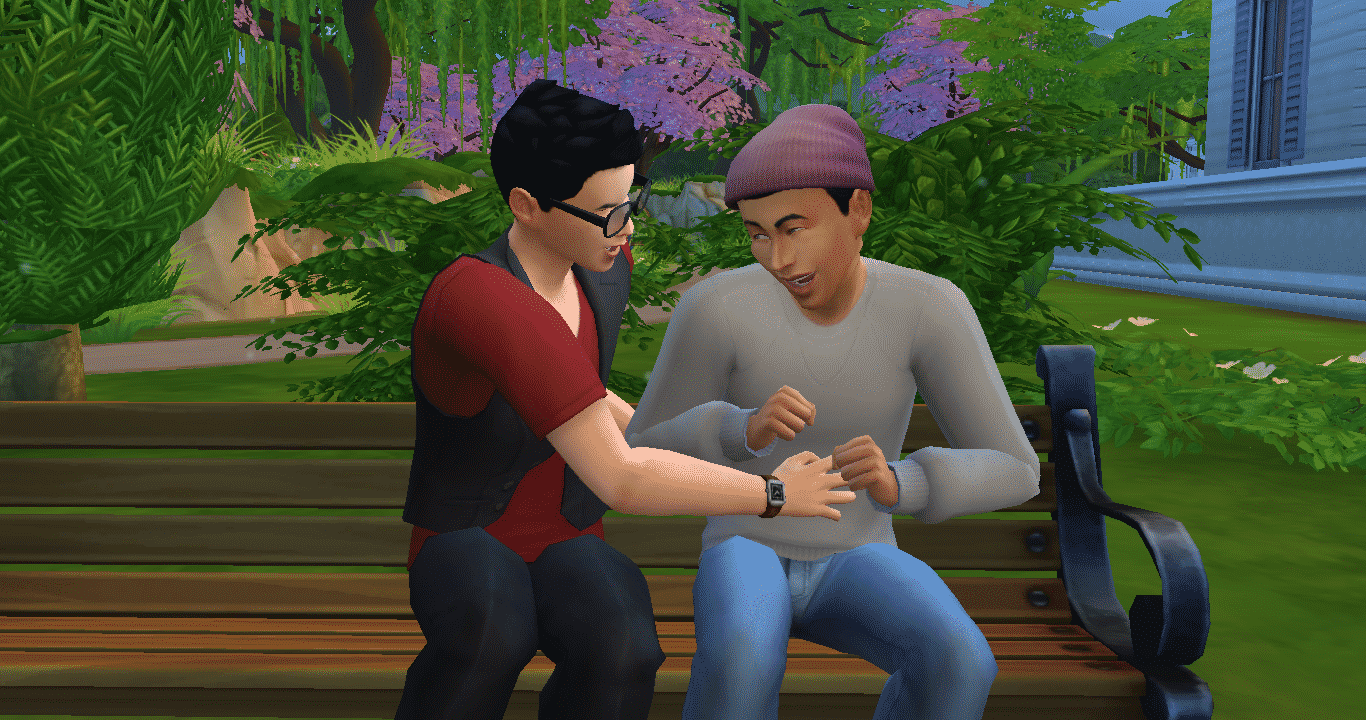
The June 2016 update for The Sims 4 added more gender options for Sims. One of those options is if the Sim will be able to be pregnant or be able to impregnate other Sims. With this option same-sex couples will be able to become pregnant and have children with no adoption or mods required! If you already have a same-sex couple in your game and you want them to have kids, follow these easy steps demonstrated by the Larson family and the Matson Family:

Firstly, go to a dresser and select “Change Sim”

06-03-16_6-17-13 PM

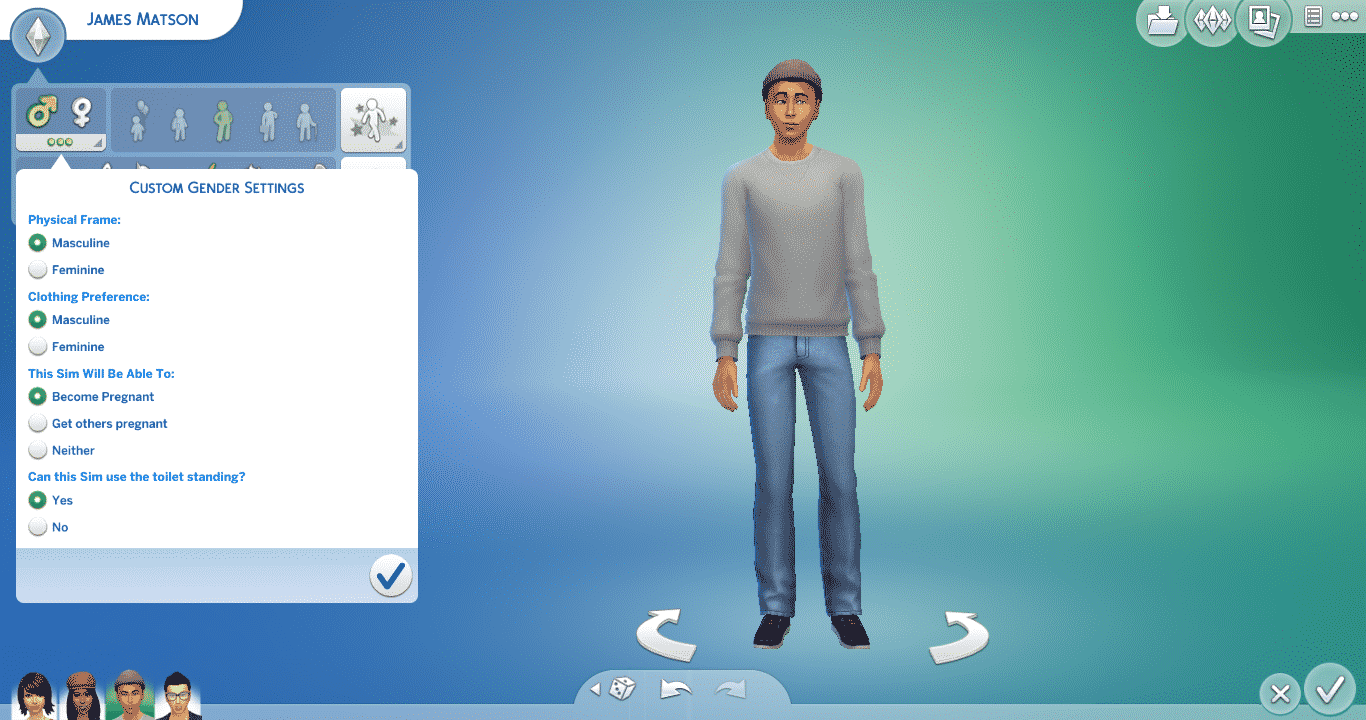
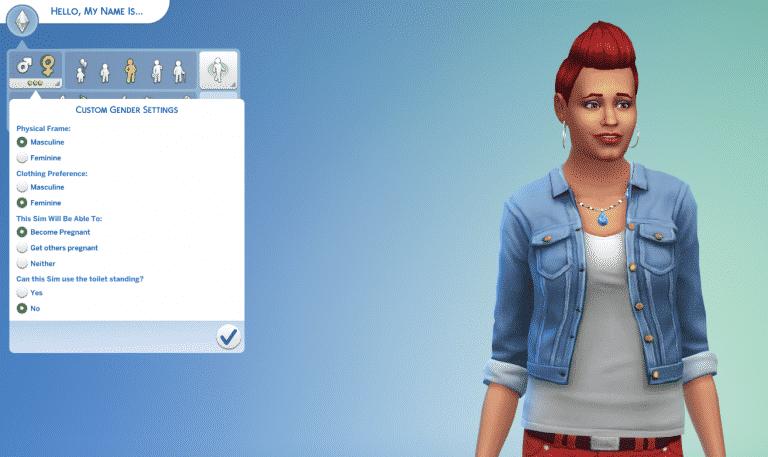
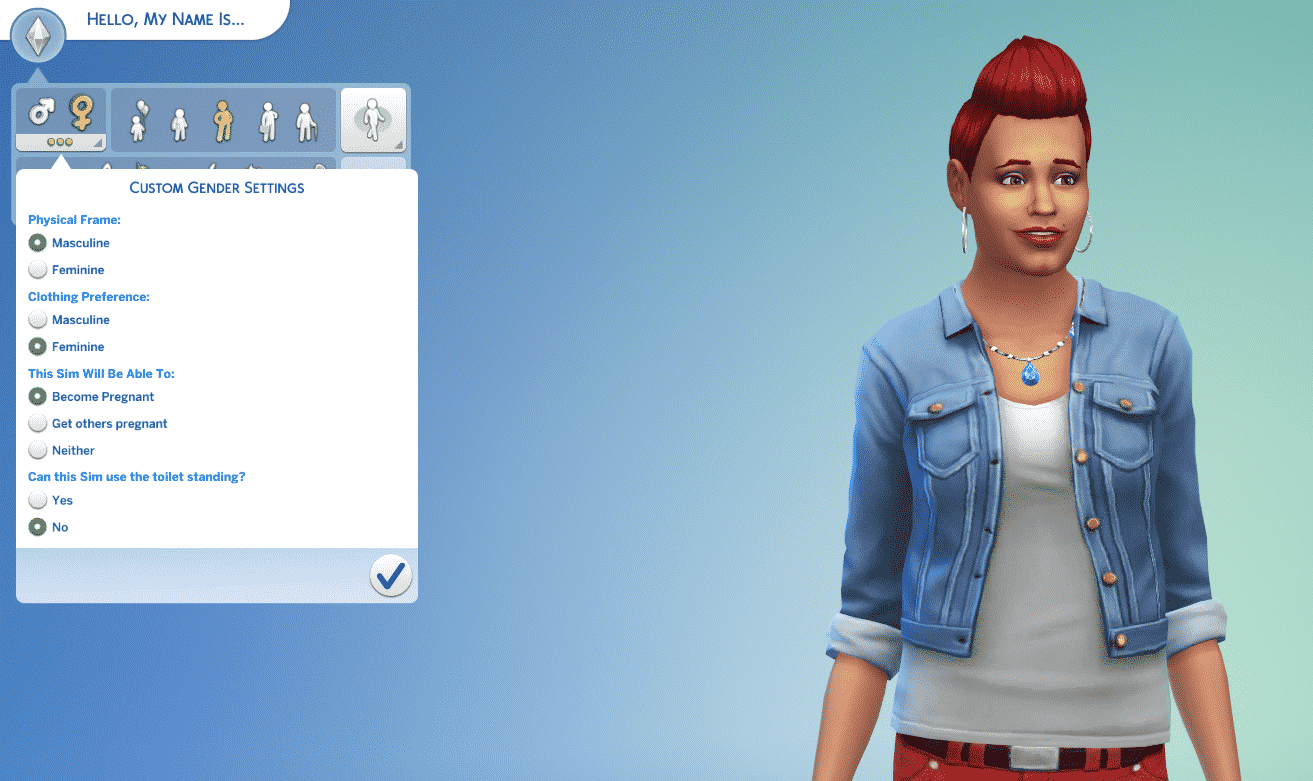
When CAS has loaded go to the custom gender settings.

If you have a gay couple, choose the “Become Pregnant” option for one of the Sims. Make sure their partner has the “Get others pregnant” option selected

06-03-16_6-17-59 PM

If you have a lesbian couple, choose the “Get others pregnant” option for one of your Sims. Make sure their partner has the “Become Pregnant” option selected.

06-03-16_6-18-19 PM

And that’s it! Your couple should now have the “Try for Baby” interaction!

Happy impregnating!

The Sims 4 June 2016 Update: Minor Additions

Beside the two HUGE additions that came with the latest The Sims 4 Update (Gender Customization and Improved Indoor Lighting), The Sims Team made some improvements and small additions to the game as well.

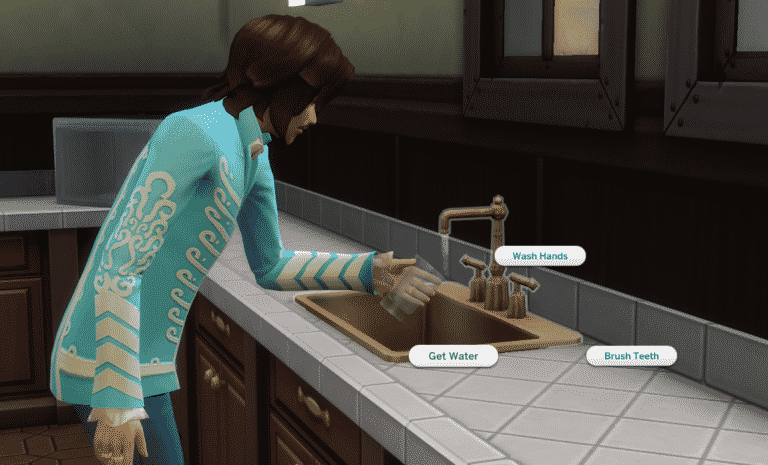
Drink Water from Sink

Your Sims can now Drink Water from the Sink! Simply click on the Sink and select ‘Get Water’. There aren’t any new buffs of special features with this, but new interactions are always welcome!

getwater

Ponder Glass Fullness / Emptiness

glass1

Attach Table to Chair

Previously, you were only able to attach a Chair to the Table. Now you can move the Table and attach it to the Chair as well! The Update also added a new light-green interface when a Table is selected – highlighting all the content that’s attached to the Table.

New Food Thumbnails

Food Thumbnails have been improved and now show food in better light! These thumbnails will appear whenever you select the ”Cook” interaction, or when you have food stored in your inventory.

cookthumbs

Ask to Just Be Friends Interaction

A Sim who is romantically involved with another Sim can ask his/her romantic interest if they can just be friends. This will remove any progress made in the Romantic Relationship Bar.

befriends

befriends2

Age Tags

During a conversation, the age information will show up when you hover over the Sim Thumbnail. These Age Tags have also been added to The Gallery.

youngadult

Resize Paint from Reference Paintings

Previously, you weren’t able to resize Paint from Reference Paintings using the Shift + ] tool in Build Mode. Now, the resize feature is finally unlocked for Paint from Reference Paintings!

Plumbosion Poster

A new Poster has been added to the game!

poster

New Color Swatches

The Carpet and the Heartwood Plank Flooring got updated with new Color Swatches! I’ll be updating this section if I come across any new objects with new color swatches.

Window, Arch and Door Black Swatches

Most of the modern Windows, Arches and Doors received a Black Swatch upgrade!

blackswatch

The Sims 4 June 2016 Update: Improved Indoor Lighting (+ Video)

The Sims 4’s latest Update has just brought a significant Graphical Improvement!

Simmers who have set their Lighting Settings to Very High will be able to experience the great indoors with better detail and charming visuals!

lightingindoor

The Sims 4 June 2016 Update: Gender Customization Overview

With the latest The Sims 4 Update, you are now able to completely Customize your Sims’ Gender and give them any clothing and accesories they want – no matter of their gender!

In Create A Sim, click on the Plumbob on the upper left corner. You’ll notice that under the Male and Female gender icons there are 3 dots. After clicked, you’ll be able to customize the selected gender with the following options:

  • Physical Frame
  • Clothing Preferemnce
  • Pregnancy Abilities
  • Toilet Standing

gend1

Physical Frame

Here’s a comparison on Physical Frames: the Sim you’re seeing on the left has no customized Gender Settings, while the Sim on the right is a Female Sim with a Masculine Physical Frame.

Here’s a comparison for male Sims: the Sim you’re seeing on the left is a male Sim with no customized Gender Settings, while the Sim on the right is a Male Sim with a Female Physical Frame.

Clothing Preference

Chosing the Clothing Preference will filter all the CAS items to either Feminine or Masculine. This covers everything, including Hairstyles, Clothing, Accessories, Makeup and more!

TIP: If you want to have both Masculine and Feminine items listed, simply remove the filter by pressing the X button!

 Capture

Pregnancy Abilities

This section of the Gender Customization Option lets you choose if your Sim can make someone else pregnant, become pregnant ore neither of those.

TS4 gamescom OlieBabs

Toilet Standing

This feature pretty much asks you if you want your Sim to be capable of using the toilet by standing or by sitting.

Sims-4-Toilet

Voice Types

This Update unlocks all 6 Voice Types for both genders! The first 3 icons are Female Voices, while the last 3 icons are Male Voices.

voice

Change Sim Option

You’ll be able to customize your Sim’s gender any time by clicking the Closet / Mirror and selecting the option Change Sim.

change

Using this Option, not only will you be able to customize your Sim’s Gender, but also customize your Sim’s body and face by using the good ol’ push and pull features.

TS4_x64 2016-06-02 21-47-54-14

[mks_separator style=”solid” height=”2″]

This Update unlocks so much creativity for you to unleash! Even though the Live Mode features are pretty much the same, the stories you’ll be able to tell with the help of Gender Customization Features are limitless!

The Sims 4: CAS Custom Content and the new Patch

SimGuruModSquad elaborated what happens to CAS Custom Content after the latest The Sims 4 Update!

With today’s patch, CAS CC should continue to function as it did previously.

However we intentionally do not allow legacy CC to be used on the opposite gender or opposite gendered frame. This is because there are new authoring requirements in order for CAS parts to work in the new system. So CAS CC will need to be updated to work with opposite genders.

Full technical details for community tool makers are available here.

Capture

Tip: @Crinrict

The Sims 4 Dine Out / Kids Stuff Pack: Information Found in Patch Files

ts4e3logo

The XML tuning in the new patch released today reveals what could point to features in The Sims 4 Dine Out and the upcoming Kids-themed Stuff Pack.

Please note: the existence of this code only indicates that the features were planned at one point in development. It is possible for some of them to have been removed.

Tag Updates

<T ev=”26627″>Func_ChefStation</T>
<T ev=”26628″>Func_HostStation</T>
<T ev=”26629″>Func_Booth</T>
<T ev=”26630″>Situation_RestaurantDining</T>
<T ev=”26631″>Func_ExperimentalFood</T>
<T ev=”26632″>Role_RestaurantEat</T>
<T ev=”26633″>Role_RestaurantStaff</T>
<T ev=”26634″>Interaction_WaitstaffIdle</T>
<T ev=”26635″>Role_HostAtStation</T>
<T ev=”26636″>Func_Booth_Corner</T>
<T ev=”26637″>Job_RestaurantDiner</T>
<T ev=”26638″>Role_Restaurant_PostPlaceOrder</T>
<T ev=”26639″>Func_PlacematDrawing</T>
<T ev=”26640″>Interaction_Restaurant_WaitToPlaceOrder</T>
<T ev=”26641″>Func_Booth_Banquette</T>
<T ev=”26642″>Situation_HomeChef</T>
<T ev=”26643″>Func_FoodPlatter</T>
<T ev=”26644″>Uniform_RestaurantCritic</T>
<T ev=”26647″>Role_RestaurantDiner</T>
<T ev=”26648″>Buff_OwnableRestaurant_Customer</T>
<T ev=”32769″>Func_PuppetTheater</T>
<T ev=”32770″>Func_BattleStation</T>
<T ev=”32771″>Func_Collection_Monsters</T>


Tags of note are Func_Booth_Banquette, Func_PuppetTheater and Func_BattleStation which are features that haven’t been announced yet. Func_Collection_Monsters may refer to a feature in the upcoming Kids Stuff Pack.

restaurants.chefs_choice

  • A new tuning resource, restaurants.chefs_choice, reveals the existence of a “Chef’s Choice” feature. It is also indicates that the choice will vary depending on the time of day, and will be restricted for Child Sims.

restaurants.restaurant_tuning

  • There are six preset menu types: American, Italian, Seafood, Experimental, Brunch and Homechef.
  • The available food qualities are Grade F, Standard, Fresh Organic and Sustainably Grown
  • You can advertise your restaurant similar to how you can advertise retail stores.
  • The game differentiates between appetizers, main courses and desserts. It is currently unknown if this causes a major difference or if they are just autonomy categories.
  • There is such a feature as a “daily special discount” – it is currently unknown exactly how this works.


The Sims 4: CAS Update Trailer

0

For more information about the latest The Sims 4 Update, check out the latest blog and the newest Patch Notes!

EA Blog: The Sims Roundtable – Adding More Choices to The Sims 4

1

Via EA.com!

All of us at EA want to make sure everyone in our diverse community who plays our games feels included and has the ability to express themselves as they play. No game exemplifies this kind of player choice like The Sims, a game with a long history of allowing player freedom and expression.

With The Sims 4 updating Create A Sim to expand the gender customization options, we sat down with four members of The Sims team: Maxis General Manager Rachel Franklin, Producer Kevin Gibson, Senior Producer Lyndsay Pearson, and Designer Lakshmi Howe to find out how this new update came about and what new choices you have in creating your Sims.

Q: How did the team start talking about the expanding the Create A Sim customization options?

RACHEL FRANKLIN: We always look at the kinds of Sims our players want to make and strive to make sure that what they see in everyday life can be reflected inside of the game. Then we provide them with the tools to create any Sim they choose.

rendition1.img

KEVIN GIBSON: The Sims is a simulation game that should reflect life. Expanding Create A Sim to support a broader range of stories that include diverse characters was a natural extension. We all felt it was definitely time to make this addition.

LYNDSAY PEARSON: Our team started working on a cool prototype based around what would happen if we could let any Sim wear anything. We started seeing female Sims in sweater vests and a Curvy Darth Vader, and we got really excited about the potential to unlock a huge amount of additional customization.

rendition1.img (1)

LAKSHMI HOWE: It was really cool seeing the team come together to find solutions that allowed us to make so many Sims we’ve never been able to make before.

Q: How long did the process of adding the update take, from beginning to end?

RF: We started talking about expanding Create A Sim around a year ago. There was a big art effort involved, in addition to some technical prototyping, as we also wanted to make sure that the hands-on body manipulation looked great on any kind of body type. Not to mention, given the assortment of stories this update can facilitate, the team also worked very closely with GLAAD to assure that the update was authentic and respectful to the transgender community.

LP: It’s something we started doing little bits at a time and started work in earnest about six months ago.

CASUpdate_Screen_Official

Q: How important is it for Sims players to have choices in how they represent their Sims?

KG: The Sims is about the player. It’s a sandbox game, and our goal is to give as many tools as possible to play in the sand. Without choice, it’s not a sandbox. It’s not The Sims.

RF: Exactly – The Sims is all about choice and self-expression. The first thing most people do when they start playing The Sims is make themselves and everybody they know. So if you can’t relate to the Sim that you are creating, we haven’t done our players justice in being able to provide them the tools they need to play the way they want.

rendition1.img (2)

LH: We are constantly trying to think of ways to create new types of Sims, whether that’s adding new traits and clothing or creating new systems to express their differences. We’re always working to allow players to better create themselves, someone they know, or someone for a great story.

Q: So, what does this update mean for those who play the game?

LH: We opened up clothing, makeup, accessories, voices and more to the opposite gender. With these changes, players have the opportunity to explore more gender fluidity than we’ve seen in The Sims before.

RF: Now you can customize, create or modify your Sims with any kind of body type or clothing style.

LP: Players will be able to select almost any piece of clothing or accessories for their Sims, regardless of the initial gender setting. They will also have even more direct control over their Sims’ frame and body shape.

Q: What are some of the ways that players can make their Sim even more personalized with this update?

KB: Players can modify their voice and are not restricted to the original set of three and we have opened up the clothing catalog, including hair, which is a huge gain for player personal customization.

LP: I personally like trying out all the new hair options! Hair can add so much character to my Sim.

Q: What part of the update is the Sims team most proud or excited about?

RF: I think this is an update that means different things for different people. We each have our own favorite features or capabilities. I think it’s awesome that everyone can wear whatever they want in the game.

KG: The whole thing! It’s been a labor of love and we want to give players all of it and see what they do with it.

LP: The tech required to make this change – to allow assets to be worn across both genders – was pretty deep and cool. It was also really experimental.

LH: I think we’re just excited to give players more flexibility in how their Sims appear, to allow them to express different backstories and personalities for those Sims.

Q: What does it mean for you to have this update available for players?

RF: We have a deep respect for our players no matter who they are or where they come from. For us to be able to give them more control and freedom of expression is the heart of what makes a Sims game so special. And supporting that makes me personally honored to work here.

LP: The Sims is an extremely personal game. Our players use it to play out challenges, try out new things or tell their stories. The reason I’m so happy to provide this update to Create A Sim is because we’re removing some of the gates that might previously have been on those stories.

LH: I’m really excited that we’ve opened up the stories our players can tell within the game. It’s always been important to me that we support a large variety of ways to define and play with your Sims, so I’m very proud that we managed to remove some barriers to creating Sims that defy stereotypical gender definition.

The Sims 4: June 2016 Update! (+ Patch Notes)

ts4e3logo

The Sims Team has released a brand new Update for The Sims 4, adding some brand new features including removed Gender Barriers, Improved Lighting and more!

To download the latest version of The Sims 4, simply open your Origin program and if the game doesn’t update automatically, right click on The Sims 4 and select ”Update”.

In case you have Mods or Custom Content, the game will automatically disable them for you after first launching The Sims 4 after the update. To re-enable all your Mods and Custom Content, select the Settings option in the Menu and select Settings. Under the”Other” section you’ll find the ”Enable Custom Content and Mods” option. Check it and restart your game in order for it to take effect!

Patch Notes

Update: 06/02/2016 – PC Version 1.19.28.1010 / Mac Version 1.19.28.1210

Hello Simmers,

I hope you have had a wonderful [Note for the user of this form: fill in this blank with locale specific recent holiday or family specific event of eventfulness, significance, and/or noteworthiness]!

We’ve got some changes happening… and so without any caveating, let’s jump into…

…What’s New?

Major Create a Sim changes:
New options are now available when creating or modifying your Sims. These options provide expanded opportunities to customize your Sims’ style and story.

These options are entirely in your control and the game itself will not modify how Sims appear in your world. Instead this is about adding more tools in your toolbox, and letting you pick the tools that make sense to you while ignoring what doesn’t.

So, what are the new tools and options available to you in Create a Sim?

Customize Gender options
There is a new button called Customize Gender found beneath the gender selection buttons. This opens up a panel of options that allow you to customize details about the currently displayed Sim. These options are specific to the current Sim being edited, and modify the physique of the Sim (does the Sim have a masculine or feminine frame), toilet behavior, and whether or not they can become pregnant*.

*Children do not have access to the Customize options. Teens do, but while they can set their pregnancy preferences, they will have to wait until they become young adults for the choice to be active.

Voice settings
Sims now have access to all six of the Sim voices to expand the range of available audio options.

Clothing Filters
All* Create a Sim assets (tops, bottoms, accessories, hairs, shoes… all) are now available to either gender. Through the use of the filters found under the Fashion Choice option, you can choose to show/hide based on Masculine and Feminine tags.

If you are unfamiliar with the catalog filters, they are found just above the asset catalog (such as tops or bottoms), by clicking on the triangle icon (its tooltip will say “Open Filter Panel”).

As a result, you now have access to a hugely expanded catalog. As an example, by selecting both filters under tops, you will nearly double the number of available tops to choose from (if you were to add it all up, across all of the asset categories, you are coming close to somewhere over 700 assets being added for availability).

*We came close to 100% coverage of all assets, but some were proving difficult for various reasons. We chose to lean towards the ‘give access to more’ over the ‘make everything perfect’ side however. Let us know about any issues you run against.

What about Sims I’ve already made?
I mentioned above that these options are available for modifying Sims as well as creating. So, specifically, when editing Sims via Edit Household from the map, or when clicking on a Dresser and choosing the new option “Change Sim” – you will have access to many editing options that were previously not available for played Sims, such as modifying gender, body and face shapes, and the customize gender options.

We also made the addition and removal of tattoos available in all Create a Sim re-entry modes (including Plan Outfit).

There is a great deal to explore with these expanded Create a Sim options, I look forward to hearing all about… oh, I guess there is a bit more here to talk about.

Lighting Changes:
For players that play with their Lighting settings set to Very High (Options menu under Graphics tab), you will see an improvement to the way sun (and moonlight) project into rooms through windows.

And as well, we have a couple issues that we have addressed.

General Issues…

  • You can slot… er pair… connect… attach, yes attach! You can now attach a table to a chair, whereas before you had to attach the chair to the table.
    • The green boundary visuals will also update to include both object footprints now.
      • Err, footprint… um.
  • Bills, previously being an unknown envelope in your Sims inventory, will now tell you they are a bill when you hover over them.
  • Tidy Up away actions will now also tidy up puddles.
    • And now… some tongue twisters for no reason:
      • The puddles play, kept tidy the tidal pool.
      • A Tidy Up while away, keeps the puddles at bay.
      • Poodles play playfully in the puddles people lay.
  • Poodles was only typed here because of its alliteration in regards to puddles. In no way is this a foreshadowing, hinting, or similar… it is only used because of the alliteration. Alligator.
  • Non family members may now also get the “Whisked Away” buff when a child or baby is taken away for neglect, depending on their relationship, and the distance to the action.
  • The “Whisked Away” buff will now properly tell you the origin of the buff.
    • The origin of the buff will not sound like your mother-in-law: “So, let your kid get taken away huh? Forgot to feed him? Do you even remember his name? Don’t talk to me about making room in your home… what kind of household is this?”
  • The Hug whim is no longer a flirty whim, but a happy whim.
  • Sims now have to wait for the birthday blower to blow out their candles before taking a slice of SimCity Cheesecake.
    • Reminds me of that time when I grabbed my dinner before the moms on Mother’s Day. Yea, that was a mistake…
      • I prefer to fast now.
  • Death Flowers are now considered part of the “Harvest All” action.
    • No longer shall they be ostracized for their death like demeanor!
  • The default name for the Book of Life is no longer “This is SciFi book One,” rather it is now “The Book of Life.”
  • Foodie Sims will no longer receive the “Disappointing Drink” buff after drinking reward store bought potions.
    • One steamy review read “After having drank one hundred Potion of Youth beverages, I can not in good conscience recommend this “so called drink” for consumption. One and a half stars.”
  • We fixed an issue that could result in light being shown on incorrect floors. If lights are placed on a lower level, it was possible for their light to transfer to upper levels through doors with glass.
  • We fixed an issue where the game is telling your pregnant Sims to do push-ups (via the whims), and then yelling at you for trying to do push-ups with a pregnant Sim.
    • Although thinking about how such a dialog might occur…
      • ”Drop and gimme 20!”
      • “Why did you just try to do 20 push-ups, don’t you know you’re pregnant!?”
      • “Now drop and gimme 20!”
  • Sims will no longer get the Comfy or Uncomfy buff from sitting at a pool edge.
    • It’s not too hard, not too soft… it’s just right. Now eat your porridge.
  • Sims with the “Hates Children” trait now get a happy buff when they fail a pregnancy test…
    • … or is that succeed a pregnancy test? I mean if they don’t like children and they are shown to not be pregnant, that is a success… right?
  • Fixed an issue that would cause light to bleed through a blocks ceiling. You should see less light bleed at the top of interior blocks.
    • If light could bleed, would it be dark?
  • We fixed an issue that could prevent Sims from being able to continue the “Soothing Jets” upgrade on a Princess Cordelia’s Bathtub.
  • Sims will no longer reset if they attempt to “Summon a Grilled Cheese” sandwich while holding something in both of their hands.
    • Do not reset on an empty stomach. Resetting is not for everyone. If you or a loved one have blurred vision after a recent reset, queue an interaction immediately.
  • Paintings on an Easel, will no longer be removed to the household inventory when the lot is rotated or the room in which the painting is contained is moved or rotated.
  • Sims can now purchase items from the Lice Cold Freezer when visiting an NPCs Retail lot.

Get to Work…

  • The resize object cheat will now properly resize photographs.
    • But, grandmother, what big eyes you have!

Get Together…

  • Sims will now only get the whim to Light a Bonfire, when there is a bonfire present.
  • The Sun Setting Park Bench – Floral Edition will now count towards the bench requirement for building Park venues.

Outdoor Retreat…

  • It seems as though the hermit had a ‘hermit outfit’ that he was supposed to wear when hermiting. Now, the hermit will properly wear his ‘hermit outfit’.
    • Though, I’m not sure why a hermit cares what the bears see him wear…wherever he may fair… even when he relaxes in his chair… eating a pear… glaring at the hares… who are unaware of his despair… as he sits alone in his soli…tude.
  • Sims will no longer have a chance to reset when cancelling roast marshmallows at a campfire while socializing.
  • Sims seated at a campfire, will no longer stand up to listen to a Group Story being told to them.
    • Yes, it may be an intense story. But sit, relax. Maybe I’m just going to tell you about a river rafting trip, and I won’t mention anything about the guy with a hook for a hand.

Spa Day…

  • Pregnant Sims can’t take a mud bath. They still can’t take a mud bath. However, now, when you try to take a mud bath, we tell you they can’t take a mud bath with a tooltip on the not available interaction.
  • Meditating Sims can now have self-discoveries for skills such as Herbalism, Baking, and Photography.
  • Socializing in a steam room will now properly satisfy the “Sit and Talk to Your Date” goal when on a date.
    • …also steam room socialization can be steamy.
      • Also, I like steamed pork buns…
  • …not that they are the same thing at all.
  • But all this talk about steam really got me thinking about how hungry I am and I really could go for a steamed pork bun.
  • We fixed an issue where the game is telling your pregnant Sims to do Yoga (via the whims), and then yelling at you for trying to… you know, I’m sensing a trend here…

Cool Kitchen Stuff…

  • Ice Cream Cones and Cartons will now inform you (by highlighting yellow) when they are going to be removed from the lot due to a build action (such as drawing a room on top of them).

Movie Hangout Stuff…

  • We fixed an issue where a Sim that was on vacation and comes home early, or a Sim that skips school or work, will not be available to “Watch a Movie Together” until they would normally have come home.

Romantic Garden Stuff…

  • Sims that become a ghost by way of the wishing well will now properly route as if they were a ghost.

As always, I wish you well, happy Simming, and we love hearing from you – your trials, tribulations, and successes!
-SimGuruGnome

The Sims Blog: The Sims 4 Expands Gender Customization Options

2

Via TheSims.com!

For more than 16 years, The Sims franchise has empowered players to express themselves through open gameplay and endless customization. That’s why we’re so excited that today’s free* update to The Sims 4 features an expanded Create A Sim mode with new gender customization options, and gives our players even more ways to play with life.

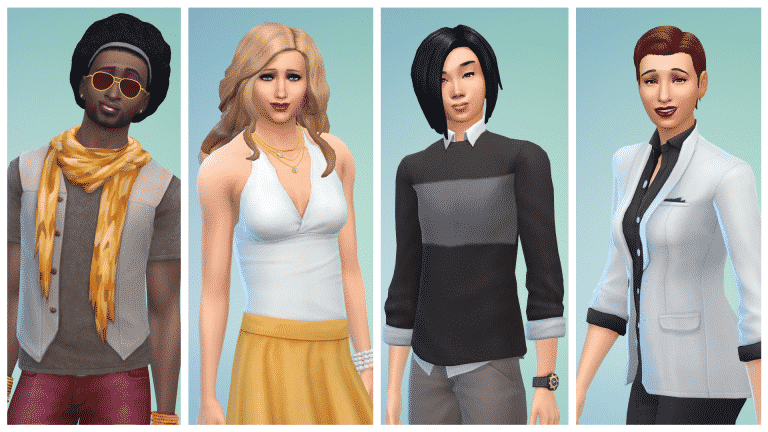
For the first time, you’ll be able to customize your Sims without the gender boundaries previously set in place. This means you can now create Sims with any type of physique, walk style, and tone of voice you choose – regardless of their gender.

We’ve also made clothing, hair, jewelry, and other visual options available to all Sims. Over 700 pieces of content previously only available to either male or female Sims, have now been made available to all Sims regardless of initial gender selection. This includes content from The Sims 4 base game and previously launched packs.

You can now dress your Sims in any attire, give them short, long or styled hair, or customize them with some personal accessories to top off their look. Through the addition of new filters and sorts in Create A Sim, what you do with these new options is entirely up to you!

CASUpdate_Screen_Official

The Sims is made by a diverse team for a diverse audience, and it’s really important to us that players are able to be creative and express themselves through our games. We want to make sure players can create characters they can identify with or relate to through powerful tools that give them influence over a Sims gender, age, ethnicity, body type and more.

So, no matter how you like to play, we hope this update to Create A Sim gives you plenty of new options. Personally, we’ve had a ton of fun exploring how good many of the short hair male hairstyles look on the female Sims, and vice versa. And we’re just getting started checking out how outfits and styles look on totally different body types.

We can’t wait to continue to hear from you about all the ways you use the game to play with life.

The Sims 4 Removes Gender Barriers

18

UPDATE#4: SimGuruHouts confirmed on Reddit that there are Feminine and Masculine filters in CAS.

Capture

UPDATE #3: GameSpot brought new quotes from Lyndsay!

“We also saw this as an awesome opportunity to continue to nurture an inclusive environment for our community,” she added. “The Sims Team is a diverse group that makes a game for a diverse audience, and we want everyone to be able to create who they want.” Pearson also pointed out that The Sims 4’s core gameplay is not impacted by the new gender customization options. The world will still react to you in the same way. Finally, Pearson teased that Maxis still has a “long list” of items and features it hopes to add to The Sims 4–further expanding the gender customization options could be one of them. “Since the game launched about 18 months ago, we’ve released updates or expansions nearly every month,” she said. “We still have a long list of things to we’re planning to add to the game. Stay tuned!”

UPDATE #2: The Verge brought some new quotes from Lyndsay Pearson about the new game-changing features!

“The update gives players more ways to reflect the world around them, or in their imaginations, creating the sims and the stories they want,” says lead producer Lyndsay Pearson. “Our players are constantly engaged in a conversation with us about The Sims, and they’re always requesting more of everything,” says Pearson. “We always have an incredibly long list of things we want to add to the game, and so much of that list comes directly from player feedback. In this case, players have been asking why certain hairstyles, clothing, and other options were limited to one gender or the other… We also saw it as an awesome chance to continue to nurture what’s always been an inclusive environment for all our players.” Pearson says that in addition to taking feedback from fans, the development team also consulted with GLAAD on the update to ensure the changes were respectful. Pearson says that there’s likely more on the way as well. “We’re always looking for new ways to push creative boundaries for our players,” she says, “and these tools grow over time, just like the game itself.”

UPDATE: SimGuruLyndsay has confirmed that the game will not automatically create any NPCs using this new functionality. This means that they added some optionality with the new features!

Associated Press have just confirmed that today’s The Sims 4 Patch will remove gender boundaries and allow players to create Sims with any type of physique, walk style or voice.

According to the text,  EA and Maxis said over 700 pieces of content previously available to only male or female Sims will now be accessible regardless of gender in “The Sims 4” and its various expansion packs.

For more info, check out the quoted text below!

— The creators of “The Sims” are opening up gender customization options for the first time in the history of the popular life simulation video game.

“The Sims” publisher Electronic Arts and developer Maxis says a free update available Thursday for “The Sims 4” will remove gender boundaries and allow players to create Sims with any type of physique, walk style or voice.

“The Sims 4” and earlier installments in the 16-year-old series previously restricted specific clothing, hair styles and other aesthetic options to either male or female characters.

EA and Maxis say over 700 pieces of content previously available to only male or female Sims will now be accessible regardless of their gender in “The Sims 4” and its expansion packs.

The gaming medium rarely depicts or allows players to create transgender characters.

___

The creators of “The Sims” are opening up gender customization options for the first time in the long-running history of the popular life simulation video game.

“The Sims” publisher Electronic Arts and developer Maxis said a free update available Thursday for “The Sims 4” will remove gender boundaries and allow players to create virtual townsfolk — or Sims, as they’re known — with any type of physique, walk style or voice they choose.

“The Sims 4” and earlier installments of the 16-year-old series previously restricted specific clothing, hair styles and other aesthetic options to either male or female characters.

EA and Maxis said over 700 pieces of content previously available to only male or female Sims will now be accessible regardless of gender in “The Sims 4” and its various expansion packs.

The studio said in a statement it wanted to “make sure players can create characters they can identify with or relate to through powerful tools that give them influence over a Sims’ gender, age, ethnicity, body type and more.”

While previous editions of “The Sims” have featured character customization restrictions based on gender, users have unofficially modified the PC game over the years to remove such barriers.

“The Sims 4” executive producer Rachel Franklin said in an email to The Associated Press that the developers have been working for over a year on the update. She noted that “female Sims can wear sharp men’s suits like Ellen (DeGeneres), and male Sims can wear heels like Prince.”

Franklin also noted players can now change their Sims’ gender at any time and specify whether they can reproduce with other characters. She said Maxis worked with the lesbian, gay, bisexual and transgender advocacy group GLAAD on the update, including following a suggestion to remove gender symbols associated with characters in the game’s gallery.

The move brings “The Sims” in line with its depiction of gay, lesbian and bisexual characters.

The franchise has included same-sex relationship options since its 2000 debut, although gamers who desired virtual nuptials for their Sims of the same sex had to wait until the release of “The Sims 3” in 2009.

The gaming medium rarely depicts or invites users to create transgender characters. The fantasy role-playing game “Dragon Age: Inquisition” from EA and developer BioWare notably featured a transgender male character named Krem in 2014.

Tip: SimCookie

The Sims 4 Dine Out: Post your Questions for the Livestream!

0

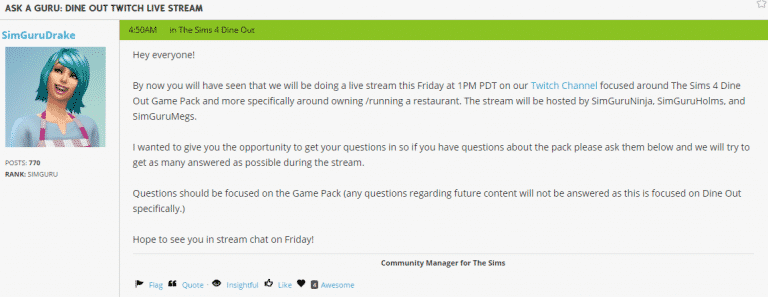
SimGuruDrake has opened an ‘Ask A Guru’ Thread over at The Sims Forums where you can post your questions about The Sims 4 Dine Out.

Some of the questions will be answered this Friday at 1PM EDT, when The Sims Team will be doing a Dine Out Livestream!

Post your questions!

Capture

Tip: @Vane_Sims

Origin On The House: Nox / Battlefield Hardline Getaway (FREE)

0

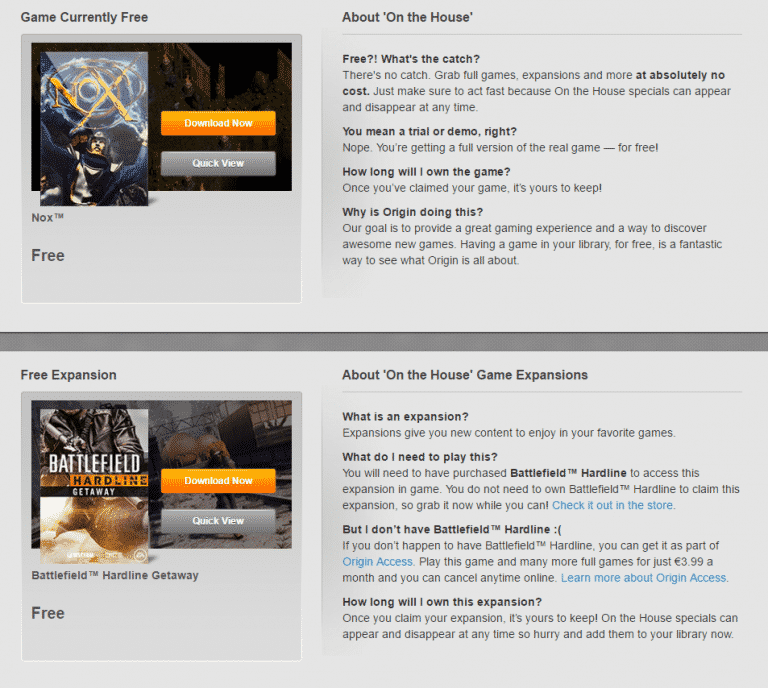
TWO games are now FREE for claiming on Origin!

Nox is available for free for a limited time, while Battlefield Hardline: Getaway Expansion Pack will be free until June 7th. Although you need the Battlefield Hardline base game to play this Pack, you can claim this pack for free now even though you don’t have the base game yet.

Click below to claim these games!

Capture

Heads up: The Sims 4 Update coming June 2nd

2

UPDATE: Associated Press have confirmed that the new update is coming on June 2nd!

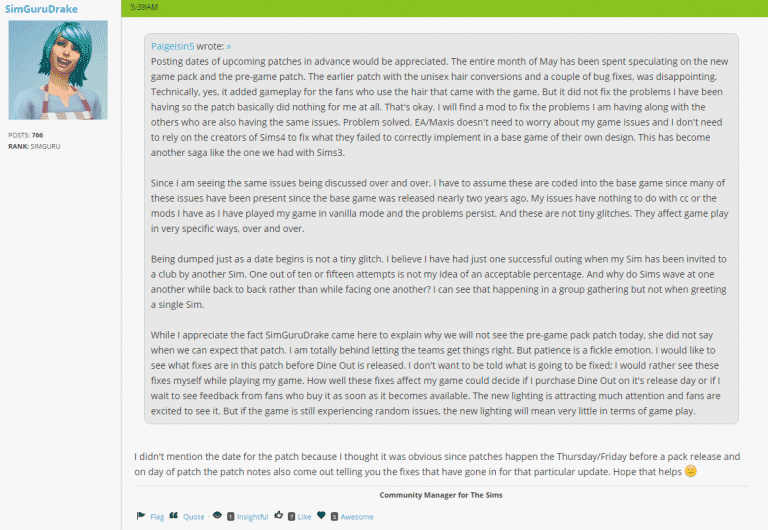
In preparation for The Sims 4 Dine Out release, which releases June 7th, The Sims Team will be releasing a new Update for The Sims 4 Tomorrow / this Friday.

Although SimGuruDrake didn’t want to clarify exactly when, she confirmed that the new Update will definitely release either tomorrow or this friday.

Capture

Along with some bug fixes, we should expect new features with the upcoming The Sims 4 Update, such as the teased CAS Changes and Improved Lighting!

The Sims Team joins Snapchat!

0

The Sims Team has just joined one of the biggest Social Networks of today – Snapchat!

In case you don’t know what it is, Snapchat is a social network where you can share your pics, videos and stories that will last for only 24 hours. You can also send messages to your friends that they can only see once. For more info, visit their website!

The Sims Team promises to share ”Lots of fun stuff with the Gurus and general studio life!”. For those who don’t have Snapchat and have no intentions to install it but would like to see what’s going on in The Sims Studio, we’ll be re-posting interesting Snaps and if there are more Snaps in a day, we’ll combine them and upload on our YouTube Channel.

You can add The Sims on Snapchat by searching for thesimsofficial, or by scanning the QR code down below:

2JaFCnqv