The Sims Team may have accidentally revealed the next pack making its way to The Sims 4 for Xbox One and PS4!
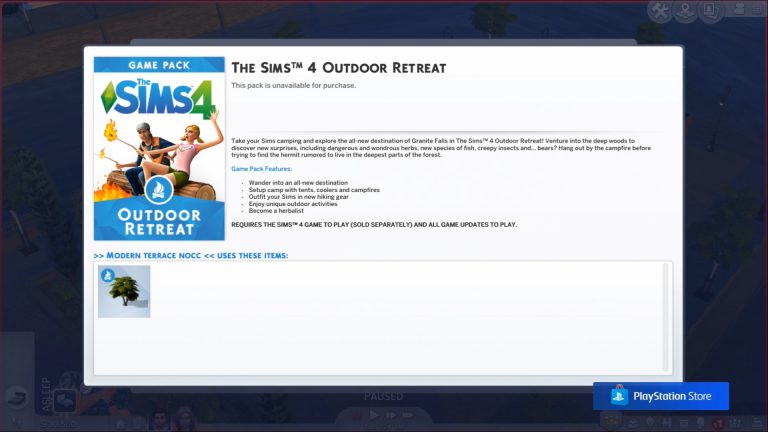
The latest Sims 4 Console Update features a lot of new community creations being added to the My Library. One of the creations called “Modern Terrace NoCC” features an object from The Sims 4 Outdoor Retreat – a Game Pack which currently is not available for Console.
Considering that The Sims Team had to manually pick and transport the room that features Outdoor Retreat from the online Gallery to Consoles they probably have this Game Pack ready for release…after Seasons.
Want to know everything that’s been added, improved and fixed with the latest update for The Sims 4 on Xbox One and PS4? Check out our update overview video above – there’s also a teaser for the upcoming pack making its way to the console (no, it’s not Seasons!)
The Sims Team has released a brand new Update for The Sims 4 for Console devices – Xbox One and PS4!
Patch Notes
Update: 11/08/2018 – v1.12
Hello Simmers!
‘Tis the Seasons to be jolly, almost! As we approach the end of the year, we looked at some of the more requested features from console Simmers to bring to this update. As well as feature requests, we focused on stability improvements and prepare your Sims for one of the most requested packs. Let’s jump in to what’s new.
What’s New?
The Main Menu is important – you can start a new game, resume an existing game, see what packs you have, check the control scheme and… that’s about it. Turns out that you wanted to do more, so how about switching which pack background you see? While on the Main Menu simply press Left or Right on the Right Stick to cycle through the backgrounds from The Sims 4 game and some of the packs you have installed. Best thing, your preferred background will be there the next time you return to the Main Menu.
To Save or not to Save? That is the question! For some Simmers, 5 saves was not enough so we have bumped that up to a 10 save capacity plus your Autosave.
General Issues
Some of the tutorials contained images that were inexplicably different sizes; we did a pass and now they are perfectly aligned.
Autosaves should always be represented by a portrait of your Household, but there were some opportunities for it to be blank. We have refocused our cameras and readied the photographer to generate accurate Household images for your save games.
Glass Roofs weren’t quite as glass as we would have liked with sunlight not reacting as we would have hoped. With a bit of polish, the glass lets the light shine through just like you would expect.
Oakenstead and Cypress Terrace in Willow Creek are some of the largest lots. They aren’t so big that daylight should act differently compared to the rest of Willow Creek.
Building takes skill and a creative eye. What it doesn’t need is a camera that appears to have a mind of its own. Now the build camera will stay on the floor you are working on, it is up to you when you want to move up and down floors.
The Camera Speed setting seemed to have its own speed in mind and it wasn’t necessarily the one you wanted.
Sometimes you zoom in on your Sims to check out what they are up to, but sometimes you couldn’t zoom back out. Now you can!
Live dragging objects makes moving things around a lot easier. Being able to Live Drag objects into a Sims’ inventory takes that a step further.
We addressed an issue which saw performance levels drop in some Lots and only recover if you travelled to a different Lot.
“Change Personality Traits…” panel for the Re-Traiting Potion can be backed out of, if you change your mind about changing your personality traits that is.
When creating your Sim, the profile icon had an distracting side effect as it updated to your changes. The profile icon will instead update when you have finished making adjustments and de-selected the active slider.
More community creations have been added into My Library.
We have dealt with a number of nasty issues that led to some stability issues.
Get to Work
A good detective follows the clues and solves the mysteries. Previously it was difficult and even impossible to investigate when you arrived on the scene. We polished the magnifying glass and isolated the witnesses so now you can investigate and solve your way to being the best detective in town.
Part of solving a crime is to talk with witnesses. While we can’t guarantee the answers you get will help you solve the case, the “Chat with Civilians” lets you talk with the Sims without having to repeat yourself a second time.
Get Together
While in Club Manager and accessing the Club Perks, the controls sometimes jumped around like a Sim on the dance floor. That made it difficult to select your options. Things are a lower tempo now, except the music beats.
Cats & Dogs
Everyone loves pictures of their Cats & Dogs but that doesn’t mean the camera should magically gain another frame. Now you get 5 photographs per photography session and no more, so pick your shots wisely.
Vampires
Vampires may not be able to see their own reflections, but that doesn’t mean you shouldn’t be allowed to remove facial features you added and changed your mind about. Eye Sockets/Brows/Mouths/Eye details can all be removed by selecting them again in CAS.
PlayStation 4
Simmers are creative by nature, so it came as little surprise that you needed more space to save your creations into My Library. There is now significantly more room to save additional Lots, Rooms and Households without compromising on what to keep.
The Sims is a colorful world, and if you tilted the camera just so, you got even more color thanks to the multi-colored walkways that would appear. We toned down the color scheme, so now the walkways shouldn’t look like a rainbow fell onto the ground anymore.
If you bought a Bundle of The Sims 4 packs and need quicker access to download them, the icons on the Main Menu will now take you to the download section of the PlayStation Store.
Xbox One
During the initial loading of The Sims 4 there was a black void that seemed to last forever. While it is part of the loading sequence, it should be a lot shorter, meaning less time wondering whether your TV is still turned on.
If you prefer to buy your packs in bundles, you may have noticed that the pack icon on the Main Menu incorrectly informed you that you didn’t own the pack. The pack icons should now accurately reflect whether you own the content or not regardless of how you prefer to shop.
If you purchased a Bundle of The Sims 4 packs and hadn’t installed them, the Main Menu icons will now correctly reflect the packs you own.
Xbox One X owners may have noticed some lower than expected shadow detail cast by Glass Roofs while zooming out. This has been rectified so the shadow detail is more detailed at all zoom levels.
Additional texture quality improvements have been made to allow Xbox One X owners to get more from their hardware.
As always, we appreciate the feedback and do read all the comments so be sure to let us know what you think of the changes once you have had a chance to try them out.
UPDATE: During the Q2 2019 Earnings Conference Call EA’s CEO Andrew Wilson has stated the facts we’ve listed below, as well as the fact that “We see a long future for this game and its thriving community”.
Electronic Arts has just announced during their financial report for the second quarter of 2019’s Fiscal Year. With some information about their other franchises they have also released an information that The Sims 4 has managed to sell nearly 30 million Expansion Packs from the game’s release to this date!
They haven’t provided any more information about The Sims Franchise. We’ll make sure to update this post with more information in case EA has any more prepared remarks regarding The Sims Franchise.
In our Sims 4 live service, fans have downloaded nearly 30 million expansion packs life-to-date, and with our monthly average players continuing to grow year-over-year, we see a long future ahead for this game and its thriving community.
Live services: net bookings were up 6% year on year, to $328 million, a new Q2 record. The increase was driven by FIFA, Madden and The Sims 4, offset by the effects of the transition from FIFA Online 3 to FIFA Online 4 in Asia. The Sims 4 live services are in their fourth year, continue to perform very strongly, and are on track to grow 20% over fiscal 2018. In addition, our subscription services continue to grow, and we expect the launch of Battlefield V to drive additional subscriptions to our Origin Access Premier service. As a reminder, over the course of a year, our Live Services business is about 50% Ultimate Team, 30% other live services such as Sims 4 Expansion Packs and FIFA Online 4, and 20% subscriptions, advertising and other.
We anticipate net bookings for the quarter to be $1.725 billion. This is down 12% year-onyear, primarily because we had two extra launches in Q3 last year – Need for Speed Payback and The Sims 4 for consoles.
Zerbu’s Mod Constructor Program for The Sims 4 has just entered a brand new testing phase!
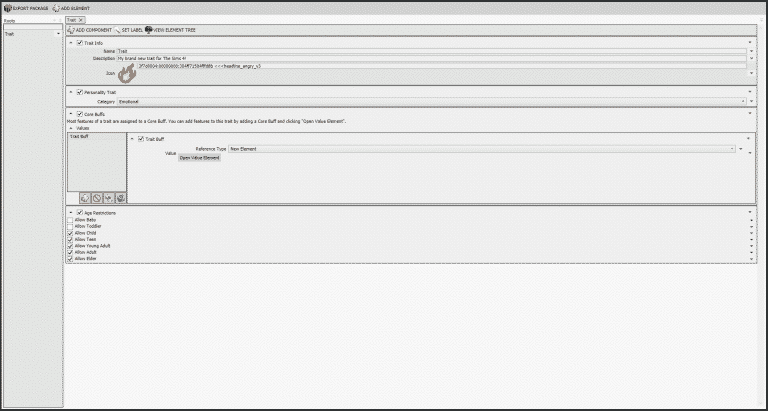
He announced in his post on SC Social that the latest test version of The Sims 4 Mod Constructor (V4) now allows you to create your own learnable traits! Learnable traits can be obtained by completing certain objectives in the game. They’re also going to be a “bridge” to aspirations, which Zerbu said that he plans to add sometime soon.
Check out more information down below:
New Feature: Learnable traits! Your can create reward traits that your Sims can learn by completing objectives. This feature is a “bridge” to aspirations, which I plan to add soon.
To create a learnable trait, add an “Objective Set” element from the “2: Intermediate” category of the Add Element dialog. There will be two components automatically created. One is a list of objectives, the other defines the reward.
To define an objective, add an item to the list and click “Open Value Element”. From there, click “Add Component” and select any of the available types from the “Objective Types” group.
You can add up to four objectives. By default, your Sim will need to complete all of them, but if you can add a “Only Some Required” component to the Objective Set, the Sim will only need to complete the specified amount.
For the reward component, enter the name, description and icon of the trait, as well as the text to be displayed as a notification when the Sim receives it. Set “Reward Trait” to “New Element” and click “Open Reward Trait Element” to add features to the trait as you would a normal personality trait.
Once your Sim completes the objectives, they’ll be rewarded with the trait and the notification will appear.
Want to learn more about Mod Constructor and download it yourself? Click the button below!
TheSims.com has published another blog about Venessa’s journey to fame in The Sims 4 Get Famous Expansion Pack!
Meet Venessa: Part Two
Fame for Real
The birds chirped. The sun was shining. Soft music played in the background. Venessa rubbed the sleep from her eyes, almost forgetting where she was. She had fallen asleep on the couch. Again. Learning her lines. It was the second week of filming her next big project, and her reputation was riding on this film. Her last movie, Finish Line, a summer blockbuster about the first female pro racecar driver, was a huge hit. So was the movie before that. Her agency thought she could do no wrong, but sometimes she still felt like that girl who hopped off the bus in Mirage Park.
She glanced up at the wall to her list, now framed behind glass. The words “BIG MOVIE” were scratched off. Venessa still remembered the phone call from her agency to tell her she got the part.
She strolled into the kitchen, flipped on the coffee machine, and headed to the juicer to make her favorite concoction.
Flash!
What was that? She quickly turned around and saw the shrubs shaking in her backyard.
“Who’s there?!” she screamed.
But she knew who it was. Why couldn’t they just leave her alone?
“If you don’t leave right now,” she yelled out the window. “I’m calling the police!”
The man with the camera bolted from her front yard into the street. He kept going and didn’t look back.
“Great,” Venessa sighed. “Front-page tabloid news again. Wonder if I got abducted by aliens this time.”
She stomped up the stairs to take a shower and get ready for work.
SimGuruKate has announced today that the Fame & Reputation Livestream that they planned to do for The Sims 4 Get Famous Expansion Pack has been delayed from November 2nd to November 6th.
The livestream right after Maxis Monthly concludes, which is also set for November 6th (11AM PT).
This Friday’s EP6 live stream will be moved to next Tuesday at 11:30 AM PT after Maxis Monthly. Maxis has a Creative Jam on Friday for us to get together and brainstorm and prototype cool new ideas that might influence current or future games. We want all staff to participate.
My apologies for the short notice. We felt it was super important to have all our developers participate in this very cool opportunity, including those who were scheduled to stream. We will being showing off all things Fame & Reputation on 11/6 at 11:30 AM PT!
The Sims 4 Seasons Expansion Pack is hitting the Xbox One / PS4 shelves just months after its release to PC and Mac.
The official date of the release for Seasons on Consoles is November 13th, 2018. If we take in consideration the release times for previous EPs for Consoles, we could expect the pack to come out at 10AM PT / 7PM CET / 6PM BT.
Yup, we too know that time zones can get really confusing which is why we’ve provided you with a countdown that you can track until the pack fully comes available for both consoles!
SimGurus have answered another batch of questions about The Sims 4 Get Famous Expansion Pack on Twitter!
We’ve compiled a list of all the relevant answers that SimGurus have provided down below. We’ll make sure to update the post with new informations and tweets by the gurus as they surface.
You can find the first part of the SimGuru Q&A HERE!
The lot traits can really help attract different types of celebrity Sims and to also create exclusive celebrity residential lots. So all the traits tie right back directly to Sims!
Music nowadays is all assembled in the studio. My shadowy friend here is into Media Production & has already produced a new track. She’s now in the process of mixing & matching different layers. (The audio of these tracks as you apply different sounds is frickin’ awesome BTW!) pic.twitter.com/OiycA1Joyi
And this is just a slice of all the cool little things you can do with this object! Can’t wait to show you more in all of its glorious intricacies! Lots of combinatory goodness here. (We’ll def show it in a pre-launch livestream!)
This audio content on the Music Production Station is wholly owned by Maxis/EA. This means you can safely play this content on social media without fear of any copyright strikes or claims! 🎼
You don’t lose reputation simply from doing something “bad”; you lose reputation when another sim perceives you as doing something “bad” in their eyes.
It’s possible that the pond tool could return in the future. We didn’t have time to add it for this release, but we didn’t want to hold terrain tools back due to that.
You’re in luck – as you may have seen in some info from SimsCamp today, there’s an easy to use cheat to add or remove any Fame Quirk if you need precise control over shaping your celebrity Sim.
Just to clear up discussion around Fame Quirks in #TS4GetFamous… they aren’t randomly assigned. We wanted it to always feel like receiving a quirk made sense in the context of how your Sim was recently behaving.
The behavior of your Sim determines which Fame Quirk they receive. Although it’s tuned differently per quirk, generally speaking performing the trigger behavior multiple times within a certain window of time is what causes a quirk to get assigned.
Ah… you may not be aware then, that when leveling up your Media Production Skill, way more options open up even within those initially available songs. From your screenshot, you were only seeing a small subset of the stems of the song that can be toggled.
No, the music station puts you in the role of a music producer – selecting the various stems of a song to create a final track. It isn’t for actually recording the music.
It puts you in the role of a music producer, where you select from various stems within a song to create tracks that you can release and play back on stereos, or get yourself signed by a music label.
To answer your question. Your sims can go to auditions at the same time. They go to these solo.
They can also have their gigs at the same time. You would have to choose which sim you want to follow to work. The others would go solo because you are busy.
SimGuruNick has announced that The Sims 4 for Xbox One and PS4 will be getting a brand new update this Wednesday – October 31st, 2018!
Although he hasn’t specified anything specific about this game update it’s probably going to bring plenty of bug fixes and game optimizations for the upcoming release of The Sims 4 Seasons which is hitting consoles on November 13th, 2018.
Our next console patch will be available Wednesday, October 31st at 10AM PST! Woooo!!! Check your local date/time here: https://t.co/XlcM1AZKTu
Footage that you see down below is presented by EA Game Changers
Ever since the announcement of The Sims 4 Get Famous Expansion Pack I’ve read a lot of comments from people who were worried that the asking price of Get Famous (40USD) is too much and that the pack should’ve been 20USD instead – the price of a Game Pack. Now, truth be told, I would probably be of the same opinion if I just watched the reveal trailer for The Sims 4 Get Famous because let’s be honest – it doesn’t reveal too much complexity within this pack.
However, after scratching the surface at SimsCamp 2018 and digging deeper into what The Sims 4 Get Famous has to offer I fully understand why The Sims Team has decided to make Get Famous into a full-fledged Expansion Pack.
Here are just some of the reasons why The Sims 4 Get Famous has every right to be an Expansion Pack:
1) Fame
The biggest feature about this pack lies withing its name – Fame!
If you’ve ever played The Sims 1 Superstar or The Sims 3 Late Night then you probably know something about The Sims Team’s perception of fame. The Sims 1 tried to incorporate fame through singing / acting careers while The Sims 3’s vision of fame was more through networking, opportunities and acting.
However, The Sims 4 Get Famous really takes becoming famous to a whole new level. Just like in real life – fame is not something that you can obtain by meeting a celebrity or testing out your waters in singing and acting. It’s something you have to work for in order to achieve – which is exactly what this pack is doing. Did your Athlete Sim just become a Professional Athlete in the Athlete Career? They will be rewarded with fame points! What about all those restless nights that your Sim has spent behind the DJ booth in various Nightclubs? They will receive fame points as well!
Sims can also become famous through different skills. Yup, I’m even talking about the Archeology Skill from The Sims 4 Jungle Adventure Game Pack.
There’s so many aspects where Fame is incorporated not just with the Base Game but all of the packs we’ve received so far. Best of all
2) Fame Perks & Quirks
One of my favorite things about this pack is that you get to branch out and choose different benefits as you become more famous and go through 5 different fame stages. Each stage brings unique perks that you can purchase using the Fame Points, which can be obtained each time you level up.
The perks are really fun to unlock and will give you plenty of special benefits but beware of the quirks – unlike with Vampire’s mechanism where you can just choose side effects / quirks of your choice here you have to be extra careful. Quirks are obtained by your Sim’s behavior and there’s no other way around them.
Want to use your fame to get all things for free? Go ahead! Love to interact with Paparazzi’s and have your photos taken by them? Beware, they might get too annoying…
3) Reputation
One of my favorite things that I loved about The Sims 2 Apartment Life is the introduction of reputation. Reputation is all about how other Sims will perceive you, observe you and interact with your Sim.
Sims with positive reputation will always have it easy with other Sims. However, negative reputation might be too much to handle – unless your Sim enjoys being the villain in their story.
The new world that you get with The Sims 4 Get Famous definitely isn’t the brightest gem when it comes to the lot numbers. Still, it manages to bring a completely new aesthetic in The Sims 4 series that we didn’t get with previous worlds.
It’s probably one of the best looking worlds out there which is why I’ll always ask myself why did we get punished with only 11 lots. If anything, it’s a bustling world full of Sims passing by that will definitely notice you if you’re on a path to becoming famous.
The Acting Career is a complex Active Career that you really have to work for in order to get somewhere. It has very complex gameplay that brings a lot of rewards (and obstacles) along the way. Sims will have to work on their skills, prepare for different tasks “just” so they can pass the audition for the gig. Afterwards come additional preparations that your Sim needs to perform in order to successfully complete the gig.
Following your Sims to the Studio Lot means that you get to meet with a lot of crew members who are each tagged with different titles. You have Co-Stars, Directors, Producers and many more who are all there to help you do your part.
There are over 30 gigs that your Sims can perform and each gig comes with different stage props, backgrounds and interactions that your Sim has to perform in order to complete their performance.
6) Acting Props
The acting props that you have on the set can all be placed down on your Home Lot or Venue! What’s best about it is that there are tons of unique acting interactions that you can perform anywhere. And, with the right props and objects that you place down you’ll be able to tell countless stories for your Sims!
Sims also have A HUGE amount of costumes that they can wear that you unlock through the Acting Career. It’s definitely the most complex career we’ve received to date with the most unlockables!
7) New Objects & their Complex Gameplay
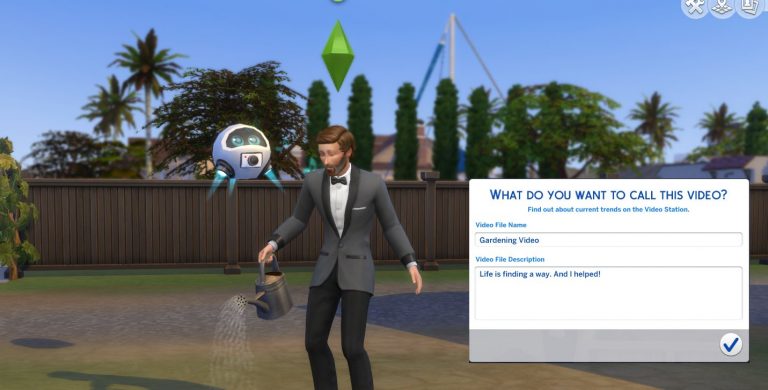
The Sims 4 Get Famous has some of the most complex objects we’ve received in The Sims 4. You get the Video Station that allows you to record, edit and upload videos. The Music Station provides all sorts of instruments and music that you can layer together creating unique and different sounds that you can play anywhere. There are Drones, Sleeping Pods, The Vault and so, so much more unique objects that will give you so many things to do on your home lot.
There are many gameplay aspects that I haven’t covered in this article that I will in my The Sims 4 Get Famous News & Articles Category. This doesn’t mean that Get Famous is a pack for everyone – but its asking price is completely reasonable for the content and gameplay that you get in exchange.
Still, this doesn’t say that I might fully like the pack considering that this is all based on 4 hours of gameplay. You should expect my The Sims 4 Get Famous Review a day or two before the release of this pack with full critiques and compliments.
During Sims Camp 2018 in London we had a chance to get our hands on The Sims 4 Get Famous Expansion Pack and try out the new objects that come with this pack. In the video above you’ll see a detailed breakdown of the new objects that come with unique and complex gameplay, some of them even being tied to the Media Production Skill which is brand new with this pack.
For all the exclusive posts and information about Get Famous visit our Get Famous Post Category!
There’s a variety of new items in Create A Sim that can be unlocked only through the Acting Career.
There’s a special new shiny outfit that you unlcok when reaching Level 10 Acting Skill.
There are a lot of different outfit themes featured in CAS that go through different centuries and eras.
There are 4 different talent agencies that actors can choose with different ones being unlocked at specific levels of your acting career.
Talent agencies can call your Sim to let them know about specific auditions.
You can do Drama Performances that will help you level up your Acting Career and also allow your Sim to earn Simoleons through tips.
Your Actor Sims will have a specific set of Prep Tasks such as working on specific skills, practicing drama scenes and researching specific emotional states that your Sims will have to get into.
Sims will get a prompt screen when it’s time for them to perform their gigs. You’ll be able to select to join your Sim and control their acting gig adventure or you can send them alone without your direct input during their shift.
The more prep tasks such as getting into hair makeup and practicing your acting and lines you do the more Simoleons and fame you earn at the end of your acting shift.
Sims can make posts to their “Simstagram Story”.
Sims can only do acting in the acting career and won’t be able to become directors or other NPCs that are featured at the studio venue.
You’ll be able to change the background green screen to specific themes. You’ll also be able to change special visual effects on the change such as rose petals falling from the sky.
As soon as you start performing your gig on the scene you’ll be given a specific list of tasks that you need to perform on the sage in order to successfully complete your gig performance.
After ending your acting gig shift you’re able to choose whether you want your Sim to stay at the studio lot or go home.
All of the objects that you get at the studio lot for performances, stage decoration and so on are available in Build Mode and can be placed down on your residental lot.
There are a lot of different themed rooms that revolve around specific scenes that are also featured on specific acting gig stages.
Themed Room Sets are very big and are recommended to be placed on bigger lot sizes.
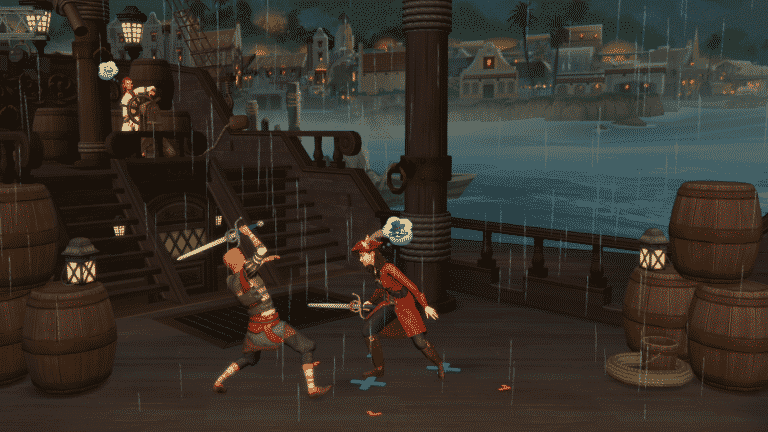
There are specific stage marks made only for buildable lot types that allow you to do all interactions that you would normally be able to do during your acting gig such as sword fighting, attacking Sims with a SimRay, Risky Dancing and so on.
Pregnant Sims are able to act and do their acting gigs.
Sims are able to use the Hair and Makeup Station to change their hairstyles and makeup. They’ll go through 3 different styles as they perform the interaction and you’ll be able to keep that specific style by just clicking on your Sim and selecting “Keep Style”.
You can change other Sims’ entire appearance by selecting the Hair and Makeup station which will take that specific Sim you’ve chosen to Create A Sim.
There are 2 different studios: one is for commercials and low budget gigs while the second studio is for primetime television and movies.
You can choose to immediately go into a costume by selecting the Costume stand object.
There’s an acting mark that you can place down on the ground where your Sims will be able to perform an unique death scene.
There’s a specific visual effect that makes Spaghetti and Meatballs fall from the sky.
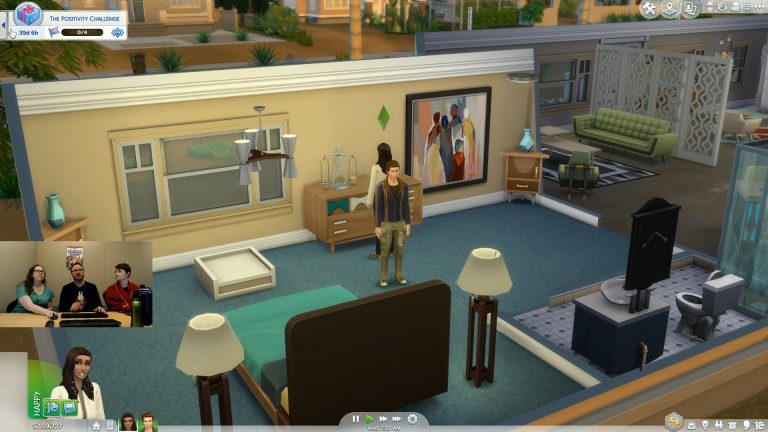
The Sims Team has accidentally revealed during The Sims 4 Get Famous Expansion Pack Livestream that there’s going to be a special online challenge for The Sims 4 Base Game.
In the top left corner you can see “The Positivity Challenge” in an User Interface that resembles previous online challenges that we had.
We can probably expect more information about this challenge as we approach the upcoming update for The Sims 4 Base Game.