
Home Blog Page 288

The Sims 4 Console: New Update + Patch Notes! (September 6th, 2018)

The Sims 4 Console: New Update + Patch Notes! (September 6th, 2018)

The Sims Team has released a brand new Update for The Sims 4 for Console devices – Xbox One and PS4!

Patch Notes

Update: 09/06/2018 – v1.10

Hello Simmers!

Wow, what a summer we have had in The Sims 4 with the release of two fan favorite packs, Cats & Dogs and Laundry Day and great feedback for the Community creations in My Library. We are keeping that sunshine-boosted momentum going with this new update.

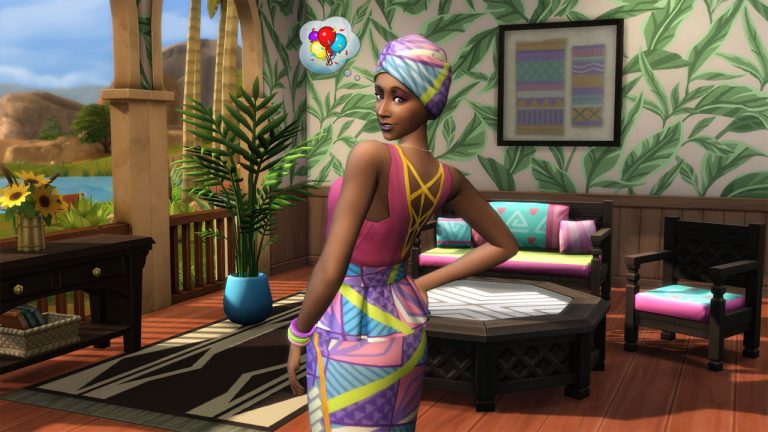
Talking of sunshine, we cast an eye to the Caribbean and its vibrant, colorful clothing and styles. With Carnival taking place throughout the region, we took inspiration from the traditional patterns to craft some hip, modern clothing for your Sims to wear to a party, or perhaps the last picnic of the summer.

This new update adds several often requested and cool new features, some of which are exclusive to console, so let’s jump in to what’s new.

What’s New?

  • Hark, what light through yonder window breaks! Or rather a sky light rather than a window. That’s right, Simmers can now add glass roofs to their builds.
  • Horticultural Sims can get their thumbs extra green thanks to the overhauled Gardening Skill. Rather than rewrite it, here is the perfect explanation from SimGuruGrant.
    • We synchronized plants to need water, etc. at the same time of day.
    • Seed Packets can be opened if placed on the ground.
    • There is a gardening sort in outdoor activities in Build to make it easy to find all the gardening equipment.
    • You can also buy seed packets in build now!
    • Gardening Evolution has been streamlined to 5 levels with better UI, plus we made the interaction immediate.
    • Uncommon and Rare Seed packets can be purchased once you’re at higher levels of the gardening skill. This means you can just buy them instead of hunting them down in the world.
    • You can research plants (new interaction) to gain info for your notebook.
    • Research tells you things like the right growing season, sell price, and more.
    • You can now sell Harvestables directly from the plant.
    • Most interactions now have an “area of effect” option at higher levels so you can garden more quickly and efficiently.
  • While SAVE GAME 1 is an inspired name for your first save, it doesn’t really portray what the save is. That is why you can now give your Save Game files their own name. When saving for the first time, simply hit Save and put in the name you want, and you are all set.
  • Don’t worry – if you already have SAVE GAME 1 or even made a typo when saving your new named saves, you can also RENAME your save files. To do this, open the Save Game or Load Game Menu and hit Square button (PS4) / X button (Xbox One).
  • Did you have bigger problems than just the name of your Save? Want to free up a Save Slot? With a new feature we like to call “DELETE” you can delete a Save Game rather than overwrite it. Simply highlight your Save Game in the Load or Save menu and press Triangle button (PS4) / Y button (Xbox One).
  • My Library is a place of wonder. One of the things we often wondered is “Why do you need to open a Household, Lot, Room before you can delete it?” We didn’t have a good answer for that so now you can just highlight the creation and press Triangle button (PS4) / Y button (Xbox One) to delete the item without having to open it first.
  • Thanks to your feedback and ongoing suggestions, we added more Community Creations. Thanks to all the Simmers for the suggestions and extra special thanks to the creators.
  • If you used a Household from My Library in CAS then proceeded into the World without making any changes, you’d find that My Library would have a whole load of clones. Now, if your Sim doesn’t change from the one you selected from My Library, we don’t waste your space by creating duplicates.
  • There are new clothing categories in CAS for Cold Weather and Hot Weather outfits. The extra options provide more wardrobe and storytelling options.
  • There is a whole new Swimwear category for toddlers.
  • What else can we say about CAS? I guess we could say that there are new lipsticks, eyeshadows, eyeliners. Everything you need for that new look.
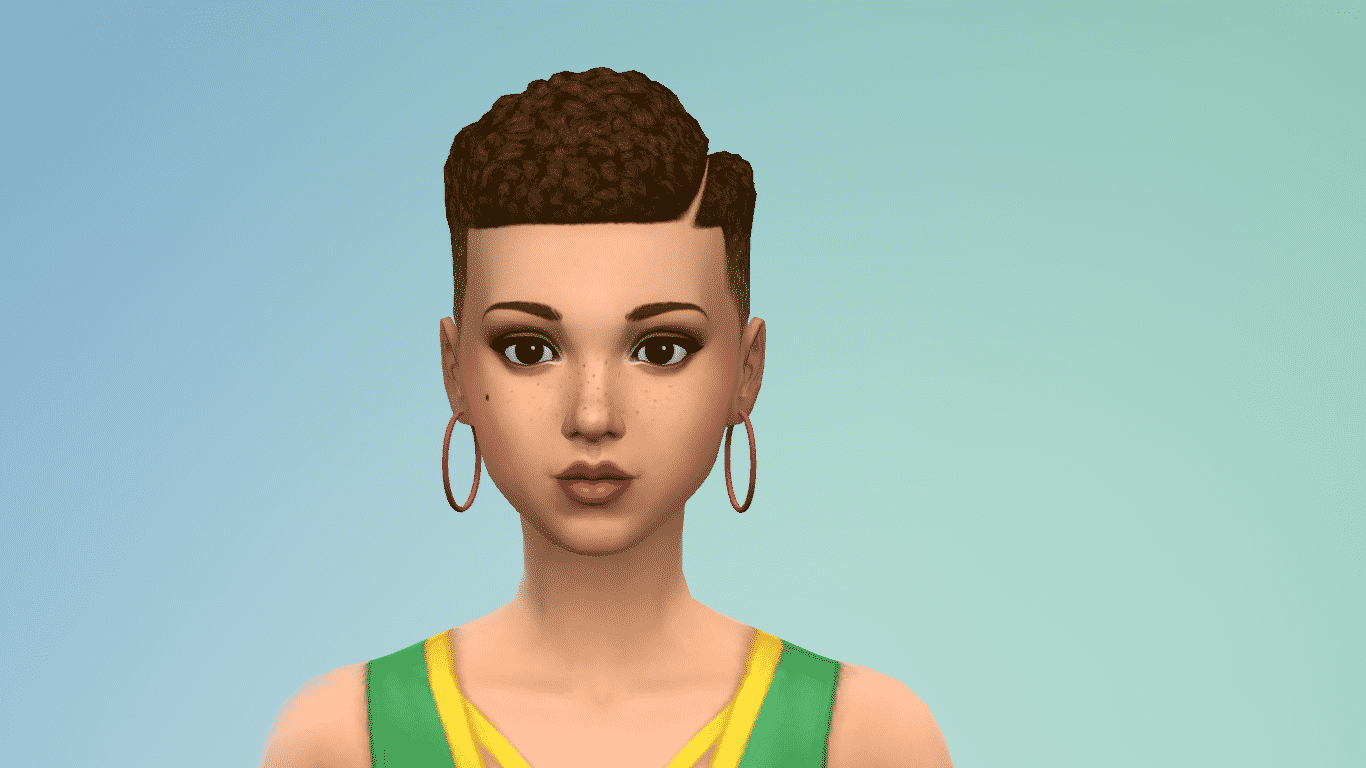
  • Caribbean content that includes three new hairs, two of which have beautiful curls & textures! There are also numerous new clothing assets, some makeup, and even a little furniture. We should mention that it includes a ceiling fan and sliding door…
  • If you go to the Rewards Store and look in the Aspirations panel, you’ll see you can spend satisfaction points to re-roll your traits with the re-training potion.

General Issues

  • Wallpapering a large room shouldn’t be any more challenging than it already is. I mean, who has time to line up the patterns just right? We got rid of that annoying performance drop when you got all decorative.
  • Things can and do go wrong in The Sims, so much so that we even have a Game Over screen. When you reach that screen, you might have been unlucky enough to realize that your latest Save Game recorded the fact that all your Sims were gone. Now, you get a choice of where you want to save your game, if you even want to.
  • A wise person once said… I need trepanation like a hole in the World. Well, OK they didn’t say that but if they played The Sims 4 and had used Undo on a room placement while placing a tile floor then they might have.
  • Using Manage Households to add families should be straight forward rather than being as smooth as a holiday meal with your extended family.
  • While you might not own a house, it doesn’t mean you shouldn’t be able to admire a beautifully built home with all its textures.
  • Starting a new life in a new lot with a new household is sure to bring neighbors over with pie and intrigue. That Welcome Wagon shouldn’t go hiding your controls though, just keep an eye on that one neighbor eyeing up your silverware.
  • Placing floors while using Place Room Mode shouldn’t cause performance issues anymore, floor fitters have gotten more efficient.
  • In Build Mode you’d expect the Search option to find what you needed and it kind of did, if you only searched for one word. It wasn’t so good if you added a multiple word search like “Unicorn Dreamshower,” Now everyone can search for and add a “Unicorn Dreamshower” in their home? Hurrah!
  • While you are busy searching, you might also notice that we correctly show the Build menus where previously there was a big gap.
  • You know what is better than watching TV? Watching TV with a friend, unless they like to talk through every show.
  • We have a large amount of choice in CAS so it was a shame that you couldn’t see some color swatches on clothing items as the sheer number of options couldn’t fit on screen. A bit of a wardrobe re-organization and all clothing options are available to you.
  • Ever notice that when the Welcome Wagon visits, the visiting Sim hides their fruit cake to keep for themselves? Well now they’ll actually share it with you. Whether you take a piece is up to you though.

Get to Work

  • When you start a new Career, you generally want to read the whole job description which is why we add the ability to scroll on the careers panel. Now you can’t claim you didn’t know what you were getting into when accepting a job.
  • Talking of careers, some employers can be overly aggressive with their hiring techniques and would overlap categories. We asked them kindly to be nice and organize the careers tabs so everyone could get some screen time.
  • Restocking supplies is no longer free, Sims will actually pay for what they order. It does mean that the cheaper restocking perk gets you some nice discounts.
  • Hospitals can get busy, it doesn’t mean that doctors trying to put more than one Sim in a bed at a time is an acceptable solution. New hospital rule: One patient, one bed!
  • Aliens and Vampires don’t feel inclined to change the colors of their beards and eyebrows when going to work anymore.
  • Case Closed! The Police Chief didn’t do it and can’t be a suspect of a crime anymore.
  • The “Ask About Suspect” interaction is now available during an APB event in the detective career.

City Living

  • Sims that are resurrected after dying from eating poisonous Pufferfish Nigiri will no longer die after eating anything else. We carefully washed the dishes to clean off the poison properly this time.
  • Every restaurant wants a good review from food critics and it helps if they don’t have conflicting experiences while coming up with their reviews. We all agreed on a rating system they’ll all stick to from now on.

Cats & Dogs

  • We don’t usually condone painting your cats and dogs, but it doesn’t mean you should be limited when doing it in Create a Pet. The larger paint strokes used to cause problems for a number of Simmers, until now.
  • Cats that have been spayed won’t get pregnant anymore if they have the Free Spirit trait and leave the house for a secret rendezvous with the tom cat next door.
  • You would have thought that cats held a static charge with the way that toys stuck to them when they finished playing. Turns out that isn’t the case so toys will stay on the floor when not being played with.
  • Adopt, don’t buy. Eligible Sims can do just that with their cat or dog of choice.
  • We love to look at photos of cats and dogs as much as the next person but sometimes you have to eat. Being able to back out of Simstagram Pet lets your Sim go and do the things Sims do.
  • Veterinary Clinic staff will focus on treating your furry friends even if a TV or computer is on the lot. We had to set the employees’ screen time rules.

Dine Out

  • New recipes from Cats & Dogs will be available and work as expected in restaurants.

Perfect Patio Stuff

  • *Big fish, little fish, cardboard box* All radios can now tune in to the Electronica station.

Romantic Garden Stuff

  • If you close your eyes really tight and wish hard enough at the Wishing Well a summoned child will actually be added to the household.
  • The Wishing Well now gives you a soulmate which matches the gender of your Sim’s romantic preference.

Backyard Stuff

  • Why do birds suddenly appear, everytime a bird feeder is near? Birds will come back to your garden when a bird feeder is placed.

Vintage Glamour Stuff

  • Butlers need rest, plus no one gets to sleep if they do chores while you try to sleep. Sending the Butler to go and sleep while everyone else is asleep will allow the time to fly by.
  • After a long day you just want to clean off the makeup. A new interaction on the vanity table will allow your Sim take off the Vanity Makeup.

PlayStation 4

  • PlayStation 4 Pro Simmers should notice higher Sim texture quality levels while in Live mode thanks to the additional power.

Xbox One

  • Simmers on Xbox One X can now get more from the additional power of the console and should notice higher Sim texture quality levels while in Live mode.
  • The Sims 4 might not be a game about reflexes but it doesn’t mean we want to be stuck at 30fps, that is why we have lifted the frame rate cap on Xbox One X.
  • Switching profiles won’t confuse your online friends as much as they’ll be able to accurately see what part of The Sims 4 you are actually playing.

As you might expect, we looked to the PC and Mac versions of The Sims 4 and brought over some of their fixes and changes to the PlayStation 4 and Xbox One. With all these new features and changes, we bet you are more eager to go and try them out than read about them so we’ll sign off here, for now!

– SimGuruLegacy
The Sims 4: The Gallery is back Online; Expect Less Downtimes

0

The Sims Team’s scheduled maintenance for The Sims 4 Gallery’s servers has finally been completed!

You’ve probably noticed in the last couple of weeks ever since The Gallery Overhaul Update that the servers would crash almost on a daily basis. The Sims Team is hoping that this maintenance will fix those issues and make The Gallery a stable experience once again.

The Sims 4: The Gallery is back Online; Expect Less Downtimes

The Sims 4 Console: Confirmed Content the Upcoming Update

SimGurus have confirmed that an update for The Sims 4 Xbox One and PS4 will be including more than just the regular bug fixes. Moreover, SimGuruKate has officially confirmed that the next update for The Sims 4 Console is coming this thursday!

If you’re interested in knowing what this update will include you’ve come to the right place! Here’s all the content confirmed so far that’s coming to the upcoming update for The Sims 4 on consoles:

Glass Roofs

Glass Roofs, originally introduced with The Sims 4 Seasons Expansion Pack is one of the biggest features confirmed for the upcoming update. The Glass Roofs update includes 6 new glass roof type. If you’re still wondering what they look like in the game check out the preview screenshots we’ve made back in June during The Sims 4 Seasons Livestream:

There are 6 new glass roof types being added to the game, including:

  • Hexagon Glass Roof
  • Solid-Sheet Glass Roof
  • Ornamental-Scrollwork Glass Roof
  • Diamond-Paneled Glass Roof
  • Square-Paneled Glass Roof
  • Rectangular Paneled Glass Roof

The Sims 4 Console: Confirmed Content the Upcoming Update

What do these glass roofs look like in the game? Check out the screen captures that we’ve made below!


Gardening Overhaul

A complete overhaul of the gardening system has been confirmed for the next update for The Sims 4 Console. This feature update has also arrived with The Sims 4 Seasons! Here’s all the new things featured with it:

Perhaps the most anticipated feature of today’s update, the Sims Team has overhauled the existing gardening system!

The Sims 4 Console: Confirmed Content the Upcoming Update

The following seed packets are now purchasable in buy mode:

  • Catnip Herb Packet – §25 (requires Cats & Dogs)
  • Starter Flowers, Fruits, Herbs, and Vegetables – §35
  • Farmer Flowers and Fruit – §100 (requires level 7 of the gardening skill)
  • Farmer Veggies and Herbs – §100 (requires level 7 of the gardening skill)
  • Uncommon Plants – §250 (requires level 7 of the gardening skill)
  • Rare Plants – §1,000 (requires level 10 of the gardening skill)

The Sims 4 Console: Confirmed Content the Upcoming Update* avocado tree requires The Sims 4 Jungle Adventure

Plants now have a brand new UI! Replacing the existing ten category system is a new quality bar with five different stages of evolution.

The Sims 4 Console: Confirmed Content the Upcoming Update

The Sims 4 Console: Confirmed Content the Upcoming Update

Along with the UI improvements, plants now have new interactions! Sims are now able to research their plants by taking a few picture and jotting down some notes! Once the interaction is complete, the plant’s details will appear in the sim’s personal notebook.

Also included with the update is improved selling options! Sims can now specify what they’re selling from the interaction menu. In order to use the new Super Sell feature, your sim must first reach level 8 in the gardening skill!

The Sims 4 Console: Confirmed Content the Upcoming Update


Caribbean Content Update

The Caribbean Content Update can be treated as a mini Stuff Pack added free of charge to The Sims 4 Base Game! This content update is already available on PC and Mac and has been confirmed to be added in the next update for The Sims 4 Console. Here’s all the Caribbean content that you can expect this Thursday!

Create A Sim

This update comes with three new hairstyles for teens and older Sims. One masculine, one feminine, and one unisex. Of course, players can always customise the tags to use these hairstyles on any Sim with any gender customisations. The new hairstyles feature some amazingly detailed ringlet curls!

In addition to the new hair, this update adds new clothing to the game. There is a new head wrap, 2 feminine tops, 2 feminine skirts, 1 unisex pair of sweatpants, 1 pair of unisex sandals, and 1 masculine suit. All of the new clothing comes with a good variety of variants.

In the makeup category, there is new lipstick, eyeliner and eyeshadow, featured below.

The Sims 4 Console: Confirmed Content the Upcoming Update

If you’re overwhelmed by ALL THIS NEW SHINY STUFF WHOAH, you’re not alone. To help, The Sims Team has added two new styled looks featuring these new CAS parts, so decking your Sims out for Carnival is as easy as click-and-go.

Build/Buy

CAS isn’t the only place where you’ll find new Caribbean-inspired goodies. You can completely revamp your Sim’s living space with a new wallpaper, armchair, loveseat, coffee table, potted plant, and painting, pictured below.

The Sims 4 Console: Confirmed Content the Upcoming Update

But The Sims Team still isn’t finished surprising us! There are four new sliding doors of varying heights in two distinct styles. A brand new ceiling fan can be found in Misc. Decorations as well. SPOILER ALERT: The fan is animated!

We could not be more hyped for all this free content. The Sims Team has really outdone themselves this time!

The Sims 4: Scheduled Gallery Maintenance

0

SimGuruKate tweeted out earlier today that The Sims team would be taking The Gallery down for some much-needed maintenance.e. This round of maintenance is scheduled to start at 11 PM PT  time today (7 AM UK time on Wednesday 6th) and may last for up to forty-eight hours. During this time all online features will be unavailable. SimGurus will confirm the work has been completed via Twitter.

The Sims 4: How to run a Batch Fix with Sims 4 Studio

Are you tired of seeing random townies using custom content you didn’t assign to them? Are you having issues with objects not doing what they are intended? Well we can fix some of your problems easily, thanks to Sims 4 Studio.

In this tutorial we will be going over how to apply batch fixes to Create-a-Sim and Build/Buy mode.

Please be sure to READ CAREFULLY before you run a batch fix. If you are unsure of what you are clicking, reference this guide.

Step 1

Install Sims 4 Studio!

If you are unsure on how to install S4S please read this guide here: Learning Your Tools: S4S

In the “Learning Your Tools: Sims4Studio” guide I will walk you through the install process and setting up the program for first time use.

Step 2

Now that you have Sims 4 Studio installed, launch the program.

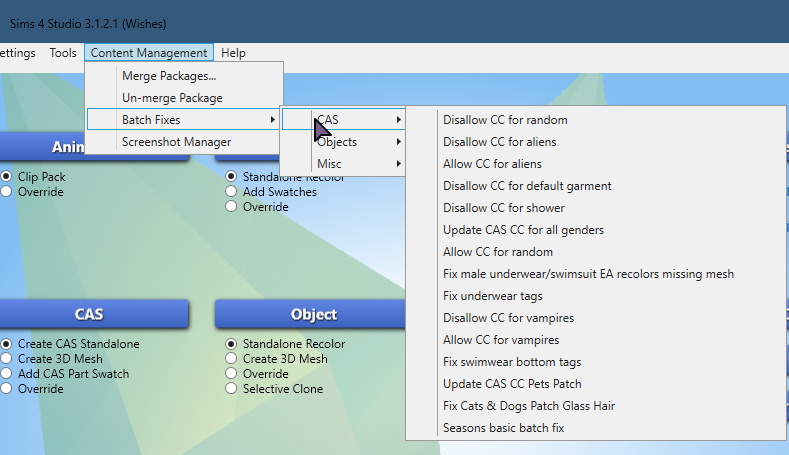
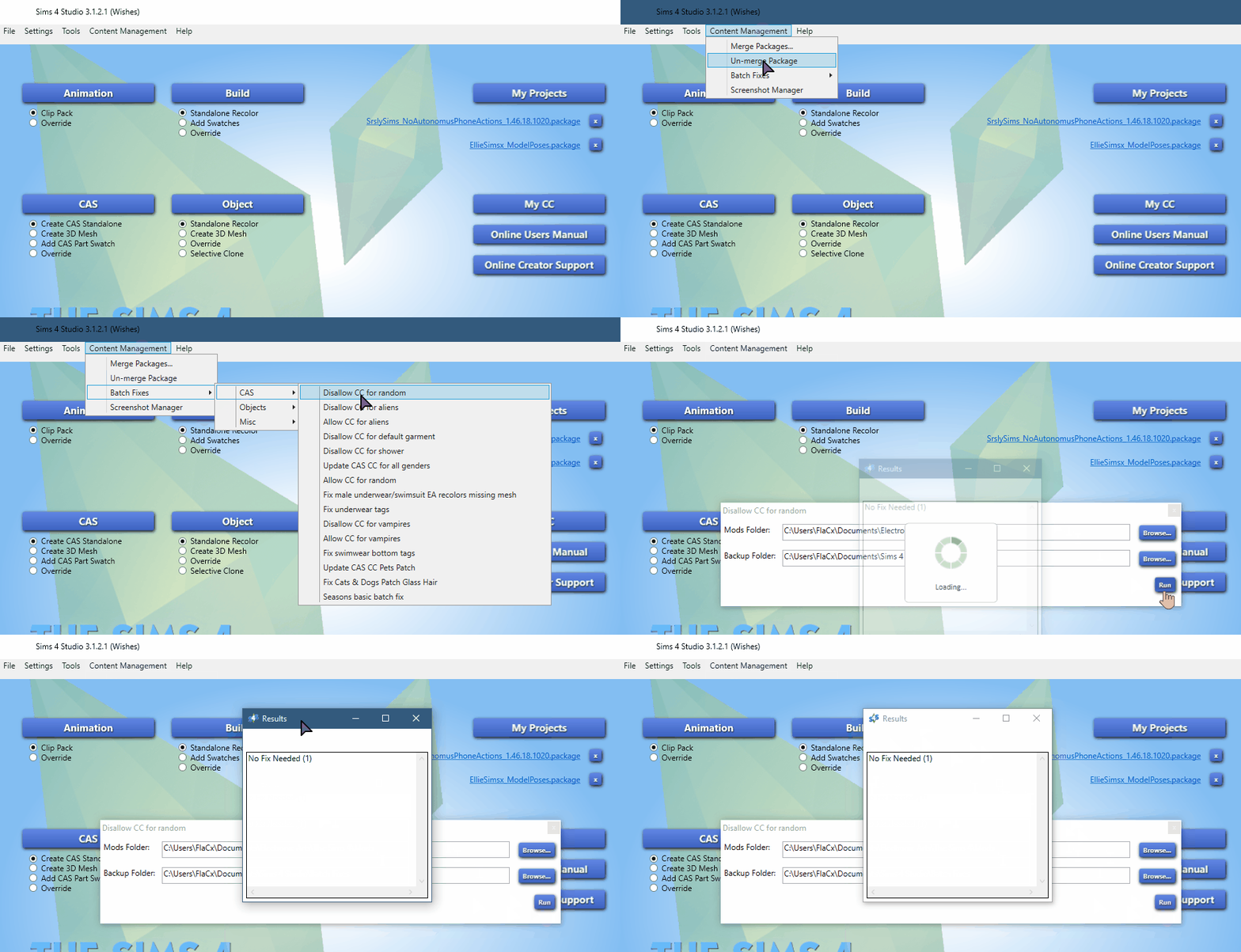
On the top navigation panel go to: Tools > Content Management > Batch Fixes


You will now see three options listed under Batch Fixes: CASObjects, and Misc.

These are the categories of fixes currently available for The Sims 4.

Lets go over each of the them, and their function.

Create-a-Sim Batch Fixes

CAS Batch Fixes – These will fix many errors caused by game updates to CAS + CC errors.

2018 09 01%2B15 20 57 Window

  • Disallow CC for random* – CC will not be used on townies, or game generated sims.
  • Disallow CC for aliens – CC will not be available for Aliens in CAS.
  • Allow CC for aliens – CC will be available for Aliens in CAS.
  • Disallow CC for Default – This fixes any CC item stuck on your sim in their “nude” outfit.
  • Disallow CC for shower  This fixes any CC items stuck on your sim in the shower. If this is a problem, and this batch fix does not fix it. Check out: “Reset Baiting Outfit“.
  • Update CC for all genders – This will allow male to use female clothes and vice versa.
  • Allow CC for random – CC will be used on all townies, or game generated sims.
  • Fix male missing mesh – This fixes the underwear/swimsuit bottoms that may be invisible.
  • Fix underwear tags – Some undergarmets are not tagged as underwear, this will fix that.
  • Disallow CC for Vampires – CC will not be available for Vampires in CAS.
  • Allow CC for Vampires – CC will be available for Vampires in CAS.
  • Fix swimwear bottom tags – Some swimwear are not tagged as swimwear this will fix that.
  • Update CAS CC Pets Patch – Fixes bugs caused by Pets that alter your custom content.
  • Fix Cats & Dogs Patch Glass Hair – Fixes the glass hair bug, caused by the pets patch.
  • Seasons basic batch fix – Adds the hot/cold tag to all CC, with the seasons patch.

Color Code Priority:

  1. Green = Run batch fix often
  2. Yellow = Run if you own those packs.
  3. Red = Run at your preference. 

*NOTE: If you are using CC for random, this can cause lag in the game. IF you are experiencing lag issues with many sims in one area having custom content you may want to run t”Disallow CC for Random”.

NOTE: IF YOU USE DEFAULT REPLACEMENTS

DO NOT RUN: Disallow CC for random or Disallow CC for Default 

If you are using default replacement skin/eyes/hair/etc. Find those items and remove them from your mods folder temporarily while you run the batch fix.

Once you are done place your default back into your mods folder. 

If you run these commands with your defaults installed they will be turned off!

Object Batch Fixes

Object Batch Fixes – These will fix many errors caused by game updates to Build/Buy mode objects.

2018 09 01%2B15 21 35 Window

  • Fix dishwasher slots – Allows dishwashers to be placed into old CC counter tops.
  • Fix Dining Tables… – Adds a tag for CC dining tables/chairs to be functional with dine out and parenthood.
  • Fix single beds..– Adds monsters under the bed to CC single beds.
  • Fix CC Light tuning – Fixes CC lights that no longer alluminate or give “Script Called” errors when placed.
  • Update CC counters for toddlers – Fixes the tuning on CC counters for the free toddlers life state patch.
  • Update CC bookcases for toddlers – Fixes the tuning on CC bookshelves for the free toddlers life state patch.
  • Update CC TV’s… – Adds all cc TV’s to be able to use the City Living video game consoles.
  • Fix objects for cats & dogs – Allows pets to sleep on furniture and interact with items.

Color Code Priority:

  1. Green = Run batch fix often
  2. Yellow = Run if you own those packs.
  3. Red = Run at your preference. 

Step 3

Run all of the batch fixes in GREEN.

Run all of the batch fixes in YELLOW if you own those packs.

Only run the batch fixes in RED if you are 100% sure you want to use those items.

NOTE: If you do happen to run a batch fix on something you did not want to change. There is a backup of the .package files that were changed in: DocumentsSims 4 StudioBatch Fixes

If you have a lot of custom content installed the batch fix process can take quite some time. Just wait until it is finished.

Here is a gif example of me running a batch fix on my game:

gif

Step 4 

Clear you game cache. If you are unsure how check out my tutorial: “How to ensure a Healthy Game!“. This will walk you through clearing your cache step by step as well as other tips and tricks to run your game smoothly with CC and Mods.

Step 5

Start up your game and enjoy it!

The Sims Mobile: Rockin’ Rocket Heirloom Quest Video Walkthrough

0

Want to know what it takes to complete The Sims Mobile’s latest Heirloom Quest that unlocks a whole new career? Check out our latest walkthrough video!

The Sims Mobile: Rockin’ Rocket Heirloom Quest Walkthrough

The Sims Mobile introduces a brand new career with their Limited-Time Rockin’ Rocket Heirloom Quest! After completing this limited 4-day quest you’re able to enjoy the brand new Space Explorer Career that you can play with in the Science Facility in Waterfront.

There are 19 parts of the Rockin’ Rocket Heirloom Quest that you need to complete in 4 days. Here are all the parts:

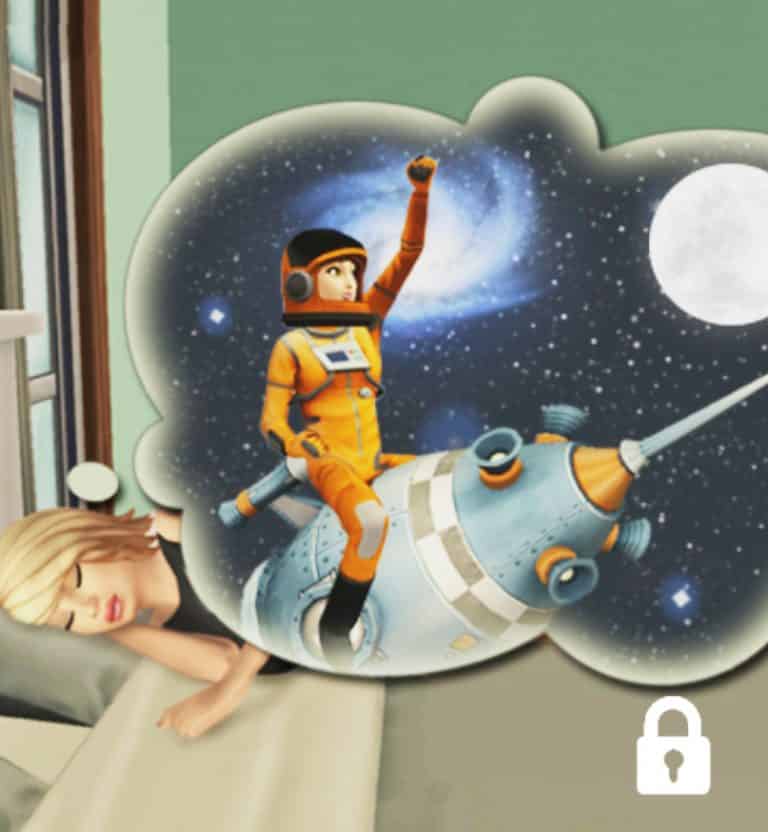
  • Part 1 – Tap on a bed and dream of space.
  • Part 2 – Tap on a sofa and read about space.
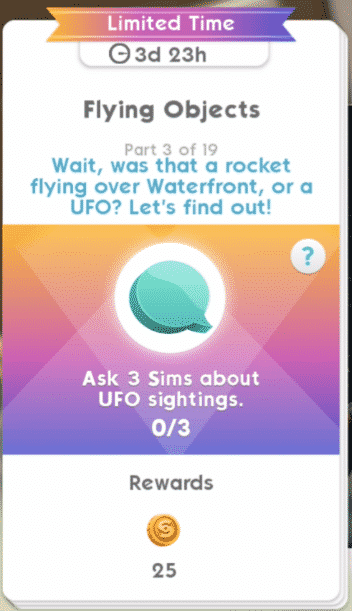
  • Part 3 – Ask 3 Sims about UFO sightings.
  • Part 4 – Earn 650 Simoleons.
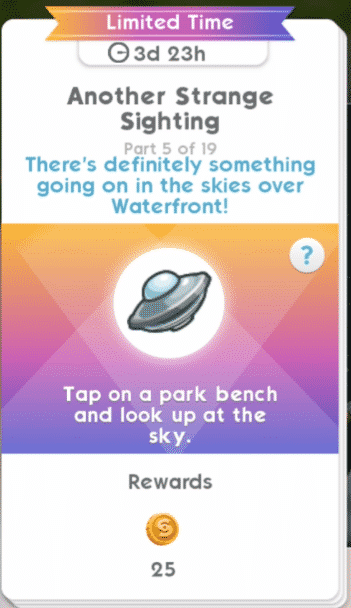
  • Part 5 – Tap on a part bench and look up at the sky.
  • Part 6 – Complete all LlamaZoom tasks and collect rewards.
  • Part 7 – Tap on a Sim and complete the It’s Just Rocket Science event. (8 hour event)
  • Part 8 – Tap on a table and apply for astronaut training.
  • Part 9 – Tap on a Sim and complete the Get In Shape event. (8 hour event)
  • Part 10 – Complete all LlamaZoom tasks and collect rewards.
  • Part 11 – Tap on a table and keep filling out more paperwork.
  • Part 12 – Complete all LlamaZoom tasks and collect rewards.
  • Part 13 – Tap on a Sim and complete the Get in Shape event. (8 hour event)
  • Part 14 – Complete all LlamaZoom tasks and collect rewards.
  • Part 15 – Tap on a Sim and complete the It’s Just Rocket Science event. (8 hour event)
  • Part 16 – Tap on a mirror and practice interview answers.
  • Part 17 – Tap on a Sim and complete the Get in Shape event. (8 hour event)
  • Part 18 – Complete all LlamaZoom tasks and collect rewards.
  • Part 19 – Tap on a Sim and complete the It’s Just Rocket Science event. (8 hour event)

The Sims Mobile: Rockin’ Rocket Heirloom Quest WalkthroughThe Sims Mobile: Rockin’ Rocket Heirloom Quest WalkthroughThe Sims Mobile: Rockin’ Rocket Heirloom Quest WalkthroughThe Sims Mobile: Rockin’ Rocket Heirloom Quest WalkthroughThe Sims Mobile: Rockin’ Rocket Heirloom Quest WalkthroughThe Sims Mobile: Rockin’ Rocket Heirloom Quest WalkthroughThe Sims Mobile: Rockin’ Rocket Heirloom Quest WalkthroughThe Sims Mobile: Rockin’ Rocket Heirloom Quest WalkthroughThe Sims Mobile: Rockin’ Rocket Heirloom Quest WalkthroughThe Sims Mobile: Rockin’ Rocket Heirloom Quest WalkthroughThe Sims Mobile: Rockin’ Rocket Heirloom Quest WalkthroughThe Sims Mobile: Rockin’ Rocket Heirloom Quest WalkthroughThe Sims Mobile: Rockin’ Rocket Heirloom Quest WalkthroughThe Sims Mobile: Rockin’ Rocket Heirloom Quest WalkthroughThe Sims Mobile: Rockin’ Rocket Heirloom Quest WalkthroughThe Sims Mobile: Rockin’ Rocket Heirloom Quest WalkthroughThe Sims Mobile: Rockin’ Rocket Heirloom Quest WalkthroughThe Sims Mobile: Rockin’ Rocket Heirloom Quest WalkthroughThe Sims Mobile: Rockin’ Rocket Heirloom Quest Walkthrough

Completing this event will grant you the Rockin’ Rocket Heirloom. With this Heirloom you have access to Space Explorer build objects that you can place down in the Science Facility in Waterfront.

The Sims Mobile: Rockin’ Rocket Heirloom Quest Walkthrough

Placing down the Observatory will grant you access to start the Space Explorer Career.

The Sims Mobile: New Waterfront Concept Art

0

SimGuruAzure has shared some new concept art pieces from The Sims Mobile’s latest Waterfront Update.

Howdy Simmers! Does anyone want to see some concept art of the Wellness Center? Emily? Both?

Full disclosure – I did not make this art! I got it from our amazing concept artist Amy. She’s not on twitter so I will share this for her.

The concept phase is a really fun part of game dev. It’s where the imagination can go crazy and possibilities are endless!

The Sims Mobile: New Waterfront Concept Art

We wanted to add careers that were different and fun so we realized that the venue would have to be more than just a gym. A Wellness Center could cover fitness and more!

During the concept phase Amy puts loads of items into the space to tell the story of the venue’s potential. We never end up making everything but it does inform our choices when our designers craft careers and stories.

The Sims Mobile: New Waterfront Concept Art

We always want to add fun little touches to the game. Amy concepts some of those as well! Sometimes special ideas stick, like this little dude! We made sure that he would make it into the game for players to find.

The Sims Mobile: New Waterfront Concept Art

Venue concepts are fun but my favorite concept art always revolves around characters like Izzy or Emily!

A lot went into Emily. We had so many discussion about every detail, like her shirt color…

The Sims Mobile: New Waterfront Concept Art

Orange won! Another piece of concept that I LOVE is the art that helped us hone in on what Emily’s personality would be like.

The Sims Mobile: New Waterfront Concept Art

The personality concept helps inform the way Emily speaks and her animations!

Here comes the last bit of concept art! One of the biggest debates we had over Emily was about her hair…

Should her hair be in a high bun? Does that look too neat? Emily is a woman on the move! Add more pencils and pens!!!!!!!

The Sims Mobile: New Waterfront Concept Art

My fav feedback note: “…No one clips their barrette like that”

Rest assured, in-game Emily clips her barrettes like the rest of us. That’s it for today folks! Happy Simming!

LIVE: First Official Guru Garage Livestream

1

Today is the day when SimGurus do their first ever Guru Garage Livestream! This livestream is going to be 2 hours of pure gameplay by the developers of The Sims 4 including SimGuruRomeo, SimGuruKate and some other Gurus.

The livestream will focus specifically on Get Together and Clubs. It begins on August 31st at 8PM CET / 7PM BT/ 11AM PDT!

For more information about the new marketing strategy that The Sims Team has planned up on Twitch, Click Here!


The Sims Mobile: First Look at the Space Explorer Career

0

The Sims Mobile Team released a small update for the game just a few hours ago which is around 30MB. Although the update doesn’t make any significant changes, it does add a new heirloom to the game called the Rockin’ Rocket. With this Heirloom you’ll be able to unlock the Rocket Science Career Story, and with it the Space Explorer Career itself.

The Sims Mobile: First Look at the Space Explorer Career

Considering that the heirloom has been added just recently we could be expecting the hunt for this heirloom to go live in the next few days. Until then, enjoy this preview of the Space Explorer Career, as well as a first look at the objects and chapters that you’ll get to unlock with the  Rocket Science Story!

The Sims Mobile: First Look at the Space Explorer Career

The Sims 4 Console: Release Date for Upcoming Update Announced

6

SimGuruLegacy has confirmed the release date for the upcoming update for The Sims 4 on Xbox One and PS4!

The update is expected to come with many game changing features that are both exclusive to console players such as Library improvements and additions, save game improvements as well as integration of free content that’s available on The Sims 4 for PC / Mac including Glass Roofs, Gardening Overhaul, Caribbean Content Update and more.

The update is scheduled for release on September 6th at 10am Pacific, a week before the release of The Sims 4 Get Together on consoles!

The Sims 4: SimGuruNinja changes Avatar featuring Unreleased Content

3

SimGuruNinja, a game developer working on The Sims 4 has published a new avatar on Twitter featuring a hairstyle that’s currently not available in the game’s catalogue.

To further prove that I went in the game and compared all the hairstyles available in the game (including all the released packs) + disabled the gender filter. However, no hairstyle was close to the hairstyle that SimGuruNinja has on his avatar.

The Sims 4: SimGuruNinja changes Avatar featuring Unreleased Content

The avatar was present on SimGuruNinja’s Twitter Profile for about an hour until it got taken down and replaced with a base game hairstyle.

In case you don’t know, SimGuruNinja developed a few Game Packs as well as Expansion Packs for The Sims 4. Could the hairstyle above be a part of an upcoming EP / GP? Time will tell!

The Sims 4 Get Together is coming to Xbox One and PS4 on September 11

The Sims Team has just announced that The Sims 4 Get Together Expansion Pack will finally be making its way to Xbox One and PS4 consoles on September 11th!

Get Together is the 4th Expansion Pack coming to Consoles with only Seasons left to make its way.

The Sims 4 Get Together is coming to Xbox One and PS4 on September 11

The Sims Mobile: Making of the Juicer Object (Concept to Completion)

0

SimGuruBeth, a Lead Object Modeler for The Sims Mobile, has shared an entire process of how the Juicer Object that can be found in Waterfront’s Wellness Center came to life. Check her process from concept to completion down below!

Hi! For those who don’t know, I’m Beth – the lead Object Modeler on The Sims Mobile. I help my team create our furniture and venues. Now that Waterfront is out (yay!), I want to share an example of how we take an object from concept to the final model.

The Sims Mobile: Making of the Juicer Object (Concept to Completion)

After designs for a feature are final, the concept artist provides a callout for us to work with. I begin figuring out how it can work for our animators and within our limitations. I create a ‘block model’ to get a sense of scale/placement that will work.

The Sims Mobile: Making of the Juicer Object (Concept to Completion) The Sims Mobile: Making of the Juicer Object (Concept to Completion)

Next, I start work on the final model by getting the basic shapes blocked out before adding smaller details. Then I check to see if I can reuse anything we’ve made before. Work smart, not hard! It adds consistency to our world and our art style.

The Sims Mobile: Making of the Juicer Object (Concept to Completion)

Finally I’ll start texturing. I’ll start by adding base shadows and highlights, and work on everything in grayscale – this helps keep good values on the final piece. Once I’m all done I’ll start deciding which parts will change colors with the variant options.

The Sims Mobile: Making of the Juicer Object (Concept to Completion)

Once the model is done, I add it to the game. It’s our job to ensure it all works in game before submitting any work. Then it’s tested and we wait for release. There’s a lot involved in making it all look good as a final product! Hope you enjoyed my part of Making of Waterfront.

The Sims Mobile: Making of the Juicer Object (Concept to Completion) The Sims Mobile: Making of the Juicer Object (Concept to Completion)

The Sims 4 Gallery Spotlight: Affordable & Luxury Homes

The Sims 4 Gallery Spotlight: Affordable & Luxury Homes

In this Spotlight we’re featuring both affordable and luxurious homes for your Sims that feature multiple packs of content.

Hover over the pulsing plumbobs to see screenshots of marked areas. Pulsing plumbob that’s on the left bottom corner contains all the info (and download link) of the lot.

To see more of our previous Gallery Spotlights, CLICK HERE!

[ult_hotspot main_img=”id^77963|url^https://simscommunity.info/wp-content/uploads/2018/08/08-25-18_12-54-57-AM.jpg|caption^null|alt^null|title^08-25-18_12-54-57 AM|description^null”][ult_hotspot_items icon_type=”custom” icon_img=”id^39525|url^https://simscommunity.info/wp-content/uploads/2015/09/plumbob2.png|caption^null|alt^null|title^plumbob2|description^null” img_width=”38″ tooltip_custom_color=”” tooltip_custom_bg_color=”rgba(255,255,255,0.01)” tooltip_width=”400″ tooltip_position=”right” enable_bubble_arrow=”off” tooltip_continuous_animation=”on” hotspot_position=”58.7950327510917,51.77914110429448″]

The Sims 4 Gallery Spotlight: Affordable & Luxury Homes

[/ult_hotspot_items][ult_hotspot_items icon_type=”custom” icon_img=”id^39525|url^https://simscommunity.info/wp-content/uploads/2015/09/plumbob2.png|caption^null|alt^null|title^plumbob2|description^null” img_width=”38″ tooltip_custom_color=”” tooltip_custom_bg_color=”rgba(255,255,255,0.01)” tooltip_width=”400″ tooltip_position=”right” enable_bubble_arrow=”off” tooltip_continuous_animation=”on” hotspot_position=”34.85262008733624,52.02453987730061″]

The Sims 4 Gallery Spotlight: Affordable & Luxury Homes

[/ult_hotspot_items][ult_hotspot_items icon_type=”custom” icon_img=”id^39525|url^https://simscommunity.info/wp-content/uploads/2015/09/plumbob2.png|caption^null|alt^null|title^plumbob2|description^null” img_width=”52″ tooltip_custom_color=”#1e73be” tooltip_custom_bg_color=”#ffffff” tooltip_width=”450″ tooltip_position=”right” tooltip_continuous_animation=”on” hotspot_position=”89.61858624454149,3.190184049079755″ tooltip_custom_border_size=”border-style:solid;|border-width:2px;border-radius:5px;|border-color:#81d742;”]

Let’s Start a Family (Download Here)

by CIMTHABESTB247

Value: §17,274
Size: 20×15
Lot Type: Residental Lot[/ult_hotspot_items][/ult_hotspot][ult_hotspot main_img=”id^77924|url^https://simscommunity.info/wp-content/uploads/2018/08/08-25-18_1-02-55-AM.jpg|caption^null|alt^null|title^08-25-18_1-02-55 AM|description^null”][ult_hotspot_items icon_type=”custom” icon_img=”id^39525|url^https://simscommunity.info/wp-content/uploads/2015/09/plumbob2.png|caption^null|alt^null|title^plumbob2|description^null” img_width=”38″ tooltip_custom_color=”” tooltip_custom_bg_color=”rgba(255,255,255,0.01)” tooltip_width=”400″ tooltip_position=”right” enable_bubble_arrow=”off” tooltip_continuous_animation=”on” hotspot_position=”53.05676855895196,48.466257668711656″]

The Sims 4 Gallery Spotlight: Affordable & Luxury Homes

[/ult_hotspot_items][ult_hotspot_items icon_type=”custom” icon_img=”id^39525|url^https://simscommunity.info/wp-content/uploads/2015/09/plumbob2.png|caption^null|alt^null|title^plumbob2|description^null” img_width=”38″ tooltip_custom_color=”” tooltip_custom_bg_color=”rgba(255,255,255,0.01)” tooltip_width=”400″ tooltip_position=”right” enable_bubble_arrow=”off” tooltip_continuous_animation=”on” hotspot_position=”28.404748908296945,49.4478527607362″]

The Sims 4 Gallery Spotlight: Affordable & Luxury Homes

[/ult_hotspot_items][ult_hotspot_items icon_type=”custom” icon_img=”id^39525|url^https://simscommunity.info/wp-content/uploads/2015/09/plumbob2.png|caption^null|alt^null|title^plumbob2|description^null” img_width=”52″ tooltip_custom_color=”#1e73be” tooltip_custom_bg_color=”#ffffff” tooltip_width=”450″ tooltip_position=”right” tooltip_continuous_animation=”on” hotspot_position=”89.61858624454149,3.190184049079755″ tooltip_custom_border_size=”border-style:solid;|border-width:2px;border-radius:5px;|border-color:#81d742;”]

The Water House 2.0 (Download Here)

by CIMTHABESTB247

Value: §188,885
Size: 30×20
Lot Type: Residental Lot[/ult_hotspot_items][/ult_hotspot][ult_hotspot main_img=”id^77926|url^https://simscommunity.info/wp-content/uploads/2018/08/08-25-18_1-05-54-AM.jpg|caption^null|alt^null|title^08-25-18_1-05-54 AM|description^null”][ult_hotspot_items icon_type=”custom” icon_img=”id^39525|url^https://simscommunity.info/wp-content/uploads/2015/09/plumbob2.png|caption^null|alt^null|title^plumbob2|description^null” img_width=”38″ tooltip_custom_color=”” tooltip_custom_bg_color=”rgba(255,255,255,0.01)” tooltip_width=”400″ tooltip_position=”right” enable_bubble_arrow=”off” tooltip_continuous_animation=”on” hotspot_position=”54.26787663755459,56.56441717791411″]

The Sims 4 Gallery Spotlight: Affordable & Luxury Homes

[/ult_hotspot_items][ult_hotspot_items icon_type=”custom” icon_img=”id^39525|url^https://simscommunity.info/wp-content/uploads/2015/09/plumbob2.png|caption^null|alt^null|title^plumbob2|description^null” img_width=”38″ tooltip_custom_color=”” tooltip_custom_bg_color=”rgba(255,255,255,0.01)” tooltip_width=”400″ tooltip_position=”right” enable_bubble_arrow=”off” tooltip_continuous_animation=”on” hotspot_position=”34.347707423580786,56.56441717791411″]

The Sims 4 Gallery Spotlight: Affordable & Luxury Homes

[/ult_hotspot_items][ult_hotspot_items icon_type=”custom” icon_img=”id^39525|url^https://simscommunity.info/wp-content/uploads/2015/09/plumbob2.png|caption^null|alt^null|title^plumbob2|description^null” img_width=”52″ tooltip_custom_color=”#1e73be” tooltip_custom_bg_color=”#ffffff” tooltip_width=”450″ tooltip_position=”right” tooltip_continuous_animation=”on” hotspot_position=”89.61858624454149,3.190184049079755″ tooltip_custom_border_size=”border-style:solid;|border-width:2px;border-radius:5px;|border-color:#81d742;”]

Modern Estate (Download Here)

by mwn2002

Value: §211,327
Size: 40×30
Lot Type: Residental Lot[/ult_hotspot_items][/ult_hotspot][ult_hotspot main_img=”id^77929|url^https://simscommunity.info/wp-content/uploads/2018/08/08-25-18_1-10-19-AM.jpg|caption^null|alt^null|title^08-25-18_1-10-19 AM|description^null”][ult_hotspot_items icon_type=”custom” icon_img=”id^39525|url^https://simscommunity.info/wp-content/uploads/2015/09/plumbob2.png|caption^null|alt^null|title^plumbob2|description^null” img_width=”38″ tooltip_custom_color=”” tooltip_custom_bg_color=”rgba(255,255,255,0.01)” tooltip_width=”400″ tooltip_position=”right” enable_bubble_arrow=”off” tooltip_continuous_animation=”on” hotspot_position=”52.234579694323145,47.11656441717791″]

The Sims 4 Gallery Spotlight: Affordable & Luxury Homes

[/ult_hotspot_items][ult_hotspot_items icon_type=”custom” icon_img=”id^39525|url^https://simscommunity.info/wp-content/uploads/2015/09/plumbob2.png|caption^null|alt^null|title^plumbob2|description^null” img_width=”38″ tooltip_custom_color=”” tooltip_custom_bg_color=”rgba(255,255,255,0.01)” tooltip_width=”400″ tooltip_position=”right” enable_bubble_arrow=”off” tooltip_continuous_animation=”on” hotspot_position=”37.54093886462882,46.62576687116564″]

The Sims 4 Gallery Spotlight: Affordable & Luxury Homes

[/ult_hotspot_items][ult_hotspot_items icon_type=”custom” icon_img=”id^39525|url^https://simscommunity.info/wp-content/uploads/2015/09/plumbob2.png|caption^null|alt^null|title^plumbob2|description^null” img_width=”52″ tooltip_custom_color=”#1e73be” tooltip_custom_bg_color=”#ffffff” tooltip_width=”450″ tooltip_position=”right” tooltip_continuous_animation=”on” hotspot_position=”89.61858624454149,3.190184049079755″ tooltip_custom_border_size=”border-style:solid;|border-width:2px;border-radius:5px;|border-color:#81d742;”]

Los Gallardos Villa (Download Here)

by blackrosemakridu

Value: §261,985
Size: 50×50
Lot Type: Residental Lot[/ult_hotspot_items][/ult_hotspot]