Home Blog Page 301

The Sims 4 Update: New Stuff Pack Features & Improvements

The Sims 4’s latest update didn’t just bring new improvements to the base game. Several Stuff Packs for The Sims 4 have been upgraded with a few tweaks and additions, all of them which are focused solely on gameplay objects. Here’s what’s new in some of the Stuff Packs for The Sims 4:

The Sims 4 Fitness Stuff

Sims listening to music from their earbuds are now finally able to raise their fun need for doing so!

The Sims 4 Update: New Stuff Pack Features & Improvements

The Sims 4 Bowling Night Stuff

There are several great improvements in this Stuff Pack. First of all, your Sims are now able to multitask while bowling. This means they’ll be able to socialize with their group comfortably while bowling together.

The Sims 4 Update: New Stuff Pack Features & Improvements

Next, you’ll be able to choose between 3 different frames to play with when starting a bowling round:

  • 3 Frame Game
  • 5 Frame Game
  • 10 Frame Game

The Sims 4 Update: New Stuff Pack Features & Improvements

And last but not least, your Sims will now level up in their Bowling Skill much faster now!

The Sims 4 Vintage Glamour Stuff

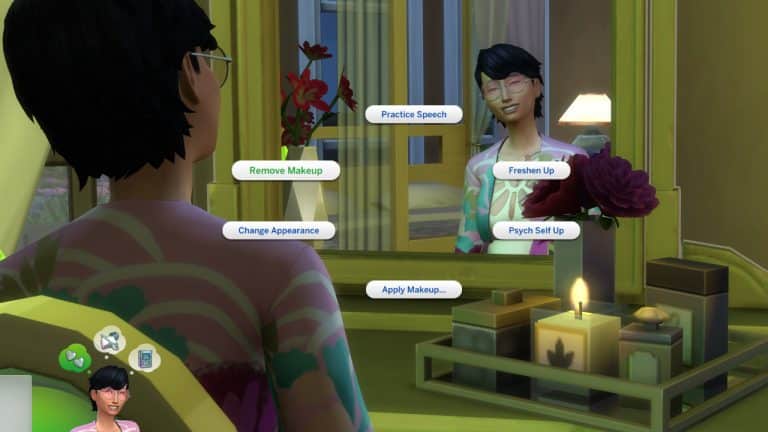
Makeup that you apply using the vanity table can now also be removed directly from the vanity table without having to go take a shower or change outfits in order to remove it.

The Sims 4 Update: New Stuff Pack Features & Improvements

You’re now able to order your Butler to go to sleep. This is really helpful if your entire household is sleeping and you want to enable ultra speed mode by sending the butler go to sleep as well.

The Sims 4 Update: New Stuff Pack Features & Improvements

The Sims 4 My First Pet Stuff

The death of your rodent pet will now have an impact on your household, giving them a sad moodlet.

I tried to trigger the death of my rodent however there seems to be an issue where the food seems refilling automatically even when I isolate the rodent cage.

The Sims 4 Update: New Stuff Pack Features & Improvements

The Sims 4: How to live in a Glass Dome!

Reddit User Nikolai2960 discovered you can use the new Glass Roof update to live inside a dome!

Heres how to do it!

Step 1

Build a house! I chose to make a small hut because the lot is quite snug, however, this can work on larger builds too as long as the lot is also big.

The Sims 4: How to live in a Glass Dome!

Step 2

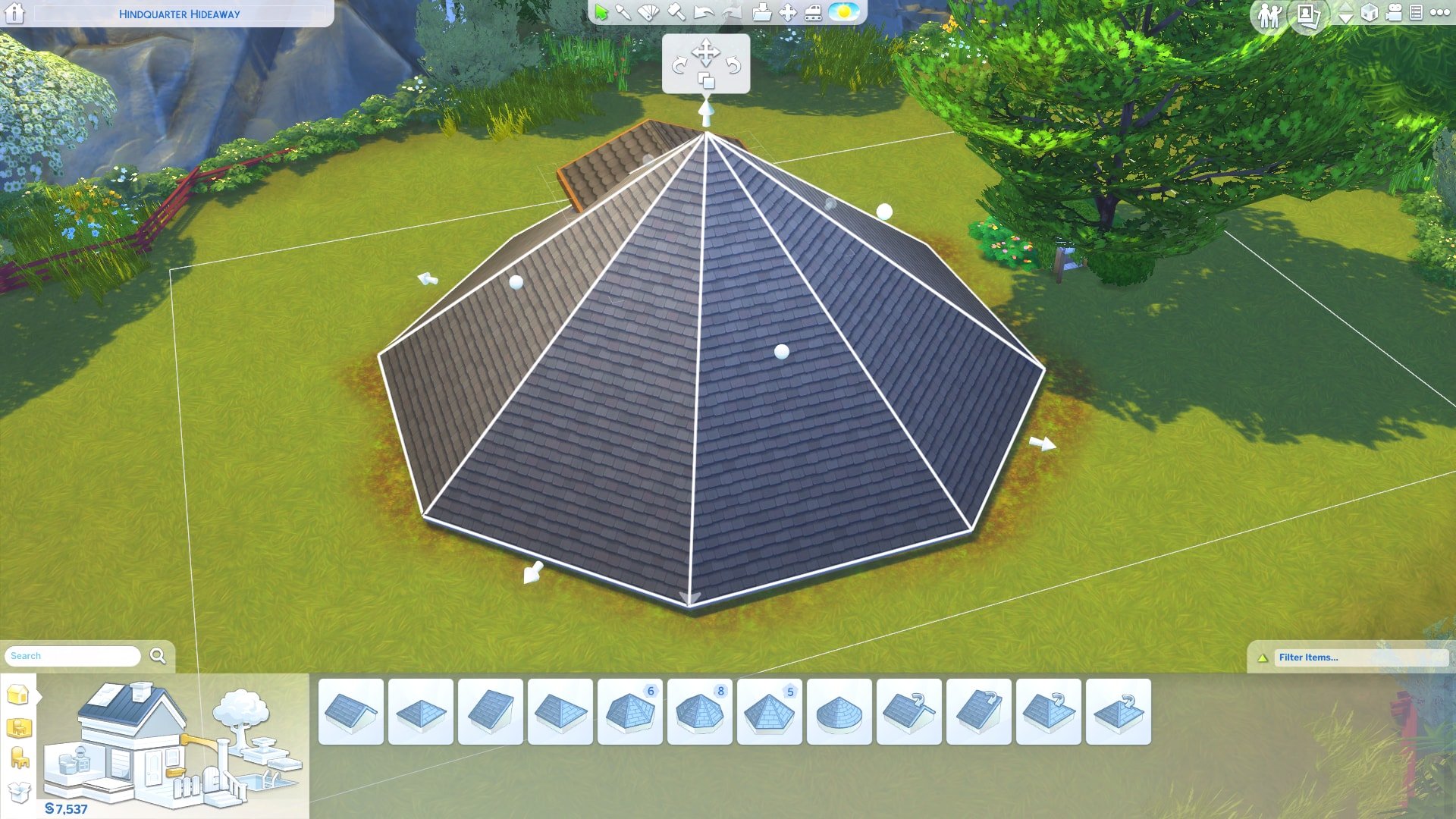
Choose a Round or Octagonal Roof and place it in the center of your house! Don’t worry if the house clips through, the next step will fix that. You should have something like this:

The Sims 4: How to live in a Glass Dome!

Step 3

Next, you want to drag the white dots upwards so the roof is a dome, the roof will look like the 2nd picture when you have it correct:


The Sims 4: How to live in a Glass Dome!

The Sims 4: How to live in a Glass Dome!

Step 4

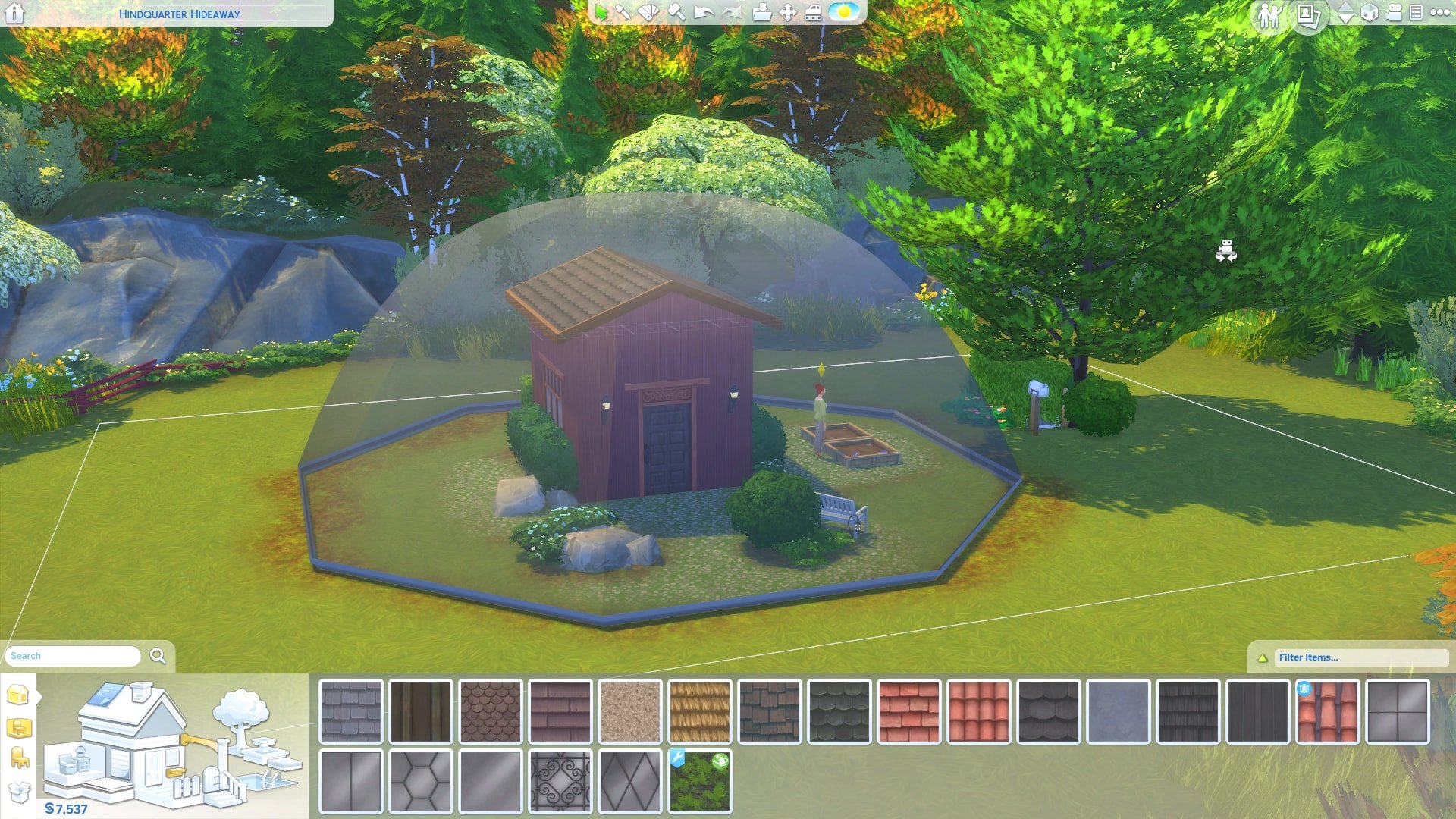
Now you have your dome shape it’s time to choose some glass! Head over to the roof section and choose a glass design, I chose the clear design so it looks like a snowglobe!

The Sims 4: How to live in a Glass Dome!

The Sims 4: How to live in a Glass Dome!

Step 5

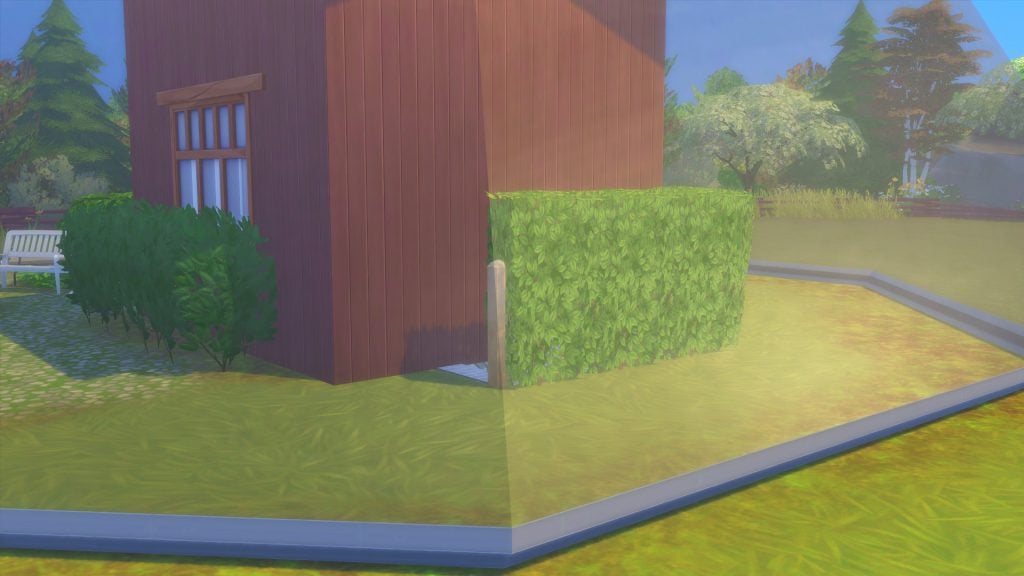
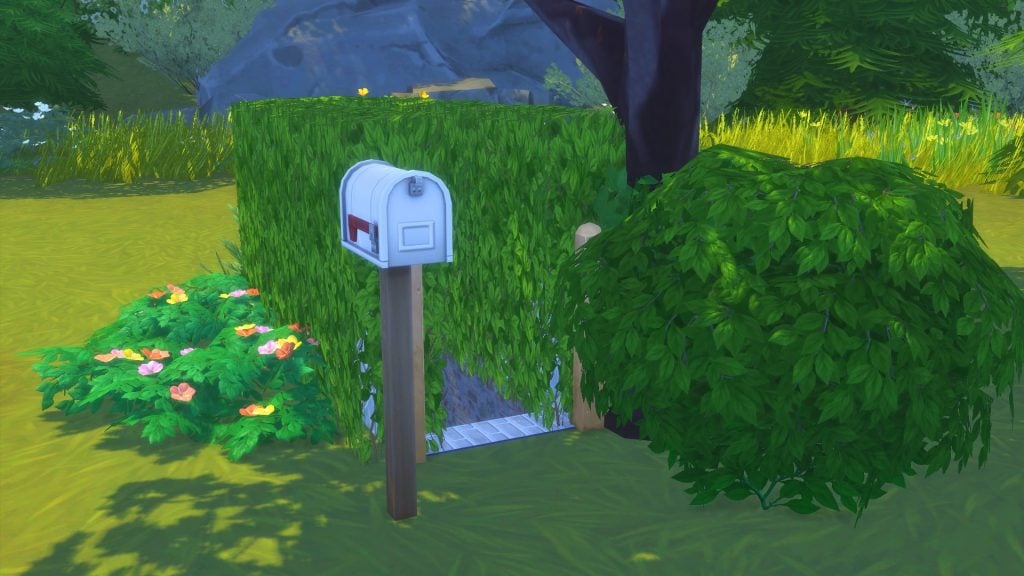
The final step is so your Sim can access their home! You need to use the basement tool to make an underground corridor. I hid the entrances to the domes with Hedge Fences. Like this:

The Sims 4: How to live in a Glass Dome!

The Sims 4: How to live in a Glass Dome!

The Sims 4: How to live in a Glass Dome!

And you’re done!

The dome is fully functional! Your Sim should have no issues going about their daily lives inside the dome. The dome cannot be walked through so if you feel like adding a little flair to your Sims life take away that basement access! You can see below a picture of my Sim happily gardening in her dome:

The Sims 4: How to live in a Glass Dome!

The Sims 4: How to live in a Glass Dome!

If you want a little extra…

Here’s a guide on how to connect Domes! You can also use this to have a ground level entrance to the dome if you don’t want a basement entrance!

First, you want to build a section between the two domes like below:

The Sims 4: How to live in a Glass Dome!

The Sims 4: How to live in a Glass Dome!

Step 2

Choose a roof shape to fit on top, I chose gabled roof but you can do others. Then you want to place it on top of the built section. Once you’ve done that use the smaller arrows to pull the edge of the roof up to get rid of the overhang.

The Sims 4: How to live in a Glass Dome!

The Sims 4: How to live in a Glass Dome!

Step 3

Next, I added windows to the room and doors to each of the domes and corridor. I then got rid of the floor so the whole thing is grass. You also then change all the roofs to glass and boom! You’ve got connected Domes!

The Sims 4: How to live in a Glass Dome!

The Sims 4: How to live in a Glass Dome!

The Sims 4: New Content & Features (June 19th Update Overview)

In preparation for Season’s worldwide launch on June 22nd, the Sims Team has released a brand new  1.25 GB patch for The Sims 4 today!

Here’s what’s new:

New Clothing Categories in Create-A-Sim

The Sims 4: New Content & Features (June 19th Update Overview)

You can now specify hot and cold weather outfits for sims of all ages, as well as have your toddlers enjoy in the new swimwear category! This will not impact gameplay without The Sims 4 Seasons installed.

Glass Roofing Is Now Available!

The Sims 4: New Content & Features (June 19th Update Overview)

The Sims 4: New Content & Features (June 19th Update Overview)

Found with the other roofing choices, glass roofs are now available for everyone to use! As seen above, they come in 6 new options:

  • Hexagon Glass Roof
  • Solid-Sheet Glass Roof
  • Ornamental-Scrollwork Glass Roof
  • Diamond-Paneled Glass Roof
  • Square-Paneled Glass Roof
  • Rectangular Paneled Glass Roof

The Sims 4: New Content & Features (June 19th Update Overview)

Similar to windows, the new glass roofs will cast shadows on the interior of your sim’s homes! Shown above is the hexagon roof.

The Gardening Update

Perhaps the most anticipated feature of today’s update, the Sims Team has overhauled the existing gardening system!

The Sims 4: New Content & Features (June 19th Update Overview)

The following seed packets are now purchasable in buy mode:

  • Catnip Herb Packet – §25 (requires Cats & Dogs)
  • Starter Flowers, Fruits, Herbs, and Vegetables – §35
  • Farmer Flowers and Fruit – §100 (requires level 7 of the gardening skill)
  • Farmer Veggies and Herbs – §100 (requires level 7 of the gardening skill)
  • Uncommon Plants – §250 (requires level 7 of the gardening skill)
  • Rare Plants – §1,000 (requires level 10 of the gardening skill)

The Sims 4: New Content & Features (June 19th Update Overview)* avocado tree requires The Sims 4 Jungle Adventure

Plants now have a brand new UI! Replacing the existing ten category system is a new quality bar with five different stages of evolution.

The Sims 4: New Content & Features (June 19th Update Overview)

The Sims 4: New Content & Features (June 19th Update Overview)

Along with the UI improvements, plants now have new interactions! Sims are now able to research their plants by taking a few picture and jotting down some notes! Once the interaction is complete, the plant’s details will appear in the sim’s personal notebook.

Also included with the update is improved selling options! Sims can now specify what they’re selling from the interaction menu. In order to use the new Super Sell feature, your sim must first reach level 8 in the gardening skill!

The Sims 4: New Content & Features (June 19th Update Overview)

Re-Traiting Potion

The Re-Traiting Potion allows your Sim to change their personality traits for 5,000 Satisfaction Points!

s The Sims 4: New Content & Features (June 19th Update Overview) The Sims 4: New Content & Features (June 19th Update Overview)

Some Small Tweaks to the Existing UI

And finally, eagled-eyed fans may notice a few visual changes to the UI!

The Sims 4: New Content & Features (June 19th Update Overview)

The Sims 4: New Update + Patch Notes! (June 19th, 2018)

The Sims 4: New Update + Patch Notes! (June 19th, 2018)

The Sims Team has released a brand new Update for The Sims 4 on PC and Mac!

To download the latest version of The Sims 4, simply open your Origin program and if the game doesn’t update automatically, right click on The Sims 4 and select ”Update”.

In case you have Mods or Custom Content, the game will automatically disable them for you after first launching The Sims 4 after the update. To re-enable all your Mods and Custom Content, select the Settings option in the Menu and select Settings. Under the”Other” section you’ll find the ”Enable Custom Content and Mods” option. Check it and restart your game in order for it to take effect!

Patch Notes

UPDATE: 06/19/2018 – PC 1.44.77.1020 / Mac 1.44.77.1220

Hello Simmers! SimGuruGrant here! This month’s update is a really big one with hundreds of tweaks, improvements, and fixes to a bunch of content in The Sims 4. Read below to catch up on some of the specific ones! SimGuruGnome is still off on assignment, so once again you’re stuck with boring old me. My apologies!

The Sims 4

  • Fixed numerous pieces of clothing that were not properly compatible or had graphical issues.
  • Fixed numerous issues related to having and interacting with a large number of objects in a Sim’s inventory.
  • Players used to be able to grab a Sim from the gallery randomly then immediately upload it BACK to the gallery, gaining sole credit. That is no longer the case.
  • We’ve been working with air traffic controllers, and as a result, birds are no longer flying through houses throughout the various worlds. It seems we were bird brains on this one.
  • The Welcome Wagon will no longer hide their fruitcake for themselves. When they come say hi, they totally will give you that fruit cake. Which your Sims may or may not hate.
  • Children no longer wake up in a panic every time they wake up. Now, only when there are monsters around.
  • You can now successfully complete the wedding event by having the newlyweds enjoy the first slice of cake!
  • Sims at a social event with failing needs will now properly return to their active lot when you tell them to do so as expected.
  • If a Sim dies while their roommate is off lot, when the roommate returns, they’ll be very sad.
  • If you try to add birthday candles to a cake, the tooltip tells you how to do so if it is currently on the wrong part of the table.
  • Active Sims won’t try to drink so dang much during a party. Once they have a refreshing beverage, they should be good.
  • The “Sims walking on their knees” issue has been fixed for toddlers who age up.
  • The Book of Life can now be read if it is bound to the same lot as the Sim trying to read it. You can now truly get a life, or at least read about it.
  • Custom Music should now work appropriately on all stereos.

Get to Work

  • Aliens and Vampires no longer adjust the colors of their beards and eyebrows when going to work. The office uniform policy has been updated.
  • Some of our fake, not approved doctors were assigning patients to beds that already had a patient in them. This is poor healthcare and we’ve fixed it.
  • You can now sell gardening produce and flowers at retail again.
  • The police chief can no longer be the suspect in a crime. OR CAN THEY? No, they can’t. We fixed it. Or…no seriously. Case closed.
  • Sims can now purchase items stored in the LICE Cold Retail Freezer on NPC owned retail stores.
  • Employee Sims will now clock in more reliably, and automatically be assigned a job task when they show up for work.
  • Doctors and Detectives will no longer receive the Go on Vacation whim so frequently.

Get Together

  • A Sim’s club progress no longer resets when transferring the Sim to a new household.

City Living

  • Sims who are resurrected after dying from eating poisonous Pufferfish Nigiri will no longer die when they eat anything else. Sorry, seems it took us longer to get all the poison out than we would have liked.
  • Sims listening to music via Earbuds (Fitness Stuff) will no longer cause a noise complaint from neighbors in the apartment.
  • Food Critics will no longer have conflicting experiences when reviewing food.
  • Squeamish Sims (Outdoor Retreat) are now properly affected by mice and natural dangers (Jungle Adventure).
  • Sims will now fall asleep after receiving the Zonked moodlet from the Bubble Blower.
  • Teenagers will no longer send inappropriate text messages regarding the Romance Festival.
  • The Scattered Panes windows now cast appropriate shadows.

Dine Out

  • New recipes from Cats & Dogs now function as expected in restaurants.

Perfect Patio Stuff

  • Uhntz uhntz uhntz uhntz ALL RADIOS CAN NOW PLAY THE ELECTRONICA STATION uhntz uhntz uhntz uhntz

Cats & Dogs

  • Male stall vendors who work in Brindleton Bay and San Myshuno no longer wear high heels. Nobody appreciates our fashion choices!
  • Vet clinic staff will now work AS EXPECTED even if a TV or computer are on the lot. We had to update our staff policy.
  • We unfloated the objects that were floating at the Pupperstone Park location.
  • Cats will no longer receive a Flirty Moodlet from Flirty Paintings. They’ll have to look elsewhere to find love. Mee-yow.
  • Spayed cats will no longer become pregnant after an adventure from the Free Spirit trait. Now they’re super fixed.
  • Pet toys will no longer stick to cats when they’re finished playing with them. They’ll stay on the floor, as they should!
  • Fixed situations where Sims were unable to adopt cats or dogs.
  • Sims who belong to played households can no longer be employed by the Vet Clinic.
  • Sims now face the right direction when fishing in Brindleton Bay. The water is thataway!

Romantic Garden Stuff

  • When a new child is successfully summoned using the Wishing Well, the child is now actually added to the household. The magic had to be tweaked, and we apologize for any inconvenience.

Vintage Glamour Stuff

  • We’ve added an interaction to send the Butler to sleep so that time will speed up when everyone in the household is now sleeping.
  • You can now remove Vanity Makeup with a new interaction on the vanity table.

Laundry Day Stuff

  • The maid will no longer put folded clothes back into the washer and dryer. They were just trying to help…badly.

Fitness Stuff

  • Earbuds now raise a Sim’s fun need while music is streaming directly into their ears.

Bowling Night Stuff

  • Sims can now socialize with each other while bowling, because it’s not like they’re breaking a sweat with rigorous athleticism.
  • Sims will level up their bowling skill more quickly now.
  • Sims can now choose between 3, 5, or 10 frame games of bowling, with the winning Sim’s score shown at the end of the game.

My First Pet Stuff

  • Sims, and especially pets, will now be a bit less obsessed with their rodents.
  • Sims who owned a rodent will become sad for a period of time when their rodent dies.

-SimGuruGrant

The Sims 4: Seasons Themed Custom Content Lookbook

Inspired by Seasons, I decided to create some Themed Look Books! The Items used are CC and all linked below!

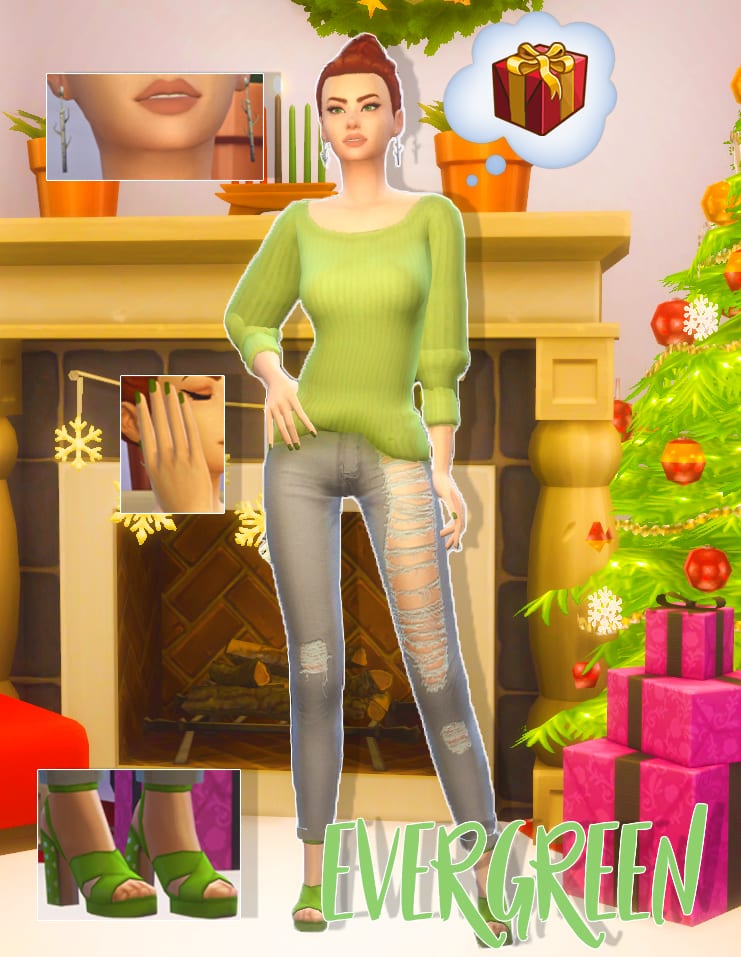
Evergreen

The Sims 4: Seasons Themed Custom Content Lookbook

This look I decided to draw from the green of the Christmas Tree, it’s a tree that never wilts and its evergreen. So I went with a loose baggy jumper by Invadersim and pared it with some pumps by Madlen. The little white dots on the heels reminded me of snowfall. Then we have silver birch earings from Simple Simmer and I think the white of the birch brings a bright tone to the look.

CC Included:

Hair: WMS Aria Hair

Accessories: SimpleSimmer Birch Tree Earrings  || MsBlue’s Velvet Nails

Top: Invadersim RC Anessasims Rainy Day Sweater

Bottom: TajsiweL Lauran AFJeans

Shoes: Madlen Regina Shoes

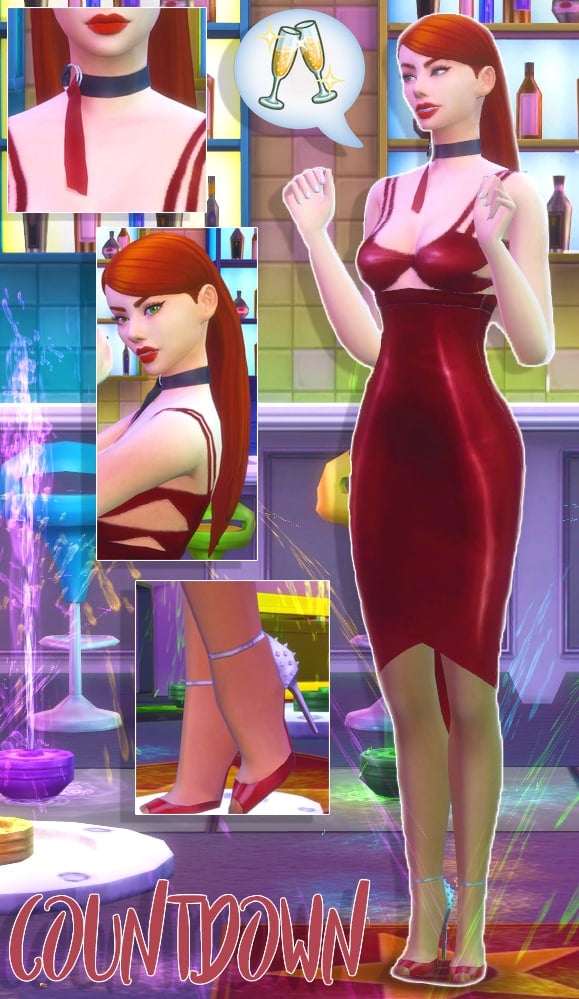
Countdown

The Sims 4: Seasons Themed Custom Content Lookbook

Countdown is a New Years Party themed look! I decided to go with a sultry dark red dress by Dulisla. I have wanted to use these shoes by Madlen for ages and I think the little spikes on the heel give the look a little fun dangerous feel. I adore this sleek hair by Grimcookies and thought it brought the right amount of sleekness and party.  The thing that really ties this outfit together is the choker by SLYD, again adding to the sultry theme but also bringing in a simple accessory that doesn’t take away from the attention the dress gives.

CC Included:

Hair: Grimcookies Chanel Hair

Accessories: SLYD Silk Choker || MsBlue’s Velvet Nails

Top: Dulisla Dress

Bottom: Blushchat Cold Weather Tights

Shoes: Madlen Daniel Shoes

Resolutions

The Sims 4: Seasons Themed Custom Content Lookbook

The next look is based on those New Year Resolutions, the main one people take up is getting fit! I loved this little-cropped jacket by Mortimergth, still keeping you warm while out for a jog but enough skin showing to allow you to cool down when you’re working out, a perfect balance. Next were these thick leggings by PurrsephoneSims, a beautiful lavender and slightly cropped at the bottom. For the shoes, I went with these dip-dyed trainers by Madlen, The blue and purple fit into the outfit well but also providing your Sim with comfort while working out.

CC Included:

Hair: Enrique Braid Hair

Accessories: MsBlue’s Velvet Nails

Top: Nina Jacket Croptop MG

Bottom: Hayden Leggings PurrsephoneSims

Shoes: Madlen Kelly Shoes

In Bloom

The Sims 4: Seasons Themed Custom Content Lookbook

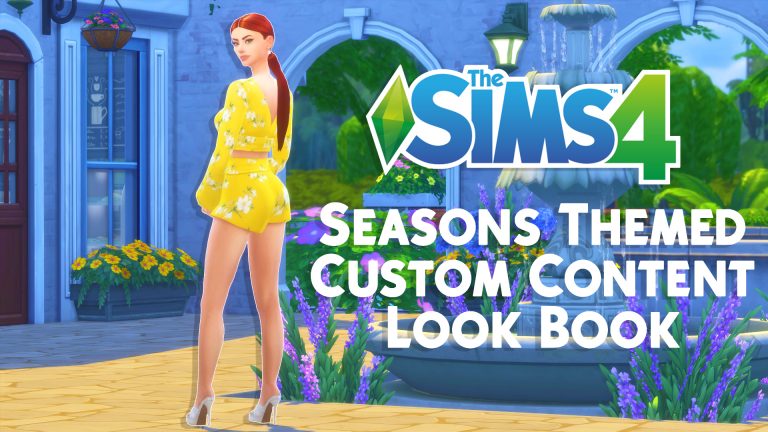
In bloom is probably my favorite outfit even though it’s so simple. Of course, I went with florals in spring, I know groundbreaking, but I died when I saw this yellow and I knew I had to make a look. The outfit is a separate top and shorts by Ilkup and you can mix and match with other items which are nice, but I decided to use them together here for maximum effect. Next, I got these cute rose earrings by PTS and matched the white color to the flowers on the outfit. And lastly these heels by of course Madlen, a little gold buckle to bring in the yellow.

CC Included:

Hair: Kotcat Arianna Hair

Accessories: PTS Rose Earrings || MsBlue’s Velvet Nails

Top: Ilkup Magnolia Shirt

Bottom: Ilkup Magnolia Shorts

Shoes: Madlen Paloma Shoes

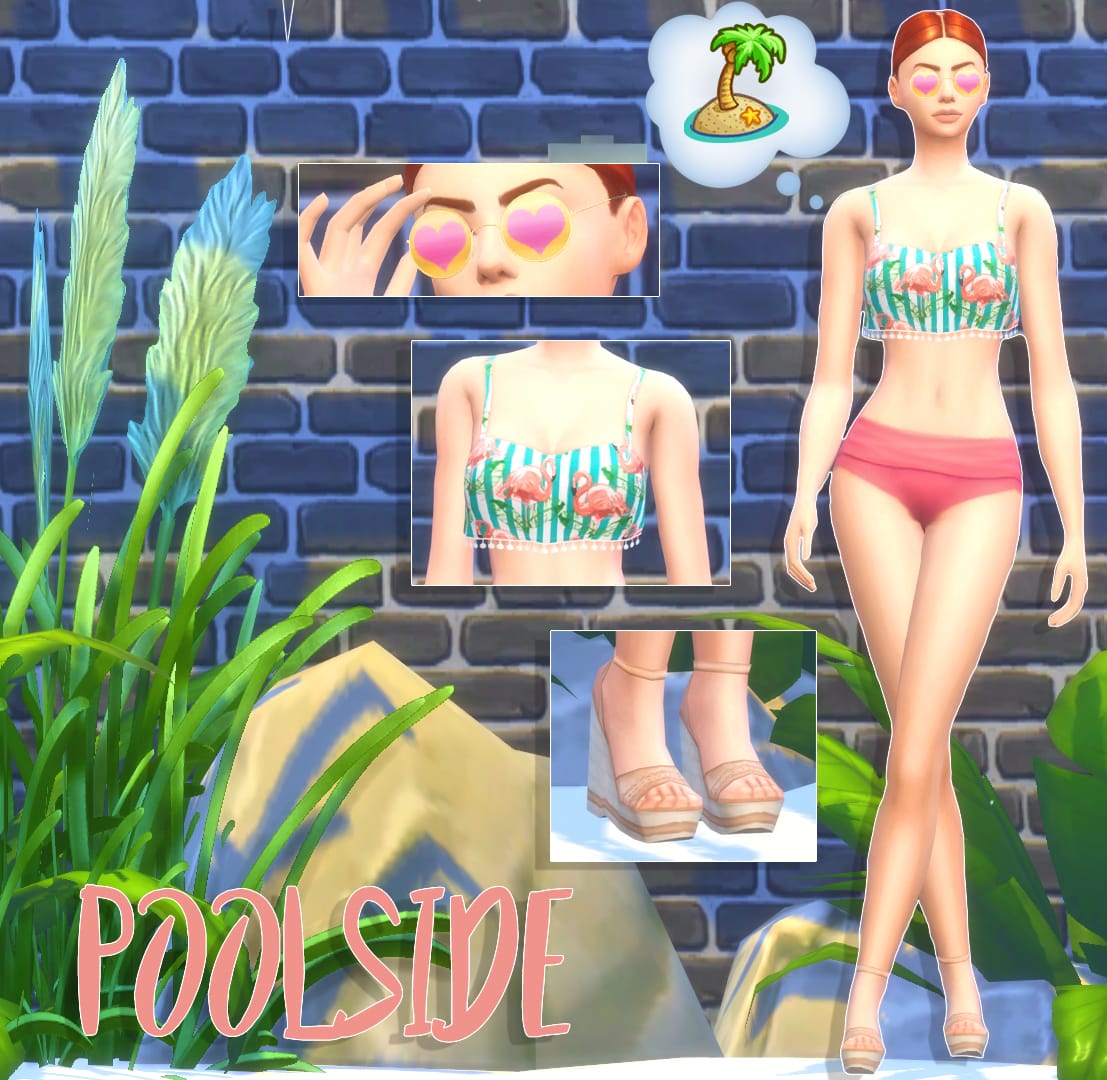
Poolside

The Sims 4: Seasons Themed Custom Content Lookbook

Last but not least I chose to go with a swim look. I was listening to Dua Lupa and I knew when I saw this flamingo top it needed to be in a swim outfit, so I paired it with some Spa Day Bottoms which I know aren’t CC but they went so well! And then some Madeln sandal heels which I love the skin color swatch because again it doesn’t take away from the bold top but still has that beach vibe. Then I found these sunglasses by Pralinesims and I thought the yellow and pink heart screamed cute summer so I just had to add them!

CC Included:

Hair: Kotcat Arianna Hair

Accessories: PS Ekseo Glasses

Top: Trillyke Horololo Top

Bottom: Spa Day Game Pack

Shoes: Madlen Felicia Shoes

Would you like to see more Look Books? Will you be downloading any of the CC here? Let us know in the comments!

The Sims 4 Seasons: Traditions and their Features

The Sims 4 Seasons: Traditions and their Features

The Sims 4 Seasons Expansion Pack brings the ability to create your own holidays. Each holiday can be customized and depend on up to 5 traditions that you can choose in the Edit Holiday Menu.

With each tradition there’s at least 1 activity that will encourage your household and the world around you to perform them. There are also traditions which bring multiple activities and interactions!

Down below you’ll see a list of all traditions that you get with The Sims 4 Seasons. There are also certain traditions that you unlock after installing certain packs for The Sims 4 that we’ll cover during this week!

The Sims 4 Seasons: Traditions and their Features

  • Air Grievances – Direct honest feedback is harsh and it feels oh so good to get off your chest. To participate, select other Sims and choose Mean socials such as Yell At.
  • Appreciate an Object – What is special and worthy of appreciation to you? Reflect around objects and the larger meaning behind them. To participate, click on an Object and select Appreciate.
  • Art & Music Spirit – Make music and make art. Sing until your voice gives out or the neighbors complain. To participate, create art by doing things like Painting, Taking Photos or Dancing, or do musical things by Singing, Listening to Music, or Playing an Instrument.
  • Attend Holiday Ceremony – Attend a Ceremony b using the phone to travel there to complete this tradition.
  • Baking – The smell of fresh baked treats is worth celebrating. Why not make a holiday around it? To participate, Click on a Stove and Select Bake or Cook, then choose a baked good.
  • Bar-B-Que – There is nothing quite like fire grilled food. Debates on the best fuel source and sauce recipe get very heated. To participate, Click on any Outdoor Grill and select Grill.
  • Cleaning – A clean home is a happy home! To participate, Clean around the home, Empty the Trash, Mop Up Puddles, and Clean Up dishes.
  • Countdown to Midnight – Stay up past bedtime and shout at the TV in celebration! To participate, Watch the Countdown to Midnight on TV. The countdown will be available on TVs after 11:00PM.
  • Decorate – The perfect bit of color and decor can really set the stage for any holiday. To participate, place holiday decorations from Build Mode. Decorate the house exterior by placing and using The Attic Stack Decoration Box.
  • Drinking – Celebrate with the perfect summer lemonade, warm apple spiced nog, or any of a Mixologists wonderful creations. To participate, drink something from a Bar, Drink Stand or Fridge.
  •  Egg Hunt – Colorfully painted eggs are hidden throughout your yard. Gotta collect ’em all. To participate, click on objects in the world and select Hunt for Egg.
  • Exercise – Celebrate by taking care of yourself. Push yourself to do just a few more reps or go just a little further on your run. To participate, do any exercise activity like Jogging, Push-ups, or Lifting Weights.
  • Fasting – Appreciate all the good food you have by going without for a short time. To participate, do not Eat any food for 6 hours.
  • Father Winter – On special nights of celebration, Father Winter will visit the household of festive Sims. If you are quick you can catch him bringing gifts for all good children. To participate, place a Fireplace and a Pile of Presents in your home. Then wait for midnight.
  • Festive Lighting – Traditional lighting of candles is a great way to save on the electrical bill while gathering friends and family. To participate, Click on a Holiday Tree, Menorah, or Kinara and select Light Candle.
  • Festive Spirit – Be festive and jolly with friends and family. To participate, use festive socials such as Lighting the Holiday Tree, Ask if Good or Bad or Belly Laugh.
  • Fighting – Time to practice that right hook! Today is all about starting Fights with other Sims.
  • Fire – The crackling flames inspire primal celebration. To participate, Light a Bonfire, Campfire, Fireplace or Burn a Leaf Pile. Then interact with any of these sources of fire.
  • Flower Bunny – The Flower Bunny has come to visit and spread flowery delight! To participate, do Friendly interactions with the Flower Bunny.
  • Games – Strategy, learning, entertainment, and accomplishment all in the same activity. Great alone or with friends. To participate, play with video games, toys, the arcade or the chess table.
  • Gardening – A tradition dedicated to those with a green thumb, and those working on one. To participate, Harvest, Plant, Water, Weed, or Spray in the garden.
  • Give Flowers – To participate, use the Purchase Gift interaction on the phone or computer to buy flowers. Then select a Sim and choose Give Gift.
  • Give Gifts – Exchanging a gift is a great way to conver appreciation, humor, and romance. It even works to trick adversaries. To participate, Buy Gifts from the Phone, Computer or Build Mode. Click on other SIms and Give Gifts. Make sure to check the mail for gifts sent to you.
  • Go on a Date – Take out that special someone, or invite out a new soon to be special someone. It’s tradition! To participate, Click on the Phone and select Ask on Date, Choose another Sim and select a location for the date.
  • Go on a Vacation or Travel – There is no place like home…which you won’t know until you travel! To participate, Click on the Phone and select Take a Vacation, or Travel to a Commercial Venue.
  • Grand Meal – A most delectable feast awaits stomachs growling in anticipation. Just make sure someone else volunteers to do the dishes. Cook a Grand Meal by clicking on the Stove or Fridge. To start the feast, select Call to Grand Meal on the completed dish.
  • Holiday Gnomes – Give respect and gifts to the friendly gnomes in the hopes of festive rewards. To participate, find Gnomes around your lot, Click on the Gnomes and select Appease the Gnome.
  • Invite Guests – Celebrate with friends, family, and random Sims you met on the street. To participate, Click on the Phone and select Invite to Hangout at Current Lot. Then socialize with at least two of your guests once they arrive.
  • Light Kinara – Light the candles on the Kinara to reflect the seven principles. To participate, Click on the Kinara and select Light Candle.
  • Light Menorah – Celebrate by lighting the candles of the Menorah. To participate, Click on the Menorah and select Light Candle.
  • Make Resolutions – Don’t put off until tomorrow what you can do today. To participate, Click on your Sim and select Make Resolution.
  • Mischief Spirit – A holiday is the perfect excuse for mischievious hijinks that are in good fun. Time to work on some pranks. To participate, Click on another Sim and select Mischief. Then select any of the Mischief options.
  • Open Presents – It’s better to receive than to give. Wait, reverse that! To participate, Open a Present from any Gift Pile.
  • Party Spirit – Drink, Dance, and Play Music. The party spirit lives in us all. To participat,e use any of the various party activities. Drink, Dance, Play an Instrument, Tell Jokes, Flirt, or Sing.
  • Polar Bear Plunge – It is freezing out but the water hasn’t completely iced over. Perfect time for a swim. To participate, Swim in any outside pool while it is cold outside.
  • Remembrance – Spend time remembering those who have passed but are never truly gone. To participate, Click on an Urn or Gravestone and choose any of the available options. You can also meet and interact with a Ghost.
  • Romantic Spirit – Spend a little extra time with the one you love or the one you are falling in love with. To participate, do romantic socials such as Kissing, Hugging, Flirting, or if the mood strikes, WooHoo!
  • Spooky Spirit – The midnight hours is close at hand. Ghosts, vampires and aliens are in the plan. Celebrate all that sends a shiver up the spine. To participate, do spooky actions such as interacting with ghosts, vampires, or aliens. You can also carve pumpkins, or play spooky music on the Pipe Organ.
  • Sports TV – Yes, cheering louder does help your team win on TV. To participate, Click on a TV and select Watch Sports.
  • Streaking – Nothing is as freeing as running down the street with the wind in your, um, face. To participate, select the Sim and then select Go Streaking.
  • Tell Stories – Gather around and tell your favorite stories. It is much more interactive than reading a book. To participate, tell a story to another Sim. Try reading a toddler a book or telling stories around a campfire if you have one.
  • Thankful Spirit – Spend time to reflect and be thankful – who knows what tomorrow will bring. To participate, discuss what you can Be Thankful for with another Sim.
  • Trick or Treat – Random masked neighborhood kids come to your door asking for food? Sounds like a great tradition. To participate, Click on Children who have knocked on your door and select Trick or Treat!
  • Watch Romantic TV – A proper romantic flick can really set the mood for a romantic holiday. To participate, Click on the TV and select Watch Romance.
  • Water Fun – When the weather heats up, celebrate with a little H20. It is the only Tradition that requires a swimsuit!
  • To participate, go Swimming or interact with various water toys like the Kiddie Pool, Sprinkle-O-Matic, or Water Balloons.
  • Wear Costumes – A chance to dress up as a Llama or a Fairy and have everyone act like that is normal. To participate, Click on your Sims and select Wear Costume. Then choose your costume.

The Sims 4 Seasons: The Seasons Chooser Menu

The Sims 4 Seasons: The Seasons Chooser Menu

In The Sims 4 Seasons Expansion Pack there are 2 ways to pick a season that you want to dive in: the first way is through live mode and the second way is through the seasons chooser menu. However, the seasons chooser menu is presented to you only when starting up a new game or loading up your old save game that you’ve played before installing The Sims 4 Seasons.

The Sims 4 Seasons: The Seasons Chooser Menu

The Seasons Chooser Menu features 4 plumbobs with different color variations representing each season. There are special animations that you get after clicking each season! Check them out below:

The Sims 4 Seasons: List of Impressions & Gameplay Videos from EA Play

0

The Sims 4 Seasons: List of Impressions & Gameplay Videos from EA Play

During EA Play Capture Sessions that took place on June 9th and June 10th, Sims Game Changers had an opportunity to record and capture plenty of footage for The Sims 4 Seasons Expansion Pack.

Down below we’ve made a list of all the videos and articles that have been published by Sims Game Changers. After each event atendee adds new footage we’ll update this post so make sure you have this post bookmarked for new footage and info!

Articles

Videos

Perfect your Picture: Get the most out of your The Sims 4 Screenshots!

0

One of the best parts about The Sims is that there’s a huge space online for you to share your in game escapades with thousands of people! However, sometimes it takes just a little magic to get your screenshots to really pop, and make them extra special. If you’re not familiar with anything beyond pressing ‘c’ in game – don’t fret! There’s a huge assortment of excellent tutorials and templates to teach you how to do anything you possibly could want to.

Getting The Shot

So you’ve got your moment, and your game is paused. The best way that I’ve found to get the perfect shot is to make sure I’m in Camera Mode (press the TAB key while in Live Mode, paused or unpaused), using the W A S D keys to move about and take shots from every angle. It may seem excessive, but the more variety you have, the more likely you’ll get one shot that is just right!

Perfect your Picture: Get the most out of your The Sims 4 Screenshots!

TIP! The Sims 4 has really unique and fun facial expressions! Make the most of this and capture your sims making silly, sad, or angry faces. It really helps to get the tone of the image across without much effort! You can also use Instant Mood potions, or mods, to get your sim in the right mood for their great expressions.

Edit To Perfection

When it comes to editing, the sky’s the limit with possibilities. If you like the traditional Sims 4 look, you can’t go wrong with incorporating speech bubbles, thought bubbles and moodlets! Here’s some great resources with excellent templates for any mood, thought or conversation. Using templates, you can write whatever you want and aren’t restricted to actual in-game notifications and moodlets, making it great for storytellers wanting to add some personality into their shots.

Perfect your Picture: Get the most out of your The Sims 4 Screenshots!

For the more dedicated of us, you can easily up your screenie game by tweaking your image in a photo editor. Some lovely simmers have shared some easy to use documents that you can just drag and drop onto your shots to spruce them up without needing to touch a thing!

If you’re a Photoshop savant, don’t be afraid to make your own! Play with saturation, brightness, curves, and your screenshot will be picture perfect in no time.

TIP! For a Maxis Match style editing, play with brightness and saturation. The more colourful, the better – and you can do this in free programs such as Gimp as well!

The most important thing is to remember to have fun and experiment – spend time to familiarise yourself with your programs, play around with settings and utilise the community’s numerous tools to make your screenshots unique!

The Sims 4 Seasons: Embargo Lift + New Footage and Q&A Livestream

2

The embargo for content and information that we’ve captured for The Sims 4 Seasons Expansion Pack during EA Play is finally lifting in just a few hours! We’ve already prepared plenty of new videos on our YouTube Channel as well as a few posts for the website talking and showcasing the new Seasons features.

However, that won’t be all for today. I also planned up a Seasons Livestream where I’ll be showcasing hours of footage that I captured during the event and try to cram it up into a 1-hour long livestream. This is also a good opportunity for you to ask questions about certain features that we might have answers to.

Don’t worry – this won’t be the only livestream for The Sims 4 Seasons. This wednesday we’ll be fully getting our hands on an early access copy of The Sims 4 Seasons, with all Expansion, Game and Stuff Packs installed. It’s going to be a jam-packed livestream with plenty of overviews, showcases and of course gameplay that you DON’T want to miss!

There’s also going to be lots of new footage from other Game Changers as well! CLICK HERE to check out the list of all EA Play attendees that will publishing their footage starting today.


The Sims FreePlay: Special Announcement Livestream

0

The Sims FreePlay Team will be doing a special announcement livestream in less than an hour – telling us more about the upcoming update as well as giving us an opportunity to ask the developers of Sims FreePlay our questions.

You can watch the livestream below!


Preparing for The Sims 4 Seasons

Months and months of speculation have led to this very moment – The Sims 4 Seasons, one of the most anticipated Expansion Packs for The Sims 4 is coming next week! We totally understand if you get lost with the pack after installing it considering it’ll bring new gameplay to each world and everything we have in the game so far!

Here are some tips to help you focus for The Sims 4 Seasons’ release on June 22nd:

Check on your recent households

I don’t know about you but personally my Sims 4 game is FULL of save games and households that I haven’t checked on for months. It’ll be a good idea if you brush through some of your older saves and prepare your households for blizzards and thunderstorms.

It’s time to unfurnish

Love the house that you’ve built but feel like your interior could use a little Seasons twist? Unfurnish your home so you can be ready when the time comes for adding new bedroom & kitchen items as well as holiday objects such as the christmas tree, menorahs and more!

Remove (only some) of your roofs

The big new update for The Sims 4 is going to bring glass roofs to the game. If you feel like your rooms need more space then remove the roofs and prepare to add plenty of sunshine to your interior.

…or create something entirely new!

Don’t feel like revisiting your old Sims? That’s totally fine! Create a new household and make sure they’re fans of the outdoors because they’ll be spending a lot of time outside once The Sims 4 Seasons comes out.

Build a house from scratch and focus on adding a huge area for gardening – both indoors and outdoors. The new gardening features that Seasons will bring will keep your Sims occupied for hours!

Add a twist to Challenges

Feel like challenges for The Sims 4 that we have so far could use a little Seasons twist? Revisit some of the challenges we have now and think of a way you could incorporate weather, gardening and even scarecrows into one (or multiple) challenges.

We have plenty of Challenges that you can check out on our Challenges Forum!


We know you don’t like doing technical stuff for The Sims 4 but trust me – you’ll be thankful knowing that your game is fully prepared for Seasons.

Clear your Cache Files

Cache files help speed up the loading of thumbnails and more little things in The Sims 4. However, it might be a bit too overwhelming for both the game and your PC if you haven’t cleared your cache in a while. To make sure The Sims 4 runs smoothly for The Sims 4 Seasons, make sure you clear your cache files as explained in this post!

Prepare your Mods

The Sims 4 Seasons will change the way graphics and the environment function and look like in the game. Also, there’s going to be a few new outfit categories added that might potentionally break CC and Mods that you already have.

To make sure your game doesn’t break with all the Mods / CC that you might have, regularly check on the original sources of your mods and see if they’ve been active recently to make sure they’ll be putting out an update for their mods / checking if their mods are compatible for the upcoming Sims 4 patch.

The Sims 4 will automatically disable your mods after the update but it’s best if you check if every mod will be functional after the upcoming Sims 4 update.

Back Up your Save Game

The Sims 4 Seasons is a gamechanger and therefore it is not guaranteed if it’ll work perfectly for everyone. Before installing the upcoming game update or the expansion pack itself it’s best if you back up your save game in case things go wrong.

Make sure you meet the System Requirements

PC SYSTEM REQUIREMENTS

MINIMUM SPECS:
OS: 64 Bit Required. Windows 7 (SP1), Windows 8, Windows 8.1, or Windows 10
CPU: 1.8 GHz Intel Core 2 Duo, AMD Athlon 64 Dual-Core 4000+ or equivalent (For computers using built-in graphics chipsets, the game requires 2.0 GHz Intel Core 2 Duo, 2.0 GHz AMD Turion 64 X2 TL-62 or equivalent)
RAM: At least 4 GB RAM
HARD DRIVE: At least 3 GB of free space (15 GB if installing with The Sims™ 4) with at least 1 GB additional space for custom content and saved games
VIDEO: 128 MB of Video RAM and support for Pixel Shader 3.0. Supported Video Cards: NVIDIA GeForce 6600 or better, ATI Radeon X1300 or better, Intel GMA X4500 or better.
DIRECTX: DirectX 9.0c compatible
SOUND CARD: DirectX 9.0c Compatible
INPUT: Keyboard and Mouse
ONLINE REQUIREMENTS: Internet connection required for product activation

RECOMMENDED SPECS:
OS: 64 Bit Windows 7, 8, 8.1, or 10
PROCESSOR: Intel core i5 or faster, AMD Athlon X4
VIDEO CARD: NVIDIA GTX 650 or better
MEMORY: 4 GB RAM
HARD DRIVE: 18 GB of Hard Drive space

MAC SYSTEM REQUIREMENTS

MINIMUM SPECS:
OS: Mac OS® X 10.7.5 (Lion)
CPU: Intel Core 2 Duo 2.4 GHz Processor or better
RAM: At least 4 GB RAM
HARD DRIVE: At least 3 GB of free space (15 GB if installing with The Sims™ 4) with at least 1 GB additional space for custom content and saved games
VIDEO: NVIDIA GeForce 9600M GT, ATI Radeon HD 2600 Pro or better. Video RAM of 256MB or better.
INPUT: Keyboard and Mouse
ONLINE REQUIREMENTS: Internet connection required for product activation

RECOMMENDED SPECS:
OS: Mac OS® X 10.9 or later
PROCESSOR: Intel Core i5 or better
VIDEO CARD: NVIDIA GTX 650 or better
MEMORY: 8 GB RAM
HARD DRIVE: 18 GB of Hard Drive space

MORE to The Sims Mobile: Version 11.0 Update Overview

Hey Simmers,

Looking for more details of the new major update for the Sims Mobile? Here you go!

MORE to The Sims Mobile: Version 11.0 Update Overview

If you haven’t downloaded the new update, hit the button!

After the 80MB+ update from Google Play Store or Appstore, an additional in-game update is required.

MORE to The Sims Mobile: Version 11.0 Update Overview

It is considered quite a big update with the size of 324MB, make sure you have good internet connection because great things are coming!

The update came with heaps of cool new items, new features such as Heirloom Store and Surprising Choice.

Heirloom Store

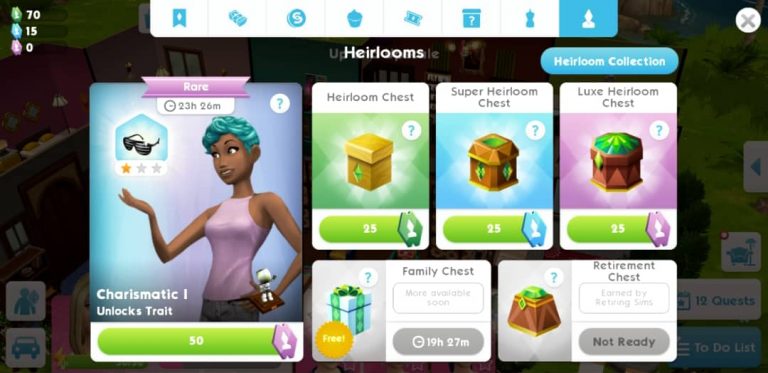
Main part of the game is Heirloom, which we can use to unlock stories, hobbies and traits. Good thing is, there are more ways to earn heirlooms now!

MORE to The Sims Mobile: Version 11.0 Update Overview

The Sims Mobile has added to the heirloom store the FAMILY CHEST which you can receive heirloom tickets and other rewards (Simoleons, Simcash, Cupcakes, Fashion Gems) daily, and the most amazing thing is, it’s FREE! In addition, the Retirement Chest is now available for you once your sim is retired.

Unlike the previous version where you have limited heirlooms appear every once in a while, you can now acquire heirlooms anytime by purchasing the Heirloom Chest, Super Heirloom Chest, or Luxe Heirloom Chest using the Heirloom tickers. Here is the break-down of what you can get for each Chest:

  • Heirloom Chest (purchased by Heirloom tickers): Common 80%, Uncommon 20%
  • Super Heirloom Chest (purchased by Super Heirloom tickers): Common 15%, Uncommon 65%, Rare 20%
  • Luxe Heirloom Chest (purchased by Luxe Heirloom tickers): Uncommon 30%, Rare 70%

MORE to The Sims Mobile: Version 11.0 Update Overview

More information is also given about the bonus that an heirloom can give us.

You can now Switch Traits!

How amazing is that? Your sim doesn’t have to stick with a trait for the rest of its life. See that new icon on the right corner of your sim’s trait? Click on it!

MORE to The Sims Mobile: Version 11.0 Update Overview

You can replace a trait using a few Heirloom Tickets. Once it set, your sim will have a new trait!

MORE to The Sims Mobile: Version 11.0 Update Overview

Speed Up an Event

Tired of waiting? Simply Go Faster by using a cupcake at the beginning of the event and a chance to get a bonus on career or hobby points! (from level 9)

MORE to The Sims Mobile: Version 11.0 Update OverviewMORE to The Sims Mobile: Version 11.0 Update Overview

More chance to earn Fashion Gems!

Yet another cool stuff: we can now earn Fashion Gems through parties. Make sure you attend parties everyday for the chances of getting more Fashion Games to unlock more clothing from the Izzy’s Fashion Shop!

MORE to The Sims Mobile: Version 11.0 Update Overview

A Surprising Choice…

The never-happen-before fun choices of the Sims Mobile game which you can get more bonuses by picking an action given for your sim, note that this feature will only be available once you’ve reached level 10 or up.

PLEASE NOTE: This feature is temporarily disabled due to a few bugs. You can expect it to return in a few days.

New Items

Last but not least, the update also came with new Furniture in Home Item Collection: Farmhouse Living and Kitchen Essentials.

MORE to The Sims Mobile: Version 11.0 Update Overview

And what are those sparkling things?…

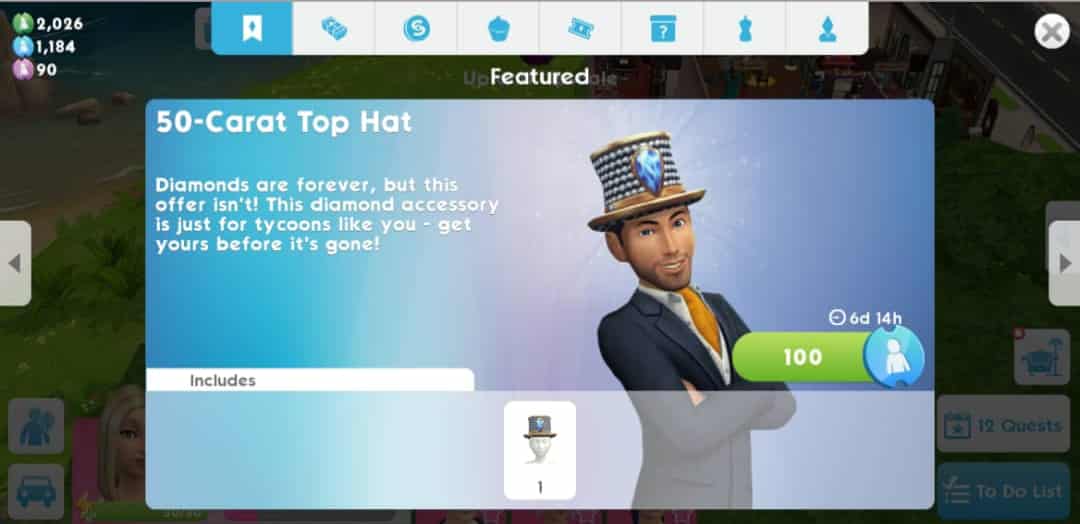
Get the 50-Carat Party/Top Hat and Bracelet to make your sims look more fabulous with other…sims! I know you love diamonds!

MORE to The Sims Mobile: Version 11.0 Update OverviewMORE to The Sims Mobile: Version 11.0 Update OverviewMORE to The Sims Mobile: Version 11.0 Update Overview

The Sims 4 Seasons: Integration with Vampires

0

One of the top questions that simmers have been asking ever since the announcement of The Sims 4 Seasons Expansion Pack is how will vampires (from The Sims 4 Vampires Game Pack) react to different weather and will they be able to come out.

SimGuruJill and SimGuruChibi have answered yesterday during the livestream some of the vampire-related questions, saying that vampires will be able to come outside of their homes when it’s not so sunny.

We also got a confirmation that, when it comes to UV protection, vampires will be able to be under the glass roofs and that The Sims Team is currently working on making Vampires safe from the sun rays under the umbrella.

The Sims 4 Seasons: Integration with Vampires The Sims 4 Seasons: Integration with Vampires The Sims 4 Seasons: Integration with Vampires

SimGuruChibi even published a public poll on her Twitter profile asking if simmers want umbrellas to protect vampires from the sun. The outcome of this poll was that most people did want that feature.

The ability to shield vampires from the sun using an umbrella is coming, however, not with the next update.

Getting started with Simblr

The Sims 4 has such a large social media presence on YouTube, Twitch, and Twitter that it can be easy to overlook the ever growing simming community on Tumblr – one of the internet’s most active blogging platforms! With users boasting upwards of thirty thousand followers, content creators around every corner, and a fair number of EA Game Changers in the mix – the “simblr” community is not one to be underestimated.

Tumblr’s easy to navigate platform encourages users of all ages and follower counts to join in on the fun and start sharing their own unique content! Jumping into such a large, close knit community can be intimidating, so here’s a few tips to get you started.

Step one, get down with the lingo!

The first step in understanding such a vast community of users is understanding what all of their unique abbreviations stand for! Veteran simmers may recognize some of these common terms, but first-timers in the community may benefit from a handy cheat sheet!

  • Where can I find… (or commonly abbreviated as “wcif”) is a quick and easy way to ask other simblrs where they downloaded content they’re currently using! Common practice is to include links to the requested content in the reply, as seen in the example below.

Getting started with Simblr

  • WIP (or work in progress) signifies something a user is currently working on! Often seen in the context of creating edits or custom content, such posts are usually created to build excitement for an upcoming project or receive feedback from their followers.
  • MM (or maxis match) refers to a specific style of custom content! Originating from the days when Maxis exclusively created Sims, maxis match content is made in the existing style of the game.
  • Alpha, the direct opposite of maxis match, signifies realistic content! It is created in a similar style to what you would find in real life, as opposed to the cartoony style of most sims games.

Step two, create a space to showcase your content!

Whether you decide to share gameplay pictures, write stories, or try your hand at creating custom content… You need a platform! Choose a username and icon that somewhat relates to the Sims so other users know what to expect from your blog. A common theme amongst the community is to choose icons pulled straight from the game.
Getting started with Simblr

Step three, get to work blogging!

With some basic knowledge under your belt, it’s time to hit the blogosphere! Start posting your content of choice. Try not to stress about followers or notes – this is the fun part! Post what makes you happy, and everything else will follow.

Whether you grow into a blog with a large, devoted following one day or remain small – enjoy every step of the way! Every single milestone is an accomplishment and reason to celebrate.


Hello, everyone! For those of you who don’t know me, I’m storylegacysims on Tumblr and Twitter – but please feel free to call me Molly.

I’m new to The Sims Community and I can’t wait to get to know all of you! If you ever have any questions, feel free to reach out to me on either of the above platforms.