Home Blog Page 336

There’s a weird reason why The Sims 4’s latest update is so big

The first thing you probably noticed when updating your Sims 4 game to the latest version is the file size (2.6GB). It’s been confirmed as the biggest update for The Sims 4 so far. However, the game only brought stability improvements and a few new features to the game. What’s so interesting is the fact that the update which brought the biggest amount of content (Toddler Update) back in January 2017 was much smaller than this one – which is why I wanted to investigate why this update is so big.

After going through the game files I was surprised – The Sims 4 PC data files were FULL of files for The Sims 4 Console.

There’s a weird reason why The Sims 4’s latest update is so big

Some UI features like modifying the user interface width and height (features exclusive to the console version) are also present in the PC files:

There’s a weird reason why The Sims 4’s latest update is so big

There are also new lessons added which have been made for the console version exclusively.

Text strings from The Sims 4 Console and the main menu itself have also transferred over to the PC version.


We don’t know yet if this means that The Sims Team is working on making the Console and PC version a more streamlined experience or if they want to move some features from Console to PC and vice versa. However, they wouldn’t add a ton of these files for nothing!

5 Things to do While Waiting for Cats & Dogs to Download

If you’re anything like me, then you have what might just be the slowest Internet connection in the world, or at least it feels that way to you. If you’re a Simmer like me (and obviously, you are, because you’re here reading this), you know all too well how agonizing a slow connection can be on the day of a new expansion release. It’s usually hours and hours of crying, pleading with the Sims gods, and scratching desperately at your computer screen in anticipation.

But fear not! I have the solution! Instead of all that unpleasantness, here are five ways you can pass the time and get your Cats & Dogs fix while waiting for Cats & Dogs to come to you at last.

5 Things to do While Waiting for Cats & Dogs to Download

Watch ALL of the livestreams

Hey, if you can’t play your favourite game, what’s the next best thing? Watching someone else play your favourite game, of course! Luckily, there are plenty to keep you entertained for hours on end until you can play, yourself. Stroll on over to Sims Community‘s YouTube channel to check out replays of all of the SimGuru livestreams for Cats & Dogs. We also have our very own launch party livestream replay available on our channel. We are so here for you during this difficult time.

Read ALL of the articles

Sims Community has got you covered with all of the latest and greatest info about Cats & Dogs, from Build/Buy and CAS overviews to an interactive Brindleton Bay world map and much more! Brush up on your research ahead of time so you can dive right into all the fun when that glorious Ready to Play button pops up in Origin. You can find all of our Cats & Dogs articles right here.

Get your smustle on

You can always air out your pre-expansion jitters with some therapeutic interpretive dance; the smustle. Naturally. Break out your best smustling moves in the middle of the living room. Who knows? Maybe your real life cats and dogs will decide to join in! They’re lovably unpredictable like that, aren’t they?

Chat with us!

Did you know Sims Community is on social media? Well, we are, and we love hearing from you! Tweet us or leave us a comment on Facebook to let us know about all the Cats & Dogs feelings! All of them! You might not know this, but we here at Sims Community are in fact, licensed therapists! DISCLAIMER: That was a joke. We are not licensed therapists. We just really love The Sims. Like you.

Breathe!

That’s right. In… and out. In… and out. Ahhhh. It will be okay. You will get through this and Sims Community will be here for you through it all with our videos, articles, and social media posts. We can’t really help you with the smustle, though. Sorry.

We’re pawsitive that these five coping techniques are exactly what you need right meow to make it through your download process. It can be ruff, but we’re not kitten when we say you’ve got this! (Too much pun? Nah. Never too much pun).


Image Credit: Lady Hope

The Sims 4 Cats & Dogs: First Impressions

As one of the most highly anticipated packs of the entire Sims 4 history Cats & Dogs is due to have some amazing reception, but does it live up to the hype?

I’ve eagerly waited these past months in utter joy, counting down the days and hours till I myself could have some furry friends to play with. Finally, 11 pm hits in the UK, where I live, and Origin alerts me my Sims game is ready to download, it’s here! Of course, I then spend the next 5 hours glued to my screen. I played with the create-a-pet which in my opinion isn’t as versatile as I thought it would be. It was a struggle to make my dog Gracie look like her computer counterpart. However, I enjoyed experimenting with the paint and getting to grips with the feature, of which I hope comes to create-a-sim some day. Brindleton Bay was my next adventure to move into, sorry Windenburg, and it’s blown me away. The immense detail of the world is phenomenal, the Sims team have outdone themselves to create a world that feels like a home for not just our Sims but our Pets as well.

The Sims 4 Cats & Dogs: First Impressions

I’ve been planning my vet legacy for a week now and so, of course, I went ahead and spent an hour and a half building a Clinic. It took me a few tries to work around the equipment size but in the end, I was rather happy with it. I was able to make dog and cat specific rooms thanks to the new locks and mats. This helped it feel more realistic for a storyteller like me. People might be comparing this to Get To Work’s Doctor career but it flows so much smoother with easier diagnoses and equipment use. The only thing that puzzled me, that wasn’t immediately clear, was that some pets needed surgery as a part of the treatment but it didn’t tell me so on the screen. However, this is a career I feel like I am going to spend hours divulging into.

The Sims 4 Cats & Dogs: First Impressions

Of course, the pack was due to have its teething problems and I encountered many of them. First thing I noticed was my Sim wouldn’t stop bathing my dog. My dog was losing its needs as was my Sim but the bath just wouldn’t stop. I was able to fix this issue by debugging but for people who don’t know how or use cheats it’s a real issue. Another issue I found was my dogs getting dirty every day! I was spending so long bathing them when in real life you don’t have to wash a dog every day. I hope this is just a bug and not an in-game feature as it’s highly annoying. One last issue I’ve had with the game is my dog’s passing out from exhaustion when they have beds and haven’t been doing anything crazy. It’s so frightening to see your pet randomly passed out while walking around the house.

The Sims 4 Cats & Dogs: First Impressions

The Sims 4 Cats & Dogs: Launch Trailer

0

https://www.youtube.com/watch?v=K9yv9xw6djU

The Sims Team has released a launch trailer for The Sims 4 Cats & Dogs Expansion Pack. Check it out!

The Sims 4 received another huge upgrade with the latest update

0

The latest Sims 4 Update keeps on with amazing surprises. So far we know that the game has improved stability and that it fixed some major bugs and issues that were present before. However, there is one huge thing that was changed with the update that wasn’t mentioned in the patch notes.

SimGuruNick confirmed that The Sims 4’s population cap has increased from 305 Sims to 575 Sims in all worlds. This means that you’ll encounter more different Sims walking around your neighborhood.

In this cap are also included Cats and Dogs if you have The Sims 4 Cats & Dogs Expansion Pack.

The Sims 4: List of Broken Mods (November 2017 Update)

3

Luthsthings has posted an amazing, in-depth list of all the mods that have been affected by the latest Sims 4 Update. The list is constantly being updated with information of mods both reported being fixed and broken.

You can check out the list by clicking the image below!

The Sims 4: List of Broken Mods (November 2017 Update)

The Sims 4 Cats & Dogs is now available Worldwide!

3

The day that you’ve been waiting for has finally arrived – The Sims 4 Cats & Dogs Expansion Pack is now available worldwide!

You can get the pack on Origin, Amazon and other trusted sources for purchasing game codes. The pack is also available in all retail stores worldwide starting today if you prefer having a physical copy of the game.

Happy launch day and I hope you enjoy this pack!

The Sims 4 Cats & Dogs is now available Worldwide!

The Sims 4 Cats & Dogs: Creating a Household of Cats and Dogs without Sims

Want to show off your unique Pets that you’ve created in The Sims 4 Cats & Dogs but keep coming across this screen letting you know that you need at least one Sim in your household? There’s a quick workaround for this!

The Sims 4 Cats & Dogs: Creating a Household of Cats and Dogs without Sims

After you think you’ve created your perfect Household of Pets that you’d like to save in your Library or put it up for the world to see – don’t select the check mark button on the bottom right corner (because you’ll receive the notice shown in the screen above). Instead, press the “Save Household” icon in the upper right corner:

The Sims 4 Cats & Dogs: Creating a Household of Cats and Dogs without Sims

This will allow you to share your Pet (or multiple Pets) without needing Sims to be included in your Household.

The Sims 4 Cats & Dogs: Creating a Household of Cats and Dogs without Sims

This feature comes really in handy if you want to save only Pets to The Gallery or are looking for new Pets that you’d like to add to your Household.

The Sims 4 Cats & Dogs: All of the New Cats & Dogs Traits and Aspiration

Are you wanting to get an idea of what kind of Cat or Dog you want as a pet? Well now you can check out the full list of traits for Cats, Dogs and Sims below and start thinking of what your purrfect pet could be!

Please note that some traits are not compatible with others. If this happens the conflicting trait will not be selectable.

Sims Aspirations & Traits

With The Sims 4 Cats & Dogs, Sims were given a new aspiration and two traits. We shared information about these in a previous article but here’s a quick recap of them

The Sims 4 Cats & Dogs: All of the New Cats & Dogs Traits and Aspiration


Friend of the Animals – This Sim wants to be friends with the animals. The bonus trait that comes with selecting this aspiration is the Animal Affection trait. Having this trait means that relationships with animals beings at a higher values.


Once you have completed all of the milestones of the Friend of the Animals aspiration you will unlock the Animal Whisperer reward trait. Having this reward trait means that it is easier to train and discipline animals as well as gain releastionship with them faster.

The Sims 4 Cats & Dogs: All of the New Cats & Dogs Traits and Aspiration


The Sims 4 Cats & Dogs: All of the New Cats & Dogs Traits and Aspiration

Dog Lover – These Sims love to be near dogs. They will gain relationships faster with dogs and socialize with dogs more than the average Sim.


The Sims 4 Cats & Dogs: All of the New Cats & Dogs Traits and Aspiration

Cat Lover – These Sims tend to make cats their companions, preferring the company of cats to other Sims.


Cat Traits


The Sims 4 Cats & Dogs: All of the New Cats & Dogs Traits and AspirationAffectionate – These cats really lover their owners. They’ll try to stick close to them whenever possible.


The Sims 4 Cats & Dogs: All of the New Cats & Dogs Traits and Aspiration

Aloof – These cats don’t really need their owners, they’re just there for the free food.


The Sims 4 Cats & Dogs: All of the New Cats & Dogs Traits and Aspiration

Clever – These cats are fast learners, and some say that they can even understand Simlish when spoken to!


The Sims 4 Cats & Dogs: All of the New Cats & Dogs Traits and Aspiration

Curious – These cats are more curious about their surroundings. The like to search different objects around the house.


The Sims 4 Cats & Dogs: All of the New Cats & Dogs Traits and Aspiration

Fluffy – These cats are more fluffy than normal! They’ll hack up hairballs more often.


The Sims 4 Cats & Dogs: All of the New Cats & Dogs Traits and Aspiration

Free Spirit – These cats enjoy wandering around the world, almost as if they were wild animals! But don’t worry, they’ll always come home for the food.


The Sims 4 Cats & Dogs: All of the New Cats & Dogs Traits and Aspiration

 Friendly – These pets tend to be friendly to other Sims, and will happily greet other Sims around them.


The Sims 4 Cats & Dogs: All of the New Cats & Dogs Traits and Aspiration

 Frisky – These cats are more active than other cats. They really like to pounce and run around.


The Sims 4 Cats & Dogs: All of the New Cats & Dogs Traits and Aspiration

Glutton – These pets will eat significantly more often, and much more messily.


The Sims 4 Cats & Dogs: All of the New Cats & Dogs Traits and Aspiration

Lazy – These cats really enjoy their catnaps. They also are less likely to jump from place to place since it takes too much effort.


The Sims 4 Cats & Dogs: All of the New Cats & Dogs Traits and Aspiration

 Mischievous – These cats are always up to no good! They will often misbehave and can even be encouraged to do so.


The Sims 4 Cats & Dogs: All of the New Cats & Dogs Traits and AspirationPlayful – These pets love toys and want to play all the time, even when they’re not excited


The Sims 4 Cats & Dogs: All of the New Cats & Dogs Traits and Aspiration

Prowler – These cats enjoy prowling around the neighbourhood. Send them out and they might come back with something they’ve found


The Sims 4 Cats & Dogs: All of the New Cats & Dogs Traits and Aspiration Skittish – These cats are scared of everything. Okay well, almost everything. They also like to hide alot.


The Sims 4 Cats & Dogs: All of the New Cats & Dogs Traits and AspirationSpoiled – These cats are spoiled creatures. Scoulding them hardly ever changes their behavior


The Sims 4 Cats & Dogs: All of the New Cats & Dogs Traits and Aspiration Talkative – These cats love to yowl along with other Sims. They’ll even try to sing upon request.


The Sims 4 Cats & Dogs: All of the New Cats & Dogs Traits and AspirationTerritorial – These cats are fairly protective of their territory. They will be agressive to anyone new they meet.


 Dog Traits


The Sims 4 Cats & Dogs: All of the New Cats & Dogs Traits and Aspiration

Active – These dogs are very energetic. They really like running and enjoy frequent walks.


The Sims 4 Cats & Dogs: All of the New Cats & Dogs Traits and Aspiration

Adventurous –  These dogs will sometimes leave the house to go on solo adventures, but are also happy to go on an adventure with their owners.


The Sims 4 Cats & Dogs: All of the New Cats & Dogs Traits and Aspiration

Aggressive – These dogs will be more hostile when greeting others and might attack others unless properly trained.


The Sims 4 Cats & Dogs: All of the New Cats & Dogs Traits and Aspiration

Couch Potato – These dogs are low-energy creatures that like to relax and unwind with their owners rather than run around.


The Sims 4 Cats & Dogs: All of the New Cats & Dogs Traits and Aspiration

Friendly – These pets tend to be friendly to other Sims, and will happily greet other Sims around them.


The Sims 4 Cats & Dogs: All of the New Cats & Dogs Traits and Aspiration

Glutton – These pets will eat significantly more often, and much more messily.


The Sims 4 Cats & Dogs: All of the New Cats & Dogs Traits and Aspiration

Hairy – These dogs will leave hair piles laying around. Brush their fur to keep things tidy.


The Sims 4 Cats & Dogs: All of the New Cats & Dogs Traits and Aspiration

Hunter – These dogs are natural hunters. Send them off into the world and they’ll hunt and dig for things.


The Sims 4 Cats & Dogs: All of the New Cats & Dogs Traits and Aspiration

Independent – These dogs are less likely to need constant affection and can even walk themselfs.


The Sims 4 Cats & Dogs: All of the New Cats & Dogs Traits and Aspiration

Jumpy – These dogs are easily frightened, and like to hide away moreoften. They will often shy away from things like fights.


The Sims 4 Cats & Dogs: All of the New Cats & Dogs Traits and Aspiration

Loyal – These dogs want to be closer to their owners and love to be petter. They also like to follow their owners around.


The Sims 4 Cats & Dogs: All of the New Cats & Dogs Traits and Aspiration


Playful – These pets love toys and want to play all the time, even when they’re not excited.


The Sims 4 Cats & Dogs: All of the New Cats & Dogs Traits and Aspiration

Sleuth – These dogs are naturally more curious and like to investigate different objects around the house.


The Sims 4 Cats & Dogs: All of the New Cats & Dogs Traits and Aspiration

Smart – These bright dogs are easier to train and pick up tricks quickly. They might even understand Simlish.


The Sims 4 Cats & Dogs: All of the New Cats & Dogs Traits and Aspiration

Stubborn – These dogs don’t like being told what to do. Scolding them doesn’t do much to change their misbehaviors, but you can try begging them to stop.


The Sims 4 Cats & Dogs: All of the New Cats & Dogs Traits and Aspiration

Troublemaker – These dogs are always up to nothing good. They will often misbehave and can even be encouraged to do so.


The Sims 4 Cats & Dogs: All of the New Cats & Dogs Traits and Aspiration

Vocal – These dogs like to howl occasionally and can even sing on command.


And that’s it for all the traits that come with the new expansion. Let us know what kind of Pets you are going to create in your game and what traits they are going to have!

Tips and Tricks for making Objects smaller in The Sims 4

2

Think Small

Hi, I’m Jason Sterling. There was a lot of excitement over the new roofs added to the base game selection for the Sims 4. However, I’m someone who loves not only tiny houses but also the tiny apartments in San Myshuno. As such, I was far more anticipating the ability to make things smaller. It’s something I’ve wanted for a long time. I set out to test the new ability and below are my successes and failures and uncertainties while thinking small.

You’ll need this cheat:

  • bb.MoveObjects  (MOO) Allows build/buy items to be freely moved around within the build and activates the height slider that raises objects up and down in the air and on the walls using the number 9 for up and the number 0 for going back down. Press CTRL-SHIFT-C to open a dialog box in the upper left of the window while in the game. Type the cheat in bold and press enter.

The Obvious

There have always been numerous items that were considered- abnormally large – for the Sims in the Sims 4. Other items size fit their purpose but many of us wanted a smaller version for wider use. There are several examples below and most likely you’ve already thought of most of them. The new ability to decrease their size works very well, by and large. Skully bear and his friends are an exception. You can see immediately that the eyes disappear when sized down and since it is a interactive item the animations only really work on the first size reduction. Still, for decor, such as placed on a shelf it works and if you are a toddler you’ll stand and babble at it no matter what it’s size. We’re not really going to discuss the obvious items though. You know them already. Play around and enjoy.

Tips and Tricks for making Objects smaller in The Sims 4

The Not-So-Obvious

Below Left: A table top Christmas tree has been a request since their introduction. Now we have it. Use the “9” height slider cheat to elevate the tree into position. Shown here I’ve created a smaller version of the fireplace with a mantle tree and shrunken book-ended wreathes to hold a garland in place for an apartment set up. I’ve shown the next smallest fireplace entirely to illustrate the limits of the tool graphically. For purely decorative purposes I could see the smaller version in bathrooms and bedrooms.

Tips and Tricks for making Objects smaller in The Sims 4

Above right is an apartment kitchen look. The wall panel televisions, reduced in size, make great additions tucked under the cabinets. So does the stereo. I’ve shortened the fridge as an example. At one degree smaller from full height it works without any noticeable graphical oddities. Any smaller, like for a bar set up and visually the sim’s interactions are out of sync. As pictured it makes for an urban or European size fridge.

My two favorite tests so far are below. First, adding ornaments to the tree. You can see the array of different items I chose but use your imagination here. Shrink the item in size and using “9” lift it into place. Hold down the “Alt” button while holding the item and shift it about until it looks right. The inset shows the shrunken snowmen at night.

Tips and Tricks for making Objects smaller in The Sims 4

This is my favorite use of shrinking. Take the aquarium, reduce it to the smallest size, then insert it into water to create swimming fish. From right to left you can see the full size items. Then I have shrunken and placed them in the pool. Lastly, I disguised the aquarium box with rocks. In a full build I would continue with other details. This is just an example.

Tips and Tricks for making Objects smaller in The Sims 4

 Maybe We Should

While initially playing with this tool there where several items I tried that I was uncertain about. I’ll illustrate them here so that maybe they will spur your imagination and ingenuity to uncover a use for them that I couldn’t.

The video game system works in a fully shrunken form. IF  you don’t mind pretending the sims are using Wii style controllers and a holographic screen. Which, honestly I don’t. I will use it in this fashion. Further I may place a third cabinet in the middle and pretend the unit was a holographic advertisement display for Myshuno. I shrunk the sofa by one degree. This fits with apartment/small house style. The sims almost sit on it. It needs some tinkering. Then, there is the cupcake factory. I shrunk it to counter size. It does work but only floating in the air, sitting on the floor or on a half wall ledge.  It has to be placed with MOO and “9” if floating or using the ledge. Drawbacks aside, it has a much smaller footprint and I’ll integrate it into my steampunk builds.

Tips and Tricks for making Objects smaller in The Sims 4

One of my first thoughts was to use a “real” Christmas tree. I loved it and decorated it in the fashion above but, like all trees, it disappears when you are near it. I do have an example of the shrunken presents shown here. They fit far better in smaller size. The telescope and the DJ booth both have large footprints. Here both have been shrunk by one degree. They work well in this fashion but not otherwise. In the end I couldn’t think of a good reason to do so though. The amount of space saved was not great. If you’re reading this and have an idea shoot it my way. I’d love to try it.

Tips and Tricks for making Objects smaller in The Sims 4

Below is an effect I’d really like to hear ideas from people about. I have tucked the smallest hot tub under a table. Then had the sims get in it and positioned the chairs underneath them. At the time I was thinking maybe a seance table. I know, I was reaching but I’m still fascinated by the effect. For story telling it might work well as a seance table. Do you have an idea about it? Let me know. It may go from “maybe” to “definite”.

Tips and Tricks for making Objects smaller in The Sims 4

Maybe We Shouldn’t

These last items by and large aren’t worth the trouble. The microscope, like the telescope has been something of a point of contention with some due to size but the new tool really doesn’t help. Doors and windows are a lost cause too. You can see two of my closest successes here but they would still require a great deal of accessorizing to enable their use. Even then it might just be wasted effort.

Tips and Tricks for making Objects smaller in The Sims 4

Lastly, Remember the Whimsy

The best part of this new tool is the exploration it provides. Use it in your game see what it leads you too. During my tests I was playing with the awning below. It occurred to me that it would make a charming addition to the mouse hole in San Myshuno. It grew from there and I had to make myself stop or the little mouse would have had an estate sized yard when I was done. Find your moment like that but don’t stop. Just go with it and see where it leads you.

Tips and Tricks for making Objects smaller in The Sims 4

Thanks for reading. I hope you take away a little bit of inspiration and a few ideas to incorporate in to your own design. You can see my Sims and their adventures everyday during Morning in the Americas 5:30am CST on Twitch: https://go.twitch.tv/jasonanthonysterling and at other pre-announced times. Please feel free to follow me on Twitter: Jasonsterling70  Facebook: Facebook.com/MyWorldofSims and the Sims Gallery: Tony Sterling Sims 4 Gallery

Join our The Sims 4 Cats & Dogs Launch Party Livestream on YouTube!

0

To celebrate the launch of The Sims 4 Cats & Dogs Expansion Pack I’ll be doing a special Launch Party Livestream of the pack on YouTube!

The stream begins at 10PM CET / 1PM PT and I’ll make sure to provide a replay of the stream once its over.

CLICK BELOW TO WATCH IT!

Join our The Sims 4 Cats & Dogs Launch Party Livestream on YouTube!

The Sims 4 is now a better game

3

The Sims 4 went through PLENTY of changes since its release in September 2014, but the effort to make the game better were clearly doubled. Sure, the long-awaited Packs such as Vampires, Parenthood and Cats & Dogs are one of the highlights for this year, but that’s not what I’ll talk about in this article.

The Sims 4 Base Game went through a huge change since the last update, and even though you probably haven’t noticed some of the following details, they are a sign that things are constantly improving and upgrading, making the game a more stable platform for upcoming free and paid releases.

Stability Improvements

One of the highlights from the latest update is the fact that The Sims 4 is now much more stabile. The game has a smaller amount of simulation lags occuring (when Sims need a few seconds to respond or move on with their actions). I myself have noticed that the game is much more fast and responds more quickly to interactions that I pick for my Sims. The Sims 4 also no longer creates “time jumps” when switching from Speed 3 to Speed 1, which was an issue that was present since the game’s release.

I’m not the only one who noticed that the game’s stability has improved:

Bug Fixes

The latest update is a proof that anything can be fixed. Seriously, it will take you around 19 minutes to read all the bugs that the team has fixed!

More Options for Powerful Computers

The game has recently started focusing on Simmers with powerful PC setups. You can now control how many Sims you can have in your World without them losing any important progress. This lets you create worlds with more unique Sims. These type of options require computers with better hardware and are completely optional.

Some system requirements have also changed with the release of Cats & Dogs. The team is more confident about creating and bringing new features that could be an obstacle for low-end computers. Still, we’re living in 2017 and hardware that requires recommended settings for The Sims 4 isn’t that expensive either.

The Sims 4 is now a better game

EA’s confidence

Electronic Arts isn’t shy when it comes to boasting about The Sims 4’s success. The game has 40% more active players in this quarter than it had in the same quarter last year. EA executives are very confident in the product and with The Sims 4 and its DLC coming to Consoles, we can expect The Sims 4 to grow and upgrade in years to come.

Rebranding

Say goodbye to “Weirder Sims” – a slogan which was used to promote The Sims 4 sometime around 2014 and 2015. Ever since the game received more family content and got a bigger audience the team is more confident in promoting the good old “Play With Life” slogan, showcasing some family aspects.

You’ve probably seen more ads all over the internet about the game.

The Sims 4 is now a better game


Do you think The Sims 4 has improved and do you believe in EA’s confidence about the future of the game? Let us know in the comments!

The Sims 4: New Update! (November 9th, 2017)

The Sims 4: New Update! (November 9th, 2017)

The Sims Team has released a brand new Update for The Sims 4, fixing the relationship bug!

To download the latest version of The Sims 4, simply open your Origin program and if the game doesn’t update automatically, right click on The Sims 4 and select ”Update”.

In case you have Mods or Custom Content, the game will automatically disable them for you after first launching The Sims 4 after the update. To re-enable all your Mods and Custom Content, select the Settings option in the Menu and select Settings. Under the”Other” section you’ll find the ”Enable Custom Content and Mods” option. Check it and restart your game in order for it to take effect!

The Sims 4 Console: EA Access Trial Now Available

2

A few days ago we reported that there would be a free 10 hour trial of The Sims 4 on Xbox One/Xbox One X for EA Access members.

So if you want to try out The Sims 4 on Xbox One before buying the full game you can.

All you need to do is make sure you are an EA Access Member and visit Game Trials in the EA Access Xbox One App to start your trial. Remember if you buy the full game all progress made in the trial version will carry over into the full game!

The Sims 4 Console: EA Access Trial Now Available


The Sims 4 Cats & Dogs: Create A Pet 101

The Sims 4 Cats & Dogs: Create A Pet 101

Early Access code provided by EA!

Many of you I know are eager to get stuck in and start creating your Pets for when the game comes out on Friday! This article is going to take a look at some of the features in the new Create-A-Pet feature and how easy it is to create your purrfect pet companion!

How do I go about creating a Pet?

At the bottom left hand corner of the screen where you would add a new Sim just click add, then click the paw print and then choose whether you want a Cat or Dog.

The Sims 4 Cats & Dogs: Create A Pet 101

Step One: Do you want a Cat or Dog as your Pet?

Now this may seem like an easy question but it doesn’t just stop there. You then have the choice of having a kitten/puppy, an adult cat/dog or an edler cat/dog. Once you have made that choice you then have to decide on if you are going to have a preset breed of cat or dog or if you are feel adventurous creating a mixed breed.

Step Two: Face Detail, Body & Tails

A nice easy step to get started is that you can choose one of the preset body shapes which is the same as if you were chooisng a preset body when creating a Sim. Alternativley you can create your  own body shape for your pet. Tails are excatly the same. You can use the one that your pet has when you first select them or you can choose from several different presets.

For your pets face you can really go into lots of detail. You can have different coloured eyes, different ear shapes, nose and face shape just like how you can change it when you create a Sim and there are plenty of presets to choose from too. Detail Edit Mode also allows you to customize your pet even more.

Step Three: Coat Colour/Patterns & Fur

Once you’ve chosen you Pet’s Body and Tail you can to start to make your pet unique and stand out from the others. Do you want a pink and blue polka dot Tuxedo cat or an orange Huskey? Then go ahead! The possibilities are endless. Seriously they are.

As for Fur you can choose from a selection of presets for both Cats and Dogs. Depending on the breed of Cat or Dog depends on the types of fur you can get as well.

Step Four: Pet Clothing

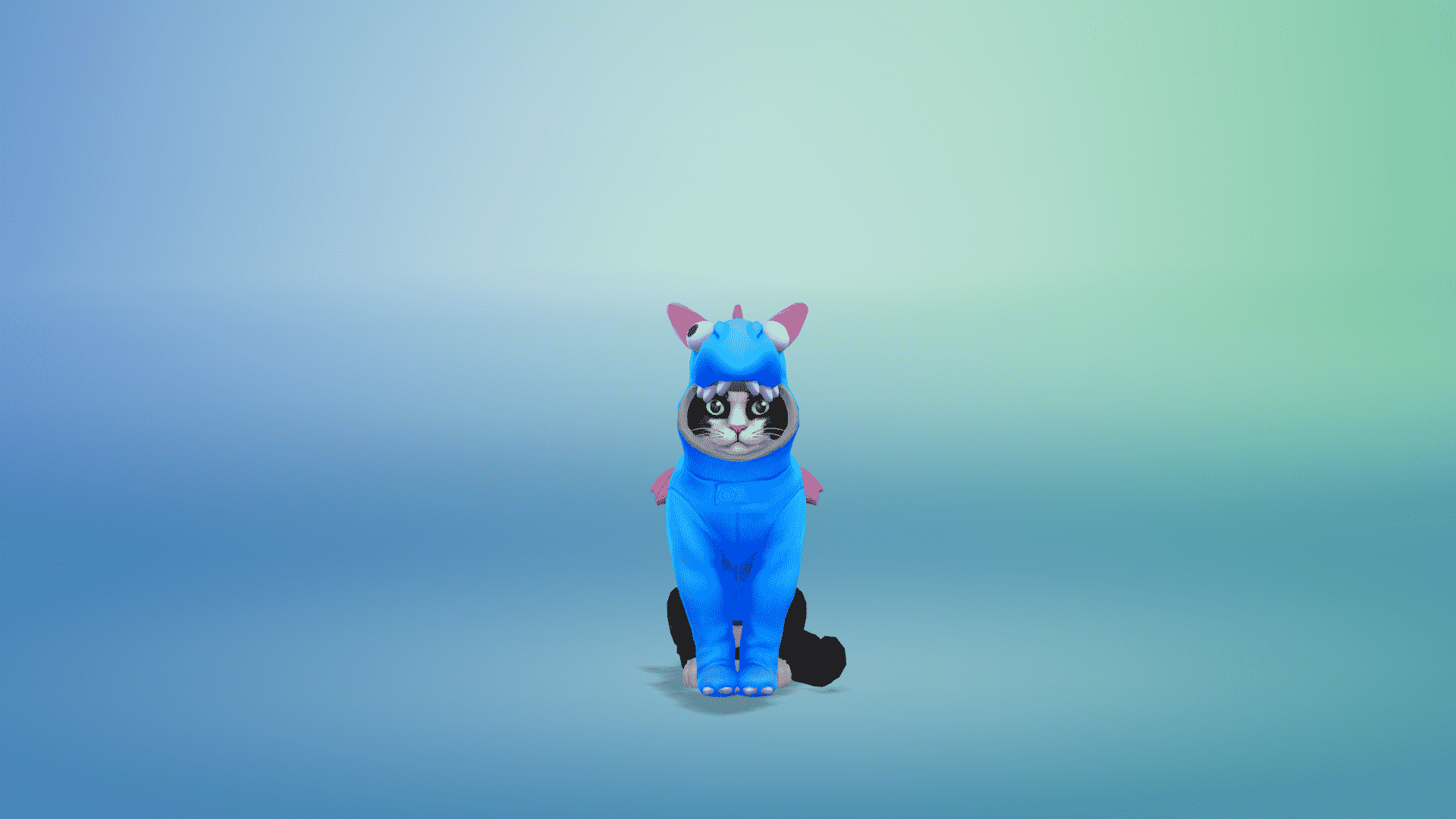
Apart from the traditional collar or bandana you can dress your pet up as a taco, a hot dog, a rainbow dinosaur, a unicorn, a shark, wear a unicorn headband, wear a top hat and so much more. So items of clothing are specifically for cats and the same for dogs.

Step Five: Paint Mode

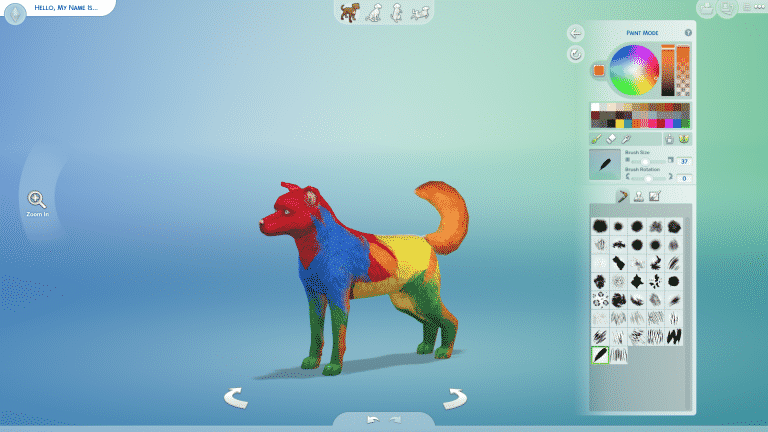
One of the most anticipated features of Create-A-Pet was the paint mode which is very similar to The Sims 3’s Create-A-Style feature. This feature is really easy & fun to use and again the possibilities of customizng your pet is endless. With the paint brush mode you what ever you do on one side of the pet will automatically copy to the otherside. The same with the stamp mode and also with the stencils as well. You can change the size of the brush/stamp and also rotate the position too.

Step Six: Traits & Naming Your Pet

Naming your pet and giving them three traits really helps bring out your Pet’s personality and that what makes them stand out from the others! Both cats and dogs have their own set of traits from!

Step Seven:

Finish of your household. Find a home. Get exploring the beautiful Brindleton Bay and say hello to a world full of Cats & Dogs!

The Sims 4 Cats & Dogs: Create A Pet 101


The Sims 4 Cats & Dogs: Create A Pet 101

Early Access code provided by EA!