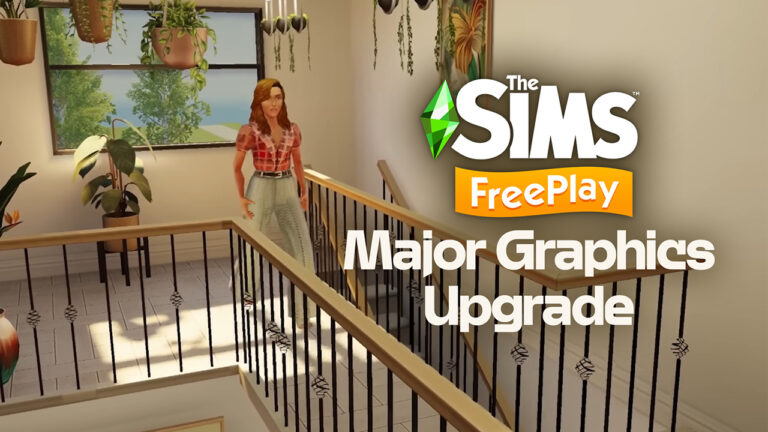
The current biggest Sims Smartphone game is getting a major graphics update!
The Sims FreePlay remains as one of the strongest mobile titles in The Sims Franchise. After almost 15 successful of the game, the team announced their next big overhaul. Dynamic Light Graphics are coming to The Sims FreePlay, with massive visual overhauls and responsive lighting depending on the outdoor time and weather.
This big graphics overhaul for The Sims FreePlay is set to launch in March 2025, with more information about the exact release date to be expected as we get closer to that month.
Until then, take an official look into the changes coming to this Android and iOS Sims game:
The Sims FreePlay: Dynamic Light Graphics Preview
We have surprises in store for our 25th birthday – I can’t wait to show you this!
We’re adding realistic soft shadow lighting in the game. The sun and other light sources can bounce around the room so you can create bright and lofty spaces, cozy nooks and transform all of your Sims’ homes.
. We can’t wait to see how Simmers use it to make their perfect homes.
Are you surprised with the Dynamic Light Graphics Upgrade coming to The Sims FreePlay and do you plan on brushing off your old Sim Town save games? Join the comments down below and let us know!
Instantly create Bucket List goals, unlock reward Traits and more with these advanced Sims 4 Cheats!
You can’t cheat death (unless you ask Grim nicely), but lucky for you, The Sims 4 Life & Death Expansion Pack does come with some new cheat codes for you to use!
In this guide, we’ll be taking you through all types of The Sims 4 Life & Death Cheats. From Trait Cheats to promoting your Sims in the Reaper Active Career. Plus, quick solutions to trigger new Bucket List prompts and more!
Before you enter any cheats, you need to enable cheats first.
To enable cheats on PC and Mac systems:
Press CTRL+SHIFT+C simultaneously to bring up the cheat box
Type testingcheats true in the cheat box
Press Enter to activate advanced cheats
Close the cheat box by pressing CTRL+SHIFT+C simultaneously again
If you entered the cheat correctly, a message will appear under the cheat box informing you that cheats have been enabled.
Playstation
Reminder that enabling advanced The Sims 4 Life and Death cheats on PlayStation 4 and 5 consoles will permanently disable trophies on that save file!
To enable cheats on PlayStation 4 and 5 systems:
Press L1+L2+R1+R2 simultaneously to bring up the cheat box
Type testingcheats true in the cheat box
Press X to activate advanced cheats. The game will warn you that doing so will disable your trophies and ask if you’re sure. Press X again to confirm that you want to enable cheats.
To close the cheat box, press L1+L2+R1+R2 simultaneously again
If you entered the cheat correctly, a message will appear under the cheat box informing you that cheats have been enabled.
Xbox One & Xbox Series X
Reminder that enabling The Sims 4 Life and Death cheats on Xbox One and Xbox Series X consoles will permanently disable achievements on that save file!
To enable cheats on Xbox One and Xbox Series X systems:
Press all four back triggers simultaneously to bring up the cheat box
Type testingcheats true in the cheat box
Press A to activate advanced cheats. The game will warn you that doing so will disable your achievements and ask if you’re sure. Press A again to confirm that you want to enable cheats.
To close the cheat box, press all four back triggers simultaneously again
If you entered the cheat correctly, a message will appear under the cheat box informing you that cheats have been enabled.
image: ea.com
The Sims 4 Life And Death Cheats
Trait Cheats
The expansion pack brought 10 new traits to the game: 3 CAS traits, 3 reward traits and 4 grief-type traits. You can apply all of these easily to your Sim using The Sims 4 Life and Death Cheats!
Skeptical Sims don’t trust everything they see and want to find solid proof of anything they’re unsure of. The Skeptical trait is incompatible with the Macabre trait.
traits.equip_trait trait_Skeptical
Chased by Death Sims are, well, chased by death. If they’re involved in any activities that could kill them, then it’s unlikely they’ll get away unscathed! Sims with this trait get to progress their soul’s journey faster, though.
traits.equip_trait trait_ChasedByDeath
Macabre Sims enjoy all things that the darkness offers and aren’t afraid of anything concerning death or the afterlife. It’s not just a phase, Mom! The Macabre trait is not compatible with the Skeptical trait.
traits.equip_trait trait_Macabre
Grimborn is a reward trait – Sims acquire this trait if they are offspring of the Grim Reaper. Their lifespans are longer, and they have a scythe-shaped birthmark underneath their ear.
Traits.equip_trait Grimborn
Grim Descendant is a reward trait – offspring of Grimborn Sims have this trait, but they don’t have a longer lifespan.
Traits.equip_trait GrimDescendant
Ghost Whisperer is a reward trait for completing the Ghost Historian aspiration.
traits.equip_trait GhostWhisperer
Grief Trait Sims 4 Life and Death Cheats
Grief Traits can be added or removed with the following cheats:
Anger Grief
traits.equip_trait trait_grief_anger
traits.remove_trait trait_grief_anger
Sadness Grief
traits.equip_trait trait_grief_depression
traits.remove_trait trait_grief_depression
Denial Grief
traits.equip_trait trait_grief_denial
traits.remove_trait trait_grief_denial
Holding It Together: Grief
traits.equip_trait trait_grief_hold
traits.remove_trait trait_grief_hold
Skill Cheats
There’s one new skill that comes with the Life & Death pack – the Thanatology skill. Thanatology is the scientific study of death, dying, grief, and loss, and how people deal with those types of experiences.
You can set your Sims’ Thanatology skill using this cheat:
Stats.Set_Skill_Level Minor_Thanatology X (1-5)
Ghost Mastery Cheats
Ghost abilities can be unlocked using gained Experience Points in the Ghost Mastery panel. Use the following cheat to add Experience Points. Replace [number] with the desired amount.
You can use the following cheat to unlock the ultimate ability in either the good or evil branches. To activate it, you must use ANY good or evil ability once.
Good:
Stats.set_stat statistic_ghostpowers_good 99
Evil:
Stats.set_stat statistic_ghostpowers_evil 99
Career Cheats
There are 2 new careers for your Sims to try out from this pack! Use the following Sims 4 Life and Death cheats to apply career promotions (or demotions) to the new careers:
Undertaker Career
Promotion:
Careers.Promote Mortician
Demotion:
Careers.Demote Mortician
Reaper Career
Promotion:
Careers.Promote Active_Reaper
Demotion:
Careers.Demote Active_Reaper
Aspirations /Soul’s Journey Sims 4 Life and Death Cheats
To complete your active Sim’s current aspiration milestone, earning satisfaction points and progressing the Soul’s Journey:
aspirations.complete_current_milestone
To grant satisfaction points to your active Sim:
sims.give_satisfaction_points X
image: ea.com
The Sims 4 Bucket List Cheats
You can use the following cheat to add specific Bucket List objectives to a Sim – make sure you have testingcheats enabled, then Shift + Click on your Sim and go to:
Pack Cheats > Expansion Packs > EP17 Life And Death > Add Unfinished Business Objective.
There, you can choose between all the Bucket List categories and pick whichever objective you would like to add to your Sim.
Enjoy the latest expansion pack in a pro way using these Sims 4 life and death cheats and have a spooky, grand old time!
EA releases official details on how the first Sims 4 House Refresh works in the game.
Maxis surprised everyone yesterday when they released their first ever Townie House Refresh for The Sims 4 Base Game. Including several Residental Lots in Oasis Springs and Willow Creek.
Today, the team released an official Frequently Asked Questions blog, detailing how to make the new Houses load up in your game and more.
Table of Contents
Sul Sul, Simmers! My name’s Colin, and I’m a Producer on The Sims 4! Like many of you, I’ve been playing The Sims for a long time. I was first introduced to the series back in 2000, and the rest is history. As such a long-time fan of the franchise, I consider it an honor to contribute to the fantastic legacy of The Sims!
Today I’m excited to share a unique project the team has been working on to enhance your base game experience further and deepen the established lore within our game!
The Sims 4 Base Game Townie Home Refresh
Over the last 10 years, The Sims 4 Base Game has received many Build/Buy Mode updates, some of which include pools, platforms, half walls, new SDX items, and more! The team wanted to breathe new life into some of our most iconic lots, utilizing all these great features that have been added over the years.
These lots were built with the utmost love and care by talented members of The Sims 4 Development Team. Our goal was not to bulldoze the lot and start from scratch, but to honor the existing lot while giving it some updates and modifications that made it fresh and exciting! Some elements will feel new, while other elements pay homage to the original lots.
While updating these homes, each dev received a summary of each sim in the household, including their age, traits, career, and aspirations. Utilizing this information, the team layered in unique decor, skill-building items, and other fun nods to the townies who live in this home. We aimed for these homes (and even the bedrooms) to be immediately recognizable and suit the sims who live there.
Both the Updated and Original Lots will be available in your “My Library folder. Update them all, update some, or keep the original lots – the choice is yours!
We hope you enjoy these new homes and the stories you’ll tell with them!
How to See this Refresh In-Game
We’ve updated all occupied Residential (or Townie) Lots in Willow Creek and Oasis Springs in today’s patch.
Players that start a New Save after this update will automatically see these refreshed lots in Willow Creek and Oasis Springs. If you have an Existing Save, you will not see any updates automatically. But, you can manually place them in an existing save from the “My Library” tab.
To see the Refreshed Lots with a New Save:
Start a New Game from the Main Menu.
After creating your household in CAS, go to Willow Creek or Oasis Springs.
The Refreshed Lots will automatically be in the world for you to enjoy!
To see the Refreshed Lots with an Existing Save:
Load your Existing Save from the Main Menu.
Go to Manage Worlds, and then go to Willow Creek or Oasis Springs.
Click on the “Gallery” tab in the top right corner.
Click on the “My Library” and filter by “Maxis.” You’ll see all the updated lots here.
Select the desired lot and click “Place Lot” at the bottom right corner.
Select the desired lot location and confirm to place the lot.
Repeat this process for any desired lots you’d like to see updated.
LEFT: BFF House Before Refresh. RIGHT: BFF House After Refresh
The Sims 4 Townie House Refresh: Frequently Asked Questions
I edited a townie lot in an existing save. Will my build be impacted?
No, your build will not be impacted. Even if you modified the townie home before the update, this update should not impact existing saves.
I created my own lot where a townie lot used to be located in an existing save. Will my build be impacted?
No, your build will not be impacted. This update should not impact existing saves, even if you built a new lot where a townie lot used to be.
I’m manually placing the lots in an existing save, but when I try to place a lot, the townie household can’t afford the new home.
If this happens, you can utilize the “Free Real Estate” cheat.
You can open the cheat menu by pressing “Ctrl + Shift + C” on your PC or holding down all the shoulder buttons on your console controller.
Type in “testingCheats true”
Type in “FreeRealEstate On”
Continue the lot placement as instructed above.
I would like to keep the original homes. How can I keep them in my game?
In order to see the original homes, you’ll need to manually replace them.
We’ve added the “Legacy Versions” to your Library for you to place.
With an Existing Save, I see the updated lots in the World View, but they are not updated when I load into them.
Should this occur, you can do the following:
Load into the lot and save your game.
Load back into the World View. You should now see the accurate thumbnail.
If you are looking for the updated lots in an existing save, they can only be added manually.
What are your thoughts on the first Townie House Refresh in The Sims 4 Base Game? Let us know your thoughts down below!
The iconic Cake Dancing makes an interactive return with one of the New Gameplay Objects coming to The Sims 4!
EA and Maxis released a new Patch for The Sims 4 yesterday, allowing us to take a special look into the New Gameplay Objects coming with the upcoming Blast From The Past Live Event.
This Sims 4 Event is set to begin on February 4th, and during the course of several weeks you’ll unlock new gameplay features and items for your game. These rewards will be tied directly to your EA Account, and your progress is cross-compatible between Desktop and Consoles if you’ve linked your accounts properly.
There are 3 New Gameplay Objects included with the upcoming The Sims 4 Blast From The Past Online Event, including:
The ElectroDance Floor
Get Up! Alarm Clock
Surprise Birthday Cake
Bigger Gatherings Banquet
The ElectroDance Floor
Celebrate the 25th Anniversary with a new Base Game Dance Floor! You can also choose to turn on / off the lights and light up the surroundings in vibrant colors.
Get Up! Alarm Clock
One of the new Gameplay Objects that bring useful function to The Sim 4 is the new Get Up! Alarm clock! You can set the time for the alarm to ring at any time of day to get your Sim up and ready for the day.
Surprise Birthday Cake
This iconic object was first introduced with The Sims 1: House Party Expansion Pack. Where an NPC Cake Dancer Sim would hide underneath the cake until given the interaction orders to perform a dance routine:
In The Sims 4’s upcoming limited time event, you’ll be able to perform a dance routine as your Sim steps down the stairs! Take a look at this video preview:
Video Preview of New Cake Dancing Interaction
The object is multipurpose, meaning that you can entertain the guests, call Sims over for a celebration, or just choose to take a slice!
Bigger Gatherings Banquet Table
There’s a new Sims 4 Base Game Banquet Table that you can unlock with the upcoming Sims 4 Live Event! The object lets you serve a premade assortment of dishes, or you can choose to stock it with any recipe of your choice:
Non Gameplay Objects
It’s time to put the speculation to rest – the Retro Table and Wall Phones are purely decorative! Considering that all phone interactions in The Sims 4 are done through the User Interface, there hasn’t been implemented an interactive way of choosing phone socials. At least officially.
What do you think about the new Gameplay objects and decorative heirlooms coming to The Sims 4? Join the conversation below and stay tuned for the latest information on The Sims 4 Live Events right here on Sims Community!
Take an official peek into all The Sims 4 Kits releasing January 2025.
Maxis is launching five new The Sims 4 Kits in January 2025, including two Official Kits, a Creator Collaboration Kit and two Creator Kits:
The Sims 4 Casanova Kit – January 16th Release Date
The Sims 4 Secret Sanctuary Kit – January 16th Release Date
The Sims 4 Comfy Gamer Kit (Lilsimsie Collab) – January 16th Release Date
The Sims 4 Business Chic Creator Kit (Madlen) – January 30th Release Date
The Sims 4 Refined Livingroom Creator Kit (Pierisim) – January 30th Release Date
Thanks to @Simmattically who extracted the official Sims 4 Kits screenshots from today’s Sims 4 Patch, we have a more clear presentation of what to expect from each Kit release this month.
Each Kit is retailed at $4.99USD, or a price equivalent to your local currency.
List of The Sims 4 Kits Releases
The Sims 4 Casanova Cove Kit
The Sims 4 Secret Sanctuary Kit
The Sims 4 Comfy Gamer Kit (Lilsimsie Collab)
The Sims 4 Business Chic Creator Kit (Madlen)
The Sims 4 Refined Livingroom Creator Kit (Pierisim)
If you want to have another look at the items, here we go! (Final items may vary) – Pierisim
What do you think about The Sims 4 Kits releasing in January 2025? Share your opinions down below and stay tuned to all the latest Sims 4 Kits News!
Multiple clues and hints lead up to one of the most anticipated throwback re-releases!
It’s been a while since I talked about The Sims 2 and The Sims 1 on this website.
One of the earliest memories of great excitement writing about this game is when EA gave it out The Sims 2 for free in 2015 as a part of a special 15th Anniversary Gift to players. The game was released through the form of The Sims 2 Ultimate Collection for PC Windows, and was a limited time activation where you could claim it during a limited 7 day period and have it yours to keep forever.
Unfortunately, that promotion was very limited and seemed like the last hurrah of The Sims 2 Build version that we played on Windows. There’s a different version of the game for Mac called The Sims 2 Super Collection, which unfortunately missed out on porting the last two Expansion Packs and several Stuff pack releases. Plus, the version has very frequent glitches and crashes if you’re playing on the Apple Silicon computers.
As of 2025, I cannot open The Sims 2 Super Collection on an Apple Sillicon macbook past the launcher point. Just as many other Simmers who run this highly successful processor and play The Sims 4 and The Sims 3 just fine.
10 years after last talking about The Sims 2, it seems that EA and Maxis are finally ready to speak again. And not only re-release The Sims 2, but possibly also The Sims 1 with updated support. Here’s what makes us think that:
Table of Contents
The Sims 2 and The Sims 1 Merch hits the Shelves
The first clue comes from TikTok user dominika.ilysm who spotted new Sims Merch in the clothing retail store “Cropp” in Poland. Take a look:
Huge thanks to @Simmattically for originally spotting this TikTok!
Did you notice anything? There’s now official merch being sold for The Sims 2 and The Sims 1! Sure, Bella Goth from The Sims 4 is also there looking stylish as ever, but that’s not the point here.
It would be pretty disappointing to sell merch for video games that you can’t really play…right? Or is that just my wishful thinking. But either way, The Sims Official Merch shop also only sold items with video game motives that we could play on generally supported devices.
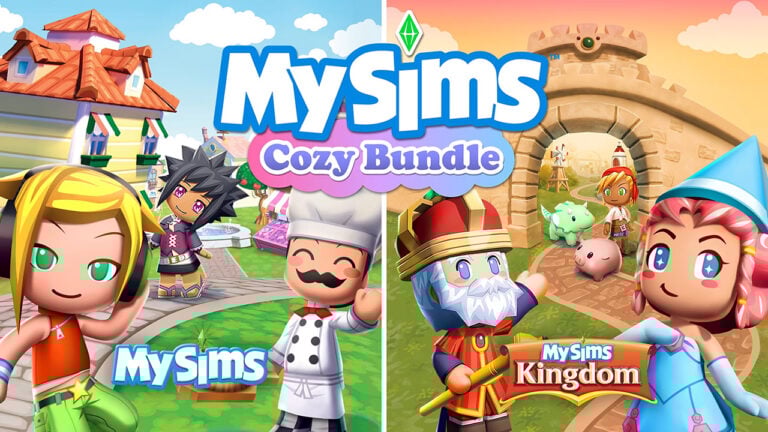
They even released merch for the MySims Cozy Bundle, which is also coming to Windows PC this March!
This Roadmap Clue
Today during Behind The Sims, Maxis revealed their Roadmap for The Sims 25th Anniversary celebrations. With a special segment from January 27th to January 31st called “Nostalgia Now”. The Sims Team even openly invited players to start speculating what could happen during this time frame:
The Sims 25th Roadmap is your guide to all things birthday, so start speculating—hmm…what could Nostalgia Now mean?
Right after that, there’s going to be a 25 Hour Livestream playing The Sims Games. Could the speculated Sims 1 and The Sims 2 re-releases be apart of that? We’re still just guessing…
The Milk Carton Photos
This unique collection is included with the upcoming Sims 4 Live Event starting February 4th. It includes unique characters from the following game releases:
The Sims 2 (Bella Goth and Burglar)
MySims
The Sims Life Stories
The Sims Medieval
The Sims 3 (Into The Future Expansion Pack)
The Comfy Gamer Kit Game Posters
Did we just get even more hints at potential re-releases happening for The Sims Franchise? On January 16h, 2025 EA released three new Sims 4 Kits. The collaboration Kit with Lilsimsie features a selection of 12 different video game posters in Build Mode. Specifically, they’re titled as Sims Forever! Collectible Art Prints in the game.
These rare and collectible art prints are guaranteed to show off your love for some of your favorite games! Pick your favorite cover and display it with pride.
Each wall poster variant features a Simlish transcribed version of a Sims Game cover, including:
The Sims 3 could easily be a part of the Nostalgia Now celebration. It’s still a staple and iconic entry to the series after all!
What do you think?
There could be a lot more clues about The Sims 2 and The Sims 1 re-release happening that I’m missing, but if anything, I truly believe that a re-release of these two games would mean a lot to the franchise.
The Sims Movie is officially in the works, and I’m sure EA would love to introduce new (and old) players back into the interesting stories and gameplay mechanics of earlier Sims games. It would be a true shame to leave the silver screen theatre with no way to play back older Sims games and familiarize yourself with the storyline.
I truly believe that all four entries to The Sims Franchise can co-exist greatly together just because each has something that the other doesn’t.
Many players were able to create 3rd party throwback experiences of The Sims Online. And even bring back The Sims 1 to the touchscreens unofficially until EA gave the creators of this project a cease & desist letter. And at least hopefully gave them the right idea for an official release…
But what do you think? Please note that everything talked about here is marked strictly as rumor until we get closer to January 27th, 2025. After all, the team hyped us up to speculate, so we will keep you posted in this article if we know any more updates. Until then, stay tuned to all things The Sims on Sims Community!
Maxis reveals a huge lineup of official and Creator-made The Sims 4 Kits.
January 2025 is starting off with a quick burst of Sims 4 content, including the January 14th Patch Update and the release of three new Kits on January 16th!
Image: EA
Three Kits (including a collaboration with lilsimsie) will launch on January 16th. Two Kits in collaboration with Pierisim and Madlen will drop later this month, and two more Kits in collaboration with aharris00britney and Syboulette will launch later this year.
The Sims 4 Secret Sanctuary Kit
Create a luxurious space tucked behind a secret passage in a bookcase, full of lavish furniture sure to delight Sims who enjoy the finer things in life and indulge in timeless fashion with The Sims 4Secret Sanctuary Kit.
This Kit is inspired by our beloved and iconic Bella Goth, so we can expect a very stylish Kit indeed.
The Sims 4 Casanova Cave Kit
Maybe your Sims style is more modern and sleek? The Sims 4Casanova Cave Kit has just what your Sims need to entertain and make an impression, whether it’s game night with friends or a romantic date night.
This Kit is inspired by the one and only Don Lothario. Hooray for a masculine themed Kit!
The Sims 4 Comfy Gamer Kit (in collaboration with lilsimsie)
Design a warm, inviting gaming room with personal touches that will offer your Sims a place to unwind with their favorite pastime with The Sims 4 Comfy Gamer Kit, created in collaboration with longtime Simmer and content creator lilsimsie.
We’ll be able to create a cozy gaming sanctuary for our Sims with this Kit! The preview image shows a new desk, computer and gamer clutter.
More information about these Kits will be available on January 16th.
More Creator Kits Coming Soon
Two Creator Kits made in collaboration with Pierisim and Madlen is set to launch later this month. More information about these kits are still pending but Madlen announced the name of their Kit: Business Chic!
This Kit appears to be a Create-A-Sim Kit with chic and stylish business attire, while Pierisim’s Kit is a Build/Buy Kit with a modern vibe to it. The creator of this Build Kit also announced their Kit title – naming it The Sims 4 Refined Livingroom Kit.
The next Creator Kits that are launching later this year were made in collaboration with aharris00britney – a custom content creator that’s best known for their amazing hairstyles. A Kit centered around new hairs would be fantastic! The other Creator Kit was made in collaboration with Syboulette who’s best known for the dreamiest Build/Buy Custom Content so I’m looking forward to seeing their Kit announcement!
What do you think about these upcoming Kits? Start a discussion and let us know below!
New clothing, CAS items and Build Mode objects are coming for free!
The Sims 4 Base Game is getting a huge update on February 4th, 2025 to celebrate The Sims’ 25th Anniversary. It’s been revealed by Maxis that the upcoming Sims 4 Patch will include new Create A Sim items for Sims of all ages. From new facial hair to clothing for Toddlers, Infants and Adults.
The Build Mode catalogue is also getting updated with new swatches for Kitchen sets, Doors and Windows and Outdoor Kids’ Playground.
Take a first look into the upcoming Free Sims 4 Content below:
The Sims 4 Anniversary Update: First Look
What’s a birthday without gifts? On February 4th, The Sims 4 base game will receive a huge update, bringing 70+ new in-game items to all players. There will be new Create a Sim options, including two new hairstyles, baby hairs added to three classic hairstyles, and a goatee for those looking for new facial hair options. Kiddos won’t be left out, as Toddlers will receive a new hairdo! In addition, there will be new clothing from head to toe, like a new turtleneck and bodysuit, along with jackets, jeans, bike shorts, and so much more. And don’t forget to accessorize with a gold chain or a classy set of pearls, a fitted cap, and new shoes, including heels, sneakers, and sandals.
Create A Sim Content Preview
Build Mode Content Preview
These items will be a completely free addition to The Sims 4 Base Game for all players. Additional objects, CAS items and reward traits will be available on the same day as this Update through the Blast From The Past Online Event. Also launching February 4th!
Are you excited for over 70 new items coming to The Sims 4 for free? Join the conversation below and be the first to know when the update releases right here on Sims Community!
There’s a new Sims 4 Update for Desktop and Consoles!
EA and Maxis have released a brand new The Sims 4 Update across Desktop and Console supported platforms. The latest version of the game fixes several bugs, as well as prepares the game for the arrival of three new Kits. What else is new? Find out in the Patch Notes and Patch Overview down below:
The Main Menu Update
Table of Contents
Installing the Latest Sims 4 Update
You can get the latest Sims 4 Update on the following official launchers and platforms:
You can download the latest Sims 4 Update by checking for a Patch through the EA App. Or Origin if you play on Mac. If you have Automatic Updates enabled the update will automatically download through your client program. In case your EA App is not working properly ensure you’ve cleared your app cache!
If you play The Sims 4 on Xbox Series X / S and Playstation 4 and 5 you can request a new update by checking for updates under The Sims 4 game in the Main Menu. If you’ve enabled automatic updates the Patch should download right away.
This Update is expected to automatically disable all your Mods and CC after patching the game. Make sure all of your custom content and mods are up to date and functional with the latest Sims 4 Update game version!
Official Sims 4 Patch Notes
Update 1/14/2025
PC: 1.112.481.1030 / Mac: 1.112.481.1230
Console: 2.05
Hoople Borpna Simmers! Ok, it’s not February yet, but The Sims 25th Birthday is just around the corner and it’s exciting to think about twenty-five years of The Sims!
At 10 AM PST, the first update of the new year will begin to roll out bringing a range of improvements from a brand-new Main Menu to memory and performance optimizations, a refresh of the base game homes, and a few bug fixes.
Thank you for your support and continued reporting efforts via Answers HQ, it really helps us identify the issues you care the most about. If you’re ready to start the birthday party early, come join us in The Sims Discord!
Dag dag!
The Sims Team
What’s New in The Sims 4?
Base Game Updates
Main Menu Visual Refresh
To start off with, we have a brand-new Main Menu visual refresh! We’ve pushed aside the clutter to make space for your Sims! New Game / Resume Game has moved from right to left, as have a few of the other navigation options. Home, Events and Store can be found at the top, along with the Options panel in the far right. It may take a moment to get used to the New Game / Resume Game new location, I know it took a moment for some of us. A few other changes to mention:
The visual update includes a bit of fresh paint, a little less clutter, with the desire to keep information clear and discoverable for you!
The Sims in the center are your last played household Sims, all of them!
And important updates and information from The Sims are focused on the right side.
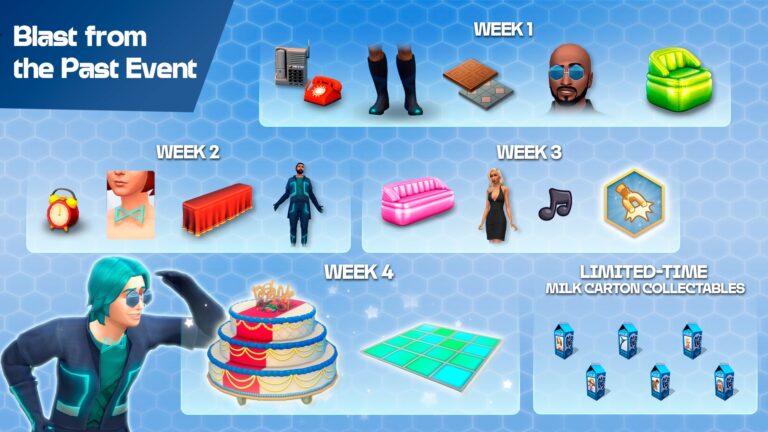
Speaking of the Main Menu, you’ll receive a message about the upcoming Blast from The Past Event.Starting on February 4th, this birthday event will feature rewards inspired by iconic items from the 2000s, such as a milk carton, telephone, alarm clock, triple-tiered birthday cake, and inflatable chair and loveseat.
Performance and Memory Improvements
Smoother Gameplay – We’ve optimized mouse movements, preventing slowdowns and making gameplay more responsive on PC, Console, and Mac.
Improved Graphics and Performance – On Mac and PS4, we’ve optimized how graphic data is handled, resulting in smoother and more efficient rendering and overall performance.
Memory Efficiency – Various enhancements have been made to save memory across all platforms, helping the game run more smoothly and reducing crashes.
Base Game Townie Home Refresh
New year, new homes! All Townie Homes in Willow Creek and Oasis Springs have been updated and renovated to breathe some fresh life into classic lots.
Both the Legacy and Updated Lots are automatically available in the “My Library” tab.
New Saves – Players who start a New Game will automatically see the updated lots in the world!
Existing Saves – Players who would like to see the update in their existing saves must manually update the homes by placing the new lots from the “My Library” tab.
Bug Fixes
Console
Potion Color Issue on Consoles – Fixed a bug where potion colors in cauldrons would change to gray after loading a saved game.
Texture Reloading Optimization – Improved the texture reloading process on Xbox One to reduce “out-of-memory” crashes, and providing more efficient loading of game lots.
Base Game:
[AHQ] Fullscreen Minimization Fix – We resolved an issue where you couldn’t minimize the game in Fullscreen mode using DirectX 11. Now, key combinations like Alt + Tab and the Windows key will work as expected.
“Work in Off hours” interaction does not clear the Tense buff for workaholic Sim.
[AHQ] Fixed cases of really high Bills. Lot Taxes will now only count the property value and household_net_worth not add value from anything in inventories.
[AHQ] “Try for baby” in shower will now fill the Hygiene motive.
[AHQ] Inspired Sim will no longer mix drinks excessively.
Discomfort Relief Value is no longer missing for Bath tubs.
“Purchase Garlic Seeds” has its own interaction and should be categorized/available under the “Purchase Seeds” interaction.
[AHQ] Outgoing and Socially Awkward traits cannot be selected together. If one is selected, the other will appear greyed out and cannot be chosen.
[AHQ] Female frame facial hair on Male Sims will no longer disappear.
[AHQ] Shoes are now replaced with barefoot when a Styled Look with barefoot is applied.
[AHQ] Water puddle VFX animation will no longer appear on the ground floor when Sim is swimming on the second floor.
“Revive” is now available on a dead Cowplant.
Ponds properly display water textures in Map View.
Comfort Value attribute is no longer missing for Toilet objects.
Affecting Multiple Packs
[AHQ] Sims’ weight and muscle levels are now properly affected by Bike Riding, Horse Riding, Jog here and Rock Climbing.
[AHQ] Thumbnails of Guidry and Temperance Sim are visible in relationship panel, Sims profile, Manage HH.
Sim no longer has the option to give the toddler fertilizer as food from inventory.
[AHQ] Sim can now set the waffle/pizza oven/stand mixer for sale in a retail store.
“Invite to Hangout at Current Lot” interaction is no longer available for Infants in the Sim profile.
Get Together
Clubs are now under the default section under the social groups interface.
City Living
[AHQ] “Play with emotion” interaction is now greyed out when the piano keyboard breaks.
Cats & Dogs
[AHQ] Dog and Cats with the fire obsession perk are far less obsessed with the fireplace.
[AHQ] Sims no longer gain Fitness skill when cleaning the litter box.
Discover University
[AHQ] Sim with the Gym Rat trait will no longer lose hygiene while juggling a soccer ball.
[AHQ] Frequency of getting electrocuted from Robotic Workstation has been considerably reduced.
Eco Lifestyle
[AHQ] Roaches are removed from the dumpster after Sim successfully performs the “Try to clear roaches” interaction.
Snowy Escape
[AHQ] Seaweed Ramen recipe is now available from the fridge cooking menu.
Sim’s Hygiene motive will now increase when using a Hot Spring.
Cottage Living
[AHQ] Sims can now use Hot Pot with the Simple Living Lot Challenge.
High School Years
[AHQ] When Sims switch from an outfit created in Thriftea to a regular outfit, they no longer revert back to the Thriftea outfit when showering/bathing.
[AHQ] Notification badges no longer displayed when phone is in silent mode and when Social Bunny has notifications turned off.
[AHQ] Bronze prom reward now unlocks correctly in B/B catalogue.
“Hide from Paparazzi” interaction is available for Sims with Fame level 3 and below.
Growing Together
[AHQ] Fixed an issue where some Life Milestones wouldn’t be achieved when the Sim is off lot,, including milestones for toddlers’ movement skill.
Horse Ranch
[AHQ] ‘Drink an Aged Nectar’ Want fulfils when Sim drinks the aged nectar bottle
For Rent
[AHQ] A serving of Vegetable Chili from the Pressure Cooker will no longer turn into 8 servings.
Spa Day
[AHQ] Applied Pedicure will no longer vanish when a Manicure is requested.
Dine Out
Sparkling Water is now available under the “Fizzy” category.
My First Pet
[AHQ] In new saves Sim will no longer receive “Baby whisked away” buff and TNS suggesting that Rattigan passed away when Rattigan is still alive.
Nifty Knitting
[AHQ] Knitting now counts towards Arts & Crafts for Scouting.
Crystal Creations
[AHQ] Last Exception error will no longer trigger when Ring is placed on the Mystical Moonlight Crystal Grid and the household is reloaded.
[AHQ] Option to order Crystals is now available on the computer.
What’s your experience been like so far installing and playing the latest Sims 4 Update? Join the conversation below!
The Sims Team has shared their content roadmap for The Sims 25th Anniversary. Making it the first limited-time Roadmap to happen in the series – and with more vague teasers than ever!
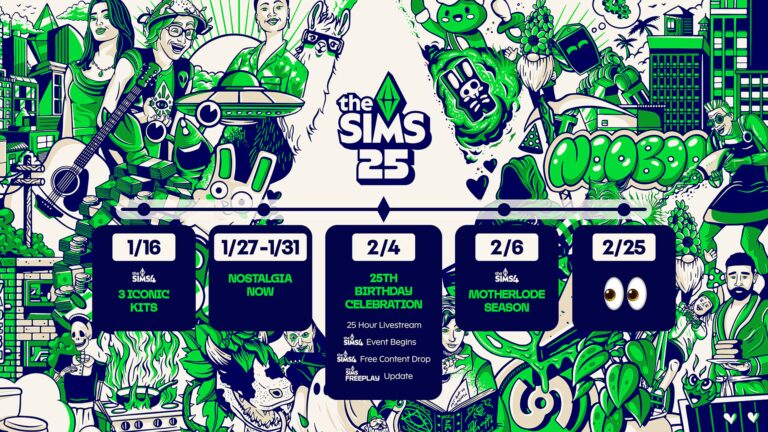
The Roadmap confirms the release of three Sims 4 Kits this Thursday. The time period for “Nostalgia Now” seems to be teasing at something…but what? And, we have an official list of Birthday Celebrations coming to The Sims 4 game. From a new Base Game Event to a brand new Free Content Update.
Lastly – the anniversary celebrations end on February 6th when a new Sims 4 Roadmap Season is unveiled. Teasing a potential Sims 4 Expansion Pack announcement on February 25th. Take a look:
The Sims 25th Anniversary Roadmap
The Sims is turning 25! Here’s A Sneak Peek at the Birthday Celebrations 👀
ICYMI, The Sims 25th Roadmap is your guide to all things birthday, so start speculating—hmm…what could Nostalgia Now mean?—and mark your calendar:
Earn throwback CAS items and gameplay objects in this new Sims 4 Event!
Maxis announced today that they’ll be launching a new Sims 4 Event called Blast From The Past. This online login event is set to begin on February 4th, 2025 across PC, Xbox, Playstation and Mac devices.
The new Online Event brings back some of the most iconic objects from The Sims 1, The Sims 2 and The Sims 3.
Get ready for a free, limited-time Event where you’ll need to venture into Live Mode to participate.
The Sims 4 Blast From The Past Event will feature rewards inspired by iconic items from the 2000s, like a milk carton, telephone, alarm clock, triple-tiered birthday cake, and inflatable chair and loveseat.
Another preview of this login event was provided during Behind The Sims, giving a more in-close look at the new throwback objects from The Sims 1:
During the official Behind The Sims livestream, we got a first look at The Sims 4 Main Menu update that’s set to release TODAY!
Mersea, the host of Behind The Sims introduced us to a stylish new menu that Simmers across PC and Consoles will stumble across after opening up their game. Here’s a first look:
What are your thoughts on the game’s new main menu user interface? Let us know in the comments below and stay tuned for latest news on The Sims 4!
Here’s what’s getting fixed today, and when to expect Festival fixes.
A new The Sims 4 Patch is set to release today across PC, Mac, Xbox and Playstation supported platforms. The patch will help prepare the Base Game for the upcoming release of three new Sims 4 Kits, along with bug fixes and polishing for existing game issues that players have reported over the last couple of months.
It hasn’t been confirmed if the new Sims 4 Patch will bring any new game features and / or items to the catalogue. However, we are hoping to be pleasantly surprised with the announcements that will follow along the upcoming Behind The Sims Episode.
So, what’s getting fixed today? Check it all out in the official Sims 4 Laundry List for today’s game patch:
The Sims 4 Patch: Laundry List
Here’s the list of community concerns we’re investigating for the upcoming The Sims 4 Patch:
Base Game:
[AHQ] Fixed cases of really high Bills where Lot Taxes would not only count the property value, but also add value from anything in inventories.
[AHQ] Inspired Sim will no longer mix drinks excessively.
[AHQ] ‘Try for baby’ in the shower will now fill the Hygiene motive.
[AHQ] Outgoing and Socially Awkward traits cannot be selected together. If one is selected, the other will appear greyed out and cannot be chosen.
[AHQ] Female frame facial hair on Male Sims will no longer disappear.
[AHQ] Shoes are now replaced with barefoot when a Styled Look with barefoot is applied.
[AHQ] Water puddle VFX animation will no longer appear on the ground floor when a Sim is swimming on the second floor.
[AHQ] Sim no longer has the option to give the toddler fertilizer as food from inventory.
Affecting Multiple Packs
[AHQ] Thumbnails of Guidry and Temperance are visible in the relationship panel, Sims profile, and Manage Household panel.
[AHQ] Knitting now counts towards Arts & Crafts for Scouting.
[AHQ] Sims’ weight and muscle levels are now properly affected by Bike Riding, Horse Riding, Rock Climbing, and ‘Jog Here’ activities.
[AHQ] Sim can now set the waffle/pizza oven/stand mixer for sale in a retail store.
Cats & Dogs
[AHQ] Cats and dogs with the fire obsession perk are far less obsessed with the fireplace.
[AHQ] Sims no longer gain fitness skill when cleaning the litter box.
City Living
[AHQ] ‘Play with emotion’ interaction is now greyed out when the piano keyboard breaks.
Cottage Living
[AHQ] Sims can now use Hot Pot with the Simple Living Lot Challenge.
Crystal Creations
[AHQ] Last Exception error will no longer trigger when a ring is placed on the Mystical Moonlight Crystal Grid and the household is reloaded.
[AHQ] Option to order Crystals is now available on the computer.
Discover University
[AHQ] Sim with the Gym Rat trait will no longer lose hygiene while juggling a soccer ball.
[AHQ] Frequency of getting electrocuted from Robotic Workstation has been considerably reduced.
Eco Lifestyle
[AHQ] Roaches are removed from the dumpster after a Sim successfully performs the ‘Try to clear roaches’ action.
For Rent
[AHQ] A serving of Vegetable Chili from the Pressure Cooker will no longer turn into 8 servings.
Get Together
Clubs are now under the default section under the social groups interface.
Growing Together
[AHQ] Fixed an issue where some Life Milestones wouldn’t be achieved when the Sim is off-lot, including Milestones for a toddler Sim’s movement skill.
High School Years
[AHQ] When Sims switch from an outfit created in Thriftea to a regular outfit, they no longer revert back to the Thriftea outfit when showering/bathing.
[AHQ] Notification badges are no longer displayed when the phone is in silent mode and Social Bunny has notifications turned off.
Horse Ranch
[AHQ] ‘Drink an Aged Nectar’ Want now fulfills when Sim drinks an Aged Nectar bottle.
My First Pets Stuff
[AHQ] In new saves, Sim will no longer receive the ‘Baby whisked away’ moodlet and The Sims Notification System will not suggest that Rattigan passed away when Rattigan is still alive.
Snowy Escape
[AHQ] Seaweed Ramen recipe is now available from the fridge cooking menu.
Sim’s Hygiene Motive will now increase when using a Hot Spring.
Spa Day
[AHQ] Applied Pedicure will no longer vanish when a Manicure is requested.
Overlapping Festivals and Food Stalls Glitch
EA has acknowledged a Sims 4 Glitch where certain festivals from Expansion Pack would overlap and not spawn properly in the designated neighborhood. Leading to usability issues with festival objects, food stalls and more.
Almost eight hundred people reported this issue to EA Help. The Sims Direct Team acknowledged this issue, saying that they’re working to resolve it in one of the future Sims 4 Patches. Unfortunately, this issue won’t be fixed in today’s Sims 4 Patch,.
Our team is currently investigating the issue regarding overlapping festivals & festival objects merging with other items.
Thanks for your reports on this; we’re aiming to provide a fix in a future patch & appreciate your patience while we work towards a solution.
The Windows Patch makes the game compatible for newer systems!
It’s been a while since we talked about everyone’s favorite game from 2009 – The Sims 3. To everyone’s surprise, the game has been updated to a newer version on January 13th, 2025 for Windows operating systems. Almost ten years after its previous update!
The newest version of The Sims 3 delivers performance and launch fixes for newer processors, where the game was unable to launch if you were running it on a more updated PC build of your Windows operating system.
The Sims Team didn’t release any official Patch Notes for The Sims 3’s latest update as of now. But we do have an insightful piece of information about what this patch entails from EA Help member puzzlezaddict. Take a look:
EA released a very minor patch for Sims 3 today, only for the EA App version and Windows. The new version number is 1.69.47.024017.
This patch fixes the Alder Lake issue, where the game wouldn’t start correctly on certain newer, higher-end Intel processors. It makes no other changes.
If you get the activation window, simply click Exit and launch the game again. It should work this time around.
This update is currently only available for The Sims 3 players who play the game through the EA App. The update hasn’t been released as of now on Steam.,
Could this be just the beginning of a very exciting news season ahead that awaits us with the latest Behind The Sims episode? Tune in to Sims Community to discover more interesting surprises very soon!
What’s your experience like with The Sims 3’s latest update release? Share your thoughts in the comments down below!






,xPosition=0.5,yPosition=0.5&w=1677 "The Sims 4 Life And Death Cheats Guide 11")


,xPosition=0.5,yPosition=0.5&w=1677 "The Sims 4 Life And Death Cheats Guide 14")