



As a self diagnosed CC addict, I used to be one of THOSE people. Yes, you know the ones. The “I’m never ever going to use CC in my game” people.
I was so obsessed with some of the sims my friends were making, and always envied how amazing they looked! Then it hit me why my sims didn’t look quite right….. EYELASHES. So I went on a jolly over to Tumblr to download some CC eyelashes. 5gb of CAS cc later and it was safe to say I was hooked. However, it took me HOURS to find the CC I liked because as I’m sure you all know, custom content Tumblr is confusing, especially if you’ve never used tumblr before (which I had not).
So I thought it would be super handy for my fellow CC newbies, to create an essentials CAS CC items guide so you don’t have to spend a whole evening trying to figure out what’s what! So here we go, my personal favourite CC items to get you started on your journey!
Eyelashes
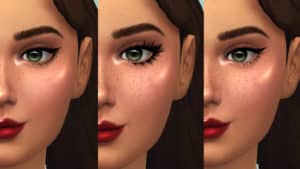
So in terms of eyelashes, there’s one CC creator I am OBSESSED with. Kijiko eyelashes are amazing. Every time I ask a simmer which ones they use this is always the recommendation. It’s actually crazy how much difference eyelashes make on a sim.
Eyes

So I never had a problem with sims eye colours…. until I found these. They are SO detailed and I honestly can’t look at the base game eyes anymore. I find the base game eye colours very flat, they literally are just… well colours! But these CC eyes really have another level and dimension to them. GG ChiefWhiskers, GG <3
Hair

Now there are a LOT of talented CC hair creators out there, but I have my favourites that I first started out with. This particular hair is by the very talented GreenLlamas.
Download here (it also comes in a shorter version and it is SO cute)
Other notable creators: NolanSims, BustedPixels
Skin details

FRECKLES. I can’t tell you how obsessed I am at downloading freckles. This particular set from SimTone has 4 swatches, depending on how intense you would like your freckles to be.
Make-up
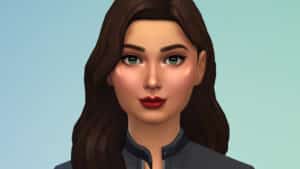
I think most of my CC folder is just makeup, especially eyeliners. I really wanted to split up the make up section so you get at least one of everything to start with.
Lips: By GrimCookies. This lip palette is one of my favourites for a number of reasons. It is very natural looking and I love to fact it has a little highlight on the cupids bow. It also has a really wide variety of colours for a starter kit. Download here
Eyeliner: By PralineSims. This amazing pack has not 1, not 2, but 96 eyeliners! It’s called the ultimate collection for good reason! I used number 58 for this sim. Download here
Eye shadow: By GrimCookies. I adore this eye shadow palette by Grimcookies. It has an awesome colour variety for natural as well as bolder looks. Download here
Cheeks: By SimTone. The cheeks are in the same set as the freckles. Download here
Highlighter: By BubbleVoid. When it comes to highlighters, I really want a blinding shine. I want people to see it! That being said, I know that’s not everyone’s cup of tea. Which is why this highlighter is great! It has a wide variety of shine, so you can go bold or subtle. It’s also perfect for a good variety of skin tones. Download here
Eyebrows

I never knew how badly I needed CC eyebrows…. until I downloaded CC eyebrows. These brows by Adeic are really great because they are maxis match BUT also have that really realistic feel to them.
Clothes

So as always, there are SO SO MANY wonderful clothing CC creators, but for the purposes of this article I have chosen to feature Moontrait because they have some super adorable outfits. However if you’re looking for some nice male clothing CC I would also highly recommend BustedPixels as they have a real mix!
Dress: By MoonTrair Download here
Shoes: By SimTone Download here
Glasses: By TamoSim Download here
Need a hand installing CC for the first time? Follow this tutorial by SnarkyWitch!


36 Comments
Useful post! I was hoping for a zip file containing a couple of each so we could download all of them at once
Reply to Andrea
Pretty sure that’s disrespecting said creators and their Terms of Use. Please don’t do that.
Reply to Andrea
that’d go against some of the creators TOUs.
I love this and I need more of these.
I had downloaded it before and the eyelashes cc didnt work for me. They would show up over the default 🙁
Reply to Pernezha
You need a mod to remove the default eyelashes
Reply to Pernezha
look up kijiko’s remove ea eyelashes mod 🙂
Reply to Pernezha
that’s how it is? they’re supposed to be accessories in the glasses tab.
Reply to Pernezha
The one linked above is the accessories version. They’re found under the ‘Glasses’ category. Kijiko also has skin detail versions of these eyelashes to save you time picking eyelashes in each outfit category. I recommend that one as well, though they might conflict with rings.
Reply to Pernezha
You need to also get the remove lashes mod which is on the same site
Reply to Pernezha
Maybe you downloaded a old set of lashes? I have some kijiko and it works fine you dont need mods to apply it.
Thanks so much for mentioning me!
Useful post! I was hoping for a zip file containing a couple of each so we could download all of them at once
Reply to Andrea
that’d go against some of the creators TOUs.
Reply to Andrea
Pretty sure that’s disrespecting said creators and their Terms of Use. Please don’t do that.
I use ps4:( so I can never have cc:(
Jazzy we need to be friends Your about the author sounds just like me! (Minus the whole plant thing.. my cats are plant murderers) thanks for the info I’ve been dizzy looking through all of the CC and not knowing where to start
Thank you so much! All the links are great. I like Maxis-like cc more so these are all great finds for me:)
Very Cute, I know im very late to the sims game because i just got the sims 4, but this was very helpful, thank you! 🙂
Thanks for featuring me!
I already have a ton of cc, but this was still really useful because I found some creators I may not have found before! Thanks!
Thanks for featuring me!
I already have a ton of cc, but this was still really useful because I found some creators I may not have found before! Thanks!
Very Cute, I know im very late to the sims game because i just got the sims 4, but this was very helpful, thank you! 🙂
Jazzy we need to be friends Your about the author sounds just like me! (Minus the whole plant thing.. my cats are plant murderers) thanks for the info I’ve been dizzy looking through all of the CC and not knowing where to start
Thank you so much! All the links are great. I like Maxis-like cc more so these are all great finds for me:)
I had downloaded it before and the eyelashes cc didnt work for me. They would show up over the default 🙁
Reply to Pernezha
look up kijiko’s remove ea eyelashes mod 🙂
Reply to Pernezha
You need a mod to remove the default eyelashes
Reply to Pernezha
The one linked above is the accessories version. They’re found under the ‘Glasses’ category. Kijiko also has skin detail versions of these eyelashes to save you time picking eyelashes in each outfit category. I recommend that one as well, though they might conflict with rings.
Reply to Pernezha
that’s how it is? they’re supposed to be accessories in the glasses tab.
Reply to Pernezha
You need to also get the remove lashes mod which is on the same site
Reply to Pernezha
Maybe you downloaded a old set of lashes? I have some kijiko and it works fine you dont need mods to apply it.
Thanks so much for mentioning me!
I use ps4:( so I can never have cc:(
I love this and I need more of these.
Welcome to Sims Community!
Our community is about connecting people through open and thoughtful conversations. We want our readers to share their views and exchange ideas in a safe space.
In order to do so, we've created a simple set of rules that will improve your experience. Simply put, keep it civil.
Your post will/might be rejected if it contains:
User accounts will/might be blocked if we notice:
So, how can you be a power user?
Thanks for reading our community guidelines. Please note that we're aware of certain issues with Sign In / Log In and Create Account / Email Confirmation issues. We're working behind-the-scenes on a new Account Creation process. Thank you for your patience and remember - freedom of speech is not freedom of reach