


Your favorite The Sims 2 families are back, but now in The Sims 4!

Needlework Reverie has recreated some of our favorite The Sims 2 characters—this time with a Sims 4 Save File! Not only did she create The Sims 2 characters, but she also created both houses and community venues for them to use. She made approximately 148 sims for the Save File. We love this nod to The Sims 2 and can't wait to play with it even more!

Sims 4 Save File Walkthrough
Description
"What if all of the sims we know and love from TS2 were remade for TS4? Well you don’t need to wonder that anymore. Answer questions like, “How did Cassandra and MarySue know each other?” and “What was Brandi like as a teen?” “Did Don have game?” Ever wondered how things would be different for Romeo and Mercutio if their mom was still alive? Would things be different for Juliet if her grandmother was? Or Maybe you just want a save file that feels different and lively. I got you, boo."

Backstory
"It is 8 years before Bella disappeared from Pleasantview, and all the sims that are meant to be contemporaries of Cassandra Goth's are teens too and are living at home with their families. What were they like as teens? Set Pleasantview up so the events of the beginning happen, or go down alternate routes. It's all up to you.
Strange Town and Veronaville are also alternative timelines for you to discover in this Sims 4 Save File. All the sims have jobs and relationships in their home world. You can choose how much or how little to mingle them. There are even sims in Britechester enrolled in the colleges."
World Maps


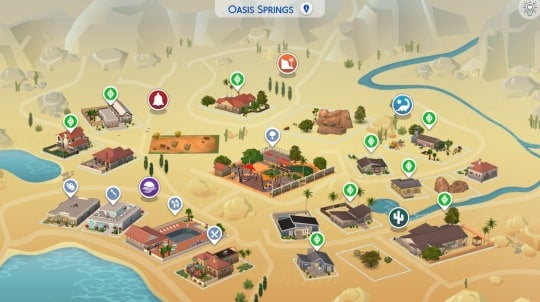

Builds


More Information
In addition to the information we have shared, Needlework Reverie has included more information in the following posts:
Her Game Setup
This is what Needlework Reverie had installed when creating this save file:
EP: all EPs installed but High School Years
GP: all GPs installed but Journey to Batuu
SP: all SPs installed but My First Pet Stuff
Kits: all kits installed
If you are missing any of the packs used, you will end up with some sims missing clothes, hair, etc. You can always use testingcheats on and cas.fulleditmode on to edit the sims. A warning will appear when opening the save, but it just means that saving the file without those packs installed will delete that information. The save is not corrupted.
Note: You will have sims from the packs that Needlework Reverie did not own. You'll just need to go into manage worlds and delete them if you do not want them walking around.
How to Install
Open your The Sims 4 folder and then your Saves folder. Extract the Needlework Reverie folder somewhere outside the folder. Check to see if you have a save with the same name. If you do not, just copy and paste the files to the Saves folder. DO NOT put this in your mods folder. If you do have a save with that number, CHANGE the number to a number not already in your folder. Make sure the files all have the same number. The save should show up in your game in Load Game. It should be named Needleworkreve TS2 in TS4.

You can download the Save File for FREE on her Tumblr! You can also find Needlework Reverie's work on her Patreon!


0 Comments
Be the first to comment.
Welcome to Sims Community!
Our community is about connecting people through open and thoughtful conversations. We want our readers to share their views and exchange ideas in a safe space.
In order to do so, we've created a simple set of rules that will improve your experience. Simply put, keep it civil.
Your post will/might be rejected if it contains:
User accounts will/might be blocked if we notice:
So, how can you be a power user?
Thanks for reading our community guidelines. Please note that we're aware of certain issues with Sign In / Log In and Create Account / Email Confirmation issues. We're working behind-the-scenes on a new Account Creation process. Thank you for your patience and remember - freedom of speech is not freedom of reach