The new Sims 4 Update has arrived, bringing The Marketplace and Game Improvements!
Electronic Arts has just released a new The Sims 4 Update exclusively on PC and Mac platforms. The Sims Team confirmed that this is due to The Marketplace having a different date set “for the next few months” for Xbox and Playstation players. During this time players are expected to encounter a version mismatch when using The Gallery feature, as confirmed in the latest Sims 4 Laundry List detailing the next game improvements included in this Game Update.
Please note; this Base Game update will launch on PC and Mac on March 17th, with PlayStation and Xbox coming later. During this time, console players may experience a temporary version mismatch when using the Gallery.
Although not officially confirmed by EA / Maxis, the latest Sims Insider report claims that this happened due to Sony putting a pause on new feature releases until The Sims 4 game stability improves.
Sims Insider: Doesn’t shock me at all. EA wanted to rush this out in time for the acquisition. Ironically, they’ve had to delay it on console because of an investigation by Sony about the stability of the game and that was the platform they were mostly targeting with this storefront.
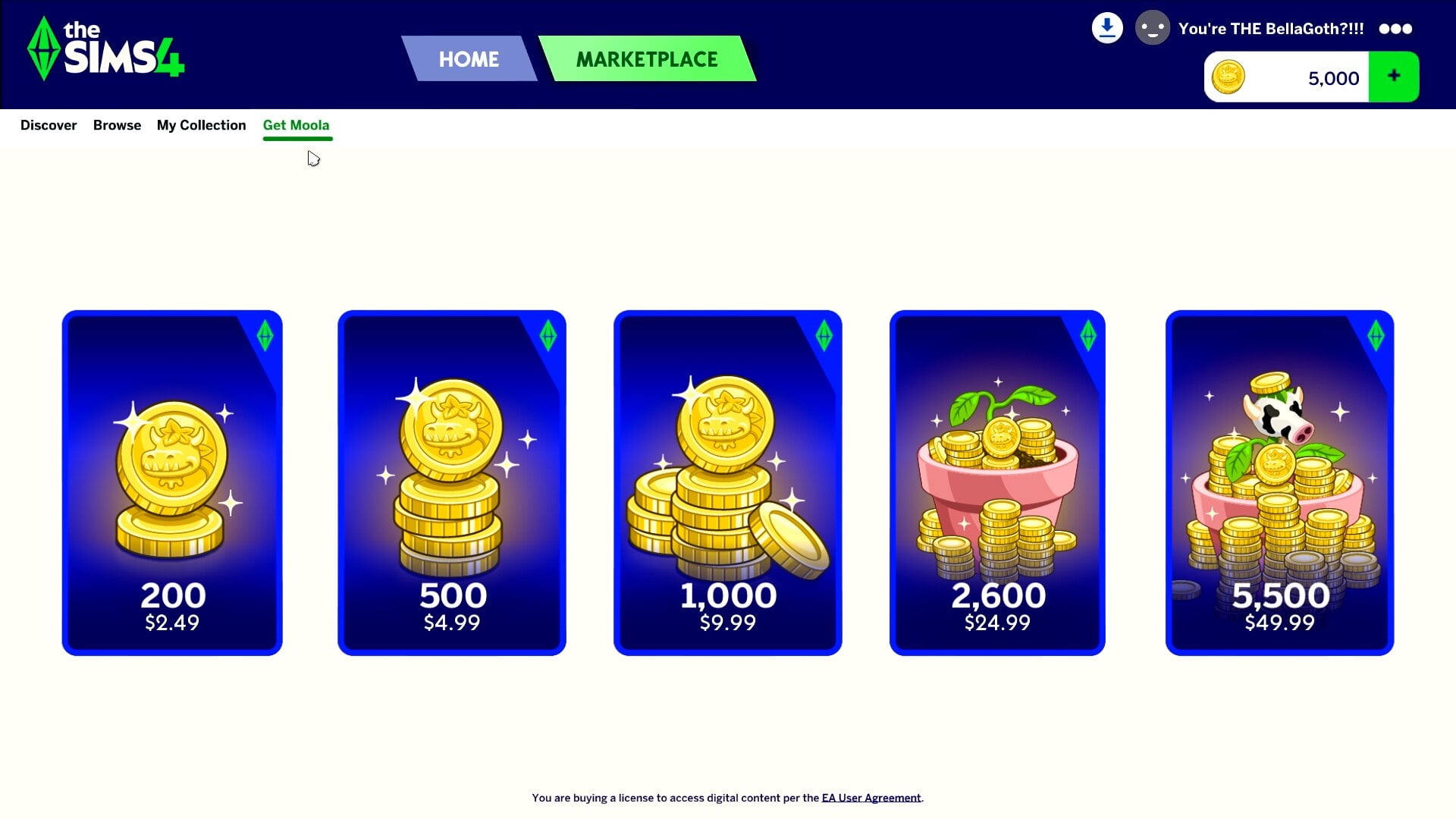
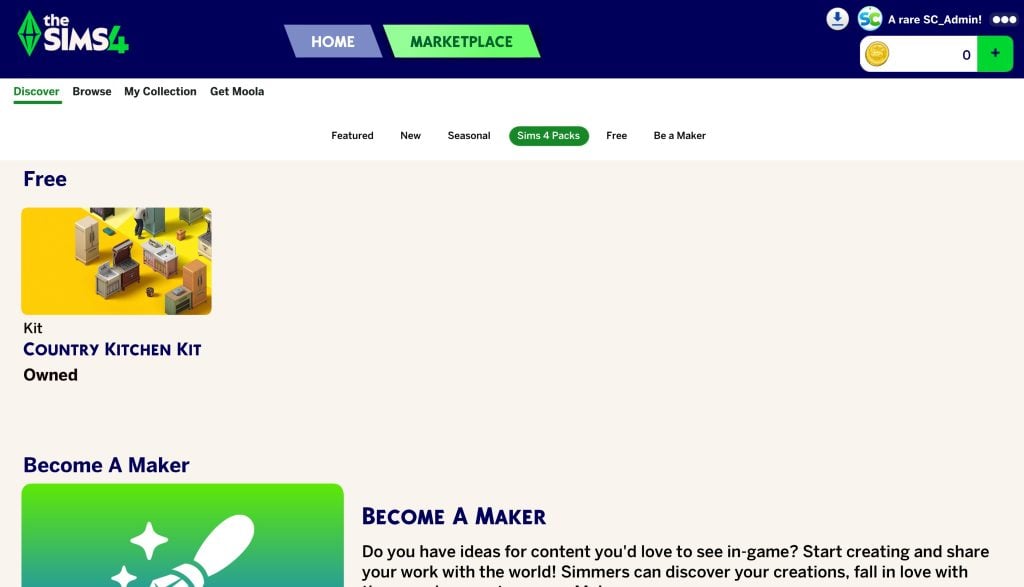
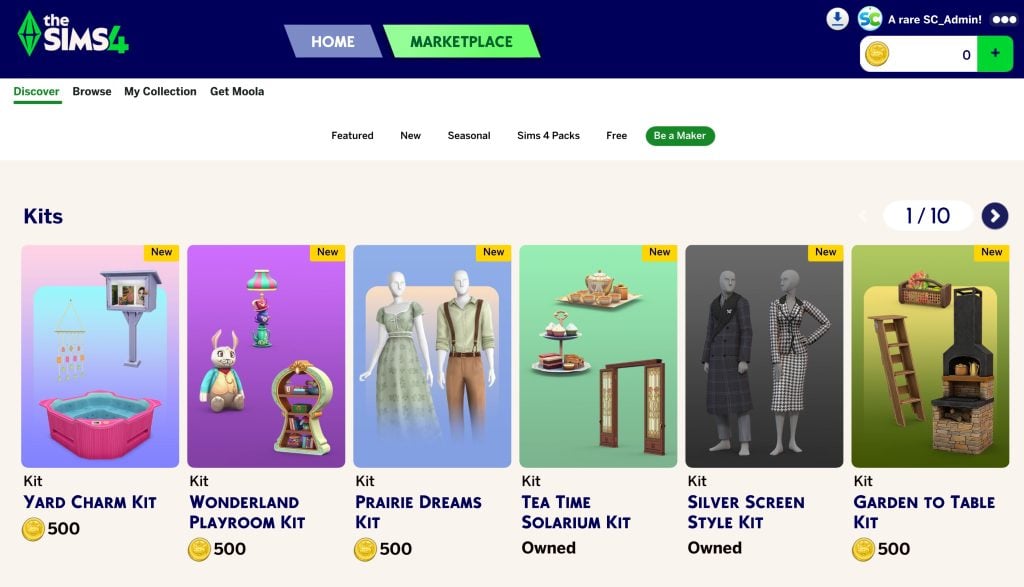
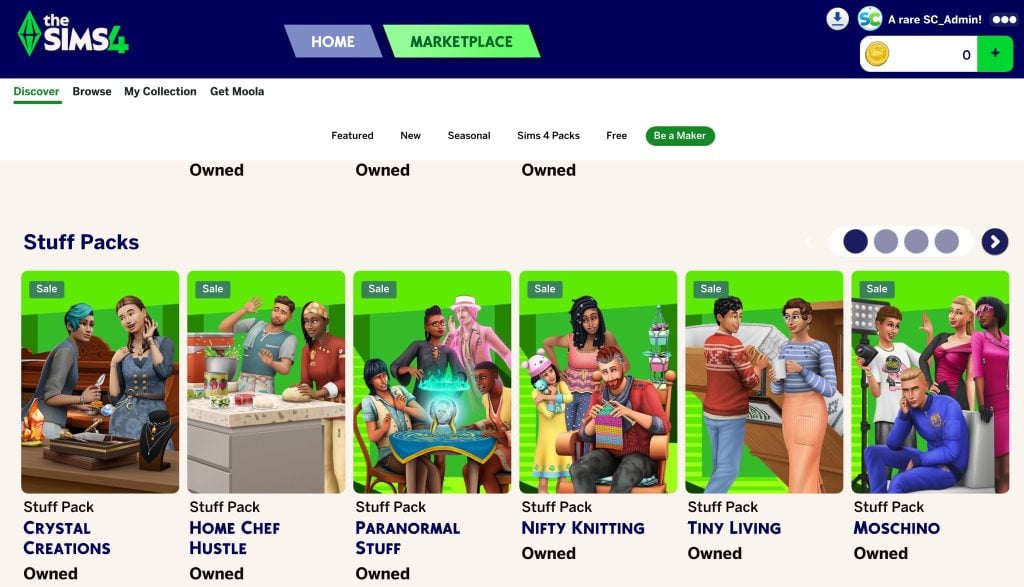
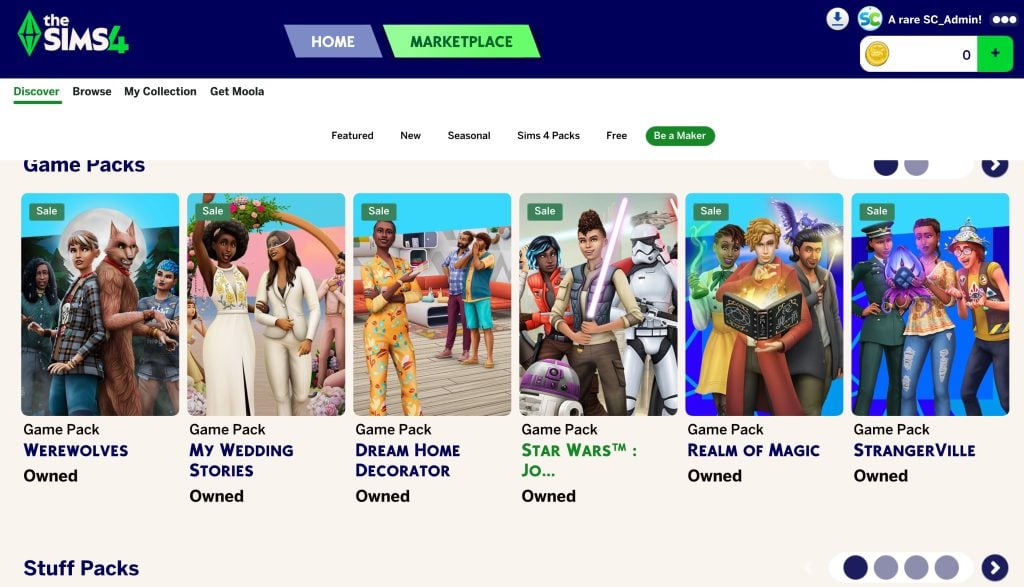
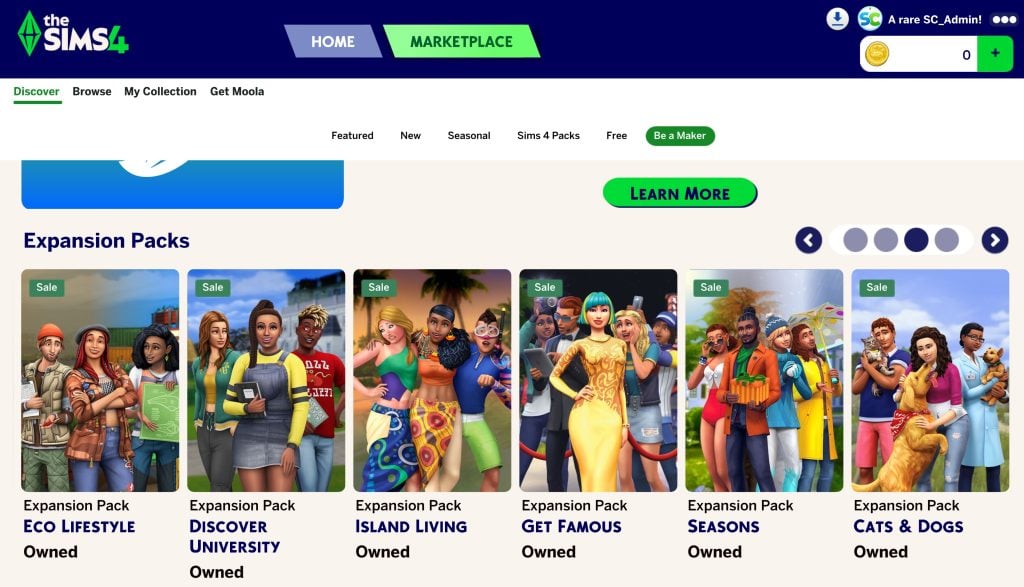
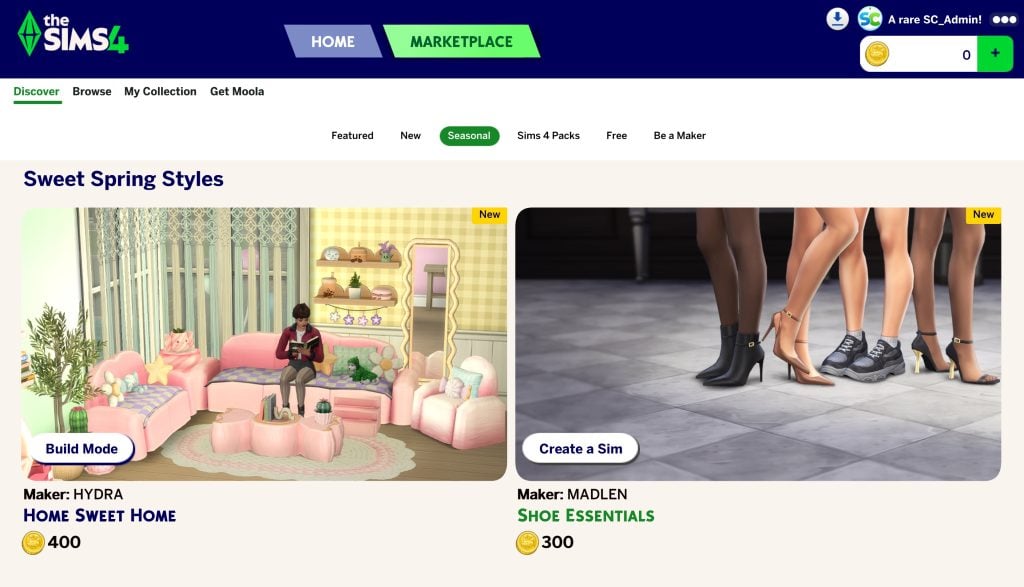
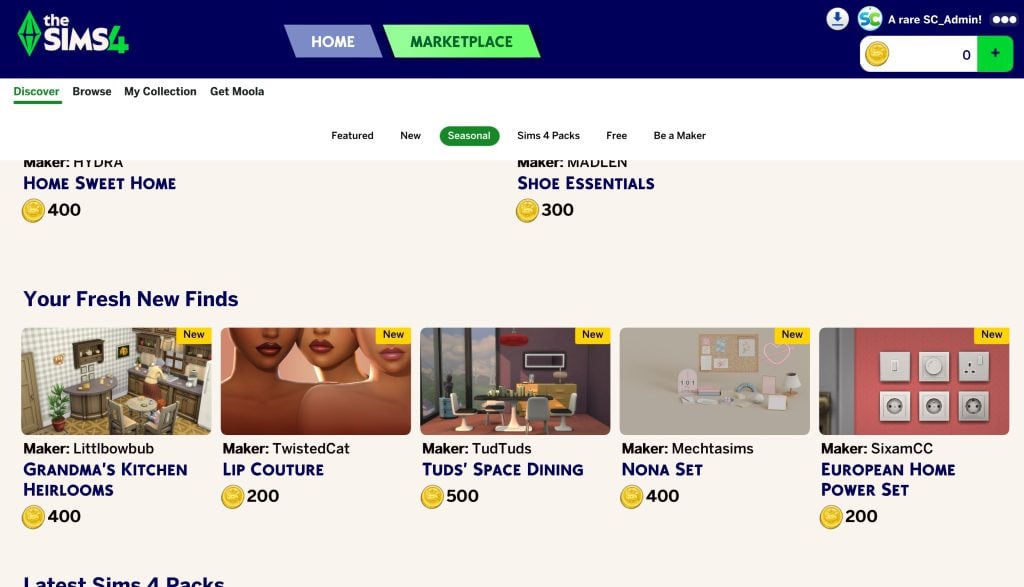
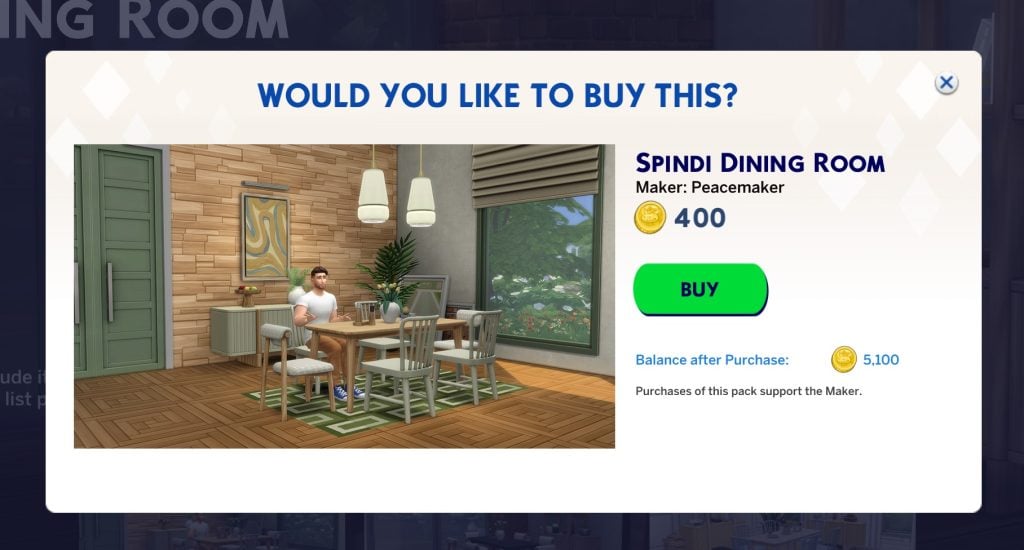
Moving onto official information, you should now expect to purchase all The Sims 4 Kits, including Maxis-Made and Creator Kits within The Marketplace user experience. This DLC type can now only be bought using Moola virtual currency. Purchasing Kits is now done exclusively in-game rather than using official store platforms.
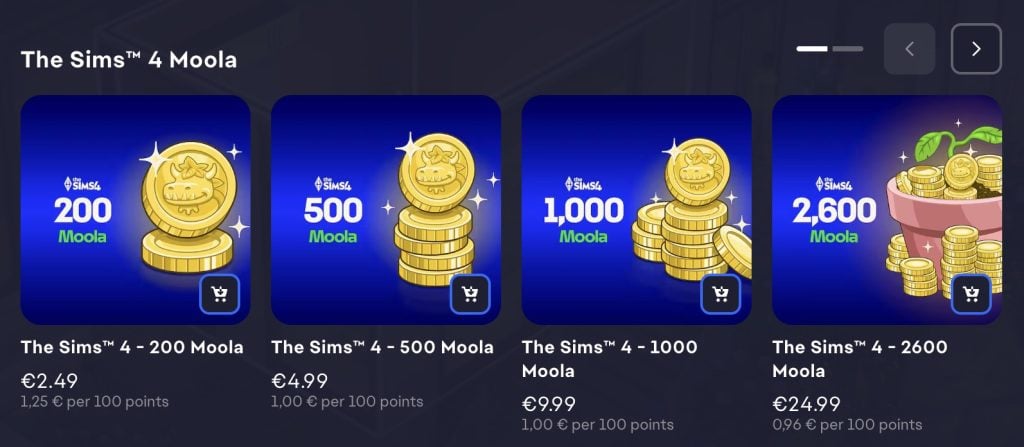
Here is the Moola coin price structure. You should be able to purchase Moola coins through in-game or using game launchers and official store platforms. Including Amazon too!
EA App preview of The Sims 4 Moola pricing structure:
From ongoing Sim Autonomy Improvements to general Bug Fixes, here’s everything new and changed in the latest Sims 4 Update:
Table of Contents
The Marketplace Launch and Game Improvements Update
Installing the Latest Sims 4 Update
You can get the latest The Sims 4 Update on the following official launchers and platforms:
You can download the latest Sims 4 Update by checking for a Patch through the EA App, Steam or Epic Games launcher for Desktop. If you have Automatic Updates enabled the update will automatically download through your client program. In case your EA App is not working properly ensure you’ve cleared your app cache!
If you play The Sims 4 on Xbox Series X / S and Playstation 4 and 5 you can request a new update by checking for updates under The Sims 4 game in the Main Menu. If you’ve enabled automatic updates the Patch should download right away.
There’s also a handy official guide to Mods and CC maintenance, as well as backing up your Saves! Click here to learn all about healthy upkeep of your The Sims 4 files.
This update delivers The Sims 4 Marketplace to PC and Mac players, with Console coming soon! It also includes more than 60 quality-of-life bug fixes and improvements, many of which address top-voted issues from the community. Alongside these fixes, we’ve made several adjustments to Sim autonomy, targeting behaviors such as Sims socializing with strangers, excessive flirting, and obsessively using certain objects.
Jump in, explore the Marketplace and enjoy The Sims 4 with a host of fixes and improvements designed to enhance your everyday gameplay experience!
Happy Simming!
The Sims 4 Team
What’s New?
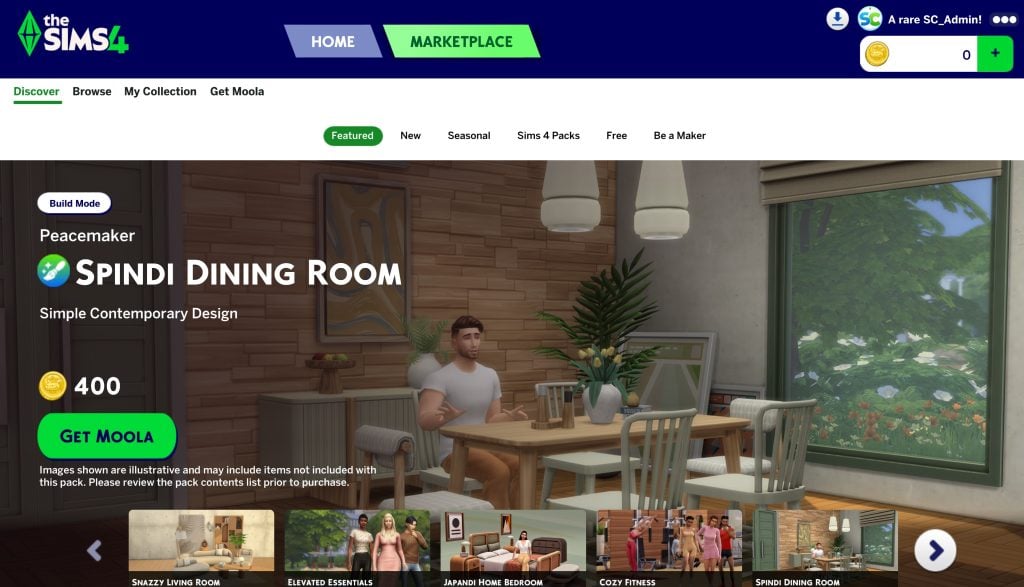
As mentioned, this release introduces the Marketplace to PC and Mac players, with Console coming soon! Fully integrated into The Sims 4, with curated collections and improved discovery tools to help you find the creations that match your playstyle.
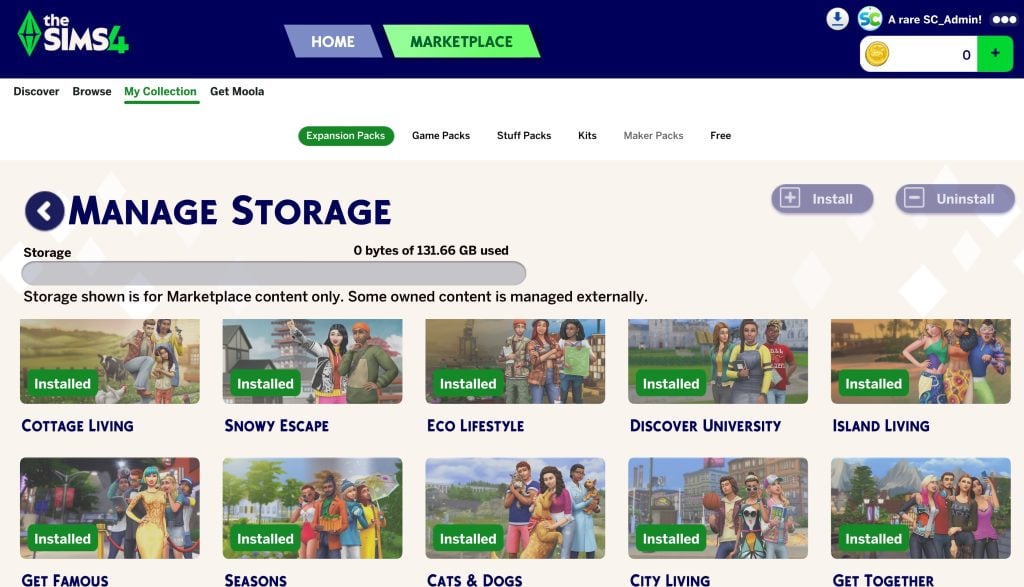
Pack Select has been relocated from the Game Options Menu and can now be found under My Collection within the Marketplace. It still allows you to select the content you want to play with in your Saved Game, as well as add the ability to manage the storage of your Marketplace downloaded content (which includes Marker Packs and newly purchased Kit content) directly from within the game.
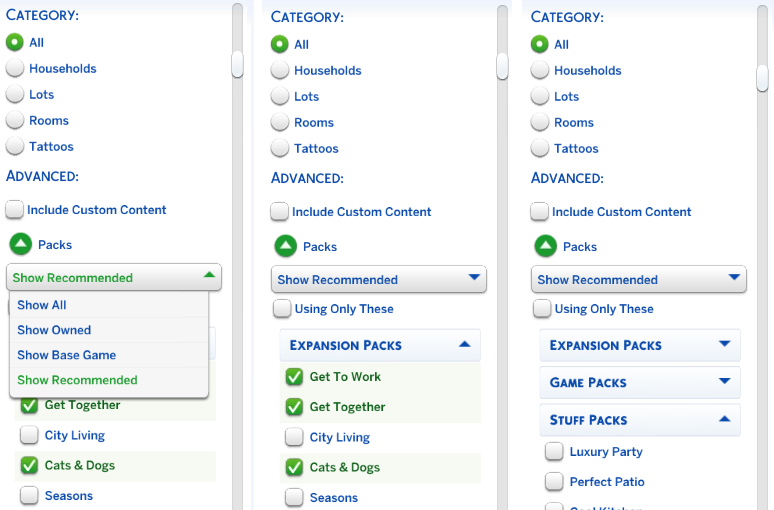
This patch also marks the arrival of updates to Gallery discovery with improved filters for easier Gallery navigation!
A picture of the new Filter Options available when searching on The Sims 4 Gallery
Bug Fixes
Top 5 Most Voted Fixes:
[EA Forums][EA Forums] Extensive updates to ensure that Sims’ eye blinking will now show fully closed eyes for most interactions, see the blog post for more information on these changes.
[EA Forums] Prom will once again appear on Calendars, and Sims will be able to attend. This fix will ensure it is working for both new and old saves. Alongside this fix, we fixed another issue where Prom goals weren’t able to be completed. (High School Years)
[EA Forums] We fixed an issue where Pet and Horse data was being lost in Premade Households. This issue will no longer occur in new saves. Existing saves where the issue already occurred will not be retroactively corrected. (Cats & Dogs, Horse Ranch)
[EA Forums] We’ve implemented a notable change to how Sims determine who they speak with on a lot. Now, Sims will generally prefer speaking with familiar Sims they already have a good rapport with, and Sims are less likely to engage with strangers spontaneously.
[EA Forums] Animals can be assigned to an Animal Shed after moving the Household to a new lot. They no longer become stuck in Household or Sim Inventory. This is also fixed for saves where the animals were already stuck. (Cottage Living)
Sims Autonomy Improvements
“Sim autonomy” is one of our Quality of Life Team’s key focus areas based on community feedback, and this update delivers on 3 of our top autonomy issues: Sims socializing with strangers, excessive flirting, and Sims using certain objects obsessively. We’ll continue to watch player feedback surrounding Autonomy for future updates.
Base Game
[EA Forums] We’ve addressed the issue where Sims were excessively flirting with each other.
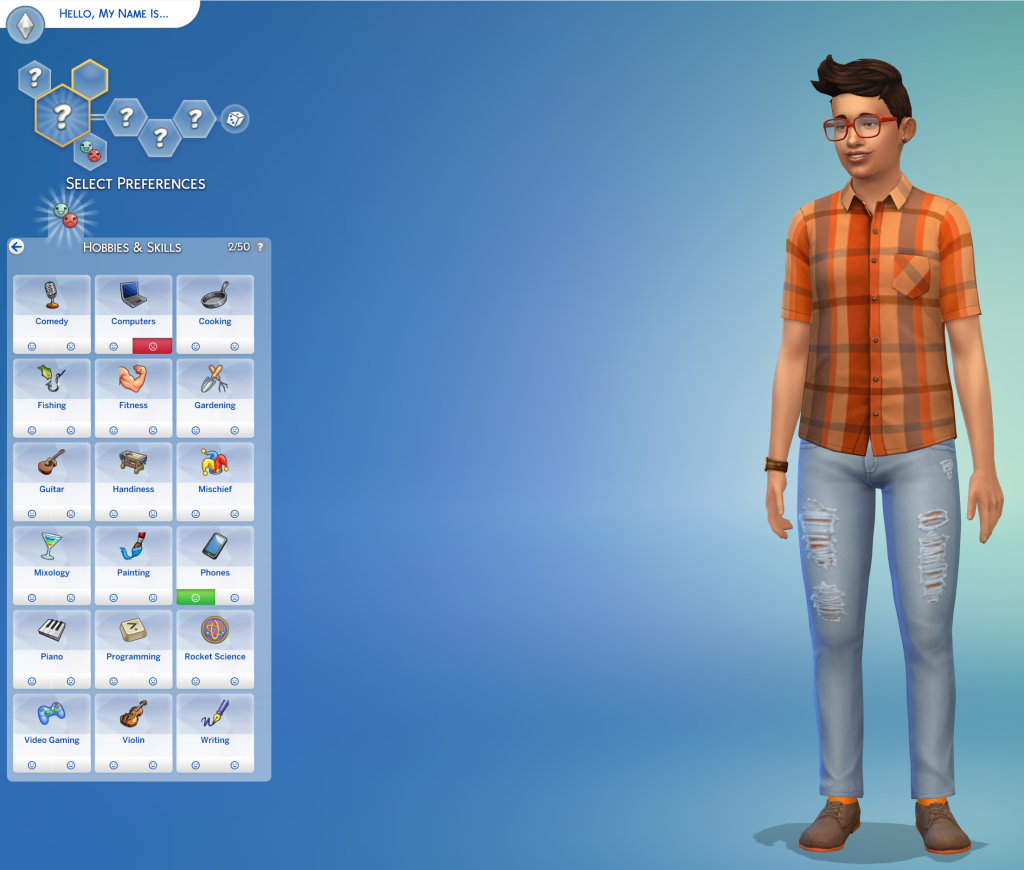
[EA Forums] We’ve heard your feedback and wanted to address Sims using Computers and Phones too often. We’ve added a few new preferences to the Base Game including: Likes Phones, Likes Computers, Dislikes Phones, and Dislikes Computers. If you don’t want your Sims to autonomously use these objects, please give them the “Dislikes Phones” or “Dislikes Computers” Preferences. If you’d like them to use these objects more often, select the appropriate “Likes” Preference.
A picture of a Sim in Create a Sim with the Sims 4 Preferences Menu Open. This menu includes a picture of the two new Preferences for Computers and Phone. In the picture Phones are liked whereas Computers are Disliked to show both options.
[EA Forums] If a Sim autonomously uses the Phone, they will receive a cooldown on wanting to do this autonomously again for six Sim hours. This cooldown does not exist for non-active Household Sims, Teen Sims, or Sims who Like Phones. Sims who Dislike Phones (a new Preference we added) will never use them autonomously anymore.
[EA Forums] If a Sim autonomously uses the Computer, they will receive a cooldown on wanting to do this autonomously again for half of a Sim day. This cooldown does not exist for non-active Household Sims, Sims who are Geeks, Sims who Like Computers, or when it is a preferred interaction for Getaways, Clubs, Small Businesses, or Dynasties. Sims who Dislike Computers (a new Preference we added) will never use them autonomously anymore.
[EA Forums] The “Troll teh Forums” Computer Interaction has been added to the same cooldown that is used for other Computer interactions. Sims will also now need Mischief Skill Level 6 or higher to consider this action autonomously unless they have the following Traits: Evil, Childish, Geek, Hot-Headed, Erratic, or Mean (who always have it available). (Base Game)
[EA Forums] If a Sim autonomously destroys a Doll House, it will receive a cooldown on wanting to do this autonomously again for some time. We also made a change so that only Sims with certain Traits (Evil, Hates Children, Mean, Hot-Headed) will ever autonomously decide to destroy a Doll House while Angry. Before this update, this autonomous behavior could occur for any Sim who was feeling Angry or Dazed.
[EA Forums] If a Sim autonomously mixes a drink, they will receive a cooldown on wanting to do this autonomously again for a Sim day for non-NPCs. Previously this would occur frequently for Sims who were Inspired, or Sims with the Bro or Foodie Trait.
[EA Forums] If a Sim autonomously Swims, they will receive a cooldown on wanting to do this autonomously again for some time. This cooldown does not exist for non-active Household Sims, on Pool Venues, during Pool Party, or Birthday Party events, when Swimming is a preferred interaction for Getaways, Clubs, or Small Businesses, or if the Sim is a Merfolk or PlantSim.
[EA Forums] If a Sim autonomously plays the Violin, they will receive a cooldown on wanting to do this autonomously again for a Sim day. This cooldown does not exist for non-active Household Sims, for Sims who are Music Lovers, Sims who Like Violins, or when it is a preferred interaction for Getaways, Clubs, Small Businesses, or Dynasties.
[EA Forums] If a Sim autonomously plays the Guitar, they will receive a cooldown on wanting to do this autonomously again for a Sim day. This cooldown does not exist for non-active Household Sims, for Sims who are Music Lovers, Sims who Like Guitars, or when it is a preferred interaction for Getaways, Clubs, Small Businesses, or Dynasties.
[EA Forums] If a Sim autonomously plays Chess, they will receive a cooldown on wanting to do this autonomously again for a Sim day. This is for non-NPCs only, and not applicable during Clubs or Getaways involving Chess.
[EA Forums] We’ve added a cooldown for Sims dancing while on a lot that the Sim owns. Sims who Like Dancing, Dance Machine Trait Sims, and certain situations will not receive this cooldown. This cooldown is not for non-active Household Sims. This cooldown will disappear when Sims move lots in case they are going to a lot where they want to dance.
[EA Forums] We’re reducing how often a Sim considers turning on the Radio. Sims with the Music Lover trait will consider listening to music more often than other Sims.
[EA Forums] Though practically a staple of Sim culture (I’m being cheeky), we’ve added a cooldown for autonomous Push-Ups, Sit-Ups, and Stretches. Now, only Sims who are Energized at the Gym Venue or Sims with the Active trait will consider doing this autonomously.
[EA Forums] We’ve added a cooldown for Foodie Sims watching Culinary Training Videos on the Television where they won’t do this autonomously for two days after doing it.
[EA Forums] If a Child Sim autonomously uses the Space Ship Jungle Gym, they will receive a cooldown on wanting to do this autonomously again for a Sim day. This cooldown does not exist for non-active Household Sims or when it is a preferred interaction for Getaways, Clubs, or Small Businesses. Leaving the current lot also removes the cooldown.
[EA Forums] If a Sim autonomously plays with the Lump of Clay, they will receive a cooldown on wanting to do this autonomously again for a while. This cooldown does not occur for Creative Sims or Sims who Like Pottery.
Discover University
[EA Forums] If a Sim autonomously plays with the Soccer Ball they will receive a cooldown on wanting to do this autonomously again for a while. This cooldown does not occur for Sims who Like Fitness or non-Household Sims.
Cottage Living
[EA Forums] If a Sim autonomously does Cross-Stitch, they will receive a cooldown on wanting to do this autonomously again for some time. This cooldown does not exist for Sims who Like Cross-Stitching or when it is a preferred interaction for a Club.
Lovestruck
[EA Forums] Sims will no longer consider playing Who’s Up Party Games while in the middle of writing a Book on the Computer.
Adventure Awaits
[EA Forums] If a Sim autonomously plays with the Paper Airplane, they will receive a cooldown on wanting to do this autonomously again for a while. This cooldown does not occur for Sims who Like Papercrafting.
Spa Day
[EA Forums] If a Sim autonomously uses the Yoga Mat, they will receive a cooldown on wanting to do this autonomously again right away. This cooldown does not exist for High Maintenance Sims or Sims who Like Wellness. (Sims must be Wellness Skill Level 2 to Autonomously use a Yoga Mat – previously and still.) The cooldown is removed when leaving the lot, and when it’s the preferred interaction for Getaways, Clubs or Small Businesses.
Movie Hangout
[EA Forums] A cooldown has been added to the Popcorn Popper so that after it has been used by a Sim that Sim will not want to immediately use it again for some time.
Pet & Animal Fixes
With two of our Top Community Issues being around animals and pets, we fixed a few other bugs also in this category to provide a better overall experience with these systems.
[EA Forums] Animals in the Animal Shed, Chicken Coop, Mini Goats, and Sheep will no longer be multiplied. This was happening when these animals were placed into a Sim inventory, then back in the world, and after that the Sims moved their Household. (Cottage Living, Horse Ranch)
General Bug Fixes
We addressed a handful of other important issues that were quickly rising with player reports, particularly problematic in gameplay, or easy to fix.
Base Game
Sims with the Unflirty Trait will no longer get the ick when hugged.
Placing a painting on the wall and then returning it to the Sim’s Inventory will no longer result in a Simulation error.
Seasons
[EA Forums] Flowers will no longer get stuck midair while crafting a Flower Arrangement.
For Rent
[EA Forums] The “Do Inspection and Maintenance” interaction is now available on applicable working and broken objects in a Tenant Household for Landlord Sims. This should function both during Maintenance events and outside of them for Landlord Sims.
Life & Death
We’ve adjusted design elements on some of our swatches for the Ornate Mystery Rug which were concerning to some players.
Royalty & Legacy
[EA Forums] There was an issue where the updated Family Tree could cause wrong connections and overlapping which has now been fixed.
[EA Forums] We fixed a crash that could occur when resuming the game after deleting the Capp Household in Ondarion.
[EA Forums] Ondarion’s Verdemar lot is no longer reversed.
Parenthood
Child and Teen Sims who grew up in the same Household but weren’t related could get the Super Sibling relationship, despite not being related and then could later romance each other. Because we didn’t want to prevent stories where children could have possibly been in the same Household at one point while not related and end up in a relationship, we decided to fix this by renaming the relationships to Childhood Besties and Childhood Frenemy.
StrangerVille
There should no longer be a Script Call Fail error when the Plant Containment Cell is on the lot and the player tries to place other objects.
CAS & Build Mode Tagging Updates
We had the opportunity to address a large swath of simpler tagging bugs, making CAS and Build Mode sorting more accurate overall. Here are related issues we fixed:
Base Game
All Makeup that was in the Everyday category has been added to both Hot and Cold Weather Outfit category as a sorting option.
We’ve sorted 43 existing items under the Kids’ Decorations category.
Various lights (that were previously considered wall lights) have been sorted into the Lighting > Outdoor Lights in Build Mode category.
“Cute Critter Basket” is now sorted under Objects by Function > Kids > Kids’ Decorations.
Updated the swatch color for (yfMakeupLipstick_EF28GlossyLips_RedRuby) to appear more accurate.
(yfBottom_SDX040CCHSkirtPleated) will no longer appear for masculine frame Sims.
The Pencil Holder object has been additionally sorted into the Clutter category in Build Mode.
The “Wicker-Work Diaper Storage” object is now sorted under Objects by Function > Kids > Kids’ Furniture.
The “Bow, Bow, Bow!” object is now sorted under Objects by Function > Activities and Skills > Life Event Activities.
The “Martian Soil” wall pattern is now categorized under the Misc category rather than the Paneling in Build Mode category.
The “Sweetpea” and “Firehouse Brick” wall patterns are now sorted into Masonry and Siding.
Sycee of the Prosperous Moon, Right Side Up Gnome, and Bob the Butler Fancy Sculpture have been removed from their previous category and are now sorted under Decorations > Sculptures.
Multipack
We updated a large amount of love seats and benches to properly be identified as “Benches” for lot requirements when placed.
Lovestruck
We’ve adjusted the Lovestruck Beard swatches to display in the correct order.
(ymBottom_EP16Jeans) will now appear as a Masculine Fashion Choice in CAS filters.
Life & Death
“Perilous Paneling” and “Patterned & Perilous Paneling” now sort into the Paneling category, and “Lunar Reverie” sorts into the Wallpaper category.
Enchanted by Nature
“Wild Uncanny Cane” plant is now sorted in both Roof Sculptures and Outdoor Plants.
Backyard
(yfTop_SP08TeeBoatNeck_GradientPink) no longer sorts as Yellow in CAS filters.
Moschino
The “Libearian” bookshelf and the “I’m So Shiny!” surface have been removed from the Sculptures category.
Holiday Celebration
The “Kinara” and “Menorah” light objects are now sorted under Lighting > Table Lamps.
“Holiday Snowman” and “Pre-strung Tree of Lights” are now sorting under Lighting > Outdoor Lights.
Kitchen Clutter
All clutter items from the Kitchen Clutter pack are now visible when sorting by the pack filter and looking under the Misc Decorations category in Build Mode’s room view.
The Forever Friends Event
(ymTop_EV0641TankTwistBack_SolidBlackCyan) will no longer appear for masculine frame Sims.
The Nature’s Calling Event
Cove Stone – Round, Cove Stone – Flat, and Cove Stone Cluster objects are now sorted in the Outdoor Plants > Rocks category in Build Mode.
<Modder changelog>
Fixed Issue
Change Log
(ymBottom_EP16Jeans) will now appear as a Masculine Fashion Choice in CAS filters. (Lovestruck)
Added filter tag to asset (ymBottom_EP16Jeans).
(yfTop_SP08TeeBoatNeck_GradientPink) no longer sorts as Yellow in CAS filters. (Backyard Stuff)
Removed filter tag from asset (yfTop_SP08TeeBoatNeck_GradientPink).
Updated the swatch color for (yfMakeupLipstick_EF28GlossyLips_RedRuby) to appear more accurate.
Updated swatch icon color for asset (yfMakeupLipstick_EF28GlossyLips_RedRuby).
All Makeup that was in the Everyday Category has been added to both Hot and Cold Weather Outfit Category as a sorting option. This will make it easier than ever to do your makeup for these categories (since the options were previously hidden in many cases).
Added Hot and Cold Weather Tags to the base prototypes for all makeup assets. Removed Hot and Cold Weather Tags on a few specific assets that also did not have Everyday Category tags.
Animals can be assigned to an Animal Shed after moving the Household to a new lot. They no longer become stuck in Household or Sim Inventory. This is also fixed for saves where the animals were already stuck.Animals being unable to be assigned to the Animal Shed after moving was blocking another, older bug where Animals would become unresponsive after being assigned to the Animal Shed after moving. Since we fixed the first one, we also fixed this one alongside it.
Created a boolean tuning field ‘allow_transfer_out_of_hh_inventory’ that, when enabled, will allow an object in the HH inventory that cannot be directly placed in-world (eg. livestock animals) to be properly slotted to an in-world object. Enabled this boolean in the tuning for the loot action that slots livestock animals to their sheds.Modified the function that removes the animal shed object to return early if the shed is currently in the HH inventory (so the animal shed will not get erroneously unregistered from the animal service when moving HH)
Animals in the Animal Shed, Chicken Coop, Mini Goats, and Sheep will no longer be multiplied. This was happening when these animals were placed into a Sim inventory, then back in the world, and after that the Sims moved their Household.
Stopped tracking objects in the lost and found service if their location is currently in the Household Inventory (because they cannot be lost if they are in the HH inv).Properly set the livestock animals’ owner ID field in the python code after they are assigned to a shed (since livestock animals cannot be placed in-world they were bypassing the logic that normally sets that field, causing the Sim to not own them anymore after moving HH)
Sims will no longer consider playing Thumbs Up or the WooHoo Card Game while in the middle of writing a book on the computer.
Adding tests to autonomousSimPicker_TriviaBox_ThumbsUp_PlayWith and autonomousSimPicker_TriviaBox_WooWho_PlayWith to ensure Sims who are writing on the computer are not considered
Flowers will now longer get stuck midair while crafting a Flower Arrangement.
Set the Create Target Name of the arrangementTable_Passive Animation Element to be the in-progress craft arrangement. Also updated the VFX participant type in the outcome of the flowerArrangingTable_Arrange interaction to be CreatedObject instead of CraftingObject.
If a Child Sim autonomously uses the Space Ship Jungle Gym they will receive a cooldown on wanting to do this autonomously again for a Sim day. This cooldown does not exist for non-active Household Sims or when it is a preferred interaction for Getaways, Clubs, or Small Businesses. Leaving the current lot also removes the cooldown.
Adding a cooldown to autonomously running JungleGymBoat_Play and JungleGymRocketShip_Play
If a Sim autonomously uses the Yoga Mat they will receive a cooldown on wanting to do this autonomously again right away. This cooldown does not exist for High Maintenance Sims or Sims who Like Wellness. (Sims must be Level 2 to Autonomously use a Yogo mat – previously and still.) The cooldown is removed when leaving the lot, and when its the preferred interaction for Getaways, Clubs or Small Businesses.
Adding a cooldown to autonomously running si_Yoga_Practice and Yoga_Routine
We’ve heard your feedback and wanted to address Sims using Computers and Phones too often. When considering how to fix this, we felt there were stories to tell around Sims who can be a little obsessed about Phones and Computers and also Sims who do NOT like them and never want to use them! Because of that, we’ve added a few new preferences to the Base Game. These Include: Likes Phones, Likes Computers, Dislikes Phones, and Dislikes Computers. As their names imply, these new Preferences are particularly important now when determining how your Sim will (or won’t) engage with Computers and Phones. If you don’t want your Sims to autonomously use these objects, please give them the “Dislikes Phones” or “Dislikes Computers” Preferences. If you want them to be obsessed… you know what to do. Please enjoy!
Adding new Traits for phone and computer preferences. These are tested on the aptly named Phone and Computer super interactions.
In addition to the new Computer-related Preferences, if a Sim autonomously uses the Computer they will receive a cooldown on wanting to do this autonomously again for half of a Sim day. This cooldown does not exist for non-active Household Sims, for Sims who are Geeks, Sims who Like Computers, or when it is a preferred interaction for Getaways, Clubs, Small Businesses, or Dynasties. Sims who Dislike Computers (a new Preference we added) will never use them autonomously anymore.
Adding a cooldown to autonomously running autonomous-enabled Computer_Reacreation interactions, and the beloved Computer_TrollForum interaction
We’ve added a cooldown for Sims autonomously turning on the stereo to listen to music.
Adding a cooldown to autonomously running Stereo_AutonomousPickChannel as well as adding dancing cooldowns.
If a Sim autonomously destroys a Doll House it will receive a cooldown on wanting to do this autonomously again for some time. We also made a change so that only Sims with certain Traits (Evil, Hates Children, Mean Hot-Headed) will ever autonomously decide to destroy a Doll House while Angry. Before this update, this autonomous behavior could occur for any Sim who was feeling Angry or Dazed.
Adjusting tests and adding a cooldown to DollHouse_Smash
If a Sim autonomously does Cross-Stitch they will receive a cooldown on wanting to do this autonomously again for some time. This cooldown does not exist for Sims who Like Cross-Stitching or when it is a preferred interaction for a Club.
Adding a cooldown to autonomously running crossStitch_StartCrafting_Autonomously and craftingResume_CrossStitch
If a Sim autonomously mixes a drink they will receive a cooldown on wanting to do this autonomously again for a Sim day for non-NPCs. Previously this would occur frequently for Sims who were Inspired, or Sims with the Bro or Foodie Trait
Adding an autonomous cooldown to bar_StartCraftingAutonomously for Inspired/Foodie/Bro Sims.
If a Sim autonomously Swims they will receive a cooldown on wanting to do this autonomously again for some time. This cooldown does not exist for non-active Household Sims, on Pool Venues, during Pool Party or Birthday Party events, when Swimming is a preferred interaction for Getaways, Clubs, or Small Businesses, or if the Sim is a Mermaid or PlantSim.
Adding a cooldown to the fun motive advertisement on pool-swim_Autonomous_Start
If a Sim autonomously plays the Violin they will receive a cooldown on wanting to do this autonomously again for a Sim day. This cooldown does not exist for non-active Household Sims, for Sims who are Music Lovers, Sims who Like Violins, or when it is a preferred interaction for Getaways, Clubs, Small Businesses, or Dynasties.
Adding a cooldown to autonomously running interactions under Violin_NonTieredMenu and Violin_TieredMenu
If a Sim autonomously plays the Guitar they will receive a cooldown on wanting to do this autonomously again for a Sim day. This cooldown does not exist for non-active Household Sims, for Sims who are Music Lovers, Sims who Like Guitars, or when it is a preferred interaction for Getaways, Clubs, Small Businesses, or Dynasties.
Adding a cooldown to autonomously running interactions under Guitar_NonTieredMenu and Guitar_TieredMenu
If a Sim autonomously plays Chess they will receive a cooldown on wanting to do this autonomously again for a Sim day. This is for non NPCs only, and not applicable during clubs or getaways revolving around chess.
Adding an autonomous cooldown to Chess_PonderMoves, Chess_Social and Chess_Table_Social
We’ve added a cooldown for Sims dancing while on a lot that the Sim owns. Sims who Like Dancing, Dance Machine Trait Sims, and certain situations will not receive this cooldown. This cooldown is not for Non-Active Household Sims. This cooldown will disappear when Sims move lots in case they are going to a lot where they want to dance.
Adding a cooldown to autonomously running interactions like DanceFloor_Dance, Stereo_Dance and many others
Though practically a staple of Sim culture (I’m being cheeky), we’ve added a cooldown for autonomous Push-Ups, Sit-Ups, and Stretches. Now, only Sims who are Energized at the Gym Venue or Sims with the Active trait will consider doing this autonomously.
Adding a cooldown to autonomously considering sim_doPushUpsAutonomously, sim_doSitUpsAutonomously, Sim_doStretching, and Solo_WorkOut.
The “Troll teh Forums” Computer Interaction has been added to the same cooldown that is used for other Computer interactions. Sims will also now need Mischief Skill of 6 or higher to consider this action autonomously unless they have the following Sims Traits: Evil, Childish, Geek, Hot-Headed, Erratic, or Mean (who always have it available).
Adding a cooldown to autonomously running autonomous-enabled Computer_Reacreation interactions, and the beloved Computer_TrollForum interaction. The Troll Forum interaction also received a test restructure for its availability.
A cooldown has been added to the Popcorn Popper so that after it has been used by a Sim that Sim will not want to immediately use it again for some time.
Adding a cooldown to PopcornPopper_StartCooking_Autonomously
We’ve added a cooldown for Foodie Sims watching Culinary Training Videos on the television where they won’t do this autonomously for two days after doing it.
Adding an autonomous cooldown on tv_WatchCooking_CulinaryTraining for Foodie Sims
Placing a painting on the wall and then returning it to the Sim’s inventory will no longer result in a Simulation error.
Objects duplicated between world and inventory will be discarded from inventory on load
• We did extensive updates to ensure that Sims’ eye blinking will now show fully closed eyes for most interactions.• High-impact animations—such as blinking in CAS, sleep loops, kissing, and looking down at a phone—were given extra focus to ensure eyes fully close.• In some rare cases, some eye sets may experience slight over-blinking due to their shape—which was preferred to consistent under-blinking across most eye shapes.• We did a lot of work to provide the best visual experience for eyes closing with upper and lower eyelashes slotted for a Sim:• The most noticeable interactions for players received special attention to minimize any clashing between eyelashes.• High-impact animations—such as blinking in CAS, sleep loops, kissing, and looking down at a phone—were given extra focus to ensure eyelashes don’t clash.• Upper and lower eyelash clashes may still occur with certain eye shapes and less noticeable interactions. We did our best to minimize this issue.• Lower lashes now move along with the lower eyelid.Unusual brow movements during some sleep loops will be fixed. This was tied to certain mood animations partially being played while a Sim was sleeping.
The Cantina High Top Tables object now has a price of $550 Simoleons, rather than $0.
Updated price in tuning
Prom will once again appear on Calendars and Sims will be able to attend. This issue was occurring in old saves created prior to a previous Prom-related fix, but this fix will ensure it is working for both new and old saves.
When scheduling prom, we were testing for any early graduate Sims, but the Tests would always fail on older saves. Moved those tests to when prom is run.
We fixed an issue where Prom goals weren’t able to be completed.
Updated score multiplier test to return a default value instead of throwing an error when running on simless events.
We’ve implemented a notable change to how Sims determine who they speak with on a lot. With these changes, we hope to make Sims feel a bit smarter when it comes to socialization. Now, Sims will generally prefer speaking with familiar Sims they already have a good rapport with, and Sims are less likely to engage with strangers spontaneously. On top of this, they’ll also factor in distance before choosing a Sim to talk to. Our intention is that it’ll be less likely for stranger Sims to push into a conversation between friends but not outright remove Sims wanting to get to know one another. Likewise, we didn’t want Sims charging across the lot to start a conversation, and Sims should no longer be psychically targeting another Sim for socialization over great distances. Paired together, we feel this update makes Sim socialization feel less disruptive, more appropriate, and generally much more enjoyable.
Adding a new aggregate interaction (aggregate_SocialObservation_Chat) to determine the proper Sim to run SocialPickerSI on.
We fixed an issue where Pet and Horse data was being lost in Premade Households. This will no longer occur in fresh saves. However, if this occurred in an old Save, it will still be occurring in that instance.
Re-exported premade household info with pets in game.
“Perilous Paneling” and “Patterned and Perilous Paneling” now sort into the Paneling category, and “Lunar Reverie” sorts into the Wallpaper category.
Removed WallPattern_Paint tag from assets (Panel02RR), (Panel01RR) and (Painted02MODERN_WSTR) wall patterns. Added WallPattern_Wallpaper tag to (Painted02MODERN_WSTR) wall pattern, and WallPattern_Paneling to (Panel02RR) and (Panel01RR).
All clutter items from the Kitchen Clutter pack are now visible when sorting by the pack filter and looking under the Misc Decorations category in Build Mod’s room view.
“Wild Uncanny Cane” plant is now sorted in both Roof Sculptures and Outdoor Plants.
Added Build_Shrub and Build_Shrub_Bush tags to (plantLot1x1_EP19GENsharpLeaf). Also added Build_Flower and Build_Flower_GroundCover tags to (plantLot1x1_EP19GENwisp).
“Cute Critter Basket” is now sorting under Objects by Function > Kids > Decorations.
Added BuyCatLD_KidsDecoration tag to (sculptTableLarge_EF48GENanimalBasket) and (sculptTableLarge_EF48GENtoyBasket).
“Holiday Snowman” and “Pre-Strung Tree of Lights” are now sorting under Lighting > Outdoor Lighting.
Added BuyCatLD_OutdoorLight tag to (lightOutdoorFloor_FP01GENdeadTreeHoliday) and (sculptFloor1x1_FP01GENholidaySnowman).
The “Libearian” bookshelf and the “I’m So Shiny!” surface have been removed from the Sculptures category.
Removed BuyCatLD_Sculpture tag from (bookcaseSurface_SP15GENbooks) and (pedestal_SP15GEN).
The “Kinara” and “Menorah” light objects are now sorting under Lighting > Table Lamp.
Removed BuyCatLD_MiscDecoration from (lightTableCandle_FP01GENkinara) and (lightTableCandle_FP01GENmenorah) and added BuyCatLD_TableLamp to both items.
Sims with the Unflirty trait will not longer get the ick when hugged. Just because you’re Unflirty, doesn’t mean you don’t enjoy the occasional hug.
Removing Unflirty tested outcomes from Mixer_social_Hug_targeted_Friendly_MiddleScore
The “Do Inspection and Maintenance” interaction is now available on broken objects in a Tenant Household for Landlord Sims.
Fixing a test on landlordTenant_DoInspectionMaintenance
The Cove Stone – Round, Cove Stone – Flat, and Cove Stone Cluster objects are now sorted in the Outdoor Plants > Rocks category in Build Mode.
Removed BuyCatLD_MiscDecoration tag from (rockLot1x1_EF63EVRclustersRound), (rockLot1x1_EF63EVRclustersShort), and (rockLot1x1_EF63EVRclustersTall).
(yfBottom_SDX040CCHSkirtPleated) will no longer appear for masculine frame Sims.
Marked RestrictCrossGender on (yfBottom_SDX040CCHSkirtPleated)
The Pencil Holder object has been additionally sorted into the Clutter Category in Build Mode. It was afterall the icon for the Clutter Category!
Added BuyCatLD_Clutter tag to (sculptTableGENTeenPencilHolder).
Child and Teen Sims who grew up in the same Household but weren’t related could get the Super Sibling relationship, despite not being related and then could later romance each other. Because we didn’t want to prevent stories where children could have possibly been in the same Household at one point while not related and end up in a relationship, we decided to fix this by renaming the relationships to Childhood Besties and Childhood Frenemy.
Renamed some relbits and supporting descriptions in Parenthood.
The “Wicker-Work Diaper Storage” object is now sorting under Objects by Function > Kids > Kids Furniture.
Replaced BuyCatLD_MiscDecoration tag with BuyCatEE_KidFurniture tag on (sculptFloor_EF48GENdiaper).
The “Bow, Bow, Bow!” object is now sorting under Objects by Function > Activities & Skills > Life Events.
Added BuyCatEE_LifeEventActivity tag to (sculptTableMedium_SDX002GENholidayBow).
The “Martian Soil” wall pattern is now categorized under the Misc category rather than the Paneling Build Mode Category.
Various lights (that were previously considered wall lights) have been sorted into the Lighting > Outdoor Lights Build Mode Category.
Removed BuyCatLD_WallLight tag from (lightOutdoorWallSGHigh), (lightOutdoorWallSGLow), (lightOutdoorWallSGMed), (lightWall_EP02PUBLIC), (lightWall_EP05GEN), (lightWall_EP11GENiron), (lightWall_SP10GENarrow), (lightWall_SP10GENmetal), (lightWallGFVerticalBars), (lightWallQA_01), (lightWallQA_07), and (lightWallQA_10). Also added BuyCatLD_OutdoorLight tag to all these assets.
(ymTop_EV0641TankTwistBack_SolidBlackCyan) will no longer appear for masculine frame Sims.
Removed GenderMale tag on (ymTop_EV0641TankTwistBack_SolidBlackCyan)
If a Sim autonomously plays with the Lump of Clay they will receive a cooldown on wanting to do this autonomously again for while. This cooldown does not occur for Creative Sims or Sims who Like Pottery.
Adding a cooldown to ClayBlob_Mold
If a Sim autonomously plays with the Paper Airplane they will receive a cooldown on wanting to do this autonomously again for while. This cooldown does not occur for Sims who Like Papercrafting.
Adding a cooldown to super_Papercraft_PaperAirplane_Self_Throw_AutonomousOnly, super_Papercraft_PaperAirplane_Self_ThrowAround, super_Papercraft_PaperAirplane_Throw and super_Papercraft_PaperAirplane_Throw_FromInventory
If a Sim autonomously plays with the Soccer Ball they will receive a cooldown on wanting to do this autonomously again for while. This cooldown does not occur for Sims who Like Fitness or non-Household Sims.
Adding a cooldown to AutonomousObjectInInventory_SoccerBall and AutonomousObjectPicker_SoccerBall interactions
We’ve addressed the issue where Sims were excessively flirting with each other. This was occurring for players who did not own Adventure Awaits due to an issue with how a rule for Getaways was set up.
Fixing a test on Socials_Romance_STC which governs autonomous tests for all romantic mixer socials
The (wall_V_Clapboard02SGBrick_NT_PeachWhiteBrick) and (wall_V_Clapboard02SGBrick_NT_BlueRedBrick) wall patterns are now sorting into Masonry and Siding.
Added (WallPattern_Mansory) and (WallPattern_Sidding) to the tags
The Sycee of the Prosperous Moon, Right Side Up Gnome, and Bob the Butler Fancy Sculpture have been removed from their previous sorting category and are now sorted under Function > Decorations > Sculptures.
We updated a large amount of love seats and benches to properly be identified as “Benches” for lot requirements when placed.
Added Venue_Object_Bench, BuyCatSS_OutdoorBench, BuyCatSS_OutdoorSeating, and BuyCat_Venue_Park tags and removed BuyCatSS_OutdoorChair and Venue_Object_Chair tags from various loveseats.
We’ve updated some of the swatches for the Ornate Mystery Run which had designs that could resemble some inappropriate symbology.
Updated some swatch variant textures for (rug3x3_EP17GENskull).
There should no longer be a Script Call Fail error when the Plant Containment Cell is on the lot and the player tries to place other objects.
Added state smallBusiness_OpenClose_close to object_RetailPedestal (the tuning file for the Plant Containment Cell)
We’ve sorted many existing items under the Kids Decoration category.
We’ve added safeguards in the game to check against inappropriate sibling relationships. When the game loads, the game will check to see if a Sim has any spouse or fiance, and if they do it will also check to see if they share parents. If any shared parents are found, the game will remove them from the Sim, and then reapply the correct relationship and remake the FamilyTree. This fix may not address all instances in which incorrectly available romantic actions can occur, but rather this specific kind. As always, please report any new instances on the forums so we can get them properly logged and accounted for in upcoming fixes.
After Load, the GenealogyTracker has a fix to remove shared parents from Sims that are married/engaged now.When all Sims are fully loaded, the Genealogy Tracker checks if they have any spouses or fiancees, and if they share any parents.If any shared parents are found, we’re removing them from the Sim, and then we apply the correct bits, and remake the FamilyTree.The source of truth for Sibling Sims comes from their parents, so we had to take some drastic measures to fix this retroactively. If we don’t want to apply this fixup, there will be a need to override the fix from the Genealogy Tracker.
Author Release Notes
The Sims 4 Mods & CC Being Disabled
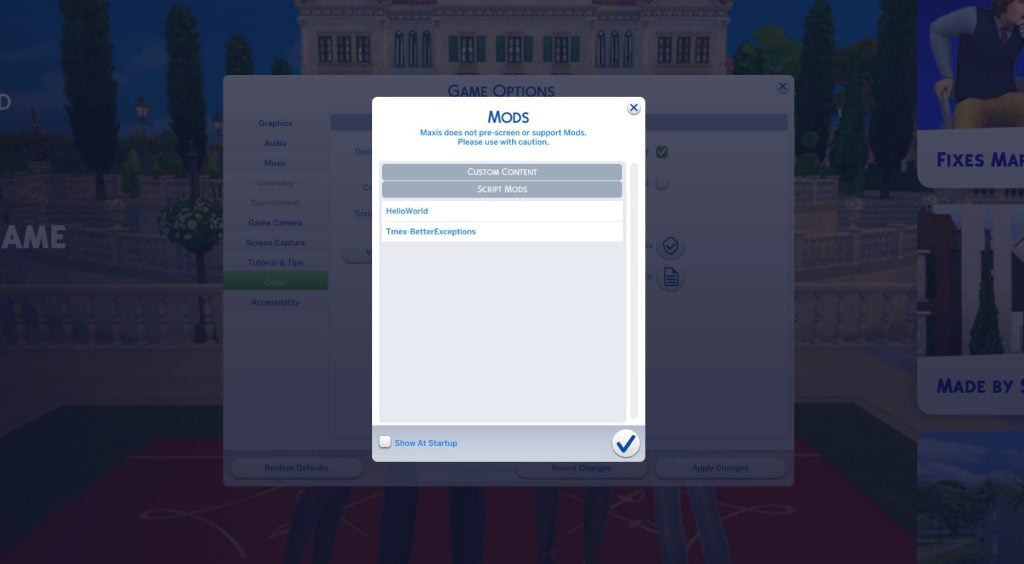
Several players are currently reporting that The Sims 4 disabled their Mods & CC. Even after enabling them in the game settings, the pre-installed Mods and Custom Content still doesn’t show up in the game.
None of my CC or mods besides script mods load into the game after the update…?? I’m going crazy here, am I the only one with this issue???
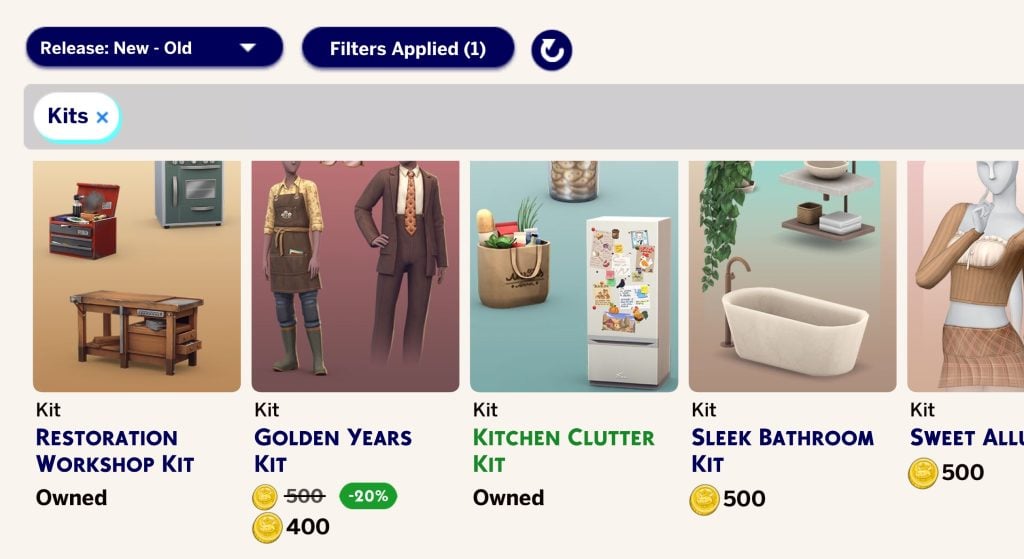
The new Sims 4 Marketplace allows for Kits to seemingly have their own occassional sales. The Sims 4 Golden Years Kit is currently available for 20% off…a whole dollar!
Manage Storage Menu
There’s an internal memory storage for The Sims 4 marketplace content. Including Maker Sets and items!
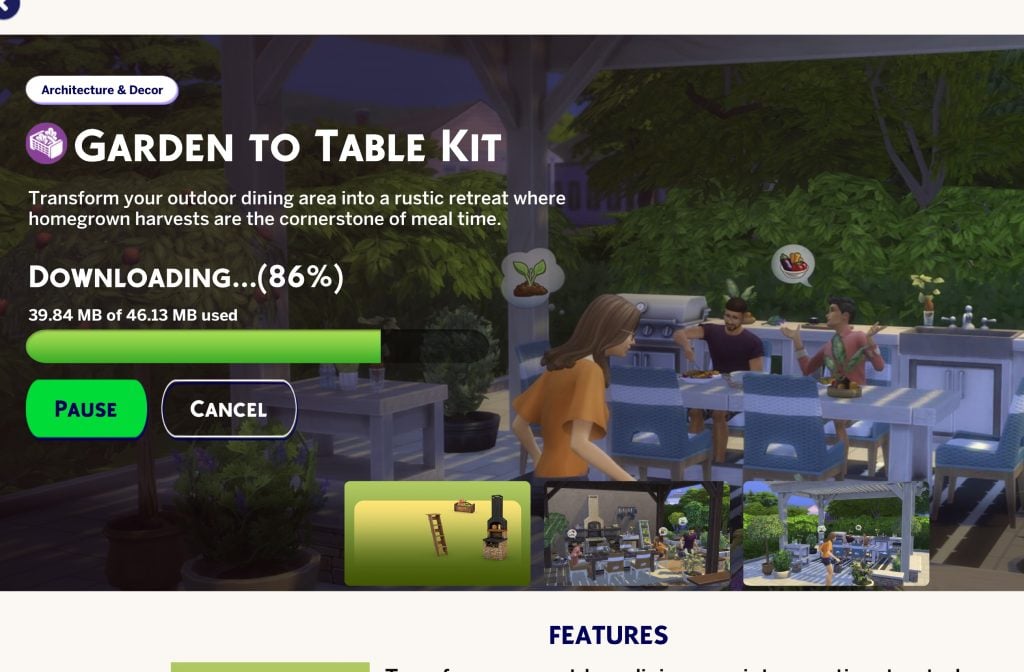
In-Game Downloading of Sims 4 Kits
The Sims 4 Kits can now be downloaded and used straight away without restarting the game.
Screenshot
First In-Game Look at The Sims 4 Marketplace
Gallery Preview
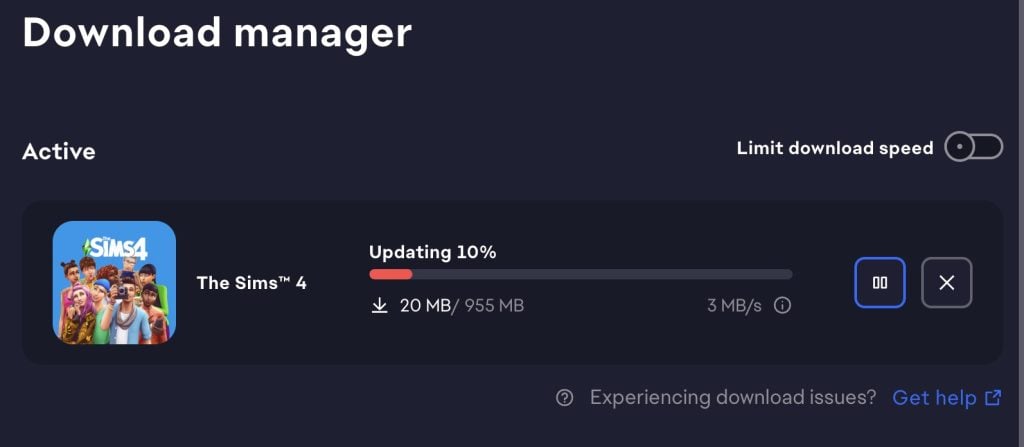
The update is 955MB on Mac platforms.
What are your thoughts on the latest Sims 4 Update for PC and Mac? Let us know about your updating experience in the comments down below and stay tuned for more articles and overviews on new content right here on Sims Community!
Reticulating splines as a webmaster for Sims Community over the last 12 years. You can find me here writing articles and doing reports on your favorite life sim games, among other things!
Our community is about connecting people through open and thoughtful conversations.
We want our readers to share their views and exchange ideas in a safe space.
In order to do so, we’ve created a simple set of rules that will improve your experience.
Simply put, keep it civil.
Your post will/might be rejected if it contains:
Spam
Insults, profanity, incoherent, obscene or inflammatory language and threats of any kind
Attacks on the identity of other commenters or the article’s author
User accounts will/might be blocked if we notice:
Continuous attempts to re-post comments that have been previously moderated/rejected
Racist, sexist, or homophobic comments
Attempts or tactics that put the site security at risk
So, how can you be a power user?
Stay on topic and share your passion. Feel free to elaborate to get your point across.
‘Like’ or ‘Dislike’ when you are filled with emotions!
Protect your community. Use the report tool to alert us when someone breaks the rules.
Thanks for reading our community guidelines. Please note that we're aware of certain issues with Sign In / Log In and Create Account / Email Confirmation issues. We're working behind-the-scenes on a new Account Creation process. Thank you for your patience and remember - freedom of speech is not freedom of reach!
So what I gather is, pick up the free kit if you don’t have it and just ignore the marketplace
Lotje1981
1 month ago
I have after I opended the game enabled the cc bsck, and after that opened the game again. The whole UIwere going mad and no single button worked anymore. o I could’t even disable the cc again,
I have deleted most of the mods. And I have done the 50/50 tests, the cc I have back in my mod folder don’t give UI issues, v=but now some don’t shoving up, while the are in my mod folder.
Same here. Nothing of my CC loads into the game after this update.
Tahnee Maree
1 month ago
Have they bothered to fix the game breaking Noble Residence lot trait bug or are they too excited to extort their player base with micro transactions? I don’t even have the trait on any lots anymore and my sims still get stuck in infinite confetti animation loops.
Grzegorz
1 month ago
Now kits in Poland are 25% more expensive. It was 19,90 PLN now is 500 Moola so 25 PLN.
They’ve gone back to their original price. Initially, they cost 25 PLN, and that’s still the case with those first kits. Then, I think the dollar’s drop brought them down to 20 PLN.
I’m rather concerned that we’re a few PLN behind again compared to the euro and dollar prices… Although on Steam, we’d be even more screwed. I wonder what the Russians’ exchange rate is… ugh.
giu
1 month ago
the new moola thing is so dumb , whoever came up with that idea should be fired
this is so stupid and im not even trying to be insulting , its literally the TRUTH
they just keep exposing themselves how money hungry they are , they arent even ashamed of this mess , its sad
and yes i know its a way for creators to get paid but lets be honest , theyre probably arent even going to get paid enough
if they want people to give them money they can just use patreon or leave other ways for people to donate e t c (i rather give them money directly to them)
i feel like EA is just taking advantage of them , idk something feels fishy about this i dont trust it
It’s a way for Maxis to introduce a new product tier for players to buy into while reducing financial stress from Maxis. They only needs to oversee approval, not spend money producing packs of content and marketing it and maintain servers. Cheaper for Maxis, more expensive for players, even if the buying in my be a little less (or more in some places), you get less content per-cent. Many of the packs on the marketplace are 400 Moola, but they don’t sell Moola in quantities of 400. We can’t buy in at cost. Theft.
What’s stopping Maxis from making smaller kits and pricing them at $2-4, or larger for 6-9? They profit either way.
It really sounds like someone trying to bring the whole thing to the ground in the most corporate-friendly way possible.
But yes, it’s pretty much a fact this sucks. Yet, some people are still falling for it…
Denise aka Fengjui
1 month ago
Right off the bat, I tried to update my Sims4 and it came up with error message. But I had to take off my VPN in order to update. That’s kind of stupid. Once it got updated, I noticed right off that my Sim doesn’t have any hair that I chose for her from a cc. I noticed also that the cc stuff that I got is not there anymore like the wallpapers that I use. It’s pretty sad.
So way to go EA thanks for screwing up SIms4.
Last edited 1 month ago by Denise aka Fengjui
bri
1 month ago
this suks. just bought all the expansions and game packs i did not have, a few days ago. now nothing works. had to ‘repair’ game which took almost an hour. cc is dead, wish i would have know before spending almost $400 for a game that is non functioning
hopefully they will push a fix or rollback patch to get players back to the game
This sounds like a satire by someone sho already knew how broken the game has always been and how much ea doesn’t deserve one more cent. If so, good one, got a chuckle out of me. If not… you sweet summer child.
holly webb
1 month ago
well sims 4.you have really done a number on my mods stuff clothing etc. even the mod enabler is on downloads are there.but not in the game its self. im not happy at all am not going buy my mods back when i have spend so much on the packs and kits
Lisa
1 month ago
Glad to know I’m not the only one with the CC issue.. Typical Ea “fix” something and break another in return. Now I can’t play my save file because half my sims are walking around naked…
Your garbage patch that added the Marketplace that nobody wanted absolutely destroyed cc. Congrats on another sh*tstorm, EA.
Sarah
1 month ago
I updated and then re-enabled my mods. I then exited and restarted the game. The main menu screen is now black and I am unable to navigate the screen. Including being able to open Game Options. Is anyone else having this issue?
Pommy PomPom
1 month ago
Shame on you EA! Despite having auto updates off, it happened anyway. I feel for all the content creators and Mod makers, not all of them were in it for the money. Some actually enjoy making creations to enhance what could be a pretty boring game. Way to go EA, looks like you’ve just joined the inflated profit bandwagon scheme. Personally, I think it was planned all along, they’ve seen what the players like most and are going to grab as many Simoleans as they can from it. I’m not going to hold my breath waiting for the CC and Mods to be restored to us. I’m a CC builder myself, from the Second Life programme, and this was going to be my next big project.
most of us get the sims because we can download mods and cc they going to lose business. i turned my game off line im not updating or i will not be playing the sims and i been playing since 15 and im about to be 40
15 + 25 = 40, so that’s accurate. Impressive. You’re a true OG player if you’ve been playing since 2000 when Sims 1 came out
empress
1 month ago
do not update ALL MODS AND CC IS BROKEN the update has messed up all of them
Norbi
1 month ago
I haven’t updated The Sims 4 yet, but I always move the mods folder to the desktop before updating.
Sam
1 month ago
I think that the funniest fix of all of these has to be the fact that Dazed Sims used to be able to Destroy Dollhouses. Imagine having Eco Lifestyle, the Juicy Community, or whatever the N.A.P was called, is active, and a dazed sim destroys a dollhouse. I think that’s the Sims equivalent of a drunk person destroying a dollhouse irl…
Also
How about, Idk, MAKING THEM STOP AUTONOMOUSLY USING THEIR PHONES EVERY THREE SECONDS WHILE WALKING?! It’s annoying af and has been there since High School Years! I hope this Minecraft Marketplace rip-off gets so much criticism that EA regrets LYING to us!
They were literally asked if they planned to add microtransactions, a game/battle or a subscription to The Sims 4 and the answer was no!
A MARKETPLACE IS LITERALLY A PLACR FULL OF MICRO TRANSACTIONS BECAUSE YOU LITERALLY SPEND RWAL MONEY TO GET MORE FAKE MONEY! AND ‘MOOLA’ DOESN’T SOUND CUTE, IT SOUNDS DISGUSTING!
I’d be more into the idea if you could earn Moola through, Idk, scenarios? Also, UPDATE THE SCENARIOS! We need more! Add at least one new scenario for every major update (pre-pack release). Throw the Marketplace and Moola down the toilet, along with the buyout (screw rainbow hating Saudi Arabia!) I call it ‘rainbow hating’ because it refers to the LGBTQIA+ community, and since the community flag is a rainbow, I figured that ‘rainbow community’ would be easier than the acronym that isn’t exactly an acronym as it’s the first letter for each romantic/sexual preference, and it’s not OWCA (the Organization Without a Cool Acronym) or L.O.V.E.M.U.F.F.I.N. (the ‘E’ standing for Evil, the rest, I don’t remember what the letters stands for. OWCA is easy to remember)
Sorry for the rant and thanks for coming to my TedTalk
Last edited 1 month ago by Samantha
Celyn
1 month ago
i had an issue with sims not being able to try for baby or get pregnant even after removing mods and cc
Des
1 month ago
My entire gallery was deleted… everything that I’ve made since I got this game over 7 years ago is just…gone. Console player.
The Sims 4 community has spent years sharing stories about broken restaurant visits, missing meals, endless waiting times, and Sims standing outside instead of...
One of the early developers working on The Sims 4 shares dissatisfaction with initial project - and early Titanopolis World screens.
One of The Sims 4 devel...











So what I gather is, pick up the free kit if you don’t have it and just ignore the marketplace
I have after I opended the game enabled the cc bsck, and after that opened the game again. The whole UIwere going mad and no single button worked anymore. o I could’t even disable the cc again,
I have the exact same problem….
Game updates can break Mods. Before re-enabling your Mods, wait for creators to update them or confirm them as compatible with the new game update.
The mods aren’t broken. They appear to have been disabled by EA.
I have deleted most of the mods. And I have done the 50/50 tests, the cc I have back in my mod folder don’t give UI issues, v=but now some don’t shoving up, while the are in my mod folder.
here is the thing, if you look at the article, I believe the commenter is speaking on the option of switching mods on being broken at the moment
They said that after re-enabling Mods, the UI went bad and buttons no longer worked, which suggests broken UI Mods.
If you are using the Better Build Buy Mod, you’ll have to remove it until it is updated. I removed that Mod and my UI returned. Goodluck.
Non-script mods aren’t working! Funny that this happens when the Marketplace launches. What a coincidence. How convenient is that?
Script mods dont seem to be working either. AWESOME
it downloaded this update for me despite turning off automatic updates in ea wtf
yes the same thing happened to me and i now unable to play my game
So all my mods dont work ive tried everything and what is that it. Are EA gonna fix it or no.
Nothing (cc) works anymore!
Same here. Nothing of my CC loads into the game after this update.
Have they bothered to fix the game breaking Noble Residence lot trait bug or are they too excited to extort their player base with micro transactions? I don’t even have the trait on any lots anymore and my sims still get stuck in infinite confetti animation loops.
Now kits in Poland are 25% more expensive. It was 19,90 PLN now is 500 Moola so 25 PLN.
They’ve gone back to their original price. Initially, they cost 25 PLN, and that’s still the case with those first kits. Then, I think the dollar’s drop brought them down to 20 PLN.
I’m rather concerned that we’re a few PLN behind again compared to the euro and dollar prices… Although on Steam, we’d be even more screwed. I wonder what the Russians’ exchange rate is… ugh.
the new moola thing is so dumb , whoever came up with that idea should be fired
this is so stupid and im not even trying to be insulting , its literally the TRUTH
they just keep exposing themselves how money hungry they are , they arent even ashamed of this mess , its sad
and yes i know its a way for creators to get paid but lets be honest , theyre probably arent even going to get paid enough
if they want people to give them money they can just use patreon or leave other ways for people to donate e t c (i rather give them money directly to them)
i feel like EA is just taking advantage of them , idk something feels fishy about this i dont trust it
It’s a way for Maxis to introduce a new product tier for players to buy into while reducing financial stress from Maxis. They only needs to oversee approval, not spend money producing packs of content and marketing it and maintain servers. Cheaper for Maxis, more expensive for players, even if the buying in my be a little less (or more in some places), you get less content per-cent. Many of the packs on the marketplace are 400 Moola, but they don’t sell Moola in quantities of 400. We can’t buy in at cost. Theft.
What’s stopping Maxis from making smaller kits and pricing them at $2-4, or larger for 6-9? They profit either way.
its already been confirmed that EA is taking advantage of creators
Yes, EA is getting the bulk of the money, not the creators.
It really sounds like someone trying to bring the whole thing to the ground in the most corporate-friendly way possible.
But yes, it’s pretty much a fact this sucks. Yet, some people are still falling for it…
Right off the bat, I tried to update my Sims4 and it came up with error message. But I had to take off my VPN in order to update. That’s kind of stupid. Once it got updated, I noticed right off that my Sim doesn’t have any hair that I chose for her from a cc. I noticed also that the cc stuff that I got is not there anymore like the wallpapers that I use. It’s pretty sad.
So way to go EA thanks for screwing up SIms4.
this suks. just bought all the expansions and game packs i did not have, a few days ago. now nothing works. had to ‘repair’ game which took almost an hour. cc is dead, wish i would have know before spending almost $400 for a game that is non functioning
hopefully they will push a fix or rollback patch to get players back to the game
This sounds like a satire by someone sho already knew how broken the game has always been and how much ea doesn’t deserve one more cent. If so, good one, got a chuckle out of me. If not… you sweet summer child.
well sims 4.you have really done a number on my mods stuff clothing etc. even the mod enabler is on downloads are there.but not in the game its self. im not happy at all am not going buy my mods back when i have spend so much on the packs and kits
Glad to know I’m not the only one with the CC issue.. Typical Ea “fix” something and break another in return. Now I can’t play my save file because half my sims are walking around naked…
LOL there was actually a Mod for that too.
i promise u that nobody wanted this <3
Your garbage patch that added the Marketplace that nobody wanted absolutely destroyed cc. Congrats on another sh*tstorm, EA.
I updated and then re-enabled my mods. I then exited and restarted the game. The main menu screen is now black and I am unable to navigate the screen. Including being able to open Game Options. Is anyone else having this issue?
Shame on you EA! Despite having auto updates off, it happened anyway. I feel for all the content creators and Mod makers, not all of them were in it for the money. Some actually enjoy making creations to enhance what could be a pretty boring game. Way to go EA, looks like you’ve just joined the inflated profit bandwagon scheme. Personally, I think it was planned all along, they’ve seen what the players like most and are going to grab as many Simoleans as they can from it. I’m not going to hold my breath waiting for the CC and Mods to be restored to us. I’m a CC builder myself, from the Second Life programme, and this was going to be my next big project.
most of us get the sims because we can download mods and cc they going to lose business. i turned my game off line im not updating or i will not be playing the sims and i been playing since 15 and im about to be 40
15 + 25 = 40, so that’s accurate. Impressive. You’re a true OG player if you’ve been playing since 2000 when Sims 1 came out
do not update ALL MODS AND CC IS BROKEN the update has messed up all of them
I haven’t updated The Sims 4 yet, but I always move the mods folder to the desktop before updating.
I think that the funniest fix of all of these has to be the fact that Dazed Sims used to be able to Destroy Dollhouses. Imagine having Eco Lifestyle, the Juicy Community, or whatever the N.A.P was called, is active, and a dazed sim destroys a dollhouse. I think that’s the Sims equivalent of a drunk person destroying a dollhouse irl…
Also
How about, Idk, MAKING THEM STOP AUTONOMOUSLY USING THEIR PHONES EVERY THREE SECONDS WHILE WALKING?! It’s annoying af and has been there since High School Years! I hope this Minecraft Marketplace rip-off gets so much criticism that EA regrets LYING to us!
They were literally asked if they planned to add microtransactions, a game/battle or a subscription to The Sims 4 and the answer was no!
A MARKETPLACE IS LITERALLY A PLACR FULL OF MICRO TRANSACTIONS BECAUSE YOU LITERALLY SPEND RWAL MONEY TO GET MORE FAKE MONEY! AND ‘MOOLA’ DOESN’T SOUND CUTE, IT SOUNDS DISGUSTING!
I’d be more into the idea if you could earn Moola through, Idk, scenarios? Also, UPDATE THE SCENARIOS! We need more! Add at least one new scenario for every major update (pre-pack release). Throw the Marketplace and Moola down the toilet, along with the buyout (screw rainbow hating Saudi Arabia!) I call it ‘rainbow hating’ because it refers to the LGBTQIA+ community, and since the community flag is a rainbow, I figured that ‘rainbow community’ would be easier than the acronym that isn’t exactly an acronym as it’s the first letter for each romantic/sexual preference, and it’s not OWCA (the Organization Without a Cool Acronym) or L.O.V.E.M.U.F.F.I.N. (the ‘E’ standing for Evil, the rest, I don’t remember what the letters stands for. OWCA is easy to remember)
Sorry for the rant and thanks for coming to my TedTalk
i had an issue with sims not being able to try for baby or get pregnant even after removing mods and cc
My entire gallery was deleted… everything that I’ve made since I got this game over 7 years ago is just…gone. Console player.